Welcome Guest ( Log In | Register )

670 Pages « < 431 432 433 434 435 > » Bottom

Outline · [ Standard ] · Linear+

TIME [OFFICIAL] TIME Fibre Broadband™ v4, Experience the ONE TRUE 2Gbps

views
     
jasonchan323
post Mar 1 2022, 11:51 PM

Getting Started
**
Junior Member
72 posts

Joined: Mar 2012


HI Sifus,

I am currently using the Huawei mesh offered by TIME. The router combines both 2.4 and 5 Ghz into 1 wifi. Is there any ways that if i could specifically conenct 2.4Ghs? Coz some of the device required 2.4 connection
engonaplane
post Mar 2 2022, 01:01 AM

New Member
*
Junior Member
43 posts

Joined: Mar 2020
QUOTE(jasonchan323 @ Mar 1 2022, 11:51 PM)
HI Sifus,

I am currently using the Huawei mesh offered by TIME. The router combines both 2.4 and 5 Ghz into 1 wifi. Is there any ways that if i could specifically conenct 2.4Ghs? Coz some of the device required 2.4 connection
*
yea - if u login to the ONT, you will find a checkbox ticked to have the same SSID for 2.4G and 5G. Just untick to set different SSID for each band. that said a 2.4g device will not see the 5G anyway, so there is no harm in using a combined SSID
Anime4000
post Mar 2 2022, 03:07 AM

Look at all my stars!!
*******
Senior Member
2,400 posts

Joined: Jul 2009
From: /dev/null


To who using stock TIME AIO ONU, want to change DNS, try this,

Enable SSH or TELNET:
Attached Image

Open SSH:
CODE

ssh root@192.168.100.1


Root password is:
CODE

adminHW


Later you will be greet WAP>

Enter SU WAP:
CODE

su


You will see SU_WAP> when success

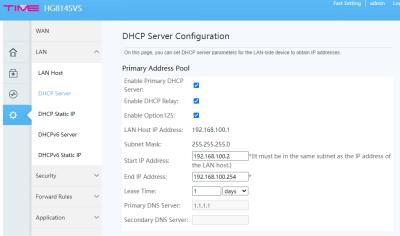
See your LAN DHCP
CODE

display dhcp server pool all


look like this:
CODE

----------------------------------------------------------------------
Index  DHCP Server      Netmask          State
----------------------------------------------------------------------
1      192.168.100.1    255.255.255.0    up
2      --               --               down
----------------------------------------------------------------------
Total: 2

success!


Then, Update it:
CODE

dhcp server pool config index 1 gateway 192.168.100.1 netmask 255.255.255.0 start 192.168.100.2 end 192.168.100.254 dns 1.1.1.1


Check on WebGUI if success:
Attached Image

Done biggrin.gif

Some extra finding...
CODE

SU_WAP>display pppoe client all
----------------------------------------------------------------------
Index  Interface HW Addr             State           IP/Netmask
----------------------------------------------------------------------
1      TIMEBB    34:58:40:1A:C1:59   Up              202.184.170.93/32
----------------------------------------------------------------------
Total: 1

success!
SU_WAP>display ppp interface interface TIMEBB
---------------------------------------------------------------------
Mru            :1492
Status         :Enable
IPCPStatus     :Enable
IPv6CPStatus   :Enable
---------------------------------------------------------------------

success!
SU_WAP>ppp interface config ?
ppp interface config interface interface { status status | ipcpstatus ipcpstatus | ipv6cpstatus ipv6cpstatus | mru mru } *

Alpha_Tay
post Mar 2 2022, 12:36 PM

Beware The Spammer Star!
******
Senior Member
1,725 posts

Joined: Jan 2003
TIME Looking Glass

Get real-time information on your backbone routing and network efficiency.

https://lglass.time.com.my/

https://www.time.com.my/carrier

Other

https://www.ipserverone.com/connection-test

https://lg.my.controlvm.com/

https://lg.shinjiru.com.my/

https://looking.house/company.php?id=164

https://lg.gbnetwork.my/

https://malaysia-vps.com/looking-glass/

http://lg-malaysia.hybridserver.net/

https://lg.myren.net.my/lg/lg.cgi doesnt work

https://lg.ixtelecom.net/

https://lg.exabytes.my/

https://looking-glass.tm.com.my/

Welcome to TM Looking Glass Portal

Home

Login

Thank you for visiting TM Looking Glass Portal.

Telekom Malaysia Berhad ™ Copyright © 2017

Please login to enter and use the system.

THIS PORTAL SYSTEM IS PROVIDED 'AS IS', WITHOUT WARRANTY OF ANY KIND, EXPRESS OR IMPLIED, INCLUDING BUT NOT LIMITED TO THE WARRANTIES OF MERCHANTABILITY, FITNESS FOR A PARTICULAR PURPOSE AND NONINFRINGEMENT. IN NO EVENT SHALL THE AUTHORS OR COPYRIGHT HOLDERS BE LIABLE FOR ANY CLAIM, DAMAGES OR OTHER LIABILITY, WHETHER IN AN ACTION OF CONTRACT, TORT OR OTHERWISE, ARISING FROM, OUT OF OR IN CONNECTION WITH THE SOFTWARE OR THE USE OR OTHER DEALINGS IN THE SOFTWARE.


This post has been edited by Alpha_Tay: Mar 2 2022, 05:27 PM
derthvadar
post Mar 2 2022, 03:14 PM

(ง •̀_•́)ง
******
Senior Member
1,794 posts

Joined: Feb 2016
From: Bikini Bottom
Just finished the installation.

The service so good all settle within 30 minutes.

TIME 100Mbps 🚀
Sam Leong
post Mar 2 2022, 04:15 PM

On my way
****
Junior Member
681 posts

Joined: Mar 2016


QUOTE(Alpha_Tay @ Mar 2 2022, 12:36 PM)
TIME Looking Glass

Get real-time information on your backbone routing and network efficiency.

https://lglass.time.com.my/

https://www.time.com.my/carrier
*
i don't think their looking glass can reflect actual home fibre network status

user posted image

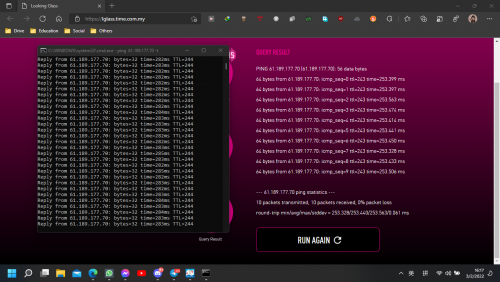
Destination same IP [China Telecom] 61.189.177.70

from my side 280+ms
from TIME looking Glass = 250+ms


from my side to TIME speedtest server = 3ms

So wat's the problem here lol

ps : 2nd time test both side almost same (390+ms)

user posted image
so again whats the problem here can make so much difference between 1st and 2nd time test
just after 1/2 minutes then the latency spike up over 100ms+


both test run parellel
when i hit start on the looking glass page then i hit enter on my cmd to ping


ps2 : 3rd time test return back to 1st time status

user posted image

This post has been edited by Sam Leong: Mar 2 2022, 04:17 PM
Alpha_Tay
post Mar 2 2022, 05:28 PM

Beware The Spammer Star!
******
Senior Member
1,725 posts

Joined: Jan 2003
use traceroute to find out?

different ip range, different route?

also, ping result depend on your last mile 1st hop ping beside router, example, for adsl streamyx, there is a setting called fast path or interleaved mode with different level at dslam for each port, with fast path, the ping could go as low as around 6ms 1st hop, with highest level interleaved mode, the ping would go as high as 60ms 1st hop, in the end, the malaysia local or nearby country example singapore destination ping would interpolate depend on 1st hop ping, it's not just plus minus + - only.

i ping sgp-2.valve.net 103.10.124.1 valve dota 2 singapore server, the ping result is almost same with your server https://lg-my-time.samsam123.name.my/ and time server https://lglass.time.com.my/

traceroute doesnt seem to work at time server, but do work at your server with missing result at the middle.

time server 1st hop result from traceroute is 223.28.26.21 ge-1-2-5-er-01-akhmw.ni.time.net.my , while 211.24.220.166 lglass.time.com.my , and 104.21.86.232 lg-my-time.samsam123.name.my and 1st hop 202.184.160.1

QUOTE(Sam Leong @ Mar 2 2022, 04:15 PM)
i don't think their looking glass can reflect actual home fibre network status

user posted image

Destination same IP [China Telecom] 61.189.177.70

from my side 280+ms
from TIME looking Glass = 250+ms
from my side to TIME speedtest server = 3ms

So wat's the problem here lol

ps : 2nd time test both side almost same (390+ms)

user posted image
so again whats the problem here can make so much difference between 1st and 2nd time test
just after 1/2 minutes then the latency spike up over 100ms+
both test run parellel
when i hit start on the looking glass page then i hit enter on my cmd to ping
ps2 : 3rd time test return back to 1st time status

user posted image
*
This post has been edited by Alpha_Tay: Mar 2 2022, 09:46 PM
Sam Leong
post Mar 3 2022, 07:52 AM

On my way
****
Junior Member
681 posts

Joined: Mar 2016


QUOTE(Alpha_Tay @ Mar 2 2022, 05:28 PM)
use traceroute to find out?

different ip range, different route?

also, ping result depend on your last mile 1st hop ping beside router, example, for adsl streamyx, there is a setting called fast path or interleaved mode with different level at dslam for each port, with fast path, the ping could go as low as around 6ms 1st hop, with highest level interleaved mode, the ping would go as high as 60ms 1st hop, in the end, the malaysia local or nearby country example singapore destination ping would interpolate depend on 1st hop ping, it's not just plus minus + - only.

i ping sgp-2.valve.net 103.10.124.1 valve dota 2 singapore server, the ping result is almost same with your server https://lg-my-time.samsam123.name.my/ and time server https://lglass.time.com.my/

traceroute doesnt seem to work at time server, but do work at your server with missing result at the middle.

time server 1st hop result from traceroute is 223.28.26.21 ge-1-2-5-er-01-akhmw.ni.time.net.my , while 211.24.220.166 lglass.time.com.my , and 104.21.86.232 lg-my-time.samsam123.name.my and 1st hop 202.184.160.1
*
My 1st hop ping beside ping around 2-3 ms only so i don't think it will caused the final result inaccurate.
The IP i stated above [61.189.177.70] will get diff result with time server and my side
idk why

From my side :
CODE
traceroute to 61.189.177.70 (61.189.177.70), 30 hops max, 32 byte packets
1  202.184.160.1  2.63 ms  AS9930  Malaysia, Kuala Lumpur, time.com.my
2  *
3  223.28.43.54  8.89 ms  AS9930  Singapore, time.com.my
4  ix-be-12.ecore1.svq-singapore.as6453.net (180.87.105.6)  10.14 ms  AS6453  Singapore, tatacommunications.com
5  if-be-24-2.ecore1.esin4-singapore.as6453.net (180.87.107.193)  182.00 ms  AS6453  Singapore, tatacommunications.com
6  180.87.15.112  181.91 ms  AS6453  Singapore, tatacommunications.com
7  if-ae-28-2.tcore1.av3-toyohashi.as6453.net (180.87.3.128)  185.15 ms  AS6453  Japan, Aichi, Toyohashi, tatacommunications.com
8  if-ae-2-2.tcore2.av3-toyohashi.as6453.net (180.87.3.131)  180.77 ms  AS6453  Japan, Aichi, Toyohashi, tatacommunications.com
9  if-ae-28-2.tcore2.lvw-losangeles.as6453.net (64.86.252.32)  181.79 ms  AS6453  United States, California, Los Angeles, tatacommunications.com
10  64.86.252.63  182.02 ms  AS6453  United States, California, Los Angeles, tatacommunications.com
11  202.97.43.105  266.43 ms  AS4134  China, Guangdong, Guangzhou, ChinaTelecom
12  202.97.91.189  267.42 ms  AS4134  China, Guangdong, Guangzhou, ChinaTelecom
13  202.97.94.125  270.46 ms  AS4134  China, Guangdong, Guangzhou, ChinaTelecom
14  202.97.96.118  281.06 ms  AS4134  China, Guizhou, Guiyang, ChinaTelecom
15  61.189.177.70  281.63 ms  AS4134  China, Guizhou, Guiyang, ChinaTelecom

CODE
PING 61.189.177.70 (61.189.177.70) 56(84) bytes of data.
64 bytes from 61.189.177.70: icmp_seq=1 ttl=244 time=282 ms
64 bytes from 61.189.177.70: icmp_seq=2 ttl=244 time=282 ms
64 bytes from 61.189.177.70: icmp_seq=3 ttl=244 time=281 ms
64 bytes from 61.189.177.70: icmp_seq=4 ttl=244 time=281 ms

--- 61.189.177.70 ping statistics ---
4 packets transmitted, 4 received, 0% packet loss, time 3004ms
rtt min/avg/max/mdev = 281.355/281.472/281.607/0.094 ms


TIME side (No tracert) :
CODE
PING 61.189.177.70 (61.189.177.70): 56 data bytes
64 bytes from 61.189.177.70: icmp_seq=0 ttl=243 time=252.687 ms
64 bytes from 61.189.177.70: icmp_seq=1 ttl=243 time=252.696 ms
64 bytes from 61.189.177.70: icmp_seq=2 ttl=243 time=252.673 ms
64 bytes from 61.189.177.70: icmp_seq=3 ttl=243 time=252.648 ms
64 bytes from 61.189.177.70: icmp_seq=4 ttl=243 time=252.665 ms
64 bytes from 61.189.177.70: icmp_seq=5 ttl=243 time=252.684 ms
64 bytes from 61.189.177.70: icmp_seq=6 ttl=243 time=252.689 ms
64 bytes from 61.189.177.70: icmp_seq=7 ttl=243 time=252.650 ms
64 bytes from 61.189.177.70: icmp_seq=8 ttl=243 time=252.665 ms
64 bytes from 61.189.177.70: icmp_seq=9 ttl=243 time=252.743 ms

--- 61.189.177.70 ping statistics ---
10 packets transmitted, 10 packets received, 0% packet loss
round-trip min/avg/max/stddev = 252.648/252.680/252.743/0.026 ms


I don't think my 1st hop ping will cause around 30ms different aon the last destination
I've checked the BGP path , the AS number is same as my routing
AS9930 - AS6453 - AS4134
Maybe TIME side routing is different from mine?

jjj2
post Mar 3 2022, 09:19 AM

Look at all my stars!!
*******
Senior Member
3,608 posts

Joined: Feb 2006
QUOTE(garybenjamin @ Mar 1 2022, 04:39 PM)
Thank you JJ. i moved my ONT to close to where you place vola .... i able to get 28xmbps rather than 8x~9x mbps .... thanks bro.
*
Welcome Bro smile.gif
jjj2
post Mar 3 2022, 09:27 AM

Look at all my stars!!
*******
Senior Member
3,608 posts

Joined: Feb 2006
QUOTE(throwawayacclmao @ Feb 28 2022, 01:11 AM)
Hi i am recently moving to a new place and requested relocation service.
The installer came and mentioned there is a high reading error at the optical fibre and say he cant install and asked me to talk to management.
Management says its usual case in this condo and usually need the TIME installer to replace the fibre head connector.

May I know how long this process usually take? Not sure if TIME going to charge me full price during when this service is down pending relocation installation.
*
Hi, for long run, it is advisable to get your management to recommend a professional fibre contractor/specialist to check the entire infra, from MDF-->Riser-->Unit, and rectify respectively.
The fibre contractor/specialist would be able to generate an OTDR report for your reference.

If you are based in Penang, then we could assist.

Thanks.
jjj2
post Mar 3 2022, 09:32 AM

Look at all my stars!!
*******
Senior Member
3,608 posts

Joined: Feb 2006
QUOTE(slack3r @ Feb 28 2022, 01:14 PM)
Thanks to jjj2 & PRSXFENG my ont is now in bridge mode took less than 15mins
Hi I can't seem to access the ONT now but I can still see the wireless networks from the ONT but there are exclamation points indicating there is no internet connection
*
If the CS pushed over the settings, the WiFi should be turned off and the ONT will be on Full Bridge Mode. Anyway you can login to turn it off manually.
Thanks.
jjj2
post Mar 3 2022, 09:39 AM

Look at all my stars!!
*******
Senior Member
3,608 posts

Joined: Feb 2006
QUOTE(stevenhsl @ Feb 28 2022, 02:50 PM)
Question: Is the Wifi 6 router HG8145X6 a 2-in-1 ONT or standalone router?

My condo's optical terminal is placed near the fuse box and enclose inside a metal case, currently the config is a standalone ONU + router place near TV console through the build-in LAN socket, hence 2-in-1 is not ideal for my unit. My current setup is HG8240H ONU + WA8021V5.

From the comments in thread, and also Huawei support site, (https://support.huawei.com/enterprise/en/doc/EDOC1100140843), it looks like HG8145X6 and 8145V5 are the same 2-in-1 ONT unit.

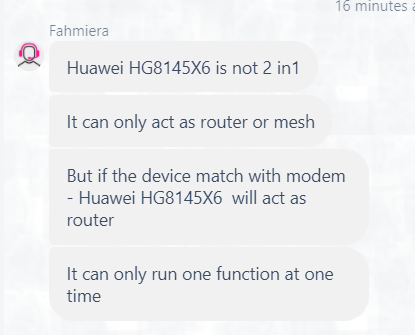
However, TIME CS told me otherwise, she said HG8145X6 is a standalone router, and will pair with HG8240H ONU.

I'm quite confused though, some said it is 2-in-1, but CS said it is standalone router...

user posted image
*
Hi, X6 can be configured as a 2-in-1 (aka Fibre Modem + Router). Like your case, it can be also configured as an AP (should be called Router) by omitting the PON function, means you may have a HG8240H5 ONU paired with X6.

Thanks.
jjj2
post Mar 3 2022, 09:40 AM

Look at all my stars!!
*******
Senior Member
3,608 posts

Joined: Feb 2006
QUOTE(paogeh @ Feb 28 2022, 01:56 AM)
another questions .
For past years TIME receipt/statement ,

if IncomeTax audit,
can we ask TIME to provide the backdated years for the receipt claim under internet/broadband ? Thank you
*
Hi, you may request from CS to provide a Summary of payment for the respective year.
Thanks.
Alpha_Tay
post Mar 3 2022, 11:45 AM

Beware The Spammer Star!
******
Senior Member
1,725 posts

Joined: Jan 2003
maybe due to QoS from Time

QUOTE(Sam Leong @ Mar 3 2022, 07:52 AM)
My 1st hop ping beside ping around 2-3 ms only so i don't think it will caused the final result inaccurate.
The IP i stated above [61.189.177.70] will get diff result with time server and my side
idk why

From my side :
CODE
traceroute to 61.189.177.70 (61.189.177.70), 30 hops max, 32 byte packets
1  202.184.160.1  2.63 ms  AS9930  Malaysia, Kuala Lumpur, time.com.my
2  *
3  223.28.43.54  8.89 ms  AS9930  Singapore, time.com.my
4  ix-be-12.ecore1.svq-singapore.as6453.net (180.87.105.6)  10.14 ms  AS6453  Singapore, tatacommunications.com
5  if-be-24-2.ecore1.esin4-singapore.as6453.net (180.87.107.193)  182.00 ms  AS6453  Singapore, tatacommunications.com
6  180.87.15.112  181.91 ms  AS6453  Singapore, tatacommunications.com
7  if-ae-28-2.tcore1.av3-toyohashi.as6453.net (180.87.3.128)  185.15 ms  AS6453  Japan, Aichi, Toyohashi, tatacommunications.com
8  if-ae-2-2.tcore2.av3-toyohashi.as6453.net (180.87.3.131)  180.77 ms  AS6453  Japan, Aichi, Toyohashi, tatacommunications.com
9  if-ae-28-2.tcore2.lvw-losangeles.as6453.net (64.86.252.32)  181.79 ms  AS6453  United States, California, Los Angeles, tatacommunications.com
10  64.86.252.63  182.02 ms  AS6453  United States, California, Los Angeles, tatacommunications.com
11  202.97.43.105  266.43 ms  AS4134  China, Guangdong, Guangzhou, ChinaTelecom
12  202.97.91.189  267.42 ms  AS4134  China, Guangdong, Guangzhou, ChinaTelecom
13  202.97.94.125  270.46 ms  AS4134  China, Guangdong, Guangzhou, ChinaTelecom
14  202.97.96.118  281.06 ms  AS4134  China, Guizhou, Guiyang, ChinaTelecom
15  61.189.177.70  281.63 ms  AS4134  China, Guizhou, Guiyang, ChinaTelecom

CODE
PING 61.189.177.70 (61.189.177.70) 56(84) bytes of data.
64 bytes from 61.189.177.70: icmp_seq=1 ttl=244 time=282 ms
64 bytes from 61.189.177.70: icmp_seq=2 ttl=244 time=282 ms
64 bytes from 61.189.177.70: icmp_seq=3 ttl=244 time=281 ms
64 bytes from 61.189.177.70: icmp_seq=4 ttl=244 time=281 ms

--- 61.189.177.70 ping statistics ---
4 packets transmitted, 4 received, 0% packet loss, time 3004ms
rtt min/avg/max/mdev = 281.355/281.472/281.607/0.094 ms


TIME side (No tracert) :
CODE
PING 61.189.177.70 (61.189.177.70): 56 data bytes
64 bytes from 61.189.177.70: icmp_seq=0 ttl=243 time=252.687 ms
64 bytes from 61.189.177.70: icmp_seq=1 ttl=243 time=252.696 ms
64 bytes from 61.189.177.70: icmp_seq=2 ttl=243 time=252.673 ms
64 bytes from 61.189.177.70: icmp_seq=3 ttl=243 time=252.648 ms
64 bytes from 61.189.177.70: icmp_seq=4 ttl=243 time=252.665 ms
64 bytes from 61.189.177.70: icmp_seq=5 ttl=243 time=252.684 ms
64 bytes from 61.189.177.70: icmp_seq=6 ttl=243 time=252.689 ms
64 bytes from 61.189.177.70: icmp_seq=7 ttl=243 time=252.650 ms
64 bytes from 61.189.177.70: icmp_seq=8 ttl=243 time=252.665 ms
64 bytes from 61.189.177.70: icmp_seq=9 ttl=243 time=252.743 ms

--- 61.189.177.70 ping statistics ---
10 packets transmitted, 10 packets received, 0% packet loss
round-trip min/avg/max/stddev = 252.648/252.680/252.743/0.026 ms


I don't think my 1st hop ping will cause around 30ms different aon the last destination
I've checked the BGP path , the AS number is same as my routing
AS9930 - AS6453 - AS4134
Maybe TIME side routing is different from mine?
*
Stinga
post Mar 4 2022, 01:16 AM

Getting Started
**
Junior Member
114 posts

Joined: Jun 2008


QUOTE(jasonchan323 @ Mar 1 2022, 11:51 PM)
HI Sifus,

I am currently using the Huawei mesh offered by TIME. The router combines both 2.4 and 5 Ghz into 1 wifi. Is there any ways that if i could specifically conenct 2.4Ghs? Coz some of the device required 2.4 connection
*
Wondering if the device will auto switch from 5Ghz to 2.4Ghz depending on distance?
jjj2
post Mar 4 2022, 09:17 AM

Look at all my stars!!
*******
Senior Member
3,608 posts

Joined: Feb 2006
QUOTE(Stinga @ Mar 4 2022, 01:16 AM)
Wondering if the device will auto switch from 5Ghz to 2.4Ghz depending on distance?
*
Yes.
linearz
post Mar 4 2022, 05:22 PM

New Member
*
Junior Member
40 posts

Joined: Jan 2003
QUOTE(Anime4000 @ Mar 2 2022, 03:07 AM)
To who using stock TIME AIO ONU, want to change DNS, try this,

Enable SSH or TELNET:
Attached Image

Open SSH:
CODE

ssh root@192.168.100.1


Root password is:
CODE

adminHW


Later you will be greet WAP>

Enter SU WAP:
CODE

su


You will see SU_WAP> when success

See your LAN DHCP
CODE

display dhcp server pool all


look like this:
CODE

----------------------------------------------------------------------
Index  DHCP Server      Netmask          State
----------------------------------------------------------------------
1      192.168.100.1    255.255.255.0    up
2      --               --               down
----------------------------------------------------------------------
Total: 2

success!


Then, Update it:
CODE

dhcp server pool config index 1 gateway 192.168.100.1 netmask 255.255.255.0 start 192.168.100.2 end 192.168.100.254 dns 1.1.1.1


Check on WebGUI if success:
Attached Image

Done biggrin.gif

Some extra finding...
CODE

SU_WAP>display pppoe client all
----------------------------------------------------------------------
Index  Interface HW Addr             State           IP/Netmask
----------------------------------------------------------------------
1      TIMEBB    34:58:40:1A:C1:59   Up              202.184.170.93/32
----------------------------------------------------------------------
Total: 1

success!
SU_WAP>display ppp interface interface TIMEBB
---------------------------------------------------------------------
Mru            :1492
Status         :Enable
IPCPStatus     :Enable
IPv6CPStatus   :Enable
---------------------------------------------------------------------

success!
SU_WAP>ppp interface config ?
ppp interface config interface interface { status status | ipcpstatus ipcpstatus | ipv6cpstatus ipv6cpstatus | mru mru } *

*
CODE
ssh root@192.168.0.1                                      
Unable to negotiate with 192.168.0.1 port 22: no matching host key type found.Their offer: ssh-rsa

BTW, my huawei is still 2 in 1 mode, not in bridge mode.

Edit:
I use normal telnet, can login and use the SU_WAP

This post has been edited by linearz: Mar 4 2022, 05:27 PM
PRSXFENG
post Mar 4 2022, 08:29 PM

Look at all my stars!!
*******
Senior Member
2,611 posts

Joined: Nov 2020


QUOTE(linearz @ Mar 4 2022, 05:22 PM)
CODE
ssh root@192.168.0.1                                      
Unable to negotiate with 192.168.0.1 port 22: no matching host key type found.Their offer: ssh-rsa

BTW, my huawei is still 2 in 1 mode, not in bridge mode.

Edit:
I use normal telnet, can login and use the SU_WAP
*
I wonder if TIME staff are looking at this thread and locking things down as we speak sweat.gif
Anime4000
post Mar 4 2022, 10:46 PM

Look at all my stars!!
*******
Senior Member
2,400 posts

Joined: Jul 2009
From: /dev/null


QUOTE(linearz @ Mar 4 2022, 05:22 PM)
CODE
ssh root@192.168.0.1                                      
Unable to negotiate with 192.168.0.1 port 22: no matching host key type found.Their offer: ssh-rsa

BTW, my huawei is still 2 in 1 mode, not in bridge mode.

Edit:
I use normal telnet, can login and use the SU_WAP
*
QUOTE(PRSXFENG @ Mar 4 2022, 08:29 PM)
I wonder if TIME staff are looking at this thread and locking things down as we speak  sweat.gif
*
if SSH cannot, Telnet can be use, just need to enable first
blackwindow
post Mar 5 2022, 11:14 AM

Getting Started
**
Junior Member
110 posts

Joined: Mar 2011
From: Kuala Lumpur


Hi guys, I've gotten the free mesh from TIME. But when I switch on the mesh. For awhile the connection is fine but after awhile it will mess up. Either it goes really slow or no connection at all. How to fix this?

670 Pages « < 431 432 433 434 435 > » Top
 

Change to:
| Lo-Fi Version
0.0357sec    1.11    6 queries    GZIP Disabled
Time is now: 17th December 2025 - 02:12 PM