Outline ·
[ Standard ] ·
Linear+
TIME [OFFICIAL] TIME Fibre Broadband™ v4, Experience the ONE TRUE 2Gbps
|
claudetan
|
 Feb 20 2022, 03:45 PM Feb 20 2022, 03:45 PM
|

|
Noticed that time use 2 in 1 instead of like Unifi, BTU unit + router, so question, if i want to use after market router, i still to plug my after market router to the original one right?
|
|
|
|
|
|
jjj2
|
Feb 20 2022, 03:49 PM
|
|
|
QUOTE(claudetan @ Feb 20 2022, 03:45 PM) Noticed that time use 2 in 1 instead of like Unifi, BTU unit + router, so question, if i want to use after market router, i still to plug my after market router to the original one right? Hi, 2 configs can be done. 1) Connect your own router to the 2-in-1 ONT & configure your router as AP. 2) Request TIME switch the 2-in-1 ONT to bridge mode, and configure your router to dial pppoe. Thanks. |
|
|
|
|
|
claudetan
|
Feb 20 2022, 03:59 PM
|
|
|
QUOTE(jjj2 @ Feb 20 2022, 03:49 PM) Hi, 2 configs can be done. 1) Connect your own router to the 2-in-1 ONT & configure your router as AP. 2) Request TIME switch the 2-in-1 ONT to bridge mode, and configure your router to dial pppoe. Thanks. in term for performance, which 1 better? i just order 100mbps without upgrade to wifi6, planning to buy after market if coverage not good |
|
|
|
|
|
jjj2
|
Feb 20 2022, 07:39 PM
|
|
|
QUOTE(claudetan @ Feb 20 2022, 03:59 PM) in term for performance, which 1 better? i just order 100mbps without upgrade to wifi6, planning to buy after market if coverage not good Just go for Bridge mode for better control over your network. Thanks. |
|
|
|
|
|
DeStiNyz
|
Feb 21 2022, 09:38 AM
|
New Member

|
QUOTE(poh880 @ Feb 18 2022, 01:00 PM) Deco X50 can direct use PPPoE, since Time don't use VLAN. Just get your username and password ready. QUOTE(blacktubi @ Feb 18 2022, 01:29 PM) If they provide the Huawei all in one modem wireless router, make sure they turn it to bridge mode so you can use the Deco X50 on PPPOE mode ah I see, thanks for the info |
|
|
|
|
|
KCCHONG89 P
|
Feb 21 2022, 11:49 AM
|
New Member
|
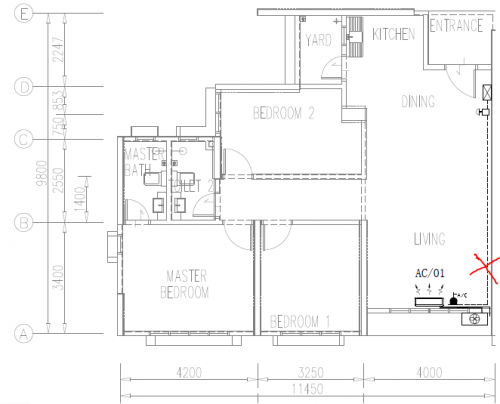 Hi Guys, wanna to ask if i place Time router unit at " X " area , i need to add Wifi Mesh for get more better performance or not? My house is 1000sf. Thanks |
|
|
|
|
|
muncheno
|
Feb 21 2022, 12:17 PM
|
|
|
QUOTE(KCCHONG89 @ Feb 21 2022, 11:49 AM) Hi Guys, wanna to ask if i place Time router unit at " X " area , i need to add Wifi Mesh for get more better performance or not? My house is 1000sf. Thanks DefinitelyYES. My condo unit is 1050 sqft and I'm using bridging mode via LAN cable with 2 routers in order to maximize my 500 mbps package. Else with single router, the opposite corner to your router will have bad connection (depending on number of walls in between). |
|
|
|
|
|
KCCHONG89 P
|
Feb 21 2022, 01:43 PM
|
New Member
|
QUOTE(muncheno @ Feb 21 2022, 12:17 PM) DefinitelyYES. My condo unit is 1050 sqft and I'm using bridging mode via LAN cable with 2 routers in order to maximize my 500 mbps package. Else with single router, the opposite corner to your router will have bad connection (depending on number of walls in between). Can i know any suggestion area for place the Wifi Mesh for me? |
|
|
|
|
|
muncheno
|
Feb 21 2022, 02:12 PM
|
|
|
QUOTE(KCCHONG89 @ Feb 21 2022, 01:43 PM) Can i know any suggestion area for place the Wifi Mesh for me? I'm not a network expert, please try it yourself. Important is to consider the signal have to passthrough how many wall in between and type of wall (behind the structural column that containing steel may no be a good idea). 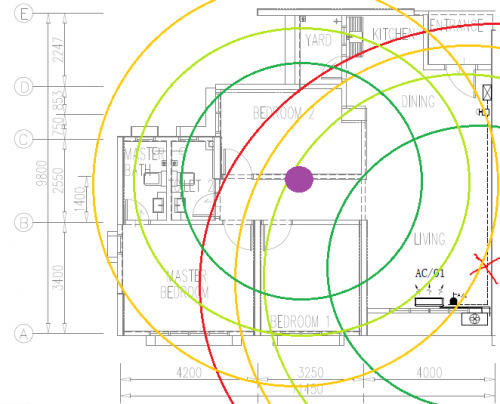 This post has been edited by muncheno: Feb 21 2022, 03:42 PM This post has been edited by muncheno: Feb 21 2022, 03:42 PM |
|
|
|
|
|
KCCHONG89 P
|
Feb 21 2022, 06:24 PM
|
New Member
|
QUOTE(muncheno @ Feb 21 2022, 02:12 PM) I'm not a network expert, please try it yourself. Important is to consider the signal have to passthrough how many wall in between and type of wall (behind the structural column that containing steel may no be a good idea). Alright, understand and thank you for your advice. |
|
|
|
|
|
noobfm
|
Feb 22 2022, 04:36 PM
|
Getting Started
|
Hi guys, i've called Time CS for 5 times to request their help in switching to bridging mode but that doesn't seems to be effective at all..
how should i proceed in this case? other than keep on calling them lol
|
|
|
|
|
|
jjj2
|
Feb 22 2022, 05:31 PM
|
|
|
QUOTE(noobfm @ Feb 22 2022, 04:36 PM) Hi guys, i've called Time CS for 5 times to request their help in switching to bridging mode but that doesn't seems to be effective at all.. how should i proceed in this case? other than keep on calling them lol Hi, they cant do it right away for you, they will request the provisioning team to push over the correct settings, that will take some time. |
|
|
|
|
|
noobfm
|
Feb 22 2022, 06:13 PM
|
Getting Started
|
QUOTE(jjj2 @ Feb 22 2022, 05:31 PM) Hi, they cant do it right away for you, they will request the provisioning team to push over the correct settings, that will take some time. thanks, do you know usually how long would they take ? |
|
|
|
|
|
jjj2
|
Feb 23 2022, 09:41 AM
|
|
|
QUOTE(noobfm @ Feb 22 2022, 06:13 PM) thanks, do you know usually how long would they take ? Hi, usually it takes 24---72 hours upon agreement. P/S : What did they tell you ? Thanks. |
|
|
|
|
|
dannyw
|
Feb 23 2022, 10:36 AM
|
|
|
Any user switching from Unifi 30Mbps to TIME 100Mbps. Just want to know in actual fact is that much different?
|
|
|
|
|
|
jjj2
|
Feb 23 2022, 10:58 AM
|
|
|
QUOTE(dannyw @ Feb 23 2022, 10:36 AM) Any user switching from Unifi 30Mbps to TIME 100Mbps. Just want to know in actual fact is that much different? Yes, it has significant difference viewing the backbone architecture is totally different, moreover when you connect via LAN cable. Thanks. |
|
|
|
|
|
dannyw
|
Feb 23 2022, 12:00 PM
|
|
|
QUOTE(jjj2 @ Feb 23 2022, 10:58 AM) Yes, it has significant difference viewing the backbone architecture is totally different, moreover when you connect via LAN cable. Thanks. Thanks. Now days people put the modem & router on TV cabinet (easy for LAN connect to TV) or higher place at center of house (for better WiFi reception)? |
|
|
|
|
|
guess0410
|
Feb 23 2022, 12:05 PM
|
Getting Started
|
Hi guys..i got a call. to upgrade my current tplink archer c1200 to huawei wa8021v5 router.
i try to serarch the wifi speed of huawei router but cant get any info.
Is it worth to change it?
Mostly using wifi only (100Mbps plan).
The promoter told me that current warranty for TP link router is ended.
With the renewal of 2 year contract, will get a huawei wa8021v5 router.
thank for the input.
|
|
|
|
|
|
noobfm
|
Feb 23 2022, 01:38 PM
|
Getting Started
|
QUOTE(jjj2 @ Feb 23 2022, 09:41 AM) Hi, usually it takes 24---72 hours upon agreement. P/S : What did they tell you ? Thanks. first CS told 1 hr, but not really helping 2nd and 3rd CS told that they are getting 2nd level subject matter expert to help, although already called me to confirm they had changed to bridging mode from their end but nothing is working at the moment  |
|
|
|
|
|
jjj2
|
Feb 23 2022, 02:59 PM
|
|
|
QUOTE(dannyw @ Feb 23 2022, 12:00 PM) Thanks. Now days people put the modem & router on TV cabinet (easy for LAN connect to TV) or higher place at center of house (for better WiFi reception)? Hi, usually you put the Router approx. 1.5m above the floor is good enough, anyway if you go for ceiling/wall mounted AP, then you need to mount it higher. Thanks. |
|
|
|
|



 Quote
Quote


 0.0286sec
 0.26
0.26
 6 queries
 GZIP Disabled