Welcome Guest ( Log In | Register )

672 Pages « < 395 396 397 398 399 > » Bottom

Outline · [ Standard ] · Linear+

TIME [OFFICIAL] TIME Fibre Broadband™ v4, Experience the ONE TRUE 2Gbps

views
     
rabbit.dynamite
post Sep 23 2021, 12:15 AM

New Member
*
Junior Member
29 posts

Joined: May 2013
From: Cave of Caerbannog
Has Time started to throttle torrents?

Currently using Time 300Mbps. Previously could easily get torrent speed of multiple MB/s on a single healthy torrent.

However, I realised that starting last week, my torrent speed fluctuates around 80 - 500 KB/s with an average of around 200 - 300 KB/s. And this speed is across multiple healthy torrents.

The telltale sign that I'm getting throttled is when my torrent program is running, my web browsing slows down considerably and intermittently. The second I close my torrent program, web browsing goes back to normal.

Another thing I notice is that the web browsing only slows down on my desktop running the torrent program. All other devices connected to the router (mobile, laptops) still enjoy normal speeds when web browsing.

I am under the impression that when throttling it will throttle the line running to my house, meaning all devices are affected by throttling. However in my case it seems that I'm getting throttled selectively at the device level? Unless of course it's actually nothing to do with throttling and something to do with my desktop instead.

rabbit.dynamite
post Sep 23 2021, 05:26 AM

New Member
*
Junior Member
29 posts

Joined: May 2013
From: Cave of Caerbannog
QUOTE(rabbit.dynamite @ Sep 23 2021, 12:15 AM)
Has Time started to throttle torrents?

Currently using Time 300Mbps. Previously could easily get torrent speed of multiple MB/s on a single healthy torrent.
*
Ignore my question. After further testing, I discovered it was due to my wifi card issue. Phew...at least that issue is easy to resolve. If it was really Time throttling torrents, that one more pening. sweat.gif
aichiban
post Sep 23 2021, 04:37 PM

pot yia thee keh tai lang!!
******
Senior Member
1,994 posts

Joined: Apr 2006
From: Sien Ga Lin


Hi. I am on 500mbps plan, and got "CURRENT ROUTER: TP-Link EC230" together with the plan in 2019.

Now I am getting the -RM10 promo together with the mesh nodes - Huawei WA8021V5.

Are they compatible?

jjj2
post Sep 24 2021, 12:03 AM

Look at all my stars!!
*******
Senior Member
3,616 posts

Joined: Feb 2006
QUOTE(aichiban @ Sep 23 2021, 04:37 PM)
Hi. I am on 500mbps plan, and got "CURRENT ROUTER: TP-Link EC230" together with the plan in 2019.

Now I am getting the -RM10 promo together with the mesh nodes - Huawei WA8021V5.

Are they compatible?
It depends how you define compatible. If you expect it to work as a wireless relay, then yes. But if you want it to work in full meshing mode, then it's not.
Again, if you hook it up with a network cable & make it work as an AP, then yes it is.


*
This post has been edited by jjj2: Sep 24 2021, 12:04 AM
imcrazyz
post Sep 24 2021, 09:15 AM

Getting Started
**
Junior Member
154 posts

Joined: Jan 2014
Halo guys.
I'm planning to switch internet service from TM to TIME after contract ends.

May I know what's the transition period for termination?

Let's say the contract ends on 22 October, can I raise the termination request on 22 October to TM and arrange TIME installation in the next few days?
gtiwtks
post Sep 24 2021, 09:31 AM

Getting Started
**
Junior Member
77 posts

Joined: Jun 2006
I am getting the -RM10 promo together with the mesh nodes - Huawei WA8021V5.

Can i use the mesh as wifi router and connect back my existing ac1200 and configure it as switch to connect all lan devices as the mesh nodes had limit lan port?

This post has been edited by gtiwtks: Sep 24 2021, 09:31 AM
ktchang321
post Sep 24 2021, 09:43 AM

New Member
*
Newbie
10 posts

Joined: Aug 2013
QUOTE(xSean @ Sep 21 2021, 08:14 PM)
Call time?
*
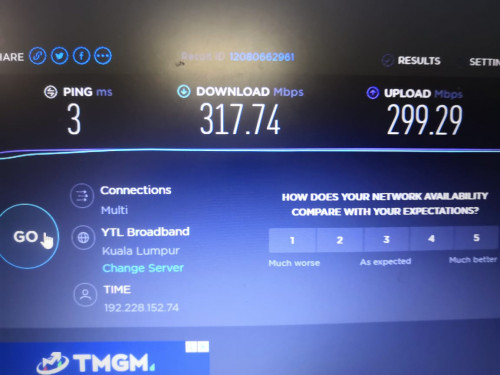
I bought Ax73 router to replace my current EC-230 router. And test again speedtest via Lan cable CAT6. This few times can get download speed and upload speed 300mbps (new upgrading plan is 300mbps). Fantastic!!!! And my wifi speed of my master bedroom also increase and much better (Ax73 - around 100mbps, EC230 - around 20mbps last time). So really high recommend AX73.

FYI, EC-230 router only can get 140-160mbps after upgrading new plan 300mbps via CAT6. That's why I decide to bought AX73 to replace EC-230. No regret to replace new router Ax73.

user posted image
jjj2
post Sep 24 2021, 09:53 AM

Look at all my stars!!
*******
Senior Member
3,616 posts

Joined: Feb 2006
QUOTE(imcrazyz @ Sep 24 2021, 09:15 AM)
Halo guys.
I'm planning to switch internet service from TM to TIME after contract ends.

May I know what's the transition period for termination?

Let's say the contract ends on 22 October, can I raise the termination request on 22 October to TM and arrange TIME installation in the next few days?
*
Hi,

Thank you for your interest in TIME Fibre Internet services.

Let us assist you in the switching over with ease.

Please kindly check with TM on the termination conditions beforehand.
Then we will assist you in the Registration & Installation accordingly.

Buzz me when you are ready ya...

Thanks.
jjj2
post Sep 24 2021, 09:54 AM

Look at all my stars!!
*******
Senior Member
3,616 posts

Joined: Feb 2006
QUOTE(gtiwtks @ Sep 24 2021, 09:31 AM)
I am getting the -RM10 promo together with the mesh nodes - Huawei WA8021V5.

Can i use the mesh as wifi router and connect back my existing ac1200 and configure it as switch to connect all lan devices as the mesh nodes had limit lan port?
*
Hi, yes you can.
gtiwtks
post Sep 24 2021, 11:09 AM

Getting Started
**
Junior Member
77 posts

Joined: Jun 2006
QUOTE(jjj2 @ Sep 24 2021, 09:54 AM)
Hi, yes you can.
*
The installer came to install the new mesh, ask him to help setup but he said can't be done.

Can share some quick guide to do so? Very much appreciated.
FusionXY
post Sep 24 2021, 11:28 AM

LAZZIE ON VACATION
*******
Senior Member
3,836 posts

Joined: Aug 2016

QUOTE(gtiwtks @ Sep 24 2021, 11:09 AM)
The installer came to install the new mesh, ask him to help setup but he said can't be done.

Can share some quick guide to do so? Very much appreciated.
*
Do you mean from ONU - - > Mesh Node - - > C1200?
gtiwtks
post Sep 24 2021, 11:46 AM

Getting Started
**
Junior Member
77 posts

Joined: Jun 2006
QUOTE(FusionXY @ Sep 24 2021, 11:28 AM)
Do you mean from ONU - - > Mesh Node - - > C1200?
*
Yes....
FusionXY
post Sep 24 2021, 11:51 AM

LAZZIE ON VACATION
*******
Senior Member
3,836 posts

Joined: Aug 2016

QUOTE(gtiwtks @ Sep 24 2021, 11:46 AM)
Yes....
*
For the C1200 wish to extend Wi-Fi or extend cable port?
If using for LAN Port extend, disable Wireless and DHCP.
Set AP mode. Connect from WAN to one of the LAN Port on the new mesh.
gtiwtks
post Sep 24 2021, 12:25 PM

Getting Started
**
Junior Member
77 posts

Joined: Jun 2006
QUOTE(FusionXY @ Sep 24 2021, 11:51 AM)
For the C1200 wish to extend Wi-Fi or extend cable port?
If using for LAN Port extend, disable Wireless and DHCP.
Set AP mode. Connect from WAN to one of the LAN Port on the new mesh.
*
How to set AP mode. Can't seem to find the step from the user manual...

gtiwtks
post Sep 24 2021, 12:25 PM

Getting Started
**
Junior Member
77 posts

Joined: Jun 2006
QUOTE(FusionXY @ Sep 24 2021, 11:51 AM)
For the C1200 wish to extend Wi-Fi or extend cable port?
If using for LAN Port extend, disable Wireless and DHCP.
Set AP mode. Connect from WAN to one of the LAN Port on the new mesh.
*
How to set AP mode. Can't seem to find the step from the user manual...

nivla878 P
post Sep 24 2021, 12:32 PM

New Member
*
Probation
3 posts

Joined: Sep 2021
I currently use one of the Deco M4 as Router. Surprisingly one mesh node can cover entire Condo unit of 1200 square feet but of course with WiFi signal degradation. Using 100MBPs plan.

I have both 2.4ghz and 5ghz band running speed test. While far away from router under 2.4Ghz band, I am clocking 20MBps with WiFi signal of 70%.

Under 5ghz band, I am clocking 50Mbps with WiFi signal of 45%.

In theory I should use 2.4ghz band for long distance but surprisingly I get lower speed even with a better WiFi signal.

Not sure which one is the right network band to use.
FusionXY
post Sep 24 2021, 12:35 PM

LAZZIE ON VACATION
*******
Senior Member
3,836 posts

Joined: Aug 2016

QUOTE(gtiwtks @ Sep 24 2021, 12:25 PM)
How to set AP mode. Can't seem to find the step from the user manual...
*
Try disable DHCP then connect from LAN Port 1 of the AC1200 to one of the available port on the Mesh node.
wayton
post Sep 24 2021, 02:19 PM

Enthusiast
*****
Junior Member
897 posts

Joined: May 2019
QUOTE(nivla878 @ Sep 24 2021, 12:32 PM)
I currently use one of the Deco M4 as Router. Surprisingly one mesh node can cover entire Condo unit of 1200 square feet but of course with WiFi signal degradation. Using 100MBPs plan.

I have both 2.4ghz and 5ghz band running speed test. While far away from router under 2.4Ghz band, I am clocking 20MBps with WiFi signal of 70%.

Under 5ghz band, I am clocking 50Mbps with WiFi signal of 45%.

In theory I should use 2.4ghz band for long distance but surprisingly I get lower speed even with a better WiFi signal.

Not sure which one is the right network band to use.
*
Throughput or max capacity of 2.4Ghz is lower than 5Ghz.
So a perfect 2.4Ghz may not achieve more speed than 5Ghz with half signal.

5Ghz degradation quickly with distance and obstacle, a low wifi signal when reach the bottom threshold, may cause intermittent loss of signal that affect the smoothness despite may achieve higher speed.

Smoothness and stability is also a concern, not only speed.

Experienced before a phone that has weak wifi reception, don't know it is lemon unit or not, always disconnect wifi intermittent when wifi signal become weak after walk a little far away or behind wall.
The phone keep on switch back and forth between wifi and data, causing app not to load properly.
For general normal use, good wifi signal > more speed with low wifi signal.

But 2.4Ghz normally is crowded if living in condo or high density area, so need to check whether your area wifi signal is crowded or not. 5Ghz is preferred to have less interference.
xSean
post Sep 24 2021, 03:38 PM

Look at all my stars!!
*******
Senior Member
2,778 posts

Joined: Oct 2006
QUOTE(ktchang321 @ Sep 24 2021, 09:43 AM)
I bought Ax73 router to replace my current EC-230 router. And test again speedtest via Lan cable CAT6. This few times can get download speed and upload speed 300mbps (new upgrading plan is 300mbps). Fantastic!!!! And my wifi speed of my master bedroom also increase and much better (Ax73 - around 100mbps, EC230 - around 20mbps last time). So really high recommend AX73.

FYI, EC-230 router only can get 140-160mbps after upgrading new plan 300mbps via CAT6. That's why I decide to bought AX73 to replace EC-230. No regret to replace new router Ax73.

user posted image
*
Today just upgraded to 300mbps and same issue what you mentioned but I can reached 200 Mbps only with wifi5. Haven't test with lan cable. Look like I'm gonna buy new router, eyeing ax73 or Ax72. Why you choose ax73 instead Ax72?
Lineage
post Sep 24 2021, 07:37 PM

the Chaotic Throne
*******
Senior Member
4,524 posts

Joined: Oct 2007
From: ~Still finding the place~


Recently switch from Unifi to TIME..500mbps package..

Signed up from jjj2

Very good service.. thumbup.gif


Attached Image

This post has been edited by Lineage: Sep 25 2021, 08:13 AM

672 Pages « < 395 396 397 398 399 > » Top
 

Change to:
| Lo-Fi Version
0.0255sec    0.57    6 queries    GZIP Disabled
Time is now: 23rd December 2025 - 02:16 AM