Welcome Guest ( Log In | Register )

671 Pages « < 394 395 396 397 398 > » Bottom

Outline · [ Standard ] · Linear+

TIME [OFFICIAL] TIME Fibre Broadband™ v4, Experience the ONE TRUE 2Gbps

views
     
nivla878 P
post Sep 19 2021, 09:52 PM

New Member
*
Probation
3 posts

Joined: Sep 2021
https://pictr.com/images/2021/09/19/BlFCav.md.jpg

Hi sifus need some help. I am registering for Time Internet 100Mbps with given Huawei Modem+Router HG8145V5.

My unit has an fiber optic termination at the kitchen area and a concealed LAN cable running from kitchen to my living area as shown on my layout. I expect poor coverage on master bedroom. Need advise if I should get a Deco M4 3 pack to place at which locations or should I get a high gain router like Tplink AX73 to place it at living area.

Thanks for helping out.

https://pictr.com/images/2021/09/19/BlFTF5.md.jpg
jjj2
post Sep 20 2021, 12:30 AM

Look at all my stars!!
*******
Senior Member
3,612 posts

Joined: Feb 2006
QUOTE(nivla878 @ Sep 19 2021, 09:52 PM)
<a href='https://pictr.com/images/2021/09/19/BlFCav.md.jpg' target='_blank'>https://pictr.com/images/2021/09/19/BlFCav.md.jpg </a>
Hi sifus need some help. I am registering for Time Internet 100Mbps with given Huawei Modem+Router HG8145V5.
My unit has an fiber optic termination at the kitchen area and a concealed LAN cable running from kitchen to my living area as shown on my layout. I expect poor coverage on master bedroom. Need advise if I should get a Deco M4 3 pack to place at which locations or should I get a high gain router like Tplink AX73 to place it at living area.
Thanks for helping out.
<a href='https://pictr.com/images/2021/09/19/BlFTF5.md.jpg' target='_blank'>https://pictr.com/images/2021/09/19/BlFTF5.md.jpg </a>
*
Hi, go for Mesh Routers, if budget allows, go for higher end like M9 Plus or AX...

Thanks.
jjj2
post Sep 20 2021, 12:31 AM

Look at all my stars!!
*******
Senior Member
3,612 posts

Joined: Feb 2006
QUOTE(developer @ Sep 19 2021, 08:51 PM)
recently i moved from PJ back to KL, and in KL, the time server speedtest ping is always high. back in PJ, my speedtest to TIME server is only 1ms to 2ms.

but in KL, i am getting 15ms~18ms.

i checked with neighbour, apparently they are getting like 8ms?

i tried to complain to time and they told me, since its lower than 20ms, its normal.

wondering how many ms you guys get from speedtest to time server.
*
Between 5--15ms.
nivla878 P
post Sep 20 2021, 01:11 AM

New Member
*
Probation
3 posts

Joined: Sep 2021
QUOTE(jjj2 @ Sep 20 2021, 12:30 AM)
Hi, go for Mesh Routers, if budget allows, go for higher end like M9 Plus or AX...

Thanks.
*
If I use TPlink AX73 or Asus TUF AX3000 place in my living room, is it advisable as I heard a lot comments have good WiFi coverage. Putting mesh around the house will generate high radiation compared to a single router?
ktchang321
post Sep 20 2021, 09:29 AM

New Member
*
Newbie
10 posts

Joined: Aug 2013
Hi, I submitted upgrading 300mbps via self care portal yesterday. Today I checked again and found my selfcare already show my current package is 300mbps. FYI, my schedule for installation is 28/9/2021. So, I just want double check with you, is this same as those upgrading 300mbps? Before installation on new router, plan already change 300mbps?

2nd, I test speedtest and max speed get is around 200mbps only. So is this normal? My current router still EC230.
FusionXY
post Sep 20 2021, 10:14 AM

LAZZIE ON VACATION
*******
Senior Member
3,836 posts

Joined: Aug 2016

QUOTE(ktchang321 @ Sep 20 2021, 09:29 AM)
Hi, I submitted upgrading 300mbps via self care portal yesterday. Today I checked again and found my selfcare already show my current package is 300mbps. FYI, my schedule for installation is 28/9/2021. So, I just want double check with you, is this same as those upgrading 300mbps? Before installation on new router, plan already change 300mbps?

2nd, I test speedtest and max speed get is around 200mbps only. So is this normal? My current router still EC230.
*
Which method that you use for the speed test?
LAN or WiFi?
ktchang321
post Sep 20 2021, 10:16 AM

New Member
*
Newbie
10 posts

Joined: Aug 2013
QUOTE(FusionXY @ Sep 20 2021, 10:14 AM)
Which method that you use for the speed test?
LAN or WiFi?
*
Both.
FusionXY
post Sep 20 2021, 10:24 AM

LAZZIE ON VACATION
*******
Senior Member
3,836 posts

Joined: Aug 2016

QUOTE(ktchang321 @ Sep 20 2021, 10:16 AM)
Both.
*
For LAN Cable connection should be able to get full 300mbps speed. Have you tried restarting?
jjj2
post Sep 20 2021, 02:28 PM

Look at all my stars!!
*******
Senior Member
3,612 posts

Joined: Feb 2006
QUOTE(nivla878 @ Sep 20 2021, 01:11 AM)
If I use TPlink AX73 or Asus TUF AX3000 place in my living room, is it advisable as I heard a lot comments have good WiFi coverage. Putting mesh around the house will generate high radiation compared to a single router?
*
Hi, let's not worry too much on this low-level radiation... else, your phones, & even the single router will be a concern.
The master bedroom would have lower speed, if you still prefer single router, go for TUF AX3000 & place it facing the hallway.

Thanks.
xSean
post Sep 20 2021, 08:45 PM

Look at all my stars!!
*******
Senior Member
2,776 posts

Joined: Oct 2006
QUOTE(ktchang321 @ Sep 20 2021, 09:29 AM)
Hi, I submitted upgrading 300mbps via self care portal yesterday. Today I checked again and found my selfcare already show my current package is 300mbps. FYI, my schedule for installation is 28/9/2021. So, I just want double check with you, is this same as those upgrading 300mbps? Before installation on new router, plan already change 300mbps?

2nd, I test speedtest and max speed get is around 200mbps only. So is this normal? My current router still EC230.
*
Found the problem? Problem from router or time?
ktchang321
post Sep 20 2021, 09:07 PM

New Member
*
Newbie
10 posts

Joined: Aug 2013
QUOTE(xSean @ Sep 20 2021, 08:45 PM)
Found the problem? Problem from router or time?
*
Use LAN Cat6 to retest internet speed few times. Download speed around 160-180mbps and upload speed can achieve almost 300mbps. Y like this? Any sifu can advise?

Using existing router EC-230.
RagingCandy
post Sep 21 2021, 05:46 PM

Getting Started
**
Junior Member
205 posts

Joined: Sep 2014
QUOTE(jjj2 @ Sep 10 2021, 02:21 PM)

*

**Need helps**


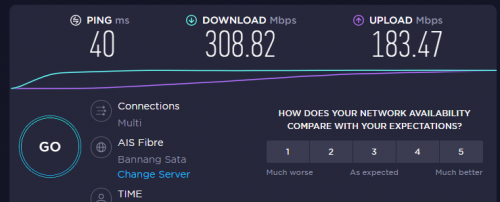
I applied for the 300Mbps plan yesterday. A check just now it seems like they have upgraded it. HOWEVER, the upload speed is not able to hit 300Mbps.
Sometimes I only get a download speed of 50Mbps. It never happens with my 100Mbps plan.
Any idea?

Router: Tplink AX1500 Wi-Fi 6 Router

user posted image
kmrdeva
post Sep 21 2021, 06:39 PM

Look at all my stars!!
*******
Senior Member
4,790 posts

Joined: Jan 2003
QUOTE(RagingCandy @ Sep 21 2021, 05:46 PM)

**Need helps**


I applied for the 300Mbps plan yesterday. A check just now it seems like they have upgraded it. HOWEVER, the upload speed is not able to hit 300Mbps.
Sometimes I only get a download speed of 50Mbps.  It never happens with my 100Mbps plan.
Any idea?

Router: Tplink AX1500 Wi-Fi 6 Router

user posted image
*
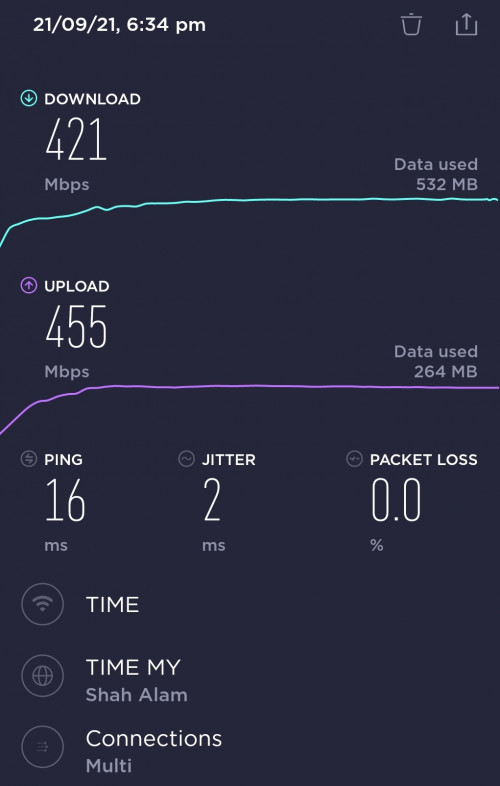
Any reason why you are testing with a Thai server?

I am in Penang and just ran a test against the Shah Alam Time server.

Time Fibre plan - 500mb
Phone - OnePlus 8T
Router - Asus Zenwifi XT8

(5m from my primary mesh router node)

user posted image

This post has been edited by kmrdeva: Sep 21 2021, 06:40 PM
RagingCandy
post Sep 21 2021, 06:53 PM

Getting Started
**
Junior Member
205 posts

Joined: Sep 2014
QUOTE(kmrdeva @ Sep 21 2021, 06:39 PM)
Any reason why you are testing with a Thai server?

I am in Penang and just ran a test against the Shah Alam Time server.

Time Fibre plan - 500mb
Phone - OnePlus 8T
Router - Asus Zenwifi XT8

(5m from my primary mesh router node)

user posted image
*
Same result even connecting to TiME server or using TIME website to test it.
kmrdeva
post Sep 21 2021, 07:01 PM

Look at all my stars!!
*******
Senior Member
4,790 posts

Joined: Jan 2003
QUOTE(RagingCandy @ Sep 21 2021, 06:53 PM)
Same result even connecting to TiME server  or using TIME website to test it.
*
Tried testing with a wired connection eg PC?
xSean
post Sep 21 2021, 08:13 PM

Look at all my stars!!
*******
Senior Member
2,776 posts

Joined: Oct 2006
QUOTE(RagingCandy @ Sep 21 2021, 06:53 PM)
Same result even connecting to TiME server  or using TIME website to test it.
*
Got called time?
xSean
post Sep 21 2021, 08:14 PM

Look at all my stars!!
*******
Senior Member
2,776 posts

Joined: Oct 2006
QUOTE(ktchang321 @ Sep 20 2021, 09:07 PM)
Use LAN Cat6 to retest internet speed few times. Download speed around 160-180mbps and upload speed can achieve almost 300mbps. Y like this? Any sifu can advise?

Using existing router EC-230.
*
Call time?
ktchang321
post Sep 21 2021, 08:30 PM

New Member
*
Newbie
10 posts

Joined: Aug 2013
QUOTE(RagingCandy @ Sep 21 2021, 05:46 PM)

**Need helps**


I applied for the 300Mbps plan yesterday. A check just now it seems like they have upgraded it. HOWEVER, the upload speed is not able to hit 300Mbps.
Sometimes I only get a download speed of 50Mbps.  It never happens with my 100Mbps plan.
Any idea?

Router: Tplink AX1500 Wi-Fi 6 Router

user posted image
*
same scenario happened to me.
RagingCandy
post Sep 21 2021, 09:06 PM

Getting Started
**
Junior Member
205 posts

Joined: Sep 2014
QUOTE(kmrdeva @ Sep 21 2021, 07:01 PM)
Tried testing with a wired connection eg PC?
*
QUOTE(xSean @ Sep 21 2021, 08:13 PM)
Got called time?
*
QUOTE(ktchang321 @ Sep 21 2021, 08:30 PM)
same scenario happened to me.
*
Tested using LAN cable connecting to my laptop. The upload speed gradually reaching 300Mbps toward the end of the testing. Like it is struggling to reach that speed.

All devices with WiFi 6 are NOT ABLE to reach 300Mbps/ ONLY HALF OF IT.

I yet to call TIME as the internet is currently in use for zoom call. Maybe give them a call later.

jjj2
post Sep 22 2021, 08:46 AM

Look at all my stars!!
*******
Senior Member
3,612 posts

Joined: Feb 2006
QUOTE(RagingCandy @ Sep 21 2021, 05:46 PM)

**Need helps**


I applied for the 300Mbps plan yesterday. A check just now it seems like they have upgraded it. HOWEVER, the upload speed is not able to hit 300Mbps.
Sometimes I only get a download speed of 50Mbps.  It never happens with my 100Mbps plan.
Any idea?

Router: Tplink AX1500 Wi-Fi 6 Router

user posted image
*
HI, try changing the speedtest server to TIME Shah Alam or TT Dotcom.

Or you may directly proceed to use speed.time.com.my

Do make sure to perform speedtest under the following criterias.
1) Turn off any background running heavy services>
2) Turn off Internet Security or Antivirus temporary.
3) Stop all other Internet usage while performing speedtest.
4) Test using a good Cat5e or Cat6 network cable.
5) Try different browser & Speedtest server to test.
6) Download Speedtest Desktop Apps to test rather than Browser based.

If problem still persists, then please kindly file a report to 1800 18 1818, will proceed to 2nd level of troubleshooting.

Thanks.


This post has been edited by jjj2: Sep 22 2021, 08:53 AM

671 Pages « < 394 395 396 397 398 > » Top
 

Change to:
| Lo-Fi Version
0.4312sec    0.72    6 queries    GZIP Disabled
Time is now: 21st December 2025 - 10:53 PM