Outline ·
[ Standard ] ·
Linear+
TIME [OFFICIAL] TIME Fibre Broadband™ v4, Experience the ONE TRUE 2Gbps
|
orb666
|
 Oct 26 2018, 01:01 PM Oct 26 2018, 01:01 PM
|
New Member


|
@blacktubi I'm not expecting it to be the same with a wired connection. I am aware of the limitations. I'm just asking if anyone is experiencing this and if it is normal.
@ralyon Can you share your configuration on the 5Ghz setting?
As of now I'm the only one using the internet here in our condo unit. I'm using my Zenfone 3 and still can't get atleast 200Mbps @ 5Ghz. I'm also testing it beside my router.
|
|
|
|
|
|
Lord_Ashe
|
Oct 26 2018, 02:29 PM
|
|
|
QUOTE(orb666 @ Oct 26 2018, 01:01 PM) @blacktubi I'm not expecting it to be the same with a wired connection. I am aware of the limitations. I'm just asking if anyone is experiencing this and if it is normal. @ralyon Can you share your configuration on the 5Ghz setting? As of now I'm the only one using the internet here in our condo unit. I'm using my Zenfone 3 and still can't get atleast 200Mbps @ 5Ghz. I'm also testing it beside my router. Download Wifi Analyser for Android. Look at the channel saturation, which could also play a role. I had to manually change the channels for the 5Ghz network to be usable in my bedroom. Now on P20 Pro I can get 300-320 Mbps on wifi (in the same room as router) and maybe 40-50 in the furthest bedroom (with wifi extender). |
|
|
|
|
|
wirelessbuyer
|
Oct 26 2018, 03:14 PM
|
|
|
QUOTE(orb666 @ Oct 26 2018, 12:11 PM) Good day to all, I am using a TP-Link Archer C7 V2 with firmware 3.15.1 Build 160715 Rel.50549n. My plan just upgraded to 1Gbps. Using my desktop with cat5e I'm getting 800-900Mbps. But using 5Ghz wifi connection with my huawei p20 pro I can't get past 200Mbps. Anyone experiencing this? And also, is it safe to upgrade the firmware from MY to UK? TIA! What is your network speed/link speed on your phone? Attached thumbnail(s)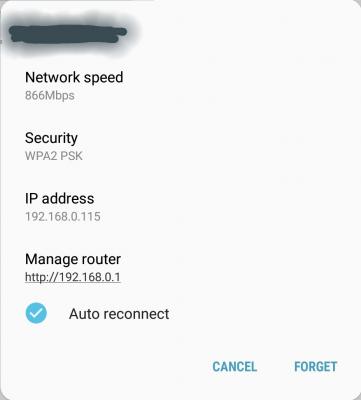
|
|
|
|
|
|
zzzz52
|
Oct 26 2018, 04:10 PM
|
|
|
Hi Guys, just a feedback. I'm using 500mbps plan and pairing my Note 9 with the Asus AC86U, I was able to get ~450mbps UL/DL about 5M away from the router.. It is pretty good.
Speedtest to TIME server.
Satisfied with it.
|
|
|
|
|
|
jamespaul
|
Oct 26 2018, 04:12 PM
|
Getting Started
|
QUOTE(jjj2 @ Oct 26 2018, 09:11 AM) Real On-Site TestingTested 2 nodes Deco M9 Plus combo with Dlink DIR882 on 1Gbps line yesterday... Incoming 7xxMbps, take into consideration of old concealed Cat5e cables in the house, On Wireless, Deco able to achieve 5xxMbps (tested on TP-Link Deco apps), normal speedtest TIME Server constantly giving 4xxMbps. Beamforming -- slightly bit slower. Node-to-Node connectivity -- superb Setup -- Easy For Home mesh, this is definitely a recommended choice. Thanks. Deco M9 can work with DIR882? I thought must work with only their own nodes? How is the speed for the second node? or third if any? |
|
|
|
|
|
jamespaul
|
Oct 26 2018, 04:14 PM
|
Getting Started
|
QUOTE(ralyon @ Oct 26 2018, 12:49 PM) I have C7 v2 as well. My phone can get 350+mbps if 1m away from router. You should check your phone's wifi spec. If not mimo capable, then it will max out at around 200mbps only. C7 v2 is quite an old model. I accidentally bought this too. Not too good, the version 5 is much better as they have dual bank antennas. |
|
|
|
|
|
@jiman
|
Oct 26 2018, 04:27 PM
|
Getting Started
|
super jealous seeing you guys enjoying the highspeed. I am still stuck on 100mbps TIME IPTV  |
|
|
|
|
|
orb666
|
Oct 26 2018, 04:34 PM
|
New Member
|
@wirelessbuyer On my Zenfone 3 the Link Speed is 433Mbps. When I tried speedtest I'm only getting 129Mbps Down and 159Mbps UP, that is beside the router.
@Lord_Ashe Will try to change the channel.
|
|
|
|
|
|
SilentVampire
|
Oct 26 2018, 04:48 PM
|
|
|
QUOTE(jamespaul @ Oct 26 2018, 04:12 PM) Deco M9 can work with DIR882? I thought must work with only their own nodes? How is the speed for the second node? or third if any? Nope, it ca work as an AP as well. QUOTE(orb666 @ Oct 26 2018, 04:34 PM) @wirelessbuyer On my Zenfone 3 the Link Speed is 433Mbps. When I tried speedtest I'm only getting 129Mbps Down and 159Mbps UP, that is beside the router. @Lord_Ashe Will try to change the channel. Doesn’t matter if you are beside the router if your 5GHz channel is congested. |
|
|
|
|
|
Dave Minion
|
Oct 26 2018, 04:50 PM
|
Getting Started
|
want to ask if after apply TIME online and still waiting for installation can cancel it first? any penalty?
|
|
|
|
|
|
FusionXY
|
Oct 26 2018, 05:08 PM
|
|
|
QUOTE(@jiman @ Oct 26 2018, 04:27 PM) super jealous seeing you guys enjoying the highspeed. I am still stuck on 100mbps TIME IPTV You may terminate TIME IPTV subscribe TIME instead QUOTE(Dave Minion @ Oct 26 2018, 04:50 PM) want to ask if after apply TIME online and still waiting for installation can cancel it first? any penalty? Cancel the installation or terminate during contract period? Thanks |
|
|
|
|
|
jjj2
|
Oct 26 2018, 05:09 PM
|
|
|
QUOTE(Macnair @ Oct 26 2018, 12:44 PM) I see, the manual is a bit different as TIME firmare is different than the default firmware for this unit. There is no manual based on the TIME Firmware. If you have any questions, feel free to post it here, or email/pm me, will guide you on that. Thanks. This post has been edited by jjj2: Oct 26 2018, 05:21 PM |
|
|
|
|
|
jjj2
|
Oct 26 2018, 05:12 PM
|
|
|
QUOTE(jamespaul @ Oct 26 2018, 04:12 PM) Deco M9 can work with DIR882? I thought must work with only their own nodes? How is the speed for the second node? or third if any? Yes it can work as AP mode. It's auto adjust, on 2nd node, slightly lower, managed to get approx 17x--2xxMbps, most of the time between 16x --18xMbps. |
|
|
|
|
|
jjj2
|
Oct 26 2018, 05:13 PM
|
|
|
QUOTE(Dave Minion @ Oct 26 2018, 04:50 PM) want to ask if after apply TIME online and still waiting for installation can cancel it first? any penalty? No Penalty, we can assit you to expedite it. Feel Free to pm us if you need any help. |
|
|
|
|
|
wirelessbuyer
|
Oct 26 2018, 05:30 PM
|
|
|
QUOTE(orb666 @ Oct 26 2018, 04:34 PM) @wirelessbuyer On my Zenfone 3 the Link Speed is 433Mbps. When I tried speedtest I'm only getting 129Mbps Down and 159Mbps UP, that is beside the router. @Lord_Ashe Will try to change the channel. Here is my speedtest result with AC1200 router for your reference. All tested with WiFi 5GHz 802.11ac next to router. No neighbor WiFi interference on my channel after checking on WiFi Analyzer app. Speed will reduce when move further away from router. - Laptop with Intel AC8260 (2x2 - 867Mbps) - Max reach 400Mbps - Galaxy S8 (2x2 - 867Mbps) - Max reach 350Mbps - Lenovo P2 phone (1x1 - 433Mbps) - Max reach 300Mbps - Sony Z3 compact (1x1 - 433Mbps) - Max reach 200Mbps |
|
|
|
|
|
arefiq09
|
Oct 26 2018, 06:44 PM
|
Getting Started
|
QUOTE(FusionXY @ Oct 25 2018, 10:38 PM) Try to reset your router. Or alternatively, perform direct connection to ONU. If still occurs, time to get a new router. Thanks. May I know how to perform direct connection to ONU? What's the steps? Edit: How will I need to configure the login and stuff Edit again: I unplugged and plugged back the cable between C1200 and the ONU, then the speed is back to 500 without turning off any of the device. This post has been edited by arefiq09: Oct 26 2018, 07:27 PM |
|
|
|
|
|
FusionXY
|
Oct 26 2018, 07:54 PM
|
|
|
QUOTE(arefiq09 @ Oct 26 2018, 06:44 PM) May I know how to perform direct connection to ONU? What's the steps? Edit: How will I need to configure the login and stuff Edit again: I unplugged and plugged back the cable between C1200 and the ONU, then the speed is back to 500 without turning off any of the device. Direct connection to ONU means bypass the router, connect from ONU to Laptop itself. You may need to have the PPPOE login details ready. Try to restart, or check whether your cable is CAT 5E. Thanks. This post has been edited by FusionXY: Oct 26 2018, 07:55 PM |
|
|
|
|
|
ralyon
|
Oct 26 2018, 08:22 PM
|
Getting Started
|
QUOTE(orb666 @ Oct 26 2018, 01:01 PM) @blacktubi I'm not expecting it to be the same with a wired connection. I am aware of the limitations. I'm just asking if anyone is experiencing this and if it is normal. @ralyon Can you share your configuration on the 5Ghz setting? As of now I'm the only one using the internet here in our condo unit. I'm using my Zenfone 3 and still can't get atleast 200Mbps @ 5Ghz. I'm also testing it beside my router. Mode: 11/a/n/ac mixed Channel: 149 Tick - Enable SSID Broadcast WPS Status: Enabled security - WPA/WPA2 - Personal Version: Auto Encryption: AES Wireless MAC Filtering: Disabled Wireless Advanced: Transmit Power: High Beacon Interval : 100 RTS Threshold: 2346 Fragmentation Threshold: 2346 DTIM Interval: 1 Tick - Enable WMM Tick - Enable Short GI I have different firmware: Firmware Version: 3.14.3 Build 150520 Rel.53345n Hardware Version: Archer C7 v2 00000000 This post has been edited by ralyon: Oct 26 2018, 08:28 PM |
|
|
|
|
|
ralyon
|
Oct 26 2018, 08:27 PM
|
Getting Started
|
QUOTE(jamespaul @ Oct 26 2018, 04:14 PM) C7 v2 is quite an old model. I accidentally bought this too. Not too good, the version 5 is much better as they have dual bank antennas. Bought mine 2-3 years ago. So far this model is good, can on for months without reboot. Nowadays, i don't really use 2.4ghz anymore, antennas for 5ghz is good enough for me. |
|
|
|
|



 Quote
Quote




 0.0210sec
 0.73
0.73
 6 queries
 GZIP Disabled