Welcome Guest ( Log In | Register )

302 Pages « < 269 270 271 272 273 > » Bottom

Outline · [ Standard ] · Linear+

Home Networking WiFi Router Discussion Thread, Updated for 2023

views
     
SnowWhiteTan
post Jan 10 2024, 10:09 AM

Getting Started
**
Junior Member
232 posts

Joined: Dec 2005
QUOTE(Omochao @ Jan 9 2024, 10:22 PM)
What is the ac rating for that triband mesh brand? ac1200 or ac1900? or ac2200?

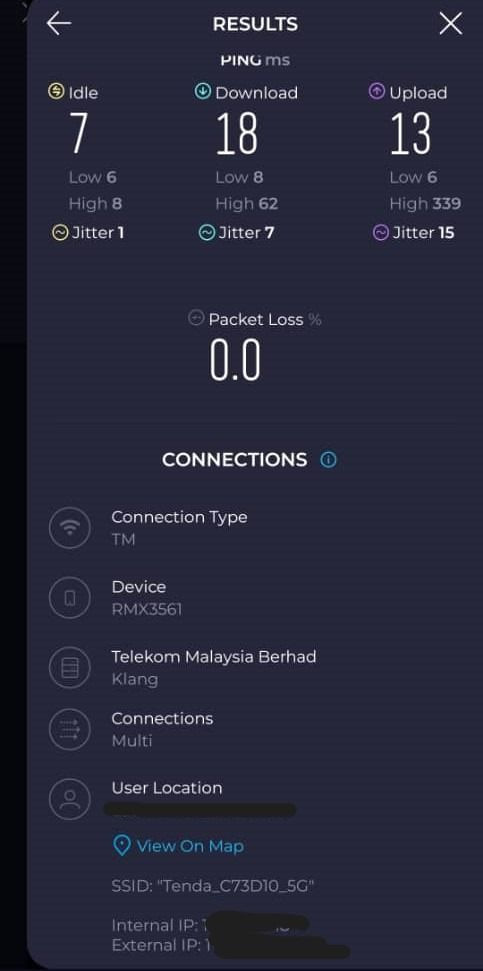
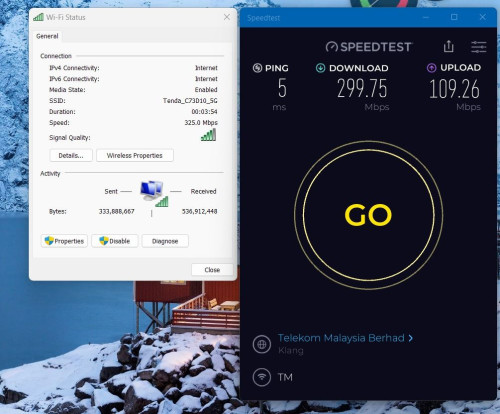
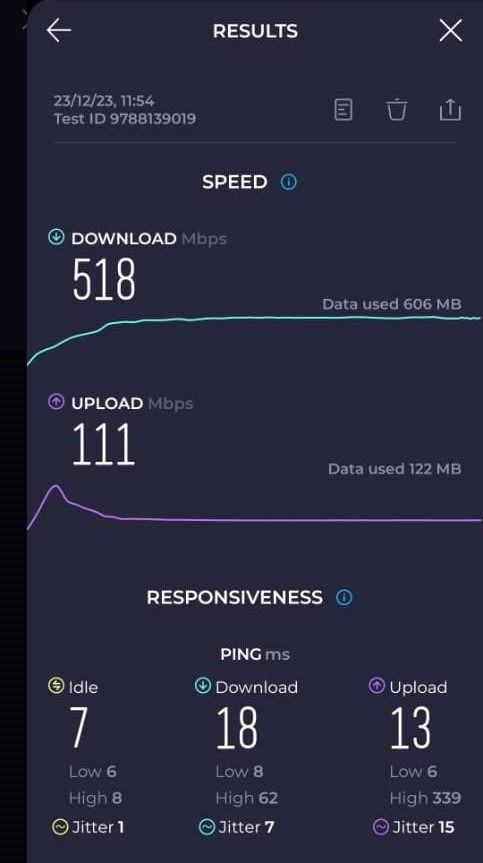
Generally it can support up to 300mbps, as my previous tenda ac10u ac1200 router can even reach up to 400mbps++.

Just that you'll have to sacrifice on better UI since TP link deco provides more options to play around but it doesn't means practical at times for new users.

If you don't really intend to further change or expect any speed upgrade in the near future, the ac mesh can last you for more than 2-3 years.

Routers are built to last for daily usage.

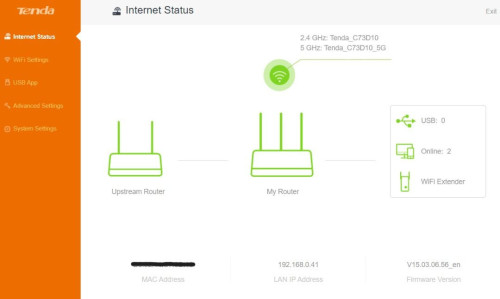
Here's the example of my previous tenda router before I sold it off to another user, this router really was the bang for buck.

» Click to show Spoiler - click again to hide... «
*
judging from the reviews, 3 pack mesh should be able to cover 5000 sq-ft with reasonable speed. if can get 1/3 of the speed upstairs from main node at downstairs, i think its already better than my current setup. biggrin.gif
i'm using Tenda brand AX9, but it's not very stable and overheats easily...
Omochao
post Jan 11 2024, 03:05 AM

Enthusiast
*****
Junior Member
835 posts

Joined: Nov 2007
From: Land of Forgotten
QUOTE(SnowWhiteTan @ Jan 10 2024, 10:09 AM)
judging from the reviews, 3 pack mesh should be able to cover 5000 sq-ft with reasonable speed. if can get 1/3 of the speed upstairs from main node at downstairs, i think its already better than my current setup.  biggrin.gif
i'm using Tenda brand AX9, but it's not very stable and overheats easily...
*
as long fits the checkboxes that you have,then is fine by all means.

depends on how you look at it, I was using a tenda router ac10u long before this swu 3.0, i remembered the last update bump my speed to 300mbps, but i opted out and choose to downgrade to 100mbps..on and off was around 50-60mbps
hammetts
post Jan 12 2024, 08:41 AM

Getting Started
**
Junior Member
66 posts

Joined: Mar 2012
Hi, Does anyone has experience setting KAON AR2140 (maxis free router) as repeater using easymesh function? my main router AX53

Ive tried but kinda fail. its detect AR2140 as mesh but when i tried the coverage it was the same whether its on or off.

FYI i use this step

Steps:
1) Connect a laptop to LAN port of the AR2140
2) Navigate to the address http://192.168.1.254 using your preferred browsers (Mozilla Firefox, Google Chrome, Microsoft Edge)
3) Login as administrator into the web GUI
4) Using the navigation menu that is displayed on the left side of the AR2140 web GUI, click on NETWORK and then WAN Mode to access the menu to switch the operation mode of the AR2140
5) Select the button Bridge (Repeater) and a new submenu Friendly Name will appear
6) You can change the Friendly Name to any name as identification of the MESH nodes to be displayed in the web GUI. Eg: Kitchen's MAP, Bedroom, Living Hall AP, etc.
7) Click on APPLY button and the AR2140 will reboot automatically and ready to be setup to pair to a master/controller node using the WPS button


This post has been edited by hammetts: Jan 12 2024, 08:43 AM
sitescope
post Jan 13 2024, 01:18 PM

Look at all my stars!!
*******
Senior Member
4,494 posts

Joined: Oct 2013
QUOTE(hammetts @ Jan 12 2024, 08:41 AM)
Hi, Does anyone has experience setting KAON AR2140 (maxis free router) as repeater using easymesh function? my main router AX53

Ive tried but kinda fail. its detect AR2140 as mesh but when i tried the coverage it was the same whether its on or off.

FYI i use this step

Steps:
1) Connect a laptop to LAN port of the AR2140
2) Navigate to the address http://192.168.1.254 using your preferred browsers (Mozilla Firefox, Google Chrome, Microsoft Edge)
3) Login as administrator into the web GUI
4) Using the navigation menu that is displayed on the left side of the AR2140 web GUI, click on NETWORK and then WAN Mode to access the menu to switch the operation mode of the AR2140
5) Select the button Bridge (Repeater) and a new submenu Friendly Name will appear
6) You can change the Friendly Name to any name as identification of the MESH nodes to be displayed in the web GUI. Eg: Kitchen's MAP, Bedroom, Living Hall AP, etc.
7) Click on APPLY button and the AR2140 will reboot automatically and ready to be setup to pair to a master/controller node using the WPS button
*
Try use cable frm ax53 lan to kaon wan
nles
post Jan 17 2024, 07:07 PM

♥ It's not about the girl ♥ It's the G-Shock
*******
Senior Member
2,125 posts

Joined: Jan 2003


Quick question.

Double storey semi-d with smart home.
Which solution, Asus ZenWifi or Ubiquiti?
Omochao
post Jan 18 2024, 12:17 PM

Enthusiast
*****
Junior Member
835 posts

Joined: Nov 2007
From: Land of Forgotten
QUOTE(nles @ Jan 17 2024, 07:07 PM)
Quick question.

Double storey semi-d with smart home.
Which solution, Asus ZenWifi or Ubiquiti?
*
every different maker is hard to say how far or strong Wifi signal cover they can produce, can be due to OS,firmware and settings.

Best suggestion go for TP link ones, their UI more user friendly and straight forward.

This post has been edited by Omochao: Jan 18 2024, 12:25 PM
Omochao
post Jan 18 2024, 01:55 PM

Enthusiast
*****
Junior Member
835 posts

Joined: Nov 2007
From: Land of Forgotten
Just for sharing, cheapest i found online for an ax1800 rated mesh system, can support 500mbps no issues . Am using it at the moment , cheaper than what I bought from last sales.

Deco X20, is around RM500++ for 2 packs.
If anyone wants a simple mesh, this works and can pair effortlessly.

Attached Image

This post has been edited by Omochao: Jan 18 2024, 01:59 PM
TSblacktubi
post Jan 18 2024, 08:49 PM

-
Group Icon
Elite
8,418 posts

Joined: Jul 2008

QUOTE(nles @ Jan 17 2024, 07:07 PM)
Quick question.

Double storey semi-d with smart home.
Which solution, Asus ZenWifi or Ubiquiti?
*
I will go for ASUS, the firmware is more reliable than Ubiquiti.

Ubiquiti kept releasing new products for the $$$ and don't really care about fixing existing bugs.

QUOTE(Omochao @ Jan 18 2024, 01:55 PM)
Just for sharing, cheapest i found online for an ax1800 rated mesh system, can support 500mbps no issues . Am using it at the moment , cheaper than what I bought from last sales.

Deco X20, is around RM500++ for 2 packs.
If anyone wants a simple mesh, this works and can pair effortlessly.

Attached Image
*
I thought you was complaining about it previously?

Did you manage to fix the slowness?

This post has been edited by blacktubi: Jan 18 2024, 08:51 PM
Omochao
post Jan 18 2024, 09:03 PM

Enthusiast
*****
Junior Member
835 posts

Joined: Nov 2007
From: Land of Forgotten
QUOTE(blacktubi @ Jan 18 2024, 08:49 PM)
I thought you was complaining about it previously?

Did you manage to fix the slowness?
*
yep somehow, swapping out them both to be set as main node ,and using the certain speed test server and certain timing can achieve 500mbps. it wasn't the QOS or what so ever.

now combining with my fiberhome router ax3000 to create whole house mesh network. so far so good. just that is lacking on options compared to tp link and the frequency of firmware updates.
p1p
post Jan 23 2024, 11:17 AM

Enthusiast
*****
Senior Member
713 posts

Joined: Jan 2003
From: Pg


I am currently using Deco E4 AC1200 to link two buildings. I'm thinking of a small upgrade (current speeds only at 10-20mbps on the other side)

Two options:
1. Run Ethernet cables to the current DECO (40 meter run) with a 100mbps limit.
2. Purchase a TP-Link Deco X50 Outdoor WiFi 6 AX3000 Outdoor Mesh WiFi Wireless Access Point Router to bridge my blind spots.

What would you recommend?
shredder
post Jan 23 2024, 11:37 AM

Getting Started
**
Junior Member
251 posts

Joined: Dec 2006


Anyone can give feedback for TP-LINK AXE75 (AXE5400) router?
jacktiew
post Jan 25 2024, 10:09 AM

Getting Started
**
Junior Member
289 posts

Joined: Sep 2012
QUOTE(p1p @ Jan 23 2024, 11:17 AM)
I am currently using Deco E4 AC1200 to link two buildings. I'm thinking of a small upgrade (current speeds only at 10-20mbps on the other side)

Two options:
1. Run Ethernet cables to the current DECO (40 meter run) with a 100mbps limit.
2. Purchase a TP-Link Deco X50 Outdoor WiFi 6 AX3000 Outdoor Mesh WiFi Wireless Access Point Router to bridge my blind spots.

What would you recommend?
*
First option cheaper and confirm stable.
alg7_munif
post Jan 25 2024, 02:47 PM

New Member
*
Junior Member
17 posts

Joined: Jan 2011
Hi,

Any recommendation between these 2:
1) Asus TUF-AX6000
2) TP-Link Archer AX95

I need better coverage for 2 stories terrace house. UNIFI 500 mbps with a lot of smart switches. Thanks
TSblacktubi
post Jan 25 2024, 04:10 PM

-
Group Icon
Elite
8,418 posts

Joined: Jul 2008

QUOTE(alg7_munif @ Jan 25 2024, 02:47 PM)
Hi,

Any recommendation between these 2:
1) Asus TUF-AX6000
2) TP-Link Archer AX95

I need better coverage for 2 stories terrace house. UNIFI 500 mbps with a lot of smart switches. Thanks
*
Want better coverage then go for mesh system or multi-router mesh setup.

If you trying to cramp everything into one router, delay in switch will happen.

Those WiFi signal in those smart switch are not good.
TongCN
post Jan 26 2024, 11:51 AM

Look ma, I have lots stars :D
*******
Senior Member
6,689 posts

Joined: Aug 2008
From: Malaysia


My mind just pop out this issue after making purchase of TP-Link Deco XE75 yesterday (haven't received)

So what i learnt is that 6Ghz can be wireless backhaul and SSID at the same time but the 6Ghz will be like a separated SSID toward 2.4/5Ghz.

Question: Meaning to say that if my Wi-Fi 6E devices connecting to 6Ghz SSID will not be able to see devices connected to Wi-Fi 2.4/5Ghz ?
Example if i want to chromecast (google) or screen mirror (ios) from my Wi-Fi 6E devices to TV (connected with non-Wi-Fi 6E). It will not see each other cause differ SSID
sadlyfalways
post Jan 26 2024, 11:54 AM

Regular
******
Senior Member
1,185 posts

Joined: Nov 2020
Hey guys! I have some questions regarding my router upgrade.

Was using a ubiquiti dream machine with sqm as gateway for my x90 but sold it because wanted some cash to upgrade to WiFi 7

Deco x90 has been performing well, but I noticed the qos or sqm in the deco app does not do anything

With the ubiquiti no matter what or how much I was downloading, I never had ping spikes or packet loss when gaming

With the deco however, even with qos enabled, a simple Speedtest can cause about 10 seconds of packet loss and ping spikes in my game

I’m planning on getting the deco be65, does anyone know if the sqm or qos in that router is any good?

Or anything else you recommend for WiFi 7 for 2k?
ben3003
post Jan 26 2024, 12:20 PM

10k Club
********
All Stars
10,859 posts

Joined: Jan 2003
From: Sarawak


QUOTE(TongCN @ Jan 26 2024, 11:51 AM)
My mind just pop out this issue after making purchase of TP-Link Deco XE75 yesterday (haven't received)

So what i learnt is that 6Ghz can be wireless backhaul and SSID at the same time but the 6Ghz will be like a separated SSID toward 2.4/5Ghz.

Question: Meaning to say that if my Wi-Fi 6E devices connecting to 6Ghz SSID will not be able to see devices connected to Wi-Fi 2.4/5Ghz ?
Example if i want to chromecast (google) or screen mirror (ios) from my Wi-Fi 6E devices to TV (connected with non-Wi-Fi 6E). It will not see each other cause differ SSID
*
No issue, as long as the gateway is the same. 2.4ghz device also can see 5ghz device, and is separate ssid.
TongCN
post Jan 26 2024, 02:35 PM

Look ma, I have lots stars :D
*******
Senior Member
6,689 posts

Joined: Aug 2008
From: Malaysia


QUOTE(ben3003 @ Jan 26 2024, 12:20 PM)
No issue, as long as the gateway is the same. 2.4ghz device also can see 5ghz device, and is separate ssid.
*
Hmm .. hopefully, as per checking in reddit, ppl suggest naming the 6Ghz as same with 2.4Ghz/5Ghz for the Fast Roaming feature

TSblacktubi
post Jan 27 2024, 01:01 PM

-
Group Icon
Elite
8,418 posts

Joined: Jul 2008

QUOTE(TongCN @ Jan 26 2024, 02:35 PM)
Hmm .. hopefully, as per checking in reddit, ppl suggest naming the 6Ghz as same with 2.4Ghz/5Ghz for the Fast Roaming feature
*
iOS will prompt a warning if 6Ghz is different name with 2.4/5Ghz as well

Best practice nowadays is to use same name
ben3003
post Jan 27 2024, 07:56 PM

10k Club
********
All Stars
10,859 posts

Joined: Jan 2003
From: Sarawak


QUOTE(blacktubi @ Jan 27 2024, 01:01 PM)
iOS will prompt a warning if 6Ghz is different name with 2.4/5Ghz as well

Best practice nowadays is to use same name
*
Same name as in like ssid is identical? Or like abc_5G and abc_6G can also? Cos mine is abc_2.4G and abc_5G default by router

302 Pages « < 269 270 271 272 273 > » Top
 

Change to:
| Lo-Fi Version
0.0283sec    0.81    6 queries    GZIP Disabled
Time is now: 15th December 2025 - 09:11 PM