Welcome Guest ( Log In | Register )

Outline · [ Standard ] · Linear+

Home Networking WiFi Router Discussion Thread, Updated for 2023

views
     
jacktiew
post May 25 2021, 01:53 PM

Getting Started
**
Junior Member
289 posts

Joined: Sep 2012
QUOTE(sparktzm @ May 25 2021, 12:56 PM)
Hi i having slow connection and no 5GHZ connection using stock UNIFI C1200 router at 2nd floor. Will it better i buy AX73 to replace stock router or buy DECO M4 as wifi mesh?

House type: Landed
Size of house: 3000sqft , 2 floors
Number of devices connected to WiFi: 10
Internet Speed: 100Mbps
*
I would suggest M9 plus instead as 3000 sqft plus 2 floor is really big for a single router to cover. Unless you have Ethernet all over the house, get a triband mesh to reduce the speed deduction over wifi.
jacktiew
post Sep 24 2021, 04:28 PM

Getting Started
**
Junior Member
289 posts

Joined: Sep 2012
QUOTE(drbionicle @ Sep 24 2021, 02:27 PM)
Hi Sifuz,

Currently using Archer C5v (stock router from Maxis). Reception at upper floors not great, so looking to either upgrade router or change to wifi mesh. Appreciate your advice.

House type: Landed
Size of house: 3 storey
Features required: improve connection at ypper floors
Number of devices connected to WiFi: 4 HP, 1 android tv (mainly for Netflix), 4 computers (frequently uses Zoom, VPN)
Internet Speed: Maxis 30 Mbps (looking to upgrade to 100Mbps)
Budget: 1k
*
Get Deco M9 Plus 2 pack from carousell at around rm600. If not enough then only add on.
jacktiew
post Feb 15 2022, 11:16 AM

Getting Started
**
Junior Member
289 posts

Joined: Sep 2012
QUOTE(lovingforyou @ Feb 14 2022, 09:53 PM)
Hi sifu LYN, i'm totally zero IT with these things.
My house double storey, size 80ft x 24ft, using 300mbps free modem and free router from TM 4 years ago, placed at 2nd floor middle corridor.
With recent my house wifi device (TV, laptops, smartphone, ipad and etc) increasing, everyone complaining about slow and lag.
I even report to TM that my connection is slow, but end up they restart and test my connection, everythings is fine.
My friend told me that i need a home plug (extend it from 2nd floor to Gr floor) to setup a new start signal.

Any suggestion how do i make my entire house with 5Ghz wifi connection? How's the arrangement plan and etc
Btw i have to get some IT guy for settings due i'd no idea what's the username and password for my connection sweat.gif
*
Option 1: Buy a mesh system.
Option 2: Pull a LAN cable from 2nd to 1st floor and use a normal mesh system through Ethernet backhaul.
Option 3: Use a triband mesh system if you don't want to pull cable.

I personally use option 2 because it is more reliable than option 1 and cheaper than option 3.

For username and password, you can get it from your current router or call your ISP customer service to obtain it.

This post has been edited by jacktiew: Feb 15 2022, 11:21 AM
jacktiew
post Feb 16 2022, 11:27 PM

Getting Started
**
Junior Member
289 posts

Joined: Sep 2012
QUOTE(lovingforyou @ Feb 16 2022, 03:16 PM)
Any recommended service provider that i can consider
Example like contract RM300 monthly with new modem and router + 3 mesh wifi device
I think this route is better for myself personally because they'll setup it for me i think  hmm.gif
*
Your budget and how much speed you needed?

Preferably buy your own router rather than pay so much to ISP. They are now easier to setup by mobile app compared to older days.
jacktiew
post Feb 21 2022, 12:50 PM

Getting Started
**
Junior Member
289 posts

Joined: Sep 2012
QUOTE(Lieblingsmonster @ Feb 21 2022, 12:30 AM)
House type: Landed
Size of house: 1400 Square feet , 2 floors terrace house
Features: just normal internet will do
Number of devices connected to WiFi: 6
Internet Speed: 100Mbps
Budget: below 300

A LAN cable already pulled from to second floor. What router should i place on second floor to ensure whole second floor can connect to wifi.
*
You can get deco m4 from carousell for around rm300 to replace your ISP router since you're already wired.
jacktiew
post Apr 11 2022, 10:38 PM

Getting Started
**
Junior Member
289 posts

Joined: Sep 2012
QUOTE(ipohzeng @ Apr 11 2022, 01:33 PM)
Hi, looking for advise

22x70 double storey. with modem at ground floor living hall at tv area
Is 2 x X50 deco enough or better to get 2x X68 for backhaul feature?
ON maxis 300mbps package.

Thanks!
*
If you have enough budget, of course triband X68 is better choice.

Place X68 at the living room of second room for optimal connection.
jacktiew
post May 6 2022, 11:03 PM

Getting Started
**
Junior Member
289 posts

Joined: Sep 2012
QUOTE(GigaNano @ May 6 2022, 05:19 PM)
Thanks for the reply, well I guess the walls in my house thicker, you walk in a room, even the router is just outside, the signal drop dy, not to mentioned going downstairs, the connection will sometimes auto disconnect, kindda annoying really.

I read many good reviews of the Archer ax20, so I’ll give it a try.
*
If that's the case, you should gone mesh wifi instead.

This post has been edited by jacktiew: May 6 2022, 11:04 PM
jacktiew
post Jan 25 2024, 10:09 AM

Getting Started
**
Junior Member
289 posts

Joined: Sep 2012
QUOTE(p1p @ Jan 23 2024, 11:17 AM)
I am currently using Deco E4 AC1200 to link two buildings. I'm thinking of a small upgrade (current speeds only at 10-20mbps on the other side)

Two options:
1. Run Ethernet cables to the current DECO (40 meter run) with a 100mbps limit.
2. Purchase a TP-Link Deco X50 Outdoor WiFi 6 AX3000 Outdoor Mesh WiFi Wireless Access Point Router to bridge my blind spots.

What would you recommend?
*
First option cheaper and confirm stable.
jacktiew
post Jun 7 2025, 08:40 AM

Getting Started
**
Junior Member
289 posts

Joined: Sep 2012
QUOTE(zxxcats @ Jun 6 2025, 08:13 PM)
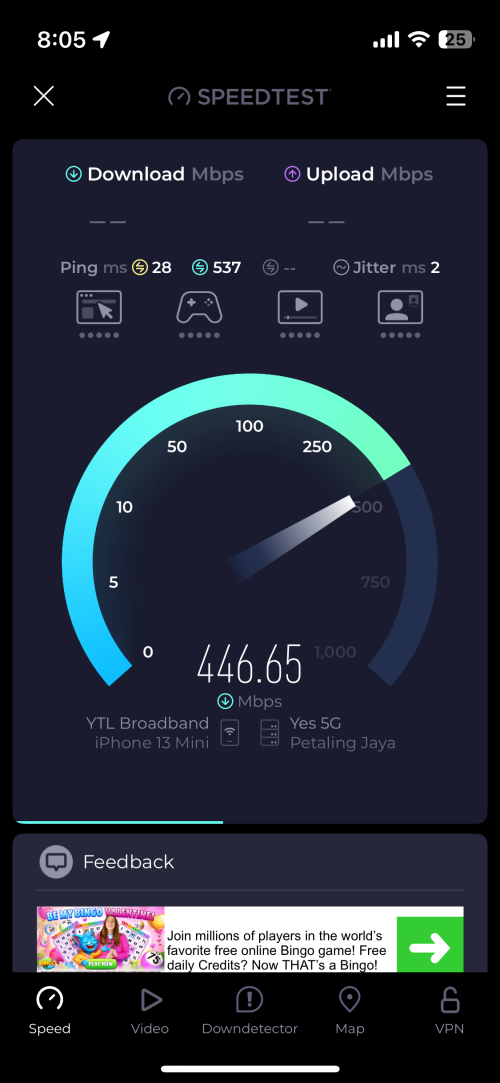
Hiya folks. Recently, I went ahead and bought myself TP-Link NX200 5G Wifi router after I tested out YES 5G network at my place via free eSIM on my iPhone 13 mini. Truly a nice plug and play experience when I tried the router using my existing Maxis nano SIM then YES 5G nano SIM (the Broadband Flexi plan).

user posted image Speedtest result using YES via wifi.

Now, one problem - I couldn’t get my adguard DNS to work. Rather, I don’t know how to set up custom DNS at router level. Kindly please advise, thank you.
*
https://www.tp-link.com/us/support/faq/1712/
jacktiew
post Oct 1 2025, 12:57 PM

Getting Started
**
Junior Member
289 posts

Joined: Sep 2012
QUOTE(sam240 @ Oct 1 2025, 11:35 AM)
Hi,
wondering is anyone setup using AC + AP for home seamless roaming WiFi?
AC: Access Controller
AP: Access Point

Below are the example of picture and the setup.
AP have 2 type, ceiling type or 86 wall plug size.
user posted image

My questions:
1) Mostly this type AC+AP are China product, are those WiFi frequency/channel compatible with our laptop/phone/tablet devices?
2) Will the AP (ceiling type) WiFi signal stronger/wider than our high-performance router (example Asus router)?

For sure, ethernet cable need to be ready for each room or by selected point.
Any input and comment are welcome  notworthy.gif
*
1. Can use.
2. But the transmit power is lower than Malaysia/US one if not mistaken. Hence lesser the coverage are.

(Correct me if I'm wrong)


Change to:
| Lo-Fi Version
0.0293sec    0.97    7 queries    GZIP Disabled
Time is now: 18th December 2025 - 04:39 AM