Welcome Guest ( Log In | Register )

302 Pages « < 271 272 273 274 275 > » Bottom

Outline · [ Standard ] · Linear+

Home Networking WiFi Router Discussion Thread, Updated for 2023

views
     
TongCN
post Feb 2 2024, 02:33 PM

Look ma, I have lots stars :D
*******
Senior Member
6,689 posts

Joined: Aug 2008
From: Malaysia


QUOTE(Omochao @ Feb 2 2024, 01:52 PM)
Yes, wasted a lot but that's the only way, for networking features and functions, really depends on which one you using for the main node.

Check with this link, different region , different firmware versions, also try to take note for hardware version.
https://www.tp-link.com/my/choose-your-location/
*
Thanks for the region thing, i think mine xe75v1 is Global (English) with 1.2.9 now as Malaysia firmware is 1.2.8 only.

And there is v3 already, woot.

Suddenly i recall that yesterday when setting up the deco xe75
Initially i was adding new deco and wired XE75 to X20 (main) to activate the XE75

While X20 remain as Main, i remember i see that i can configure the 6Ghz band in the app
Not sure should i reverse my position now if i wan to continue use the HomeCare instead of HomeShield:

X20 (Main) wired to XE75 (Node and position in middle of the house) wireless to X20 (Node2)

What do i lose for this setup beside changing back to homeCare

This post has been edited by TongCN: Feb 2 2024, 03:05 PM
Omochao
post Feb 2 2024, 04:19 PM

Enthusiast
*****
Junior Member
835 posts

Joined: Nov 2007
From: Land of Forgotten
QUOTE(TongCN @ Feb 2 2024, 02:33 PM)
Thanks for the region thing, i think mine xe75v1 is Global (English) with 1.2.9 now as Malaysia firmware is 1.2.8 only.

And there is v3 already, woot.

Suddenly i recall that yesterday when setting up the deco xe75
Initially i was adding new deco and wired XE75 to X20 (main) to activate the XE75

While X20 remain as Main, i remember i see that i can configure the 6Ghz band in the app
Not sure should i reverse my position now if i wan to continue use the HomeCare instead of HomeShield:

X20 (Main) wired to XE75 (Node and position in middle of the house) wireless to X20 (Node2)

What do i lose for this setup beside changing back to homeCare
*
Hard to say , as I have yet to test out on my own neither do I own a pair of deco mesh. but if it works , then good choice, get to enjoy homecare, same speed and coverage, with 6ghz still can turn on.

but that doesn't means the x20 main node will be able to emit 6gnz.
TongCN
post Feb 2 2024, 04:50 PM

Look ma, I have lots stars :D
*******
Senior Member
6,689 posts

Joined: Aug 2008
From: Malaysia


QUOTE(Omochao @ Feb 2 2024, 04:19 PM)
Hard to say , as I have yet to test out on my own neither do I own a pair of deco mesh. but if it works , then good choice, get to enjoy homecare, same speed and coverage, with 6ghz still can turn on.

but that doesn't means the x20 main node will be able to emit 6gnz.
*
Probably tonight test see. The main node will be in living room while XE75 will be covering from middle of the house and it's wired to main node plus i find that the signal of XE75 quite huge - few bulbs of mine like from way opposite of the living room can connect to it all of sudden.


However, the 6Ghz band if i rename same as 2.4/5Ghz band, my Wi-Fi 6E phone still more toward 5Ghz sweat.gif Not sure is it due to 2.4/5Ghz is set to WPA2/WPA3 while 6Ghz can only select WPA3

Another thing to lose maybe is that it's actually is Tapo and Kasa IoT compatible - i can change my bulb and plug from Deco app right now if XE75 is main.
VPN server, i'm not using currently.

This post has been edited by TongCN: Feb 2 2024, 04:51 PM
Omochao
post Feb 2 2024, 05:10 PM

Enthusiast
*****
Junior Member
835 posts

Joined: Nov 2007
From: Land of Forgotten
QUOTE(TongCN @ Feb 2 2024, 04:50 PM)
Probably tonight test see. The main node will be in living room while XE75 will be covering from middle of the house and it's wired to main node plus i find that the signal of XE75 quite huge - few bulbs of mine like from way opposite of the living room can connect to it all of sudden.
However, the 6Ghz band if i rename same as 2.4/5Ghz band, my Wi-Fi 6E phone still more toward 5Ghz  sweat.gif Not sure is it due to 2.4/5Ghz is set to WPA2/WPA3 while 6Ghz can only select WPA3

Another thing to lose maybe is that it's actually is Tapo and Kasa IoT compatible - i can change my bulb and plug from Deco app right now if XE75 is main.
VPN server, i'm not using currently.
*
afaik, bandsteering or smart connect only applies for 2.4ghz+5ghz, for 6ghz they put it under MLO, but only on Wifi 7.

not sure if Wifi6e router/mesh smart connect includes 6ghz as well or not?

by default, all tapo kasa is under tp link, should be compatible .
g-string
post Feb 2 2024, 05:17 PM

Getting Started
**
Junior Member
180 posts

Joined: Sep 2006
Hi all.

Need some advice as reading online got me more confused.

My house has a wired connection in all 9 rooms, and it's 3 floors. Size of one floor is around 3k sq ft +/-.

Currently running 5 different brand routers, only the main incoming router is an AC68U, the rest are the free routers from TM collected over the years biggrin.gif Currently on the 800mb package.

Each router is wired, and running its own SSID.

Problem is I want to consolidate under one SSID, but with auto handoff ala MESH.

Reading online seems I dont need to get triband expensive mesh routers, just a dual band wifi 6E should be fine? Since backhaul will be wired.

So question is if I dont need MESH since running wired, which router brand and model is decent and works well with Unifi?

Asus AiMesh seems decent? And can just add a new base router and re-use my AC68 as an AP, saving money? From what I read, its one base router and about 2-3 APs to cover the house?

From user experience, what is a decent base router and for AP? Looking to spend maybe 1-1.5k for all.

thanks v much.
Omochao
post Feb 2 2024, 08:12 PM

Enthusiast
*****
Junior Member
835 posts

Joined: Nov 2007
From: Land of Forgotten
QUOTE(g-string @ Feb 2 2024, 05:17 PM)
Hi all.

Need some advice as reading online got me more confused.

My house has a wired connection in all 9 rooms, and it's 3 floors. Size of one floor is around 3k sq ft +/-.

Currently running 5 different brand routers, only the main incoming router is an AC68U, the rest are the free routers from TM collected over the years biggrin.gif  Currently on the 800mb package.

Each router is wired, and running its own SSID.

Problem is I want to consolidate under one SSID, but with auto handoff ala MESH.

Reading online seems I dont need to get triband expensive mesh routers, just a dual band wifi 6E should be fine?  Since backhaul will be wired.

So question is if I dont need MESH since running wired, which router brand and model is decent and works well with Unifi?

Asus AiMesh seems decent? And can just add a new base router and re-use my AC68 as an AP, saving money? From what I read, its one base router and about 2-3 APs to cover the house?

From user experience, what is a decent base router and for AP? Looking to spend maybe 1-1.5k for all.

thanks v much.
*
Get a router that come with bss coloring to reduce interference between AP clients. WiFi6 generation should suffice for you, the only thing good about WiFi6e, is the additional 6ghz band only, other than that not much of a big improvement from WiFi6.

Or else just go directly to WiFi7. but might go over your budget.

Since you have wired backhaul, just get TP-link line up routers, archer ax90 or ax 73, 3 of them, settle 1 whole floor. There might be some small wifi dead zone, then consider using your old routers as a wireless repeater to extend that last mile range.
g-string
post Feb 3 2024, 04:27 PM

Getting Started
**
Junior Member
180 posts

Joined: Sep 2006
QUOTE(Omochao @ Feb 2 2024, 08:12 PM)
Get a router that come with bss coloring to reduce interference between AP clients. WiFi6 generation should suffice for you, the only thing good about WiFi6e, is the additional 6ghz band only, other than that not much of a big improvement from WiFi6.

Or else just go directly to WiFi7. but might go over your budget.

Since you have wired backhaul, just get TP-link line up routers,  archer ax90 or ax 73, 3 of them, settle 1 whole floor.  There might be some small wifi dead zone, then consider using your old routers as a wireless repeater to extend that last mile range.
*
So WIFI6 should be enough to fit budget.

thanks will check out the routers. based on budget.
TongCN
post Feb 3 2024, 05:33 PM

Look ma, I have lots stars :D
*******
Senior Member
6,689 posts

Joined: Aug 2008
From: Malaysia


QUOTE(Omochao @ Feb 2 2024, 05:10 PM)
afaik, bandsteering or smart connect only applies for 2.4ghz+5ghz, for 6ghz they put it under MLO, but only on Wifi 7.

not sure if Wifi6e router/mesh smart connect includes 6ghz as well or not?

by default, all tapo kasa is under tp link, should be compatible .
*
My kasa no issue to link with deco but Tapo can detect but unable to add into deco, not sure why

Also dunno why the notification of the deco always double pop out (one thing connect) example, iPhone 14 connect, and deco will pop out

iPhone has joined xxxx network

Quite frust

Another thing is I’m adding the Wi-Fi bulb and when prompt to join network, it will detect 3x of my SAME SSID shocking.gif
Not sure are those main deco + 2x node deco


This post has been edited by TongCN: Feb 3 2024, 05:36 PM
Omochao
post Feb 3 2024, 08:55 PM

Enthusiast
*****
Junior Member
835 posts

Joined: Nov 2007
From: Land of Forgotten
QUOTE(TongCN @ Feb 3 2024, 05:33 PM)
My kasa no issue to link with deco but Tapo can detect but unable to add into deco, not sure why

Also dunno why the notification of the deco always double pop out (one thing connect) example, iPhone 14 connect, and deco will pop out

iPhone has joined xxxx network

Quite frust

Another thing is I’m adding the Wi-Fi bulb and when prompt to join network, it will detect 3x of my SAME SSID  shocking.gif
Not sure are those main deco + 2x node deco
*
Yes it is, back when I was using Mercusys Halo, it showed the same thing as well.

So I guess somehow it is the same for the mentioned above that when you joined a network, double notifications .

Just reselect the Wifi which has better signal strength as indicated in the list..that should be fine as it means is closer to the source.


TongCN
post Feb 4 2024, 02:51 PM

Look ma, I have lots stars :D
*******
Senior Member
6,689 posts

Joined: Aug 2008
From: Malaysia


QUOTE(Omochao @ Feb 3 2024, 08:55 PM)
Yes it is, back when I was using Mercusys Halo, it showed the same thing as well.

So I guess somehow it is the same for the mentioned above that when you joined a network, double notifications .

Just reselect the Wifi which has better signal strength as indicated in the list..that should be fine as it means is closer to the source.
*
Maybe next time when free only redo everything lol.. I have like 80+ clients in the list now XD

Omochao
post Feb 4 2024, 05:33 PM

Enthusiast
*****
Junior Member
835 posts

Joined: Nov 2007
From: Land of Forgotten
QUOTE(TongCN @ Feb 4 2024, 02:51 PM)
Maybe next time when free only redo everything lol.. I have like 80+ clients in the list now XD
*
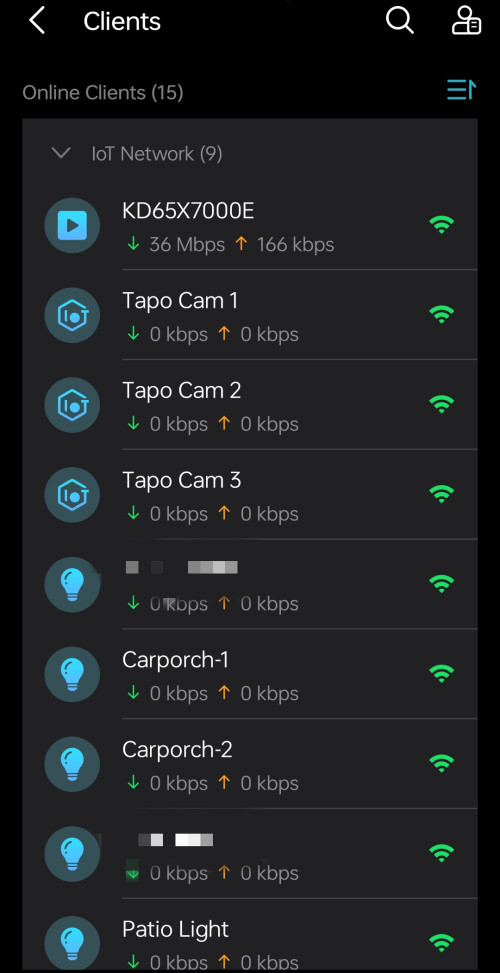
I'm using IoT network now ,so far so good...

Though I cant seem to find any difference with using main network..but nevermind...just leave it as it is.

user posted image
user posted image
TongCN
post Feb 5 2024, 08:24 AM

Look ma, I have lots stars :D
*******
Senior Member
6,689 posts

Joined: Aug 2008
From: Malaysia


QUOTE(Omochao @ Feb 4 2024, 05:33 PM)
I'm using IoT network now ,so far so good...

Though I cant seem to find any difference with using main network..but nevermind...just leave it as it is.

user posted image
user posted image
*
I haven't really transferred all my old IOT to IOT network.

Do you use the Homeshield btw?
Omochao
post Feb 5 2024, 12:10 PM

Enthusiast
*****
Junior Member
835 posts

Joined: Nov 2007
From: Land of Forgotten
QUOTE(TongCN @ Feb 5 2024, 08:24 AM)
I haven't really transferred all my old IOT to IOT network.

Do you use the Homeshield btw?
*
Homeshield?
All premium, so I didn't bothered with it, no kids, so no need supervision, surf at your own risk. biggrin.gif tongue.gif
Invulnerability
post Feb 5 2024, 03:55 PM

Getting Started
**
Junior Member
291 posts

Joined: Feb 2016
my 100mpbs fibrehome free router having bad wifi strength to cover all the room for 1200sqft condo, if buy ax55 will it help for wifi strength?
TongCN
post Feb 5 2024, 05:12 PM

Look ma, I have lots stars :D
*******
Senior Member
6,689 posts

Joined: Aug 2008
From: Malaysia


QUOTE(Omochao @ Feb 4 2024, 05:33 PM)
I'm using IoT network now ,so far so good...

Though I cant seem to find any difference with using main network..but nevermind...just leave it as it is.

user posted image
user posted image
*
QUOTE(Omochao @ Feb 5 2024, 12:10 PM)
Homeshield?
All premium, so I didn't bothered with it, no kids, so no need supervision, surf at your own risk. biggrin.gif  tongue.gif
*
Btw, what model you using ?
I see Wi-Fi Access Control which not yet release in my model (or won't?)

XE75 v1 also currently no support the force devices feature T__T while v2 i see can.

Regarding on the double notification, how you end up solve?
Omochao
post Feb 5 2024, 06:57 PM

Enthusiast
*****
Junior Member
835 posts

Joined: Nov 2007
From: Land of Forgotten
QUOTE(TongCN @ Feb 5 2024, 05:12 PM)
Btw, what model you using ?
I see Wi-Fi Access Control which not yet release in my model (or won't?)

XE75 v1 also currently no support the force devices feature T__T while v2 i see can.

Regarding on the double notification, how you end up solve?
*
X50 + X20

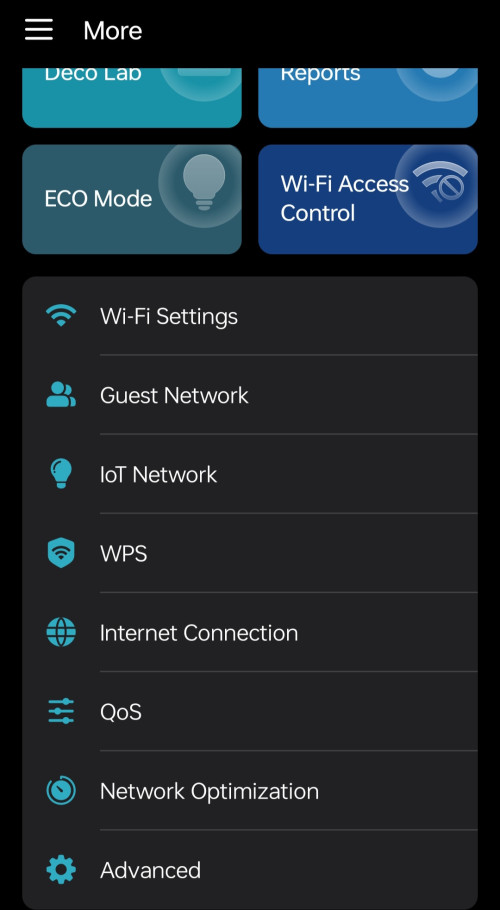
wifi access control is blacklist + whitelist mode . this year should be coming out. They even have eco mode for deco x50/x55 now..But after add in deco x20, the eco mode is gone because they haven't release the firmware yet for x20 malaysia..V4 has it.

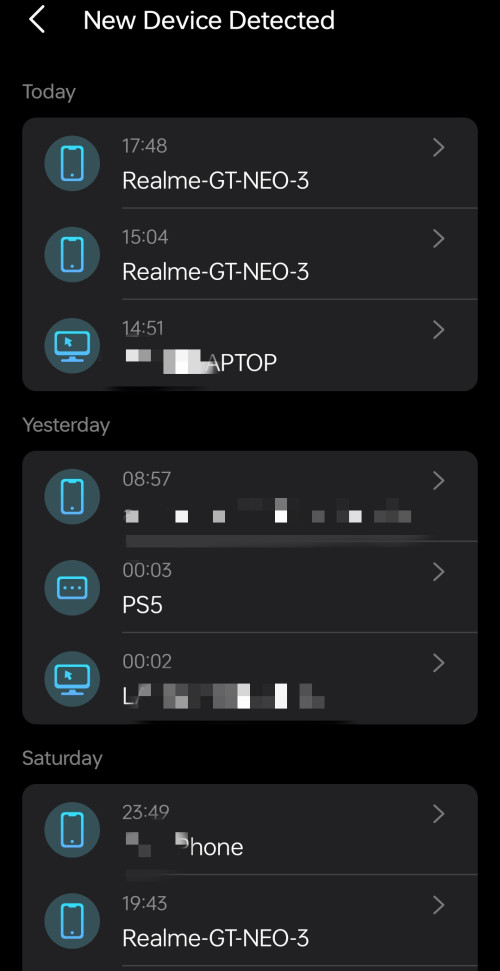
Just turn off the notification, because I rename all connected device individually to check any outsiders.

Maybe you can send in a support ticket at tp link forums to report about that issue.

user posted image

This post has been edited by Omochao: Feb 5 2024, 07:00 PM
TongCN
post Feb 6 2024, 08:21 AM

Look ma, I have lots stars :D
*******
Senior Member
6,689 posts

Joined: Aug 2008
From: Malaysia


QUOTE(Omochao @ Feb 5 2024, 06:57 PM)
X50 + X20

wifi access control is blacklist + whitelist mode . this year should be coming out. They even have eco mode for deco x50/x55 now..But after add in deco x20, the eco mode is gone because they haven't release the firmware yet for x20 malaysia..V4 has it.

Just turn off the notification, because I rename all connected device individually to check any outsiders.

Maybe you can send in a support ticket at tp link forums to report about that issue.

user posted image
*
I see.

Currently i think the latest one is 1.9.0 (1.3.0 or 1.6.0 by differ region)
The XE75 v1 of mine is 1.2.9 right now.
I want the Force Signal feature sweat.gif

Though Deco good thing is the combination of differ model but sometime those feature also will be limited by Node units.
I changing my parent's one Deco M4R 2 packs by adding X20 (v1) as main and setting the Wi-Fi security to WPA2/WPA3.
Then when i add back the M4R the security macam haywired :\
Revert to WPA/WPA2 cause M4R doesn't support WPA3 doh.gif
So iphone will pop out saying "Wi-Fi security Weak" notification, lol..
Omochao
post Feb 6 2024, 09:08 PM

Enthusiast
*****
Junior Member
835 posts

Joined: Nov 2007
From: Land of Forgotten
QUOTE(TongCN @ Feb 6 2024, 08:21 AM)
I see.

Currently i think the latest one is 1.9.0 (1.3.0 or 1.6.0 by differ region)
The XE75 v1 of mine is 1.2.9 right now.
I want the Force Signal feature  sweat.gif

Though Deco good thing is the combination of differ model but sometime those feature also will be limited by Node units.
I changing my parent's one Deco M4R 2 packs by adding X20 (v1) as main and setting the Wi-Fi security to WPA2/WPA3.
Then when i add back the M4R the security macam haywired :\
Revert to WPA/WPA2 cause M4R doesn't support WPA3  doh.gif
So iphone will pop out saying "Wi-Fi security Weak" notification, lol..
*
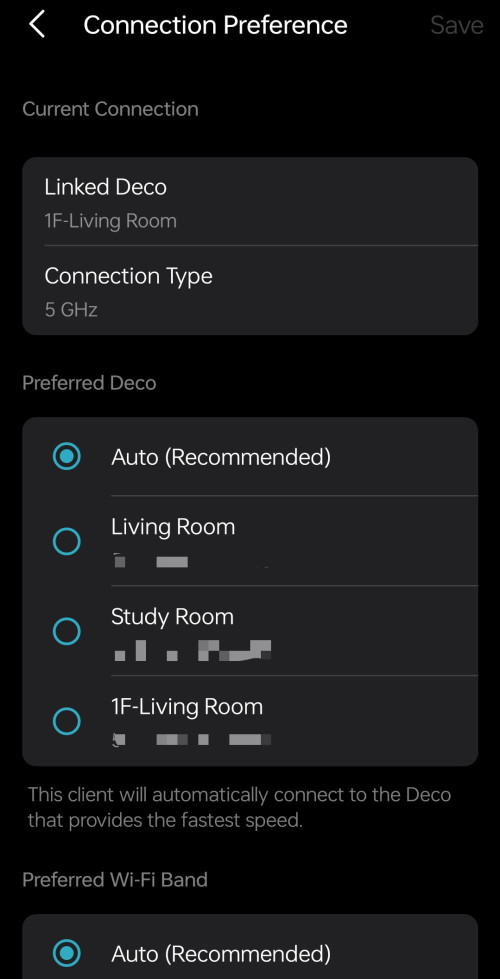
Check here to see if preferred signal source feature available for your device, if not, wait for the firmware update, should be coming soon.

Not much of a use especially for devices like mobiles that you need it to roam from one point to another point, this feature benefits IoT devices, or device that you won't move around like laptops/desktops or TVs. The only good thing about it, is that you can set your mobile devices to keep connecting to the 5Ghz mode.


https://www.tp-link.com/fi/support/faq/3480/

Yes, M4 deco is ac and supports up to WPA2 only, imo, WPA2 is enough, the better the security authentication method, the more power is needed to decrypt the password, hence why some devices (even those that supports WPA3) will face disconnection after some time.

Like one of my friend, who didn't know that his router turned on WPA3 by default, usually on first try, his devices can connect to the router without issue, by night time, the next day, everything is disconnected, and trying to connect back the WiFi will keep failing, initially he thought his router was defective and even called tech support to check, the support keep telling him to reset and reset port, but I came to help him, and set it back to WPA2, working until today, didn't need to restart at all.

user posted image

This post has been edited by Omochao: Feb 6 2024, 09:13 PM
TongCN
post Feb 7 2024, 11:56 AM

Look ma, I have lots stars :D
*******
Senior Member
6,689 posts

Joined: Aug 2008
From: Malaysia


QUOTE(Omochao @ Feb 6 2024, 09:08 PM)
Check here to see if preferred signal source feature available for your device, if not, wait for the firmware update, should be coming soon.

Not much of a use especially for devices like mobiles that you need it to roam from one point to another point, this feature benefits IoT devices, or device that you won't move around like laptops/desktops or TVs. The only good thing about it, is that you can set your mobile devices to keep connecting to the 5Ghz mode.
https://www.tp-link.com/fi/support/faq/3480/

Yes, M4 deco is ac and supports up to WPA2 only, imo, WPA2 is enough, the better the security authentication method, the more power is needed to decrypt the password, hence why some devices (even those that supports WPA3) will face disconnection after some time.

Like one of my friend, who didn't know that his router turned on WPA3 by default, usually on first try, his devices can connect to the router without issue, by night time, the next day, everything is disconnected, and trying to connect back the WiFi will keep failing, initially he thought his router was defective and even called tech support to check, the support keep telling him to reset and reset port, but I came to help him, and set it back to WPA2, working until today, didn't need to restart at all.

user posted image
*
XE75 v1 is not in the list, man ..
Really hope TP-Link don't play with me by not giving those feature for "old" hardware model.

The force signal is good for those IoT
Omochao
post Feb 7 2024, 12:14 PM

Enthusiast
*****
Junior Member
835 posts

Joined: Nov 2007
From: Land of Forgotten
QUOTE(TongCN @ Feb 7 2024, 11:56 AM)
XE75 v1 is not in the list, man ..
Really hope TP-Link don't play with me by not giving those feature for "old" hardware model.

The force signal is good for those IoT
*
It will come, but only they themselves can tell.

IoT devices like Tapo Cams/ LED bulbs, I didn't even change anything, just put it on auto for all signal and band selection. Because it can only go up to 2.4Ghz, no point changing it anyway. The only thing that I can think off is that I can set it to connect to another node.

302 Pages « < 271 272 273 274 275 > » Top
 

Change to:
| Lo-Fi Version
0.0229sec    0.46    6 queries    GZIP Disabled
Time is now: 15th December 2025 - 06:09 PM