Welcome Guest ( Log In | Register )

Outline · [ Standard ] · Linear+

Home Networking WiFi Router Discussion Thread, Updated for 2023

views
     
TongCN
post Jan 26 2024, 11:51 AM

Look ma, I have lots stars :D
*******
Senior Member
6,716 posts

Joined: Aug 2008
From: Malaysia


My mind just pop out this issue after making purchase of TP-Link Deco XE75 yesterday (haven't received)

So what i learnt is that 6Ghz can be wireless backhaul and SSID at the same time but the 6Ghz will be like a separated SSID toward 2.4/5Ghz.

Question: Meaning to say that if my Wi-Fi 6E devices connecting to 6Ghz SSID will not be able to see devices connected to Wi-Fi 2.4/5Ghz ?
Example if i want to chromecast (google) or screen mirror (ios) from my Wi-Fi 6E devices to TV (connected with non-Wi-Fi 6E). It will not see each other cause differ SSID
TongCN
post Jan 26 2024, 02:35 PM

Look ma, I have lots stars :D
*******
Senior Member
6,716 posts

Joined: Aug 2008
From: Malaysia


QUOTE(ben3003 @ Jan 26 2024, 12:20 PM)
No issue, as long as the gateway is the same. 2.4ghz device also can see 5ghz device, and is separate ssid.
*
Hmm .. hopefully, as per checking in reddit, ppl suggest naming the 6Ghz as same with 2.4Ghz/5Ghz for the Fast Roaming feature

TongCN
post Jan 29 2024, 08:35 AM

Look ma, I have lots stars :D
*******
Senior Member
6,716 posts

Joined: Aug 2008
From: Malaysia


QUOTE(blacktubi @ Jan 27 2024, 01:01 PM)
iOS will prompt a warning if 6Ghz is different name with 2.4/5Ghz as well

Best practice nowadays is to use same name
*
I dun have Iphone 15 pro series (only series with Wi-Fi 6E) with me though.

I do have few Wi-Fi 6E devices at home so i can just rename the 6Ghz as same SSID with 2.4Ghz/5Ghz so the client will auto switch it self ?

QUOTE(ben3003 @ Jan 27 2024, 07:56 PM)
Same name as in like ssid is identical? Or like abc_5G and abc_6G can also? Cos mine is abc_2.4G and abc_5G default by router
*
Mesh router normally combine into one SSID (2.4Ghz and 5Ghz) so the client can auto switch whenever it's strong signal exclude Wi-Fi 6E default with "_6ghz" index behind
if rename to all same meaning sort of "combine" and client will auto detect and connect.

QUOTE(ben3003 @ Jan 28 2024, 05:04 AM)
mean both same or enable the smart connect at router? Problem is i don wan my 5ghz device connecting to 2.4g.
*
Create a guest network with only 2.4Ghz tongue.gif
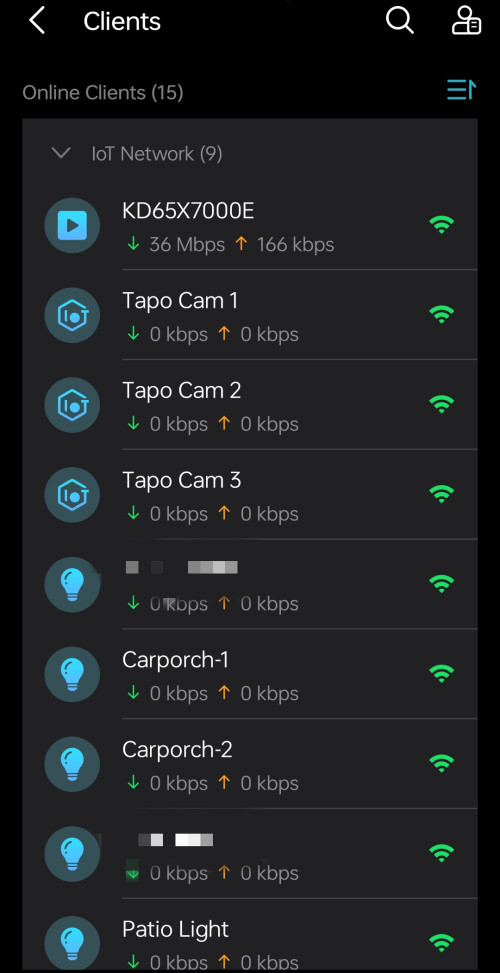
But now router has those "IoT network" separate out SSID
TongCN
post Jan 29 2024, 01:36 PM

Look ma, I have lots stars :D
*******
Senior Member
6,716 posts

Joined: Aug 2008
From: Malaysia


QUOTE(ben3003 @ Jan 29 2024, 12:52 PM)
Ohh, i prefer to control which connect 2.4g which connect 5g lol. Asus do have smart connect with band steering bla bla. Asus don have IoT thingy i think lol. My uncle sharing my wifi also they connect 2.4g, ancient phone so yeah, better just separate lol
*
I prefer the router and client auto switch themselves XD

Further range auto switch to 2.4Ghz and vice versa

While most of my IoT using guest network with 2.4Ghz for stable link

Wait XE75 come and see how adjust later tongue.gif

Only issue is my x20 is v1 which does not support IoT network (only v3 and v4) which is a bummer for early adopter doh.gif
TongCN
post Jan 30 2024, 08:37 AM

Look ma, I have lots stars :D
*******
Senior Member
6,716 posts

Joined: Aug 2008
From: Malaysia


QUOTE(Omochao @ Jan 29 2024, 11:47 PM)
And this is one big problem with Tp-link or their subsidiary Mercusys devices that they make.

Too many versions of a device with slight alterations due to hardware/chips supply.

And I took one 2 days to fully compared the different hardware versions of x20 and x50, reasons being ,I'm interested with the IoT network, signal source, connection preference . And lately they added ECO mode to it but only on V3 and above for x20 deco.

Imagine a normal user, they won't even ask dealer/vendor about this as they don't even know in the first place. And by the time you get it and open it up, is already too late to realize about the firmware differences, hopefully those features will come to v2 and v1.

Deco x10 is the worst..totally cut off from future supports for now
*
Yea, hate to have these v1,v2 things unless u ask the seller to check before buy (online)
Physical store can directly check the box there.

Not only TP-Link actually, some of those IoT brand example bulb and wall plug also having these issue of different hardware version and support differ firmware.
Such as the Matter compatibility right now, the compatibility lists mentioned this model is supported but hardware ID not support puke.gif doh.gif

Deco x10 basically is a normal + cutoff version of all deco with less feature.

This post has been edited by TongCN: Jan 30 2024, 08:38 AM
TongCN
post Jan 30 2024, 09:35 AM

Look ma, I have lots stars :D
*******
Senior Member
6,716 posts

Joined: Aug 2008
From: Malaysia


QUOTE(Omochao @ Jan 30 2024, 09:19 AM)
From what I've gathered online, TP-link got many factories all over the world, chips supply is not consistent or they never keep stock on hold for production.
Also due to certain region wifi power limit regulations, they need to adjust base on that region. So in the end, come out with many types of hardware revisions.

Yes, I even read some complained about Tapo cameras with the later versions had bad microphone sound, but the older ones is better mic but slower processing hardware.

Hopefully they can at least standardize it more in the future even with different hardwares.

Feels bad for those early buyers of Deco X10, device is great, but the lack of firmware update support is terrible. If they can't handle it, why don't just release the source code and allow the community to cook up a good customized firmware of decos.
*
Let's just hope they continue support those v1 & v2 variants (technically early adopters or beta tester sweat.gif )

Now i dunno which version i will get for my Deco XE75, lol..
Based on deco forum, it seems like v1 firmware more advance than v2 model.
TongCN
post Feb 2 2024, 08:19 AM

Look ma, I have lots stars :D
*******
Senior Member
6,716 posts

Joined: Aug 2008
From: Malaysia


So received my XE75 and it's a v1 :\

After done setup, feels like there one part downgrade which is :

1) X20 v1 has this home care: https://www.tp-link.com/us/homecare/ which is free and quite good to use (at least last time blocked me from certain site or ads)

2) XE75 now is Homeshield Subscription based and basic (free) doesnt even provide Malicious site blocking :\
3) XE75 also dun have speed test build in anymore sweat.gif

This post has been edited by TongCN: Feb 2 2024, 08:56 AM
TongCN
post Feb 2 2024, 01:14 PM

Look ma, I have lots stars :D
*******
Senior Member
6,716 posts

Joined: Aug 2008
From: Malaysia


QUOTE(Omochao @ Feb 2 2024, 12:22 PM)
x50 and above all using homeshield..so unless you want free homecare basic, you need to change the main node x20, but then it seems like intentionally bottle necking your hardware.

have you try changing tp link region , europe,global,us and some other foreign country in english? i notice for example , x20 deco has different versions for each country despite same hardware versions. you can try playing around with that
*
If using x20 as main deco then feels waste for my xe75 lol

Gonna test homeshield Trial 30 days first and see

Never try the region thing though. Under account?
TongCN
post Feb 2 2024, 02:33 PM

Look ma, I have lots stars :D
*******
Senior Member
6,716 posts

Joined: Aug 2008
From: Malaysia


QUOTE(Omochao @ Feb 2 2024, 01:52 PM)
Yes, wasted a lot but that's the only way, for networking features and functions, really depends on which one you using for the main node.

Check with this link, different region , different firmware versions, also try to take note for hardware version.
https://www.tp-link.com/my/choose-your-location/
*
Thanks for the region thing, i think mine xe75v1 is Global (English) with 1.2.9 now as Malaysia firmware is 1.2.8 only.

And there is v3 already, woot.

Suddenly i recall that yesterday when setting up the deco xe75
Initially i was adding new deco and wired XE75 to X20 (main) to activate the XE75

While X20 remain as Main, i remember i see that i can configure the 6Ghz band in the app
Not sure should i reverse my position now if i wan to continue use the HomeCare instead of HomeShield:

X20 (Main) wired to XE75 (Node and position in middle of the house) wireless to X20 (Node2)

What do i lose for this setup beside changing back to homeCare

This post has been edited by TongCN: Feb 2 2024, 03:05 PM
TongCN
post Feb 2 2024, 04:50 PM

Look ma, I have lots stars :D
*******
Senior Member
6,716 posts

Joined: Aug 2008
From: Malaysia


QUOTE(Omochao @ Feb 2 2024, 04:19 PM)
Hard to say , as I have yet to test out on my own neither do I own a pair of deco mesh. but if it works , then good choice, get to enjoy homecare, same speed and coverage, with 6ghz still can turn on.

but that doesn't means the x20 main node will be able to emit 6gnz.
*
Probably tonight test see. The main node will be in living room while XE75 will be covering from middle of the house and it's wired to main node plus i find that the signal of XE75 quite huge - few bulbs of mine like from way opposite of the living room can connect to it all of sudden.


However, the 6Ghz band if i rename same as 2.4/5Ghz band, my Wi-Fi 6E phone still more toward 5Ghz sweat.gif Not sure is it due to 2.4/5Ghz is set to WPA2/WPA3 while 6Ghz can only select WPA3

Another thing to lose maybe is that it's actually is Tapo and Kasa IoT compatible - i can change my bulb and plug from Deco app right now if XE75 is main.
VPN server, i'm not using currently.

This post has been edited by TongCN: Feb 2 2024, 04:51 PM
TongCN
post Feb 3 2024, 05:33 PM

Look ma, I have lots stars :D
*******
Senior Member
6,716 posts

Joined: Aug 2008
From: Malaysia


QUOTE(Omochao @ Feb 2 2024, 05:10 PM)
afaik, bandsteering or smart connect only applies for 2.4ghz+5ghz, for 6ghz they put it under MLO, but only on Wifi 7.

not sure if Wifi6e router/mesh smart connect includes 6ghz as well or not?

by default, all tapo kasa is under tp link, should be compatible .
*
My kasa no issue to link with deco but Tapo can detect but unable to add into deco, not sure why

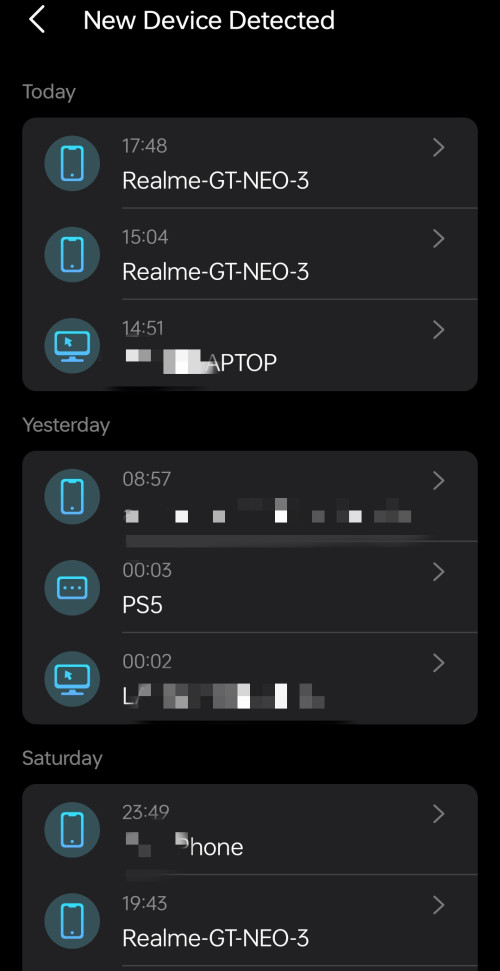
Also dunno why the notification of the deco always double pop out (one thing connect) example, iPhone 14 connect, and deco will pop out

iPhone has joined xxxx network

Quite frust

Another thing is I’m adding the Wi-Fi bulb and when prompt to join network, it will detect 3x of my SAME SSID shocking.gif
Not sure are those main deco + 2x node deco


This post has been edited by TongCN: Feb 3 2024, 05:36 PM
TongCN
post Feb 4 2024, 02:51 PM

Look ma, I have lots stars :D
*******
Senior Member
6,716 posts

Joined: Aug 2008
From: Malaysia


QUOTE(Omochao @ Feb 3 2024, 08:55 PM)
Yes it is, back when I was using Mercusys Halo, it showed the same thing as well.

So I guess somehow it is the same for the mentioned above that when you joined a network, double notifications .

Just reselect the Wifi which has better signal strength as indicated in the list..that should be fine as it means is closer to the source.
*
Maybe next time when free only redo everything lol.. I have like 80+ clients in the list now XD

TongCN
post Feb 5 2024, 08:24 AM

Look ma, I have lots stars :D
*******
Senior Member
6,716 posts

Joined: Aug 2008
From: Malaysia


QUOTE(Omochao @ Feb 4 2024, 05:33 PM)
I'm using IoT network now ,so far so good...

Though I cant seem to find any difference with using main network..but nevermind...just leave it as it is.

user posted image
user posted image
*
I haven't really transferred all my old IOT to IOT network.

Do you use the Homeshield btw?
TongCN
post Feb 5 2024, 05:12 PM

Look ma, I have lots stars :D
*******
Senior Member
6,716 posts

Joined: Aug 2008
From: Malaysia


QUOTE(Omochao @ Feb 4 2024, 05:33 PM)
I'm using IoT network now ,so far so good...

Though I cant seem to find any difference with using main network..but nevermind...just leave it as it is.

user posted image
user posted image
*
QUOTE(Omochao @ Feb 5 2024, 12:10 PM)
Homeshield?
All premium, so I didn't bothered with it, no kids, so no need supervision, surf at your own risk. biggrin.gif  tongue.gif
*
Btw, what model you using ?
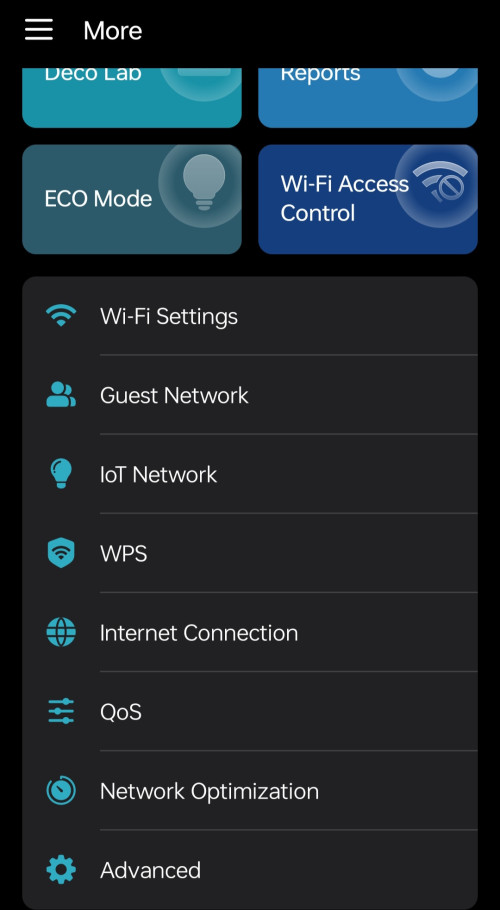
I see Wi-Fi Access Control which not yet release in my model (or won't?)

XE75 v1 also currently no support the force devices feature T__T while v2 i see can.

Regarding on the double notification, how you end up solve?
TongCN
post Feb 6 2024, 08:21 AM

Look ma, I have lots stars :D
*******
Senior Member
6,716 posts

Joined: Aug 2008
From: Malaysia


QUOTE(Omochao @ Feb 5 2024, 06:57 PM)
X50 + X20

wifi access control is blacklist + whitelist mode . this year should be coming out. They even have eco mode for deco x50/x55 now..But after add in deco x20, the eco mode is gone because they haven't release the firmware yet for x20 malaysia..V4 has it.

Just turn off the notification, because I rename all connected device individually to check any outsiders.

Maybe you can send in a support ticket at tp link forums to report about that issue.

user posted image
*
I see.

Currently i think the latest one is 1.9.0 (1.3.0 or 1.6.0 by differ region)
The XE75 v1 of mine is 1.2.9 right now.
I want the Force Signal feature sweat.gif

Though Deco good thing is the combination of differ model but sometime those feature also will be limited by Node units.
I changing my parent's one Deco M4R 2 packs by adding X20 (v1) as main and setting the Wi-Fi security to WPA2/WPA3.
Then when i add back the M4R the security macam haywired :\
Revert to WPA/WPA2 cause M4R doesn't support WPA3 doh.gif
So iphone will pop out saying "Wi-Fi security Weak" notification, lol..
TongCN
post Feb 7 2024, 11:56 AM

Look ma, I have lots stars :D
*******
Senior Member
6,716 posts

Joined: Aug 2008
From: Malaysia


QUOTE(Omochao @ Feb 6 2024, 09:08 PM)
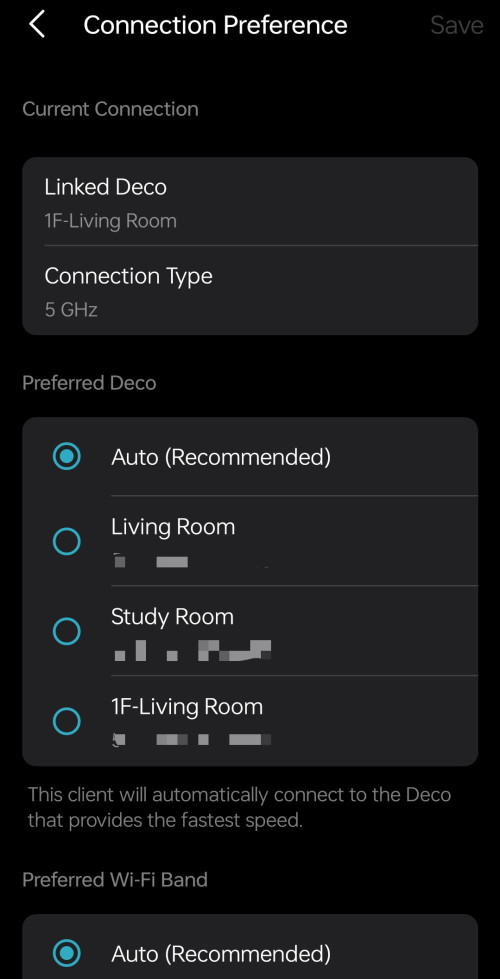
Check here to see if preferred signal source feature available for your device, if not, wait for the firmware update, should be coming soon.

Not much of a use especially for devices like mobiles that you need it to roam from one point to another point, this feature benefits IoT devices, or device that you won't move around like laptops/desktops or TVs. The only good thing about it, is that you can set your mobile devices to keep connecting to the 5Ghz mode.
https://www.tp-link.com/fi/support/faq/3480/

Yes, M4 deco is ac and supports up to WPA2 only, imo, WPA2 is enough, the better the security authentication method, the more power is needed to decrypt the password, hence why some devices (even those that supports WPA3) will face disconnection after some time.

Like one of my friend, who didn't know that his router turned on WPA3 by default, usually on first try, his devices can connect to the router without issue, by night time, the next day, everything is disconnected, and trying to connect back the WiFi will keep failing, initially he thought his router was defective and even called tech support to check, the support keep telling him to reset and reset port, but I came to help him, and set it back to WPA2, working until today, didn't need to restart at all.
user posted image
*
XE75 v1 is not in the list, man ..
Really hope TP-Link don't play with me by not giving those feature for "old" hardware model.

The force signal is good for those IoT
TongCN
post Feb 7 2024, 12:55 PM

Look ma, I have lots stars :D
*******
Senior Member
6,716 posts

Joined: Aug 2008
From: Malaysia


QUOTE(Omochao @ Feb 7 2024, 12:14 PM)
It will come, but only they themselves can tell.

IoT devices like Tapo Cams/ LED bulbs, I didn't even change anything, just put it on auto for all signal and band selection. Because it can only go up to 2.4Ghz, no point changing it anyway. The only thing that I can think off is that I can set it to connect to another node.
*
Mine sometime will jump node and connect further way lol
TongCN
post Feb 19 2024, 01:43 PM

Look ma, I have lots stars :D
*******
Senior Member
6,716 posts

Joined: Aug 2008
From: Malaysia


Hmm .. this is funny

To recap, i replaced one unit of my x20 to my parent home and use as single router while leaving 2 units x20 at my own home while main using XE75

Yesterday i saw pop out of new firmware can be installed in my app.
I check my own home and it says everything is up-to-date
XE75 - 1.2.9
X20 - 1.5.2

So i switch to parent's home and detect the X20 has 1.5.3

How come my home's one X20 cannot be upgrade from 1.5.2 to 1.5.3 (is it because it is a node now?)

I bought the X20 (3packs) btw so all should be same if there is a new firmware update.
TongCN
post Feb 20 2024, 08:22 AM

Look ma, I have lots stars :D
*******
Senior Member
6,716 posts

Joined: Aug 2008
From: Malaysia


QUOTE(PRSXFENG @ Feb 19 2024, 08:30 PM)
Maybe different hardware revisions?
*
The 3 units of x20 is a 3 packs bundle actually so all hardware version is same which is v1


QUOTE(Omochao @ Feb 20 2024, 05:32 AM)
I think is due to you using the main node XE75,is causing the app detect your location in MY.

Meanwhile global and US website has 1.5.3 for Deco X20 V1.
If you are daring enough, can always download the file, and update it manually through the web browser.
*
Not sure, maybe when i switch x20 as main again probably will update-able i guess.
Just some minor improvement so can skip at the moment.

I wan XE75 1.3.0 update and dunno when sweat.gif

Addon: both my home and parent home using same TP-Link account of mine actually.

This post has been edited by TongCN: Feb 20 2024, 08:24 AM
TongCN
post Aug 21 2024, 01:49 PM

Look ma, I have lots stars :D
*******
Senior Member
6,716 posts

Joined: Aug 2008
From: Malaysia


With unifi now offer RM65/ month (Total 24 months) for Deco BE65 - 2 pack, is it a good buy ?

Check shopee most still selling RM1,7xx ~ RM1,8xx (Before discount and shipping cost)

TNC: https://unifi.com.my/sites/default/files/ht...C-Mesh-Deco.pdf

However there's this "Setel" promotion which kinda hidden 24 months contract for "add-on subscription" that i asked through the livechat:
https://unifi.com.my/sites/default/files/ht...mpaign-2024.pdf

2 Pages  1 2 >Top
 

Change to:
| Lo-Fi Version
0.1483sec    1.24    7 queries    GZIP Disabled
Time is now: 18th December 2025 - 12:44 PM