Welcome Guest ( Log In | Register )

302 Pages « < 268 269 270 271 272 > » Bottom

Outline · [ Standard ] · Linear+

Home Networking WiFi Router Discussion Thread, Updated for 2023

views
     
skylancer
post Dec 28 2023, 04:26 PM

Getting Started
**
Junior Member
196 posts

Joined: Oct 2007


I’m just install my Time wifi 500mb package with huawei wifi router and wifi mesh node.
Can I know whether I can buy like tplink mesh and mix the wifi mesh with the current huawei router and mesh node?

Since I have test in the room even with current huawei mesh node and my speed was only 100-150mb. Any good suggestion with time user here? Thanks
TSblacktubi
post Dec 28 2023, 04:59 PM

-
Group Icon
Elite
8,418 posts

Joined: Jul 2008

QUOTE(skylancer @ Dec 28 2023, 04:26 PM)
I’m just install my Time wifi 500mb package with huawei wifi router and wifi mesh node.
Can I know whether I can buy like tplink mesh and mix the wifi mesh with the current huawei router and mesh node?

Since I have test in the room even with current huawei mesh node and my speed was only 100-150mb. Any good suggestion with time user here? Thanks
*
Most newer mid-range and above condo should come with Ethernet cables to at least the master room. If you have them, connecting them with wired backhaul would speed up significantly.

If no, you will need at least a tri-band mesh product to get a significant speed boost.
eternity4av
post Dec 30 2023, 03:22 PM

♥ ♥ ♥ taeyeon
*******
Senior Member
2,270 posts

Joined: Nov 2004
hi fellow seniors, I lately moved to 1st floor of my double storey home, and facing low speed wifi connection of my existing 800mbps internet.

Built up area - 2400sq ft
Router : AX73
devices using on 1st floor :
1/ M1 MBA (using fast.com 530mbps)
2/ iPhone 15 Pro (using fast.com 40mbps)
3/ Samsung S20 FE (using fast.com speed is 5.2mbps)

was looking at range extenders, but when researching in YouTube they ask to avoid range extenders at all cost, and get mesh instead, was thinking if I were to get a Deco X20, will it be compatible with my existing AX73?
Omochao
post Jan 2 2024, 08:22 AM

Enthusiast
*****
Junior Member
835 posts

Joined: Nov 2007
From: Land of Forgotten
QUOTE(eternity4av @ Dec 30 2023, 03:22 PM)
hi fellow seniors, I lately moved to 1st floor of my double storey home, and facing low speed wifi connection of my existing 800mbps internet.

Built up area - 2400sq ft
Router : AX73
devices using on 1st floor :
1/ M1 MBA (using fast.com 530mbps)
2/ iPhone 15 Pro (using fast.com 40mbps)
3/ Samsung S20 FE (using fast.com speed is 5.2mbps)

was looking at range extenders, but when researching in YouTube they ask to avoid range extenders at all cost, and get mesh instead, was thinking if I were to get a Deco X20, will it be compatible with my existing AX73?
*
Never go for ranger extenders or power line adapters unless no choice and last mile or to cover wifi dead zones for low bandwidth devices.

Deco X20 is ax1800 rated. If you intend to cover the whole house perimeter , then go for mesh, or get another TP-link router which has easy mesh function, eg; ax53 or ax55

For your current speed, best get AX3000 rated and above to ensure your routers+mesh can dish out 800Mbps.


If your concern is only extending WiFi coverage and range only, my suggestion just go grab a 2nd hand router and set is as wireless repeater.

If you want speed and coverage, your only choice is using wired backhaul, the good thing, can be mixed and match with any desired router or mesh. Bad thing, you need to headache for a while on how to set up the cat5e cables.
hammetts
post Jan 3 2024, 11:18 AM

Getting Started
**
Junior Member
66 posts

Joined: Mar 2012
Dear Sifus, I really need help to set up my home Router connection

House type: Landed
Size of house: 2 Storey bungalow (live with in laws)
Features required: Need advise
Number of devices connected to WiFi: 2 smart tv, 3+ pc, 10+ phone
Internet Speed: 500mbps
Current Router Location: 2nd floor, on the floor
Currently using original AR2140 maxis router.

Question
1) I need to extend coverage to 1st floor to 4 rooms + 2 kitchen area. Can i buy TP link (ax55) easymesh router as main, and use the current AR2140 as mesh to expand coverage on 1st floor?
2) advise on mesh model
I really need help on setting up the router or mesh.

Thanks in advance/

This post has been edited by hammetts: Jan 3 2024, 11:34 AM
Muachee
post Jan 4 2024, 01:45 PM

New Member
*
Newbie
5 posts

Joined: Jun 2007
thinking of getting a router to cover 2story.. TP-link AX7800 or AX11000 better? i have no technical knowledge about wifi.. heard the AX7800 got Wifi6E and the AX11000 is older model
eternity4av
post Jan 5 2024, 08:21 AM

♥ ♥ ♥ taeyeon
*******
Senior Member
2,270 posts

Joined: Nov 2004
QUOTE(Omochao @ Jan 2 2024, 08:22 AM)
Never go for ranger extenders or power line adapters unless no choice and last mile or to cover wifi dead zones for low bandwidth devices.

Deco X20 is ax1800 rated. If you intend to cover the whole house perimeter , then go for mesh, or get another TP-link router which has easy mesh function, eg; ax53 or ax55

For your current speed, best get AX3000 rated and above to ensure your routers+mesh can dish out 800Mbps.
If your concern is only extending WiFi coverage and range only, my suggestion just go grab a 2nd hand router and set is as wireless repeater.

If you want speed and coverage, your only choice is using wired backhaul, the good thing, can be mixed and match with any desired router or mesh. Bad thing, you need to headache  for a while on how to set up the cat5e cables.
*
thanks for the reply, so if i were to remain my ax73, so i just need get another ax53/or ax55 and set it up on upper floor is that correct?
YoungMan
post Jan 6 2024, 10:22 PM

Look at all my stars!!
*******
Senior Member
6,818 posts

Joined: Oct 2008
From: Kuala Lumpur


Deleted

This post has been edited by YoungMan: Jan 8 2024, 09:29 PM
ma_nickah
post Jan 7 2024, 01:52 AM

New Member
*
Junior Member
6 posts

Joined: Jul 2021
Hi. Does anyone know if Deco X20 is good enough for my 500mbps Time package or do I need x50 and above to max out the 500mbps on my devices?
pakarbu
post Jan 7 2024, 05:06 PM

Getting Started
**
Junior Member
124 posts

Joined: Oct 2011
Hi, please suggest me a few router to use at my home.

House type: Landed
Size of house: 1 floor, 3000 sqft (about 70x40)
Features required: 2.5gbe port wan
Number of devices connected to WiFi: 30++ (most of them iot devices)
Internet Speed: 1 gbps
Budget: below RM1000

Currenty looking at asus ax4200, deco x80, tplink ax72 pro.
Is asus ax82u have 2.5gbe ports? The ax82u gundam sure suite my home deco style.

This post has been edited by pakarbu: Jan 7 2024, 07:04 PM
WaNaWe900
post Jan 8 2024, 09:13 AM

చąហ ąచҽ™
******
Senior Member
1,397 posts

Joined: Feb 2012
From: sOuL SoCiETY.. iSKaNDaRPuTeRi.. JB.. JDT


QUOTE(pakarbu @ Jan 7 2024, 05:06 PM)
Hi, please suggest me a few router to use at my home.

House type: Landed
Size of house: 1 floor, 3000 sqft (about 70x40)
Features required: 2.5gbe port wan
Number of devices connected to WiFi: 30++ (most of them iot devices)
Internet Speed: 1 gbps
Budget: below RM1000

Currenty looking at asus ax4200, deco x80, tplink ax72 pro.
Is asus ax82u have 2.5gbe ports? The ax82u gundam sure suite my home deco style.
*
ASUS RT-AX86U Gundam Zaku Edition surely have 2.5Gbe port icon_rolleyes.gif
Omochao
post Jan 8 2024, 04:07 PM

Enthusiast
*****
Junior Member
835 posts

Joined: Nov 2007
From: Land of Forgotten
QUOTE(eternity4av @ Jan 5 2024, 08:21 AM)
thanks for the reply, so if i were to remain my ax73, so i just need get another ax53/or ax55 and set it up on upper floor is that correct?
*
Yes that's true, if you truly want to enjoy the "mesh" function , best find out whether that next model you are going to get has firmware with "EASYMESH" updated into it. Not all tp link router has easy mesh, some still in waiting list to be updated.

Or if you don't mind, just get another ax73.
Omochao
post Jan 8 2024, 04:09 PM

Enthusiast
*****
Junior Member
835 posts

Joined: Nov 2007
From: Land of Forgotten
QUOTE(ma_nickah @ Jan 7 2024, 01:52 AM)
Hi. Does anyone know if Deco X20 is good enough for my 500mbps Time package or do I need x50 and above to max out the 500mbps on my devices?
*
I am using mercusys Halo H70x, can achieve close to 500mbps, and according to specs wise, h70x AX 1800 is same as Deco X20, just different subsidiary. But Tplink Deco has more functions and features, price also higher. X50 is for only if you are planning to go 1Gbps in the near future.
SnowWhiteTan
post Jan 8 2024, 04:37 PM

Getting Started
**
Junior Member
232 posts

Joined: Dec 2005
Hi.
I wonder if mercusys Halo H70x is good for 2.5 storey house with around 5000sq ft built-up area? 300mbps package.
TSblacktubi
post Jan 8 2024, 08:27 PM

-
Group Icon
Elite
8,418 posts

Joined: Jul 2008

QUOTE(SnowWhiteTan @ Jan 8 2024, 04:37 PM)
Hi.
I wonder if mercusys Halo H70x is good for 2.5 storey house with around 5000sq ft built-up area? 300mbps package.
*
Do yourself a favour and get the HALO H90X 3 pack unless you don't mind to have a slow Wi-Fi coverage.
Omochao
post Jan 8 2024, 10:04 PM

Enthusiast
*****
Junior Member
835 posts

Joined: Nov 2007
From: Land of Forgotten
QUOTE(SnowWhiteTan @ Jan 8 2024, 04:37 PM)
Hi.
I wonder if mercusys Halo H70x is good for 2.5 storey house with around 5000sq ft built-up area? 300mbps package.
*
h70x itself is sufficient for the speed 300Mbps...wifi coverage wise just below excellent..just average. Though I suggest to use ethernet backhaul to get the best speed.

On my first floor, 20 feets away from the router with a room separated , I'm getting 340+ mbps if away from the mesh.

or you can consider getting ax3000 or h80x .

Mercusys app and settings is a bit limited in functions , while Tp link has more stuffs to play with.
SnowWhiteTan
post Jan 9 2024, 02:34 PM

Getting Started
**
Junior Member
232 posts

Joined: Dec 2005
QUOTE(Omochao @ Jan 8 2024, 10:04 PM)
h70x itself is sufficient for the speed 300Mbps...wifi coverage wise just below excellent..just average. Though I suggest to use ethernet backhaul to get the best speed.

On my first floor, 20 feets away from the router with a room separated , I'm getting 340+ mbps if away from the mesh.

or you can consider getting ax3000 or h80x .

Mercusys app and settings is a bit limited in functions , while Tp link has more stuffs to play with.
*
can't really do ethernet backhaul sad.gif would prefer the easiest setup possible and h80x seems good as well.
will h80x outperform h70x in terms of wifi speed as my package is 300mbps only?

does mesh setup have better wifi speed compared to the router-repeater-range extender setup? for example, i place my main router on first floor and 2 repeaters on 2nd floor. if i can get 70mbps in one of the rooms on the 2nd floor, can i get 100mbps or more at the same spot?
Omochao
post Jan 9 2024, 03:47 PM

Enthusiast
*****
Junior Member
835 posts

Joined: Nov 2007
From: Land of Forgotten
QUOTE(SnowWhiteTan @ Jan 9 2024, 02:34 PM)
can't really do ethernet backhaul sad.gif would prefer the easiest setup possible and h80x seems good as well.
will h80x outperform h70x in terms of wifi speed as my package is 300mbps only?

does mesh setup have better wifi speed compared to the router-repeater-range extender setup? for example, i place my main router on first floor and 2 repeaters on 2nd floor. if i can get 70mbps in one of the rooms on the 2nd floor, can i get 100mbps or more at the same spot?
*
No idea, is out of my budget when I was considering on which mesh I need to buy. but on paper wise should be better coverage since is an ax3000 rated for H80X.

So is either you take a leap of faith and gamble on with it. But one thing I can assure you won't get near to subscribed speed if its connected wirelessly.


As shared by other forummers here, one wireless hop will Halve the speed definitely. unless that router or the receiver has a dedicated 5ghz band to receive/transmit another stream, which is what they call it as tri-band, but that also is very expensive, and can easily cost from 600 ish onwards.

So if your speed at main router is 300mbps, the next mesh node will set you back at 150-180 or if lucky can get 200++mbps?

The only good thing I see from a mesh network, is that you can roam around without having to suffer from weak wifi signal coverage, speed wise not so.

So your only choice is for this only specific wireless setup is

Get triband mesh

Or

Just get a simple and conventional mesh and forego and not think about that speed anymore, which I find not practical, since we are already paying why dont get the full speed?

SnowWhiteTan
post Jan 9 2024, 10:03 PM

Getting Started
**
Junior Member
232 posts

Joined: Dec 2005
QUOTE(Omochao @ Jan 9 2024, 03:47 PM)
No idea, is out of my budget when I was considering on which mesh I need to buy. but on paper wise should be better coverage since is an ax3000 rated for H80X.

So is either you take a leap of faith and gamble on with it. But one thing I can assure you won't get near to subscribed speed if its  connected wirelessly.
As shared by other forummers here, one wireless hop will Halve the speed definitely. unless that router or the receiver has a dedicated 5ghz band to receive/transmit another stream, which is what they call it as tri-band, but that also is very expensive, and can easily cost from 600 ish onwards.

So if your speed at main router is 300mbps, the next mesh node will set you back at 150-180 or if lucky can get 200++mbps?

The only good thing I see from a mesh network, is that you can roam around without having to suffer from weak wifi signal coverage, speed wise not so.

So your only choice is for this only specific wireless setup is

Get triband mesh

Or

Just get a simple and conventional mesh and forego and not think about that speed anymore, which I find not practical, since we are already paying why dont get the full speed?
*
Yes it's gonna be a gamble for me indeed 😆 the affordable triband mesh is still with AC technology, that's why I'm not sure if it's a good buy
Omochao
post Jan 9 2024, 10:22 PM

Enthusiast
*****
Junior Member
835 posts

Joined: Nov 2007
From: Land of Forgotten
QUOTE(SnowWhiteTan @ Jan 9 2024, 10:03 PM)
Yes it's gonna be a gamble for me indeed 😆 the affordable triband mesh is still with AC technology, that's why I'm not sure if it's a good buy
*
What is the ac rating for that triband mesh brand? ac1200 or ac1900? or ac2200?

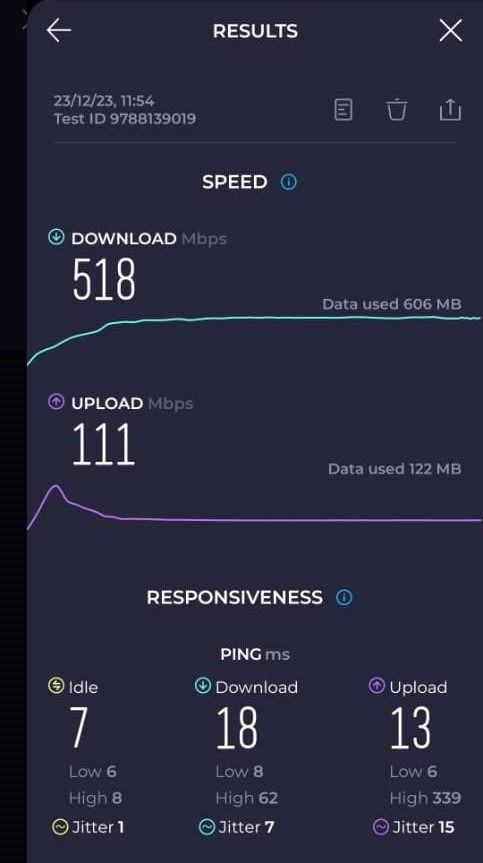
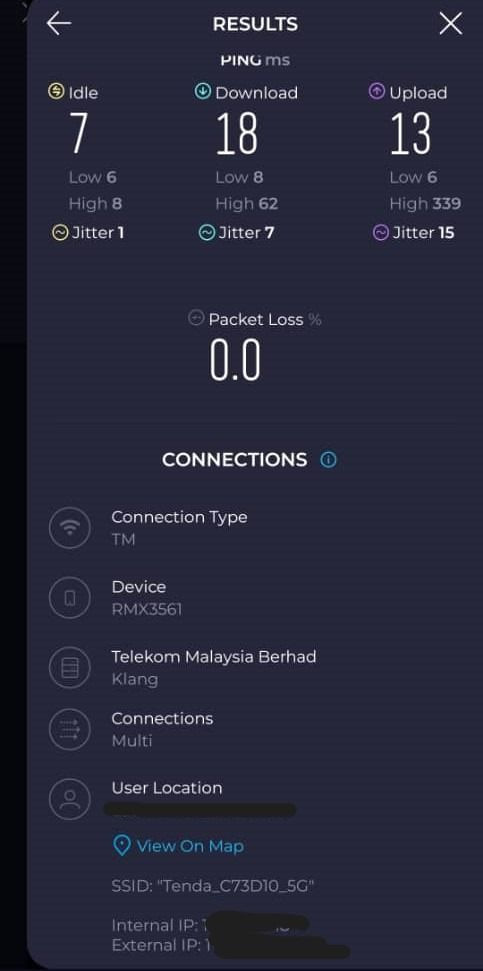
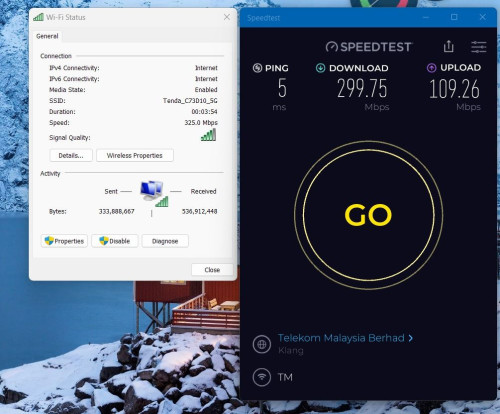
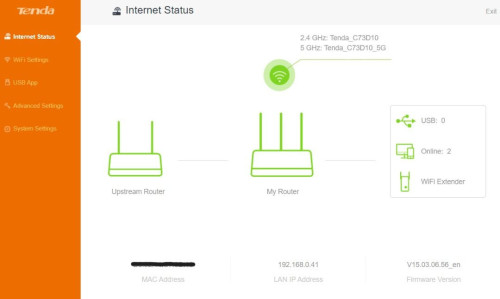
Generally it can support up to 300mbps, as my previous tenda ac10u ac1200 router can even reach up to 400mbps++.

Just that you'll have to sacrifice on better UI since TP link deco provides more options to play around but it doesn't means practical at times for new users.

If you don't really intend to further change or expect any speed upgrade in the near future, the ac mesh can last you for more than 2-3 years.

Routers are built to last for daily usage.

Here's the example of my previous tenda router before I sold it off to another user, this router really was the bang for buck.

» Click to show Spoiler - click again to hide... «


This post has been edited by Omochao: Jan 9 2024, 10:25 PM

302 Pages « < 268 269 270 271 272 > » Top
 

Change to:
| Lo-Fi Version
0.0955sec    0.98    6 queries    GZIP Disabled
Time is now: 15th December 2025 - 02:39 PM