
Welcome Guest ( Log In | Register )

302 Pages « < 206 207 208 209 210 > » Bottom

Outline · [ Standard ] · Linear+

Home Networking WiFi Router Discussion Thread, Updated for 2023

views
     
GNR
post Sep 10 2021, 06:52 PM

New Member
*
Newbie
26 posts

Joined: Feb 2010
Hi sifus,

Need some advice.

House type :condo
Size of house :1300 sqft
Features required : basic for now
Number of devices connected to WiFi : 6-7 Once my partner moves in. But not 6-7 at one go.
Internet speed : Time 100 mbps
Budget :300-400

Legend
LR - living room
R - 2nd bedroom
Mr - Master bedroom
K - Kitchen
X - soho box.
Measurements are wall to wall estimate but close enough.
Device at soho box - huawei echolife hg8240h5
Device at LR TV area - huawei edge ont wa8021v5
Each room has a telephone line, the Lan cable type

1. Plan to use 2nd bedroom as work / pc area, if possible using Lan cable connected to pc for some casual online gaming.

2. Master bedroom only 1 bar of WiFi currently. Just need a strong WiFi signal there for mobile phone. No TV and don't plan to put one.

3. Living room - mainly Netflix and mobile phone, maybe work too. Not planning for ps5. I was never a console gamer.

What do you humbly propose?
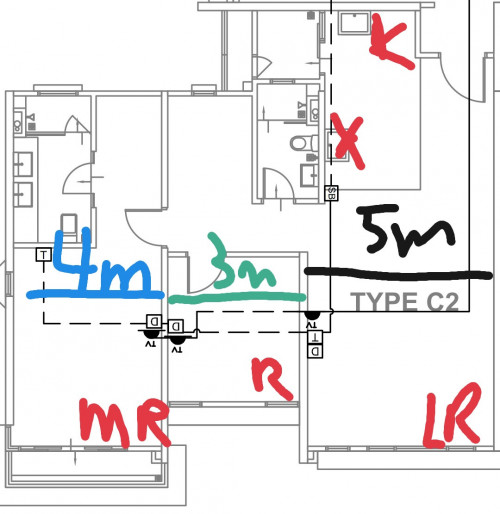
user posted image

This post has been edited by GNR: Sep 10 2021, 06:54 PM
szecheng
post Sep 11 2021, 10:30 AM

Casual
***
Junior Member
460 posts

Joined: Jun 2008


QUOTE(David3850 @ Sep 10 2021, 03:10 PM)
Hi, hope anyone can give me some suggestion to solve the problems I am having now.

I am subscribed to Unifi 5mbps package. Using the original D Link DIR-825M router provided by TM. I have added 3 units of Deco M9 Plus for wireless mesh setup in my three storeys home. I have placed each floor each with one Deco M9 Plus.

The problem is, the wireless mesh signal is not strong on the first and second floor, due to walls blocking etc. Now I'm looking to sell of my M9 Plus and get me a new seetup that can solve my problems: Weak signal strength due to walls.

I have called a few network product sellers, they are suggesting that first thing to change is the D Link router provided by TM. Then buy 3 x wifi 6 mesh routers for each of the floor. They suggested Netgear Obi or the Deco AX90 from TP Link.

My budget is around RM 3,500+ - . Can anyone help to suggest some models based on my budget please? Sorry I am really noob in networking solution. I have read a tons of articles but still blur...
*
if you hardwire backhaul,
TPlink deco mesh dual band wifi will do. this is the cheapest

if you wireless backhaul,
TPlink deco mesh triband x90

your budget allow high end triband such as asus or netgear
szecheng
post Sep 11 2021, 10:35 AM

Casual
***
Junior Member
460 posts

Joined: Jun 2008


QUOTE(GNR @ Sep 10 2021, 06:52 PM)
Hi sifus,

Need some advice.

House type :condo
Size of house :1300 sqft
Features required : basic for now
Number of devices connected to WiFi : 6-7 Once my partner moves in. But not 6-7 at one go.
Internet speed : Time 100 mbps
Budget :300-400

Legend
LR - living room
R - 2nd bedroom
Mr - Master bedroom
K - Kitchen
X - soho box.
Measurements are wall to wall estimate but close enough.
Device at soho box - huawei echolife hg8240h5
Device at LR TV area - huawei edge ont wa8021v5
Each room has a telephone line, the Lan cable type

1. Plan to use 2nd bedroom as work / pc area, if possible using Lan cable connected to pc for some casual online gaming.

2. Master bedroom only 1 bar of WiFi currently. Just need a strong WiFi signal there for mobile phone. No TV and don't plan to put one.

3. Living room - mainly Netflix and mobile phone, maybe work too. Not planning for ps5. I was never a console gamer.

What do you humbly propose?

user posted image
*
TPlink ax73 is suitable for you, just try to place the router in the middle of the house, near the walkway
one floor doesnt need mesh

This post has been edited by szecheng: Sep 11 2021, 10:36 AM
FuNks
post Sep 12 2021, 07:12 PM

F z N
*******
Senior Member
2,812 posts

Joined: Dec 2011


hi guys. am using archer AX20. encounter an issue.

have 2 laptops, 1) using ax201 chip. 2) using ac old chip 5 years laptop.

ax201 getting weak and unstable connection, while the old laptop getting x3 better download speed, x10 upload speed.

both laptop side by side. is it router issue? because the ax201 laptop is a week old.
SlaJaZz
post Sep 12 2021, 08:40 PM

Getting Started
**
Junior Member
69 posts

Joined: Sep 2014


Hi, i stayed at a condo but no unifi line yet for 2yrs+ its frustrating i know, so im using hua wei modem and slot in sim card (digi postpaid 100 infinite for my daily usage. I wanna ask anything can upgrade the internet speed beside upgrade house? tongue.gif

This post has been edited by SlaJaZz: Sep 12 2021, 08:44 PM
TSblacktubi
post Sep 12 2021, 09:12 PM

-
Group Icon
Elite
8,408 posts

Joined: Jul 2008

QUOTE(FuNks @ Sep 12 2021, 07:12 PM)
hi guys. am using archer AX20. encounter an issue.

have 2 laptops, 1) using ax201 chip.   2) using ac old chip 5 years laptop.

ax201 getting weak and unstable connection, while the old laptop getting x3 better download speed, x10 upload speed.

both laptop side by side. is it router issue? because the ax201 laptop is a week old.
*
Update the WiFi card driver if you have not done it yet.

https://www.intel.com/content/www/us/en/pro.../downloads.html

QUOTE(SlaJaZz @ Sep 12 2021, 08:40 PM)
Hi, i stayed at a condo but no unifi line yet for 2yrs+ its frustrating i know, so im using hua wei modem and slot in sim card (digi postpaid 100 infinite for my daily usage. I wanna ask anything can upgrade the internet speed beside upgrade house? tongue.gif
*
There is a hard speed cap on DiGi Infinite 100 and there's no easy way to bypass it.

This post has been edited by blacktubi: Sep 12 2021, 09:13 PM
FuNks
post Sep 12 2021, 10:18 PM

F z N
*******
Senior Member
2,812 posts

Joined: Dec 2011


QUOTE(blacktubi @ Sep 12 2021, 09:12 PM)
Update the WiFi card driver if you have not done it yet.

https://www.intel.com/content/www/us/en/pro.../downloads.html
There is a hard speed cap on DiGi Infinite 100 and there's no easy way to bypass it.
*
already did update, and also clean installation (uninstall and reinstall) didnt seem to work, and might even been worse cry.gif
cannavaro
post Sep 13 2021, 12:50 PM

CATTENACIO
*******
Senior Member
3,008 posts

Joined: Sep 2005
From: T.T.D.I, Bukit Damansara


Some tests done.. not the average 'speed test' review


GNR
post Sep 13 2021, 02:39 PM

New Member
*
Newbie
26 posts

Joined: Feb 2010
QUOTE(szecheng @ Sep 11 2021, 10:35 AM)
TPlink ax73 is suitable for you, just try to place the router in the middle of the house, near the walkway
one floor doesnt need mesh
*
You're recommending ax 73 is because its coverage area is big enough and capable of penetrating several walls?

I'm just curious as I'm wondering if the ax 20 would be good enough considering my Internet package is just 100mbps.
nokia6280
post Sep 14 2021, 10:01 AM

Look at all my stars!!
*******
Senior Member
5,705 posts

Joined: Sep 2011


QUOTE(GNR @ Sep 13 2021, 02:39 PM)
You're recommending ax 73 is because its coverage area is big enough and capable of penetrating several walls?

I'm just curious as I'm wondering if the ax 20 would be good enough considering my Internet package is just 100mbps.
*
For your information.... I go for ax73 because signal strengths is much more better comparing with ax20.

My personal opinion is go for ax70 so you have less worried of coverage concerns and also for future expansion.

https://www.blacktubi.com/review/tp-link-archer-ax73/
LYNshop
post Sep 14 2021, 02:37 PM

Getting Started
**
Junior Member
109 posts

Joined: Nov 2012
hi guys, may i know if router currently archer ax20, can use with deco m4 mesh? as in lan cable from router to m4? or need to remove ax20 router and link deco m4 with unifi modem?
szecheng
post Sep 14 2021, 05:23 PM

Casual
***
Junior Member
460 posts

Joined: Jun 2008


QUOTE(GNR @ Sep 13 2021, 02:39 PM)
You're recommending ax 73 is because its coverage area is big enough and capable of penetrating several walls?

I'm just curious as I'm wondering if the ax 20 would be good enough considering my Internet package is just 100mbps.
*
you have to understand, mesh does give wide coverage but not maximum speed unless you wired backhaul, so recommended for 2 storey house
if only one floor ax73 easily cover 1100-1200 square feet
pakarbu
post Sep 14 2021, 08:31 PM

Getting Started
**
Junior Member
124 posts

Joined: Oct 2011
Hi, is there any router other that asus that has Download Manager built in like Asus Download Master?
kshoo
post Sep 15 2021, 09:19 AM

New Member
*
Junior Member
24 posts

Joined: Nov 2011
Hi all,

I have been contacted by Unifi for a potential upgrade, from 100Mbps to 300Mbps add-on with a set pf Tplink Mesh Wifi (not sure which model). I don't have any backend wired ethernet, and have no intention of pulling/concealing CAT7. I just want to rely on WIFI, and thus far, despite some walls the speed is still pretty good.

The last time I was offered a free upgrade, I remember that after the technician came to my house to check, he mentioned that for whatever WIFI tech at that time (about 2 years back) it's quite difficult to get past 200Mbps consistently from the router and WIFI that was offered to me (I think it is a Huawei modem-router, plus a TP link WIFI), which was why I had no choice but to subscribe to the 100Mbps package.

Question -> Has the tech evolved so much now that it can support 300Mbps consistently? Is it worth the upgrade (need to add RM30 per month to get the package) The speed would be welcomed because we have multiple devices, and also an Android TV.


chkwong
post Sep 15 2021, 12:33 PM

Casual
***
Junior Member
411 posts

Joined: Mar 2013
QUOTE(kshoo @ Sep 15 2021, 09:19 AM)
Hi all,

I have been contacted by Unifi for a potential upgrade, from 100Mbps to 300Mbps add-on with a set pf Tplink Mesh Wifi (not sure which model). I don't have any backend wired ethernet, and have no intention of pulling/concealing CAT7. I just want to rely on WIFI, and thus far, despite some walls the speed is still pretty good.

The last time I was offered a free upgrade, I remember that after the technician came to my house to check, he mentioned that for whatever WIFI tech at that time (about 2 years back) it's quite difficult to get past 200Mbps consistently from the router and WIFI that was offered to me (I think it is a Huawei modem-router, plus a TP link WIFI), which was why I had no choice but to subscribe to the 100Mbps package.

Question -> Has the tech evolved so much now that it can support 300Mbps consistently? Is it worth the upgrade (need to add RM30 per month to get the package) The speed would be welcomed because we have multiple devices, and also an Android TV.
*
Not worth it. Unless you are into heavy streaming. Even streaming 4 TVs at FULL HD doesn't consume more than 50-60 Mbps total. Unless you do 4k streaming.

Get a good router 4x4 MIMO (or 3x3) with strong signal transmission and good repeater. Or good mesh system.

Don't donate free bandwidth back to unifi. Get a good router system and have full speed thru out the house.
MrWax
post Sep 15 2021, 04:21 PM

New Member
*
Junior Member
38 posts

Joined: Jan 2013
Hi,

I am planning to move to new place by end of this year, i was initially excited to hear that the house has wifi 6 internet (ASUS AX1800 RT-AX56U) connected to TM Modem in the living room downstairs, however the 5G signal strength is only 2 bar for my new room located upstairs which is worrisome.

Fortunately, the owner inform me there's lan cable upstairs in the common area that is connected to TV which i could use to install my own wifi mesh about 30-50ft away from my room.

The main devices (but ok to share access to whoever wants to connect upstairs):
a) The TV
b) My PC network card is Intel AX210 which i upgraded some time ago cuz it was cheap. - 6G connectivity
c) Planning to purchase VR headset to use virtual desktop and connect to my PC (which i read need strong connection).


I am very new to the Asus networking ecosystem and wifi settings in general... i never really tinker around the wifi settings, only learned to reset the router remotely in the past. But the Asus's Download Manager feature does look interesting for torrents. So will appreciate any foresight.


Weighing my options >>

1) Can i just plug & play for example TP-LINK DECO X20 1 PACK because it is cost effective? Are there any limitation or compatibility issue to utilize Asus router

2) If need to have Asus router to work, does it make sense to use a more power model eg AX3000 for whatever reason?


jchong
post Sep 15 2021, 09:01 PM

****************
*******
Senior Member
5,989 posts

Joined: Nov 2005
QUOTE(kshoo @ Sep 15 2021, 09:19 AM)
Hi all,

I have been contacted by Unifi for a potential upgrade, from 100Mbps to 300Mbps add-on with a set pf Tplink Mesh Wifi (not sure which model). I don't have any backend wired ethernet, and have no intention of pulling/concealing CAT7. I just want to rely on WIFI, and thus far, despite some walls the speed is still pretty good.

The last time I was offered a free upgrade, I remember that after the technician came to my house to check, he mentioned that for whatever WIFI tech at that time (about 2 years back) it's quite difficult to get past 200Mbps consistently from the router and WIFI that was offered to me (I think it is a Huawei modem-router, plus a TP link WIFI), which was why I had no choice but to subscribe to the 100Mbps package.

Question -> Has the tech evolved so much now that it can support 300Mbps consistently? Is it worth the upgrade (need to add RM30 per month to get the package) The speed would be welcomed because we have multiple devices, and also an Android TV.
*
I opted for the upgrade to 300Mbps (at RM159/month), got the free TP Link Deco M4 mesh units. But I don't use it because I already have the TP Link AX73 router.

To get full speed you'll need Wifi 6 on the router and receiving device. With my AX73 and iPhone 12, I can hit 300+ Mbps consistently in Speedtest.

In my office we use an 800Mbps line and TP Link AX20 router, Speedtest on my iPhone can reach 780+ Mbps at close range.

So with the right equipment you can certainly get high speeds over wifi.
jackytiong
post Sep 17 2021, 08:54 PM

On my way
****
Junior Member
581 posts

Joined: Jun 2008


QUOTE(szecheng @ Sep 14 2021, 06:23 PM)
you have to understand, mesh does give wide coverage but not maximum speed unless you wired backhaul, so recommended for 2 storey house
if only one floor ax73 easily cover 1100-1200 square feet
*
AX73 only penetrates up to 3 walls ya.
tachlio
post Sep 18 2021, 09:00 PM

de~sign "ing"
*******
Senior Member
3,102 posts

Joined: May 2005
From: Penang *̡͌l̡*̡̡
QUOTE(MrWax @ Sep 15 2021, 04:21 PM)
Hi,

I am planning to move to new place by end of this year, i was initially excited to hear that the house has wifi 6 internet (ASUS AX1800 RT-AX56U) connected to TM Modem in the living room downstairs, however the 5G signal strength is only 2 bar for my new room located upstairs which is worrisome.

Fortunately, the owner inform me there's lan cable upstairs in the common area that is connected to TV which i could use to install my own wifi mesh about 30-50ft away from my room.

The main devices (but ok to share access to whoever wants to connect upstairs):
a) The TV
b) My PC network card is Intel AX210 which i upgraded some time ago cuz it was cheap. - 6G connectivity
c) Planning to purchase VR headset to use virtual desktop and connect to my PC (which i read need strong connection).
I am very new to the Asus networking ecosystem and wifi settings in general... i never really tinker around the wifi settings, only learned to reset the router remotely in the past. But the Asus's Download Manager feature does look interesting for torrents. So will appreciate any foresight.
Weighing my options >>

1) Can i just plug & play for example TP-LINK DECO X20 1 PACK because it is cost effective? Are there any limitation or compatibility issue to utilize Asus router

2) If need to have Asus router to work, does it make sense to use a more power model eg AX3000 for whatever reason?
*
Just get another Asus router with AiMesh feature, even future you want to use by your own also enough.
Using X20 only can be AP mode, and SSID cant be same as Asus too.
ksoon
post Sep 18 2021, 09:42 PM

New Member
*
Junior Member
24 posts

Joined: Oct 2007
Hi fellow sifus! Thanks in advance for helping a newb here! Just signed up with TIME and using their Huawei Mesh but the connection is kinda bad.

House type: Condo
Size of house: 1300
Features required: Not really
Number of devices connected to WiFi: 4
Internet Speed: 500mbps
Budget: 500 - 800

Any help will be great!

302 Pages « < 206 207 208 209 210 > » Top
 

Change to:
| Lo-Fi Version
0.0279sec    0.49    6 queries    GZIP Disabled
Time is now: 5th December 2025 - 06:28 PM


