

QUOTE(FusionXY @ Mar 30 2021, 12:18 AM)
Emmm, not sure about that, as I don't really use the USB Port.

plug an external hdd to usb, configure it to share data to all devicesits sooo nice
Home Networking WiFi Router Discussion Thread, Updated for 2023
|
|
 Apr 2 2021, 03:40 PM Apr 2 2021, 03:40 PM
Return to original view | IPv6 | Post
#1
|
 
Junior Member
460 posts Joined: Jun 2008  
|
QUOTE(FusionXY @ Mar 30 2021, 12:18 AM) Emmm, not sure about that, as I don't really use the USB Port. plug an external hdd to usb, configure it to share data to all devicesits sooo nice |
|
|
|
|
|
Jul 21 2021, 04:38 PM
Return to original view | Post
#2
|
|
Junior Member
460 posts Joined: Jun 2008
|
Xiaomi ax3600 vs tplink ax73 Which one is better for coverage? Using 100mbps only kiritoffx liked this post
|
|
|
Jul 21 2021, 05:11 PM
Return to original view | Post
#3
|
|
Junior Member
460 posts Joined: Jun 2008
|
QUOTE(blacktubi @ Jun 14 2021, 04:06 PM) I have warned a lot of time about this here and people still choose to buy Xiaomi or China router. Will the global version will suffer same weak wifi compare to China version? Exp: ax3600 All China router designated for China market will have weak WiFi signal due to regulation. Their transmit power regulation much lower than international standard. |
|
|
Jul 23 2021, 12:13 PM
Return to original view | Post
#4
|
|
Junior Member
460 posts Joined: Jun 2008
|
anyone own xiaomi ax9000?
how is the performance? |
|
|
Jul 26 2021, 10:16 AM
Return to original view | Post
#5
|
|
Junior Member
460 posts Joined: Jun 2008
|
QUOTE(ksuuk @ Jul 25 2021, 08:17 PM) Both are having issues with coverage, TP-Link C80 is better, but supports only wifi5. what kind of coverage issue?updated: nevermind i will read your previous sharing so china firmware will have full signal, global firmware will have less signal This post has been edited by szecheng: Jul 26 2021, 10:41 AM |
|
|
Jul 29 2021, 04:54 PM
Return to original view | Post
#6
|
|
Junior Member
460 posts Joined: Jun 2008
|
QUOTE(brianiac @ Jul 29 2021, 04:32 PM) Hi Folks manual set the VLAN IDI just purchased a AX73 and the coverage is quite good. My house is 3-stories and the AX73 is at the top floor but I still get a decent connection in the ground floor. Of course my device can work with WIFI6 so all is good. But there is one nagging problem. I rarely use UNIFI IPTV but the router is configured so that IPTV is enabled (without it, there is no internet connection). If I just disable it, I cannot connect to the Internet/UNIFI. The option to change is also greyed out Is there anyway to convert the port to a normal LAN port for both IPTV and VOIP 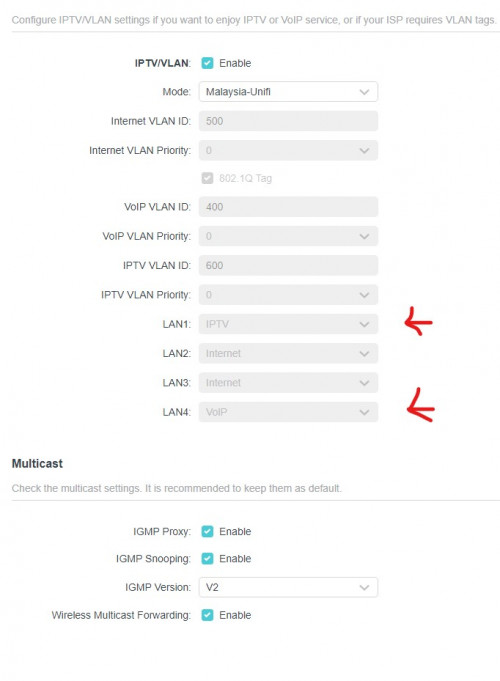 Any suggestion is much appreciated |
|
|
|
|
|
Jul 30 2021, 03:00 PM
Return to original view | Post
#7
|
|
Junior Member
460 posts Joined: Jun 2008
|
QUOTE(brianiac @ Jul 29 2021, 05:45 PM)  Thanks done and solved!  to the rescue to the rescue |
|
|
Aug 8 2021, 10:02 PM
Return to original view | Post
#8
|
|
Junior Member
460 posts Joined: Jun 2008
|
QUOTE(1wildcat1 @ Aug 8 2021, 05:02 PM) House type: Landed Ax73 placed in the middle of your houseSize of house: 1500 ish, 2 floors Features required: 5Ghz if possible - Nothing specific, only has to be fast and great coverage across Number of devices connected to WiFi:10-20 Internet Speed: 500 mbps - unifi Budget: 350-400 max currently using the DIR-850L by TM - the one that looks like a mini mac pro (black tower) Hoping to get some good advice from sifus here  This post has been edited by szecheng: Aug 8 2021, 10:02 PM |
|
|
Aug 17 2021, 01:55 PM
Return to original view | Post
#9
|
|
Junior Member
460 posts Joined: Jun 2008
|
QUOTE(FusionXY @ Aug 16 2021, 10:51 PM) Hello, TP-Link Archer A6 almost more or less the same with the stock router. wifi coverage better than ax20?My recommendation will be Archer C80. |
|
|
Aug 18 2021, 04:31 PM
Return to original view | Post
#10
|
|
Junior Member
460 posts Joined: Jun 2008
|
QUOTE(supergen3 @ Aug 18 2021, 11:42 AM) I am looking for a low cost WiFi AC access point/router. Found this Prolink router PRC2401U, AC2600 rated in Lazada. I want to ask whether Prolink routers are good especially in the firmware quality. with that price , just settle with tplink ax20 |
|
|
Aug 20 2021, 09:53 AM
Return to original view | Post
#11
|
|
Junior Member
460 posts Joined: Jun 2008
|
QUOTE(supergen3 @ Aug 19 2021, 10:46 AM) Thanks. Found even cheaper redmi ax5 router. chinese firmware? supports vlan? for unifi? |
|
|
Aug 20 2021, 03:39 PM
Return to original view | Post
#12
|
|
Junior Member
460 posts Joined: Jun 2008
|
QUOTE(supergen3 @ Aug 20 2021, 03:01 PM) Global Xiaomi version of redmi ax5 at Lazada. My purpose is use it as an AP. global normally support vlan, not sure about redmi ax5the Qualcomm IPQ6000 looks promising |
|
|
Aug 24 2021, 02:49 PM
Return to original view | Post
#13
|
|
Junior Member
460 posts Joined: Jun 2008
|
QUOTE(tnsai @ Aug 23 2021, 10:16 PM) Ah ok thanks.. seems not too much of a bump. Will look into it thanks. wired backhaul if you can, you wont regretOh I installed merlin wrt on my current router, the aimesh feature should work the same also right ? (just saw some videos seems like aimesh different from my friend's airties mesh network.. no need to wire connection one mesh to router first) |
|
|
|
|
|
Aug 26 2021, 11:32 AM
Return to original view | Post
#14
|
|
Junior Member
460 posts Joined: Jun 2008
|
QUOTE(sicklad77 @ Aug 26 2021, 09:06 AM) Hi, need advice and do bear with me. I’m still noob and trying to figure out the lingos as well. you are getting 30mb from 2.4ghz maybe your device still connected to m4 wifiisp : unifi 300mbps Router : ac66u (4 years old) AP : deco m4 (free from unifi) House : 3200sqft Devices connected : 15x (tv,phones,pc,ipcamera etc) so my asus router is connected on my ground floor and my M4 is on the second floor connected via lan cable and settings change to AP mode. before this I’m able to get 300mbps on downstairs but now I’m only getting less than 30mbps downstairs even standing next to the router. It’s only after I disconnect the 2.4ghz then reconnect then I’m getting the full speed. I’m suspecting that since I’m using same settings and name for the wifi, if I’m at the ground floor it is still connected to the upstairs M4 and does not auto-connect to the router. How to fix this? Should I buy a wifi6 router to fix this?? thats the problem when you are not using mesh system, it will not auto roaming. if you dont want to buy new mesh or router, better you configure m4 to have different ssid name |
|
|
Sep 4 2021, 12:33 PM
Return to original view | Post
#15
|
|
Junior Member
460 posts Joined: Jun 2008
|
QUOTE(thunderbird @ Sep 3 2021, 09:05 PM) Hello, XiaoMi AX-3600 Global english version?The condo i stay is 950sqft, typical 3 rooms 2 baths type. Router placed at living room, next to TV Already replaced the default router to XiaoMi AX-3600, performance was quite bad, master bedroom and 2nd bed room can't get signal at all when the door is shut. I had Asus AC-86U in another double storey house, this router is amazing and full bar even for upstairs room with door fully closed. Is there any cheaper modem on par or even better than AC-86U? I tried to look at the successor AX-86U, but very pricey Thanks. |
|
|
Sep 7 2021, 05:31 PM
Return to original view | Post
#16
|
|
Junior Member
460 posts Joined: Jun 2008
|
QUOTE(reph05 @ Sep 7 2021, 04:25 PM) Currently working from home, so planning to get a router that can allocate bandwidth for teleconference. ax73 can cover 1200 sq feet Thinking if Deco X20 can handle QoS, or I should get prosumer stuff like Ubiquiti EdgeRouter X, and connect X20 as AP. House type: Condo Size of house: 900 sqf Features required: QoS (very important) Number of devices connected to WiFi: 5 (not sure if it matters but there will another 7 laptops connected via ethernet) Internet Speed: Time Internet 500mbps Budget: < 1k Appreciate if any Sifu can provide some guidance.  never go for mesh if only one floor |
|
|
Sep 11 2021, 10:30 AM
Return to original view | Post
#17
|
|
Junior Member
460 posts Joined: Jun 2008
|
QUOTE(David3850 @ Sep 10 2021, 03:10 PM) Hi, hope anyone can give me some suggestion to solve the problems I am having now. if you hardwire backhaul,I am subscribed to Unifi 5mbps package. Using the original D Link DIR-825M router provided by TM. I have added 3 units of Deco M9 Plus for wireless mesh setup in my three storeys home. I have placed each floor each with one Deco M9 Plus. The problem is, the wireless mesh signal is not strong on the first and second floor, due to walls blocking etc. Now I'm looking to sell of my M9 Plus and get me a new seetup that can solve my problems: Weak signal strength due to walls. I have called a few network product sellers, they are suggesting that first thing to change is the D Link router provided by TM. Then buy 3 x wifi 6 mesh routers for each of the floor. They suggested Netgear Obi or the Deco AX90 from TP Link. My budget is around RM 3,500+ - . Can anyone help to suggest some models based on my budget please? Sorry I am really noob in networking solution. I have read a tons of articles but still blur... TPlink deco mesh dual band wifi will do. this is the cheapest if you wireless backhaul, TPlink deco mesh triband x90 your budget allow high end triband such as asus or netgear |
|
|
Sep 11 2021, 10:35 AM
Return to original view | Post
#18
|
|
Junior Member
460 posts Joined: Jun 2008
|
QUOTE(GNR @ Sep 10 2021, 06:52 PM) Hi sifus, TPlink ax73 is suitable for you, just try to place the router in the middle of the house, near the walkwayNeed some advice. House type :condo Size of house :1300 sqft Features required : basic for now Number of devices connected to WiFi : 6-7 Once my partner moves in. But not 6-7 at one go. Internet speed : Time 100 mbps Budget :300-400 Legend LR - living room R - 2nd bedroom Mr - Master bedroom K - Kitchen X - soho box. Measurements are wall to wall estimate but close enough. Device at soho box - huawei echolife hg8240h5 Device at LR TV area - huawei edge ont wa8021v5 Each room has a telephone line, the Lan cable type 1. Plan to use 2nd bedroom as work / pc area, if possible using Lan cable connected to pc for some casual online gaming. 2. Master bedroom only 1 bar of WiFi currently. Just need a strong WiFi signal there for mobile phone. No TV and don't plan to put one. 3. Living room - mainly Netflix and mobile phone, maybe work too. Not planning for ps5. I was never a console gamer. What do you humbly propose? 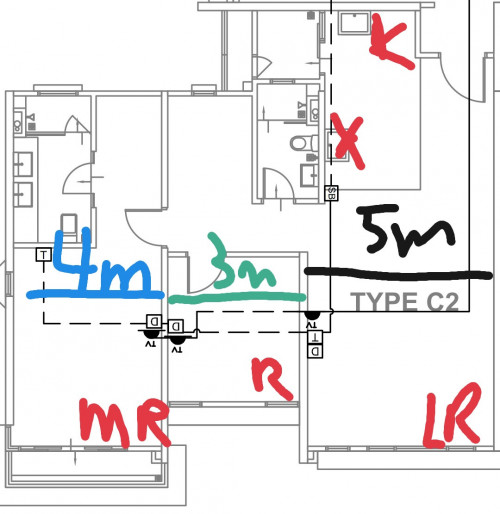 one floor doesnt need mesh This post has been edited by szecheng: Sep 11 2021, 10:36 AM |
|
|
Sep 14 2021, 05:23 PM
Return to original view | Post
#19
|
|
Junior Member
460 posts Joined: Jun 2008
|
QUOTE(GNR @ Sep 13 2021, 02:39 PM) You're recommending ax 73 is because its coverage area is big enough and capable of penetrating several walls? you have to understand, mesh does give wide coverage but not maximum speed unless you wired backhaul, so recommended for 2 storey houseI'm just curious as I'm wondering if the ax 20 would be good enough considering my Internet package is just 100mbps. if only one floor ax73 easily cover 1100-1200 square feet |
| Change to: |  0.0418sec 0.0418sec
 0.47 0.47
 7 queries 7 queries
 GZIP Disabled GZIP Disabled
Time is now: 6th December 2025 - 07:50 AM |
 Quote
Quote