Welcome Guest ( Log In | Register )

301 Pages « < 205 206 207 208 209 > » Bottom

Outline · [ Standard ] · Linear+

Home Networking WiFi Router Discussion Thread, Updated for 2023

views
     
jchong
post Sep 7 2021, 08:14 PM

****************
*******
Senior Member
5,989 posts

Joined: Nov 2005
QUOTE(Candy12 @ Sep 6 2021, 10:54 PM)
AX20 still fine at least it has a better CPU than the more expensive AX73.Can handle deluge of traffic surge and connections during peak utilization.

The Mercusys if Blacktubi was correct about having a mere Mediatek dual core inside, not worth for a few bucks more you can get a quad core CPU based router for long term investment.
*
I notice you focus a lot on the CPU. What about other components of the router like the radio, FEM, etc?
jchong
post Sep 7 2021, 08:16 PM

****************
*******
Senior Member
5,989 posts

Joined: Nov 2005
QUOTE(wirelessbuyer @ Sep 6 2021, 11:49 PM)
It's the same thing happening on asus line up too, cheaper model like rt-ax55/rt-ax56u is using quad-core chip but the more expensive model is using tri-core chip like rt-ax3000/rt-ax3000-tuf/rt-ax82u.

Not sure the exact reason behind it, but the pattern I notice is asus's quad-core model is using the built-in chip for both 2.4 and 5ghz, but the tri-core model is using dedicated chip for their 5ghz.
*
I read that the AX73 is also like that, tri-core but having dedicated chip for 5GHz. I wonder what is advantage of this dedicated chip?
TSblacktubi
post Sep 7 2021, 08:29 PM

-
Group Icon
Elite
8,406 posts

Joined: Jul 2008

QUOTE(jchong @ Sep 7 2021, 08:16 PM)
I read that the AX73 is also like that, tri-core but having dedicated chip for 5GHz. I wonder what is advantage of this dedicated chip?
*
BCM6750 comes with 1 radio, BCM6755 comes with 2 radio. The built-in radio in BCM675x SoC is only 2x2 WiFi 6.

For higher end product, manufacturers will use a dedicated radio chip that's faster. Most if not all AX3000 and AX5400 Broadcom products are using BCM6750 + BCM43684 combo. TP-Link AX73, ASUS RT-AX3000, ASUS TUF-AX3000, ASUS RT-AX82U, ASUS TUF-AX5400, ASUS ZenWiFi XD6 and etc.

Since the router will use a dedicated radio chip, there's no point to spec it with BCM6755 unless the manufacturer is developing a Tri-Band AX6600 product then they will use BCM6755+BCM43684 combo.

In reality, there's no observable CPU performance difference between BCM6750 and BCM6755. Core count is just a marketing figure and router SoC doesn't work the same way as PC or mobile.

Note: BCM6750 is 3 core, BCM6755 is 4 core.

This post has been edited by blacktubi: Sep 7 2021, 08:30 PM
EpsilonStar
post Sep 8 2021, 12:09 PM

Regular
******
Senior Member
1,245 posts

Joined: Oct 2004
From: Selangor


QUOTE(zher4883 @ Sep 7 2021, 07:32 PM)
Since you are using Asus already, you should know that Asus are generally more expensive due to its feature available and firmware support. If you are living in a double storey house and looking to get the most out of the bandwidth through wifi, you would need a mesh wifi.
*
Yes i know but is it overkill to get ax86u? or something like ax68u is good enough price vs performance.
I am planning wired backhauled aimesh if i get another router.
zher4883
post Sep 8 2021, 01:04 PM

Look at all my stars!!
*******
Senior Member
4,490 posts

Joined: Oct 2014


QUOTE(EpsilonStar @ Sep 8 2021, 12:09 PM)
Yes i know but is it overkill to get ax86u? or something like ax68u is good enough price vs performance.
I am planning wired backhauled aimesh if i get another router.
*
I can't say was it overkill or not when I don't know how much internet connected device and your subscription speed.
EpsilonStar
post Sep 8 2021, 03:57 PM

Regular
******
Senior Member
1,245 posts

Joined: Oct 2004
From: Selangor


QUOTE(zher4883 @ Sep 8 2021, 01:04 PM)
I can't say was it overkill or not when I don't know how much internet connected device and your subscription speed.
*
Oh sorry, I should have mentioned it in my ori post.

My Unifi is 500mbps. My router AC68u is currently in living hall.
Basically now only me and my wife in the house, and we are working from home now so a lot online calls during the day, and she complained bad connection a lot lately (she is furthest away from router on second floor back room) while i am also working in second floor living room and occasionally also experience bad connection and reboot router helps restore it.

Other uses include streaming Netflix at night, downloading stuffs. I occasionally also pubg mobile on ipad while wife is streaming netflix on TV.

I generally feels the router performance has degraded a bit but not sure whether internet also a factor. 5Ghz ssid sometimes also disappear, even when i am near to router.
zher4883
post Sep 8 2021, 04:26 PM

Look at all my stars!!
*******
Senior Member
4,490 posts

Joined: Oct 2014


QUOTE(EpsilonStar @ Sep 8 2021, 03:57 PM)
Oh sorry, I should have mentioned it in my ori post.

My Unifi is 500mbps. My router AC68u is currently in living hall.
Basically now only me and my wife in the house, and we are working from home now so a lot online calls during the day, and she complained bad connection a lot lately (she is furthest away from router on second floor back room) while i am also working in second floor living room and occasionally also experience bad connection and reboot router helps restore it.

Other uses include streaming Netflix at night, downloading stuffs. I occasionally also pubg mobile on ipad while wife is streaming netflix on TV.

I generally feels the router performance has degraded a bit but not sure whether internet also a factor. 5Ghz ssid sometimes also disappear, even when i am near to router.
*
To be honest, I would be hesitant to just recommend RT-AX86U due to its price tag. Blacktubi had done a comparison on Asus router wireless performance so you could really decide for yourself.
https://www.blacktubi.com/review/asus-rt-ax86u/
If you are looking to get the best out of your wifi (close to 500Mbps) when you're 1 wall away from the router, RT-AX86U. Otherwise, Asus RT-AX3000 is a great option and I would say the price/performance is way better than the RT-AX86U.

From what you had described, it sounds like your RT-AC68U is nearing the end of its life but I can't tell for sure.

This post has been edited by zher4883: Sep 8 2021, 04:30 PM
EpsilonStar
post Sep 8 2021, 05:27 PM

Regular
******
Senior Member
1,245 posts

Joined: Oct 2004
From: Selangor


QUOTE(zher4883 @ Sep 8 2021, 04:26 PM)
To be honest, I would be hesitant to just recommend RT-AX86U due to its price tag. Blacktubi had done a comparison on Asus router wireless performance so you could really decide for yourself.
https://www.blacktubi.com/review/asus-rt-ax86u/
If you are looking to get the best out of your wifi (close to 500Mbps) when you're 1 wall away from the router, RT-AX86U. Otherwise, Asus RT-AX3000 is a great option and I would say the price/performance is way better than the RT-AX86U.

From what you had described, it sounds like your RT-AC68U is nearing the end of its life but I can't tell for sure.
*
Thanks for your reply, i will think about it. Maybe just 1 shot hentam 86u tongue.gif

Btw, if i use AX router as main router, then move my AC68u upstairs and setup wired aimesh, it can work right? Not too familiar with mesh network, but i suppose with an old AC node, it won't force the AX to downgrade to AC to maintain compatibility right?
zher4883
post Sep 8 2021, 05:53 PM

Look at all my stars!!
*******
Senior Member
4,490 posts

Joined: Oct 2014


QUOTE(EpsilonStar @ Sep 8 2021, 05:27 PM)
Thanks for your reply, i will think about it. Maybe just 1 shot hentam 86u  tongue.gif

Btw, if i use AX router as main router, then move my AC68u upstairs and setup wired aimesh, it can work right? Not too familiar with mesh network, but i suppose with an old AC node, it won't force the AX to downgrade to AC to maintain compatibility right?
*
I not too familiar with AiMesh either but I would expect the AX86U working on AX mode while the AC68U working on AC mode when connected through cable.
vignaroli
post Sep 9 2021, 11:02 AM

Casual
***
Junior Member
341 posts

Joined: Jun 2008
Pull trigger on Dlink Dir-x5460 during 9.9 Sales.

Hopefully not regret for it coz after long consideration dilemma between TP link AX73 and Dlink Dir-x5460
maxguy
post Sep 9 2021, 11:09 AM

Enthusiast
*****
Senior Member
822 posts

Joined: Jan 2003


QUOTE(EpsilonStar @ Sep 8 2021, 05:27 PM)
Thanks for your reply, i will think about it. Maybe just 1 shot hentam 86u  tongue.gif

Btw, if i use AX router as main router, then move my AC68u upstairs and setup wired aimesh, it can work right? Not too familiar with mesh network, but i suppose with an old AC node, it won't force the AX to downgrade to AC to maintain compatibility right?
*
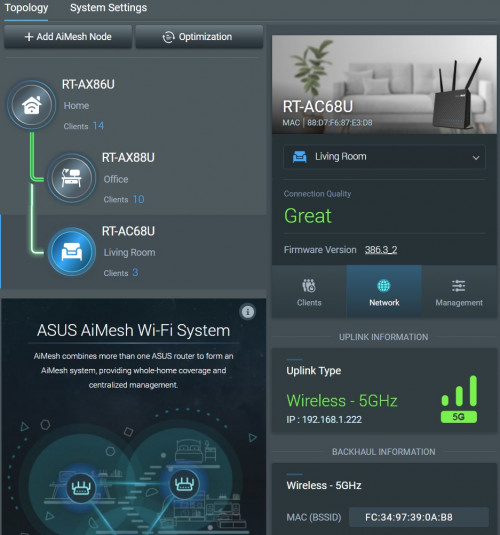
user posted image
AC68U work well as aimesh node for AX series router via both wired and wireless
jchong
post Sep 9 2021, 12:22 PM

****************
*******
Senior Member
5,989 posts

Joined: Nov 2005
QUOTE(blacktubi @ Sep 7 2021, 08:29 PM)
BCM6750 comes with 1 radio, BCM6755 comes with 2 radio. The built-in radio in BCM675x SoC is only 2x2 WiFi 6.

For higher end product, manufacturers will use a dedicated radio chip that's faster. Most if not all AX3000 and AX5400 Broadcom products are using BCM6750 + BCM43684 combo. TP-Link AX73, ASUS RT-AX3000, ASUS TUF-AX3000, ASUS RT-AX82U, ASUS TUF-AX5400, ASUS ZenWiFi XD6 and etc.

Since the router will use a dedicated radio chip, there's no point to spec it with BCM6755 unless the manufacturer is developing a Tri-Band AX6600 product then they will use BCM6755+BCM43684 combo.

In reality, there's no observable CPU performance difference between BCM6750 and BCM6755. Core count is just a marketing figure and router SoC doesn't work the same way as PC or mobile.

Note: BCM6750 is 3 core, BCM6755 is 4 core.
*
Good info. Thanks
botak91
post Sep 9 2021, 01:52 PM

Getting Started
**
Junior Member
132 posts

Joined: Feb 2007
Tempted to pull the trigger on an AC68U this 9.9 sale. Single storey with 500Mbps Unifi package.
EpsilonStar
post Sep 9 2021, 01:53 PM

Regular
******
Senior Member
1,245 posts

Joined: Oct 2004
From: Selangor


QUOTE(maxguy @ Sep 9 2021, 11:09 AM)
user posted image
AC68U work well as aimesh node for AX series router via both wired and wireless
*
Does it work like this, so if my wifi 6 client connect to AX router then connection is AX, and when it connects to AC node, then connection drop down to AC?
maxguy
post Sep 9 2021, 03:20 PM

Enthusiast
*****
Senior Member
822 posts

Joined: Jan 2003


QUOTE(EpsilonStar @ Sep 9 2021, 01:53 PM)
Does it work like this, so if my wifi 6 client connect to AX router then connection is AX, and when it connects to AC node, then connection drop down to AC?
*
yes
David3850
post Sep 10 2021, 03:10 PM

New Member
*
Junior Member
30 posts

Joined: Oct 2009
Hi, hope anyone can give me some suggestion to solve the problems I am having now.

I am subscribed to Unifi 5mbps package. Using the original D Link DIR-825M router provided by TM. I have added 3 units of Deco M9 Plus for wireless mesh setup in my three storeys home. I have placed each floor each with one Deco M9 Plus.

The problem is, the wireless mesh signal is not strong on the first and second floor, due to walls blocking etc. Now I'm looking to sell of my M9 Plus and get me a new seetup that can solve my problems: Weak signal strength due to walls.

I have called a few network product sellers, they are suggesting that first thing to change is the D Link router provided by TM. Then buy 3 x wifi 6 mesh routers for each of the floor. They suggested Netgear Obi or the Deco AX90 from TP Link.

My budget is around RM 3,500+ - . Can anyone help to suggest some models based on my budget please? Sorry I am really noob in networking solution. I have read a tons of articles but still blur...


swatch10
post Sep 10 2021, 04:50 PM

Getting Started
**
Junior Member
104 posts

Joined: Feb 2009


5mnps? or 50?
Since your budget so high, u can choose Asus mesh wifi, ASUS ZenWiFi AX Mini (XD4) or even higher spec which is ASUS ZenWiFi XD6.


QUOTE(David3850 @ Sep 10 2021, 03:10 PM)
Hi, hope anyone can give me some suggestion to solve the problems I am having now.

I am subscribed to Unifi 5mbps package. Using the original D Link DIR-825M router provided by TM. I have added 3 units of Deco M9 Plus for wireless mesh setup in my three storeys home. I have placed each floor each with one Deco M9 Plus.

The problem is, the wireless mesh signal is not strong on the first and second floor, due to walls blocking etc. Now I'm looking to sell of my M9 Plus and get me a new seetup that can solve my problems: Weak signal strength due to walls.

I have called a few network product sellers, they are suggesting that first thing to change is the D Link router provided by TM. Then buy 3 x wifi 6 mesh routers for each of the floor. They suggested Netgear Obi or the Deco AX90 from TP Link.

My budget is around RM 3,500+ - . Can anyone help to suggest some models based on my budget please? Sorry I am really noob in networking solution. I have read a tons of articles but still blur...
*
swatch10
post Sep 10 2021, 04:57 PM

Getting Started
**
Junior Member
104 posts

Joined: Feb 2009


Bro, now is ax generation. Don't go for AC anymore, kind of waste money if you ask me.


QUOTE(botak91 @ Sep 9 2021, 01:52 PM)
Tempted to pull the trigger on an AC68U this 9.9 sale. Single storey with 500Mbps Unifi package.
*
David3850
post Sep 10 2021, 05:11 PM

New Member
*
Junior Member
30 posts

Joined: Oct 2009
QUOTE(swatch10 @ Sep 10 2021, 04:50 PM)
5mnps? or 50?
Since your budget so high, u can choose Asus mesh wifi,  ASUS ZenWiFi AX Mini (XD4) or even higher spec which is ASUS ZenWiFi XD6.
*
Sorry typo. 500mbps
swatch10
post Sep 10 2021, 05:17 PM

Getting Started
**
Junior Member
104 posts

Joined: Feb 2009


Then go with that one i choose should be good for you already.
Since got 3 floors, then go for each floor put 1 mesh... And ur current router from Unifi, you can throw sungai already.. unless you want to use it for lan cable purpose or watch unifi tv.

QUOTE(David3850 @ Sep 10 2021, 05:11 PM)
Sorry typo. 500mbps
*

301 Pages « < 205 206 207 208 209 > » Top
 

Change to:
| Lo-Fi Version
0.0213sec    0.25    6 queries    GZIP Disabled
Time is now: 5th December 2025 - 05:26 AM