

QUOTE(Jjuggler @ Feb 3 2018, 10:57 PM)
happy user of ac58u here. awesome. However, there will be no asus merlin firmware support for this model since it is using qualcomm instead of broadloom chip

oh nice..Thanks 
Unifi Official TM UniFi High Speed Broadband Thread V32, Enjoy Your Speed Upgrade
|
|
 Feb 4 2018, 08:27 PM Feb 4 2018, 08:27 PM
|
 
Junior Member
103 posts Joined: Jun 2009 From: Alor Setar  
|
QUOTE(Jjuggler @ Feb 3 2018, 10:57 PM) happy user of ac58u here. awesome. However, there will be no asus merlin firmware support for this model since it is using qualcomm instead of broadloom chip oh nice..Thanks |
|
|
|
|
|
Feb 4 2018, 08:57 PM
|

Junior Member
25 posts Joined: Aug 2010
|
QUOTE(AVFAN @ Feb 4 2018, 07:33 PM) bolded... You're absolutely right. I was ranting and I apologise for that. It just frustrating, now I calm down a bit, kind of regret writting it lol. Mistake had been made :'Du need to describe better and give details for people to comment usefully to help u... no use if just to rant. .. what "ways" did u try.. what "own router" u hv.. house or condo or flat or ?? .. under 50mbps... for ethernet or wifi or both?...if wifi, how far is the distance? .. what devices u use... old or new... 2.4ghz or 5ghz or dual? if u do not provide details, all u get is "buy this router" or complain to mcc or bbc... dunno which one. all biz have rules - u signed the terns and conditions, u shouldn't and cannot complain. if u r out of contract, u get nothing except warranty for modem or BTU. if u sign new contract, u get new eqpt if they are not good enough. but not everything will be changed - u get extra warranty only if it is still working. 1) I tried TM's provided router (TRG212M) and Asus RT-N12HP-B1 at first. I know the asus router is quite old, but I think it should be good enough. I did factory reset it and upgrading the firmware. After that I also tried using my cousin's router Asus RT-AC1200, the results is the same. Also had asked TM to reset port at least 3 times. Considering installing dd-wrt, but have no idea how to setup vlan properly so I scrap that idea. Should I tried it anyway? 2) All test was done via lan (cat5e & not using Homeplug) cable directly connected to one PC (also tried it with different pc and laptop) with no other client connected to the router. Even tried turning off wireless. The highest I can get is around 40mbps down (most of the time the speed hover around 30-35mbps). Oh forgot to mention, the upload speed is fine, 20mbps consistently. When using wifi, the speed are a bit slower but understandable. Was very near to the router most of the time. 3) Device I used? You mean to connect to the router? PCs, laptop, s7 edge... 4) Should I get a new router or paid TM for a new router? Need some guidance here. Thank you in advance Regarding the T&C etc, yes you're right. Maybe it was in the agreement, which I happily signed without reading it first. Like I said a bit frustrated before, now calmed down a bit, what you wrote at the end make sense. |
|
|
Feb 4 2018, 10:27 PM
|

All Stars
24,456 posts Joined: Nov 2010
|
QUOTE(ammarsweil @ Feb 4 2018, 08:57 PM) You're absolutely right. I was ranting and I apologise for that. It just frustrating, now I calm down a bit, kind of regret writting it lol. Mistake had been made :'D we all get upset with tm/unifi at one point or another... but after 6 years, i come to see they aren't too bad... just u be patient and make full use of the opportunity when it comes.1) I tried TM's provided router (TRG212M) and Asus RT-N12HP-B1 at first. I know the asus router is quite old, but I think it should be good enough. I did factory reset it and upgrading the firmware. After that I also tried using my cousin's router Asus RT-AC1200, the results is the same. Also had asked TM to reset port at least 3 times. Considering installing dd-wrt, but have no idea how to setup vlan properly so I scrap that idea. Should I tried it anyway? 2) All test was done via lan (cat5e & not using Homeplug) cable directly connected to one PC (also tried it with different pc and laptop) with no other client connected to the router. Even tried turning off wireless. The highest I can get is around 40mbps down (most of the time the speed hover around 30-35mbps). Oh forgot to mention, the upload speed is fine, 20mbps consistently. When using wifi, the speed are a bit slower but understandable. Was very near to the router most of the time. 3) Device I used? You mean to connect to the router? PCs, laptop, s7 edge... 4) Should I get a new router or paid TM for a new router? Need some guidance here. Thank you in advance Regarding the T&C etc, yes you're right. Maybe it was in the agreement, which I happily signed without reading it first. Like I said a bit frustrated before, now calmed down a bit, what you wrote at the end make sense. now that u gave some details, easier to follow.. but u have not said anything about your home - big bungalow or typical house or condo or small high density flat?? this is impt to understand, so, please do describe. rtn12hp_b1... this router is old but is GOOD. i used it for 4 years 10->30->50mbps, all good, full speed ethernet, good enough wifi. if u can't get 50mbps with this router on ethernet, something else is suspect. i recently visited a fren in an old housing area.. he CANNOT get 50mbps with the same router on ethernet. the best he got was 45mbps. when he upgraded to 100mbps, tm's new tplink router ac1200 also cannot get full 100mbsps... can get only 92-95 max. in contrast, i get, with that tp link, 100mbps and, with a new asus rtac1300uhp, 103-105 mbps - ethernet. my suspicion is your local area infra is suboptimal, like my fren's - older areas, older eqpt, more obstacles maybe...? if i were u, i would put that old unifi router back, test again ethernet... if still nowhere close to 50mbps, i will take up the challenge. call, complain, agree to send the technician... show me how to get full 50mbps with TM router, old or new. if not my fault, i dun pay, they give me new router; if my fault, i pay rm53, get my own router. *sidenote... your asus rtn12hp is not a gigabit dual band router... and pcs/laptop typically use 2.4ghz wifi... so u can't go 5ghz unless u buy a dual band adaptor for the device... and change to a dual band router. 5ghz is a better frequency for wifi short distances, say <50ft. keep us posted what happens next. This post has been edited by AVFAN: Feb 4 2018, 10:49 PM |
|
|
Feb 4 2018, 11:22 PM
|
|
Junior Member
25 posts Joined: Aug 2010
|
QUOTE(AVFAN @ Feb 4 2018, 10:27 PM) we all get upset with tm/unifi at one point or another... but after 6 years, i come to see they aren't too bad... just u be patient and make full use of the opportunity when it comes. It is a terrace house. Definitely not a big house. A bit relief to hear rt-n12hp b1 can handle 50mbps well. Already try the old unifi router a few times before and also tried just now too, unfortunately yield same result. But I'm planning to test both of this router at my uncle's house in a few days just to be sure it is definitely not my routers fault. now that u gave some details, easier to follow.. but u have not said anything about your home - big bungalow or typical house or condo or small high density flat?? this is impt to understand, so, please do describe. rtn12hp_b1... this router is old but is GOOD. i used it for 4 years 10->30->50mbps, all good, full speed ethernet, good enough wifi. if u can't get 50mbps with this router on ethernet, something else is suspect. i recently visited a fren in an old housing area.. he CANNOT get 50mbps with the same router on ethernet. the best he got was 45mbps. when he upgraded to 100mbps, tm's new tplink router ac1200 also cannot get full 100mbsps... can get only 92-95 max. in contrast, i get, with that tp link, 100mbps and, with a new asus rtac1300uhp, 103-105 mbps - ethernet. my suspicion is your local area infra is suboptimal, like my fren's - older areas, more obstacles maybe... if were u, i would put that old unifi router back, test again ethernet... if still nowhere close to 50mbps, i will take up the challenge. call, complain, agree to send the technician... show me how to get full 50mbps with TM router, old or new. if not my fault, i dun pay, they give me new router; if my fault, i pay rm53, get my own router. *sidenote... your asus rtn12hp is not a gigabit dual band router... and pcs/laptop typically use 2.4ghz wifi... so u can't go 5ghz unless u buy a dual band adaptor for the device... and change to a dual band router. 5ghz is a better frequency for wifi short distances, say <50ft. keep us posted what happens next. Infrastucture? Wait I'm gonna ask my neighbour how his line performing. Will update you on this later. Yeah thinking on upgrading to ac router for a few months now, close to pulling the trigger around last Christmas (so many tempting deal!), but I don't think I really need 5ghz. In my household, wifi are only use primarily for whatsapps, fb etc. For streaming, dloading/uploading to the cloud etc I use PC which connect via Lan. One more thing I'm a bit worried is that the TM person I talk to said there are only 2 option: 1) replace the equipment for free but renew contract period 2) I paid for equipment myself, and I don't have to renew the contract. So it's possible my modem might be faulty right. If so seeing as I'm a bit reluctant to renew contract, should I buy modem myself (what brand/model you suggest) or better to just buy it from TM? This only if they really certain that the modem is at fault. Oh btw, they said the price to purchase router from them is RM200. Totally forgot to ask for price of modem |
|
|
Feb 4 2018, 11:37 PM
|
|
All Stars
24,456 posts Joined: Nov 2010
|
QUOTE(ammarsweil @ Feb 4 2018, 11:22 PM) It is a terrace house. Definitely not a big house. A bit relief to hear rt-n12hp b1 can handle 50mbps well. Already try the old unifi router a few times before and also tried just now too, unfortunately yield same result. But I'm planning to test both of this router at my uncle's house in a few days just to be sure it is definitely not my routers fault. typical terrace house... 50mbps... rtn12hp_b1 can handle, i m sure becos i had it.Infrastucture? Wait I'm gonna ask my neighbour how his line performing. Will update you on this later. Yeah thinking on upgrading to ac router for a few months now, close to pulling the trigger around last Christmas (so many tempting deal!), but I don't think I really need 5ghz. In my household, wifi are only use primarily for whatsapps, fb etc. For streaming, dloading/uploading to the cloud etc I use PC which connect via Lan. One more thing I'm a bit worried is that the TM person I talk to said there are only 2 option: 1) replace the equipment for free but renew contract period 2) I paid for equipment myself, and I don't have to renew the contract. So it's possible my modem might be faulty right. If so seeing as I'm a bit reluctant to renew contract, should I buy modem myself (what brand/model you suggest) or better to just buy it from TM? This only if they really certain that the modem is at fault. Oh btw, they said the price to purchase router from them is RM200. Totally forgot to ask for price of modem if u plan to stay at 50mbps, i dun see any need to go dual band 5ghz; if u go 100mbps, yes, u should. yes, check with neighbors to see if there is something u missed. the options... be informed.. the modem is covered as long as u remain a customer. if u find a problem with dect phone, it is possible the modem is going. anyway, u may want to check the modem model, post it, see if anyone can identify common problems with it. new unifi router rm200... it will be a lousy one as well. unless i see for myself it can do full 50mbps while the old and rtn12hp can't do, i will not want it! lastly, i would advise u NOT to renew contract just to get new eqpt. renew it when there is some other promo going on. u missed the recent one... +rm10 to go 100mbps? that will get u new router and possibly new modem if old cannot do. |
|
|
Feb 5 2018, 04:17 AM
Show posts by this member only | IPv6 | Post
#7946
|

Junior Member
46 posts Joined: Jan 2015
|
QUOTE(InSplre @ Feb 4 2018, 05:57 PM) Access the page using mobile phone, then only you can change the SSID to be without @unifi QUOTE(SilentVampire @ Feb 4 2018, 06:21 PM) I think it is fixed, with TM newest firmware for the DIR-850L, and the TP-Link Archer C1200. You will have to get another router to change your username to be withou the '@unifi" or flash to another country's firmware, but that can be risky for the DIR-850L. QUOTE(westlife @ Feb 4 2018, 06:43 PM) TP-link can change, no issue. Thanks for all the solutions advice, I will try again  |
|
|
|
|
|
Feb 5 2018, 10:38 AM
|

Senior Member
576 posts Joined: Dec 2017 From: Kuala Lumpur 
|
I am Unifi user
I pay RM 200+ for 30mbps Talk to the agents if I can subscribe to the new package which is a lot cheaper but they said they only allow upgrade not downgrade So wonder if I can terminate the current Unifi and resubscribe to the new package of Unifi later |
|
|
Feb 5 2018, 11:09 AM
|

Senior Member
3,305 posts Joined: Dec 2012
|
lol... Unifi down. But LINK, AUTH, LAN1 got light. Should be TM issue right?
|
|
|
Feb 5 2018, 11:13 AM
Show posts by this member only | IPv6 | Post
#7949
|

Senior Member
7,120 posts Joined: Oct 2011 From: Wakanda
|
QUOTE(RyuGW90 @ Feb 5 2018, 10:38 AM) I am Unifi user Wow.. Yours really takes the cake.. What plan is that and why didn't you switch to the cheaper 179 back in 2016?... You could try another TM Point and if they still refuse.. Worst case...Yes yes! Terminate and reapply a cheaper plan.. Get faster speeds too.I pay RM 200+ for 30mbps Talk to the agents if I can subscribe to the new package which is a lot cheaper but they said they only allow upgrade not downgrade So wonder if I can terminate the current Unifi and resubscribe to the new package of Unifi later |
|
|
Feb 5 2018, 11:18 AM
Show posts by this member only | IPv6 | Post
#7950
|

Senior Member
3,952 posts Joined: Apr 2005 From: Sector 1921B, Delta Quadrant
|
QUOTE(voncrane @ Feb 5 2018, 11:13 AM) Wow.. Yours really takes the cake.. What plan is that and why didn't you switch to the cheaper 179 back in 2016?... You could try another TM Point and if they still refuse.. Worst case...Yes yes! Terminate and reapply a cheaper plan.. Get faster speeds too. If from the ancient VIP10 paying 149+ to Unifi Lite 10Mbps paying 129+ will it be considered downgrade too...? |
|
|
Feb 5 2018, 11:24 AM
|
|
Junior Member
64 posts Joined: Apr 2009
|
I upgraded my 50mbps package (RM179 monthly) to 100mbps (RM189 monthly) in November 2017. At the beginning, TM made a mess in my billing but has since made amends.
I would like to check whether users who are also 100mbps (RM189) subscribers have the following package discounts (can check on Unifi's website)... 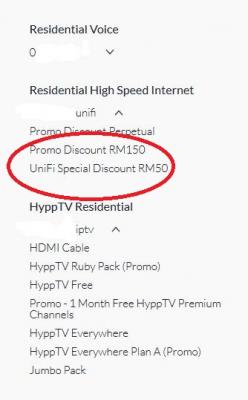
Any idea why the Internet discount is separated into two (RM150+RM50) instead of just a single RM200 discount? I worry one portion of it is given for a limited time only. |
|
|
Feb 5 2018, 11:51 AM
|
 
Staff
72,826 posts Joined: Sep 2005 From: KUL 
|
QUOTE(wwloon @ Feb 5 2018, 11:24 AM) I upgraded my 50mbps package (RM179 monthly) to 100mbps (RM189 monthly) in November 2017. At the beginning, TM made a mess in my billing but has since made amends. Yes, everyone is RM 150 + 50.I would like to check whether users who are also 100mbps (RM189) subscribers have the following package discounts (can check on Unifi's website)...
Any idea why the Internet discount is separated into two (RM150+RM50) instead of just a single RM200 discount? I worry one portion of it is given for a limited time only. You will see RM 200 discount in statement anyway. Even if it is a limited time, it is going to last for 2 years but I don't bother, God knows what will happen 2 years later. TM did promise it is perpetual though. |
|
|
Feb 5 2018, 12:24 PM
Show posts by this member only | IPv6 | Post
#7953
|
|
Junior Member
16 posts Joined: Jun 2016
|
Is there any unified plan offering 300mbps download speed?
|
|
|
|
|
|
Feb 5 2018, 12:25 PM
Show posts by this member only | IPv6 | Post
#7954
|
|
Senior Member
7,120 posts Joined: Oct 2011 From: Wakanda
|
QUOTE(Eithanius @ Feb 5 2018, 11:18 AM) If from the ancient VIP10 paying 149+ to Unifi Lite 10Mbps paying 129+ will it be considered downgrade too...? It shouldn't be but we know how TM handles things.. If possible, get the 30Mbps for RM139.. It's a better deal. Get triple download speeds for RM10 less. |
|
|
Feb 5 2018, 12:25 PM
Show posts by this member only | IPv6 | Post
#7955
|
|
Senior Member
7,120 posts Joined: Oct 2011 From: Wakanda
|
QUOTE(TLpejoy @ Feb 5 2018, 12:24 PM) Is there any unified plan offering 300mbps download speed? Nope.. TIME. |
|
|
Feb 5 2018, 01:05 PM
Show posts by this member only | IPv6 | Post
#7956
|
|
Junior Member
16 posts Joined: Jun 2016
|
QUOTE(voncrane @ Feb 5 2018, 12:25 PM) Nope.. TIME. Then how about unifi used by cyber cafe? Cause I saw some of the cc claims that they are using 300mbps unifi package. Im asking this because I need to find a cc around ipoh which provides low ping and high internet speed for some purpose. |
|
|
Feb 5 2018, 01:10 PM
|

Senior Member
2,466 posts Joined: Nov 2004
|
QUOTE(TLpejoy @ Feb 5 2018, 01:05 PM) Then how about unifi used by cyber cafe? Cause I saw some of the cc claims that they are using 300mbps unifi package. Im asking this because I need to find a cc around ipoh which provides low ping and high internet speed for some purpose. 100x3 |
|
|
Feb 5 2018, 01:15 PM
Show posts by this member only | IPv6 | Post
#7958
|
|
Junior Member
16 posts Joined: Jun 2016
|
QUOTE(aneip @ Feb 5 2018, 01:10 PM) 100x3 I see... Thanks alot! |
|
|
Feb 5 2018, 01:22 PM
|

Senior Member
3,852 posts Joined: Aug 2005
|
QUOTE(TLpejoy @ Feb 5 2018, 12:24 PM) Is there any unified plan offering 300mbps download speed? It could be business plan; those wont be in the website, need to call TM, and then they will send a account manager over to your office to discuss on business opportunity. |
|
|
Feb 5 2018, 01:37 PM
|
|
Senior Member
3,952 posts Joined: Apr 2005 From: Sector 1921B, Delta Quadrant
|
QUOTE(voncrane @ Feb 5 2018, 12:25 PM) It shouldn't be but we know how TM handles things.. If possible, get the 30Mbps for RM139.. It's a better deal. Get triple download speeds for RM10 less. If I get 30mbps for 139 will i be paying 139 forever or just 2 years only...? |
|
Topic ClosedOptions
|
| Change to: |  0.0395sec 0.0395sec
 0.71 0.71
 6 queries 6 queries
 GZIP Disabled GZIP Disabled
Time is now: 12th December 2025 - 09:07 AM |
 Quote
Quote