

Thanks bro, will definitely try then!!
TP-LINK Malaysia Official Thread, Technical Enquiries and Support
TP-LINK Malaysia Official Thread, Technical Enquiries and Support
|
|
 Feb 22 2018, 10:54 AM Feb 22 2018, 10:54 AM
|
 
Junior Member
68 posts Joined: Dec 2017 
|
Thanks bro, will definitely try then!!
|
|
|
|
|
|
Feb 23 2018, 08:47 AM
|
|
Junior Member
68 posts Joined: Dec 2017
|
Hi bro SilentVampire, I tried to change the wifi channel to the less congested channel, it really works well yesterday. BUT, this morning, I found that my phone and my mum's can barely connect to the wifi (not having any issue last night night), even if i was standing just next to the router, the wifi signal bar seems like i was standing very far from it and can barely detect it, I did not reboot as I was rushing to work. Btw, yesterday after i changed the channel, I did not reboot the router, will it be the cause??Any idea?
|
|
|
Feb 23 2018, 02:33 PM
|

Senior Member
5,714 posts Joined: Mar 2007  
|
QUOTE(abcdef123456 @ Feb 23 2018, 08:47 AM) Hi bro SilentVampire, I tried to change the wifi channel to the less congested channel, it really works well yesterday. BUT, this morning, I found that my phone and my mum's can barely connect to the wifi (not having any issue last night night), even if i was standing just next to the router, the wifi signal bar seems like i was standing very far from it and can barely detect it, I did not reboot as I was rushing to work. Btw, yesterday after i changed the channel, I did not reboot the router, will it be the cause??Any idea? No bro, that won’t be the reason why. What channel did you change it to? It should’t cause any issue bro. |
|
|
Feb 23 2018, 03:05 PM
|
|
Junior Member
68 posts Joined: Dec 2017
|
Channel 13, which nobody is using. Ya, it shouldnt be any issue at all, i tried turning on and off my phone's wifi for a few times, seems better after that, but was rushing to work this morning, didn't try further, may be will try again when back later.
|
|
|
Feb 23 2018, 04:39 PM
|
|
Senior Member
5,714 posts Joined: Mar 2007
|
QUOTE(abcdef123456 @ Feb 23 2018, 03:05 PM) Channel 13, which nobody is using. Ya, it shouldnt be any issue at all, i tried turning on and off my phone's wifi for a few times, seems better after that, but was rushing to work this morning, didn't try further, may be will try again when back later. I would suggest Channel 11 bro. It’s either 1, 6, or 11, which are non-overlapping channels. |
|
|
Feb 23 2018, 05:51 PM
|
|
Junior Member
309 posts Joined: Mar 2015
|
did we need to use surge protector to protect the homeplug?
or it can be safely plug into wall outlet directly? btw, i am using TL-WPA8630P KIT and it is connect to PS4 and TV with wired connection. This post has been edited by Azusa_San: Feb 23 2018, 05:53 PM |
|
|
|
|
|
Feb 23 2018, 09:46 PM
|
|
Senior Member
5,714 posts Joined: Mar 2007
|
QUOTE(Azusa_San @ Feb 23 2018, 05:51 PM) did we need to use surge protector to protect the homeplug? You need to plug into the wall outlet directly. If you use a surge protector, it won’t work as well.or it can be safely plug into wall outlet directly? btw, i am using TL-WPA8630P KIT and it is connect to PS4 and TV with wired connection. |
|
|
Feb 23 2018, 10:01 PM
|
|
Junior Member
309 posts Joined: Mar 2015
|
QUOTE(SilentVampire @ Feb 23 2018, 09:46 PM) You need to plug into the wall outlet directly. If you use a surge protector, it won’t work as well. The homeplug and device connected won't get damage during thunderstorm? |
|
|
Feb 23 2018, 10:42 PM
|
|
Senior Member
5,714 posts Joined: Mar 2007
|
QUOTE(Azusa_San @ Feb 23 2018, 10:01 PM) The homeplug and device connected won't get damage during thunderstorm? Maybe. It is a risk you will have to take. If you put your home plug on a surge protector, it will be unreliable and at worst, unusable. |
|
|
Mar 1 2018, 03:09 PM
|

All Stars
12,062 posts Joined: Oct 2017
|
just seaching throught router setting,
do i need update firmware? 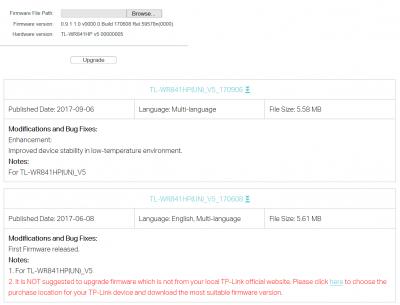
|
|
|
Mar 3 2018, 09:35 AM
|

Senior Member
1,345 posts Joined: Jun 2006
|
Hi all,
I am using c7 v2 with version 3.15.1 Build 160715 Rel.50549n. Realised my router have frequent disconnection & unable to connect again until I restart it. Anyone facing such problem and can diagnose the issue? Is it firmware problem? |
|
|
Mar 5 2018, 10:35 PM
|

Junior Member
601 posts Joined: May 2013
|
the ac1200 can support streamyx, unifi and 4g right???
|
|
|
Mar 6 2018, 08:03 AM
|
|
Senior Member
5,714 posts Joined: Mar 2007
|
QUOTE(PJng @ Mar 1 2018, 03:09 PM) just seaching throught router setting, Up to you, but just check firmware version and router version before updating.do i need update firmware?
QUOTE(crusher @ Mar 3 2018, 09:35 AM) Hi all, No problems like that when I was using it initially. Could be router overheating.I am using c7 v2 with version 3.15.1 Build 160715 Rel.50549n. Realised my router have frequent disconnection & unable to connect again until I restart it. Anyone facing such problem and can diagnose the issue? Is it firmware problem? QUOTE(Alert_RaZO @ Mar 5 2018, 10:35 PM) the ac1200 can support streamyx, unifi and 4g right??? No, it only supports Unifi. |
|
|
|
|
|
Mar 6 2018, 08:35 PM
Show posts by this member only | IPv6 | Post
#874
|

Junior Member
556 posts Joined: Feb 2008 From: PJ
|
My Archer C5 can't function properly after thunderstorm last weekend. The router is plugged into surge protector and is power off while others socket is in use. Astro KO.
Confirmed C5 adapter kong after I try using C1200 (by TM) power adapter to power up my C5. The router disconnected after few min usage and red light appeared. Called tplink support about my situation but I didn't mention is due to thunderstorm, Their support just ask me to bring all the whole set for them to check and he did mention that unsuitable power adapter will affect the functionality of the router due to the power output or something (im not pro at this power thingy). Can only visit them next week and I would like to know what's the support guy say is true? Anyhow I still need to get a new adapter because it's not cover by warranty, can I just get the 3rd party adapter with same power output instead buying from tplink if tplink adapter is overpriced? Thanks  |
|
|
Mar 7 2018, 11:48 AM
|
|
Newbie
7 posts Joined: Aug 2007
|
How old is your surge protector? Are you staying in landed property or apartment?
QUOTE(crixalisrox @ Mar 6 2018, 08:35 PM) My Archer C5 can't function properly after thunderstorm last weekend. The router is plugged into surge protector and is power off while others socket is in use. Astro KO. Thanks |
|
|
Mar 7 2018, 12:11 PM
|
|
Junior Member
556 posts Joined: Feb 2008 From: PJ
|
QUOTE(yuen3 @ Mar 7 2018, 11:48 AM) How old is your surge protector? Are you staying in landed property or apartment? About 3 years , landed |
|
|
Mar 7 2018, 01:57 PM
|
 
Elite
8,427 posts Joined: Jul 2008 
|
QUOTE(crixalisrox @ Mar 6 2018, 08:35 PM) My Archer C5 can't function properly after thunderstorm last weekend. The router is plugged into surge protector and is power off while others socket is in use. Astro KO. TP-Link is selling it for RM15.Confirmed C5 adapter kong after I try using C1200 (by TM) power adapter to power up my C5. The router disconnected after few min usage and red light appeared. Called tplink support about my situation but I didn't mention is due to thunderstorm, Their support just ask me to bring all the whole set for them to check and he did mention that unsuitable power adapter will affect the functionality of the router due to the power output or something (im not pro at this power thingy). Can only visit them next week and I would like to know what's the support guy say is true? Anyhow I still need to get a new adapter because it's not cover by warranty, can I just get the 3rd party adapter with same power output instead buying from tplink if tplink adapter is overpriced? Thanks Just bring to their Lowyat service center. |
|
|
Mar 8 2018, 12:55 AM
|

Senior Member
669 posts Joined: Sep 2015
|
Archer C1200 supplied by TM is not stable, can self reboot and disconnect at times.
I want to replace it with Archer C7 V4, May i know can I let it switch on 24/7 and will be stable, no reboot, no down time and no disconnection? |
|
|
Mar 8 2018, 01:30 AM
Show posts by this member only | IPv6 | Post
#879
|
|
Junior Member
556 posts Joined: Feb 2008 From: PJ
|
QUOTE(blacktubi @ Mar 7 2018, 01:57 PM) TP-Link is selling it for RM15. Thank you Just bring to their Lowyat service center.   |
|
|
Mar 8 2018, 11:53 AM
Show posts by this member only | IPv6 | Post
#880
|
|
Senior Member
1,197 posts Joined: Dec 2010
|
Any VDSL supported modem router similar or better performance then ADSL2+ Archer D7?.
Going switching from streamyx to unifi lite. |
| Change to: |  0.0175sec 0.0175sec
 0.33 0.33
 6 queries 6 queries
 GZIP Disabled GZIP Disabled
Time is now: 24th December 2025 - 03:01 AM |
 Quote
Quote