Outline ·
[ Standard ] ·
Linear+
TP-LINK Malaysia Official Thread, Technical Enquiries and Support
|
blacktubi
|
 May 26 2017, 04:10 PM May 26 2017, 04:10 PM
|
-


|
QUOTE(chengsiong @ May 26 2017, 12:10 PM) Dear TP Link, Why is Archer C2600 reahes EOL stage just after 1 year? While there is still bugs here and there, especially IPv6 on custom dns setting. You can download the latest firmware from the US site, it is still updated. The latest version is 170316. Flash at your own risk. http://www.tp-link.com/us/download/Archer-...0.html#Firmware |
|
|
|
|
|
blacktubi
|
May 29 2017, 11:30 AM
|
-
|
QUOTE(raynman @ May 29 2017, 08:42 AM) Okay, here goes.... I have a TP-Link TL-WR1043ND hardware version 3 with firmware 3.16.9  No matter what IPv6 settings I choose, I cannot get IPv6 to work on Unifi.  Please help. IINM, Native IPV6 is broken on that model. Try Tunnel 6to4, fill in the DNS manually and use RADVD for LAN assignment. |
|
|
|
|
|
blacktubi
|
May 29 2017, 07:44 PM
|
-
|
QUOTE(Swordylove @ May 29 2017, 01:09 PM) Hi. I bought a Cloud Camera model NC250 last year, and it has a problem of unstable connection. It frequently disconnects from the network. At first I thought maybe my router was not good enough and a bit too far. But ever since I use a new router this year, I'm more convinced that the camera is bad. The distance from my router is about 10 meters. My current router is TP-Link Archer C5. I don't think the problem is with the router, the distance or signal strength, because whenever it's connected, I see the signal strength is shown as full bars in the app, and around 90% in the web interface. My phone can also connect to my network just fine from the camera spot. So something is wrong with this camera. Please let me know how to claim warranty on it. Try using in on Ethernet and see if the same issue happen. My NC450 is pretty reliable after some wireless optimisation at a pretty congested area. I recommend using wireless 20Mhz on channel 1/6/11. |
|
|
|
|
|
blacktubi
|
Jun 4 2017, 02:58 PM
|
-
|
QUOTE(arrsoo @ Jun 2 2017, 10:57 AM) hi guys, need some help here, I'm using Archer C5 given by TM unifi. And my pc is connected to it with a TPLink T9e, while I dont hv any problem with the 2.4GHz signal which is always strong, the 5GHz signal is bad, only getting 1 bar signal most of the time. Is there anyway I can improved the 5G signal? The signal penetration of 5Ghz is weaker than 2.4Ghz. There's nothing you can do about it unfortunately, it is physics. Use 2.4Ghz for range and 5Ghz for performance. You can consider adding more access points. |
|
|
|
|
|
blacktubi
|
Jun 4 2017, 03:00 PM
|
-
|
QUOTE(phamtom X @ Jun 2 2017, 05:50 AM) » Click to show Spoiler - click again to hide... «
hi bingozero, i have changed the DNS to google dns as per your screen shot, but it randomly still block the website that I browse. Do I have to edit the IPV6 setting? Below is the screen shot of the IPV6 setting in the router. » Click to show Spoiler - click again to hide... «
[attachmentid=8867212]
Thank you for your time for helping me out. I suggest you to disable IPV6 as it may cause fallback issues on certain website currently. |
|
|
|
|
|
blacktubi
|
Jun 12 2017, 11:10 PM
|
-
|
|
|
|
|
|
|
blacktubi
|
Jun 29 2017, 12:50 PM
|
-
|
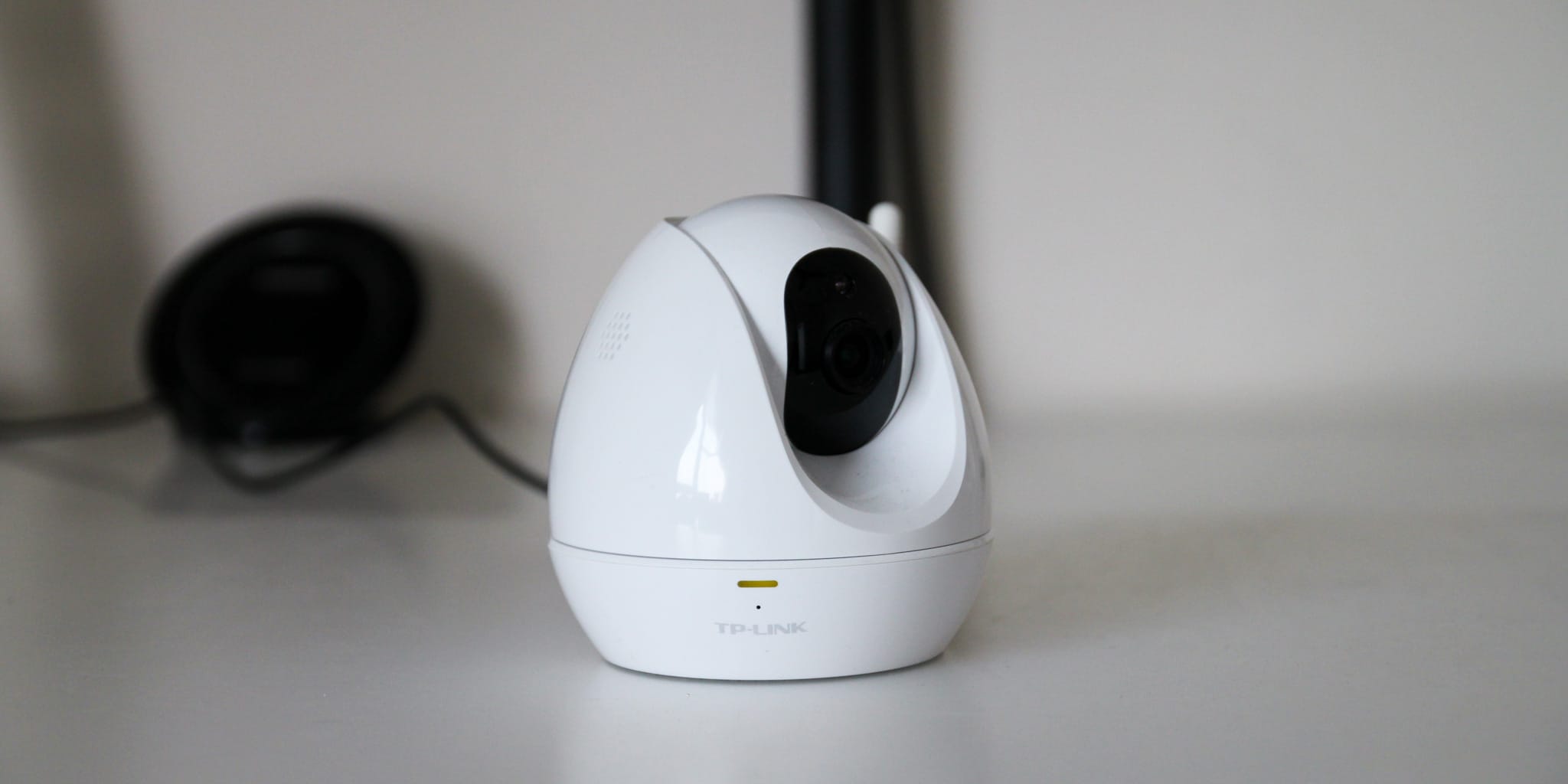 Got a chance to try TP-Link NC450 wireless network camera recently. It was great. I never expect the firmware and features to be so good. The image quality is great as well. Read my review of the camera here. |
|
|
|
|
|
blacktubi
|
Jun 30 2017, 10:22 PM
|
-
|
QUOTE(LolzWhat @ Jun 30 2017, 05:58 PM) Hmm.. I live in a double storey house. Should I get a extender/powerline then? Get a better router first then just decide on whether you need a powerline extender. In that case, C1200 is decent. If budget allows, consider the Archer C7. Use powerline extender whenever possible as the performance and stability is much better than a wireless repeater. |
|
|
|
|
|
blacktubi
|
Jul 3 2017, 12:02 PM
|
-
|
QUOTE(sheridankamal @ Jul 3 2017, 11:41 AM) Hi guys, need your advise. Recently i purchased the, 300Mbps AV500 Wi-Fi Powerline Extender Starter Kit (TL-WPA4220KIT). How do i test that my installation/pairing/sync have been successfully done? Thank you. Download the tpPLC app. It is able to show a lot of things including link speed. |
|
|
|
|
|
blacktubi
|
Jul 3 2017, 02:19 PM
|
-
|
QUOTE(theROCKeteer @ Jul 3 2017, 01:36 PM) Thanks. How to identify separate or three phase wiring? Check your power meter if you have 3 wires going through the meter. You can check your distribution box as well. If you have a 3 phase MCB then you are probably on 3 phase power supply. 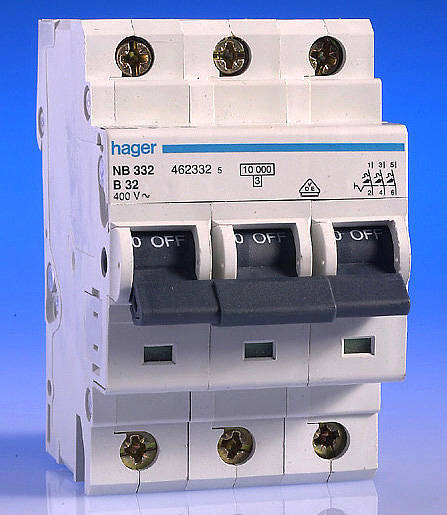 |
|
|
|
|
|
blacktubi
|
Jul 3 2017, 05:30 PM
|
-
|
QUOTE(theROCKeteer @ Jul 3 2017, 04:44 PM) I got only 1 wires going through. But my TV located in new section (after renovation) which it got new distribution box installed by wireman. Is that consider as separate line? Probably just extending from your current DB. Anyway, powerline is working even on my 3 phase power as they share the same neutral. Newer PLC works on 3 phase. This post has been edited by blacktubi: Jul 3 2017, 05:31 PM |
|
|
|
|
|
blacktubi
|
Jul 3 2017, 09:50 PM
|
-
|
QUOTE(Raymond T. @ Jul 3 2017, 09:39 PM) blacktubi how's the performance for C5400 ? Still considering which should i get C5400 or C3150 to replace my soon gonna faulty router. Anyway is there any recommendation TP-Link Switch ? C5400 is basically the C3150 with an extra 5Ghz band. Unless you really need the extra band, the C3150 is more than enough. Both have good signal reception. As for switch, there's not much difference in their dumb switch range. Just specs difference. Get at least a Gigabit switch and the number of ports you need. C3150 = 2167+1000 C5400 = 2167+2167+1000 |
|
|
|
|
|
blacktubi
|
Jul 3 2017, 10:19 PM
|
-
|
QUOTE(Raymond T. @ Jul 3 2017, 10:03 PM)  for term of wifi coverage, which one will your recommend ? The router will be at 2nd floor, while 1st floor currently using RE450. However, wifi signal sometimes seems unstable.  House radius around 12k sf. I recommend using a power line wireless extender as a wireless repeater need a good connection from the main router in order to rebroadcast it. Well, I do not notice a big difference in terms of coverage. Maybe the C5400 have slight an edge but it’s minimal. |
|
|
|
|
|
blacktubi
|
Jul 5 2017, 10:15 AM
|
-
|
QUOTE(sean810818 @ Jul 5 2017, 08:20 AM) Hi all, need help on my router. i just subscribe to TIME @ 100 mbps (staying at condo about 1000 sq ft) and i thinking to replace the router (D-Link DIR-850L) that TIME provide. below is the two model i thinking to buy. can recommend me a good one ? TP-Link Archer C3200 TP-LINK AC1900 TP-Link Archer C3150 in future i may upgrade my speed from 100mbps to 300 or 500 mbps and total 10 Device connect to internet like (phone,ps4 etc) thank you Archer C3150 is the fastest among the trio.  |
|
|
|
|
|
blacktubi
|
Jul 7 2017, 10:34 AM
|
-
|
QUOTE(theROCKeteer @ Jul 7 2017, 10:25 AM) I just bought TP-LINK TL-PA4010PKIT and plugged at my new section house. Unfortunately it fail. Just got around 1-2Mbps download speed from 50Mbps. Plugged at nearest wall from new section which is same line as modem, got almost full speed. haizz  Probably a different phase over there. Guess that's the only way you can do it, plugging it closest to your new extension. |
|
|
|
|
|
blacktubi
|
Jul 8 2017, 09:54 PM
|
-
|
QUOTE(Raymond T. @ Jul 8 2017, 09:34 PM) blacktubi What's the different between C3150 V1 & V2 ? I don't see a difference spec wise but I always go for the latest hardware since it will receive more updates. |
|
|
|
|
|
blacktubi
|
Jul 9 2017, 06:14 PM
|
-
|
QUOTE(noobandroid @ Jul 9 2017, 06:07 PM) is it possible to use 3 same model powerline in a house, single phased wirings Currently doing that. Totally possible. I don't even use the same model but they are all from TP-Link. Just add the additional powerline adapter using the tpPLC app. |
|
|
|
|
|
blacktubi
|
Jul 9 2017, 07:50 PM
|
-
|
QUOTE(noobandroid @ Jul 9 2017, 06:30 PM) but then powerline kit expensive oh, 3 of them too kik liao my plan is 1 pair for pc, extra pl for hypp tv Wait, you can't have 2 powerline network in a home I afraid. You can have multiple powerline adapters but they will be just 1 network. |
|
|
|
|
|
blacktubi
|
Jul 9 2017, 09:42 PM
|
-
|
QUOTE(noobandroid @ Jul 9 2017, 08:30 PM) so its either internet or hypptv? hmm, which suitable for hypptv bandwidth? Even AV500 is sufficient, HyppTV isn't that bandwidth hungry. |
|
|
|
|
|
blacktubi
|
Jul 13 2017, 04:54 PM
|
-
|
QUOTE(ajims @ Jul 13 2017, 09:11 AM) Please help I recently purchase Archer C3150 and can connect to Unifi fine. But I have this problem now browsing certain page it says '192.168.0.1 refused to connect'. I can't access the tp link router from the browser. But when I ping it works fine. I end up need to restart the router everyday. Any idea how to resolve?[attachmentid=8961906] Firmware version? Try reconfiguring the router. Do you change your DNS in the router? |
|
|
|
|



 Quote
Quote


 0.2756sec
 1.29
1.29
 7 queries
 GZIP Disabled