Outline ·
[ Standard ] ·
Linear+
TP-LINK Malaysia Official Thread, Technical Enquiries and Support
|
SilentVampire
|
 Mar 8 2018, 12:16 PM Mar 8 2018, 12:16 PM
|

|
QUOTE(josh5671 @ Mar 8 2018, 11:53 AM) Any VDSL supported modem router similar or better performance then ADSL2+ Archer D7?. Going switching from streamyx to unifi lite. Only two D-Link models now that support VDSL. The TP-Link models that support VDSL have not been released yet. |
|
|
|
|
|
josh5671
|
Mar 8 2018, 12:21 PM
|
|
|
I only seen vr600v and vr400v in the VDSL/ADSL listing. And both was coming soon. ( I will not buy these two, unless I going for downgraded lol)
Am I missing any thing?
Or any alternative?
|
|
|
|
|
|
SilentVampire
|
Mar 8 2018, 02:07 PM
|
|
|
QUOTE(josh5671 @ Mar 8 2018, 12:21 PM) I only seen vr600v and vr400v in the VDSL/ADSL listing. And both was coming soon. ( I will not buy these two, unless I going for downgraded lol) Am I missing any thing? Or any alternative? Yes, as I say D-Link. See here: 1) http://www.dlink.com.my/product/dsl-2877al...s-modem-router/2) http://www.dlink.com.my/product/ac1200-wir...bit-4-port-iad/I recommend you get the second one: https://www.lazada.com.my/products/d-link-a...148cDXQpSj&mp=1 |
|
|
|
|
|
josh5671
|
Mar 8 2018, 08:33 PM
|
|
|
QUOTE(SilentVampire @ Mar 8 2018, 02:07 PM) lol...I miss read it as TP-Link....... Or i should take a basic VDSL modem. then use D7 as router? |
|
|
|
|
|
SilentVampire
|
Mar 8 2018, 09:20 PM
|
|
|
QUOTE(josh5671 @ Mar 8 2018, 08:33 PM) lol...I miss read it as TP-Link....... Or i should take a basic VDSL modem. then use D7 as router? Up to you bro. You can do it if you think it is better. |
|
|
|
|
|
sean810818
|
Mar 9 2018, 10:41 AM
|
|
|
Hi all, i using TPLINK c3150 now. would like to ask this router can do below blocking ?
block browsing of facebook and youtube through mac address
i don't want to use the parent control function.
can guide me step by step to setup ? thank you
|
|
|
|
|
|
SilentVampire
|
Mar 9 2018, 11:09 AM
|
|
|
QUOTE(sean810818 @ Mar 9 2018, 10:41 AM) Hi all, i using TPLINK c3150 now. would like to ask this router can do below blocking ? block browsing of facebook and youtube through mac address i don't want to use the parent control function. can guide me step by step to setup ? thank you Hi bro, not possible to do that sorry using the C3150, unless you use the parental control function. You can only do that by using enterprise routers. |
|
|
|
|
|
sean810818
|
Mar 9 2018, 12:08 PM
|
|
|
QUOTE(SilentVampire @ Mar 9 2018, 11:09 AM) Hi bro, not possible to do that sorry using the C3150, unless you use the parental control function. You can only do that by using enterprise routers. Hi, thank you very much. tonight will set the parental control function. thanks and appreciate. |
|
|
|
|
|
SilentVampire
|
Mar 9 2018, 12:22 PM
|
|
|
QUOTE(sean810818 @ Mar 9 2018, 12:08 PM) Hi, thank you very much. tonight will set the parental control function. thanks and appreciate. No worries bro. Parental control function should be sufficient. |
|
|
|
|
|
Jjuggler
|
Mar 9 2018, 12:33 PM
|
|
|
Dear tplink, I would like to question on, who is the responsible person to pass the c3150 router? How come, a router which considered a high end router for tplink brand doesn't come with cpu load and memory usage graph? I am currently testing this router and I would like to know the answer for my question from any of your representative. Thanks.
|
|
|
|
|
|
SilentVampire
|
Mar 9 2018, 12:36 PM
|
|
|
QUOTE(Jjuggler @ Mar 9 2018, 12:33 PM) Dear tplink, I would like to question on, who is the responsible person to pass the c3150 router? How come, a router which considered a high end router for tplink brand doesn't come with cpu load and memory usage graph? I am currently testing this router and I would like to know the answer for my question from any of your representative. Thanks. Great question bro, but I don’t think TP Link will answer the question unfortunately. Better to email them directly: https://www.tp-link.com/my/support-contact....Hotline-Support |
|
|
|
|
|
Jjuggler
|
Mar 9 2018, 01:25 PM
|
|
|
QUOTE(SilentVampire @ Mar 9 2018, 12:36 PM) Great question bro, but I don’t think TP Link will answer the question unfortunately. Better to email them directly: https://www.tp-link.com/my/support-contact....Hotline-Supporta good customer representative will always answer the questions no matter in which platforms we are using bro. That's how you always keep customer's loyalty to buy your product. |
|
|
|
|
|
sixshot
|
Mar 12 2018, 12:14 PM
|
|
|
im using wireless. whats the best wireless usb adapter for unifi?
came across tplink t4u. anyone using it? how's the performance?
|
|
|
|
|
|
GYren
|
Mar 14 2018, 08:56 AM
|
New Member

|
Anyone here having problem with no connection to HyppTV? It was fine after Archer C60 setup, can watch without lagging... but when i switch on HyppTV next day, it show no connection but internet is work fine, LAN and Wifi! So i decided to restart all devices and try again, HyppTV still no connection. Then I go into router setting, IPTV was enabled and chooses Malaysia-Unifi mode and IGMP is V3. Restart all devices again, and IT WORKS! Same problem is occurring again and again, anyone know what's wrong and any solution to fix this?  The internet speed is definitely stable and faaster than using the TM's router but this HyppTV problem giving me headache...  This post has been edited by GYren: Mar 14 2018, 08:56 AM This post has been edited by GYren: Mar 14 2018, 08:56 AM
|
|
|
|
|
|
Alex9182
|
Mar 14 2018, 05:05 PM
|
|
|
New TP-Link Archer C7 user here, How do i set speed limit on Guest Network Wifi connection? can not find any where to set that. Please help. This post has been edited by Alex9182: Mar 16 2018, 09:26 PM Attached thumbnail(s)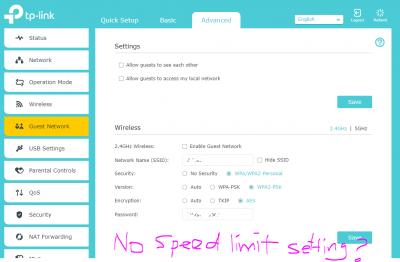
|
|
|
|
|
|
Alex9182
|
Mar 17 2018, 08:11 PM
|
|
|
TP-Link "Official" thread but TP-Link no one around to help.  |
|
|
|
|
|
SilentVampire
|
Mar 17 2018, 09:17 PM
|
|
|
QUOTE(Alex9182 @ Mar 17 2018, 08:11 PM) TP-Link "Official" thread but TP-Link no one around to help. Bro, there’s no speed limit setting for TP-Link routers, even for Asus routers. |
|
|
|
|
|
Alex9182
|
Mar 18 2018, 09:43 AM
|
|
|
QUOTE(SilentVampire @ Mar 17 2018, 09:17 PM) Bro, there’s no speed limit setting for TP-Link routers, even for Asus routers. Oh, ok. Tq bro. |
|
|
|
|
|
soonwai
|
Mar 18 2018, 10:59 AM
|
|
|
QUOTE(SilentVampire @ Mar 17 2018, 09:17 PM) Bro, there’s no speed limit setting for TP-Link routers, even for Asus routers. I've only used these 2 models. C5 has speed limiting, C1200 doesn't. |
|
|
|
|
|
Alex9182
|
Mar 18 2018, 04:49 PM
|
|
|
QUOTE(soonwai @ Mar 18 2018, 10:59 AM) Alex9182I've only used these 2 models. C5 has speed limiting, C1200 doesn't. my previous TP-Link ADSL router also has speed limiting. |
|
|
|
|



 Quote
Quote


 0.0228sec
 0.81
0.81
 6 queries
 GZIP Disabled