Welcome Guest ( Log In | Register )

249 Pages « < 201 202 203 204 205 > » Bottom

Outline · [ Standard ] · Linear+

 TP-LINK Malaysia Official Thread, Technical Enquiries and Support

views
     
sadlyfalways
post Jan 28 2022, 04:23 AM

Regular
******
Senior Member
1,187 posts

Joined: Nov 2020
Hello guys, I’m using deco x90 and recently I’m noticing high ping on Wi-Fi at certain times

I thought it is Unifi problem, but it is also affecting intranet things. My airplay on my iPhone to Apple TV is very laggy, and my songs I play through airplay 2 on my Sonos keep dropping out and have few seconds lag until it disconnects by itself

When I do Speedtest ping seems high, but speed is still above 300mbps

Anyone else having similar issues? Any fixes available besides constantly needing to reset the router ? If I reset phone problem doesn’t go away. Only router

I tried network optimisation on deco app also no difference
+Mie1+
post Jan 28 2022, 10:22 AM

New Member
*
Newbie
34 posts

Joined: Aug 2017
QUOTE(+Mie1+ @ Oct 26 2021, 10:14 PM)
I am bumping up this issue.

Has a new stable firmware been issued for Deco M4?

Equipment:
3-pack DECO M4R (US) Ver. 2.0
Firmware upgraded to: 1.5.0 Build 20210511 Rel. 34580
Date purchased: 6th June 2021
*
For more than a month now I have upgraded the firmware of my Deco M4 to the following:

M4R 2.0_1.5.2 Build 20210916 Rel. 56193

Tested the wifi speed and speed was fast and stable, not like before.
None of my vocal network users has complained about speed issues like before.
So I have pensioned off my old TM router ever since.
dickybird
post Jan 30 2022, 02:49 PM

Look at all my stars!!
*******
Senior Member
2,093 posts

Joined: Apr 2005
Can the new digi home fibre support Tp link CCTV?
Specifically the NC450 model.

This post has been edited by dickybird: Jan 30 2022, 02:52 PM
Alpha_Tay
post Jan 31 2022, 09:22 AM

Beware The Spammer Star!
******
Senior Member
1,725 posts

Joined: Jan 2003
ax20v1-up-ver1-3-5-P1[20211231-rel53949]_nosign_2021-12-31_15.01.16.bin

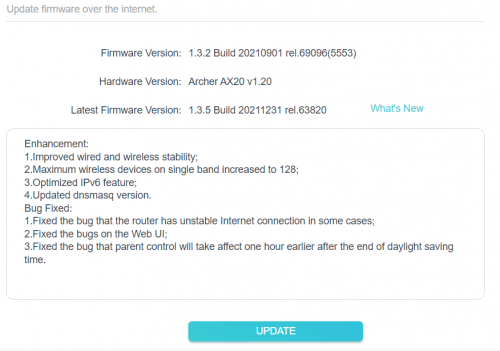
ax20v1.20-up-ver1-3-5-P1[20211231-rel63820]_nosign_2021-12-31_17.50.16.bin

Hardware Version:
Archer AX20 v1.20

Latest Firmware Version:
1.3.5 Build 20211231 rel.63820

Enhancement:

1.Improved wired and wireless stability;

2.Maximum wireless devices on single band increased to 128;

3.Optimized IPv6 feature;

4.Updated dnsmasq version.

Bug Fixed:

1.Fixed the bug that the router has unstable Internet connection in some cases;

2.Fixed the bugs on the Web UI;

3.Fixed the bug that parent control will take affect one hour earlier after the end of daylight saving time.
PJng
post Feb 1 2022, 07:55 PM

10k Club
********
All Stars
12,064 posts

Joined: Oct 2017


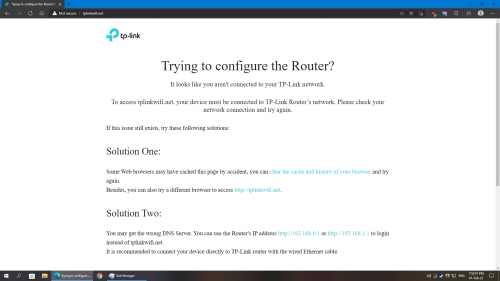
since change to ax20, about 6 to 8 out of 10 time when i enter 192.168.0.1 will error, and auto change to address show on screenshot
i need enter again address 192.168.0.1, what caused?

user posted image

edit, got new update

user posted image

This post has been edited by PJng: Feb 1 2022, 07:56 PM
Scissorshand
post Feb 2 2022, 11:49 PM

Regular
******
Senior Member
1,691 posts

Joined: Nov 2008
QUOTE(PJng @ Feb 1 2022, 07:55 PM)
since change to ax20, about 6 to 8 out of 10 time when i enter 192.168.0.1 will error, and auto change to address show on screenshot
i need enter again address 192.168.0.1, what caused?

user posted image

edit, got new update

user posted image
*
I've no issue logging fro window 7 laptop. Thanks BTW for the heads up on the new firmware
dickybird
post Feb 3 2022, 01:13 AM

Look at all my stars!!
*******
Senior Member
2,093 posts

Joined: Apr 2005
Is the NC450 cctv camera compatible with Digi home fibre broadband?
SilentVampire
post Feb 3 2022, 09:49 AM

Networking Enthusiast
*******
Senior Member
5,714 posts

Joined: Mar 2007


QUOTE(dickybird @ Feb 3 2022, 01:13 AM)
Is the NC450 cctv camera compatible with Digi home fibre broadband?
*
Should be okay, but Digi home fibre broadband only gave private IP. That’s something to keep in mind. You don’t need to port forward or anything though.
dickybird
post Feb 3 2022, 10:12 AM

Look at all my stars!!
*******
Senior Member
2,093 posts

Joined: Apr 2005
QUOTE(SilentVampire @ Feb 3 2022, 09:49 AM)
Should be okay, but Digi home fibre broadband only gave private IP. That’s something to keep in mind. You don’t need to port forward or anything though.
*
Thanks for the reply.
Yeah, just need to be able to see the video from the cctv from the app on the smartphone.
Hardly jacksparrow nowadays so I guess no port forwarding is not an issue.
blacktubi
post Feb 3 2022, 03:36 PM

-
Group Icon
Elite
8,430 posts

Joined: Jul 2008

QUOTE(dickybird @ Feb 3 2022, 01:13 AM)
Is the NC450 cctv camera compatible with Digi home fibre broadband?
*
IINM NC450 need public IP to work. It is TP-Link's older series that don't support cloud yet.
slackinux
post Feb 11 2022, 10:02 AM

Casual
***
Junior Member
407 posts

Joined: Dec 2008
Hi Tplink Malaysia,

My WiFi 6 Dell laptop having Tx/Rx 2x2 with 160Mhz on 5Ghz. I am wondering if I purchase Router with Tx/Rx 4x4, would it be wasted since my WiFi adapter not fully utilize Tx/Rx 4x4 ?
nikaizad
post Feb 11 2022, 05:56 PM

Carl Jung Enthusiast
****
Senior Member
610 posts

Joined: Jun 2010
From: Tabung Simpanan Najib
I just bought an AX72 uni, but this unit cannot change wireless channel?? why. I didn't expect this router to have limited settings, AX73 can change when i searched online
blacktubi
post Feb 11 2022, 08:33 PM

-
Group Icon
Elite
8,430 posts

Joined: Jul 2008

QUOTE(nikaizad @ Feb 11 2022, 05:56 PM)
I just bought an AX72 uni, but this unit cannot change wireless channel?? why. I didn't expect this router to have limited settings, AX73 can change when i searched online
*
You can change WiFi channel manually if you disable smart connect function.
nikaizad
post Feb 11 2022, 09:18 PM

Carl Jung Enthusiast
****
Senior Member
610 posts

Joined: Jun 2010
From: Tabung Simpanan Najib
QUOTE(blacktubi @ Feb 11 2022, 08:33 PM)
You can change WiFi channel manually if you disable smart connect function.
*
ahh, i see. but if i turn it off it won't roam to 2.4g when im out of range of 5ghz. oh well
blacktubi
post Feb 12 2022, 01:42 AM

-
Group Icon
Elite
8,430 posts

Joined: Jul 2008

QUOTE(nikaizad @ Feb 11 2022, 09:18 PM)
ahh, i see. but if i turn it off it won't roam to 2.4g when im out of range of 5ghz. oh well
*
Don't bother with changing WiFi channels, router is smart enough to make that decision for you.

Most of the time it doesn't matter these days.

Attached Image

For example, choosing between channel 36 to channel 48 actually occupy the same exact frequency on 80Mhz mode. Changing anything within them wouldn't make any difference.
sixshot
post Feb 12 2022, 03:14 PM

Casual
***
Junior Member
464 posts

Joined: Apr 2010
From: Des Plaines


Can anyone recommend me best bang for buck router. Using 300mbs unifi.

The new router called fibrehome tm provide is complete trash. Can get 300mbs 5g wifi if i close to router, but when i go to my room, speed drop to 10-15mbps. The wifi range is terrible.
FusionXY
post Feb 12 2022, 04:34 PM

LAZZIE ON VACATION
*******
Senior Member
3,836 posts

Joined: Aug 2016

QUOTE(sixshot @ Feb 12 2022, 03:14 PM)
Can anyone recommend me best bang for buck router. Using 300mbs unifi.

The new router called fibrehome tm provide is complete trash. Can get 300mbs 5g wifi if i close to router, but when i go to my room, speed drop to 10-15mbps. The wifi range is terrible.
*
Budget and house size?
sixshot
post Feb 12 2022, 04:39 PM

Casual
***
Junior Member
464 posts

Joined: Apr 2010
From: Des Plaines


QUOTE(FusionXY @ Feb 12 2022, 04:34 PM)
Budget and house size?
*
around 300-400. live in condo.
PRSXFENG
post Feb 12 2022, 07:34 PM

Look at all my stars!!
*******
Senior Member
2,616 posts

Joined: Nov 2020


QUOTE(sixshot @ Feb 12 2022, 03:14 PM)
Can anyone recommend me best bang for buck router. Using 300mbs unifi.

The new router called fibrehome tm provide is complete trash. Can get 300mbs 5g wifi if i close to router, but when i go to my room, speed drop to 10-15mbps. The wifi range is terrible.
*
Can consider TP-Link AX10/20 during sales (around RM200)
Or Asus but more premium
QuantumEdge
post Feb 12 2022, 07:40 PM

Regular
******
Senior Member
1,603 posts

Joined: Jan 2016


QUOTE(sixshot @ Feb 12 2022, 03:14 PM)
Can anyone recommend me best bang for buck router. Using 300mbs unifi.

The new router called fibrehome tm provide is complete trash. Can get 300mbs 5g wifi if i close to router, but when i go to my room, speed drop to 10-15mbps. The wifi range is terrible.
*
AX20/10 good enough, avoid AX50


249 Pages « < 201 202 203 204 205 > » Top
 

Change to:
| Lo-Fi Version
0.0238sec    1.06    6 queries    GZIP Disabled
Time is now: 24th December 2025 - 09:42 PM