

QUOTE(QuantumEdge @ Feb 12 2022, 07:40 PM)
AX20/10 good enough, avoid AX50

I saw new model ax55? I google and found out ax50 got heating issue.But new model seems ok?
TP-LINK Malaysia Official Thread, Technical Enquiries and Support
|
|
 Feb 12 2022, 08:16 PM Feb 12 2022, 08:16 PM
|
 
Junior Member
464 posts Joined: Apr 2010 From: Des Plaines  
|
QUOTE(QuantumEdge @ Feb 12 2022, 07:40 PM) AX20/10 good enough, avoid AX50 I saw new model ax55? I google and found out ax50 got heating issue.But new model seems ok? |
|
|
|
|
|
Feb 12 2022, 08:42 PM
Show posts by this member only | IPv6 | Post
#4062
|

Senior Member
610 posts Joined: Jun 2010 From: Tabung Simpanan Najib
|
QUOTE(sixshot @ Feb 12 2022, 08:16 PM) I saw new model ax55? I google and found out ax50 got heating issue. if you can get the AX55 at RM299 then its a good deal. same proc as AX72, only two less antenna. save 100 bucks. recomendedBut new model seems ok? |
|
|
Feb 12 2022, 09:32 PM
|
 
Elite
8,423 posts Joined: Jul 2008 
|
QUOTE(nikaizad @ Feb 12 2022, 08:42 PM) if you can get the AX55 at RM299 then its a good deal. same proc as AX72, only two less antenna. save 100 bucks. recomended Same proc but different 5Ghz radio.Very big difference in performance in my test. I will suggest spending the RM100 extra instead.  |
|
|
Feb 12 2022, 09:41 PM
Show posts by this member only | IPv6 | Post
#4064
|

All Stars
65,367 posts Joined: Jan 2003
|
QUOTE(blacktubi @ Feb 12 2022, 09:32 PM) Same proc but different 5Ghz radio. i was also confused with ax55 vs ax72 Very big difference in performance in my test. I will suggest spending the RM100 extra instead.  (even after read your reviews (even after read your reviews  ) )seems like almost comparable, but am sure ax72 has some advantage over ax55 (in terms of wifi performance) |
|
|
Feb 13 2022, 01:07 PM
|

Junior Member
407 posts Joined: Dec 2008
|
QUOTE(blacktubi @ Feb 12 2022, 09:32 PM) Same proc but different 5Ghz radio. AX50 and AX55 are having same 5Ghz radio with HE160 Mhz.Very big difference in performance in my test. I will suggest spending the RM100 extra instead. Below foot note are copied from Tplink web site. Note: HE160 requires client device that supports 160 MHz bandwidth on Wi-Fi. △802.11ax 2x2 160 MHz enables 2402 Mbps maximum theoretical data rates, 3X faster than standard 802.11ac 2x2 80 MHz (867 Mbps) and nearly 6x faster than baseline 1x1ac (433 Mbps) Wi-Fi as documented in IEEE 802.11 wireless standard specifications, and require the use of similarly configured 802.11ax wireless network routers. Note : The 160 MHz bandwidth may be unavailable in the 5 GHz band in some regions/countries due to regulatory restrictions. If you compare AX20 and AX55, AX20 having a Broadcom Quadcore CPU whereas AX55 having a Qualcomm Dualcore CPU (Not stated in Tplink website. In the website, it mentioned High Performance CPU only). Another different could be the RAM size, which is not mentioned in AX20 but it is stated as 512 in AX55. AX20 5Ghz radio bandwidth up to 80Mhz but AX55 5Ghz radio bandwidth up to 160 Mhz. I am wondering if 160Mhz bandwidth really usable in Malaysia? Or it is just a marketing tricks? If speed test on 80Mhz, by right both AX20 and AX55 should get almost the same speed. However, blacktubi test result produce a gap of 50 mbps between AX20 and AX55. Anyone knows why ? 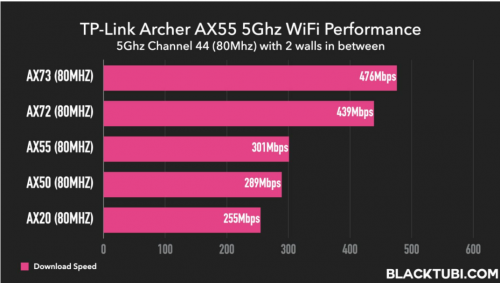 |
|
|
Feb 13 2022, 04:00 PM
|
|
Elite
8,423 posts Joined: Jul 2008
|
QUOTE(slackinux @ Feb 13 2022, 01:07 PM) AX50 and AX55 are having same 5Ghz radio with HE160 Mhz. AX55 and AX50 being the same specs doesn't mean they have the same radio RF design. WiFi performance depends the radio chipset, signal circuitry, antenna array and whatever software that drive the radio circuity.Below foot note are copied from Tplink web site. Note: HE160 requires client device that supports 160 MHz bandwidth on Wi-Fi. △802.11ax 2x2 160 MHz enables 2402 Mbps maximum theoretical data rates, 3X faster than standard 802.11ac 2x2 80 MHz (867 Mbps) and nearly 6x faster than baseline 1x1ac (433 Mbps) Wi-Fi as documented in IEEE 802.11 wireless standard specifications, and require the use of similarly configured 802.11ax wireless network routers. Note : The 160 MHz bandwidth may be unavailable in the 5 GHz band in some regions/countries due to regulatory restrictions. If you compare AX20 and AX55, AX20 having a Broadcom Quadcore CPU whereas AX55 having a Qualcomm Dualcore CPU (Not stated in Tplink website. In the website, it mentioned High Performance CPU only). Another different could be the RAM size, which is not mentioned in AX20 but it is stated as 512 in AX55. AX20 5Ghz radio bandwidth up to 80Mhz but AX55 5Ghz radio bandwidth up to 160 Mhz. I am wondering if 160Mhz bandwidth really usable in Malaysia? Or it is just a marketing tricks? If speed test on 80Mhz, by right both AX20 and AX55 should get almost the same speed. However, blacktubi test result produce a gap of 50 mbps between AX20 and AX55. Anyone knows why ? As for the AX20 and AX55 SoC, the dual-core IPQ0518 on the AX55 is actually marginally faster than the quad-core BCM6755 on the AX20. The former is based on ARM A53 architecture while the latter is based on ARM A7 architecture. Not to mention that IPQ0518 is on a more modern 14nm node versus 28nm on the BCM6755. It will result in lower heat and better power efficiency. Yes, 160Mhz is allowed by MCMC and it is not a gimmick. It will provide a faster speed on supported devices at an expense of compatibility issue with ancient devices. Ching Aik liked this post
|
|
|
|
|
|
Feb 13 2022, 05:32 PM
|
|
Junior Member
407 posts Joined: Dec 2008
|
QUOTE(nikaizad @ Feb 12 2022, 08:42 PM) if you can get the AX55 at RM299 then its a good deal. same proc as AX72, only two less antenna. save 100 bucks. recomended AX72 is 4x4 MU-MIMO router. AX72 having 6 antenna, i.e., 2 antenna for 2.4Ghz and 4 antenna for 5Ghz radio AX55 is 2x2 MU-MIMO router. AX55 having 4 antenna, i.e., 2 antenna for 2.4Ghz and 2 antenna for 5Ghz radio 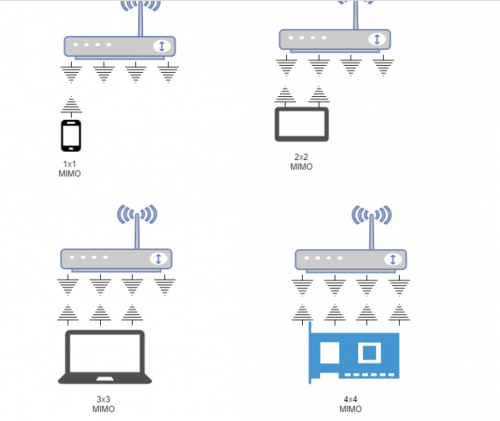 This diagram explains 4x4 Router that is connected to device with 1x1, 2x2, 3x3 and 4x4 MIMO. Only device with 4x4 MIMO able to fully utilize the benefit of 4x4 Router. Most of the devices in the market having 2x2 nowaday. Only super high end expensive device having 4x4 MIMO. 1. you can connect and simultaneously transfer data to 4 smartphones with 1x1 MIMO 2. you can connect and simultaneously transfer data to 2 tablets with 2x2 MIMO 3. you can connect and simultaneously transfer data to only 1 laptop with 3x3 MIMO and 1 smartphone with 1x1 MIMO 4. you can connect and simultaneously transfer data to only 1 laptop with 4x4 MIMO Ching Aik liked this post
|
|
|
Feb 14 2022, 08:32 AM
Show posts by this member only | IPv6 | Post
#4068
|
|
Senior Member
610 posts Joined: Jun 2010 From: Tabung Simpanan Najib
|
QUOTE(blacktubi @ Feb 12 2022, 09:32 PM) Same proc but different 5Ghz radio. yea but his house is a smaller unit, single floor condo. Very big difference in performance in my test. I will suggest spending the RM100 extra instead.  |
|
|
Feb 14 2022, 03:33 PM
Show posts by this member only | IPv6 | Post
#4069
|
|
Junior Member
464 posts Joined: Apr 2010 From: Des Plaines
|
After much consideration,i just settled with ax20. Got it for RM150.
Living room, max wifi speed at 300mbps on 5ghz connection as per subscribed package. In my room seperated by a wall, got around 250-280 mbps if i use phone. On pc, using archer t9uh, i got around 150mbps. Any way to improve connection on pc? Got any better wifi usb other then t9uh? |
|
|
Feb 14 2022, 05:37 PM
|
|
Junior Member
407 posts Joined: Dec 2008
|
QUOTE(sixshot @ Feb 14 2022, 03:33 PM) After much consideration,i just settled with ax20. Got it for RM150. WiFi 6 usb adapter from Tp-link coming soon Living room, max wifi speed at 300mbps on 5ghz connection as per subscribed package. In my room seperated by a wall, got around 250-280 mbps if i use phone. On pc, using archer t9uh, i got around 150mbps. Any way to improve connection on pc? Got any better wifi usb other then t9uh? https://www.tp-link.com/my/home-networking/.../archer-tx20uh/ Alpha_Tay liked this post
|
|
|
Feb 15 2022, 05:49 AM
Show posts by this member only | IPv6 | Post
#4071
|

Senior Member
1,779 posts Joined: Jan 2003
|
hi guy,
anyone using TPLINK AX73 how the router so far? Thanks |
|
|
Feb 15 2022, 07:56 AM
|

Junior Member
431 posts Joined: Sep 2015 From: Shah Alam
|
QUOTE(squall_12 @ Feb 15 2022, 05:49 AM) hi guy, Using one year no issue at allanyone using TPLINK AX73 how the router so far? Thanks |
|
|
Feb 15 2022, 07:51 PM
Show posts by this member only | IPv6 | Post
#4073
|
|
Senior Member
1,779 posts Joined: Jan 2003
|
QUOTE(sonicmaster @ Feb 15 2022, 07:56 AM) Using one year no issue at all any overheat issue if 24h no power off? Also how the wifi connection for 2g and 5g?Thanks |
|
|
|
|
|
Feb 19 2022, 09:30 AM
|

Junior Member
216 posts Joined: Dec 2019
|
My currently setup
Modem(BTU) - Router(AX50) -(Dynamic ip) Mesh(M4) Or should i connect my M4 as Access point? Rather than Router Share ur setup please |
|
|
Feb 19 2022, 10:54 AM
|

All Stars
15,192 posts Joined: Oct 2004
|
I have brand new TPLink Powerline 8010P for sale. Anyone is interested?
|
|
|
Feb 19 2022, 12:59 PM
|
|
Elite
8,423 posts Joined: Jul 2008
|
QUOTE(Dylnyat @ Feb 19 2022, 09:30 AM) My currently setup Remove the AX50 and use the Deco M4 directly to the modem with PPPOE mode is the best bet.Modem(BTU) - Router(AX50) -(Dynamic ip) Mesh(M4) Or should i connect my M4 as Access point? Rather than Router Share ur setup please |
|
|
Feb 20 2022, 09:38 AM
Show posts by this member only | IPv6 | Post
#4077
|
|
Junior Member
216 posts Joined: Dec 2019
|
QUOTE(blacktubi @ Feb 19 2022, 12:59 PM) Remove the AX50 and use the Deco M4 directly to the modem with PPPOE mode is the best bet. I have done that b4, but M4 limited Lan port unless i buy lan switch |
|
|
Feb 22 2022, 03:51 AM
|
|
Senior Member
1,185 posts Joined: Nov 2020
|
Hi guys, I’m not sure if my deco is the problem, but yesterday the whole day I’m noticing issues with my internet.
I’m using deco x90 for almost a year. So far no issues except starting yesterday My connection to my Sonos speaker keeps dropping, even when it is connected by Ethernet. I don’t know if it is Sonos connection dropping or the router is not letting my phone discover it on the Wi-Fi. This kept happening a few times, connect disconnect even after reset. I gave up after a while Secondly, just now my phone disconnected from the Wi-Fi for a few seconds and connected back. This happened when I was literal inches from the deco node, being stationary where I always am in bed. This connection drop has never happened before when being stationary or even when moving about different nodes in my house My phone is on iOS 15.3.1 btw, private relay and limit IP address tracking are disabled Anyone else noticing an increase in unknown dropped connections? Anyway to fix this sudden issue? |
|
|
Feb 22 2022, 12:30 PM
|
|
All Stars
15,192 posts Joined: Oct 2004
|
It is so sad to note and realise that TPLink powerline is not ideal at all and don't buy it. It is just waste of your money as it has misleading and hided information until you have bought it.
|
|
|
Feb 22 2022, 02:10 PM
|

Junior Member
369 posts Joined: Sep 2004 From: Kajang
|
QUOTE(jack2 @ Feb 22 2022, 12:30 PM) It is so sad to note and realise that TPLink powerline is not ideal at all and don't buy it. It is just waste of your money as it has misleading and hided information until you have bought it. care to share what not ideal is and the misleading and hided information that you found? |
| Change to: |  0.0312sec 0.0312sec
 0.30 0.30
 6 queries 6 queries
 GZIP Disabled GZIP Disabled
Time is now: 22nd December 2025 - 08:36 PM |
 Quote
Quote