

Thought of getting an AC1200 in garage to replace asus rtn12hp which is currently used a repeater.
Can i setup vpn on AC1200 (repeater)?
TP-LINK Malaysia Official Thread, Technical Enquiries and Support
TP-LINK Malaysia Official Thread, Technical Enquiries and Support
|
|
 Jul 2 2019, 01:57 PM Jul 2 2019, 01:57 PM
Return to original view | Post
#1
|
 
Senior Member
1,691 posts Joined: Nov 2008 
|
Thought of getting an AC1200 in garage to replace asus rtn12hp which is currently used a repeater.
Can i setup vpn on AC1200 (repeater)? |
|
|
|
|
|
Apr 18 2021, 10:49 PM
Return to original view | Post
#2
|
|
Senior Member
1,691 posts Joined: Nov 2008
|
QUOTE(HariszKilz @ Apr 18 2021, 05:03 PM) Guys. I want to ask. Between AX20 and AX50, which one is much more better in terms of stability and speed for 100Mbps ? I'm thinking of changing my router since this AC1200 provided by TM keeps restarting on it's own and internet keeps dying even though I already make a good airflow from below. I heard that AX50 heats up pretty fast because of the Intel chipset. Anybody can confirm this or have any other suggestions ? Not sure which model TM gave you but my Dlink DIR842 is working well except the coverage is not suffice for my crib and I need to maximise my speed QUOTE(aniq8676 @ Apr 18 2021, 06:04 PM) Both are great in terms of speed and stability. For me the AX20 is enough. AX50 has a overheating issue but not sure if this issue has been resolved or not on the firmware update May i know how big is your house and if you are only using Ax20 without any AP or repeater? QUOTE(blacktubi @ Apr 18 2021, 06:26 PM) AX20 or AX73 Bought AX20 yesterday after weeks of reading incl your blog and consideration over X20. Hope it'll not disappoint 🤔Skip AX50 and AX10 QUOTE(HariszKilz @ Apr 18 2021, 09:13 PM) Thanks for the suggestion guys. Just bought AX20 just now because it was on sale. Nice timing tbh. Me too just yesterday per below priceThis post has been edited by Scissorshand: Apr 18 2021, 10:50 PM Attached thumbnail(s) 
|
|
|
Apr 21 2021, 09:58 AM
Return to original view | Post
#3
|
|
Senior Member
1,691 posts Joined: Nov 2008
|
Guys new AX20 setup problem seeking guidance
Unifi credentials works on old dir842 then input the same on new router but unable to connect. What an I doing wrong since this should be a walk in the park..😅 Attached thumbnail(s) 


|
|
|
Apr 21 2021, 10:20 AM
Return to original view | Post
#4
|
|
Senior Member
1,691 posts Joined: Nov 2008
|
QUOTE(SilentVampire @ Apr 21 2021, 10:10 AM) You sure you have the correct PPPoE username and password configured? Dead sure cos I tested new pwd on old router before trying on new ax20...UPDATE: issue resolved by resetting the new router and start all over again. Awesome coverage even without the repeater now and improved speed too This post has been edited by Scissorshand: Apr 21 2021, 11:45 PM |
|
|
Apr 22 2021, 10:34 PM
Return to original view | Post
#5
|
|
Senior Member
1,691 posts Joined: Nov 2008
|
Guys..
On AX20 currently all devices has no issues with connection except my office laptop thinkpad which is unable to detect the WiFi. I've tried creating Guest WiFi on 2.4 but it is still not detecting. I've no issue with previous old router... What should I check? My interim solution was setting up asus rtn12hp as repeater just for this laptop to connect. The Unifi dlink DIR842 can't be used as repeater unfortunately This post has been edited by Scissorshand: Apr 22 2021, 10:36 PM |
|
|
Apr 23 2021, 12:48 AM
Return to original view | Post
#6
|
|
Senior Member
1,691 posts Joined: Nov 2008
|
QUOTE(blacktubi @ Apr 22 2021, 11:35 PM) Update the driver of the WiFi adapter on the laptop if that’s possible. WiFi adapter on laptop is latest so I've to figure out how to turn off WiFi 6 then.... Hmm🤔🤔🤔If that’s not an option, disable WiFi 6 on the router and that shall fix it. Need to consider to stick with repeater or turn off 6? |
|
|
|
|
|
Jul 20 2021, 10:18 PM
Return to original view | Post
#7
|
|
Senior Member
1,691 posts Joined: Nov 2008
|
QUOTE(MrGuGuZai @ Jul 19 2021, 07:44 PM) after searching on many forum and community i found out that this is common issue for this model, many people actually also facing same problem as me, many duplicate topic about the same issue found in tp link community and other forum, tp link CS are the most stupid in the world, they will keep guide you to non related setting to troubleshoot which is waste of time, i think tp link knew that this ax20 had hardware design problem since many ppl reported the same issue, but they wont care, when no more solution they will just blame your isp. I beg to differ on your opinion. Have been using AX20 for the last few months and it's been nuttin but great and exceeded my expectations. I have not experience any disconnection so far except while I was fiddling with the channels and band to get the best sweet spot for my crib. Setting were straight up from Blacktubi blog fro day 1. WiFi connection is even at the front porch of my superlink crib while the router is placed on upper living floori returned mine to lazada and refunded, bought asus ax55, all good, no disconnect no hang no hassel. avoid tp link at all cost. |
|
|
Feb 2 2022, 11:49 PM
Return to original view | Post
#8
|
|
Senior Member
1,691 posts Joined: Nov 2008
|
QUOTE(PJng @ Feb 1 2022, 07:55 PM) since change to ax20, about 6 to 8 out of 10 time when i enter 192.168.0.1 will error, and auto change to address show on screenshot I've no issue logging fro window 7 laptop. Thanks BTW for the heads up on the new firmwarei need enter again address 192.168.0.1, what caused? 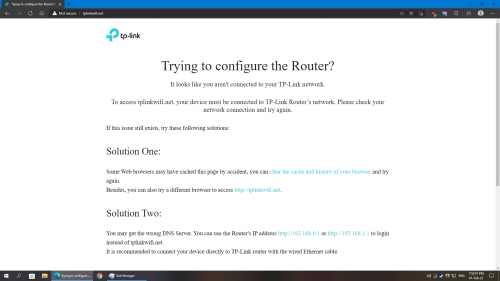 edit, got new update 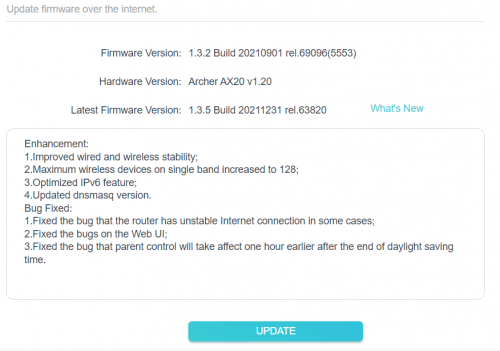 |
|
|
May 7 2023, 12:16 PM
Return to original view | IPv6 | Post
#9
|
|
Senior Member
1,691 posts Joined: Nov 2008
|
Hi guys
For ax20 besides update vlan internet 629 why is it keep prompting me to update other vlan at setup? Just ported fro unifi to digi |
|
|
May 7 2023, 03:12 PM
Return to original view | Post
#10
|
|
Senior Member
1,691 posts Joined: Nov 2008
|
Ok resolved the issue which was the pwd whereby one of it was capital O instead of 0. Thanks
|
| Change to: |  0.1164sec 0.1164sec
 0.91 0.91
 7 queries 7 queries
 GZIP Disabled GZIP Disabled
Time is now: 18th December 2025 - 02:27 AM |
 Quote
Quote