Outline ·
[ Standard ] ·
Linear+
TP-LINK Malaysia Official Thread, Technical Enquiries and Support
|
sadlyfalways
|
 Jan 6 2022, 10:43 PM Jan 6 2022, 10:43 PM
|

|
Hi guys, when i first for my deco x90 there was an issue where the 5ghz network on the main node would disappear and just die out of no where.
Tplink engineers did root access my router and managed to fix something but it took a really long time
Now i am having the exact same issue on my x90 slave node instead lol
It is really horrible now because this node is inbetween two others and so instead of dropping to 2.4ghz the phone constantly disconnects and tries to connect to the two other nodes on 5ghz, fails and just stays on 4G
|
|
|
|
|
|
cfyong2020
|
Jan 13 2022, 11:23 AM
|
|
|
dear sifu, im using tp link ax1800/ax20 my problem is when my smart tv using youtube all my other device will be no internet. i tried a andriod tv stick same problem happen. whenever the tv on youtube all the speed seems to reserve to there it makes my other device either very slow or no internet at all. Any setting i need to do? 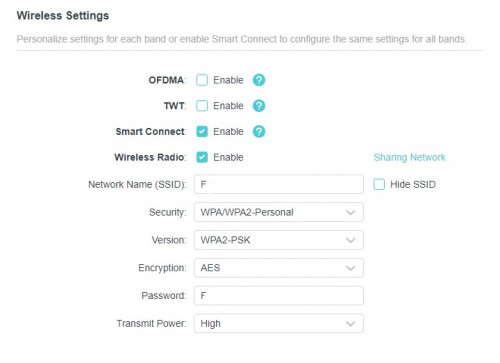 |
|
|
|
|
|
Hwoarang45
|
Jan 13 2022, 04:10 PM
|
|
|
anyone having NAT strict issues with unifi lately, tried setting everything on my tplink router still getting NAT strict, my ip from unifi is range: 100.79.x.xxx, some said they stop providing public ip range, can i still call in to request?
|
|
|
|
|
|
cybpsych
|
Jan 13 2022, 05:31 PM
|
|
|
QUOTE(cfyong2020 @ Jan 13 2022, 11:23 AM) dear sifu, im using tp link ax1800/ax20 my problem is when my smart tv using youtube all my other device will be no internet. i tried a andriod tv stick same problem happen. whenever the tv on youtube all the speed seems to reserve to there it makes my other device either very slow or no internet at all. Any setting i need to do? maybe can disable QoS or Parental Control? or temporary remove Guest Network (wifi) |
|
|
|
|
|
cfyong2020
|
Jan 13 2022, 07:15 PM
|
|
|
QUOTE(cybpsych @ Jan 13 2022, 05:31 PM) maybe can disable QoS or Parental Control? or temporary remove Guest Network (wifi) Erm both setting I did not active also. Let me try use the qos set the 10m max speed (I'm currently using 100m maxis fiber) then activate it on all device see it will works or not. |
|
|
|
|
|
jack2
|
Jan 14 2022, 09:19 PM
|
|
|
Anyone knows why my TPlink Mesh Deco AC1200 E4R, the connections either by wire or wireless ix 5X slower than the router/modem provided by the TIME?
TIME BB package: 500Mbps, connections via wired or wireless to their router = max 500
But wired or wireless to TPlink Deco AC1200 E4R max 100mbps only.. why ya?
|
|
|
|
|
|
jacktiew
|
Jan 14 2022, 09:28 PM
|
Getting Started

|
QUOTE(jack2 @ Jan 14 2022, 09:19 PM) Anyone knows why my TPlink Mesh Deco AC1200 E4R, the connections either by wire or wireless ix 5X slower than the router/modem provided by the TIME? TIME BB package: 500Mbps, connections via wired or wireless to their router = max 500 But wired or wireless to TPlink Deco AC1200 E4R max 100mbps only.. why ya? Cause the lan port on E4R is only 100Mbps. So the speed will capped at 100Mbps no matter what. You need to upgrade to better router to get rid of speed cap |
|
|
|
|
|
jack2
|
Jan 14 2022, 09:36 PM
|
|
|
QUOTE(jacktiew @ Jan 14 2022, 09:28 PM) Cause the lan port on E4R is only 100Mbps. So the speed will capped at 100Mbps no matter what. You need to upgrade to better router to get rid of speed cap aiyo, nowadays where got LAN port is just 100mbps.. i just bought only. |
|
|
|
|
|
FusionXY
|
Jan 14 2022, 09:37 PM
|
|
|
QUOTE(jack2 @ Jan 14 2022, 09:36 PM) aiyo, nowadays where got LAN port is just 100mbps.. i just bought only. That's why it is cheap for a reason. |
|
|
|
|
|
jack2
|
Jan 14 2022, 09:44 PM
|
|
|
QUOTE(FusionXY @ Jan 14 2022, 09:37 PM) That's why it is cheap for a reason. Any other alternative way? |
|
|
|
|
|
joeblow
|
Jan 14 2022, 11:32 PM
|
|
|
Quick question. I am using x20 deco mesh, and using ethernet backhaul. Either at main deco or child deco with wifi 6 s21 ultra near distance, ping is 3 to 8ms,speed only high 80 to below 95mbps for a 100mbps plan.
Is this normal? I asked is because last time even with unifi crap given router using 5ghz I also can get 95 to 100mbps using the same phone. X20 deco mesh wifi6 performance not that good?
Reason why I am asking is I plan to upgrade to 300mbps, but if wifi performance not that good I might reconsider.
|
|
|
|
|
|
jacktiew
|
Jan 14 2022, 11:47 PM
|
Getting Started
|
QUOTE(joeblow @ Jan 14 2022, 11:32 PM) Quick question. I am using x20 deco mesh, and using ethernet backhaul. Either at main deco or child deco with wifi 6 s21 ultra near distance, ping is 3 to 8ms,speed only high 80 to below 95mbps for a 100mbps plan. Is this normal? I asked is because last time even with unifi crap given router using 5ghz I also can get 95 to 100mbps using the same phone. X20 deco mesh wifi6 performance not that good? Reason why I am asking is I plan to upgrade to 300mbps, but if wifi performance not that good I might reconsider. 1. Ensure your Ethernet cable can is cat5e and above. (And also not defective.) 2. Make sure you're on 5Ghz band. 3. Try scan interference using wifi analyzer app. Below is my wifi 5 phone using Deco X20 as well. (Mine is 300Mbps.) 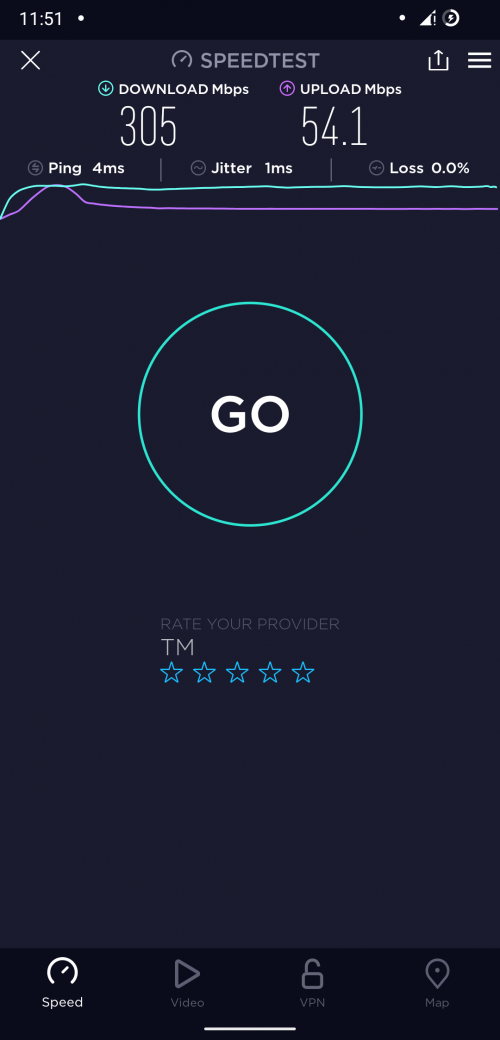 Edit: Updated the picture. This post has been edited by jacktiew: Jan 14 2022, 11:52 PM |
|
|
|
|
|
MyProLife
|
Jan 14 2022, 11:51 PM
|
|
|
QUOTE(jack2 @ Jan 14 2022, 09:44 PM) Any other alternative way? Return it and up budget a bit get x20 or above |
|
|
|
|
|
PJng
|
Jan 15 2022, 12:44 AM
|
|
|
QUOTE(jack2 @ Jan 14 2022, 09:44 PM) Any other alternative way? I just google search, only 100mbps port Cannot solve it |
|
|
|
|
|
joeblow
|
Jan 15 2022, 02:27 AM
|
|
|
QUOTE(jacktiew @ Jan 14 2022, 11:47 PM) 1. Ensure your Ethernet cable can is cat5e and above. (And also not defective.)
2. Make sure you're on 5Ghz band.
3. Try scan interference using wifi analyzer app.
Below is my wifi 5 phone using Deco X20 as well. (Mine is 300Mbps.) Thanks for your reply, I am on wifi 6, don't know how to change to 5ghz, not given option. My phone shows the wifi icon with a 6, I will l Google later. |
|
|
|
|
|
joeblow
|
Jan 15 2022, 03:36 AM
|
|
|
QUOTE(joeblow @ Jan 15 2022, 02:27 AM) Thanks for your reply, I am on wifi 6, don't know how to change to 5ghz, not given option. My phone shows the wifi icon with a 6, I will l Google later. Need help from gurus as I am not able to get a solution from google. Can Samsung S21 ultra connect on the 5ghz bandwidth and how? My setup is modem to main x20 in hall then via ethernet connected to the x20 in bedroom. I have Samsung S21 ultra and Sony A8h TV connected to the deco x20 in the bedroom. The Sony tv is on 5ghz, but my s21 ultra is on 2.4ghz. I cannot find a way to switch it. In the deco app if I disable 2.4ghz, my Sony tv continues to be connected to 5G in the bedroom deco but my phone will be connected to the hallway main deco. Though on 5G but due to weak signal speed is slow. Why can't the deco on bedroom support my phone on 5G but Sony tv can? Really confused, I tried rebooting etc. All same result with all devices deco having latest firmware. Hope someone gurus know the solution thanks. |
|
|
|
|
|
jack2
|
Jan 15 2022, 03:37 AM
|
|
|
QUOTE(MyProLife @ Jan 14 2022, 11:51 PM) Return it and up budget a bit get x20 or above Dunno can be returned or not. Bought via Lazada. QUOTE(PJng @ Jan 15 2022, 12:44 AM) I just google search, only 100mbps port Cannot solve it Thanks |
|
|
|
|
|
FusionXY
|
Jan 15 2022, 03:40 AM
|
|
|
QUOTE(jack2 @ Jan 15 2022, 03:37 AM) Dunno can be returned or not. Bought via Lazada. Thanks Try to sell in garage sales or mudah. Avoid Deco E series as limited to 100Mbps port. M5 or M9 Plus much safer. |
|
|
|
|
|
jack2
|
Jan 15 2022, 03:42 AM
|
|
|
QUOTE(FusionXY @ Jan 15 2022, 03:40 AM) Try to sell in garage sales or mudah. Avoid Deco E series as limited to 100Mbps port. M5 or M9 Plus much safer. Already posted.. I dunno about this ma so didn't realise M9 plus single pack will work or mist buy 2 pack? This post has been edited by jack2: Jan 15 2022, 03:48 AM |
|
|
|
|
|
joeblow
|
Jan 15 2022, 11:22 AM
|
|
|
QUOTE(sadlyfalways @ Jan 6 2022, 10:43 PM) Hi guys, when i first for my deco x90 there was an issue where the 5ghz network on the main node would disappear and just die out of no where. Tplink engineers did root access my router and managed to fix something but it took a really long time Now i am having the exact same issue on my x90 slave node instead lol It is really horrible now because this node is inbetween two others and so instead of dropping to 2.4ghz the phone constantly disconnects and tries to connect to the two other nodes on 5ghz, fails and just stays on 4G Hi there, I have similar issue. I have x20 deco and it seems one is almost always 2.4ghz and only the other can support 5ghz. I took extensive troubleshooting including restricting to only 5ghz and switching the two deco. Tp-link always have network card compatibility issue. I resign to fate and just stick to 2.4ghz in exchange for stability. My S21 ultra would rather have no network or only connect to the 1 bar signal 5ghz deco. Very strange and I gives up on troubleshooting since switching the 2 decos almost caused me to not have internet. For your case have you checked the setting where you only have 5ghz? I suspect the 2.4ghz option turned off? |
|
|
|
|



 Quote
Quote


 0.0438sec
 0.79
0.79
 6 queries
 GZIP Disabled