

Hi TPlink Malaysia, possible to convert unused TM Archer C1200 to AP mode?
TP-LINK Malaysia Official Thread, Technical Enquiries and Support
TP-LINK Malaysia Official Thread, Technical Enquiries and Support
|
|
 Mar 1 2021, 02:51 PM Mar 1 2021, 02:51 PM
Return to original view | Post
#1
|
 
Junior Member
407 posts Joined: Dec 2008 
|
Hi TPlink Malaysia, possible to convert unused TM Archer C1200 to AP mode?
|
|
|
|
|
|
Mar 1 2021, 05:20 PM
Return to original view | Post
#2
|
|
Junior Member
407 posts Joined: Dec 2008
|
QUOTE(taqu @ Mar 1 2021, 04:38 PM) I'm using my old C1200 as AP (for my outdoor IP Cam) & NAS. Mind to share how you configure it as AP? |
|
|
Feb 11 2022, 10:02 AM
Return to original view | Post
#3
|
|
Junior Member
407 posts Joined: Dec 2008
|
Hi Tplink Malaysia,
My WiFi 6 Dell laptop having Tx/Rx 2x2 with 160Mhz on 5Ghz. I am wondering if I purchase Router with Tx/Rx 4x4, would it be wasted since my WiFi adapter not fully utilize Tx/Rx 4x4 ? |
|
|
Feb 13 2022, 01:07 PM
Return to original view | Post
#4
|
|
Junior Member
407 posts Joined: Dec 2008
|
QUOTE(blacktubi @ Feb 12 2022, 09:32 PM) Same proc but different 5Ghz radio. AX50 and AX55 are having same 5Ghz radio with HE160 Mhz.Very big difference in performance in my test. I will suggest spending the RM100 extra instead.  Below foot note are copied from Tplink web site. Note: HE160 requires client device that supports 160 MHz bandwidth on Wi-Fi. △802.11ax 2x2 160 MHz enables 2402 Mbps maximum theoretical data rates, 3X faster than standard 802.11ac 2x2 80 MHz (867 Mbps) and nearly 6x faster than baseline 1x1ac (433 Mbps) Wi-Fi as documented in IEEE 802.11 wireless standard specifications, and require the use of similarly configured 802.11ax wireless network routers. Note : The 160 MHz bandwidth may be unavailable in the 5 GHz band in some regions/countries due to regulatory restrictions. If you compare AX20 and AX55, AX20 having a Broadcom Quadcore CPU whereas AX55 having a Qualcomm Dualcore CPU (Not stated in Tplink website. In the website, it mentioned High Performance CPU only). Another different could be the RAM size, which is not mentioned in AX20 but it is stated as 512 in AX55. AX20 5Ghz radio bandwidth up to 80Mhz but AX55 5Ghz radio bandwidth up to 160 Mhz. I am wondering if 160Mhz bandwidth really usable in Malaysia? Or it is just a marketing tricks? If speed test on 80Mhz, by right both AX20 and AX55 should get almost the same speed. However, blacktubi test result produce a gap of 50 mbps between AX20 and AX55. Anyone knows why ? 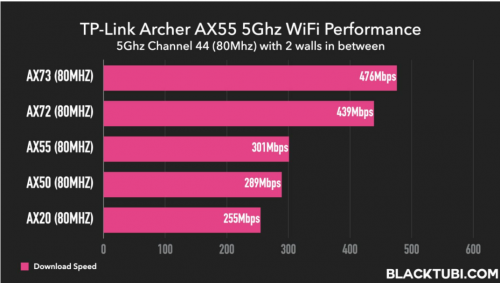 |
|
|
Feb 13 2022, 05:32 PM
Return to original view | Post
#5
|
|
Junior Member
407 posts Joined: Dec 2008
|
QUOTE(nikaizad @ Feb 12 2022, 08:42 PM) if you can get the AX55 at RM299 then its a good deal. same proc as AX72, only two less antenna. save 100 bucks. recomended AX72 is 4x4 MU-MIMO router. AX72 having 6 antenna, i.e., 2 antenna for 2.4Ghz and 4 antenna for 5Ghz radio AX55 is 2x2 MU-MIMO router. AX55 having 4 antenna, i.e., 2 antenna for 2.4Ghz and 2 antenna for 5Ghz radio 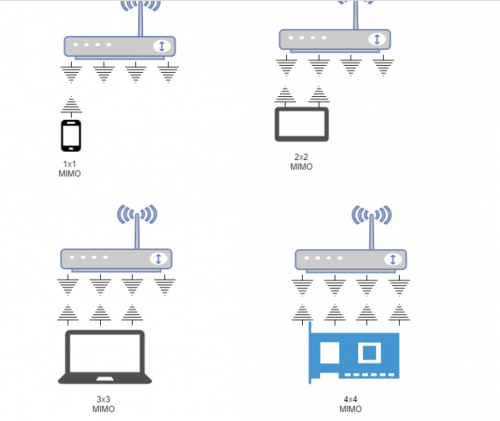 This diagram explains 4x4 Router that is connected to device with 1x1, 2x2, 3x3 and 4x4 MIMO. Only device with 4x4 MIMO able to fully utilize the benefit of 4x4 Router. Most of the devices in the market having 2x2 nowaday. Only super high end expensive device having 4x4 MIMO. 1. you can connect and simultaneously transfer data to 4 smartphones with 1x1 MIMO 2. you can connect and simultaneously transfer data to 2 tablets with 2x2 MIMO 3. you can connect and simultaneously transfer data to only 1 laptop with 3x3 MIMO and 1 smartphone with 1x1 MIMO 4. you can connect and simultaneously transfer data to only 1 laptop with 4x4 MIMO Ching Aik liked this post
|
|
|
Feb 14 2022, 05:37 PM
Return to original view | Post
#6
|
|
Junior Member
407 posts Joined: Dec 2008
|
QUOTE(sixshot @ Feb 14 2022, 03:33 PM) After much consideration,i just settled with ax20. Got it for RM150. WiFi 6 usb adapter from Tp-link coming soon Living room, max wifi speed at 300mbps on 5ghz connection as per subscribed package. In my room seperated by a wall, got around 250-280 mbps if i use phone. On pc, using archer t9uh, i got around 150mbps. Any way to improve connection on pc? Got any better wifi usb other then t9uh? https://www.tp-link.com/my/home-networking/.../archer-tx20uh/ Alpha_Tay liked this post
|
|
|
|
|
|
Dec 19 2022, 04:27 PM
Return to original view | Post
#7
|
|
Junior Member
407 posts Joined: Dec 2008
|
QUOTE(cybpsych @ Dec 19 2022, 03:58 PM) thinking to upgrade from AX20 to AX73. I have been using Mercusys MR80X since Saturday last week. any good deal lately? now, price hovering rm459 on a good average price in shopee. My first ever WiFi 6 router. So far not bad. Bought it on 12/12 for RM 177. Consider value for money for my Double Storey Terrace. This post has been edited by slackinux: Dec 19 2022, 04:28 PM cybpsych liked this post
|
|
|
May 27 2025, 12:18 PM
Return to original view | Post
#8
|
|
Junior Member
407 posts Joined: Dec 2008
|
QUOTE(jianjie @ May 10 2025, 03:06 PM) Thought of sharing my experience for those who might face the same issue. Are you able to get speed test result close to 800mbps? Mine UNIFI plan upgraded from 500mbps to 800mbps. But I hardly get speed test result close to 800mbps.Home - Unifi 800MBps, using the stock router D-Link DIR-842. Device - Deco X20 My experience has been far from "easy" unlike those who have shared their reviews. Starting off with what worked for me. My setup is Modem > Unifi router > Main Deco > sub Deco Problems faced. 1) Deco app is not available in Huawei App Gallery. Downloading it from APKPure or GBox is possible, and the app looks normal, but it just can't locate my Deco during setup phase. Solution: used the Deco app in iPhone. 2) Multiple issues during setup - unable to detect the main Deco - main Deco has solid red light Solution: press the reset button and try from the start. - device not connected to the internet Solution: apart from reset, I had to remove the entire SSID (the wifi name and password) then start from the beginning. What finally worked for me was to login to the Unifi router and made sure each LAN port was enabled for internet. My main problem was plugging it into a port meant for IPTV.. then problem solved. 3) tried calling TP Link Malaysia technical support Solution: none. Nobody picked up the phone. So far the speed has been quite satisfactory, my issue was with Unifi who's only giving me 30% of subscribed speed.. Hope this helps! 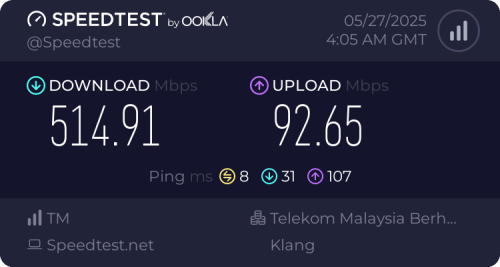 |
|
|
Jun 4 2025, 02:41 PM
Return to original view | Post
#9
|
|
Junior Member
407 posts Joined: Dec 2008
|
QUOTE(jianjie @ Jun 2 2025, 12:08 AM) erm right after modem change I managed to hit 826 Mbps. Do you mean the fiber termination modem? Mine is using ZTE fiber termination modem provided by TM. How about you?On average.. around 600~700++Mbps but that's only at direct line of sight to router. |
|
|
Oct 26 2025, 04:38 PM
Return to original view | Post
#10
|
|
Junior Member
407 posts Joined: Dec 2008
|
QUOTE(jianjie @ Jun 2 2025, 12:08 AM) erm right after modem change I managed to hit 826 Mbps. Finally, my speed test able to match 800 Mbps. Tested with my Honor 90 phone with the actual distance from the Mercusys Halo H80X mesh unit is about 6 feet.On average.. around 600~700++Mbps but that's only at direct line of sight to router.  |
| Change to: |  0.1224sec 0.1224sec
 0.96 0.96
 7 queries 7 queries
 GZIP Disabled GZIP Disabled
Time is now: 20th December 2025 - 02:29 AM |
 Quote
Quote