Welcome Guest ( Log In | Register )

Outline · [ Standard ] · Linear+

 TP-LINK Malaysia Official Thread, Technical Enquiries and Support

views
     
PRSXFENG
post May 22 2021, 02:00 PM

Look at all my stars!!
*******
Senior Member
2,607 posts

Joined: Nov 2020


QUOTE(captainwifi @ May 22 2021, 12:15 PM)
Does the Tp-link m4 work with the Maxis kaon wifi 6 easymesh router?

I saw somewhere the m4 might be easymesh. So am hoping to pair it the new maxis router.

Also does the ethernet backhaul work on the m4?
*
Not sure but the TP-Link seems to be its own proprietary mesh protocol and not WiFi Alliance EasyMesh
PRSXFENG
post May 22 2021, 04:07 PM

Look at all my stars!!
*******
Senior Member
2,607 posts

Joined: Nov 2020


QUOTE(captainwifi @ May 22 2021, 03:04 PM)
The Kaon has wifi 6 and has newer feature than the Deco M4. Would be nice if can use it together with M4.
*
WiFi 6 doesn't matter too much if your devices don't support WiFi 6, or you have slower speeds plans.

Replacing would be a better option but if you really want you could use the M4 as an AP but not sure how that will work out in terms of roaming, interference and compatability between the 2.
PRSXFENG
post May 25 2021, 07:40 PM

Look at all my stars!!
*******
Senior Member
2,607 posts

Joined: Nov 2020


Isn't AX21 just a AX20 in an AX73 chassis?
PRSXFENG
post Feb 12 2022, 07:34 PM

Look at all my stars!!
*******
Senior Member
2,607 posts

Joined: Nov 2020


QUOTE(sixshot @ Feb 12 2022, 03:14 PM)
Can anyone recommend me best bang for buck router. Using 300mbs unifi.

The new router called fibrehome tm provide is complete trash. Can get 300mbs 5g wifi if i close to router, but when i go to my room, speed drop to 10-15mbps. The wifi range is terrible.
*
Can consider TP-Link AX10/20 during sales (around RM200)
Or Asus but more premium
PRSXFENG
post Aug 17 2022, 07:04 PM

Look at all my stars!!
*******
Senior Member
2,607 posts

Joined: Nov 2020


QUOTE(koliqv @ Aug 17 2022, 05:24 PM)
Hello Guys

Im Using AX73 , have my spi firewall activated.

But i want to block most of the ads and running least ads possible.

I already try with Alternate dns but it not much different.

Is there anyone have list of url to block ads?

I also planning to use pfsense firewall or firewalla or pi-hole. but if possible i didnt want to spent much money. **pi-hole need to buy nuc or rsbpie due to no low watt usage computer in house.
*
Considered using a 3rd party ad blocking DNS? Like Adguard or NextDNS

Do note some devices (such as Samsung TVs) will avoid using ad blocking DNS.

And apple devices may bypass with Private Relay
Most browsers / android might bypass with Private DNS
You need to disable them
PRSXFENG
post Sep 15 2022, 08:53 AM

Look at all my stars!!
*******
Senior Member
2,607 posts

Joined: Nov 2020


QUOTE(19 Degree South @ Sep 15 2022, 08:12 AM)
sorry didn't get you. i am currently pairing M4 with unifi 's old wifi 5 router.
*
So, you're currently doing this setup?

ONT/Modem -> TM Provided Router -> Deco Mesh and nodes
This is what tm recommends but it's flawed as your original tm router is still broadcasting wifi and causing conflicts.

Consider
ONT/Modem -> Deco Mesh
There are guides online if you search for deco mesh PPPoE setup
Do note that if you use the old Unifi TV Box that plugs into lan4/vlan600 things might be a bit more complicated.

If you want to just upgrade to your new wifi 6 router by tm, you could just repeat your current setup
ONT/Modem -> TM wifi 6 router -> Deco Mesh
But uhhhh... Mixing wifi 6 alongside this seems messy 😅

These new routers do have a mesh standard, wifi alliance easymesh, but not compatible with deco

This post has been edited by PRSXFENG: Sep 15 2022, 08:54 AM
PRSXFENG
post Sep 15 2022, 01:30 PM

Look at all my stars!!
*******
Senior Member
2,607 posts

Joined: Nov 2020


It will work fine I think
PRSXFENG
post Oct 19 2022, 05:02 PM

Look at all my stars!!
*******
Senior Member
2,607 posts

Joined: Nov 2020


QUOTE(HumbleBF @ Oct 19 2022, 01:08 PM)
GX30, Unlimited

Do you know if XOX WAWA 18 plan with 10GB and unlimited hotspot works?
*
U Mobile doesn't let you use unlimited plans on mifi routers
not sure about XOX
PRSXFENG
post Jan 6 2023, 02:31 PM

Look at all my stars!!
*******
Senior Member
2,607 posts

Joined: Nov 2020


QUOTE(GBP56 @ Jan 6 2023, 11:41 AM)
Hi all, I’m using a Tenda mesh Wi-Fi and the router settings through the app sucks, and no default gateway webpage is available.

I’m planning to get a separate router to manage my router settings there, and the mesh will be in bridge mode only.

Can TP-link router owners help confirm there’s a default gateway webpage I can use to manageme my router settings instead of the app? I’m planning to get the TP-link Archer C1200 (cheapest router I can find with Gigabit port)
*
Yes it has a webpage but why that router? its pretty old and is known for some overheating issues
PRSXFENG
post Jul 9 2023, 07:39 PM

Look at all my stars!!
*******
Senior Member
2,607 posts

Joined: Nov 2020


QUOTE(johnnyg @ Jul 9 2023, 10:45 AM)
So looks like the Maxis Koan router is crappy. I have deco M5 and 9. I wish to upgrade the main router from Maxis that was given free to TP link. Which model should I go for? And I would then like to use the Maxis Koan router as a node to the TP-Link wifi 6 router. Can this work?
*
You need to look for EasyMesh compatible nodes
Only ones I know are Maxis provided ones and some D-Link COVR models

Deco will not mesh together
Pick one of them
You could skip the kaon and directly attach your deco
PRSXFENG
post Sep 15 2023, 11:57 PM

Look at all my stars!!
*******
Senior Member
2,607 posts

Joined: Nov 2020


QUOTE(tvcat @ Sep 15 2023, 06:59 AM)
Does TP-Link router support DuckDNS?
*
Unless they changed it in the past year, I'm pretty sure it's only TP-Link, NO-IP and Dyn
PRSXFENG
post Oct 21 2023, 08:53 PM

Look at all my stars!!
*******
Senior Member
2,607 posts

Joined: Nov 2020


QUOTE(Alert_RaZO @ Oct 21 2023, 08:43 PM)
Hi ...
I have questions guy about mesh

Currently i'm using wifi extender. I got a shop. upper floor is hostel for workers. Run speedtest, it gives only 5mbps at hostel. Unifi is 100mbps.

If i were to buy mesh, i scare that it gives the same result. Will it help to pull the signal into the hostel and provide the same speed 100mbps?
*
extender/repeaters are bad

mesh, depends on model

the best is still always cable
PRSXFENG
post Oct 22 2023, 10:56 AM

Look at all my stars!!
*******
Senior Member
2,607 posts

Joined: Nov 2020


QUOTE(free2d @ Oct 18 2023, 08:08 PM)
Have few questions about my 3 pack Deco X20 units.  Main Deco connected to Times Huawei router the other 2 are wireless backhaul.
1. So, the Deco should set to Router or AP mode?
2. Since Deco are wireless, TV and Astro unit are better connect to Deco via LAN cable, or use the tv and Astro direct wifi feature?
Thanks.
*
Drop the TIME Huawei router into modem only mode (ask time CS) and connect up the deco as router, via PPPoE

2. Always use Lan cable whenever possible
PRSXFENG
post Oct 22 2023, 10:58 AM

Look at all my stars!!
*******
Senior Member
2,607 posts

Joined: Nov 2020


QUOTE(Alert_RaZO @ Oct 22 2023, 01:00 AM)
Thanks for the idea guys...

Actually there is a 2nd router at the upper floor using cable connecting to 1st router at lower floor.

But now problem is nobody know the password for the wifi. Previous guy told me the router is for the cctv.
1. how to retrieve passoword? reset?
2. If reset, will it affect the cctv?
*
1. Yep
2. Well, if you set back the WiFi name to the same, probably fine
But this is assuming there is no need for port forwarding or other special configurations
PRSXFENG
post Nov 2 2023, 09:16 PM

Look at all my stars!!
*******
Senior Member
2,607 posts

Joined: Nov 2020


QUOTE(lpsoldier007 @ Nov 2 2023, 09:12 PM)
Hi guys.

I am using TP Link EX510 Maxis Fibre stock router.

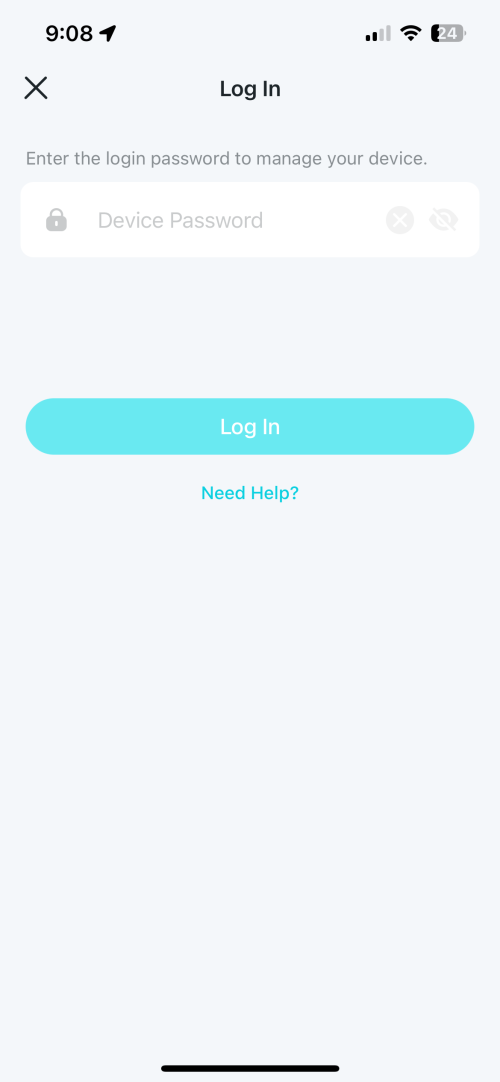
The problem I am facing right now is, after resetting the router, I cannot set the new router password.

It keep asking me to enter the correct password. I’ve been entering “admin”, my old password but still cannot login.

AFAIK, after resetting, the router should set the new password right? But my router keep asking me to enter the password.

user posted image
*
Aginet App password is not known (or at least I dont know it so I never used the app)

You have to manage it from webui, via 192.168.1.254
then the credentials printed will work
PRSXFENG
post Nov 2 2023, 10:00 PM

Look at all my stars!!
*******
Senior Member
2,607 posts

Joined: Nov 2020


QUOTE(lpsoldier007 @ Nov 2 2023, 09:22 PM)
Still cannot login from webui.

user posted image
user posted image
*
Maxis branded right...

Please try the following credentials

Tier 1
user
user

Tier 2
Administrator
[Serial Number]

Tier 3
MaxSysAdm
!!bestHOME!!XXXX
XXXX = last 4 of Serial Number
PRSXFENG
post Nov 3 2023, 01:11 PM

Look at all my stars!!
*******
Senior Member
2,607 posts

Joined: Nov 2020


QUOTE(lpsoldier007 @ Nov 3 2023, 09:53 AM)
At last manage to login using tier 3.

Thanks alot! thumbup.gif

Can use these credentials for Deco M4?
*
No, those provided credentials are set by MAXIS on their provided routers

Your own Deco mesh would have a default password printed on it

Both are tplink products, but isp provided ones are usually customized with special features or locked down in settings
so that's why despite resetting, the maxis provided router keeps its default maxis passwords
PRSXFENG
post Nov 18 2023, 08:19 AM

Look at all my stars!!
*******
Senior Member
2,607 posts

Joined: Nov 2020


QUOTE(khreve @ Nov 17 2023, 07:02 PM)
inside this Tp-Link AX53 settings, Connection type:
Static IP
Dynamic IP
PPPoe      <------ Allo(1300-38-8000) tech support said use this
L2TP
PPTP

Allo tech support also said bcoz inside this TP-Link router doesn't have listed Malaysia-Allo in as ISP profiles, i need to contact Tp-Link for assistance, so i did.

Tp-Link support(1800 2288 87) told me their router doesn't support TNB-Allo currrently. But still can use as 2nd router(AP mode).
ONU ---> Allo Router ---> Tp-Link Router ---> LAN/WIFI
*
Allo should be using Dynamic IP but it seems like things may have changed over time

Digging through the Allo Thread I found some possible solutions

1. ONU - TPLINK AX53, Dynamic IP
2. PPPoE, Singapore-Singtel profile

This post has been edited by PRSXFENG: Nov 18 2023, 08:22 AM
PRSXFENG
post Jan 6 2024, 08:44 AM

Look at all my stars!!
*******
Senior Member
2,607 posts

Joined: Nov 2020


QUOTE(virtualgay @ Jan 6 2024, 02:16 AM)
Current setup I am using Deco M5 as a router and the main node then connect it to 1 more M5 and also connect it to 2 more deco E4

Can I buy AX53 to become my router make E4 and M5 as a node only?
Can my Deco M5 not connect to the AX53 via cable but still be able to be part of the mesh network? I am thinking like buy 1 more M5 or buy AX53 that is why asking this question

If yes how many SSID it will show? I hope it just have 1 SSID and not like 3 or 4 SSID.

I am a noob to networking and wifi, sorry if the question sounded stupid or does not even make sense
*
TP-Link OneMesh is not compatible with Deco Mesh

You have to get Deco models
PRSXFENG
post Jan 6 2024, 01:21 PM

Look at all my stars!!
*******
Senior Member
2,607 posts

Joined: Nov 2020


QUOTE(virtualgay @ Jan 6 2024, 09:54 AM)
Deco mesh meaning not those router with many lan ports but those similar to E4 and M5 I am using. So I will get x10 but I scare not compatible as my E4 and M5 no wifi 6 and this x10 is wifi 6.
*
TP-Link brand will only mesh with TP-Link and Deco brand will only mesh with Deco

You can mix wifi 5 and 6 together

2 Pages  1 2 >Top
 

Change to:
| Lo-Fi Version
0.1109sec    0.59    7 queries    GZIP Disabled
Time is now: 1st December 2025 - 11:13 AM