Outline ·
[ Standard ] ·
Linear+
TP-LINK Malaysia Official Thread, Technical Enquiries and Support
|
FusionXY
|
 Jan 15 2022, 01:08 PM Jan 15 2022, 01:08 PM
|

|
QUOTE(jack2 @ Jan 15 2022, 03:42 AM) Already posted.. I dunno about this ma so didn't realise M9 plus single pack will work or mist buy 2 pack? Should have ask seller. Deco series must have at least two nodes to work. Minimum two nodes. |
|
|
|
|
|
MyProLife
|
Jan 15 2022, 01:17 PM
|
|
|
QUOTE(jack2 @ Jan 15 2022, 03:42 AM) Already posted.. I dunno about this ma so didn't realise M9 plus single pack will work or mist buy 2 pack? Your home can do wired backhaul or not? If can do wired backhaul: M5 will be good enough for up to 500m But is old model So i suggested up a bit for X20 above for wifi6 future proofing (wifi6 can easily reach over 500m) If cannot do wired backhaul, your budget must be up much higher. For triband system to work without speed deterioration. Even M9 plus will barely usable for 500m. X68/X90 or Asus XT8 not cheap |
|
|
|
|
|
jack2
|
Jan 15 2022, 01:21 PM
|
|
|
QUOTE(MyProLife @ Jan 15 2022, 01:17 PM) Your home can do wired backhaul or not? If can do wired backhaul: M5 will be good enough for up to 500m But is old model So i suggested up a bit for X20 above for wifi6 future proofing (wifi6 can easily reach over 500m) If cannot do wired backhaul, your budget must be up much higher. For triband system to work without speed deterioration. Even M9 plus will barely usable for 500m. X68/X90 or Asus XT8 not cheap What is wired backhaul |
|
|
|
|
|
MyProLife
|
Jan 15 2022, 01:27 PM
|
|
|
QUOTE(jack2 @ Jan 15 2022, 01:21 PM) Hardwire both of 2 mesh units with ethernet cable |
|
|
|
|
|
jack2
|
Jan 15 2022, 02:09 PM
|
|
|
QUOTE(MyProLife @ Jan 15 2022, 01:27 PM) Hardwire both of 2 mesh units with ethernet cable It means both need to be nearly and within the length of the eth cable? It so, the speed can go higher than 100mbps? |
|
|
|
|
|
MyProLife
|
Jan 15 2022, 02:16 PM
|
|
|
QUOTE(jack2 @ Jan 15 2022, 02:09 PM) It means both need to be nearly and within the length of the eth cable? It so, the speed can go higher than 100mbps? I think what you ask means your home is not ready for wired backhaul because your home has no ethernet cable / point installed during furnishing Get your budget ready E4R no matter wired or wireless is capped at 94m because is hardware limited by its fast ethernet 10/100m port. By now tplink should not sell this shit anymore to "坑" buyer |
|
|
|
|
|
jack2
|
Jan 15 2022, 02:22 PM
|
|
|
QUOTE(MyProLife @ Jan 15 2022, 02:16 PM) I think what you ask means your home is not ready for wired backhaul because your home has no ethernet cable / point installed during furnishing Get your budget ready E4R no matter wired or wireless is capped at 94m because is hardware limited by its fast ethernet 10/100m port. By now tplink should not sell this shit anymore to "坑" buyer Yalah.. I dunno this shit like this. Otherwise, I will buy higher unit. How about if the main deco is gigaport such as M4R then the rest is E4R? |
|
|
|
|
|
MyProLife
|
Jan 15 2022, 02:25 PM
|
|
|
QUOTE(jack2 @ Jan 15 2022, 02:22 PM) Yalah.. I dunno this shit like this. Otherwise, I will buy higher unit. How about if the main deco is gigaport such as M4R then the rest is E4R? Main deco M4R can with other E4R only on wireless backhaul And expect lower speed with this model. True stori my home m4r can barely get 300m from main unit. Down to around 150m if from second unit |
|
|
|
|
|
jack2
|
Jan 15 2022, 02:27 PM
|
|
|
QUOTE(MyProLife @ Jan 15 2022, 02:25 PM) Main deco M4R can with other E4R only on wireless backhaul And expect lower speed with this model. True stori my home m4r can barely get 300m from main unit. Down to around 150m if from second unit I will try later. So X20 is recommended now for future proof? |
|
|
|
|
|
MyProLife
|
Jan 15 2022, 02:30 PM
|
|
|
QUOTE(jack2 @ Jan 15 2022, 02:27 PM) I will try later. So X20 is recommended now for future proof? X20 yes for future proofing But if you want buy single unit for gigabit port I recommend M5 single unit to try out first. After when you get wifi6 capable devices and want more then only you consider upgrading to x20/above Take note that any deco model can join your home system easily. So M5 can work with E4R. Later can add X20 or whatever model to either replace or as add on to your deco system This post has been edited by MyProLife: Jan 15 2022, 02:32 PM |
|
|
|
|
|
jack2
|
Jan 15 2022, 02:33 PM
|
|
|
QUOTE(MyProLife @ Jan 15 2022, 02:30 PM) X20 yes for future proofing But if you want buy single unit for gigabit port I recommend M5 single unit to try out first. After when you get wifi6 capable devices and want more then only you consider upgrading to x20/above Take note that any deco model can join your home system easily. So M5 can work with E4R. Later can add X20 or whatever model to either replace or as add on to your deco system Oh ya, which device is recommended for WiFi 6 |
|
|
|
|
|
MyProLife
|
Jan 15 2022, 02:35 PM
|
|
|
QUOTE(jack2 @ Jan 15 2022, 02:33 PM) Oh ya, which device is recommended for WiFi 6 Recent iphone, samsung or xiaomi high end phones are capable and most modern laptops from this 2 years with wifi 6 card |
|
|
|
|
|
jack2
|
Jan 15 2022, 04:51 PM
|
|
|
QUOTE(MyProLife @ Jan 15 2022, 02:30 PM) X20 yes for future proofing But if you want buy single unit for gigabit port I recommend M5 single unit to try out first. After when you get wifi6 capable devices and want more then only you consider upgrading to x20/above Take note that any deco model can join your home system easily. So M5 can work with E4R. Later can add X20 or whatever model to either replace or as add on to your deco system The main issue is the modem to E4R only 100mbps via ethernet. If I can use higher range one, so the rest of deco can get higher speed right. |
|
|
|
|
|
MyProLife
|
Jan 15 2022, 06:14 PM
|
|
|
QUOTE(jack2 @ Jan 15 2022, 04:51 PM) The main issue is the modem to E4R only 100mbps via ethernet. If I can use higher range one, so the rest of deco can get higher speed right. Yes Just make the gigabit version (M4 or M5 etc) as main one connected to modem will do |
|
|
|
|
|
jack2
|
Jan 15 2022, 06:18 PM
|
|
|
QUOTE(MyProLife @ Jan 15 2022, 06:14 PM) Yes Just make the gigabit version (M4 or M5 etc) as main one connected to modem will do Wonder if it would be good I buy https://www.tp-link.com/my/home-networking/...tl-pa8010p-kit/ and connect from the TIME router to this powerline and then Deco 2 in my room connect to this powerline then I can get maximum speed on Deco2? From Deco 2 to my Desktop via LAN cable. My desktop is using old WIFI adapter and maximum just 100mbps if via Deco2 WIFI. This post has been edited by jack2: Jan 17 2022, 11:04 AM |
|
|
|
|
|
jacktiew
|
Jan 15 2022, 06:38 PM
|
Getting Started

|
QUOTE(joeblow @ Jan 15 2022, 02:27 AM) Thanks for your reply, I am on wifi 6, don't know how to change to 5ghz, not given option. My phone shows the wifi icon with a 6, I will l Google later. This is how I set up to keep my devices always on 5Ghz. I don't want them to drop to 2.4Ghz. Then guest network is basically for IoT and guests' devices which will auto choose the band for them. You can choose your way to do it. 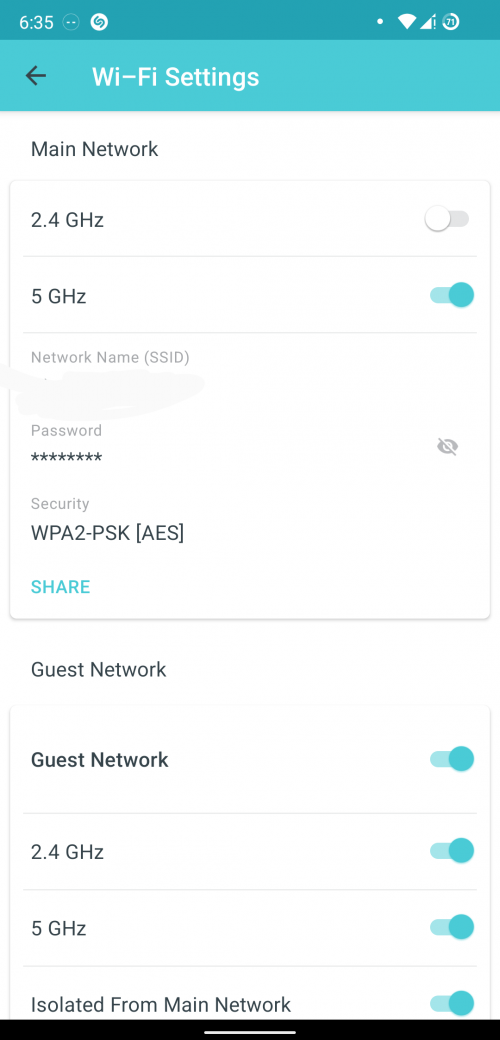 |
|
|
|
|
|
joeblow
|
Jan 15 2022, 10:07 PM
|
|
|
QUOTE(jacktiew @ Jan 15 2022, 06:38 PM) This is how I set up to keep my devices always on 5Ghz. I don't want them to drop to 2.4Ghz.
Then guest network is basically for IoT and guests' devices which will auto choose the band for them.
You can choose your way to do it.
Thanks for your help. Now I am waiting reply from tp-link technical support. I swopped my decos this morning and nearly caused me to lose network and internet access. After much trial and error, I conclude the main deco has issue. It will only support 2.4ghz, meaning if I disable 2.4ghz, the phone and my hall TV will lose internet connection or tries to connect to deco B which supports 5ghz. Meaning deco A doesn't support 5ghz totally and I don't know why. |
|
|
|
|
|
cannavaro
|
Jan 21 2022, 10:11 AM
|
|
|
QUOTE(joeblow @ Jan 15 2022, 10:07 PM) Thanks for your help. Now I am waiting reply from tp-link technical support. I swopped my decos this morning and nearly caused me to lose network and internet access. After much trial and error, I conclude the main deco has issue. It will only support 2.4ghz, meaning if I disable 2.4ghz, the phone and my hall TV will lose internet connection or tries to connect to deco B which supports 5ghz. Meaning deco A doesn't support 5ghz totally and I don't know why. previously I read in tm unifi use fb group, someone has a faulty deco (IIRC it was the E4) that somehow only broadcast 2.4ghz signal. At first he used it as slave, but no matter how close he puts it to the main, the app only show the slave is only getting 2.4 signal source from the master decom He reset the units and made the slave as master, same thing happened. End up contacting tplink tech support and they acknowledged the decos were faulty and proceed with RMA |
|
|
|
|
|
joeblow
|
Jan 21 2022, 08:53 PM
|
|
|
QUOTE(cannavaro @ Jan 21 2022, 10:11 AM) previously I read in tm unifi use fb group, someone has a faulty deco (IIRC it was the E4) that somehow only broadcast 2.4ghz signal. At first he used it as slave, but no matter how close he puts it to the main, the app only show the slave is only getting 2.4 signal source from the master decom He reset the units and made the slave as master, same thing happened. End up contacting tplink tech support and they acknowledged the decos were faulty and proceed with RMA Yes confirmed it is faulty. The 5Ghz broadcast super weak. The troubleshooting was extensive because I do not want to rma due to the fact I am not staying in KL, need to courier back. But the TPlink support from China kept asking me to send back. LOL. I might do it after CNY. For future proof since now my house only 100mbps, so the impact is not great. I might just not rma, I have 3 years warranty. My case is only one of the X20 is faulty, the other is working fine. |
|
|
|
|



 Quote
Quote




 0.0252sec
 0.65
0.65
 6 queries
 GZIP Disabled