


https://www.reddit.com/r/SoundBlasterOffici..._not_detecting/
AMD Ryzen, AM4 / AM5 Platform
|
|
 Sep 5 2021, 08:07 AM Sep 5 2021, 08:07 AM
|
 
All Stars
10,476 posts Joined: Jan 2003 From: Sarawak 
|
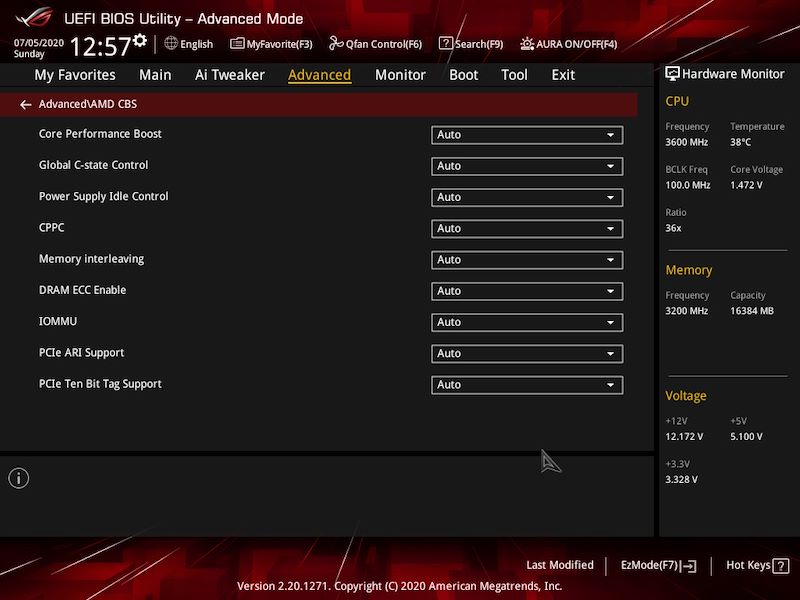
Disabling PCIe 10-bit Tag Support fix soundcard issue https://www.reddit.com/r/SoundBlasterOffici..._not_detecting/ hashtag2016 liked this post
|
|
|
|
|
|
Sep 5 2021, 08:55 AM
|

Senior Member
4,158 posts Joined: Jan 2003 From: KL
|
QUOTE(Skylinestar @ Sep 5 2021, 08:07 AM) Disabling PCIe 10-bit Tag Support fix soundcard issue Not sure this only happened on certain MB, i have been using the same sound card (i.e. AE-5) for quite a long time but never encountered such issue. In the group there are also some members using the same sound card. https://www.reddit.com/r/SoundBlasterOffici..._not_detecting/  hashtag2016 liked this post
|
|
|
Sep 6 2021, 01:35 PM
|
|
Probation
2 posts Joined: Nov 2019
|
Hello all.
I have a 5600g running on a MSI b550m-a pro mobo. Im getting driver timeouts when playing games. Anyone experienced this before? Did all i can. changed radeon software versions, installed drivers only, rolled back. still getting crashes. but now the crases takes a bit while longer. like 15 mins.. before this crashes the moment i start to play. Thanks |
|
|
Sep 6 2021, 02:26 PM
|
 
Elite
4,420 posts Joined: Jan 2003
|
QUOTE(Astroft @ Sep 6 2021, 01:35 PM) Hello all. i hope u are not playing ranked games.. if not really GG I have a 5600g running on a MSI b550m-a pro mobo. Im getting driver timeouts when playing games. Anyone experienced this before? Did all i can. changed radeon software versions, installed drivers only, rolled back. still getting crashes. but now the crases takes a bit while longer. like 15 mins.. before this crashes the moment i start to play. Thanks  |
|
|
Sep 6 2021, 09:42 PM
Show posts by this member only | IPv6 | Post
#8425
|

Junior Member
395 posts Joined: Mar 2011
|
QUOTE(Astroft @ Sep 6 2021, 01:35 PM) Hello all. Hello, i have same problem with you. But im using asus b550m a, first i monitor hardware tempreature. Everuthing is fine. Then i realize my driver got problem. Lastly i did, just swipe clean old driver using ddu and reinstall 25/8/2021 punya driver . Now running fine.I have a 5600g running on a MSI b550m-a pro mobo. Im getting driver timeouts when playing games. Anyone experienced this before? Did all i can. changed radeon software versions, installed drivers only, rolled back. still getting crashes. but now the crases takes a bit while longer. like 15 mins.. before this crashes the moment i start to play. Thanks |
|
|
Sep 11 2021, 03:44 PM
Show posts by this member only | IPv6 | Post
#8426
|

Senior Member
3,304 posts Joined: Mar 2006 From: Chicago(Port25)
|
Anyone with Ryzen 3000 series suffers from whea error code 18, black screen bsod reboot?
|
|
|
|
|
|
Sep 11 2021, 07:34 PM
|

Senior Member
4,523 posts Joined: Apr 2006 
|
QUOTE(riku2replica @ Sep 11 2021, 03:44 PM) Anyone with Ryzen 3000 series suffers from whea error code 18, black screen bsod reboot? Not for me.But this issue was somewhat common with the 3800x and also the 5800x. This is down to faulty chiplet, probably the bottom of the barrel silicon that barely pass for 8 cores but still gets binned for production. |
|
|
Sep 12 2021, 06:26 PM
|

Senior Member
990 posts Joined: Sep 2005 From: Bolehland
|
QUOTE(riku2replica @ Sep 11 2021, 03:44 PM) Anyone with Ryzen 3000 series suffers from whea error code 18, black screen bsod reboot? Sounds like a bad overclock. Is PBO enabled? |
|
|
Sep 12 2021, 06:33 PM
Show posts by this member only | IPv6 | Post
#8429
|
|
Junior Member
509 posts Joined: Feb 2016
|
QUOTE(riku2replica @ Sep 11 2021, 03:44 PM) Anyone with Ryzen 3000 series suffers from whea error code 18, black screen bsod reboot? no problem, everything work perfectly.. u may troubleshoot/to solve ur issue by either one of following 2 methods: 1) set the CPU LLC manually to medium/high setting (pls AVOID to use the highest setting. Although different mobo maker have different definition for it, u can see it in the graph they was shown in the BIOS, the higher the line in the graph, the higher LLC it is ) 2) if your DDR4 Dram is in your Mobo QVL list, u may try to enable the XMP/Overclocking profile of your Mobo. (some mobo just can't stable enough at bios default setting, yet they are working fine/'The STABLE' stable in their overclocking profile).   just my 2 cents.  This post has been edited by hashtag2016: Sep 12 2021, 08:46 PM |
|
|
Sep 12 2021, 06:39 PM
Show posts by this member only | IPv6 | Post
#8430
|

Senior Member
826 posts Joined: Jun 2005
|
QUOTE(Astroft @ Sep 6 2021, 01:35 PM) Hello all. I have a 5600g running on a MSI b550m-a pro mobo. Im getting driver timeouts when playing games. Anyone experienced this before? Did all i can. changed radeon software versions, installed drivers only, rolled back. still getting crashes. but now the crases takes a bit while longer. like 15 mins.. before this crashes the moment i start to play. Thanks QUOTE(hellkvr @ Sep 6 2021, 09:42 PM) Hello, i have same problem with you. But im using asus b550m a, first i monitor hardware tempreature. Everuthing is fine. Then i realize my driver got problem. Lastly i did, just swipe clean old driver using ddu and reinstall 25/8/2021 punya driver . Now running fine. Its not ryzen or mobo issue. Its about windows & radeon card. Especially RX580. Now im using adrenalin 21.1.1. Latest one will got driver timed out every few second. |
|
|
Sep 12 2021, 08:04 PM
Show posts by this member only | IPv6 | Post
#8431
|
|
Senior Member
3,304 posts Joined: Mar 2006 From: Chicago(Port25)
|
QUOTE(SSJBen @ Sep 11 2021, 07:34 PM) Not for me. Yeah, i suspected this as its managed to survice occt and memtest for hours. I'm using a 3500x and apparently it says made in china, so i could suspect degrade issue or bad waffle.But this issue was somewhat common with the 3800x and also the 5800x. This is down to faulty chiplet, probably the bottom of the barrel silicon that barely pass for 8 cores but still gets binned for production. QUOTE(yimingwuzere @ Sep 12 2021, 06:26 PM) Sounds like a bad overclock. Is PBO enabled? I've tried revert to stock on bios and no pbo, ram stock at 2666 no xmp enabled. It will random black screen on me. Sometimes just 2 hours after a reboot sometimes couple of days. Temps are ok. It does that on some idle, tried bump cpu volt by 0.1v, didn't help. Note: Motherboard has some heatsink over its VRM.QUOTE(hashtag2016 @ Sep 12 2021, 06:33 PM) no problem, everything work perfectly.. Yeah, it appears to be listed as qualified but not sure if the one they tested are the early batch but not the recent once since Ryzen B450 has been available for quite some time already.u may to troubleshoot/solve ur issue by following 2 methods: 1) set the CPU LLC manually to medium/high setting (pls AVOID to use the highest setting. Although different mobo maker have different definition for it, u can see it in the graph they was shown in the BIOS, the higher the line in the graph, the higher LLC it is ) 2) if your DDR4 Dram is in your Mobo QVL list, u may try to enable the XMP/Overclocking profile of your Mobo. (some mobo just can't stable enough at bios default setting, yet they are working fine/'The STABLE' stable in their overclocking profile). just my 2 cents. It sometimes gets on my nerves, when it tries to restart when doing web browsing. |
|
|
Sep 12 2021, 08:48 PM
Show posts by this member only | IPv6 | Post
#8432
|
|
Junior Member
509 posts Joined: Feb 2016
|
QUOTE(riku2replica @ Sep 12 2021, 08:04 PM) Yeah, i suspected this as its managed to survice occt and memtest for hours. I'm using a 3500x and apparently it says made in china, so i could suspect degrade issue or bad waffle. then , just try the CPU LLC method ... I've tried revert to stock on bios and no pbo, ram stock at 2666 no xmp enabled. It will random black screen on me. Sometimes just 2 hours after a reboot sometimes couple of days. Temps are ok. It does that on some idle, tried bump cpu volt by 0.1v, didn't help. Note: Motherboard has some heatsink over its VRM. Yeah, it appears to be listed as qualified but not sure if the one they tested are the early batch but not the recent once since Ryzen B450 has been available for quite some time already. It sometimes gets on my nerves, when it tries to restart when doing web browsing. p/s: I just modified my previous reply. |
|
|
Sep 13 2021, 01:56 AM
|

Senior Member
1,649 posts Joined: Sep 2008
|
QUOTE(Cruxs @ Sep 12 2021, 06:39 PM) Its not ryzen or mobo issue. Its about windows & radeon card. Especially RX580. Now im using adrenalin 21.1.1. Latest one will got driver timed out every few second. Cant be blaming windows when nvidia and intel dont have these issues.  , amd and software issues never berpisah. , amd and software issues never berpisah.QUOTE(riku2replica @ Sep 12 2021, 08:04 PM) Yeah, i suspected this as its managed to survice occt and memtest for hours. I'm using a 3500x and apparently it says made in china, so i could suspect degrade issue or bad waffle. If youre using B450, likely mobo issue. Change it to B550 as AMD seems to have obsolete that board and will be slow on bios fixes. And your troubles are pretty much bios related.... high load no issues, but crashing like mad on low load situations such as browsing and idle. This problem as plagued me to the point i switched to intel I've tried revert to stock on bios and no pbo, ram stock at 2666 no xmp enabled. It will random black screen on me. Sometimes just 2 hours after a reboot sometimes couple of days. Temps are ok. It does that on some idle, tried bump cpu volt by 0.1v, didn't help. Note: Motherboard has some heatsink over its VRM. Yeah, it appears to be listed as qualified but not sure if the one they tested are the early batch but not the recent once since Ryzen B450 has been available for quite some time already. It sometimes gets on my nerves, when it tries to restart when doing web browsing. This post has been edited by Bonchi: Sep 13 2021, 02:02 AM |
|
|
|
|
|
Sep 13 2021, 02:36 AM
Show posts by this member only | IPv6 | Post
#8434
|
|
Senior Member
826 posts Joined: Jun 2005
|
QUOTE(Bonchi @ Sep 13 2021, 01:56 AM) Cant be blaming windows when nvidia and intel dont have these issues. I dont know. Most cases happen from 2021. Need clean install to avoid it., amd and software issues never berpisah.If youre using B450, likely mobo issue. Change it to B550 as AMD seems to have obsolete that board and will be slow on bios fixes. And your troubles are pretty much bios related.... high load no issues, but crashing like mad on low load situations such as browsing and idle. This problem as plagued me to the point i switched to intel |
|
|
Sep 13 2021, 08:12 AM
Show posts by this member only | IPv6 | Post
#8435
|
|
Senior Member
3,304 posts Joined: Mar 2006 From: Chicago(Port25)
|
QUOTE(Bonchi @ Sep 13 2021, 01:56 AM) Cant be blaming windows when nvidia and intel dont have these issues. It is ticking my nerve to switch platform, while i can keep my M.2 SSD and DDR4. I've tried update Bios, it didn't work. Currently on further observation., amd and software issues never berpisah.If youre using B450, likely mobo issue. Change it to B550 as AMD seems to have obsolete that board and will be slow on bios fixes. And your troubles are pretty much bios related.... high load no issues, but crashing like mad on low load situations such as browsing and idle. This problem as plagued me to the point i switched to intel QUOTE(Cruxs @ Sep 13 2021, 02:36 AM) I dont know. Most cases happen from 2021. Need clean install to avoid it. I did clean install after the problem starts to arise, and it still crashes from time to time. |
|
|
Sep 13 2021, 09:24 AM
Show posts by this member only | IPv6 | Post
#8436
|
|
Junior Member
509 posts Joined: Feb 2016
|
QUOTE(riku2replica @ Sep 13 2021, 08:12 AM) It is ticking my nerve to switch platform, while i can keep my M.2 SSD and DDR4. I've tried update Bios, it didn't work. Currently on further observation. since u mention "idle" got issue , so increase the "CPU LLC" to "medium" shall ease your problem.I did clean install after the problem starts to arise, and it still crashes from time to time. if my memory serve me right , it was tested at AGESA ComboAM4v2PI 1.0.0.2 , but I guess it shall work in newer AGESA either. (please don't suka suka flash your BIOS , unless your mobo have dual bios or flashback function). there are some other ways , but I think CPU LLC is the only way I would suggest anybody to try . more easier and less risk , if comparing to others . p/s: if u google "amazon" "new world" "crash" "rtx", u may see some RTX cards die ,coz of playing this game, shall we blame "Nvidia" or "game developer" ? or just "EVGA" only?? different person may have different opinion... (I knew it is not related to your problem, I just saying, I guess u got the point) This post has been edited by hashtag2016: Sep 13 2021, 09:28 AM |
|
|
Sep 13 2021, 01:28 PM
Show posts by this member only | IPv6 | Post
#8437
|
|
Senior Member
826 posts Joined: Jun 2005
|
QUOTE(riku2replica @ Sep 13 2021, 08:12 AM) It is ticking my nerve to switch platform, while i can keep my M.2 SSD and DDR4. I've tried update Bios, it didn't work. Currently on further observation. Got some people solve it on reddit by adjusting the page file and some of them adjust the gpu memory timing. I just revert to old gpu driver. So far very less driver timed out occurs. And im mining with 3 gpu + main proc. And those 5++ tab open in chrome browser.I did clean install after the problem starts to arise, and it still crashes from time to time. |
|
|
Sep 13 2021, 09:48 PM
|
|
Senior Member
1,649 posts Joined: Sep 2008
|
QUOTE(hashtag2016 @ Sep 13 2021, 09:24 AM) since u mention "idle" got issue , so increase the "CPU LLC" to "medium" shall ease your problem. actually pretty much confirmed exclusively RTX3090 ftw3 with confirmed batch defect and replacements has been immediately shipped out by EVGA.if my memory serve me right , it was tested at AGESA ComboAM4v2PI 1.0.0.2 , but I guess it shall work in newer AGESA either. (please don't suka suka flash your BIOS , unless your mobo have dual bios or flashback function). there are some other ways , but I think CPU LLC is the only way I would suggest anybody to try . more easier and less risk , if comparing to others . p/s: if u google "amazon" "new world" "crash" "rtx", u may see some RTX cards die ,coz of playing this game, shall we blame "Nvidia" or "game developer" ? or just "EVGA" only?? different person may have different opinion... (I knew it is not related to your problem, I just saying, I guess u got the point) |
|
|
Sep 13 2021, 09:54 PM
|
|
Senior Member
1,649 posts Joined: Sep 2008
|
QUOTE(riku2replica @ Sep 13 2021, 08:12 AM) It is ticking my nerve to switch platform, while i can keep my M.2 SSD and DDR4. I've tried update Bios, it didn't work. Currently on further observation. it's a voltage modulation issue on the bios and the cpu is kinda walking at the edge of stability and is ready to fall off anytime. more prominent during idle as the wattage drops. LLC is the only way and you may have to set to mode 4-5 and have high temps as a compromise. your only other bet is trying to flash each and every bios your board has and find one that has the least issue.I did clean install after the problem starts to arise, and it still crashes from time to time. |
|
|
Sep 30 2021, 10:12 AM
|

Junior Member
685 posts Joined: Sep 2005
|
Ryzen 5000 refresh next year?
Web source rumours ZEN3D: 7nm Zen 3 with stacked V-Cache (up to 192MB). ZEN3XT: Zen 3 refresh with increased boost clocks, better stability and bug fixes. |
| Change to: |  0.0277sec 0.0277sec
 0.65 0.65
 6 queries 6 queries
 GZIP Disabled GZIP Disabled
Time is now: 13th December 2025 - 01:07 AM |
 Quote
Quote