Welcome Guest ( Log In | Register )

475 Pages « < 411 412 413 414 415 > » Bottom

Outline · [ Standard ] · Linear+

 AMD Ryzen, AM4 / AM5 Platform

views
     
bluemind
post Jun 20 2021, 02:06 PM

Getting Started
**
Junior Member
172 posts

Joined: Oct 2008
QUOTE(chocobo7779 @ Jun 19 2021, 09:35 PM)
To be fair though if you need to game while waiting for a proper GPU, the 5600G isn't too bad, and depending on the motherboard you can move to a proper Zen 3 chip like the 5600X or the 5800X in the future with a BIOS update and a CPU swap (along with a cooler upgrade) icon_idea.gif

If we are lucky enough we might even see the big cached Zen3s to be the last line of CPUs for the AM4 platform icon_idea.gif

While the 11400 is good, the somewhat limited upgradeability and the fact that you need a decent B560 (which isn't cheap by any means compared to B550) just to make proper use of the chip itself (otherwise you'll end up getting 30% less performance) is going to sway some people away from Rocket Lake icon_idea.gif

It's fine though if someone isn't going to upgrade their systems for a long time icon_idea.gif
QUOTE(Bonchi @ Jun 20 2021, 12:03 AM)
AMD also no more upgradability for this gen. So no diff. And I will stay away from cheap B550 if I were you....those poor memory traces will give you stability hell. And dont listen to those two useless hardware unboxed guys. All B560 can unlock power (if you want to) so you wont lose that 30% performance... the difference is only at "out of the box".

and who says 11400 no upgradeability hmm.gif i just "upgraded" from 10400F to 10600K and maybe 10900K if I can find a nicer super compact ITX case (less than 11L) that can fit better thermal solution with 3 slot gpu... waiting for dan A4H20.

besides those cezanne APU is not that "cheap" to be tossing away for vermeers... infact id say it's a pretty crazy move lol.
look for those with 5V argb connector. All those AIO are mostly branding, especially ASUS. they're either using CoolIT, Asetek or coolermaster.
*
man i wanted to get Ryzen, was hyped when it first announced but waited pass Zen 1 and Zen 2 for more stable Zen+ platform. but then 3600 price rose to RM900+ and it was hard to get these with forced motherboard bundles, maybe easier now idk. B550 motherboards (good ones) is also RM600+, not that far off from a comparable B560 with good VRMs/features.

a lot of folks on B450 also ended up upgrading to B550 anyway due to bundled mobo, better B550 features / VRM and stability (no reason not to since bundled), that would defeat the purpose of same socket upgradability if you have to rebuy motherboard or change motherboard.

some people don't mind, but it makes me uncomfortable to buy tray AMD CPUs (and rely on seller for warranty instead of AMD) or used ones since pins can be so easily bent and fixed by previous user or damaged during shipping leading to possible random instability one day, a pain to troubleshoot when you are in the middle of something.

Bonchi
post Jun 20 2021, 06:27 PM

KittehPowah
******
Senior Member
1,649 posts

Joined: Sep 2008
QUOTE(bluemind @ Jun 20 2021, 02:06 PM)
man i wanted to get Ryzen, was hyped when it first announced but waited pass Zen 1 and Zen 2 for more stable Zen+ platform. but then 3600 price rose to RM900+ and it was hard to get these with forced motherboard bundles, maybe easier now idk. B550 motherboards (good ones) is also RM600+, not that far off from a comparable B560 with good VRMs/features.

a lot of folks on B450 also ended up upgrading to B550 anyway due to bundled mobo, better B550 features / VRM and stability (no reason not to since bundled), that would defeat the purpose of same socket upgradability if you have to rebuy motherboard or change motherboard.

some people don't mind, but it makes me uncomfortable to buy tray AMD CPUs (and rely on seller for warranty instead of AMD) or used ones since pins can be so easily bent and fixed by previous user or damaged during shipping leading to possible random instability one day, a pain to troubleshoot when you are in the middle of something.
*
Ditch B450 and go for B550 for the peace of mind. Especially a good one, else youre pretty much stuck with 3200mhz ram. The support especially for zen3 is hit or miss... like my B450 having pcie issues which made me swap to B550. Do try avoid those tray cpu. 2 out of 5 of my friends got it have to self straighten some pins.
Lineage
post Jun 20 2021, 07:44 PM

the Chaotic Throne
*******
Senior Member
4,524 posts

Joined: Oct 2007
From: ~Still finding the place~


QUOTE(Bonchi @ Jun 20 2021, 09:58 AM)
Nzxt uses usb cuz they got a display. You can also look at thermaltake water3.0 rgb that uses asetek. Id-cooling is pretty weak, im personally pretty happy with coolermaster. You can also take a look at EK's aio.
*
Ok. Will take a look.. laugh.gif

This post has been edited by Lineage: Jun 20 2021, 07:44 PM
Skylinestar
post Jun 21 2021, 06:50 PM

Mega Duck
********
All Stars
10,477 posts

Joined: Jan 2003
From: Sarawak
maybe this may help your heat spike issue hmm.gif :

QUOTE
Ryzen would constantly heat spike, sending all my fans into overdrive every few minutes. Tried changing the fan curve since I kept reading heat spikes were normal - didn't really help me. I eventually found a solution here - Changed Power Plan> Advanced settings> Processor power management> Maximum processor state> and changed it from 100% to 99%. Compeltely solved my problem (WTF?)


sos
bluemind
post Jun 21 2021, 06:51 PM

Getting Started
**
Junior Member
172 posts

Joined: Oct 2008
QUOTE(Bonchi @ Jun 20 2021, 06:27 PM)
Ditch B450 and go for B550 for the peace of mind. Especially a good one, else youre pretty much stuck with 3200mhz ram. The support especially for zen3 is hit or miss... like my B450 having pcie issues which made me swap to B550. Do try avoid those tray cpu. 2 out of 5 of my friends got it have to self straighten some pins.
*
already bought Rocket Lake. maybe next gen for AMD again haha. kinda wasteful to ditch B450 if you are already on it since it's supposed to be compatible with AM4.
sai86
post Jun 21 2021, 08:59 PM

StilL LearninG
*******
Senior Member
4,934 posts

Joined: Sep 2008
From: Setapak


QUOTE(Skylinestar @ Jun 21 2021, 06:50 PM)
maybe this may help your heat spike issue  hmm.gif :
sos
*
will try this.

wtf, from constant 80C to 88C in BFV, this 1% drop instantly coz it to stabilize at 60C in the same game with same settings confused.gif

This post has been edited by sai86: Jun 21 2021, 10:03 PM
xxboxx
post Jun 22 2021, 01:23 AM

The mind is for having ideas, not holding them
*******
Senior Member
5,261 posts

Joined: Oct 2004
From: J@Y B33


QUOTE(sai86 @ Jun 21 2021, 08:59 PM)
will try this.

wtf, from constant 80C to 88C in BFV, this 1% drop instantly coz it to stabilize at 60C in the same game with same settings  confused.gif
*
From the link
QUOTE
Update: So I did the same thing as you did with my Ryzen 5 3600; turns out that 1% is not 1%; My temps fell from 88-92 (Thermal Throttling Basically) to 64°C

BUT my frequency fell down from 4GHz all core (4.2GHz single core) to 3.5GHz all core; that's a significant performance drop; I'm guessing when you change it from 100 to anything lower, it actually limits it more than it should; like it disables boost clocks or something and then applies the 99% to the limited frequency

To simplify my theory: The CPU itself naturally will have a base clock that is functional for everybody; in my case (Ryzen 5 3600) it's 3.6GHz. But it also has Boost clocks and it allows it to go higher than that (like 4GHz in my case). When you edit the power plan and go anything below 100%, it completely disables the BOOST clocks and applies 99% to the 3.6GHz BASE clock; so I get 3.5GHz; if I do 98% it goes down to about 3.4GHz

So you didn't actually go down by 1%, you also disable boost clocks which doesn't allow your CPU to go high as it could be otherwise going. but you won't notice it in a daily usage like browsing the internet or gaming because they never utilize 100% of the CPU anyway

If you do anything CPU intensive and you want fast speeds you shouldn't edit the power plan and leave it at 100%. Because I saw 12% score drop in Cinebench R23; which is significantly slower

BOTAK_WAI
post Jun 22 2021, 01:57 AM

Blow Water First Class
*******
Senior Member
4,162 posts

Joined: Jan 2003
From: Cheras, KL


QUOTE(xxboxx @ Jun 22 2021, 01:23 AM)
From the link
*
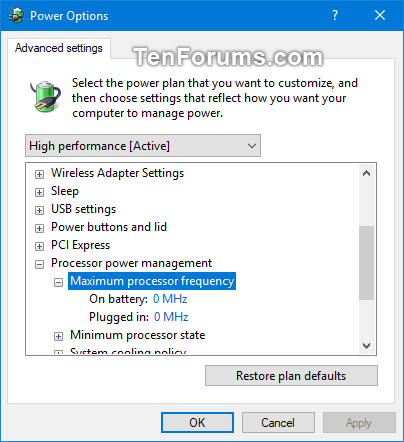
or try playing with maximum frequency in power plan (can be enabled with regedit entry)

user posted image
Lineage
post Jun 22 2021, 09:22 AM

the Chaotic Throne
*******
Senior Member
4,524 posts

Joined: Oct 2007
From: ~Still finding the place~


QUOTE(xxboxx @ Jun 22 2021, 01:23 AM)
From the link
*
Just tested, max core clock will be lower if put 99% from 4.3GHz to 4Ghz for my 3700X..
But i dont see any temp drop for both idle and stress 100%..

But I disabled the PBO, significant drop 3-5'c for idling, good enough already.

This post has been edited by Lineage: Jun 22 2021, 09:22 AM
Bonchi
post Jun 22 2021, 09:28 AM

KittehPowah
******
Senior Member
1,649 posts

Joined: Sep 2008
QUOTE(xxboxx @ Jun 22 2021, 01:23 AM)
From the link
*
Also wanted to mention that but should be done as a last resort i have used it too for but at a big performance penalty but my temps didnt improve as much maybe because im just using a 120mm aio. Regardless cpu is still optimistically going for its max allowable freq even for very minor tasks... ultimately it's a bios issue. Best to flash different bios versions and find one that works better with the setup.

QUOTE(sai86 @ Jun 21 2021, 08:59 PM)
will try this.

wtf, from constant 80C to 88C in BFV, this 1% drop instantly coz it to stabilize at 60C in the same game with same settings  :confused:
*
Gotta check your fps probably dropped alot.

Which also means, If you want an easier solution without killing performance, just put an fps limiter... my i5 max fps at 60C, afterall my monitor cannot handle such high fps so with 75hz vsync it becomes 40-50C laugh.gif my 3080 also load around 40C -50C with AAA games. Temps so low that all the fans are off and only cpu aio pump running lolol.

This post has been edited by Bonchi: Jun 22 2021, 09:38 AM
sai86
post Jun 22 2021, 08:55 PM

StilL LearninG
*******
Senior Member
4,934 posts

Joined: Sep 2008
From: Setapak


QUOTE(Bonchi @ Jun 22 2021, 09:28 AM)
Also wanted to mention that but should be done as a last resort i have used it too for but at a big performance penalty but my temps didnt improve as much maybe because im just using a 120mm aio. Regardless cpu is still optimistically going for its max allowable freq even for very minor tasks... ultimately it's a bios issue. Best to flash different bios versions and find one that works better with the setup.
Gotta check your fps probably dropped alot.

Which also means, If you want an easier solution without killing performance, just put an fps limiter... my i5 max fps at 60C, afterall my monitor cannot handle such high fps so with 75hz vsync it becomes 40-50C laugh.gif my 3080 also load around 40C -50C with AAA games. Temps so low that all the fans are off and only cpu aio pump running lolol.
*
oh no wonder the max mhz is at 3.6ghz iinm. im gaming at 120 fps and gotta test more later tonight. that 1% drop has me gaming at 100-110fps average. will try again and report bac.
at least that temp is cool and gaming still smooth but damn.
TristanX
post Jun 25 2021, 08:23 PM

Where is my stars?
Group Icon
Elite
24,351 posts

Joined: Nov 2004
From: Setapak, Kuala Lumpur


New benchmark for 3DMark. CPU Profile!

» Click to show Spoiler - click again to hide... «

Skylinestar
post Jun 26 2021, 11:43 AM

Mega Duck
********
All Stars
10,477 posts

Joined: Jan 2003
From: Sarawak
preparing my popcorn
user posted image
JohnLai
post Jun 27 2021, 12:22 AM

Skeptical Cat
*******
Senior Member
3,669 posts

Joined: Apr 2006
QUOTE(Skylinestar @ Jun 26 2021, 11:43 AM)
preparing my popcorn
user posted image
*
Reminded me of the time when I spent a lot of money back in year 2012 to buy four TPM 1.2 chips.

~.~

Modded my ancient MSI Z77A-G41 bios for NVME support (CPU I5-3570K) and use the second PCI2.0 X4 slot (electrically) for Crucial P2 1TB NVME SSD.
If the minimum TPM version is 1.2, guess the ancient system gonna last for quite some time.....

Though I still wonder, if I use fTPM feature for my Ryzen systems, there is still another secure boot problem to deal with. dry.gif
With many AGESA BIOS update, it gonna be pain with fTPM and secure boot enabled.

Speaking of which, for those who plan to buy external TPM, what will happen if the chip on TPM is faulty?
For example, bitlocker can be ran without TPM. But if bitlocker is initiated with TPM, what will happen if one needs to replace the TPM? hmm.gif
Skylinestar
post Jun 27 2021, 08:46 AM

Mega Duck
********
All Stars
10,477 posts

Joined: Jan 2003
From: Sarawak
QUOTE(JohnLai @ Jun 27 2021, 12:22 AM)
If the minimum TPM version is 1.2, guess the ancient system gonna last for quite some time.....
*
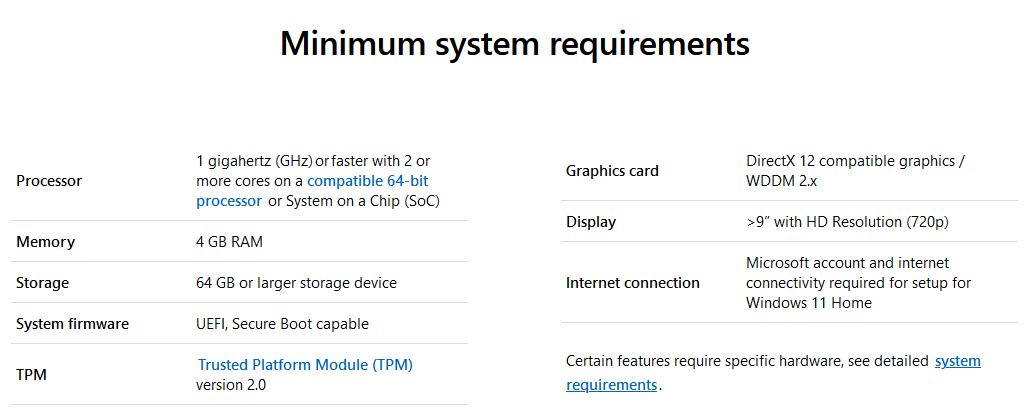
TPM 2.0
user posted image
JohnLai
post Jun 27 2021, 11:03 AM

Skeptical Cat
*******
Senior Member
3,669 posts

Joined: Apr 2006
QUOTE(Skylinestar @ Jun 27 2021, 08:46 AM)
TPM 2.0

*
Sigh, Microsoft just updated the page and removed every reference to TPM 1.2 mega_shok.gif
sai86
post Jun 27 2021, 11:40 AM

StilL LearninG
*******
Senior Member
4,934 posts

Joined: Sep 2008
From: Setapak


so, my x570 DH has a TPM header but not has built in TPM?
while they said the last few years PC should have TPM built in. hmm.gif

all this TPM mandatory is like a make up requirement to boost up PC sales or phase out old but still usable PC.
anyway all these so call implementation of Direct Storage etc gonna takes a looooong while to be implemented or get it right as usual.
JohnLai
post Jun 27 2021, 12:37 PM

Skeptical Cat
*******
Senior Member
3,669 posts

Joined: Apr 2006
QUOTE(sai86 @ Jun 27 2021, 11:40 AM)
so, my x570 DH has a TPM header but not has built in TPM?
while they said the last few years PC should have TPM built in.  hmm.gif

all this TPM mandatory is like a make up requirement to boost up PC sales or phase out old but still usable PC.
anyway all these so call implementation of Direct Storage etc gonna takes a looooong while to be implemented or get it right as usual.
*

X570 DH should have fTPM, go to bios to enable it.

Switch to Advanced mode, go to Advanced tab, there is a big AMD fTPM configuration. Set the AMD fTPM switch to enable.
John Chaser
post Jun 28 2021, 10:45 AM

On my way
****
Junior Member
685 posts

Joined: Sep 2005


QUOTE(JohnLai @ Jun 27 2021, 12:37 PM)
X570 DH should have fTPM, go to bios to enable it.

Switch to Advanced mode, go to Advanced tab, there is a big AMD fTPM configuration. Set the AMD fTPM switch to enable.
*
Dumb question, can we disable it back after running the pc check app?
JohnLai
post Jun 28 2021, 02:18 PM

Skeptical Cat
*******
Senior Member
3,669 posts

Joined: Apr 2006
QUOTE(John Chaser @ Jun 28 2021, 10:45 AM)
Dumb question, can we disable it back after running the pc check app?
*
Sure.

Just make sure you didn't enable bitlocker in conjunction with TPM before.


475 Pages « < 411 412 413 414 415 > » Top
 

Change to:
| Lo-Fi Version
0.0251sec    0.70    6 queries    GZIP Disabled
Time is now: 16th December 2025 - 10:37 AM