Welcome Guest ( Log In | Register )

475 Pages « < 413 414 415 416 417 > » Bottom

Outline · [ Standard ] · Linear+

 AMD Ryzen, AM4 / AM5 Platform

views
     
coolkwc
post Jun 30 2021, 09:27 AM

Fall in love with audio again.
*******
Senior Member
3,112 posts

Joined: Jul 2006
QUOTE(BOTAK_WAI @ Jun 30 2021, 09:13 AM)
» Click to show Spoiler - click again to hide... «

*
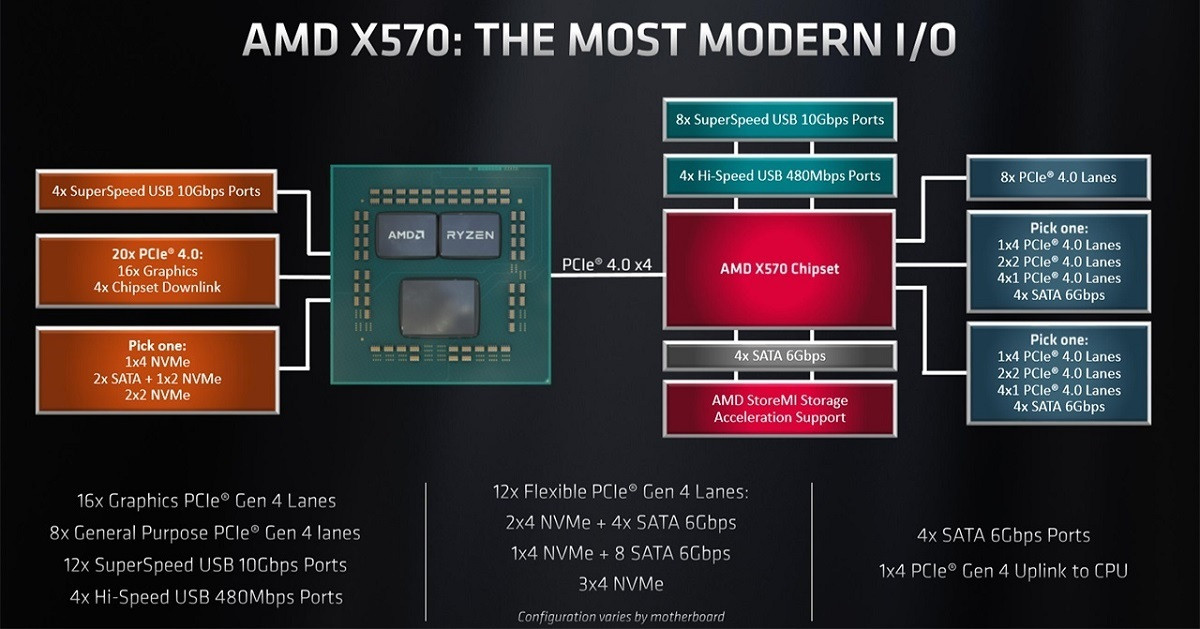
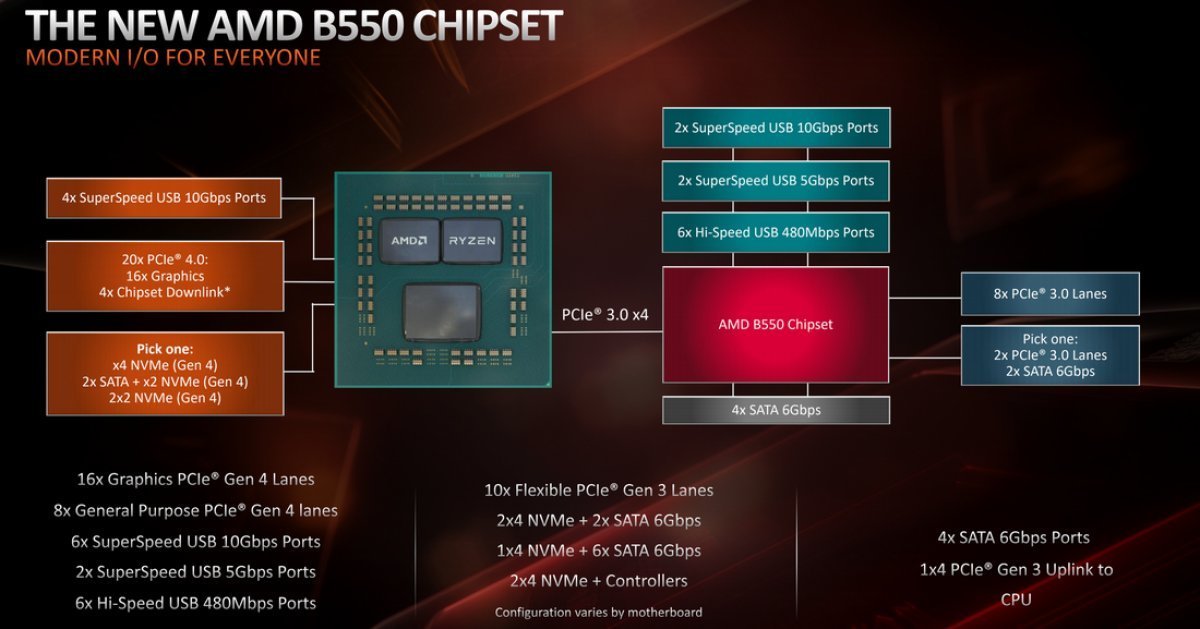
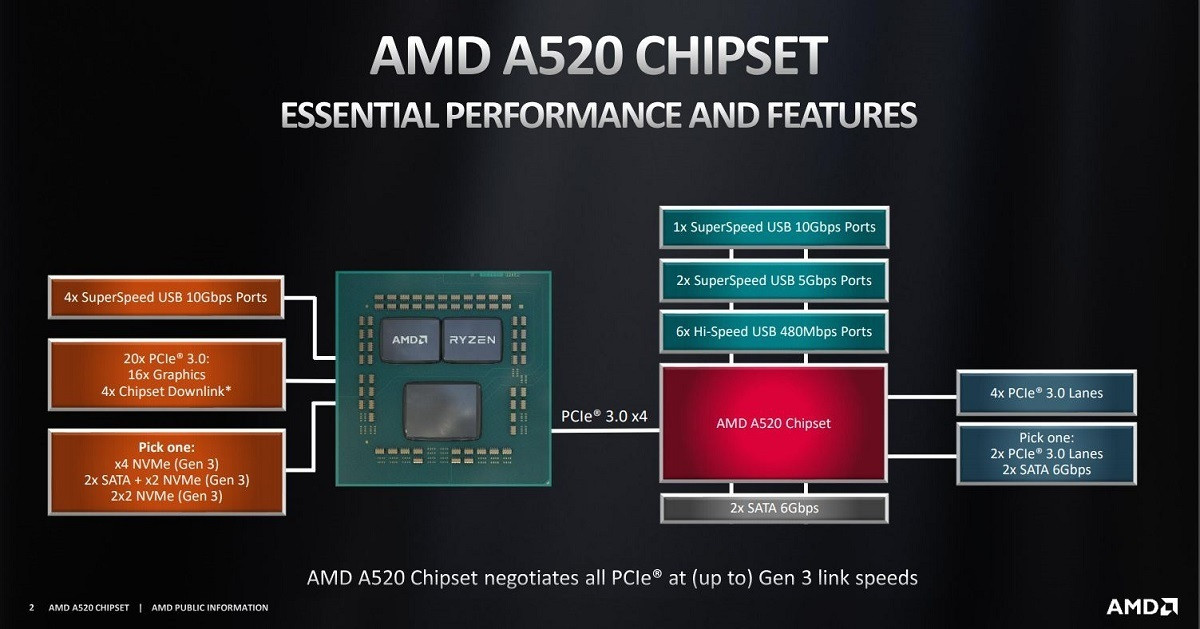
Nola, haha...Just want something more 'future proof'. Currently i already using 2 nvme drive, means max already and no room to add another new one without ditching one of the old drive.

But yeah this is not my main consideration for chipset selection.
Already made my mind and ordered Asus Rog Strix B550 Gaming-XE + 5900x.
The fan on the 570 chipset just turn me off, i don't want to open up and clean my motherboard fan/heatsink occasionally.
yimingwuzere
post Jun 30 2021, 09:39 AM

Enthusiast
*****
Senior Member
990 posts

Joined: Sep 2005
From: Bolehland


Also for X570, there's also a bug with WD's PCIE4 NVME drives having horrible speeds when running on M2 slots connected to the PCH. It's probably just WD though, no reports on the same issue happening on Phison controller SSDs or Samsung's 980 Pro.
SUSEBBattlefield
post Jun 30 2021, 09:41 AM

Ramadass Vijandren
****
Junior Member
637 posts

Joined: Nov 2018
From: Taman Sri Muda
QUOTE(coolkwc @ Jun 30 2021, 09:27 AM)
Nola, haha...Just want something more 'future proof'. Currently i already using 2 nvme drive, means max already and no room to add another new one without ditching one of the old drive.

But yeah this is not my main consideration for chipset selection.
Already made my mind and ordered Asus Rog Strix B550 Gaming-XE + 5900x.
The fan on the 570 chipset just turn me off, i don't want to open up and clean my motherboard fan/heatsink occasionally.
*
get ATX board.
make use of all PCI-E X 16 and X4 slots to your desire. brows.gif brows.gif brows.gif brows.gif
llk
post Jun 30 2021, 09:42 AM

Look at all my stars!!
*******
Senior Member
4,158 posts

Joined: Jan 2003
From: KL
QUOTE(yimingwuzere @ Jun 30 2021, 09:39 AM)
Also for X570, there's also a bug with WD's PCIE4 NVME drives having horrible speeds when running on M2 slots connected to the PCH. It's probably just WD though, no reports on the same issue happening on Phison controller SSDs or Samsung's 980 Pro.
*
WD is fixing the issue
Bonchi
post Jun 30 2021, 01:31 PM

KittehPowah
******
Senior Member
1,649 posts

Joined: Sep 2008
QUOTE(SSJBen @ Jun 30 2021, 03:30 AM)
I've tried every FCLK strap from 1600mhz to 2000mhz over the last 6 months on Zen 3, not a single time USB has dropped. Don't only read the bad news, because the bad news are always the ones that make the most noise.
*
Still happening on my buyer's b550i auros pro AX with both m.2 slots used. He changed cpu to zen3 and still having usb occasional disconnects in the log. So he took out the extra m.2 and put in a casing instead.

Ignoring the problem is what makes it never go away. Albeit much better now but it is still there if you purposely go trigger it.

QUOTE(coolkwc @ Jun 30 2021, 08:43 AM)
Yes this is normal practice, no need to pray, even my Giga Aorus Master on Intel platform did that so is not AMD only.
*
Some boards never mention especially Lower end ones like my MSI.Never mention anything till I only know when i open gpuZ and saw my gpu running on 8x a year after use. doh.gif. A few forumer helped me dig info but no clue as well, so this is what i meant by pray. Just dont buy budget board i guess then you should be fine....

This post has been edited by Bonchi: Jun 30 2021, 01:41 PM
AMD64 FX51
post Jun 30 2021, 09:45 PM

Getting Started
**
Junior Member
157 posts

Joined: Jan 2003
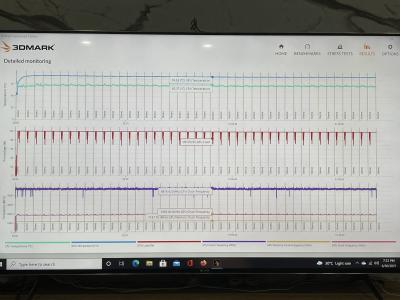
For this temperature for you it is ok?


Attached thumbnail(s)
Attached Image Attached Image
yimingwuzere
post Jun 30 2021, 11:16 PM

Enthusiast
*****
Senior Member
990 posts

Joined: Sep 2005
From: Bolehland


QUOTE(AMD64 FX51 @ Jun 30 2021, 09:45 PM)
For this temperature for you it is ok?
*
Looks solid TBH.

For a worst case scenario maybe try Prime95 Small FFT + AVX2 and run it for an hour or so while monitoring clockspeeds and temps.
AMD64 FX51
post Jul 1 2021, 12:26 AM

Getting Started
**
Junior Member
157 posts

Joined: Jan 2003
PC shop tested for my cpu & gpu stress test is cpu prime95 -72 degree and gpu furmark 65 degree.
The above is turn on turbo mode and the cpu liquid cooling fan speed by turning to 75% is much more cooler. then stock.
maybe lower it the GPU to gaming mode should be better.

Lineage
post Jul 1 2021, 07:16 PM

the Chaotic Throne
*******
Senior Member
4,524 posts

Joined: Oct 2007
From: ~Still finding the place~


Upgraded my CPU cooler to Corsair iCUE H150i Elite Capellix..

Temp about to settle down at 70'c under Prime95 stress test. However, the clocks speed for the 3700X only at 37xx mhz when im doing stress test. Is this consider normal? hmm.gif


Attached thumbnail(s)
Attached Image
AMD64 FX51
post Jul 1 2021, 08:05 PM

Getting Started
**
Junior Member
157 posts

Joined: Jan 2003
QUOTE(Lineage @ Jul 1 2021, 07:16 PM)
Upgraded my CPU cooler to Corsair iCUE H150i Elite Capellix..

Temp about to settle down at 70'c under Prime95 stress test. However, the clocks speed for the 3700X only at 37xx mhz when im doing stress test. Is this consider normal?  hmm.gif
*
set the AIO fans speed to 50 - 75% . else do pull and push AIO its help alot.

yimingwuzere
post Jul 2 2021, 09:42 AM

Enthusiast
*****
Senior Member
990 posts

Joined: Sep 2005
From: Bolehland


QUOTE(Lineage @ Jul 1 2021, 07:16 PM)
Upgraded my CPU cooler to Corsair iCUE H150i Elite Capellix..

Temp about to settle down at 70'c under Prime95 stress test. However, the clocks speed for the 3700X only at 37xx mhz when im doing stress test. Is this consider normal?  hmm.gif
*
I doubt VRMs are toasty given the mobo in your signature. Is the CPU only at stock clocks?

Technically your 3700X is within spec here, it's advertised all-core speed is 3.6GHz after all. Try enabling PBO2 or setting a manual all-core overclock.
Lineage
post Jul 2 2021, 03:08 PM

the Chaotic Throne
*******
Senior Member
4,524 posts

Joined: Oct 2007
From: ~Still finding the place~


QUOTE(AMD64 FX51 @ Jul 1 2021, 08:05 PM)
set the AIO fans speed to 50 - 75% . else do pull and push AIO its help alot.
*
Oh..i see..will try that..

QUOTE(yimingwuzere @ Jul 2 2021, 09:42 AM)
I doubt VRMs are toasty given the mobo in your signature. Is the CPU only at stock clocks?

Technically your 3700X is within spec here, it's advertised all-core speed is 3.6GHz after all. Try enabling PBO2 or setting a manual all-core overclock.
*
Ahhh..i should try to enable back PBO since I got AIO now.. notworthy.gif
coolkwc
post Jul 8 2021, 12:04 PM

Fall in love with audio again.
*******
Senior Member
3,112 posts

Joined: Jul 2006
I found Prime95 give lower temp on my 5900x compare to AIDA64, is around 8'C lower.
However all core boost is slightly lower at 4.45GHz compare to AIDA64 and Cinebench R23 @ 4.6GHz.

My bios setting:
1. PBO2 enable
2. Curve optimizer -30 all core
3. Vcore offset -0.1V
4. Boost override +200MHz
5. Power limit disable

Can see 5.1GHz spike up at he best core and captured by HWInfo and stable in idle/full load.
Guess i will just stop it here for everyday use.
Actually i'm looking forward any opportunity to further squeeze down the power consumption by further offset the Vcore despite the idle temp now is at 38'C @ 30'C room ambient.

This post has been edited by coolkwc: Jul 8 2021, 12:05 PM
llk
post Jul 8 2021, 01:31 PM

Look at all my stars!!
*******
Senior Member
4,158 posts

Joined: Jan 2003
From: KL
QUOTE(coolkwc @ Jul 8 2021, 12:04 PM)
I found Prime95 give lower temp on my 5900x compare to AIDA64, is around 8'C lower.
However all core boost is slightly lower at 4.45GHz compare to AIDA64 and Cinebench R23 @ 4.6GHz.

My bios setting:
1. PBO2 enable
2. Curve optimizer -30 all core
3. Vcore offset -0.1V
4. Boost override +200MHz
5. Power limit disable

Can see 5.1GHz spike up at he best core and captured by HWInfo and stable in idle/full load.
Guess i will just stop it here for everyday use.
Actually i'm looking forward any opportunity to further squeeze down the power consumption by further offset the Vcore despite the idle temp now is at 38'C @ 30'C room ambient.
*
Idle temp at 38 is quite ok already i guess bcos the cpu is cooled with custom WC. Normal fan cooler hard to achieve that temp.
coolkwc
post Jul 8 2021, 02:13 PM

Fall in love with audio again.
*******
Senior Member
3,112 posts

Joined: Jul 2006
QUOTE(llk @ Jul 8 2021, 01:31 PM)
Idle temp at 38 is quite ok already i guess bcos the cpu is cooled with custom WC. Normal fan cooler hard to achieve that temp.
*
Yeah, but the idle power consumption is quite crappy compare to my previous i9-9900KS.
The i9 actively lower the clock until 800MHz with 0.8Vcore during light use like desktop work, the power is only hover around ~10W (can see as low as 6W occasionally). Whereas this 5900X lowest clock 3.3GHz, idle power around 25-30W. This is not what i expected from a latest architecture CPU based on more advanced 7nm node.

But of course the full load consumption is better in AMD. By this undervolt setting, the average package power during Cinebench/AIDA64 FPU is around 170W only.

This post has been edited by coolkwc: Jul 8 2021, 02:14 PM
SSJBen
post Jul 8 2021, 02:42 PM

Stars deez nuts.
*******
Senior Member
4,523 posts

Joined: Apr 2006


QUOTE(coolkwc @ Jul 8 2021, 02:13 PM)
Yeah, but the idle power consumption is quite crappy compare to my previous i9-9900KS.
The i9 actively lower the clock until 800MHz with 0.8Vcore during light use like desktop work, the power is only hover around ~10W (can see as low as 6W occasionally). Whereas this 5900X lowest clock 3.3GHz, idle power around 25-30W. This is not what i expected from a latest architecture CPU based on more advanced 7nm node.

But of course the full load consumption is better in AMD. By this undervolt setting, the average package power during Cinebench/AIDA64 FPU is around 170W only.
*
Monolithic die vs chiplets+huge IOD, that's the trade off for both designs.

Also understand that 5900x has 50% more cores and threads than the 9900k. Idle power consumption is bound to be higher.
coolkwc
post Jul 8 2021, 03:27 PM

Fall in love with audio again.
*******
Senior Member
3,112 posts

Joined: Jul 2006
QUOTE(SSJBen @ Jul 8 2021, 02:42 PM)
Monolithic die vs chiplets+huge IOD, that's the trade off for both designs.

Also understand that 5900x has 50% more cores and threads than the 9900k. Idle power consumption is bound to be higher.
*
I will say not that bad considering lowest clock only down to 3.3GHz in idle. Would be better if can lower to sub 1GHz in idle, for sure that is going to help on idle power.

My swap from Intel to AMD decision happened within 12 hours last week without really keep up with AMD Zen design since 2 years ago, let alone those in depth details. All i known was AMD rule the high end segment now without answer from Intel.
So basically i left no choice when my motherboard dead on me suddenly (I thought is motherboard end up is 1 of 4 RAM stick fault after swapped to AMD, what a costly mistake tongue.gif ).

I try to pickup everything within a week, PBO, curve optimizer, architecture etc. and start to learn there are quite alot of drawbacks of AMD platform as well, both on the processor and chipset as well, especially memory latency side and memory clock limitation wise.

Currently my rig looks stable in everything, all/single core boost is satisfying, except a crappy cold boot issue of my board, and this is a famous issue online for Asus Rog Strix B550-E series with DOCP enable, consequences of not doing enough homework before land for this board. shakehead.gif

This post has been edited by coolkwc: Jul 8 2021, 03:28 PM
Bonchi
post Jul 8 2021, 03:28 PM

KittehPowah
******
Senior Member
1,649 posts

Joined: Sep 2008
QUOTE(SSJBen @ Jul 8 2021, 02:42 PM)
Monolithic die vs chiplets+huge IOD, that's the trade off for both designs.

Also understand that 5900x has 50% more cores and threads than the 9900k. Idle power consumption is bound to be higher.
*
more like it's the tradeoff to use the chiplet architecture to enable more cores. Same higher power draw and temps will also be noticed on the lower cores 5600X and especially 3100 and 3300 during idle or low load situations.

But yeah, just have to accept it. if wanna nitpick like me than no choice, going intel is the only answer lol because no undervolting or bios setting can affect the IOD's behavior.
coolkwc
post Jul 8 2021, 03:38 PM

Fall in love with audio again.
*******
Senior Member
3,112 posts

Joined: Jul 2006
But i really love the AMD's idea of PBO, Curve optimizer. This is really easy and good provided nowadays you won't get any meaningful overclocking at the top end chip in both Intel and AMD.

But, am i hit the silicon lottery? because i don't find many chip that can reduce all core to -30 in CO like i did.

This post has been edited by coolkwc: Jul 8 2021, 03:38 PM
Bonchi
post Jul 8 2021, 03:38 PM

KittehPowah
******
Senior Member
1,649 posts

Joined: Sep 2008
QUOTE(coolkwc @ Jul 8 2021, 03:27 PM)
I will say not that bad considering lowest clock only down to 3.3GHz in idle. Would be better if can lower to sub 1GHz in idle, for sure that is going to help on idle power.

My swap from Intel to AMD decision happened within 12 hours last week without really keep up with AMD Zen design since 2 years ago, let alone those in depth details. All i known was AMD rule the high end segment now without answer from Intel.
So basically i left no choice when my motherboard dead on me suddenly (I thought is motherboard end up is 1 of 4 RAM stick fault after swapped to AMD, what a costly mistake tongue.gif ).

I try to pickup everything within a week, PBO, curve optimizer, architecture etc. and start to learn there are quite alot of drawbacks of AMD platform as well, both on the processor and chipset as well, especially memory latency side and memory clock limitation wise.

Currently my rig looks stable in everything, all/single core boost is satisfying, except a crappy cold boot issue of my board, and this is a famous issue online for Asus Rog Strix B550-E series with DOCP enable, consequences of not doing enough homework before land for this board. shakehead.gif
*
weak AGESA bios, memory compatibility, USB device compatibility and over aggressive boosting behavior is the issues with AMD... which mostly all point back to crappy AGESA and crappy chipset drivers.

Cold boot issues you can try use more aggressive LLC as it solved on my Gigabyte B550. And usually dont worry about picking boards as usually the issues are always faced by across All AIBs as it always down to AGESA.

memory compatibility sometimes still bites back even on Zen3. it is still picky with ram especially at speeds beyond 3200mhz. It tends work best with micron E and Samsung B. Hynix D/CJR quite ok... the rest like samsung C, Micron rev B and hynix A die, you may have WHEA nightmares.

So... if you have any dissatisfaction, all you can do is just wait for newer AGESA and hopefully it solves your problem. Dont ever change mobo if you already have a mid-higher RM900+ one... i can pretty much say that the next board will have the same problem.

475 Pages « < 413 414 415 416 417 > » Top
 

Change to:
| Lo-Fi Version
0.0257sec    0.89    6 queries    GZIP Disabled
Time is now: 18th December 2025 - 10:45 AM