

QUOTE(Rhetoric @ Jan 24 2021, 11:11 PM)
what CPU you are using currently?

hi i am using ryzen 7 3700x, my game alot instance,open until 10 will start lag d hmmAMD Ryzen, AM4 / AM5 Platform
|
|
 Jan 27 2021, 01:38 AM Jan 27 2021, 01:38 AM
|
 
Probation
1 posts Joined: Oct 2020 
|
QUOTE(Rhetoric @ Jan 24 2021, 11:11 PM) what CPU you are using currently? hi i am using ryzen 7 3700x, my game alot instance,open until 10 will start lag d hmm |
|
|
|
|
|
Jan 27 2021, 04:24 AM
|
 
Elite
6,799 posts Joined: Jan 2003 
|
QUOTE(gash728 @ Jan 27 2021, 01:38 AM) hi i am using ryzen 7 3700x, my game alot instance,open until 10 will start lag d hmm How dat possible. |
|
|
Jan 27 2021, 04:27 AM
|
|
Elite
6,799 posts Joined: Jan 2003
|
QUOTE(SSJBen @ Jan 26 2021, 09:05 PM) I was playing COD cold war when it happened. There was no sudden drop in framerate nor did the game crash. I just decided to check event viewer now and the error is reported there. Cod. Warzone is crazy on “stability”Coldwar because of dlss/rtx reduces this but Have u noticed how “rt” or “dlss” type games seem to behave like javascript?? |
|
|
Jan 27 2021, 04:30 AM
|
|
Elite
6,799 posts Joined: Jan 2003
|
QUOTE(SSJBen @ Jan 26 2021, 09:05 PM) I was playing COD cold war when it happened. There was no sudden drop in framerate nor did the game crash. I just decided to check event viewer now and the error is reported there. Cod. Warzone is crazy on “stability”Coldwar because of dlss/rtx reduces this but Have u noticed how “rt” or “dlss” type games seem to behave like javascript?? Bomchi you da code guy right. Have u noticed this on dlss2.0?? Infact was talking to owikh84 the other day and we both had our rig before rtx 3080.. alot of ram issue etc all happened after we put ampere on the mobo. Coincidence?? nrw did u notice anything coinciding with ampere on the system ?? |
|
|
Jan 27 2021, 09:39 AM
|
|
Junior Member
398 posts Joined: Jul 2014 
|
QUOTE(cstkl1 @ Jan 27 2021, 04:30 AM) Cod. Warzone is crazy on “stability” AMD not the environment to confirm these kind of issues as zen3 launch came along with Ampere Coldwar because of dlss/rtx reduces this but Have u noticed how “rt” or “dlss” type games seem to behave like javascript?? Bomchi you da code guy right. Have u noticed this on dlss2.0?? Infact was talking to owikh84 the other day and we both had our rig before rtx 3080.. alot of ram issue etc all happened after we put ampere on the mobo. Coincidence?? nrw did u notice anything coinciding with ampere on the system ??  On 3800 everything was OK though, no issues after a stable profile was made. But I also play(ed) a very limited amount of games, so I wouldn't dare to say 100% no issues to be had. cstkl1 liked this post
|
|
|
Jan 27 2021, 10:08 AM
Show posts by this member only | IPv6 | Post
#7146
|
|
Junior Member
291 posts Joined: Nov 2008
|
QUOTE(cstkl1 @ Jan 27 2021, 04:30 AM) Cod. Warzone is crazy on “stability” Would like to chip in. Minor glitch with ampere.Coldwar because of dlss/rtx reduces this but Have u noticed how “rt” or “dlss” type games seem to behave like javascript?? Bomchi you da code guy right. Have u noticed this on dlss2.0?? Infact was talking to owikh84 the other day and we both had our rig before rtx 3080.. alot of ram issue etc all happened after we put ampere on the mobo. Coincidence?? nrw did u notice anything coinciding with ampere on the system ?? Ampere cards can b choosy on the display it's paired with. Paired 3070 with a older benq 3201pt 4k monitor. Have random Nvidia driver error, nvlddkm caused . Happens in light load while web browsing but not during gaming. Not very frequent but it's there. Doesn't happen with Turing cards. This can be replicated on both Ryzen and Intel platform cos I have both and with different driver versions. cstkl1 liked this post
|
|
|
|
|
|
Jan 27 2021, 10:47 AM
|

Senior Member
1,649 posts Joined: Sep 2008
|
QUOTE(cstkl1 @ Jan 27 2021, 04:30 AM) Cod. Warzone is crazy on “stability” more like coincidently most games with rt and dlss are done by such developers.. although there are exceptions with DLSS games like codemasters that doesnt crash and there’s game without DLSS like ubisoft and rockstar that could also crash. Coldwar because of dlss/rtx reduces this but Have u noticed how “rt” or “dlss” type games seem to behave like javascript?? Bomchi you da code guy right. Have u noticed this on dlss2.0?? Infact was talking to owikh84 the other day and we both had our rig before rtx 3080.. alot of ram issue etc all happened after we put ampere on the mobo. Coincidence?? nrw did u notice anything coinciding with ampere on the system ?? my ram problem started with pascal so cant comment much on it. Probably because ampere is pushing so much fps untill it strains and forced out some instability on the ram oc that is not shown on previous gen. This post has been edited by Bonchi: Jan 27 2021, 10:47 AM cstkl1 liked this post
|
|
|
Jan 27 2021, 02:05 PM
|

Senior Member
4,523 posts Joined: Apr 2006
|
QUOTE(cstkl1 @ Jan 27 2021, 04:27 AM) Cod. Warzone is crazy on “stability” I haven't played Warzone since CW launched, but when I did play it there wasn't any stability issues. Prior to playing CW, I was completing SotR. Played through all 20 hours of it, was flawless on 4k120 VRR.Coldwar because of dlss/rtx reduces this but Have u noticed how “rt” or “dlss” type games seem to behave like javascript?? Really the only major change I've did to the system was running at 2000mhz FCLK since AGESA 1190. That's the only thing I can think of that caused the event 41 error, but that doesn't explain why my system didn't auto restart either. Dafuq??? This post has been edited by SSJBen: Jan 27 2021, 02:05 PM cstkl1 liked this post
|
|
|
Jan 27 2021, 10:29 PM
|
|
Senior Member
4,523 posts Joined: Apr 2006
|
Think I found the issue, but I'm not sure.
So I got another Event 41 today and this time, the time stamp is exactly at the time Windows booted. Coincidentally, there is another system error (Event 29) which has the exact same time stamp as Event 41 error, this error is related to fast boot. Fast boot is causing an issue? Very odd. All the years of using Intel, never once it happened. EDIT - So basically it seems that everytime I boot up the PC, it's actually restarting so quickly that I don't even notice it restarting. This might explain why despite the Event 41 error is being logged, but it isn't impacting my usage of the PC when I'm actually using it. EDIT 2 - Disabled hibernation, powercfg -h off and disabled Fast Boot in BIOS. Let's see how that goes. This post has been edited by SSJBen: Jan 27 2021, 11:01 PM |
|
|
Jan 28 2021, 01:46 AM
|

Senior Member
990 posts Joined: Sep 2005 From: Bolehland
|
QUOTE(JohnLai @ Jan 27 2021, 12:20 AM) Gigabyte X570 Aorus Master Rev 1.2 and 5950X Good to know. I presume my CPU's SOC is a dud then?MSI B550 Tomahawk and 5600X = This one has only 2 DIMMS OC to 4000Mhz. Same RAM model, able to get stable IF clock at 2000Mhz. Ability to reach high IF clock is depending on the IO chip at the CPU. No matter what, 5950X IF maxed out at 1866mhz even when I used 2 DIMMs. |
|
|
Jan 28 2021, 09:48 AM
|
|
Senior Member
1,649 posts Joined: Sep 2008
|
QUOTE(yimingwuzere @ Jan 28 2021, 01:46 AM) Good to know. I presume my CPU's SOC is a dud then? 2000 is the max it can go but only guaranteed to 1600. so I wont be surprised if 50% or even only 10% of the ryzens out there can stay absolutely stable at 2000 IF. that 2000 value is the same as most mobos claim support up to 6000mhz ram OC because the vrm and socket can handle the loads and bios have settings untill that value but not guaranteed to reach. |
|
|
Jan 28 2021, 11:27 AM
|
|
Junior Member
291 posts Joined: Nov 2008
|
QUOTE(Bonchi @ Jan 28 2021, 09:48 AM) 2000 is the max it can go but only guaranteed to 1600. so I wont be surprised if 50% or even only 10% of the ryzens out there can stay absolutely stable at 2000 IF. Despite of what AMD claims , only a very small handful of chips can reach 2000 with stability 24/7. Of course the mobo can handle it but not the cpu.that 2000 value is the same as most mobos claim support up to 6000mhz ram OC because the vrm and socket can handle the loads and bios have settings untill that value but not guaranteed to reach. Just like the random BSOD issue , it's all silicon lottery playing with Ryzens. |
|
|
Jan 28 2021, 11:30 AM
|

Newbie
8 posts Joined: Jan 2006
|
QUOTE(SSJBen @ Jan 27 2021, 10:29 PM) Think I found the issue, but I'm not sure. I'm on a R5 3600 + B550, and I've also been noticing more frequent WHEA. Taking your lead, I checked Event Viewer and also discovered a bunch of Event 41 critical errors whenever I had WHEA.So I got another Event 41 today and this time, the time stamp is exactly at the time Windows booted. Coincidentally, there is another system error (Event 29) which has the exact same time stamp as Event 41 error, this error is related to fast boot. My fast start-up settings are off, so that's not the issue for me. But I did some digging, and remembered I updated my mobo bios not long ago to version F11 (B550 Aorus Pro AC), and for some reason, it was removed from the official bios download page. Then I found this: https://www.reddit.com/r/gigabytegaming/com...os_f11_missing/ https://www.reddit.com/r/gigabytegaming/com...s_pro_f11_bios/ Quoted from thread: "There is a reason. F11 BIOS was generating WHEA errors in Event Manager in Windows if you were using RAM running at 3600 MHz. This caused instability for some people. Any slower RAM speed was fine." "I still haven't been able to run my RAM at 3600MHz via its XMP profile without intermittently logging WHEA event 19 errors in Windows 10 and the equivalent errors in Linux, which occur seemingly at random." I also remembered that I'm running my Trident Z Neo RAM at 3600mhz via manual overclock instead of XMP, because enabling XMP would cause crashing. So it seems like a combination of Gigabyte 500 series mobo on F11 (or F31 on X570) with G.Skill Trident Z Neo RAM running at 3600mhz has been documented to cause crashes and random WHEA. The Gigabyte B550 Aorus Pro AC bios page has been updated with bios version F13a as of 27/1, which updates to AGESA ComboV2 1.2.0.0. I'm gonna cross my fingers and update to this bios and see what happens. This post has been edited by senzr: Jan 28 2021, 11:38 AM |
|
|
|
|
|
Jan 28 2021, 01:27 PM
|
|
Senior Member
990 posts Joined: Sep 2005 From: Bolehland
|
QUOTE(Bonchi @ Jan 28 2021, 09:48 AM) 2000 is the max it can go but only guaranteed to 1600. so I wont be surprised if 50% or even only 10% of the ryzens out there can stay absolutely stable at 2000 IF. 2000 are for golden samples only as far as I can tell.that 2000 value is the same as most mobos claim support up to 6000mhz ram OC because the vrm and socket can handle the loads and bios have settings untill that value but not guaranteed to reach. Based on what I read from other forums, Ryzen 3000 max realistic RAM target is 3733, whereas 5000 is 3800. Not sure if my CPU's SOC is a lemon or if it's a mobo BIOS issue, since I can get IF clock to 1900 or RAM to 3800 stable without issue individually, whereas it's extremely unstable when booting at 3800 in coupled mode. |
|
|
Jan 28 2021, 01:36 PM
|
|
Senior Member
1,649 posts Joined: Sep 2008
|
QUOTE(senzr @ Jan 28 2021, 11:30 AM) I'm on a R5 3600 + B550, and I've also been noticing more frequent WHEA. Taking your lead, I checked Event Viewer and also discovered a bunch of Event 41 critical errors whenever I had WHEA. usually such error is across all brands as its mostly got to do with agesa and the design of the ryzen IMC. pretty tough luck on zen2 because it seems like most support has already been halted so it’s better to use older proven stable bios if youre on zen2 as most of the newer bios fixes are meant for zen3 and pretty it will compromise zen2’s stability. Im using gigabyte’s F3 bios 1.0.0.2.. it seems to be the most stable.My fast start-up settings are off, so that's not the issue for me. But I did some digging, and remembered I updated my mobo bios not long ago to version F11 (B550 Aorus Pro AC), and for some reason, it was removed from the official bios download page. Then I found this: https://www.reddit.com/r/gigabytegaming/com...os_f11_missing/ https://www.reddit.com/r/gigabytegaming/com...s_pro_f11_bios/ Quoted from thread: "There is a reason. F11 BIOS was generating WHEA errors in Event Manager in Windows if you were using RAM running at 3600 MHz. This caused instability for some people. Any slower RAM speed was fine." "I still haven't been able to run my RAM at 3600MHz via its XMP profile without intermittently logging WHEA event 19 errors in Windows 10 and the equivalent errors in Linux, which occur seemingly at random." I also remembered that I'm running my Trident Z Neo RAM at 3600mhz via manual overclock instead of XMP, because enabling XMP would cause crashing. So it seems like a combination of Gigabyte 500 series mobo on F11 (or F31 on X570) with G.Skill Trident Z Neo RAM running at 3600mhz has been documented to cause crashes and random WHEA. The Gigabyte B550 Aorus Pro AC bios page has been updated with bios version F13a as of 27/1, which updates to AGESA ComboV2 1.2.0.0. I'm gonna cross my fingers and update to this bios and see what happens. |
|
|
Jan 28 2021, 02:02 PM
|
|
Newbie
8 posts Joined: Jan 2006
|
QUOTE(Bonchi @ Jan 28 2021, 01:36 PM) usually such error is across all brands as its mostly got to do with agesa and the design of the ryzen IMC. pretty tough luck on zen2 because it seems like most support has already been halted so it’s better to use older proven stable bios if youre on zen2 as most of the newer bios fixes are meant for zen3 and pretty it will compromise zen2’s stability. Im using gigabyte’s F3 bios 1.0.0.2.. it seems to be the most stable. I see...well, so far so good on F13a. I'm aware it's beta, so still might have issues. But try n see lor. No crashes yet, but I haven't enabled XMP, just manual overclock. The last few mobo bios haven't fixed the bad XMP profile, so I'm just manually overclocking RAM still. |
|
|
Jan 28 2021, 02:54 PM
|
|
Senior Member
4,523 posts Joined: Apr 2006
|
The majority of the time, 1.0.0.3 ABBA is the most stable AGESA for Zen 2 in addition to the best overall performance for PBO and also mem OC. In some cases (like Bonchi), 1.0.0.2 may be better. To be frank anything after 1003 ABBA was really bad for Zen 2. Mind blowing that AMD instead of progressing forward, they regressed lmao. Bonchi liked this post
|
|
|
Jan 28 2021, 03:57 PM
|
|
Senior Member
4,523 posts Joined: Apr 2006
|
QUOTE(senzr @ Jan 28 2021, 11:30 AM) I'm on a R5 3600 + B550, and I've also been noticing more frequent WHEA. Taking your lead, I checked Event Viewer and also discovered a bunch of Event 41 critical errors whenever I had WHEA. Welp, first start up today - no Event 41 nor Event 29 errors. This is after turning off hybrid mode hybernation and setting powercfg -h off.My fast start-up settings are off, so that's not the issue for me. But I did some digging, and remembered I updated my mobo bios not long ago to version F11 (B550 Aorus Pro AC), and for some reason, it was removed from the official bios download page. Then I found this: https://www.reddit.com/r/gigabytegaming/com...os_f11_missing/ https://www.reddit.com/r/gigabytegaming/com...s_pro_f11_bios/ Quoted from thread: "There is a reason. F11 BIOS was generating WHEA errors in Event Manager in Windows if you were using RAM running at 3600 MHz. This caused instability for some people. Any slower RAM speed was fine." "I still haven't been able to run my RAM at 3600MHz via its XMP profile without intermittently logging WHEA event 19 errors in Windows 10 and the equivalent errors in Linux, which occur seemingly at random." I also remembered that I'm running my Trident Z Neo RAM at 3600mhz via manual overclock instead of XMP, because enabling XMP would cause crashing. So it seems like a combination of Gigabyte 500 series mobo on F11 (or F31 on X570) with G.Skill Trident Z Neo RAM running at 3600mhz has been documented to cause crashes and random WHEA. The Gigabyte B550 Aorus Pro AC bios page has been updated with bios version F13a as of 27/1, which updates to AGESA ComboV2 1.2.0.0. I'm gonna cross my fingers and update to this bios and see what happens. My RAM remains at 3800mhz, I can boot up with 2000mhz but it's ultimately unstable outside of e-peen benchmarks. This is with AGESA 1.2.0.0, but it's also still in beta for the Asus CH8 which I'm using. |
|
|
Jan 28 2021, 06:35 PM
|

Senior Member
5,261 posts Joined: Oct 2004 From: J@Y B33
|
QUOTE(targon @ Jan 28 2021, 11:27 AM) Despite of what AMD claims , only a very small handful of chips can reach 2000 with stability 24/7. Of course the mobo can handle it but not the cpu. AMD claim RAM clock speed with IF 1:1 until 3733mhz or 3600mhz onlyJust like the random BSOD issue , it's all silicon lottery playing with Ryzens. 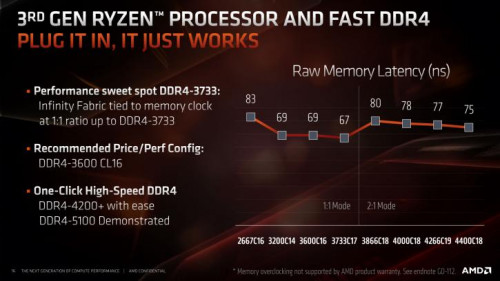 |
|
|
Jan 28 2021, 07:41 PM
|
|
Senior Member
4,523 posts Joined: Apr 2006
|
QUOTE(xxboxx @ Jan 28 2021, 06:35 PM) AMD claim RAM clock speed with IF 1:1 until 3733mhz or 3600mhz only That's Zen 2. He's talking about Zen 3. |
| Change to: |  0.0269sec 0.0269sec
 0.81 0.81
 6 queries 6 queries
 GZIP Disabled GZIP Disabled
Time is now: 20th December 2025 - 05:28 AM |
 Quote
Quote