Outline ·
[ Standard ] ·
Linear+
Cheap Asus Wifi Router Alternative, Huawei WS880 & Others
|
Granit3Grey
|
 Sep 14 2018, 09:52 PM Sep 14 2018, 09:52 PM
|
New Member


|
Do you mean wifi setting as in the router? Basically just the normal default. S8+ just connect by itself as usual. Me not advance user so everything by default. I would also suspecting the router CPU at the limit.
|
|
|
|
|
|
neuromancerx
|
Sep 16 2018, 11:18 PM
|
|
|
Unifi 500Mbps, CPU1 @98% in reality still can sustain daily load, not that you are using the bandwidth 100% flat for 24 hours This post has been edited by neuromancerx: Sep 16 2018, 11:23 PM Attached thumbnail(s)
|
|
|
|
|
|
soonwai
|
Sep 17 2018, 12:16 AM
|
|
|
WS880 should route at Asus AC66U or AC68U level. Around max 800-900Mbps in one direction. Has anyone tried with original firmware?
|
|
|
|
|
|
fkinmeng
|
Sep 17 2018, 10:53 AM
|
|
|
So WS880 can't support turbo upgrade?  |
|
|
|
|
|
Granit3Grey
|
Sep 17 2018, 11:24 AM
|
New Member
|
QUOTE(fkinmeng @ Sep 17 2018, 10:53 AM) So WS880 can't support turbo upgrade? Can if you are on Cat5e/CAT6 wired. Tested with full speed 500 Mbps with CAT6 on TM Speed test. 5G so far only max at 240++ with tplink Archer T9UH and Samsung S8+. WS880 will see significant drop of speed if you are 1floor away. Attached thumbnail(s)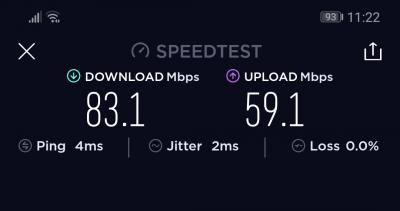
|
|
|
|
|
|
SilentVampire
|
Sep 17 2018, 11:33 AM
|
|
|
QUOTE(fkinmeng @ Sep 17 2018, 10:53 AM) So WS880 can't support turbo upgrade? Not likely. Just get a new router. |
|
|
|
|
|
fruitie
|
Sep 17 2018, 12:35 PM
|
Rise and Shine

|
QUOTE(fkinmeng @ Sep 17 2018, 10:53 AM) So WS880 can't support turbo upgrade? QUOTE(SilentVampire @ Sep 17 2018, 11:33 AM) Not likely. Just get a new router. Why not? Just curious. I thought earlier post proves it can? |
|
|
|
|
|
fkinmeng
|
Sep 17 2018, 12:50 PM
|
|
|
QUOTE(Granit3Grey @ Sep 17 2018, 11:24 AM) Can if you are on Cat5e/CAT6 wired. Tested with full speed 500 Mbps with CAT6 on TM Speed test. 5G so far only max at 240++ with tplink Archer T9UH and Samsung S8+. WS880 will see significant drop of speed if you are 1floor away. QUOTE(SilentVampire @ Sep 17 2018, 11:33 AM) Not likely. Just get a new router. Haih, I'm only on wifi, guess need spend a big chunk of money again.  |
|
|
|
|
|
SilentVampire
|
Sep 17 2018, 12:53 PM
|
|
|
QUOTE(fruitie @ Sep 17 2018, 12:35 PM) Why not? Just curious. I thought earlier post proves it can? It can, but on wired only. Better to change to something on the front page. QUOTE(fkinmeng @ Sep 17 2018, 12:50 PM) Haih, I'm only on wifi, guess need spend a big chunk of money again. It is an investment as you do use it everyday, so it pays back by itself in a way. |
|
|
|
|
|
Granit3Grey
|
Sep 17 2018, 02:39 PM
|
New Member
|
QUOTE(fkinmeng @ Sep 17 2018, 12:50 PM) Haih, I'm only on wifi, guess need spend a big chunk of money again. Just give it a try first once you are Turbo'ed. Maybe you get better results with newer firmware and also your house layout. I am still using it though because couldn't decide the next upgrade and tentatively lock down on tplink archer c3150  . Eventually waiting more feedbacks and on low budget too. |
|
|
|
|
|
sHawTY
|
Sep 17 2018, 02:42 PM
|
|
|
Anyone managed to update their RT-AC1900 (T-Mobile RT-AC68) to AsusWRT Merlin 384.7 BETA 1? I'm having the same problem when updating to 384.6  This post has been edited by sHawTY: Sep 17 2018, 02:42 PM This post has been edited by sHawTY: Sep 17 2018, 02:42 PM |
|
|
|
|
|
TSKiding
|
Sep 17 2018, 04:27 PM
|
|
|
QUOTE(Granit3Grey @ Sep 17 2018, 11:24 AM) Can if you are on Cat5e/CAT6 wired. Tested with full speed 500 Mbps with CAT6 on TM Speed test. 5G so far only max at 240++ with tplink Archer T9UH and Samsung S8+. WS880 will see significant drop of speed if you are 1floor away. Tested with CAT6 cable, my laptop to the switch is 1Gbps, but speedtest is still reaching 210Mbps, and 1 cpu core at WWS880 router reach almost 100%. 
|
|
|
|
|
|
muncheno
|
Sep 17 2018, 04:36 PM
|
|
|
QUOTE(Kiding @ Sep 17 2018, 04:27 PM) Tested with CAT6 cable, my laptop to the switch is 1Gbps, but speedtest is still reaching 210Mbps, and 1 cpu core at WWS880 router reach almost 100%.
NAT setting? Check under LAN - > Switch Control - > NAT accelerationg - > Auto Edited. Did you have QoS running? Should disable to test again. This post has been edited by muncheno: Sep 17 2018, 04:40 PM |
|
|
|
|
|
Granit3Grey
|
Sep 17 2018, 04:48 PM
|
New Member
|
QUOTE(Kiding @ Sep 17 2018, 04:27 PM) Tested with CAT6 cable, my laptop to the switch is 1Gbps, but speedtest is still reaching 210Mbps, and 1 cpu core at WWS880 router reach almost 100%. Re-test it again with CAT6 cable Sorry, have to remove the WAN IP. This post has been edited by Granit3Grey: Sep 17 2018, 04:52 PM Attached thumbnail(s)
|
|
|
|
|
|
TSKiding
|
Sep 17 2018, 07:47 PM
|
|
|
QUOTE(muncheno @ Sep 17 2018, 04:36 PM) NAT setting? Check under LAN - > Switch Control - > NAT accelerationg - > Auto Edited. Did you have QoS running? Should disable to test again. The QOS tab was hidden until I enabled BWDPI, no wonder I couldn't find it. After disabled QoS, the speedtest increased to 268Mbps, still not able to reach 300Mbps, anyway, I'm going to downgrade to 100Mbps Unifi, I don't really need the 300Mbps  |
|
|
|
|
|
jimbet1337
|
Sep 30 2018, 07:30 PM
|
|
|
Anyone with WS880 regardless of stock firmware or flashed to vortex/merlin and currently using Time Fibre?
Apparently they are rolling out speed upgrade for all current packages.
How's the speed you guys are getting?
|
|
|
|
|
|
Khalid21
|
Oct 1 2018, 03:48 PM
|
|
|
ws880 with vortex firmware -
unifi 500mbps
wifi 5ghz only manage 250mbps on mba below 200mbps on ip6s
|
|
|
|
|
|
jimbet1337
|
Oct 1 2018, 04:42 PM
|
|
|
QUOTE(Khalid21 @ Oct 1 2018, 03:48 PM) ws880 with vortex firmware - unifi 500mbps wifi 5ghz only manage 250mbps on mba below 200mbps on ip6s Thanks for your feedback |
|
|
|
|
|
muncheno
|
Oct 1 2018, 09:06 PM
|
|
|
Time just upgraded my 100mbps to 500mbps.
Using Huawei WS880 router and tested with Huawei P20pro on 5Ghz WiFi.
My Speedtest Result
DL 324 Mbps UL 431 Mbps
Will test LAN later.
Just back from work. Tired.
|
|
|
|
|
|
junclj
|
Oct 1 2018, 09:28 PM
|
|
|
QUOTE(Kiding @ Sep 17 2018, 07:47 PM) The QOS tab was hidden until I enabled BWDPI, no wonder I couldn't find it. After disabled QoS, the speedtest increased to 268Mbps, still not able to reach 300Mbps, anyway, I'm going to downgrade to 100Mbps Unifi, I don't really need the 300Mbps are you sure it is about router problem? I am now with unifi turbo 500mbps but my speedtest result is 300mbps. I am considering that it is my router problem but still not 100% confirm. Currently is RT-AC55UHP, CPU reached to 100% when speedtest reach to 300mbps download speed. Most of the time steam download was just around 20MB/s. Feels like the router is not powerful enough. So I was ordered a RT-AC86U, hope will confirm soon whether is my line problem or router problem. |
|
|
|
|



 Quote
Quote





 0.0299sec
 0.78
0.78
 6 queries
 GZIP Disabled