Welcome Guest ( Log In | Register )

Outline · [ Standard ] · Linear+

 Cheap Asus Wifi Router Alternative, Huawei WS880 & Others

views
     
TSKiding
post Jul 8 2016, 08:19 PM, updated 4y ago

Regular
******
Senior Member
1,135 posts

Joined: Jan 2003
From: Seri Kembangan


I was browsing WIFI router last weekend at Lowyat plaza, and I spot a rarely seen router - Huawei WS880 AC1750 wifi router.

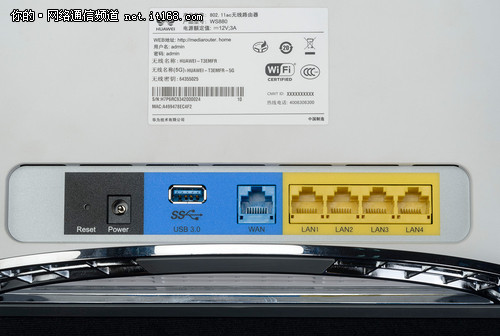
user posted image

user posted image

Basic Spec is

» Click to show Spoiler - click again to hide... «


How to flash to third party firmware

» Click to show Spoiler - click again to hide... «


Since it is broadcom chipset, it is supported by ASUSWRT and Tomato firmware, I managed to flash the firmware to ASUSWRT-MERLIN, and it detected WS880 as AC68U
Attached Image

It even supports UNIFI and Maxis broadband out of the box
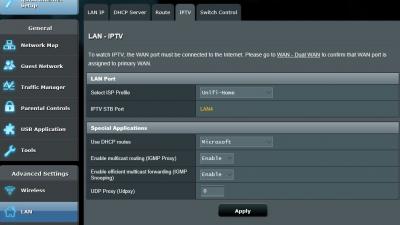
Attached Image

The speed is awesome, I can get full speed of UNIFI 30Mbps even I sit at the far corner of 1st floor while my router is sitting at the ground floor living room

This router is no longer available at Lowyat, possibly not even available in Malaysia.

This post has been edited by Kiding: May 17 2018, 07:22 PM

TSKiding
post Jul 8 2016, 09:10 PM

Regular
******
Senior Member
1,135 posts

Joined: Jan 2003
From: Seri Kembangan


You guys can go Sri Computer Hypermarket, 2nd floor lowyat plaza to get it
TSKiding
post Jul 9 2016, 01:29 AM

Regular
******
Senior Member
1,135 posts

Joined: Jan 2003
From: Seri Kembangan


QUOTE(soonwai @ Jul 9 2016, 12:20 AM)
kiding Looks like a very good deal. What do you mean by "just below RM200 price tag"? How much did you buy it for? Any T&C?
*
Attached Image

Is it clear enough ? brows.gif
TSKiding
post Jul 9 2016, 10:59 AM

Regular
******
Senior Member
1,135 posts

Joined: Jan 2003
From: Seri Kembangan


QUOTE(soonwai @ Jul 9 2016, 03:16 AM)
kiding How was the original firmware? I couldn't find any manuals or screenshots of it. Must be terrible since you flashed it to ASUSWRT so quickly.
Yeah, crazy price right? What's the catch? There must be a catch.
*
The original firmware is quite good as well, just it only supports Dyndns service, which requires yearly subscription fee, so I flash it quickly to ASUSWRT, which support free DDNS service. Anyway, I have been using openwrt and tomato for years, so I already get used to the features and flexibility of these opensource firmware


TSKiding
post Jul 9 2016, 01:31 PM

Regular
******
Senior Member
1,135 posts

Joined: Jan 2003
From: Seri Kembangan


QUOTE(raynman @ Jul 9 2016, 11:59 AM)
Can the original firmware support Unifi (VLAN tagging)?
*
Yes, support unifi out of the box
TSKiding
post Jul 10 2016, 11:24 PM

Regular
******
Senior Member
1,135 posts

Joined: Jan 2003
From: Seri Kembangan


QUOTE(vincent_ng86 @ Jul 10 2016, 10:59 PM)
Does not seems to support IPv6 out of the box.
*
Both stock firmware and AsusWRT firmware support IPV6 out of the box
TSKiding
post Jul 11 2016, 01:25 PM

Regular
******
Senior Member
1,135 posts

Joined: Jan 2003
From: Seri Kembangan


QUOTE(raynman @ Jul 11 2016, 11:20 AM)
It is not the access to the router.

The damn thing just won't boot into recovery mode to load modified bootloader.

It always boot into the original Huawei firmware login page after the reset procedure. Like no reset at all.  doh.gif
*
Did you hold the reset button for 20 secs while powering on the router?
TSKiding
post Jul 12 2016, 12:05 AM

Regular
******
Senior Member
1,135 posts

Joined: Jan 2003
From: Seri Kembangan


QUOTE(ks1230 @ Jul 11 2016, 10:54 PM)
Yes..I would highly recommend this router as well..currently running on stock firmware with eleven devices connecting to it..a really great replacement for the stock router..  rclxms.gif  ..thanks TS for sharing this awesome router at the awesome price..  thumbup.gif
[attachmentid=7064427]
*
Actually if you know what is the Huawei's core business, then you won't surprise the router has decent performance.

Huawei is ranked 3rd worldwide in router and switches, they are the most fast growing company in communication, especially in enterprise market. they are like Cisco in US, and they took a lot market share from Cisco in developing world.
TSKiding
post Jul 18 2016, 11:58 AM

Regular
******
Senior Member
1,135 posts

Joined: Jan 2003
From: Seri Kembangan


QUOTE(ycs @ Jul 18 2016, 09:28 AM)
anyone else getting the 2nd WAN ip? my real asus router doesn't have this 2nd WAN ip

[attachmentid=7112561]
Just ignore the ip address 169.254.*, the 169.254.*.* is belong to VLAN 500 interface, since it can't get the IP for VLAN 500 interface, it assigned itself Automatic Private IP Addressing which is 169.254.*.*


TSKiding
post May 6 2017, 02:17 PM

Regular
******
Senior Member
1,135 posts

Joined: Jan 2003
From: Seri Kembangan


QUOTE(DraGGarD @ May 6 2017, 09:00 AM)
morning guys, after almost one year of usage, the speed for my 2.4ghz is very slow and i cant even surf the internet but as for 5ghz, i got full speed. something is weird. Did anyone encounter this ? byw, i m still using stock firmware
*
check whether or not someone use same 2.4GHz channel with you, if yes, always change to channel that has less interference in your house
TSKiding
post Nov 11 2017, 12:03 AM

Regular
******
Senior Member
1,135 posts

Joined: Jan 2003
From: Seri Kembangan


QUOTE(muncheno @ Nov 10 2017, 06:29 PM)
Do you mind share your script on rsync?

Here is mine and i added to crontab to run on schedule.
» Click to show Spoiler - click again to hide... «


I used to used command with -v but always got it hang.
*
It is better hide your ip, username and password, or you might have somebody hacked into your network and expose your picture smile.gif
TSKiding
post Sep 14 2018, 08:31 PM

Regular
******
Senior Member
1,135 posts

Joined: Jan 2003
From: Seri Kembangan


QUOTE(Granit3Grey @ Sep 14 2018, 05:46 PM)
Hi all and I am using this router since the good deal offer from Lowyat Plaza as well flushed to MERLIN.

I would like to know if anyone else already gotten the Unifi Turbo'ed and what are the results?

Personally from me, Turbo'ed to 500 Mbps is archivable with CAT6 network cable. Tested on TM Speed Test.

Meanwhile, my concerns are on wifi. Tested on 5G with both Samsung Galaxy 8+ and as well desktop PC on USB TP-Link T9UH with only 210-220 Mbps download and consistently 100-102Mbps upload. Wifi distance within same room. Forget about 2.4G because only 30+ sad.gif

Please do share me if you have better results and what could be the possible configuration? Thank you very much.

My location is in Cheers.
*
Same thing to me, speed tested with WIFI, max get 210Mbps with Unifi 30Mbps turbo'ed to 300Mbps.

Found out the WS880 one cpu reach 100% and another cpu reach 50% during test, I believe it is WWS880 limits


TSKiding
post Sep 17 2018, 04:27 PM

Regular
******
Senior Member
1,135 posts

Joined: Jan 2003
From: Seri Kembangan


QUOTE(Granit3Grey @ Sep 17 2018, 11:24 AM)
Can if you are on Cat5e/CAT6 wired. Tested with full speed 500 Mbps with CAT6 on TM Speed test.

5G so far only max at 240++ with tplink Archer T9UH and Samsung S8+.

WS880 will see significant drop of speed if you are 1floor away.
*
Tested with CAT6 cable, my laptop to the switch is 1Gbps, but speedtest is still reaching 210Mbps, and 1 cpu core at WWS880 router reach almost 100%.
Attached Image
TSKiding
post Sep 17 2018, 07:47 PM

Regular
******
Senior Member
1,135 posts

Joined: Jan 2003
From: Seri Kembangan


QUOTE(muncheno @ Sep 17 2018, 04:36 PM)
NAT setting?
Check under LAN - > Switch Control - > NAT accelerationg - > Auto

Edited.
Did you have QoS running?
Should disable to test again.
*
The QOS tab was hidden until I enabled BWDPI, no wonder I couldn't find it.

After disabled QoS, the speedtest increased to 268Mbps, still not able to reach 300Mbps, anyway, I'm going to downgrade to 100Mbps Unifi, I don't really need the 300Mbps dry.gif
TSKiding
post Mar 24 2019, 10:59 PM

Regular
******
Senior Member
1,135 posts

Joined: Jan 2003
From: Seri Kembangan


QUOTE(phoenixxx @ Mar 24 2019, 09:46 PM)
Any router recommendation for double storey home.

My ONU is at the back room (downstairs), direct LAN cable to my PC, using stock router from Unifi (DIR 850)...

I have extra LAN port upstairs hall, which plan to put this new router and hopefully can get better 5Ghz signal throughout the house (currently using an old router as AP)

I am on unifi 300mbps (need to support Hypptv, so those Deco models cannot use)

So far surveyed a few model based on the thread here and blacktubi...

1. TP Link AC1200 (blacktubi recommend AC2300 but I cant find)
2. Tenda AC18, seems quite popular brand. However digimall / lowyat seller seems less enthusiastic and keep pushing TP Link instead :S also, seems to have a noticeable rate of lemon unit based on user feedback online, however Tenda seems to honor 1 to 1 exchange
3. ASUS 68 or 86 ... a bit too expensive for me

Any advise from sifus here? Maybe below RM500 range if possible.
*
If you want 5Ghz to cover entire two storey house, better get mesh wifi system such as Asus lyra or linksys velop

Taobao selling dual band linksys velop AC2600 for RM610
TSKiding
post Nov 30 2020, 01:21 PM

Regular
******
Senior Member
1,135 posts

Joined: Jan 2003
From: Seri Kembangan


QUOTE(Momo33 @ Nov 30 2020, 07:03 AM)
bro..was just now reading  your above msg today  . 
just wanna ask if  you were using surge protect belkins  or have a surge SPD  in your DB box at the above strikes.
its to understand if  these surge devices  really work or.. 
thanks...
*
Get a Cal-lab lightning arrestor, made in Malaysia and it works for me perfectly, the cal-lab device will sacrifice itself to protect valuable electronic devices.
TSKiding
post Jun 9 2022, 05:29 PM

Regular
******
Senior Member
1,135 posts

Joined: Jan 2003
From: Seri Kembangan


QUOTE(colmi @ Jun 9 2022, 12:35 PM)
user posted image

user posted image

My Huawei WS880 is still running strong with Xwrt-Vortex 380.66 firmware
*
My one also has been running 24 x 7 for past 6 years without any fan attached, solid router and no issue at all.

Too bad the firmware no longer get updated, which is a security concern.


Change to:
| Lo-Fi Version
0.0265sec    0.76    7 queries    GZIP Disabled
Time is now: 3rd December 2025 - 10:45 AM