Outline ·
[ Standard ] ·
Linear+
Cheap Asus Wifi Router Alternative, Huawei WS880 & Others
|
Granit3Grey
|
 Sep 14 2018, 05:46 PM Sep 14 2018, 05:46 PM
|
New Member


|
Hi all and I am using this router since the good deal offer from Lowyat Plaza as well flushed to MERLIN. I would like to know if anyone else already gotten the Unifi Turbo'ed and what are the results? Personally from me, Turbo'ed to 500 Mbps is archivable with CAT6 network cable. Tested on TM Speed Test. Meanwhile, my concerns are on wifi. Tested on 5G with both Samsung Galaxy 8+ and as well desktop PC on USB TP-Link T9UH with only 210-220 Mbps download and consistently 100-102Mbps upload. Wifi distance within same room. Forget about 2.4G because only 30+  Please do share me if you have better results and what could be the possible configuration? Thank you very much. My location is in Cheers. |
|
|
|
|
|
Granit3Grey
|
Sep 14 2018, 08:51 PM
|
New Member
|
Oh well, time to shopping for a better router Thanks Kiding. Do let me know if you found something as what you did with WS880. Very much appreciated. |
|
|
|
|
|
Granit3Grey
|
Sep 14 2018, 09:52 PM
|
New Member
|
Do you mean wifi setting as in the router? Basically just the normal default. S8+ just connect by itself as usual. Me not advance user so everything by default. I would also suspecting the router CPU at the limit.
|
|
|
|
|
|
Granit3Grey
|
Sep 17 2018, 11:24 AM
|
New Member
|
QUOTE(fkinmeng @ Sep 17 2018, 10:53 AM) So WS880 can't support turbo upgrade? Can if you are on Cat5e/CAT6 wired. Tested with full speed 500 Mbps with CAT6 on TM Speed test. 5G so far only max at 240++ with tplink Archer T9UH and Samsung S8+. WS880 will see significant drop of speed if you are 1floor away. Attached thumbnail(s)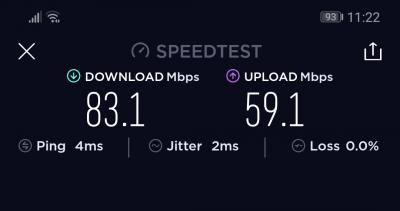
|
|
|
|
|
|
Granit3Grey
|
Sep 17 2018, 02:39 PM
|
New Member
|
QUOTE(fkinmeng @ Sep 17 2018, 12:50 PM) Haih, I'm only on wifi, guess need spend a big chunk of money again.  Just give it a try first once you are Turbo'ed. Maybe you get better results with newer firmware and also your house layout. I am still using it though because couldn't decide the next upgrade and tentatively lock down on tplink archer c3150  . Eventually waiting more feedbacks and on low budget too. |
|
|
|
|
|
Granit3Grey
|
Sep 17 2018, 04:48 PM
|
New Member
|
QUOTE(Kiding @ Sep 17 2018, 04:27 PM) Tested with CAT6 cable, my laptop to the switch is 1Gbps, but speedtest is still reaching 210Mbps, and 1 cpu core at WWS880 router reach almost 100%. Re-test it again with CAT6 cable Sorry, have to remove the WAN IP. This post has been edited by Granit3Grey: Sep 17 2018, 04:52 PM Attached thumbnail(s)
|
|
|
|
|



 Quote
Quote

 0.0175sec
 0.19
0.19
 7 queries
 GZIP Disabled