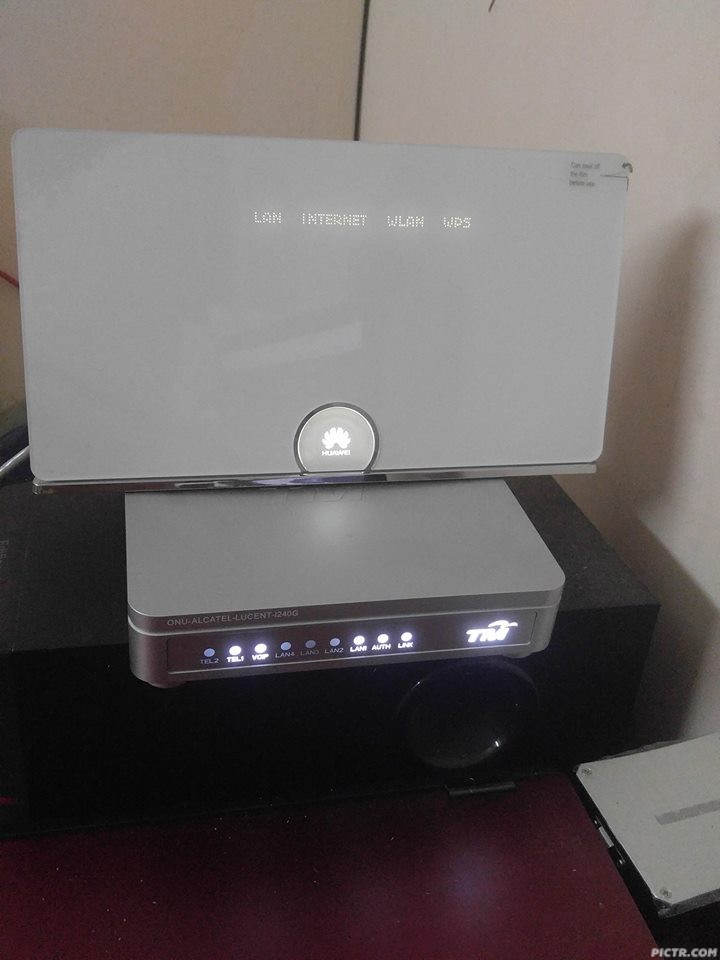
Anyway, my friend is there and already helped me to buy.
 He told me there are still plenty, one whole full rack.
Cheap Asus Wifi Router Alternative, Huawei WS880 & Others
|
|
 Jul 14 2016, 03:54 PM Jul 14 2016, 03:54 PM
Return to original view | Post
#1
|
 
Staff
72,796 posts Joined: Sep 2005 From: KUL  
|
I told my boss I'm in dilemma to go to LYP or not after work because I'm just too lazy. He asked why and I told him about this router cheap price. He asked if I still have any tasks to do, I said I'm basically done for the day. He asked me to leave office and go to LYP.
Anyway, my friend is there and already helped me to buy. He told me there are still plenty, one whole full rack. |
|
|
|
|
|
Jul 14 2016, 03:57 PM
Return to original view | Post
#2
|
|
Staff
72,796 posts Joined: Sep 2005 From: KUL
|
QUOTE(andrekua2 @ Jul 14 2016, 03:55 PM) I also there today. One shelf only... plus another stack at the counter. Yesterday 2 shelves. Really whole rack? This is what he told me, he didn't snap any photo for me though. So, still got chance one la. Just that I don't need to purposely travel from KL Sentral to LYP, got people help me to buy and send to me later.  Edit: He just told me only two full rows. This post has been edited by fruitie: Jul 14 2016, 04:01 PM |
|
|
Jul 14 2016, 04:17 PM
Return to original view | Post
#3
|
|
Staff
72,796 posts Joined: Sep 2005 From: KUL
|
QUOTE(roti_john @ Jul 14 2016, 04:07 PM) going to buy afterwork.. First rule, just make sure it will not suddenly power off when you do it. I had flashed few times during TP Link days.  this is 1st time i heard about flash router to 3rd party software. what is the precaution must take so that it won't brick? |
|
|
Jul 14 2016, 04:32 PM
Return to original view | Post
#4
|
|
Staff
72,796 posts Joined: Sep 2005 From: KUL
|
QUOTE(sHawTY @ Jul 14 2016, 04:25 PM) Currently there are no way to un-brick WS880 Any advantage to flash it to 3rd party firmware? Is the stock good enough? Since there is no way to unbrick it, I'm not sure if I want to take the risk. Just follow the guide carefully, and follow my guides too Also, when editing the CFE, make sure you type the correct MAC address & the WLAN key Double confirm you've typed the correct MAC Address & WLAN key before you save the modified CFE  My friend is doing it for me though this time. |
|
|
Jul 14 2016, 05:02 PM
Return to original view | Post
#5
|
|
Staff
72,796 posts Joined: Sep 2005 From: KUL
|
QUOTE(sHawTY @ Jul 14 2016, 04:37 PM) Don't know. I straight away flash mine to AsusWRT I see, I will speak to my friend and see which one he prefers. I have been with AsusWRT for around 6 years now since the age of RT-N16 then upgrade to RT-AC68U Maybe the stock firmware is good enough but I still prefer AsusWRT over anything else. Just a personal preferences  QUOTE(roti_john @ Jul 14 2016, 05:00 PM) just now called the store, said already out of stock Huh? My friend just grabbed two, one for me and one for him at 4pm and still with two rows full...   |
|
|
Jul 14 2016, 06:05 PM
Return to original view | Post
#6
|
|
Staff
72,796 posts Joined: Sep 2005 From: KUL
|
Luckily I managed to grab for myself.
 |
|
|
|
|
|
Jul 14 2016, 10:43 PM
Return to original view | Post
#7
|
|
Staff
72,796 posts Joined: Sep 2005 From: KUL
|
Yeah, mine also flashed to Xwrt-Vortex.
Now I will need to find my UniFi password which I have no idea what is it, I supposed I will need it. Router is still not with me, tomorrow's night only my friend will pass to me. |
|
|
Jul 15 2016, 03:45 PM
Return to original view | Post
#8
|
|
Staff
72,796 posts Joined: Sep 2005 From: KUL
|
QUOTE(christina1 @ Jul 15 2016, 03:42 PM) is this router has powerful wireless connection and is it easy to set up for Unifi? Yes, easy. My friend has helped to flash mine and will give it back to me today. At first glance, I don't think it is difficult. Out from the box, it is already UniFi friendly configuration. |
|
|
Jul 15 2016, 07:38 PM
Return to original view | IPv6 | Post
#9
|
|
Staff
72,796 posts Joined: Sep 2005 From: KUL
|
QUOTE(blacktubi @ Jul 15 2016, 07:24 PM) Anyone ordered from Lazada have their router shipped? Yes, I checked before I bought from Sri Computer because I will have visitors from China coming again in next week. Anyway, Sri Computer selling price is even cheaper than the RRP in mainland China.  |
|
|
Jul 15 2016, 10:30 PM
Return to original view | Post
#10
|
|
Staff
72,796 posts Joined: Sep 2005 From: KUL
|
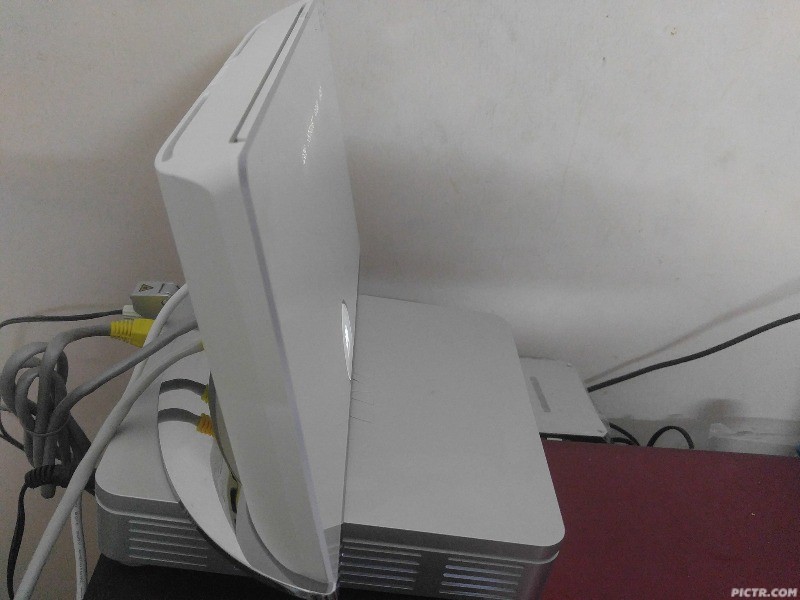
Finally got mine from my friend after he flashed the firmware.
So easy to setup even for a networking noob like me. » Click to show Spoiler - click again to hide... « Nice looking but quite heavy. This post has been edited by fruitie: Jul 15 2016, 10:34 PM |
|
|
Jul 15 2016, 11:05 PM
Return to original view | Post
#11
|
|
Staff
72,796 posts Joined: Sep 2005 From: KUL
|
QUOTE(strynch @ Jul 15 2016, 11:00 PM) Any idea how to turn of the light at the back of Huawei logo? I can't even seem to turn off the INTERNET wording, others are OK. I press the logo but only manage to turn off the lights of LAN INTERNET WLAN & WPS only. How do I turn on IPv6 by the way? I chose "native" but it is still not. This post has been edited by fruitie: Jul 15 2016, 11:06 PM |
|
|
Jul 16 2016, 01:04 AM
Return to original view | Post
#12
|
|
Staff
72,796 posts Joined: Sep 2005 From: KUL
|
QUOTE(strynch @ Jul 16 2016, 01:01 AM) How about the Huawei logo? You managed to turn it off as well? Nope, cannot... |
|
|
Jul 16 2016, 11:18 AM
Return to original view | IPv6 | Post
#13
|
|
Staff
72,796 posts Joined: Sep 2005 From: KUL
|
QUOTE(Khalid21 @ Jul 16 2016, 08:42 AM) Use masking tape Actually not a problem for me. Those LEDs look nice. |
|
|
|
|
|
Jul 16 2016, 12:08 PM
Return to original view | IPv6 | Post
#14
|
|
Staff
72,796 posts Joined: Sep 2005 From: KUL
|
QUOTE(ycs @ Jul 16 2016, 11:59 AM) oh, then i better flash the asuswrt Yes. Very easy to use, everything is easily setup. Just need to get your UniFi username and password ready. |
|
|
Jul 16 2016, 11:09 PM
Return to original view | IPv6 | Post
#15
|
|
Staff
72,796 posts Joined: Sep 2005 From: KUL
|
QUOTE(sHawTY @ Jul 16 2016, 11:05 PM) The app will only work once you're using AsusWRT firmware Just downloaded the app, detected right away and cool app. The app won't work with stock firmware |
|
|
Jul 17 2016, 11:20 AM
Return to original view | Post
#16
|
|
Staff
72,796 posts Joined: Sep 2005 From: KUL
|
QUOTE(BigSaver @ Jul 17 2016, 10:33 AM) Has anyone faced this problem: Try changing wireless channels? I used to have this kind of issue too on my previous routers, my iPad acted the same way you described above. It was solved after I changed the channel, gotta trial and error until you find the better channel.1) one/to out of few devices unable to connect to the router(my lenovo Z510 and note 3 neo sometime unable to connect even after install new driver) 2) keep connect and disconnecting ( happen at my z510 and ipad) Btw im on stock firmware. In this case my ancient DIR615 perform better than this WS880 except wireless range. |
|
|
Jul 17 2016, 07:58 PM
Return to original view | Post
#17
|
|
Staff
72,796 posts Joined: Sep 2005 From: KUL
|
My WiFi did lost intermittently, just changed the channel from 11 to 6, hope it will improve.
I'm on Xwrt-Vortex. Anybody has the same encounter as mine? |
|
|
Jul 17 2016, 09:58 PM
Return to original view | Post
#18
|
|
Staff
72,796 posts Joined: Sep 2005 From: KUL
|
QUOTE(sHawTY @ Jul 17 2016, 09:53 PM) All my devices is connected to the 5GHz SSID, so not sure if I'm affected by the same issue as yours Mine only mobile phone is connected to 5GHz. My laptop is a 5 years old laptop, so still 2.4GHz. So far OK since I changed in the afternoon. |
|
|
Jul 19 2016, 10:33 AM
Return to original view | Post
#19
|
|
Staff
72,796 posts Joined: Sep 2005 From: KUL
|
QUOTE(jeisern @ Jul 19 2016, 10:24 AM) I am using Channel 11, so far for me i would use a wifi analyzer to scan my neighborhood to see which channel is widely used (usually the default ones) and then change mine to the least used one. Yes, I used the app too earlier and noticed my neighborhood is very quiet, not congested at all. Anyway, I was using channel 11 all this while for many many years then itchy hand and switched to channel 6, then problem came. Now OK already after I switched back to channel 11. |
|
|
Jul 19 2016, 10:43 AM
Return to original view | Post
#20
|
|
Staff
72,796 posts Joined: Sep 2005 From: KUL
|
QUOTE(LostAndFound @ Jul 19 2016, 10:40 AM) If you're on Asuswrt there's already a wifi analyzer built in. Wireless -> Site Survey Thanks for the heads-up! Will go back and check out my neighborhood when I go back home today. |
| Change to: |  0.0858sec 0.0858sec
 0.35 0.35
 7 queries 7 queries
 GZIP Disabled GZIP Disabled
Time is now: 2nd December 2025 - 08:28 PM |
 Quote
Quote