

Anyone know why its like that?
cheers
BTW, shoutout to yeapch01 for registration and assistance so far

TIME [OFFICIAL] TIME Fibre Broadband™ v3.o, 500 Mbps of rocket science
|
|
 Nov 13 2016, 01:25 PM Nov 13 2016, 01:25 PM
|
 
Senior Member
1,460 posts Joined: Jan 2003  
|
not sure if its me, but just after installation, i did a speed test on wifi, i got 280mbps, then the following day till now, i only manage to get max 190mbps on LAN, and 140mbps on wifi
Anyone know why its like that? cheers BTW, shoutout to yeapch01 for registration and assistance so far |
|
|
|
|
|
Nov 13 2016, 01:42 PM
|

Senior Member
1,916 posts Joined: Mar 2008
|
QUOTE(spoonkin @ Nov 13 2016, 02:25 PM) not sure if its me, but just after installation, i did a speed test on wifi, i got 280mbps, then the following day till now, i only manage to get max 190mbps on LAN, and 140mbps on wifi Dear broAnyone know why its like that? cheers BTW, shoutout to yeapch01 for registration and assistance so far  Thanks for your support and compliment , we take it as challenge to serve the community even better. Btw , are u still using the stock router given by time . Thanks |
|
|
Nov 13 2016, 02:03 PM
|
|
Senior Member
1,460 posts Joined: Jan 2003
|
QUOTE(yeapch01 @ Nov 13 2016, 01:42 PM) Dear bro i actually tried both stock and asus rt-ac66u, still give me the same result.Thanks for your support and compliment , we take it as challenge to serve the community even better. Btw , are u still using the stock router given by time . Thanks kinda weird, like got cap for downloading at 200mbps, upload can go 300mbps though |
|
|
Nov 13 2016, 03:23 PM
|

Junior Member
315 posts Joined: Mar 2014 
|
Hello.. currently I am using TM Unifi 30Mbps internet... sometimes the connection is ok sometimes is bad.. I want to migrate to TIME but not sure if my area got coverage... if can pls PM me whatsapp number so can discuss. Cheers.
|
|
|
Nov 13 2016, 03:53 PM
|
|
Senior Member
1,916 posts Joined: Mar 2008
|
QUOTE(eNDY<3games @ Nov 13 2016, 04:23 PM) Hello.. currently I am using TM Unifi 30Mbps internet... sometimes the connection is ok sometimes is bad.. I want to migrate to TIME but not sure if my area got coverage... if can pls PM me whatsapp number so can discuss. Cheers. Dear BroThanks for your interest in Time fibre , we are time fibre distributor can help you check on coverage, registration and arranging for installation. May i know your building name or you can whatapps us @ 012 4900601 for further details Thanks |
|
|
Nov 14 2016, 01:15 AM
|

Senior Member
3,606 posts Joined: Feb 2006
|
QUOTE(spoonkin @ Nov 13 2016, 02:03 PM) i actually tried both stock and asus rt-ac66u, still give me the same result. Hi Bro,kinda weird, like got cap for downloading at 200mbps, upload can go 300mbps though Please try to test using different speedtest servers and take an average result. If the problem still persists, you need to make a report to Customer Service. Another way you could check is to bypass the Router and hook it up directly to the ONU (aka Fibre Modem) to perform a test again. If you need further help, feel free to buzz me. Thanks. |
|
|
|
|
|
Nov 14 2016, 06:07 AM
|
|
Senior Member
813 posts Joined: May 2013
|
QUOTE(dunnoduh @ Nov 12 2016, 04:20 PM) It seems to be routing properly now Are yours still ok? Mine only good for half a day. Its now went back to same shitty lag in every game.1 <1 ms <1 ms <1 ms 192.168.1.1 2 2 ms 2 ms 2 ms ag-01-glsfb.ni.time.net.my [223.28.0.216] 3 2 ms 1 ms 1 ms ae2-er-01-glsfb.ni.time.net.my [223.28.26.41] 4 14 ms 15 ms 15 ms 223.28.2.1 5 8 ms 8 ms 8 ms Bundle-Ether1-br-01-mciwg.ni.time.net.my [223.28.26.82] 6 8 ms 8 ms 8 ms 124.158.226.149 7 8 ms 8 ms 8 ms xe-0-1-0-1.cr-gw-1-sin-pip.sg.globaltransit.net [124.158.224.237] 8 8 ms 8 ms 8 ms xe-0-0-2-0.pp-gw-1-sin-pip.sg.globaltransit.net [124.158.224.66] 9 8 ms 8 ms 9 ms 4826.sgw.equinix.com [27.111.228.74] 10 103 ms 103 ms 103 ms ge-0-1-0-15.cor02.per02.wa.VOCUS.net.au [114.31.206.98] 11 103 ms 103 ms 103 ms bundle-102.cor03.syd03.nsw.vocus.net.au [114.31.206.128] 12 102 ms 102 ms 102 ms ten-1-0-0.bdr03.syd04.nsw.VOCUS.net.au [175.45.72.73] 13 99 ms 139 ms 99 ms as17819.cust.bdr03.syd04.nsw.VOCUS.net.au [175.45.73.194] 14 99 ms 99 ms 99 ms 27.111.251.106 15 103 ms 102 ms 102 ms 103.4.115.248 |
|
|
Nov 14 2016, 05:28 PM
|
|
Senior Member
1,460 posts Joined: Jan 2003
|
QUOTE(jjj2 @ Nov 14 2016, 01:15 AM) Hi Bro, thanks bro, now waiting CS to reply me, then work from therePlease try to test using different speedtest servers and take an average result. If the problem still persists, you need to make a report to Customer Service. Another way you could check is to bypass the Router and hook it up directly to the ONU (aka Fibre Modem) to perform a test again. If you need further help, feel free to buzz me. Thanks. |
|
|
Nov 14 2016, 10:31 PM
|
|
Junior Member
48 posts Joined: Sep 2008
|
hi all,
will need some help here, back from work but found out cannot online already, on modem, los indicator keep blinking red light. pon indicator no light. is this incoming line problem? |
|
|
Nov 15 2016, 12:36 PM
|

Junior Member
124 posts Joined: Aug 2007 
|
Why a condo 300 meter away from my condo available services from TIME and I do not entitled coverage?
|
|
|
Nov 15 2016, 01:28 PM
|

Senior Member
2,690 posts Joined: Aug 2005 From: Penang/ Kuala Lumpur
|
Hi there, quick questions. Let say if I am moving and I would like to bring my line with me -- how much would the charges be?
|
|
|
Nov 15 2016, 05:04 PM
|

Senior Member
3,834 posts Joined: Aug 2016
|
QUOTE(alexhwang @ Nov 15 2016, 03:31 AM) hi all, Incoming line problem. will need some help here, back from work but found out cannot online already, on modem, los indicator keep blinking red light. pon indicator no light. is this incoming line problem? Kindly call CS for problem issue It could be Fibre connector error, Cable cut or Fibre cable disconnected from the splitter unit. QUOTE(feiyoung @ Nov 15 2016, 05:36 PM) Why a condo 300 meter away from my condo available services from TIME and I do not entitled coverage? The fibre cable is lay under the road connect to the next building.Submit the request here QUOTE(evofantasy @ Nov 15 2016, 06:28 PM) Hi there, quick questions. Let say if I am moving and I would like to bring my line with me -- how much would the charges be? RM 120 charge for outdoor relocation.This post has been edited by FusionXY: Nov 15 2016, 05:05 PM |
|
|
Nov 15 2016, 06:42 PM
|
|
Junior Member
48 posts Joined: Sep 2008
|
QUOTE(FusionXY @ Nov 15 2016, 05:04 PM) Incoming line problem. thx for reply,Kindly call CS for problem issue It could be Fibre connector error, Cable cut or Fibre cable disconnected from the splitter unit. The fibre cable is lay under the road connect to the next building. Submit the request here RM 120 charge for outdoor relocation. haha, called cs this morning, suppose they asked me to call back after work, cuz need someone at home to restart the modem, but after the call suddenly my house internet up again(direct connected to synology), so i guess case closed, Thank you very much~~ lucky not cable cut~~ |
|
|
|
|
|
Nov 15 2016, 11:00 PM
|
|
Junior Member
61 posts Joined: Jan 2010
|
hi, my time got this error from router.
anybody know whats the reason? is it Time down? This post has been edited by kewell787: Nov 15 2016, 11:26 PM Attached thumbnail(s) 

|
|
|
Nov 16 2016, 04:13 AM
|

Junior Member
61 posts Joined: Aug 2016
|
Hi, I just upgraded to 300 mbps plan but my wifi is getting just about 100 to 120mbps in speedtest.
On LAN I can get 280 to 300mbps. I'm still using thr DLink 850l. Is that the max my router can go for wifi? |
|
|
Nov 16 2016, 01:13 PM
|

Senior Member
1,631 posts Joined: Jan 2003
|
QUOTE(Macnair @ Nov 16 2016, 04:13 AM) Hi, I just upgraded to 300 mbps plan but my wifi is getting just about 100 to 120mbps in speedtest. What phone are you using ?On LAN I can get 280 to 300mbps. I'm still using thr DLink 850l. Is that the max my router can go for wifi? |
|
|
Nov 16 2016, 01:54 PM
|
|
Junior Member
61 posts Joined: Aug 2016
|
QUOTE(g88 @ Nov 16 2016, 01:13 PM) What phone are you using ? Tried it in my laptop, xperia z ultra and ipad mini 2.100 to 120 mbps in wifi |
|
|
Nov 16 2016, 02:13 PM
|
 
Moderator
3,395 posts Joined: Dec 2007 From: 서울, South Korea
|
QUOTE(Macnair @ Nov 16 2016, 04:13 AM) Hi, I just upgraded to 300 mbps plan but my wifi is getting just about 100 to 120mbps in speedtest. If you enabled encryption in your WiFi, expect the speed to drop. On LAN I can get 280 to 300mbps. I'm still using thr DLink 850l. Is that the max my router can go for wifi? You may test this via your notebook connectivity - cable vs WiFi. Only on high end WiFi routers would you expect these problems to be addressed. |
|
|
Nov 16 2016, 02:28 PM
|

Senior Member
4,776 posts Joined: Jan 2003
|
QUOTE(Macnair @ Nov 16 2016, 04:13 AM) Hi, I just upgraded to 300 mbps plan but my wifi is getting just about 100 to 120mbps in speedtest. Not sure about the Dlink 850L AC1200 wifi router as I've never used it before.On LAN I can get 280 to 300mbps. I'm still using thr DLink 850l. Is that the max my router can go for wifi? With my Asus AC68U AC1900 wifi router, my Galaxy Note5 can get good speeds but only if connected to the AC 5GHz band and the phone is very near the router, e.g. 2-3 metres. 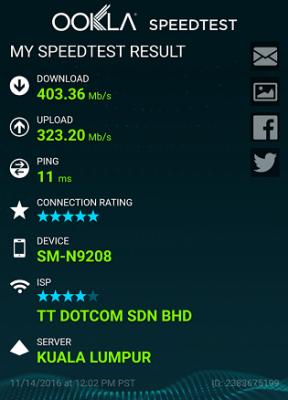
|
|
|
Nov 16 2016, 04:11 PM
|
|
Senior Member
3,606 posts Joined: Feb 2006
|
QUOTE(kewell787 @ Nov 15 2016, 11:00 PM) hi, my time got this error from router. Hi,anybody know whats the reason? is it Time down? Please call Customer Service 1800 18 1818, ans check your account status. If its active, request again the username & passwoed and key in into the ZTE Router. Thanks. |
|
Topic ClosedOptions
|
| Change to: |  0.0211sec 0.0211sec
 0.11 0.11
 6 queries 6 queries
 GZIP Disabled GZIP Disabled
Time is now: 7th December 2025 - 06:20 AM |
 Quote
Quote