Welcome Guest ( Log In | Register )

656 Pages « < 637 638 639 640 641 > » Bottom

Outline · [ Standard ] · Linear+

 Smart Home, Let's discuss

views
     
wailing81
post Aug 24 2024, 04:30 PM

Enthusiast
*****
Junior Member
711 posts

Joined: Mar 2008


QUOTE(simmarjit @ Aug 24 2024, 04:37 AM)
Yea thats me also LUL

No idea about your last question.
*
for the last question.

Aqara app has the option to trigger an automation by pressing 2 button together.
I can't find it in HA. do you have any idea how to set the same stuff up?

Thank you in advance.
simmarjit
post Aug 24 2024, 08:34 PM

Enthusiast
*****
Junior Member
980 posts

Joined: Dec 2011


QUOTE(wailing81 @ Aug 24 2024, 04:30 PM)
for the last question.

Aqara app has the option to trigger an automation by pressing 2 button together.
I can't find it in HA. do you have any idea how to set the same stuff up?

Thank you in advance.
*
https://www.zigbee2mqtt.io/devices/QBKG26LM.html

If not there i dont see how you can
trespasser
post Sep 6 2024, 07:41 PM

New Member
*
Newbie
46 posts

Joined: Aug 2013
QUOTE(alucard89 @ Aug 10 2024, 09:58 PM)
Anyone got the new aqara fp1e?

https://www.aqara.com/en/product/presence-sensor-fp1e/

Seems like the new ai spatial feature can filter those interference like ceiling fans, curtains, ac
*
I bought 2 to try it out. It able to connect via zigbee2mqtt but did not expose any parameters to test out automations.
I reckon the AI learning requires FP1E to pair with M3 hub so it might not able to distinguish ceiling fan air movement and human movement via zigbee2mqtt.

To date I tested with Sonoff SNZB-06P and Screek 2A but both still can't differentiate between ceiling fan air movement and human movement.
Was hoping FP1E able to solve this but I'm not getting my hopes up cry.gif
alucard89
post Sep 6 2024, 08:15 PM

Look at all my stars!!
*******
Senior Member
4,454 posts

Joined: Apr 2006
QUOTE(trespasser @ Sep 6 2024, 07:41 PM)
I bought 2 to try it out. It able to connect via zigbee2mqtt but did not expose any parameters to test out automations.
I reckon the AI learning requires FP1E to pair with M3 hub so it might not able to distinguish ceiling fan air movement and human movement via zigbee2mqtt.

To date I tested with Sonoff SNZB-06P and Screek 2A but both still can't differentiate between ceiling fan air movement and human movement.
Was hoping FP1E able to solve this but I'm not getting my hopes up  cry.gif
*
Hi bro, did you try this for z2m

https://github.com/Koenkk/zigbee2mqtt/issue...ment-2326967353

Screek 2A need to exclude areas with fan but there’s still issue with the not too great static detection on ld2450

And if you use LD2410, you can still exclude distance for the ceiling detection, for example if it hovers around 400 cm - 450cm.

So with the ai spatial learning enabled you can exclude the fan from your testing with fp1e?
trespasser
post Sep 7 2024, 04:08 PM

New Member
*
Newbie
46 posts

Joined: Aug 2013
QUOTE(alucard89 @ Sep 6 2024, 08:15 PM)
Hi bro, did you try this for z2m

https://github.com/Koenkk/zigbee2mqtt/issue...ment-2326967353

Screek 2A need to exclude areas with fan but there’s still issue with the not too great static detection on ld2450

And if you use LD2410, you can still exclude distance for the ceiling detection, for example if it hovers around 400 cm - 450cm.

So with the ai spatial learning enabled you can exclude the fan from your testing with fp1e?
*
Sorry mine was Screek F2, not 2A but context still the same.

user posted image

Mine still shows nothing tho. I forcefully removed it and re-pair and it still shows pic above.

Will be great if you pair the device then it shows the parameters like any other zigbee devices I had thus far.

Would really like to give U200 a try as well but currently bit too expensive IMO for this lockset.
alucard89
post Sep 7 2024, 04:27 PM

Look at all my stars!!
*******
Senior Member
4,454 posts

Joined: Apr 2006
QUOTE(trespasser @ Sep 7 2024, 04:08 PM)
Sorry mine was Screek F2, not 2A but context still the same.

user posted image

Mine still shows nothing tho. I forcefully removed it and re-pair and it still shows pic above.

Will be great if you pair the device then it shows the parameters like any other zigbee devices I had thus far.

Would really like to give U200 a try as well but currently bit too expensive IMO for this lockset.
*
Still nothing even after you add the external converter?

As for the F2, try add this extra config to your yaml to exclude the fan distance

https://community.home-assistant.io/t/ld214...-range/696688/4


trespasser
post Sep 8 2024, 10:10 AM

New Member
*
Newbie
46 posts

Joined: Aug 2013
QUOTE(alucard89 @ Sep 7 2024, 04:27 PM)
Still nothing even after you add the external converter?

As for the F2, try add this extra config to your yaml to exclude the fan distance

https://community.home-assistant.io/t/ld214...-range/696688/4
*
I shall give it a try again see if it works. Will further update.
Cheers!
epicure
post Sep 9 2024, 10:08 AM

Getting Started
**
Junior Member
229 posts

Joined: Sep 2009
Hey there everyone

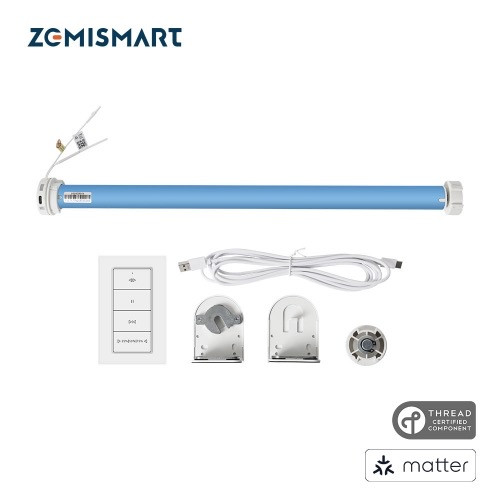
Been a while since i posted. I just installed the Zemismart Matter over Thread Roller Shade Rechargeable Motor. Installation was pretty straightforward. I took off my old blinds. Took off the bit that had the pull chain and then slotted the motor in. Re-used the old brackets and remounted the blinds onto my wall.
I got the Zemismart blinds with a 6 button remote, and pairing was pretty easy. I only had to press the button on the motor once, to pair to the remote. Other settings were done via the remote, even pairing with Homekit via the matter QR.

The motor has 3 speed settings. And since my blinds are pretty wide, the speed at its highest was just ok at best. But manageable.
All in all, i’m pretty happy with the Zemismart blinds.

Note: I only paired them to Homekit, via my Homepod mini as the thread border router. I find that if i pair them to the Zemismart M1 Hub, which i also have, any time i reboot the internet or M1, the thread devices will be offline in the M1, and i have to re-pair them again. Doenst happen when they are paired directly into Homekit.


user posted image
alucard89
post Sep 9 2024, 10:15 AM

Look at all my stars!!
*******
Senior Member
4,454 posts

Joined: Apr 2006
QUOTE(epicure @ Sep 9 2024, 10:08 AM)
Hey there everyone

Been a while since i posted. I just installed the Zemismart Matter over Thread Roller Shade Rechargeable Motor. Installation was pretty straightforward. I took off my old blinds. Took off the bit that had the pull chain and then slotted the motor in. Re-used the old brackets and remounted the blinds onto my wall.
I got the Zemismart blinds  with a 6 button remote, and pairing was pretty easy. I only had to press the button on the motor once, to pair to the remote. Other settings were done via the remote, even pairing with Homekit via the matter QR.

The motor has 3 speed settings. And since my blinds are pretty wide, the speed at its highest was just ok at best. But manageable.
All in all, i’m pretty happy with the Zemismart blinds.

Note: I only paired them to Homekit, via my Homepod mini as the thread border router. I find that if i pair them to the Zemismart M1 Hub, which i also have, any time i reboot the internet or M1, the thread devices will be offline in the M1, and i have to re-pair them again. Doenst happen when they are paired directly into Homekit.
user posted image
*
Hi bro, what about homekit stuff thru the zemismatter homekit hub. Does it still show as offline when internet is down?

epicure
post Sep 9 2024, 11:05 AM

Getting Started
**
Junior Member
229 posts

Joined: Sep 2009
QUOTE(alucard89 @ Sep 9 2024, 10:15 AM)
Hi bro, what about homekit stuff thru the zemismatter homekit hub. Does it still show as offline when internet is down?
*
What i experienced was once the internet is rebooted or if the Zemismart M1 hub is rebooted, all thread and matter devices will go offline. They never seem to recover. But zigbee devices are still online after internet reboot / hub reboot. This is particularly for Zemismart M1 Hub, as it has both matter/thread and zigbee.

For normal Zemismart Homekit hub, it only can pair with zigbee, so all those are fine

There was a firmware update recently for the M1, but i am just too lazy to try it out, cos i would need to re-pair them to the M1 again. So now i just leave all the zemismart matter over thread devices connected directly to homekit rather than through the M1

This post has been edited by epicure: Sep 9 2024, 11:06 AM
azbro
post Sep 10 2024, 09:15 AM

Look at all my stars!!
*******
Senior Member
4,403 posts

Joined: Jan 2007
From: Johor Bahru


Hi, any WiFi 2.4Ghz router to recommend for smart home?

Extended range and at least 60 connections.

I try best to use ZigBee stuff instead of WiFi, but things just keep adding up. All those CCTV also using 2.4Ghz. my current router I think gonna max out soon as stuff gets disconnected many times

My house currently using 300mbps Unifi DIR X3060Z.

Any router to recommend to bridge to to my current router?

Thank you
ntw
post Sep 10 2024, 01:28 PM

One Each At A Time
******
Senior Member
1,432 posts

Joined: Aug 2010
From: Ipoh mali~~~


QUOTE(azbro @ Sep 10 2024, 09:15 AM)
Hi, any WiFi 2.4Ghz router to recommend for smart home?

Extended range and at least 60 connections.

I try best to use ZigBee stuff instead of WiFi, but things just keep adding up.  All those CCTV also using 2.4Ghz. my current router I think gonna max out soon as stuff gets disconnected many times

My house currently using 300mbps Unifi DIR X3060Z.

Any router to recommend to bridge to to my current router?

Thank you
*
TPlink Omada, can have multiple SSID to separate your smart home devices
dest9116
post Sep 10 2024, 04:09 PM

Casual
***
Junior Member
495 posts

Joined: Apr 2019
QUOTE(azbro @ Sep 10 2024, 09:15 AM)
Hi, any WiFi 2.4Ghz router to recommend for smart home?

Extended range and at least 60 connections.

I try best to use ZigBee stuff instead of WiFi, but things just keep adding up.  All those CCTV also using 2.4Ghz. my current router I think gonna max out soon as stuff gets disconnected many times

My house currently using 300mbps Unifi DIR X3060Z.

Any router to recommend to bridge to to my current router?

Thank you
*
If keep disconnected definitely router problem. Those router provided by tm for free usually very low quality and low powered (range). If you need wifi 6 then can consider tplink ax73 or Asus tuf 4200 or Asus rog routers depending on your budget.

If you need wifi 6E then can consider tplink AXE75

If you just need normal wifi, then consider tenda ac18

I'm currently using tenda ac18 with over 60+ connections also, never disconnect once.
azbro
post Sep 10 2024, 04:33 PM

Look at all my stars!!
*******
Senior Member
4,403 posts

Joined: Jan 2007
From: Johor Bahru


QUOTE(ntw @ Sep 10 2024, 01:28 PM)
TPlink Omada, can have multiple SSID to separate your smart home devices
*
Seriously, I read the specs and can only understand a quarter of it
What is this thang?! Will look into YouTube for it's review, anyway, interesting knowledge for me. Thank you


QUOTE(dest9116 @ Sep 10 2024, 04:09 PM)
If keep disconnected definitely router problem. Those router provided by tm for free usually very low quality and low powered (range). If you need wifi 6 then can consider tplink ax73 or Asus tuf 4200 or Asus rog routers depending on your budget.

If you need wifi 6E then can consider tplink AXE75

If you just need normal wifi, then consider tenda ac18

I'm currently using tenda ac18 with over 60+ connections also, never disconnect once.
*
Thank you so much for this info.

Salute

This post has been edited by azbro: Sep 10 2024, 05:48 PM
Oltromen Ripot
post Sep 10 2024, 08:48 PM

👍 999999 person Likes this member
*******
Senior Member
4,034 posts

Joined: Dec 2019
QUOTE(azbro @ Sep 10 2024, 09:15 AM)
Hi, any WiFi 2.4Ghz router to recommend for smart home?

Extended range and at least 60 connections.

I try best to use ZigBee stuff instead of WiFi, but things just keep adding up.  All those CCTV also using 2.4Ghz. my current router I think gonna max out soon as stuff gets disconnected many times

My house currently using 300mbps Unifi DIR X3060Z.

Any router to recommend to bridge to to my current router?

Thank you
*
I have same problem like you. 70 odd permanent IoT devices tenggelam timbul at their own convenience, not at my convenience. Maxis' Huawei LG8245X-10 mesh.
Difficult to manage since we're not staying at the property every day.

I found that if i have only 1 SSID on the mesh, and all IoT connect to that, they will come and go. I find that about 20 devices per SSID seems to be working to make them stay online, thus I had 4 SSID on the same mesh.

--

I switched to TP-Link Omada.
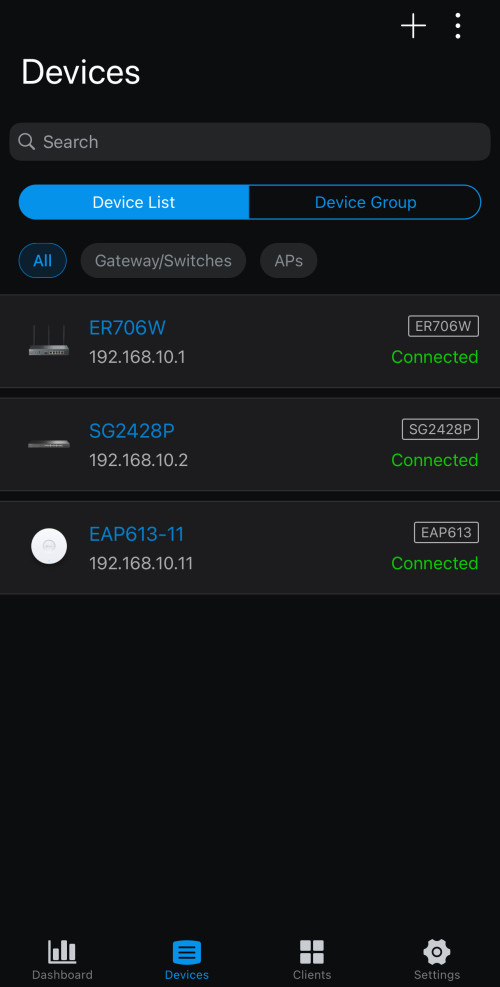
I bought ER706W gateway and EAP613.
I was surprised that when I initially installed just 1 EAP613, it immediately took over 4 IoT-related SSID and 1 CCTV SSID without breaking a sweat. All devices connected and online, 24/7.
I have also moved all the IoT devices back to only 1 SSID.

It made the 4 previously-configured Maxis' a bad preschool joke!

I resolved to expand further on Omada. Replaced the root LG8245X-10 with ER706W. Bought a 24-port PoE managed switch and moved all my wired CCTV and devices to it as well. Now my network is split into VLANs for Security, Automation, and for interactive users. All managed from central and accesible from web and app.

The only beef is, it takes 5-10 minutes for network to be usable if reboot the Omada gateway. But other than that, no complain.

Caution:

Access Points of Omada are wired-only backbone.
But they are VLAN-capable.
Each AP have limit to the number of SSID they can deploy; and each SSID can have their own VLAN, thus separating traffic and priority right at the AP.
EAP613 can deploy maximum 8x SSID on 2.4GHz and another 8x SSID on 5GHz; that means you can have between 1 VLAN to 16 VLANs delivered on wireless.
Depending on model, they come with choice of PoE or power adapter; no difference to deploying wired CCTV.
user posted image

This post has been edited by Oltromen Ripot: Sep 10 2024, 08:58 PM

eagle7
post Sep 11 2024, 09:21 AM

Getting Started
**
Junior Member
88 posts

Joined: Jul 2006
QUOTE(trespasser @ Sep 6 2024, 07:41 PM)
I bought 2 to try it out. It able to connect via zigbee2mqtt but did not expose any parameters to test out automations.
I reckon the AI learning requires FP1E to pair with M3 hub so it might not able to distinguish ceiling fan air movement and human movement via zigbee2mqtt.

To date I tested with Sonoff SNZB-06P and Screek 2A but both still can't differentiate between ceiling fan air movement and human movement.
Was hoping FP1E able to solve this but I'm not getting my hopes up  cry.gif
*
QUOTE(alucard89 @ Sep 6 2024, 08:15 PM)
Hi bro, did you try this for z2m

https://github.com/Koenkk/zigbee2mqtt/issue...ment-2326967353

Screek 2A need to exclude areas with fan but there’s still issue with the not too great static detection on ld2450

And if you use LD2410, you can still exclude distance for the ceiling detection, for example if it hovers around 400 cm - 450cm.

So with the ai spatial learning enabled you can exclude the fan from your testing with fp1e?
*
Have you tried out either ESPresense or Format BLE Tracker? Both use ESP32 to detect the presence of your Bluetooth devices, such as a smart watch, smartphone, etc., in the vicinity before signalling their detection location.

For example, embed the location name of ESPresense 1 as Hall 1, and embed the location name of ESPresense 2 as Kitchen; when your smartphone presenses in a location covered by ESPresense 1 (Hall 1), your HA will mark your smartphone in Hall 1, similar to if your phone moved from Hall 1 or an unknown location to Kitchen, your HA will show your phone in Kitchen.
Using the HA's automation to trigger a series of events like turning on the light, the fan, etc.
 
azbro
post Sep 11 2024, 09:36 AM

Look at all my stars!!
*******
Senior Member
4,403 posts

Joined: Jan 2007
From: Johor Bahru


QUOTE(Oltromen Ripot @ Sep 10 2024, 08:48 PM)
I have same problem like you. 70 odd permanent IoT devices tenggelam timbul at their own convenience, not at my convenience. Maxis' Huawei LG8245X-10 mesh.
Difficult to manage since we're not staying at the property every day.

I found that if i have only 1 SSID on the mesh, and all IoT connect to that, they will come and go. I find that about 20 devices per SSID seems to be working to make them stay online, thus I had 4 SSID on the same mesh.

--

I switched to TP-Link Omada.
I bought ER706W gateway and EAP613.
I was surprised that when I initially installed just 1 EAP613, it immediately took over 4 IoT-related SSID and 1 CCTV SSID without breaking a sweat. All devices connected and online, 24/7.
I have also moved all the IoT devices back to only 1 SSID.

It made the 4 previously-configured Maxis'  a bad preschool joke!

I resolved to expand further on Omada. Replaced the root LG8245X-10 with ER706W. Bought a 24-port PoE managed switch and moved all my wired CCTV and devices to it as well. Now my network is split into VLANs for Security, Automation, and for interactive users. All managed from central and accesible from web and app.

The only beef is, it takes 5-10 minutes for network to be usable if reboot the Omada gateway. But other than that, no complain.

Caution:

Access Points of Omada are wired-only backbone.
But they are VLAN-capable.
Each AP have limit to the number of SSID they can deploy; and each SSID can have their own VLAN, thus separating traffic and priority right at the AP.
EAP613 can deploy maximum 8x SSID on 2.4GHz and another 8x SSID on 5GHz; that means you can have between 1 VLAN to 16 VLANs delivered on wireless.
Depending on model, they come with choice of PoE or power adapter; no difference to deploying wired CCTV.

user posted image
*
Firstly thank you for the feedback, I might to study more on this tplink omada. It's kind of interested of the capabilities.

razr_sped
post Sep 11 2024, 10:05 AM

Casual
***
Junior Member
393 posts

Joined: Oct 2006


» Click to show Spoiler - click again to hide... «

just in time as mine today it broke 32 devices and i'm seeing unstable networrk issue
using zytel from digi, though it mention 128 simultaneous device on 2.4Ghz but the setup onli allow 32 max.
have tried to put guest network (which doesnt seems to have limit) as same SSID still having issue, need to consider more powerful unit that can handle more devices on the 2.4G single SSID
Drian
post Sep 11 2024, 10:25 AM

Look at all my stars!!
*******
Senior Member
4,999 posts

Joined: Jan 2003


QUOTE(azbro @ Sep 10 2024, 09:15 AM)
Hi, any WiFi 2.4Ghz router to recommend for smart home?

Extended range and at least 60 connections.

I try best to use ZigBee stuff instead of WiFi, but things just keep adding up.  All those CCTV also using 2.4Ghz. my current router I think gonna max out soon as stuff gets disconnected many times

My house currently using 300mbps Unifi DIR X3060Z.

Any router to recommend to bridge to to my current router?

Thank you
*
Seperate router and AP.

gerald7
post Sep 11 2024, 10:46 AM

r a n d o m l y
*******
Senior Member
2,452 posts

Joined: Nov 2007
From: Kuching, Sarawakland


QUOTE(Oltromen Ripot @ Sep 10 2024, 08:48 PM)
I have same problem like you. 70 odd permanent IoT devices tenggelam timbul at their own convenience, not at my convenience. Maxis' Huawei LG8245X-10 mesh.
Difficult to manage since we're not staying at the property every day.

I found that if i have only 1 SSID on the mesh, and all IoT connect to that, they will come and go. I find that about 20 devices per SSID seems to be working to make them stay online, thus I had 4 SSID on the same mesh.

--

I switched to TP-Link Omada.
I bought ER706W gateway and EAP613.
I was surprised that when I initially installed just 1 EAP613, it immediately took over 4 IoT-related SSID and 1 CCTV SSID without breaking a sweat. All devices connected and online, 24/7.
I have also moved all the IoT devices back to only 1 SSID.

It made the 4 previously-configured Maxis'  a bad preschool joke!

I resolved to expand further on Omada. Replaced the root LG8245X-10 with ER706W. Bought a 24-port PoE managed switch and moved all my wired CCTV and devices to it as well. Now my network is split into VLANs for Security, Automation, and for interactive users. All managed from central and accesible from web and app.

The only beef is, it takes 5-10 minutes for network to be usable if reboot the Omada gateway. But other than that, no complain.

Caution:

Access Points of Omada are wired-only backbone.
But they are VLAN-capable.
Each AP have limit to the number of SSID they can deploy; and each SSID can have their own VLAN, thus separating traffic and priority right at the AP.
EAP613 can deploy maximum 8x SSID on 2.4GHz and another 8x SSID on 5GHz; that means you can have between 1 VLAN to 16 VLANs delivered on wireless.
Depending on model, they come with choice of PoE or power adapter; no difference to deploying wired CCTV.

user posted image
*
wah, thats quite detailed, I was looking at omada stuff yesterday and wondering whats s 'sample' setup would look like, today saw your post. I think you have shown the path for many~ thumbup.gif

I was always wondering why my IoT devices online offline online offline. Some IP cam also, eventho its within same room of the router. Maybe is the SSID thing.


656 Pages « < 637 638 639 640 641 > » Top
 

Change to:
| Lo-Fi Version
0.0237sec    0.86    6 queries    GZIP Disabled
Time is now: 4th December 2025 - 02:23 AM