Welcome Guest ( Log In | Register )

3 Pages  1 2 3 >Bottom

Outline · [ Standard ] · Linear+

 Smart Home, Let's discuss

views
     
azbro
post May 15 2024, 08:48 AM

Look at all my stars!!
*******
Senior Member
4,403 posts

Joined: Jan 2007
From: Johor Bahru


Hi, I first time posting here and a newbies at "Smart" home

I'm using ewelink system (Sonoff bridge pro), but seems like there is a limitation to what it can do, I mean ewelink (or Sonoff, I think same company). It's has limited products and don't have some items like door lock, 2 gang switch (no neutral, no capacitor version), and limited types of CCTV.

Now I'm looking into Tuya.
For Sonoff it's easy, just get the Bridge pro and the ZigBee /WiFi sensors, can start already, there are many YouTube videos regarding it.
But for Tuya, I headache cos too much information everywhere, and the Website is more to corporate level.

I want to a new system is my home using Tuya. Not sure if Tuya is a brand, or the system or compatibility logo.

Basically I want to set up a few door open close sensors, wooden door lock CCTV, 2 gang switch (no neutral, no capacitor type) for lights and fans.

Please help and thank you in advance.

This post has been edited by azbro: May 15 2024, 08:49 AM
azbro
post May 23 2024, 01:55 PM

Look at all my stars!!
*******
Senior Member
4,403 posts

Joined: Jan 2007
From: Johor Bahru


Hi wanna ask

The Zemismart M1 hub with the matter feature.

Is it the ZigBee feature all need to use same Zemismart brand?
Seems a bit on the expensive side

I see Moes more cheaper but review not so good for the switch and sensors

Something like ewelink all need to use Sonoff. Or tuya hub all need to use tuya sensors

Thank you

This post has been edited by azbro: May 23 2024, 01:55 PM
azbro
post Jun 10 2024, 03:34 PM

Look at all my stars!!
*******
Senior Member
4,403 posts

Joined: Jan 2007
From: Johor Bahru


Hi, I'm interested in Tuya ZigBee and WiFi items

Does anyone know if Tuya need to pay Subscriptions after 1 Months use? And does it include scenes or sequence activation.

I will be using mostly Tuya items in my house.
azbro
post Jun 13 2024, 02:17 PM

Look at all my stars!!
*******
Senior Member
4,403 posts

Joined: Jan 2007
From: Johor Bahru


QUOTE(eagle7 @ Jun 13 2024, 12:05 AM)
Tuya or Smart Life require no subscription from the end user, but the developer may need to pay a subscription to use the Tuya system in their products.

I did not explore the scene or the sequence activation in the Tuya feature, as this is an optional feature bundled with different products.

If you are looking for full control, you should explore Home Assistant , and you will have full control on the scene as well as integrating and controlling other non-Tuya devices.

Don't forget to learn Node-RED to make your scene and automation easier to build and troubleshoot later.
*
Thank you for the info, I won't be going full automation or using a Google or Alexa device. Only want to do some on off sequence for simple tasks.

Maybe one day I dare to venture into Home Assistant. I see in YouTube it's quite complicated but of course is the best.

Thank you again.

Anyway, if I will not using Google Nest or echo or Apple home, do I need a 'Matter' hub?


azbro
post Jun 30 2024, 01:06 PM

Look at all my stars!!
*******
Senior Member
4,403 posts

Joined: Jan 2007
From: Johor Bahru


Hi, anyone knows what sensor to detect open close for outdoor autogate Swing type.

I'm using Sonoff ewelink door sensor and doesn't do so well as there will be multiple detection when gate open close

Currently I connect the gate like this:
Attached Image

Attached Image

This post has been edited by azbro: Jun 30 2024, 01:37 PM
azbro
post Jun 30 2024, 08:52 PM

Look at all my stars!!
*******
Senior Member
4,403 posts

Joined: Jan 2007
From: Johor Bahru


QUOTE(lucaswjk @ Jun 30 2024, 08:02 PM)
it seem like ur sensor is not level, u can try to add padding to increase the thickness.

side question, how u mount the sensor to the stainless steel?
i hv hard time drilling and then the plastic plug doesnt work...
*
Firstly is the waterproofing, I tried a few methods, even using balloons. Will tear off eventually.

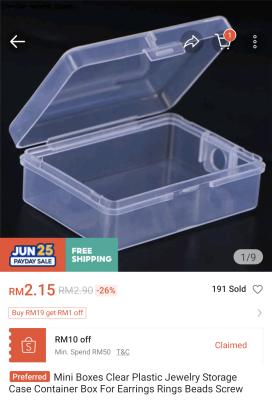
So I bought some small boxes, take note one your sensor size before ordering
Attached Image

Use some 3M VHB to tape it up. Sensor to box and box to gate.
Get the transparent ones. These are very high bond type.
But you are able to peel off in order to change the battery.

The small box to make it more water resistance you can always add black electrical tape at the sides.

This post has been edited by azbro: Jun 30 2024, 08:58 PM
azbro
post Jul 1 2024, 05:41 AM

Look at all my stars!!
*******
Senior Member
4,403 posts

Joined: Jan 2007
From: Johor Bahru


QUOTE(simmarjit @ Jun 30 2024, 10:30 PM)
I have been using Aqara one with no issues for multiple years now.
*
Thanks
I'll check it out
azbro
post Jul 1 2024, 08:24 AM

Look at all my stars!!
*******
Senior Member
4,403 posts

Joined: Jan 2007
From: Johor Bahru


QUOTE(epicure @ Jul 1 2024, 07:21 AM)
I've been using the aqara one. Been 2 years, battery still never changed. By the way you don't need to put the magnet in an enclosure. Just the sensor.
*
Thanks for the advice, I will try a few methods to avoid the false multiple trigger when the gate is open.
azbro
post Jul 1 2024, 08:26 AM

Look at all my stars!!
*******
Senior Member
4,403 posts

Joined: Jan 2007
From: Johor Bahru


QUOTE(epicure @ Jul 1 2024, 07:21 AM)
I've been using the aqara one. Been 2 years, battery still never changed. By the way you don't need to put the magnet in an enclosure. Just the sensor.
*
Thanks for the advice, I will try a few methods to avoid the false multiple trigger when the gate is open.
azbro
post Jul 2 2024, 06:02 AM

Look at all my stars!!
*******
Senior Member
4,403 posts

Joined: Jan 2007
From: Johor Bahru


QUOTE(Max @ Jul 1 2024, 09:51 PM)
looks like too far the sensor and magnet.
last time i use sonoff gate/window sensor also (zigbee) with CR button battery (forgot the CR code), but seems not reliable.. always 'missing' from zigbee map.

i changed to Tuya zigbee sensor with 2x AAA batt. much better.

just stick to gate and use small neodymium magnet stick to gate lock (i did not use the supplied magnet, as its too big)
ive open the sensor casing and look inside, seems "waterproof" enough to be use vertical at gate

» Click to show Spoiler - click again to hide... «

btw, the sonoff temp & humid sensor (zigbee) with CR battery also not reliable in my usage.. change to tuya (2x AAA batt) much better.
and im using Home Assistant.
*
Thank you, you give me good idea for the magnets placements
Will try it out with neodymium magnets. I do have a few of spares from a different project.

My sensors are mostly from Sonoff. Didn't know it was not so reliable. I'm also using Woolley sensors (Sonoff low cost models), they are even worse! Keep disconnecting and sometimes hang.

Thank you again for your advice.

azbro
post Jul 2 2024, 01:57 PM

Look at all my stars!!
*******
Senior Member
4,403 posts

Joined: Jan 2007
From: Johor Bahru


QUOTE(Max @ Jul 1 2024, 09:51 PM)

i changed to Tuya zigbee sensor with 2x AAA batt. much better.

btw, the sonoff temp & humid sensor (zigbee) with CR battery also not reliable in my usage.. change to tuya (2x AAA batt) much better.
and im using Home Assistant.
*
Just curious, what AAA batteries you normally use?
Nice energizer Lithiums, normal alkaline or Rechargeables.
azbro
post Jul 2 2024, 05:05 PM

Look at all my stars!!
*******
Senior Member
4,403 posts

Joined: Jan 2007
From: Johor Bahru


I wonder has anyone tried adding 2 PIR sensors to 1 WiFi light?

If PIR sensor detect movement it will ON, if no detect it will OFF

So if 1 PIR is ON, the other remains off is easy.

But if 1 both sensors is ON, 1 is still detecting movement and remains ON, but the other sensor after 1 minute is OFF, will the light remain ON or OFF? I want it to remain ON.

Or is it need to do some conditioning.
Example if sensor is still detecting movement, sensor 2 will not off the light. Wow..this is getting complicated for me. I'm just using the simple ewelink app, I don't think can do that.

This post has been edited by azbro: Jul 2 2024, 05:06 PM
azbro
post Jul 3 2024, 08:39 AM

Look at all my stars!!
*******
Senior Member
4,403 posts

Joined: Jan 2007
From: Johor Bahru


QUOTE(Oltromen Ripot @ Jul 3 2024, 07:40 AM)
Based off Smart Life app.

involving my
- PIR1 (door),
- PIR2 (window)
- Laundry Lights switch.

AUTOMATION 1
CODE

1. Create Automation named "Laundry Lights Auto OFF".

2. If ALL conditions are met
(a) PIR1 detects no one, AND
(b) PIR2 detects no one, AND
(c) PIR3 detects no one, AND
(d) PIR4 detects no one, AND
(e) Laundry Lights *is* switched ON. (this is here because of Then (a). You don't want Then (a) to switch ON what is otherwise already OFF.)

3. Then
(a) Laundry Lights switches ON. (This to make sure the countdown in (c) will swap into "OFF".
(b) Delay action by 3 seconds. (To make sure the switch's state is properly registered before next processing.)
(c) Laundry Lights countdown 300seconds (supposedly will swap the current "ON" into "OFF".
(d) Disable Automation "Laundry Lights Auto OFF". (Yes, disable its own self.)

4. After saving this Automation, disable it.


AUTOMATION 2
CODE

1. Create Automation named "Laundry Lights Auto ON".

2. If ANY condition is met
(a) PIR1 detects motion, OR
(b) PIR2 detects motion, OR
(c) PIR3 detects motion, OR
(d) PIR4 detects motion.

3. Then
(a) Enable Automation "Laundry Lights Auto OFF".
(b) Laundry Lights countdown 0s. (disables any countdown that maybe is already in progress).
(c) Laundry Lights switches ON.

4. After saving this Automation, enable it.


AUTOMATION 3
CODE

1. Create Automation named "Laundry Lights Manual OFF".

2. If ALL conditions are met
(a) Laundry Lights *is* switched OFF.

3. Then
(a) Disable Automation "Laundry Lights Auto OFF".
(b) Enable Automation "Laundry Lights Auto ON".

4. After saving this Automation, enable it.


AUTOMATION 4
CODE

1. Create Automation named "Laundry Lights Manual ON".

2. If ALL conditions are met
(a) Laundry Lights *is* switched ON.

3. Then
(a) Disable Automation "Laundry Lights Auto OFF".
(b) Disable Automation "Laundry Lights Auto ON".

4. After saving this Automation, enable it.


Algorithm.

1. Always remember, PIR remembers its own "motion detected" for about 2 minutes before it resets and be useful for next "motion detected".

2. The Automation Manual OFF/ON will control whether you allow Automation Auto ON to take effect.
You don't want Automation Auto OFF/ON to wreak havoc if you intentionally and manually switched ON, right?

3. The Automation Auto ON is only enabled by and after Automation Manual OFF.

4. The Automation Auto OFF is only enabled by and after Automation Auto ON.

5. If anyone manually switches OFF before Countdown expires, the switch will forget about the Countdown. This is intentional.

6. DO NOT USE DELAY+EXPLICIT OFF in the Automation Auto OFF; you do not want
(i) the Automation was triggered some time ago, and
(ii) someone actually manually switched ON while the DELAY is still not expiring, and
(iii) ended up in dark after DELAY eventually expires and EXPLICIT OFF is finally processed.

7. If done right, your AUTO ON/OFF will not interfere with manually operating the switch OFF/ON.
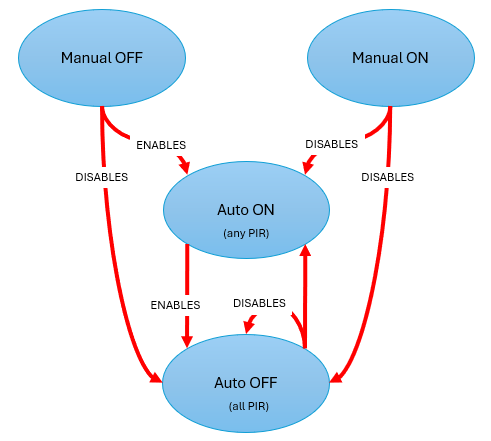
user posted image

edit:
1. swapped order of creating Automation 1 and Automation 2

2. updated image to remove wrong arrow flow.

3. add step for Automation Auto ON to remove countdown possibly already set in-progress by prior Auto OFF invocation.

4. add more PIR3, PIR4 as example if more PIRs or sensors are involved. mmwave?

--

DELAY is pausing processing of the automation ON THE SERVER. It does not take into account if the state of involved devices had changed while it is pausing. you will run unto awkward unintended outcome when processing is resumed.
COUNTDOWN is processed by the device itself, thus allowing it to abort the countdown when its own state changes.
*
Thanks, that is some heavy reading in this morning to understand

Good information. Will take me some time to digest it.
Anyway, I do agree delay function is mostly makes the scene doesn't work due to some factor. Shall try the countdown function instead.

Thank you again
azbro
post Jul 3 2024, 04:10 PM

Look at all my stars!!
*******
Senior Member
4,403 posts

Joined: Jan 2007
From: Johor Bahru


QUOTE(yrh0413 @ Jul 3 2024, 01:11 PM)
hi everyone. May I know how to make autogate (folding gate) "smart"?

my house has Aqara/Apple Homekit setup, does the Aqara T1 relay works in this case?
*
A few methods have, and you really need to do your homework to make sure it will work for your autogate.

Mine was simple, is using the 330mhz bandwidth remote.
So, to keep it simple, I bought a smart dongle that transmits that signal and works with the app I am using.
Attached Image
Its no brainer and no need to do any wiring.

But, I'm not sure if this will work for you.

Another method is to use the plug ins into the auto box to control it

Or using a finger bot.

Or switch module for low current or DC type

Autogate have many types


azbro
post Jul 6 2024, 08:39 PM

Look at all my stars!!
*******
Senior Member
4,403 posts

Joined: Jan 2007
From: Johor Bahru


I tested my Sonoff door sensor I put at autogate, that thing detects even when there is no magnet. When door swing open it starts to detect midway even when there is nagnet.

So when it is suppose to be
close
Open
Close

It is
Close
Open
Close
Open
Close.

Happen since new

I will probably change the sensor

And the PIR sensor is crazy one, seems like detecting ghost

The bulbs keep disconnecting. Once disconnects need to reboot again

Crazylah, no wonder you guys insist on Aqara even though it's cost double or triple Sonoff.

This post has been edited by azbro: Jul 6 2024, 08:44 PM
azbro
post Jul 8 2024, 08:39 AM

Look at all my stars!!
*******
Senior Member
4,403 posts

Joined: Jan 2007
From: Johor Bahru


QUOTE(Oltromen Ripot @ Jul 6 2024, 10:00 PM)
can i suggest:
- get magnet from Daiso. those small but powerful ones.

-  if your gate is sliding type to close, then paste the magnet farther from edge of the closing pole/pillar. just far enough that it triggers the sensor on pole/pillar..

- if your gate is swing-to-close or foldable, try to see if you can paste the magnet in-between the two sides of the swing gate. adjust the distance of sensor on the opposing side, just enough to respond to the magnet.
*
I've settled it, now works as intended, but I will need to get a larger magnet as my gate when close is not so aligned.

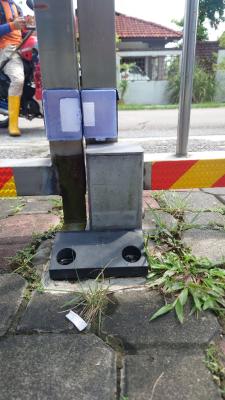
The issue was I put the on off detector below a box, which contains a solenoid lock, which magnetise when it is functioning. This made one side of the gate 'magnetised'. The on off detector got triggered from this when it is opened.
I've relocate the magnet and detector to different sides (as in the picture) and works great now.

Attached Image

This post has been edited by azbro: Jul 8 2024, 09:03 PM
azbro
post Jul 8 2024, 08:48 AM

Look at all my stars!!
*******
Senior Member
4,403 posts

Joined: Jan 2007
From: Johor Bahru


QUOTE(Oltromen Ripot @ Jul 3 2024, 09:15 AM)
1. "Then I disable myself" should be put last in the list of Thens.
We cannot predict how the server will treat such instruction, now and in future. What if put it at NOT at last in the list and it causes even the current invocation to be aborted right there and then, leaving the rest in the list of Then unexecuted. So don't take risk of premature abort.

--

Actually aaaa, if based on the conditions of Automation Auto OFF, in which it does not execute if Lights is not ON, to make it simpler, can remove and modify the following Thens.

(2) Automation Auto OFF does not need to disable itself.

(3) Automation Auto ON does not need to enable Auto OFF.

(4) Automation Manual ON need to disable both Auto OFF and Auto ON.

(5) Automation Manual OFF need to enable both Auto OFF and Auto ON.

--
*
I'm trying out Ipcamera to detect humans instead of PIR sensors for outdoors. Just ordered a Sonoff camera, hopefully it will be easier to setup and have less false detection than a PIR sensor, especially for outdoors


azbro
post Jul 9 2024, 07:21 PM

Look at all my stars!!
*******
Senior Member
4,403 posts

Joined: Jan 2007
From: Johor Bahru


QUOTE(andyeng @ Jul 9 2024, 07:11 PM)
Oh, I’m thinking of mixing and matching devices as long as they support Zigbee. Currently, I’m looking at a brand called Moes, and I've heard that Aqara sensors are very good. What do you guys think?
*
I also wondering about Moes

But this one statement really makes me not get Moes

Maybe you can PM him

Attached Image

And I'm not sure if Aqara sensors even though it's using ZigBee with work with Moes hub.

Normally it is based on Apps. If Tuya, look for the Tuya logo, it is it ewelink, need to looks for that logo to ensure it will work.

Unless you get a few different hubs and link it to Home Assistant.
I might be wrong, still newbie in this

This post has been edited by azbro: Jul 9 2024, 08:15 PM
azbro
post Jul 13 2024, 11:10 AM

Look at all my stars!!
*******
Senior Member
4,403 posts

Joined: Jan 2007
From: Johor Bahru


QUOTE(PowerGadget @ Jul 11 2024, 04:52 PM)
Anybody know tricks to install the door & window sensor outdoor? I bought it for quite sometime and no place to install.

Plan to install for my swing autogate, but it's outdoor that exposed to rain and I can't find any good waterproof case for this sensor.
*
Mine swing type
Just use small plastic casing bought at shopee

All attachment is by 3M VHB double tape.

Remember to seal the casing door with black tape to keep out moisture

And please use the magnet side at the gate locking mechanism.

As in my picture.
Attached Image

Actually, some people more daring, they just fit the sensors without any protection from the rain.

azbro
post Jul 25 2024, 10:06 AM

Look at all my stars!!
*******
Senior Member
4,403 posts

Joined: Jan 2007
From: Johor Bahru


QUOTE(alucard89 @ Jul 21 2024, 11:06 PM)
Anyone using this plug for your ac power monitoring? Working fine so far?

https://my.shp.ee/1hEpb5C

I’m still deciding whether to the get the plug or use relay with power monitoring + contactor solution
*
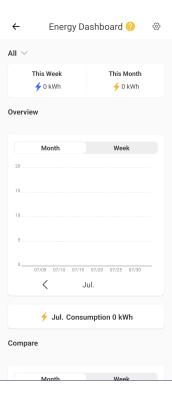
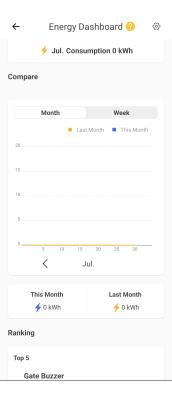
I'm using Sonoff ewelink brand, but the reading UI is just basic.
You can't put in RM inside or cut offs date / time.
Attached Image

Attached Image

Not sure about home smart apps that can link with ewelink if have more options for electricity monitor

Why not you buy one for trial

This post has been edited by azbro: Jul 25 2024, 10:08 AM

3 Pages  1 2 3 >Top
 

Change to:
| Lo-Fi Version
0.0421sec    0.48    7 queries    GZIP Disabled
Time is now: 10th December 2025 - 05:28 AM