

 Sep 11 2024, 10:46 AM


QUOTE(Oltromen Ripot @ Sep 10 2024, 08:48 PM)
I have same problem like you. 70 odd permanent IoT devices tenggelam timbul at their own convenience, not at my convenience. Maxis' Huawei LG8245X-10 mesh.
Difficult to manage since we're not staying at the property every day.
I found that if i have only 1 SSID on the mesh, and all IoT connect to that, they will come and go. I find that about 20 devices per SSID seems to be working to make them stay online, thus I had 4 SSID on the same mesh.
--
I switched to TP-Link Omada.
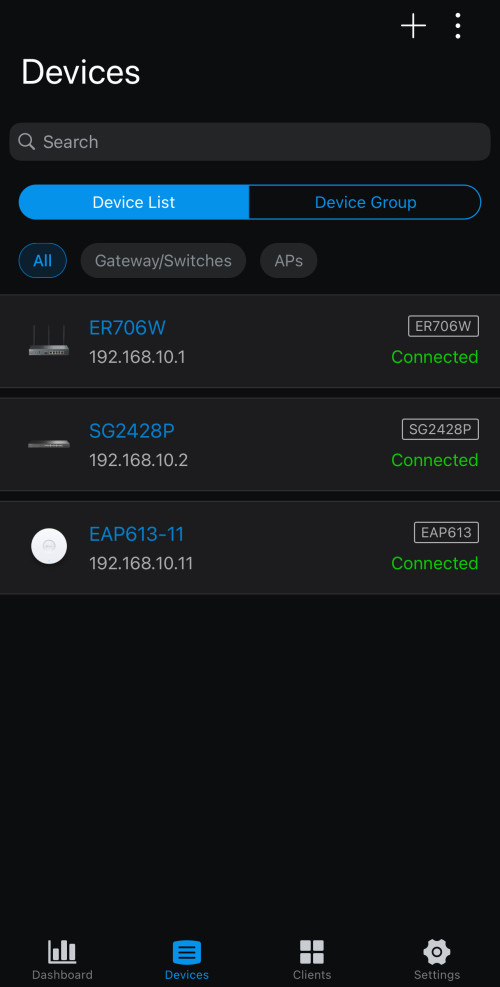
I bought ER706W gateway and EAP613.
I was surprised that when I initially installed just 1 EAP613, it immediately took over 4 IoT-related SSID and 1 CCTV SSID without breaking a sweat. All devices connected and online, 24/7.
I have also moved all the IoT devices back to only 1 SSID.
It made the 4 previously-configured Maxis' a bad preschool joke!
I resolved to expand further on Omada. Replaced the root LG8245X-10 with ER706W. Bought a 24-port PoE managed switch and moved all my wired CCTV and devices to it as well. Now my network is split into VLANs for Security, Automation, and for interactive users. All managed from central and accesible from web and app.
The only beef is, it takes 5-10 minutes for network to be usable if reboot the Omada gateway. But other than that, no complain.
Caution:
Access Points of Omada are wired-only backbone.
But they are VLAN-capable.
Each AP have limit to the number of SSID they can deploy; and each SSID can have their own VLAN, thus separating traffic and priority right at the AP.
EAP613 can deploy maximum 8x SSID on 2.4GHz and another 8x SSID on 5GHz; that means you can have between 1 VLAN to 16 VLANs delivered on wireless.
Depending on model, they come with choice of PoE or power adapter; no difference to deploying wired CCTV.

wah, thats quite detailed, I was looking at omada stuff yesterday and wondering whats s 'sample' setup would look like, today saw your post. I think you have shown the path for many~ Difficult to manage since we're not staying at the property every day.
I found that if i have only 1 SSID on the mesh, and all IoT connect to that, they will come and go. I find that about 20 devices per SSID seems to be working to make them stay online, thus I had 4 SSID on the same mesh.
--
I switched to TP-Link Omada.
I bought ER706W gateway and EAP613.
I was surprised that when I initially installed just 1 EAP613, it immediately took over 4 IoT-related SSID and 1 CCTV SSID without breaking a sweat. All devices connected and online, 24/7.
I have also moved all the IoT devices back to only 1 SSID.
It made the 4 previously-configured Maxis' a bad preschool joke!
I resolved to expand further on Omada. Replaced the root LG8245X-10 with ER706W. Bought a 24-port PoE managed switch and moved all my wired CCTV and devices to it as well. Now my network is split into VLANs for Security, Automation, and for interactive users. All managed from central and accesible from web and app.
The only beef is, it takes 5-10 minutes for network to be usable if reboot the Omada gateway. But other than that, no complain.
Caution:
Access Points of Omada are wired-only backbone.
But they are VLAN-capable.
Each AP have limit to the number of SSID they can deploy; and each SSID can have their own VLAN, thus separating traffic and priority right at the AP.
EAP613 can deploy maximum 8x SSID on 2.4GHz and another 8x SSID on 5GHz; that means you can have between 1 VLAN to 16 VLANs delivered on wireless.
Depending on model, they come with choice of PoE or power adapter; no difference to deploying wired CCTV.

I was always wondering why my IoT devices online offline online offline. Some IP cam also, eventho its within same room of the router. Maybe is the SSID thing.
 Quote
Quote
 0.3696sec
 0.67
0.67
 7 queries
 GZIP Disabled