Welcome Guest ( Log In | Register )

656 Pages « < 639 640 641 642 643 > » Bottom

Outline · [ Standard ] · Linear+

 Smart Home, Let's discuss

views
     
eagle7
post Sep 14 2024, 04:42 PM

Getting Started
**
Junior Member
88 posts

Joined: Jul 2006
QUOTE(alucard89 @ Sep 13 2024, 10:25 PM)
Followed the same tutorial before this but it just wasn’t working for me. I’ll need to revisit this again
*
Assumption: 
1. You have installed all the necessary software for the mesh network in both the primary and secondary wifi routers (e.g., replace wpad-basic-mbedtls with wpad-mesh-openssl).
2. You have set static IP for both the primary and secondary WiFi routers (e.g., 192.168.1.1 and 192.168.1.2).


A. In both the WiFi router's mesh wireless point, apply the following (in my case, I pick 5 GHz as my backbone):
1. Operating Frequecy: Mode = AC; Channel = 36; Width = 80 MHz (do not change the Mode or Channel, else it will break the link; if you insist on changing, ensure apply the changes on all the WiFi routers).
2. General Setup: Mode = 802.11s; Mesh ID = <Any ID you wish but must be standardised>; Network = LAN
3. Wireless Security: Encryption = WPA3-SAE; Key = <Any passkey, must be standardised>

B. On the Secondary WiFi Router
1. Interface -> LAN -> General Settings: Protocol = Static Address; Device = br-lan; IP Address = 192.168.1.2; IPv4 netmask = 255.255.255.0; IPv4 gateway = 192.168.1.1 
2. Interface -> LAN -> Advanced Settings: Force link = ticked; Use default gateway = ticked; Use custom DNS server = 192.168.1.1

Tips:-
If your WiFi router is using MediaTek MT7603E for the 2.4GHz, downgrade the router OS to OpenWRT 22.xx due to a stability issue in the newer version.

Side note: It is not easy to flash OpenWRT to the Xiaomi AX3000T. I will rate the difficulty level as 8.5 to 9 out of 10, as the online guide does not work. Spent hours to try and error. 
eagle7
post Sep 20 2024, 02:32 PM

Getting Started
**
Junior Member
88 posts

Joined: Jul 2006
QUOTE(alucard89 @ Sep 11 2024, 12:10 PM)
That needs you to carry devices or those smart watches which i don’t and not really suitable for older folks.
*
I believe I've found a solution to the issue where the Human Presence sensor wasn’t turning off the light or fan when it mistakenly detected movement from an object, such as a spinning fan. This would cause the room’s light and fan to remain on even when no one was around.

The solution by combining the feature of Presence Sensor and PIR Sensor in the Node-Red. With this setup, the system will send an 'OFF' signal when no movement is detected by the PIR sensor after 60 sec of wait time.

QUOTE(alucard89 @ Sep 13 2024, 10:25 PM)
Followed the same tutorial before this but it just wasn’t working for me. I’ll need to revisit this again
*
Although the command iw list | grep "Supported interface modes" -A 9 in OpenWRT shows that the hardware supports mesh points, it doesn't necessarily mean that OpenWRT can utilize this Mesh Point feature. To identify which specific hardware between two Wi-Fi routers doesn't support Mesh, you can refer to the System log and search for the keyword mesh.
alucard89
post Sep 20 2024, 06:20 PM

Look at all my stars!!
*******
Senior Member
4,454 posts

Joined: Apr 2006
QUOTE(eagle7 @ Sep 20 2024, 02:32 PM)
I believe I've found a solution to the issue where the Human Presence sensor wasn’t turning off the light or fan when it mistakenly detected movement from an object, such as a spinning fan. This would cause the room’s light and fan to remain on even when no one was around.

The solution by combining the feature of Presence Sensor and PIR Sensor in the Node-Red. With this setup, the system will send an 'OFF' signal when no movement is detected by the PIR sensor after 60 sec of wait time.
Although the command iw list | grep "Supported interface modes" -A 9 in OpenWRT shows that the hardware supports mesh points, it doesn't necessarily mean that OpenWRT can utilize this Mesh Point feature. To identify which specific hardware between two Wi-Fi routers doesn't support Mesh, you can refer to the System log and search for the keyword mesh.
*
Not really useful if you’re sleeping/lying down in the room and PIR needs some motion to trigger it.
Just got FP1E now and tested it with z2m. Works as expected except for ceiling fan. Need to grab aqara hub to test it with that ai spatial feature
eagle7
post Sep 20 2024, 07:29 PM

Getting Started
**
Junior Member
88 posts

Joined: Jul 2006
QUOTE(alucard89 @ Sep 20 2024, 06:20 PM)
Not really useful if you’re sleeping/lying down in the room and PIR needs some motion to trigger it.
Just got FP1E now and tested it with z2m. Works as expected except for ceiling fan. Need to grab aqara hub to test it with that ai spatial feature
*
You make a valid point; my solution may not work in your specific situation, like in the bedroom.

However, it works well for me in the kitchen. As soon as someone enters the kitchen area, the light automatically turns on, followed by the fan. When the person finishes cooking, washing, or other tasks, and leaves, my home automation system turns off both the light and the fan.
jason1986
post Sep 21 2024, 10:54 AM

On my way
****
Senior Member
695 posts

Joined: Apr 2010


My smart switch (smartrul) tends to switch off by itself. Seller said could be capacitor.

Can i use fan capacitor to replace?
alucard89
post Sep 21 2024, 11:00 AM

Look at all my stars!!
*******
Senior Member
4,454 posts

Joined: Apr 2006
QUOTE(eagle7 @ Sep 20 2024, 07:29 PM)
You make a valid point; my solution may not work in your specific situation, like in the bedroom.

However, it works well for me in the kitchen. As soon as someone enters the kitchen area, the light automatically turns on, followed by the fan. When the person finishes cooking, washing, or other tasks, and leaves, my home automation system turns off both the light and the fan.
*
Mmwave works simple enough in areas without fan, like bathroom or store room. Those angmoh reviewers easy la to use because their house generally don’t have ceiling fans like us here
alucard89
post Sep 21 2024, 11:04 AM

Look at all my stars!!
*******
Senior Member
4,454 posts

Joined: Apr 2006
QUOTE(jason1986 @ Sep 21 2024, 10:54 AM)
My smart switch (smartrul) tends to switch off by itself. Seller said could be capacitor.

Can i use fan capacitor to replace?
*
Try replace it first, if still the same problem
Could be capacitor on the pcb itself as well.
Like mine here, switch gets reboot when turning on the relay

user posted image

Replaced with new one and it’s working as normal again
dest9116
post Sep 21 2024, 11:16 AM

Casual
***
Junior Member
495 posts

Joined: Apr 2019
QUOTE(alucard89 @ Sep 21 2024, 11:00 AM)
Mmwave works simple enough in areas without fan, like bathroom or store room. Those angmoh reviewers easy la to use because their house generally don’t have ceiling fans like us here
*
Correct those ang moh cold country aircond also don't have, curtains also the roller blinds type.


eagle7
post Sep 21 2024, 04:35 PM

Getting Started
**
Junior Member
88 posts

Joined: Jul 2006
The mmWave presence sensor is highly effective at detecting micro-movements instantly, while the PIR sensor works well for identifying moving objects that generate heat.

By combining these two sensors, the mmWave sensor turns on the light when it detects micro-movements, while the PIR sensor observes the area and activates the fan. It then remains on standby until it no longer detects the heat-emitting object or when it becomes stationary, at which point it turns off both the light and fan.

This cycle continues to repeat.

Thus, we need both sensors and not one of them for places with moving/spining fan.
jason1986
post Sep 21 2024, 07:01 PM

On my way
****
Senior Member
695 posts

Joined: Apr 2010


QUOTE(alucard89 @ Sep 21 2024, 11:04 AM)
Try replace it first, if still the same problem
Could be capacitor on the pcb itself as well.
Like mine here, switch gets reboot when turning on the relay

user posted image

Replaced with new one and it’s working as normal again
*
Ok i try first.
lucaswjk
post Sep 21 2024, 11:17 PM

~im coming~
*******
Senior Member
3,817 posts

Joined: May 2008
From: The other side...
QUOTE(eagle7 @ Sep 21 2024, 04:35 PM)
The mmWave presence sensor is highly effective at detecting micro-movements instantly, while the PIR sensor works well for identifying moving objects that generate heat.

By combining these two sensors, the mmWave sensor turns on the light when it detects micro-movements, while the PIR sensor observes the area and activates the fan. It then remains on standby until it no longer detects the heat-emitting object or when it becomes stationary, at which point it turns off both the light and fan.

This cycle continues to repeat.

Thus, we need both sensors and not one of them for places with moving/spining fan.
*
i tried PIR sensor and microwave sensor in bathroom before.
but never at the same time. (note: not smart IoT)

it not really reliable, the light and exhaust fan got turn off when showering or when take dump.
this is not the main issue, the issue were the quality issue...
one of my bathroom almost burned down.

after that i hv to unplugged all...
azbro
post Sep 21 2024, 11:36 PM

Look at all my stars!!
*******
Senior Member
4,403 posts

Joined: Jan 2007
From: Johor Bahru


QUOTE(lucaswjk @ Sep 21 2024, 11:17 PM)
i tried PIR sensor and microwave sensor in bathroom before.
but never at the same time. (note: not smart IoT)

it not really reliable, the light and exhaust fan got turn off when showering or when take dump.
this is not the main issue, the issue were the quality issue...
one of my bathroom almost burned down.

after that i hv to unplugged all...
*
What brand was that? Shocked!!
holynoob
post Sep 23 2024, 01:14 PM

Getting Started
**
Junior Member
94 posts

Joined: Sep 2014
Does any sifus here know where can I find a company that sells 38mm tube blinds that I can put into my Zemismart Zigbee blinds motor? I've asked around a few blind shops and they all only sell a complete solution with either their own proprietary smart system or manual system already bundled. And even they themselves don't know what is the inner diametre of their tubes.
alucard89
post Sep 23 2024, 01:45 PM

Look at all my stars!!
*******
Senior Member
4,454 posts

Joined: Apr 2006
QUOTE(holynoob @ Sep 23 2024, 01:14 PM)
Does any sifus here know where can I find a company that sells 38mm tube blinds that I can put into my Zemismart Zigbee blinds motor? I've asked around a few blind shops and they all only sell a complete solution with either their own proprietary smart system or manual system already bundled. And even they themselves don't know what is the inner diametre of their tubes.
*
Any shopee sellers got the 38mm?
There's a few on taobao like this shop


holynoob
post Sep 23 2024, 01:59 PM

Getting Started
**
Junior Member
94 posts

Joined: Sep 2014
QUOTE(alucard89 @ Sep 23 2024, 01:45 PM)
Any shopee sellers got the 38mm?
There's a few on taobao like this shop
*
Not really looking for like only the metal tube. But like, for example a whole zebra blind tube that has a 38mm inner diameter. Because currently I only have the zigbee motor. or usually how do others do it? Do they buy this metal tube and then reroll the blinds onto said metal tube?
alucard89
post Sep 29 2024, 01:04 PM

Look at all my stars!!
*******
Senior Member
4,454 posts

Joined: Apr 2006
trespasser

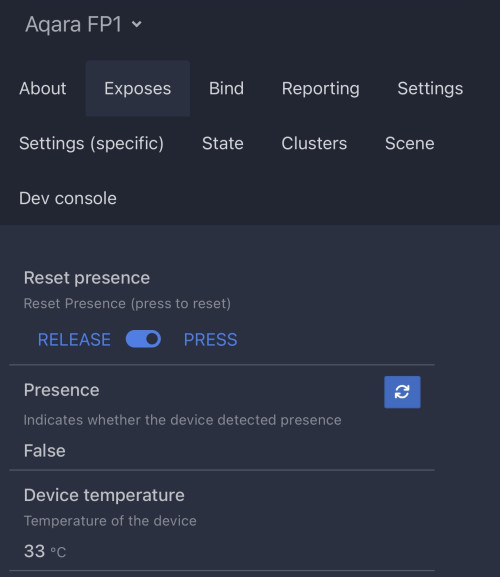
Can you try this config for fp1e?

» Click to show Spoiler - click again to hide... «


Save as lumi.sensor_occupy.agl1.json in z2m folder

After select press to start ai spatial it no longer detects false presence when the ceiling fan & ac turned on.

user posted image

I still need to find the best angle/position for it, just place on bedside table but sometimes it doesn’t detect presence. Might need to place it higher or corner angle

alucard89
post Sep 29 2024, 01:06 PM

Look at all my stars!!
*******
Senior Member
4,454 posts

Joined: Apr 2006
QUOTE(holynoob @ Sep 23 2024, 01:59 PM)
Not really looking for like only the metal tube. But like, for example a whole zebra blind tube that has a 38mm inner diameter. Because currently I only have the zigbee motor. or usually how do others do it? Do they buy this metal tube and then reroll the blinds onto said metal tube?
*
Better ask people who have it installed. I only recommended for my sister to buy whole set and that’s pretty much it
holynoob
post Sep 29 2024, 09:50 PM

Getting Started
**
Junior Member
94 posts

Joined: Sep 2014
QUOTE(alucard89 @ Sep 29 2024, 01:06 PM)
Better ask people who have it installed. I only recommended for my sister to buy whole set and that’s pretty much it
*
Cause the main reason why I went DIY is because I have my HomeAssistant running that controls my Zigbee network. So I went with a Zemismart Zigbee blinds motor
epicure
post Oct 1 2024, 02:01 PM

Getting Started
**
Junior Member
229 posts

Joined: Sep 2009
Hey guys been kinda quiet in this thread recently. I do have a couple of questions for those who are using door locks, preferrably tuya ones.

1. Are the Wifi ones reliable? Do they drop off wifi connection?
2. Whats the power consumption like for wifi door locks ? I.e. how often do you need to change the batteries?
3. Wifi door locks under Tuya (for the long term), will they work well into the future? meaning no cloud block if tuya decides to drop support?
4. should i go zigbee? is the power consumption very much improved ? (besides response time, for remote locking and notifications)

Lastly, the mortise must match up to the current lockset right? If i do change the dimensions, means i need to bore and drill to suit the new mortise and strikeplate?

Im looking to upgrade my parent’s current manual door lock to a smart doorlock. Am considering wifi, but if the change of batteries is too often, i may consider zigbee.

Thanks in advance!

This post has been edited by epicure: Oct 1 2024, 02:02 PM
alucard89
post Oct 1 2024, 02:49 PM

Look at all my stars!!
*******
Senior Member
4,454 posts

Joined: Apr 2006
QUOTE(epicure @ Oct 1 2024, 02:01 PM)
Hey guys been kinda quiet in this thread recently. I do have a couple of questions for those who are using door locks, preferrably tuya ones.

1. Are the Wifi ones reliable? Do they drop off wifi connection?
2. Whats the power consumption like for wifi door locks ? I.e. how often do you need to change the batteries?
3. Wifi door locks under Tuya (for the long term), will they work well into the future? meaning no cloud block if tuya decides to drop support?
4. should i go zigbee? is the power consumption very much improved ? (besides response time, for remote locking and notifications)

Lastly, the mortise must match up to the current lockset right? If i do change the dimensions, means i need to bore and drill to suit the new mortise and strikeplate?

Im looking to upgrade my parent’s current manual door lock to a smart doorlock. Am considering wifi, but if the change of batteries is too often, i may consider zigbee.

Thanks in advance!
*
Zigbee or bt lock all the way for the battery life
Don’t recommend those wifi version

Usually got several option for the plate that matches existing one


656 Pages « < 639 640 641 642 643 > » Top
 

Change to:
| Lo-Fi Version
0.0276sec    0.31    6 queries    GZIP Disabled
Time is now: 4th December 2025 - 01:25 AM