

 Jul 29 2024, 10:36 PM


QUOTE(alucard89 @ Jul 27 2024, 05:06 PM)
Finished adding wifi direct control to all my ac, not relying on ir this time.
All you need is esp8266 with some jst cable & connect to port on your ac pcb (check your diagram)
You can add this to your homebridge and ha. Total cost is around rm12-14 per ac
Daikin (cn_wir port)
Jst cable 2.0
https://my.shp.ee/ZYRNff2
Faikin
https://github.com/Sonic-Amiga/ESP8266-Faikin
Wiring - cn_wir port specifically because it’s scattered in the github repo. If yours is built in wifi module model just remove that cable from the port.
Mitsubishi Electric (cn105 port)
PAP jst cable
https://my.shp.ee/vwE85Ut
Mitsubishi2mqtt
https://github.com/dzungpv/mitsubishi2MQTT
For tuya, you can order this module from thailand
https://shopee.co.th/product/27525505
And that’s it, should save you 500 from sensibo or other devices. Obviously daikin has their own app, but not exactly open source. And mitsubishi electric has kumo cloud but they don’t exactly use it here. For other brands, you can just google it, i noticed panasonic, midea, haier has non cloud esp solution.

I wonder what it looks like in the HA. I have flashed the binary files into the ESP8266 without hardwiring it to the AC. From the MQTT explorer, I can see the connection but the HA cannot discovered it automatically. Maybe I need to buy the connector and plug it into the CN_WIR port.All you need is esp8266 with some jst cable & connect to port on your ac pcb (check your diagram)
You can add this to your homebridge and ha. Total cost is around rm12-14 per ac
Daikin (cn_wir port)
Jst cable 2.0
https://my.shp.ee/ZYRNff2
Faikin
https://github.com/Sonic-Amiga/ESP8266-Faikin
Wiring - cn_wir port specifically because it’s scattered in the github repo. If yours is built in wifi module model just remove that cable from the port.
» Click to show Spoiler - click again to hide... «
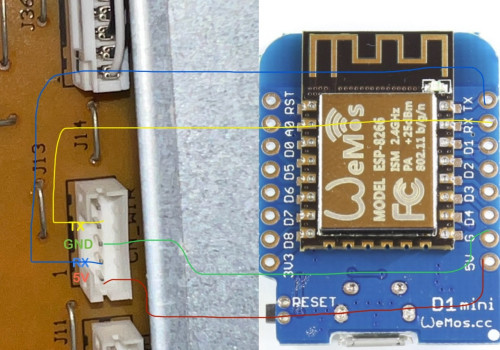
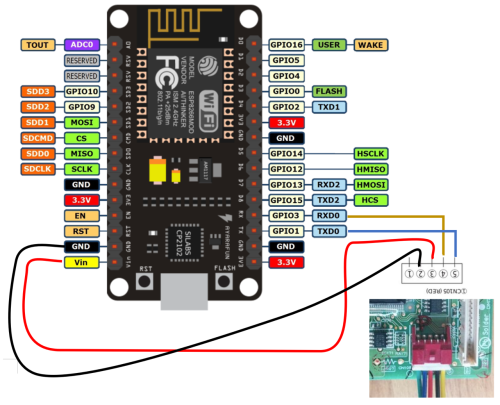
Mitsubishi Electric (cn105 port)
PAP jst cable
https://my.shp.ee/vwE85Ut
Mitsubishi2mqtt
https://github.com/dzungpv/mitsubishi2MQTT
For tuya, you can order this module from thailand
https://shopee.co.th/product/27525505
And that’s it, should save you 500 from sensibo or other devices. Obviously daikin has their own app, but not exactly open source. And mitsubishi electric has kumo cloud but they don’t exactly use it here. For other brands, you can just google it, i noticed panasonic, midea, haier has non cloud esp solution.
If anyone is interested in the above project, ensure your Daikin AC is of the "Smart Control" type or supports WIFI.
Here's how to check it:
1. Open AC front led
2. Check the wiring diagram at the side
3. Observe any port labelled as CN_WIR

Without the CN_WIR port, you can drop the above project and explore other method such as capture and playback the remote control IR signal.
To flash ESP8266, download the bin files from Faikin site and search the binary file using the build-in search function.
Download the ESP8266 flasher app from here if you are not familier with Python apps.
Here the settings that I used, ensure the correct COM port is used.


Once successfully flash, reboot the ESP8266 and try to connect the ESP8266 WIFI AP using your PC/Laptop. Run IPconfig from your Windows command prompt, copy and paste the Default Gateway IP to your browser and enter your desire MQTT Broker IP address, User name and Password.
Next steps will be soldering the jack wire to ESP8266 and plug into CN_WIR port.
QUOTE(LostAndFound @ Jul 28 2024, 05:09 PM)
Should I prioritize wall + ethernet for CCTV or just POE?
Perhaps I rephase your questions also to extend other possible optionsOption 1: Wall Power Socket + LAN cable
Option 2: LAN cable only
Option 3: Wall Power Socket only.
Option 1: My preferred option as I will not be limited to CCTV with POE type only, but I can use any other brand that may not support POE. I can extend the usage of the wall power socket for other purpose such as motion sensor, smart plug controlling the hanging LED light for all sort of festival etc.
Option 2: Limited to POE CCTV or any gadget supporting POE.
Option 3: Many CCTV now support WIFI connection such as 2.4GHz or 5GHz. If you plan to save the video stream into DVR, then ensure you have good mesh network.
 Quote
Quote
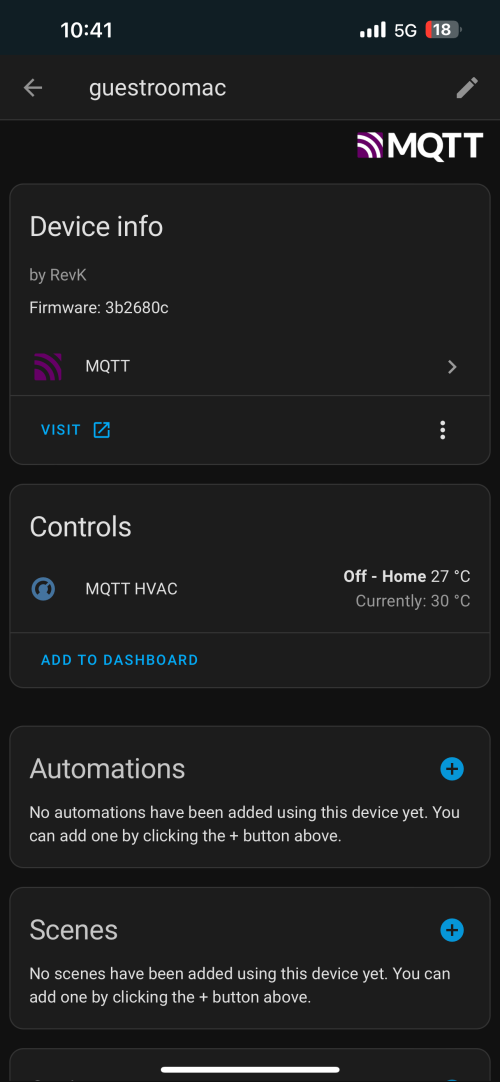
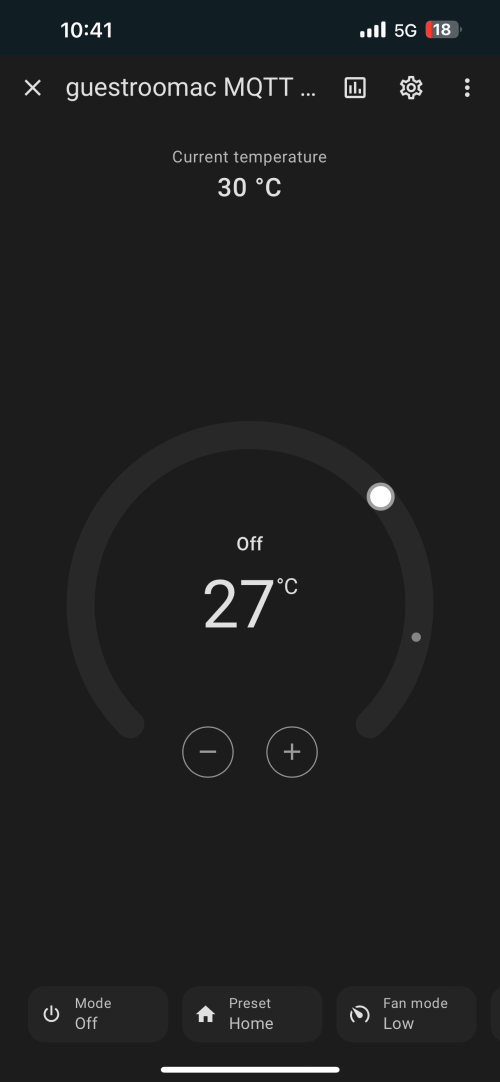





 ), while I am using my 10-year-old laptop (Intel i5-3320M) as a hypervisor host.
  .
.

 0.0253sec
 0.43
0.43
 6 queries
 GZIP Disabled