Welcome Guest ( Log In | Register )

Outline · [ Standard ] · Linear+

 Acer Aspire V Nitro Thread, Designed to rev up your life

views
     
TSshadowlck
post Feb 4 2015, 02:34 PM, updated 9y ago

Getting Started
**
Junior Member
119 posts

Joined: Dec 2013


The purpose of this thread is to discuss or share your experience regarding Acer Aspire V Nitro. rclxm9.gif rclxms.gif
You can ask any question about Acer V Nitro at here too.


Now Acer Aspire V Nitro comes with new design and new specs!!!

15.6-inch models

user posted image


VN7-572G-57N0 (New Model)
Specs

Windows 10 Home
Intel Core i5-6200U Dual-core 2.30 GHz
39.6 cm (15.6") Full HD (1920 x 1080) 16:9 IPS
NVIDIA GeForce GTX 950M with 4 GB Dedicated Memory
4 GB, DDR4 SDRAM
1 TB HDD
(Optical Drive Available)


Price: RM3099

VN7-592G-7226 (New Model)
Specs

Windows 10 Home
Intel Core i7-6700HQ 2.60 GHz
39.6 cm (15.6") Full HD (1920 x 1080) 16:9 IPS
NVIDIA GeForce GTX 960M with 4 GB Dedicated Memory
4 GB, DDR4 SDRAM
1 TB HDD + 128 GB SSD
(No Optical Drive)


Price: RM4699

17.3-inch model

VN7-792G-77XQ (New Model)
Specs

Windows 10 Home
Intel Core i7-6700HQ 2.60 GHz
43.9 cm (17.3") Full HD (1920 x 1080) 16:9
NVIDIA GeForce GTX 960M with 4 GB Dedicated Memory
16 GB, DDR4 SDRAM
1 TB HDD + 256 GB SSD
(Optical Drive Available)


Price: RM5699

Old Models

VN7-591G-78A2
Specs

Windows 8.1 Single Language
Intel Core i7-4720HQ Quad-core 2.60 GHz
39.6 cm (15.6") Full HD (1920 x 1080) 16:9 IPS
NVIDIA GeForce GTX 960M with 4 GB Dedicated Memory
16 GB, DDR3L SDRAM
1 TB HDD + 128 GB SSD


Price: RM4599

VN7-591G-78SG
Specs

Windows 8.1 Single Language
Intel Core i7-4720HQ Quad-core 2.60 GHz
39.6 cm (15.6") Full HD (1920 x 1080) 16:9 IPS
NVIDIA GeForce GTX 960M with 2 GB Dedicated Memory
8 GB, DDR3L SDRAM
1 TB HDD + 8 GB SSD


Price: RM3999

VN7-591G-744N
Specs

Windows 8.1 Single Language
Intel Core i7-4720HQ Quad-core 2.60 GHz
39.6 cm (15.6") Full HD (1920 x 1080) 16:9 IPS
NVIDIA GeForce GTX 860M with 2 GB Dedicated Memory
8 GB, DDR3L SDRAM
1 TB HDD + 8 GB SSD


Price: RM3499

VN7-591G-73A2
Specs

Windows 8.1 Single Language
Intel Core i7-4710HQ Quad-core 2.50 GHz
39.6 cm (15.6") Full HD (1920 x 1080) 16:9 IPS
NVIDIA GeForce GTX 860M with 2 GB Dedicated Memory
12 GB, DDR3L SDRAM
1 TB HDD + 8 GB SSD


Price: RM3399

VN7-791G-72BNk
Specs (From Official Page)

Windows 8.1 Single Language
Intel Core i7-4710HQ Quad-core 2.50 GHz
43.9 cm (17.3") Full HD (1920 x 1080) 16:9 IPS
NVIDIA GeForce GTX 860M with 4 GB Dedicated Memory
16 GB, DDR3L SDRAM
1 TB HDD + 8 GB SSD


Price: RM4299

Reviews


By NotebookCheck
http://www.notebookcheck.net/Acer-Aspire-V15-Nitro-VN7-591G-77A9-Notebook-Review.128435.0.html

By Goldfries
http://www.goldfries.com/hardware-reviews/acer-aspire-v-nitro-vn7-591g-black-edition-gaming-notebook-review/


Note: Acer DustDefender only available in V17 models.


If there any mistakes regarding the information above, please feel free to correct me biggrin.gif


If facing overheating issues/sudden frame drops (means overheating), please refer this
QUOTE(chiong1983 @ Mar 10 2015, 07:46 AM)
For those with cooling problems i found a way to control the both fans speed , and i think that auto fan speed never use the full potential of those fans , because i got even 94°C cpu temp and the fans sound aren't nearly close to the nousy sound when i set them to max speed.
You need to download rw everything from here http://rw-everything.software.informer.com/ and launch it , then select the "EC" tab that is circled in screenshot.
user posted image
Then go to 90x03 that is for right fan near the GPU , it should h;ave value 04 for auto fan speed , you must modify it to 14 for manual fan speed then you can modify the speed in the next column (90x04) with values from 99 to 60 , where 99 value is the lowest speed and the 60 value the highest speed , in the next column (90x05) you will see the actual speed of the fan
For the left fan near the CPU go to 90x06 and do the same thing: 04 for auto fan speed , 14 for manual fan speed ; and in the next column (90x07) set the speed with values from 99 to 40 , where the 40 is the max speed of that fan.
With the fans set to maximum speed , i never exceed 65°C in GPU and 80°C in CPU that is set to run with all four cores to 3.5GHZ from intel XTU.
I think that the cooling system potential on this laptop is more efficient than the one from asus G571 which is giant.
I hope that was useful for those with high temp problems.
*
All credits goes to chiong1983 <= Big thanks to you!

This post has been edited by shadowlck: Dec 7 2015, 02:02 PM
krgia10
post Feb 4 2015, 02:38 PM

Getting Started
**
Junior Member
183 posts

Joined: Oct 2010
From: 1 Malaysia 2 System 3 Voices
V15 spec wrong already.
TSshadowlck
post Feb 4 2015, 02:40 PM

Getting Started
**
Junior Member
119 posts

Joined: Dec 2013


QUOTE(krgia10 @ Feb 4 2015, 02:38 PM)
V15 spec wrong already.
*
Edited. Thanks for correct the mistake biggrin.gif thumbup.gif
TSshadowlck
post Feb 4 2015, 02:45 PM

Getting Started
**
Junior Member
119 posts

Joined: Dec 2013


For those who having high temperatures while gaming, refer to this:

QUOTE(Amal @ Feb 2 2015, 06:34 PM)
Haswell CPU is quite a hot CPU IMHO.

Try disabling the CPU Turbo boost.
It will help a lot on the temperature.

Go to your Power Options -> Change Plan Settings -> Change Advanced Power Settings -> Scroll and go to Processor Power Management -> Change the Maximum processor state from 100 to 99.

Your CPU will limit itself to 2.5Ghz max.
This usually won't affect the gaming performance by much. Probably 1-5% only.
*
This work for me (also one of the victim who had high temps)

A big thanks to Amal! rclxms.gif Thank you!
hctang
post Feb 5 2015, 08:00 AM

Getting Started
**
Junior Member
172 posts

Joined: May 2010


Is the heat issue that bad? Wanted to get a unit soon T.T
TSshadowlck
post Feb 5 2015, 12:20 PM

Getting Started
**
Junior Member
119 posts

Joined: Dec 2013


QUOTE(hctang @ Feb 5 2015, 08:00 AM)
Is the heat issue that bad? Wanted to get a unit soon T.T
*
Well, for me then yes it is, but not sure if other Nitro user having heat issues. There's a trick to reduce the heat though and it works for me. Btw, cooling pad isn't help anyway sad.gif

This post has been edited by shadowlck: Feb 5 2015, 12:24 PM
iverice
post Feb 5 2015, 02:22 PM

New Member
*
Junior Member
43 posts

Joined: Jun 2013
hi, fellow acer v nitro owner, before i buy this laptop, i want to ask whether you can update nvidia gpu driver from the nvidia website? because i wll be playing mostly latest game after i buy it.
lopiop
post Feb 5 2015, 06:21 PM

Casual
***
Junior Member
312 posts

Joined: Feb 2013
QUOTE(iverice @ Feb 5 2015, 02:22 PM)
hi, fellow acer v nitro owner, before i buy this laptop, i want to ask whether you can update nvidia gpu driver from the nvidia website? because i wll be playing mostly latest game after i buy it.
*
there is an nvidia geforce experience app installed, it will notify you with the latest drivers, one click and it will auto install the latest nvidia drivers. the app is also useful as it can optimise the game settings for you automatically
lopiop
post Feb 5 2015, 06:23 PM

Casual
***
Junior Member
312 posts

Joined: Feb 2013
QUOTE(hctang @ Feb 5 2015, 08:00 AM)
Is the heat issue that bad? Wanted to get a unit soon T.T
*
as others had said, i7 haswell cpu runs hot, my vnitro is also quite hot, but i dont think its really as severe as i think it is (paranoid) , so just use it and be happy biggrin.gif
riku2replica
post Feb 5 2015, 10:11 PM

Mugi-chan!! 可愛い!!
*******
Senior Member
3,304 posts

Joined: Mar 2006
From: Chicago(Port25)
QUOTE(shadowlck @ Feb 5 2015, 12:20 PM)
Well, for me then yes it is, but not sure if other Nitro user having heat issues. There's a trick to reduce the heat though and it works for me. Btw, cooling pad isn't help anyway sad.gif
*
of couse cooling pad isn't help, if it direct contact with the copper pipe, then that will only help reduce for about 3-5'c.
TSshadowlck
post Feb 6 2015, 12:18 AM

Getting Started
**
Junior Member
119 posts

Joined: Dec 2013


QUOTE(riku2replica @ Feb 5 2015, 10:11 PM)
of couse cooling pad isn't help, if it direct contact with the copper pipe, then that will only help reduce for about 3-5'c.
*
Yeah that's what it pissed me off and I bought it for RM80, I am so stupid. mad.gif
riku2replica
post Feb 6 2015, 07:27 AM

Mugi-chan!! 可愛い!!
*******
Senior Member
3,304 posts

Joined: Mar 2006
From: Chicago(Port25)
QUOTE(shadowlck @ Feb 6 2015, 12:18 AM)
Yeah that's what it pissed me off and I bought it for RM80, I am so stupid. mad.gif
*
I forgot to point out cooling pad was actually meant to help the air flow but airflow intake/outake will dependent on the laptop design,
iverice
post Feb 7 2015, 02:55 PM

New Member
*
Junior Member
43 posts

Joined: Jun 2013
hi, acer website just came with a new nitro model, the cpu had been changed to Intel Core i7-4720HQ !
lopiop
post Feb 7 2015, 03:16 PM

Casual
***
Junior Member
312 posts

Joined: Feb 2013
QUOTE(iverice @ Feb 7 2015, 02:55 PM)
hi, acer website just came with a new nitro model, the cpu had been changed to Intel Core i7-4720HQ !
*
That is my spec as well, maybe op got the old specs for the info
TSshadowlck
post Feb 7 2015, 10:59 PM

Getting Started
**
Junior Member
119 posts

Joined: Dec 2013


QUOTE(lopiop @ Feb 7 2015, 03:16 PM)
That is my spec  as well, maybe op got the old specs for the info
*
New model added. biggrin.gif

This post has been edited by shadowlck: Feb 7 2015, 11:39 PM
iverice
post Feb 7 2015, 11:27 PM

New Member
*
Junior Member
43 posts

Joined: Jun 2013
hi, i just got my v nitro rm3499 model.
i have a question, when i play game that using the gtx860m, i noticed that the core clock only clock in at 540mhz. i though the core clock should be 1019?
why is that?

i'm using msi afterburner to monitored.
lopiop
post Feb 8 2015, 01:03 AM

Casual
***
Junior Member
312 posts

Joined: Feb 2013
QUOTE(iverice @ Feb 7 2015, 11:27 PM)
hi, i just got my v nitro rm3499 model.
i have a question, when i play game that using the gtx860m, i noticed that the core clock only clock in at 540mhz. i though the core clock should be 1019?
why is that?

i'm using msi afterburner to monitored.
*
you bought for 3499? didnt know the price increased. if your not sure dont tinker with stuff in afterburner, as long as fps in game is high should be no issue, clock speed is low to maintain low temp and low power draw
iverice
post Feb 8 2015, 01:24 AM

New Member
*
Junior Member
43 posts

Joined: Jun 2013
QUOTE(lopiop @ Feb 8 2015, 01:03 AM)
you bought for 3499? didnt know the price increased. if your not sure dont tinker with stuff in afterburner, as long as fps in game is high should be no issue, clock speed is low to maintain low temp and low power draw
*
now new stock all RM3499. Are your clock also like mine while playing game? i dont mess with the clock, i just curious why it dint run on 1019 mhz
TSshadowlck
post Feb 8 2015, 11:50 AM

Getting Started
**
Junior Member
119 posts

Joined: Dec 2013


QUOTE(iverice @ Feb 8 2015, 01:24 AM)
now new stock all RM3499. Are your clock also like mine while playing game? i dont mess with the clock, i just curious why it dint run on 1019 mhz
*
How was the new model? And also share your temperature while gaming biggrin.gif
iverice
post Feb 8 2015, 12:41 PM

New Member
*
Junior Member
43 posts

Joined: Jun 2013
The temperature just like you guys mentioned, will reach to 90 if i do not turn off turbo boost.
lopiop
post Feb 8 2015, 02:36 PM

Casual
***
Junior Member
312 posts

Joined: Feb 2013
QUOTE(iverice @ Feb 8 2015, 12:41 PM)
The temperature just like you guys mentioned, will reach to 90 if i do not turn off turbo boost.
*
sorry, i think the clock speed should be fine if you check at graphic properties, how come the price increase now wan?
lopiop
post Feb 8 2015, 06:57 PM

Casual
***
Junior Member
312 posts

Joined: Feb 2013
hi guys, does anybody know if when charging the battery will stop charging when reach 100 percent?
TSshadowlck
post Feb 10 2015, 10:13 AM

Getting Started
**
Junior Member
119 posts

Joined: Dec 2013


QUOTE(lopiop @ Feb 8 2015, 02:36 PM)
sorry, i think the clock speed should be fine if you check at graphic properties, how come the price increase now wan?
*
Lol iverice bought the new model with i7-4720HQ so the price is RM3499.

This post has been edited by shadowlck: Feb 10 2015, 10:14 AM
TSshadowlck
post Feb 10 2015, 10:15 AM

Getting Started
**
Junior Member
119 posts

Joined: Dec 2013


QUOTE(lopiop @ Feb 8 2015, 06:57 PM)
hi guys, does anybody know if when charging the battery will stop charging when reach 100 percent?
*
Ya, it will stop charging after 100% to protect your laptop battery. biggrin.gif
lopiop
post Feb 10 2015, 08:42 PM

Casual
***
Junior Member
312 posts

Joined: Feb 2013
are you guys facing nvidia geforce experience app issue? there is a new driver
TSshadowlck
post Feb 10 2015, 10:00 PM

Getting Started
**
Junior Member
119 posts

Joined: Dec 2013


QUOTE(lopiop @ Feb 10 2015, 08:42 PM)
are you guys facing nvidia geforce experience app issue? there is a new driver
*
I haven't update the driver yet tongue.gif, what's wrong with the new driver?
lopiop
post Feb 10 2015, 10:43 PM

Casual
***
Junior Member
312 posts

Joined: Feb 2013
the issue is gone already, seems to be from nvidia servers, today there is suppose to be a new driver, but nvidia pulled the update
https://esports.geforce.com/forums/board/110/

lopiop
post Feb 14 2015, 08:14 PM

Casual
***
Junior Member
312 posts

Joined: Feb 2013
do you guys know how to clean the smudges on the laptop. lol, the laptop is a smudge magnet. I've tried using a screen protector cloth, but it doesnt really do the trick
iverice
post Feb 15 2015, 02:36 AM

New Member
*
Junior Member
43 posts

Joined: Jun 2013
QUOTE(lopiop @ Feb 14 2015, 08:14 PM)
do you guys know how to clean the smudges on the laptop. lol, the laptop is a smudge magnet. I've tried using a screen protector cloth, but it doesnt really do the trick
*
what is smudge, do you mean dust? lol
lopiop
post Feb 15 2015, 04:53 PM

Casual
***
Junior Member
312 posts

Joined: Feb 2013
like the sweat marks when you use the keyboard
iverice
post Feb 15 2015, 06:57 PM

New Member
*
Junior Member
43 posts

Joined: Jun 2013
lol, i got that too, i frequently need to use a moist cloth to wipe it smile.gif
lopiop
post Feb 15 2015, 07:13 PM

Casual
***
Junior Member
312 posts

Joined: Feb 2013
QUOTE(iverice @ Feb 15 2015, 06:57 PM)
lol, i got that too, i frequently need to use a moist cloth to wipe it smile.gif
*
do you also notice that the plastic of the laptop is very easily scratchable, need to be extra careful, i just brushed my laptop abit against my table and it got a small scratch
iverice
post Feb 15 2015, 08:01 PM

New Member
*
Junior Member
43 posts

Joined: Jun 2013
i been treating this laptop like my baby so far, lol
TSshadowlck
post Feb 15 2015, 10:25 PM

Getting Started
**
Junior Member
119 posts

Joined: Dec 2013


Those dust kept getting inside under my laptop keyboard and mouse touchpad LOL. Can't figure out ways to clean them cry.gif


Btw it seems like there's only a few people own AAV Nitro LUL, its quiet here haha.

This post has been edited by shadowlck: Feb 15 2015, 10:29 PM
iverice
post Feb 15 2015, 11:11 PM

New Member
*
Junior Member
43 posts

Joined: Jun 2013
yea man, i so hate to see those white thingy in between the touchpad “longkang"
lopiop
post Feb 16 2015, 07:42 PM

Casual
***
Junior Member
312 posts

Joined: Feb 2013
is there any way to permanently disable the keyboard backlight?
SUSVelocity
post Feb 17 2015, 09:41 AM

Look at all my stars!!
*******
Senior Member
3,188 posts

Joined: Nov 2007
QUOTE(lopiop @ Feb 8 2015, 06:57 PM)
hi guys, does anybody know if when charging the battery will stop charging when reach 100 percent?
*
even it wll stop it will leak so long term the battery will degrade as well so if you have removable battery when full charge please remove battery, if non removable turn off charging this also apply on mobile phone all of them uses lithum battery.
aloy88
post Feb 17 2015, 07:57 PM

Getting Started
**
Junior Member
253 posts

Joined: Mar 2008


i got a question now ...

should i go for the i7 4720HQ or i7 4710 HQ ?

Both difference is RM 20 after using the 10% discount from lazada.


TSshadowlck
post Feb 18 2015, 01:07 AM

Getting Started
**
Junior Member
119 posts

Joined: Dec 2013


QUOTE(aloy88 @ Feb 17 2015, 07:57 PM)
i got a question now ...

should i go for the i7 4720HQ or i7 4710 HQ ?

Both difference is RM 20 after using the 10% discount from lazada.
*
Then you should go for the model with i7 4720HQ since its performance is better than i7 4710HQ biggrin.gif
iverice
post Feb 18 2015, 03:00 AM

New Member
*
Junior Member
43 posts

Joined: Jun 2013
hi, do you guys face this problem like mine.
I recently bought far cry 4(uplay legit), and i play it on 900p high medium setting.
The frame rate are about 30-45. But the problem is the frame rate will drop 20+ for a few sec then when back up, this is very frustating when playing a game.
TSshadowlck
post Feb 18 2015, 01:40 PM

Getting Started
**
Junior Member
119 posts

Joined: Dec 2013


QUOTE(iverice @ Feb 18 2015, 03:00 AM)
hi, do you guys face this problem like mine.
I recently bought far cry 4(uplay legit), and i play it on 900p high medium setting.
The frame rate are about 30-45. But the problem is the frame rate will drop 20+ for a few sec then when back up, this is very frustating when playing a game.
*
Seems like your CPU is heating up, try to set the intel turbo boost off biggrin.gif
TSshadowlck
post Feb 18 2015, 01:42 PM

Getting Started
**
Junior Member
119 posts

Joined: Dec 2013


QUOTE(lopiop @ Feb 16 2015, 07:42 PM)
is there any way to permanently disable the keyboard backlight?
*
I guess no, can't find anything about it on google. :/
lopiop
post Feb 18 2015, 07:33 PM

Casual
***
Junior Member
312 posts

Joined: Feb 2013
@shadowlck did you change the thermal paste? i think acer's thermal paste job is maybe just shit
miong93
post Feb 18 2015, 07:38 PM

~ Fulamak ~
******
Senior Member
1,236 posts

Joined: Apr 2013
QUOTE(iverice @ Feb 18 2015, 03:00 AM)
hi, do you guys face this problem like mine.
I recently bought far cry 4(uplay legit), and i play it on 900p high medium setting.
The frame rate are about 30-45. But the problem is the frame rate will drop 20+ for a few sec then when back up, this is very frustating when playing a game.
*
Not a Acer user, but I think your GPU or CPU is throttling. Try disable your Intel Turbo Boost. and lower your settings. 860m can't play Far Cry 4 on medium high settings on 900p I believe. try 720p instead.
iverice
post Feb 18 2015, 10:10 PM

New Member
*
Junior Member
43 posts

Joined: Jun 2013
QUOTE(lopiop @ Feb 18 2015, 07:33 PM)
@shadowlck did you change the thermal paste? i think acer's thermal paste job is maybe just shit
*
I did turn off turbo boost, its just the same.
what I noticed thought when the gpu hit 85c, the cpu will downclock and the gpu usage with drop then along the fps will drop. but my cpu temperature are just along 70-80. I think ill send it back to check. Not sure I get a flawed gpu termal pasre or fan.
miong93
post Feb 18 2015, 10:37 PM

~ Fulamak ~
******
Senior Member
1,236 posts

Joined: Apr 2013
QUOTE(iverice @ Feb 18 2015, 10:10 PM)
I did turn off turbo boost, its just the same.
what I noticed thought when the gpu hit 85c, the cpu will downclock and the gpu usage with drop then along the fps will drop. but my cpu temperature are just along 70-80. I think ill send it back to check. Not sure I get a flawed gpu termal pasre or fan.
*
Just to let you know, Nitro fan kicks in a little late, you need to wait for it to spin sweat.gif
Also, I think by default they are using stock thermal paste, it sucks. So just ask them to use IC Diamond or any other good thermal paste.
Can you try on other game as well ? Cause so far what I know is, 860m is not suitable to play Far Cry 4 on mid high settings. This game is very demanding same like Crysis 3. Watch Dogs and AC is also another example, but mostly it is because ubisoft game is always not optimized sweat.gif
Try lowering your resolution to 720p.
iverice
post Feb 18 2015, 11:23 PM

New Member
*
Junior Member
43 posts

Joined: Jun 2013
QUOTE(miong93 @ Feb 18 2015, 10:37 PM)
Just to let you know, Nitro fan kicks in a little late, you need to wait for it to spin sweat.gif
Also, I think by default they are using stock thermal paste, it sucks. So just ask them to use IC Diamond or any other good thermal paste.
Can you try on other game as well ? Cause so far what I know is, 860m is not suitable to play Far Cry 4 on mid high settings. This game is very demanding same like Crysis 3. Watch Dogs and AC is also another example, but mostly it is because ubisoft game is always not optimized sweat.gif
Try lowering your resolution to 720p.
*
erm, what do u mean wait for the fan to spin, I tried ply that game for like 2 hour just to test it, it just went to this same cycle, gpu hit 85c, then usage drop -gpu temp then drop for abit-gpu temp rise to 85- then repeat the process.
I tried 720p medium setting just now, it did not seem to be change. :-( I starting to worried that either my gpu fan something wrong or the gpu thermal paste problem. because the cpu temp are not so high 70-80.
miong93
post Feb 18 2015, 11:42 PM

~ Fulamak ~
******
Senior Member
1,236 posts

Joined: Apr 2013
QUOTE(iverice @ Feb 18 2015, 11:23 PM)
erm, what do u mean wait for the fan to spin, I tried ply that game for like 2 hour just to test it, it just went to this same cycle,  gpu hit 85c, then usage drop -gpu temp then drop for abit-gpu temp rise to 85- then repeat the process. 
I tried 720p medium setting just now, it did not seem to be change. :-( I starting to worried that either my gpu fan something wrong or the gpu thermal paste problem. because the cpu temp are not so high 70-80.
*
CPU temperature is lower than GPU is normal, as your game utilize GPU more than CPU. Nitro is using dual fan so they are using different heat pipe, so you can see two different temperature.
Mostly GPU will heat up to 70-80+ degree C when you're playing game, especially high demanding game like Far Cry 4, Crysis 3, BF4 etc etc.
I highly suspect your GPU is throttling. If playing other lower demanding game is still the same, mostly is hardware failure.
Did this happen on the previous driver version ? (before you update to latest nvidia driver)
Send it to the shop back for a 1on1 exchange (if is still within 1 week) or service center to have a check up
iverice
post Feb 19 2015, 12:06 AM

New Member
*
Junior Member
43 posts

Joined: Jun 2013
I tried older game just now on my steam(dead space2),
the cpu and gpu ranging in a whopping 60-70+c, as I think like what u said that ds2is a much undemanding game. but I bought this laptop to ply latest game, but the gpu will throttle in those latest game. This is just sad.
miong93
post Feb 19 2015, 12:11 AM

~ Fulamak ~
******
Senior Member
1,236 posts

Joined: Apr 2013
QUOTE(iverice @ Feb 19 2015, 12:06 AM)
I tried older game just now on my  steam(dead space2),
the cpu and gpu ranging in a whopping 60-70+c, as I think like what u said that ds2is a much undemanding game. but I bought this laptop to ply latest game, but the gpu will throttle in those latest game. This is just sad.
*
Well 860m is not high end GPU. It can play latest demanding game, but not in high resolution + high settings. COD AW is okay as it is 2014 game. Some 2014 and up coming 2015 game may not work well.
I think better send it back to have a check. Cause for Nitro to go till so high is quite unusual, cause most user temperature is <85 degree c
iverice
post Feb 19 2015, 11:04 AM

New Member
*
Junior Member
43 posts

Joined: Jun 2013
QUOTE(miong93 @ Feb 19 2015, 12:11 AM)
Well 860m is not high end GPU. It can play latest demanding game, but not in high resolution + high settings. COD AW is okay as it is 2014 game. Some 2014 and up coming 2015 game may not work well.
I think better send it back to have a check. Cause for Nitro to go till so high is quite unusual, cause most user temperature is <85 degree c
*
I think I try to send it on next monday as now cny. This suck as this laptop are still brand new though
lopiop
post Feb 19 2015, 11:50 AM

Casual
***
Junior Member
312 posts

Joined: Feb 2013
QUOTE(iverice @ Feb 19 2015, 11:04 AM)
I think I try to send it on next monday as now cny. This suck as this laptop are still brand new though
*
i dont think its a hardware issue, the game is just demanding thats all
iverice
post Feb 19 2015, 12:04 PM

New Member
*
Junior Member
43 posts

Joined: Jun 2013
QUOTE(lopiop @ Feb 19 2015, 11:50 AM)
i dont think its a hardware issue, the game is just demanding thats all
*
but if thr gpu cant handle the heat even in low res setting then how im gonna play game in the future
lopiop
post Feb 19 2015, 12:05 PM

Casual
***
Junior Member
312 posts

Joined: Feb 2013
QUOTE(iverice @ Feb 19 2015, 12:04 PM)
but if thr gpu cant handle the heat even in low res setting then how im gonna play game in the future
*
what is the max temp for gpu and cpu while playing the game? other games?
iverice
post Feb 19 2015, 01:49 PM

New Member
*
Junior Member
43 posts

Joined: Jun 2013
well for far cry , the gpu as I said throttle on85c then drop abit on the temp then repeat, this result in constant fps drop which make the game unplayable. The cpu is fine after turn off turbo boost, 70-80.
miong93
post Feb 19 2015, 06:34 PM

~ Fulamak ~
******
Senior Member
1,236 posts

Joined: Apr 2013
QUOTE(lopiop @ Feb 19 2015, 11:50 AM)
i dont think its a hardware issue, the game is just demanding thats all
*
Well problem is the GPU is suspected to throttle. I think new GPU won't have this kind of issue in low settings + reso. 860m is a budget + decent GPU, not entry level also.. So shouldn't be throttling much
TSshadowlck
post Feb 20 2015, 03:13 PM

Getting Started
**
Junior Member
119 posts

Joined: Dec 2013


QUOTE(lopiop @ Feb 18 2015, 07:33 PM)
@shadowlck did you change the thermal paste? i think acer's thermal paste job is maybe just shit
*
Nope I didn't repaste the thermal. Your laptop temperature rise again even you set the Intel turbo boost off?
TSshadowlck
post Feb 20 2015, 03:15 PM

Getting Started
**
Junior Member
119 posts

Joined: Dec 2013


QUOTE(iverice @ Feb 18 2015, 10:10 PM)
I did turn off turbo boost, its just the same.
what I noticed thought when the gpu hit 85c, the cpu will downclock and the gpu usage with drop then along the fps will drop. but my cpu temperature are just along 70-80. I think ill send it back to check. Not sure I get a flawed gpu termal pasre or fan.
*
Hmm that's weird. My Cpu and GPU temp are normal while playing far cry 4 (not legit) even in med high 1080p settings.
hctang
post Feb 20 2015, 04:55 PM

Getting Started
**
Junior Member
172 posts

Joined: May 2010


Getting myself one set tomorrow.. weee~ hoprfully it wont disappoint me
iverice
post Feb 20 2015, 04:56 PM

New Member
*
Junior Member
43 posts

Joined: Jun 2013
QUOTE(shadowlck @ Feb 20 2015, 03:15 PM)
Hmm that's weird. My Cpu and GPU temp are normal while playing far cry 4 (not legit) even in med high 1080p settings.
*
I think I got the defect product. sign
TSshadowlck
post Feb 20 2015, 07:04 PM

Getting Started
**
Junior Member
119 posts

Joined: Dec 2013


QUOTE(hctang @ Feb 20 2015, 04:55 PM)
Getting myself one set tomorrow.. weee~ hoprfully it wont disappoint me
*
Remember to turn off Intel turbo boost if your laptop overheat xD.
hctang
post Feb 21 2015, 04:59 PM

Getting Started
**
Junior Member
172 posts

Joined: May 2010


Can teach me where to turn off if overheat happens.. Hopefully it won't xD
TSshadowlck
post Feb 22 2015, 11:31 AM

Getting Started
**
Junior Member
119 posts

Joined: Dec 2013


QUOTE(hctang @ Feb 21 2015, 04:59 PM)
Can teach me where to turn off if overheat happens.. Hopefully it won't xD
*
Go to your Power Options -> Change Plan Settings -> Change Advanced Power Settings -> Scroll and go to Processor Power Management -> Change the Maximum processor state from 100 to 99. biggrin.gif biggrin.gif
olay biscuit barrel
post Feb 22 2015, 11:39 AM

Getting Started
**
Junior Member
81 posts

Joined: Jan 2015
How's the build quality? Temperature? Im tempted to buy one for gaming & some zbrush & flash animations.
TSshadowlck
post Feb 22 2015, 05:41 PM

Getting Started
**
Junior Member
119 posts

Joined: Dec 2013


QUOTE(olay biscuit barrel @ Feb 22 2015, 11:39 AM)
How's the build quality? Temperature? Im tempted to buy one for gaming & some zbrush & flash animations.
*
Well, it packed with Intel i7 4710HQ/4720HQ (depends on models), 12GB Ram, 1GB SSHD and GTX 860m. This laptop cooling system isn't that great so it would be better to apply new thermal paste or turn off the Intel turbo boost off if want to avoid laptop overheating.
olay biscuit barrel
post Feb 22 2015, 08:05 PM

Getting Started
**
Junior Member
81 posts

Joined: Jan 2015
QUOTE(shadowlck @ Feb 22 2015, 05:41 PM)
Well, it packed with Intel i7 4710HQ/4720HQ (depends on models), 12GB Ram, 1GB SSHD and GTX 860m. This laptop cooling system isn't that great so it would be better to apply new thermal paste or turn off the Intel turbo boost off if want to avoid laptop overheating.
*
Thanks!
TSshadowlck
post Feb 23 2015, 02:18 AM

Getting Started
**
Junior Member
119 posts

Joined: Dec 2013


QUOTE(olay biscuit barrel @ Feb 22 2015, 08:05 PM)
Thanks!
*
You're welcome. rclxms.gif biggrin.gif
hctang
post Feb 23 2015, 10:21 AM

Getting Started
**
Junior Member
172 posts

Joined: May 2010


What software do u use to monitor temperature?
miong93
post Feb 23 2015, 11:32 AM

~ Fulamak ~
******
Senior Member
1,236 posts

Joined: Apr 2013
QUOTE(hctang @ Feb 23 2015, 10:21 AM)
What software do u use to monitor temperature?
*
HwMonitor

This post has been edited by miong93: Feb 23 2015, 11:32 AM
TSshadowlck
post Feb 23 2015, 01:35 PM

Getting Started
**
Junior Member
119 posts

Joined: Dec 2013


QUOTE(hctang @ Feb 23 2015, 10:21 AM)
What software do u use to monitor temperature?
*
Or MSI Afterburner if you want to monitor the temperature while in game. biggrin.gif
hctang
post Feb 23 2015, 01:39 PM

Getting Started
**
Junior Member
172 posts

Joined: May 2010


We can use MSI apps as well?
TSshadowlck
post Feb 23 2015, 04:12 PM

Getting Started
**
Junior Member
119 posts

Joined: Dec 2013


QUOTE(hctang @ Feb 23 2015, 01:39 PM)
We can use MSI apps as well?
*
Lol of course. MSI Afterburner doesn't mean that only MSI user can only use that just because of the name (MSI).
hctang
post Feb 26 2015, 08:25 AM

Getting Started
**
Junior Member
172 posts

Joined: May 2010


my cpu heats up to 9x degree celcius... is that consider normal? sweat.gif
TSshadowlck
post Feb 26 2015, 06:41 PM

Getting Started
**
Junior Member
119 posts

Joined: Dec 2013


QUOTE(hctang @ Feb 26 2015, 08:25 AM)
my cpu heats up to 9x degree celcius... is that consider normal?  sweat.gif
*
Nope, its consider overheating. You should turn off Intel turbo boost or reapply better thermal paste if you want.
aloy88
post Feb 26 2015, 08:33 PM

Getting Started
**
Junior Member
253 posts

Joined: Mar 2008


Sien. My window button pop out. How to solve it ? Try to slot in back but can't. sad.gif flying out soon also. Wonder if they can fix on the spot ?
TSshadowlck
post Feb 26 2015, 10:33 PM

Getting Started
**
Junior Member
119 posts

Joined: Dec 2013


QUOTE(aloy88 @ Feb 26 2015, 08:33 PM)
Sien. My window button pop out. How to solve it ? Try to slot in back but can't. sad.gif flying out soon also. Wonder if they can fix on the spot ?
*
You mean the window key pop out from keyboard? Well, you need to send your laptop back to Acer or the shop you bought your laptop from. One of my friend also got his E key pop out from the keyboard and changing the whole keyboard is the only option. sad.gif
aloy88
post Feb 26 2015, 10:43 PM

Getting Started
**
Junior Member
253 posts

Joined: Mar 2008


sigh... the problem is i bought from lazada.

i guess i need to head straight to the warranty center.

not a good start. but so far so good quite impress with this laptop.

by the way, do you all have this issue where some of the software are not full resolution ? i realise when im installing some software, can notice the pop out tab is not optimize to HD
TSshadowlck
post Feb 26 2015, 11:01 PM

Getting Started
**
Junior Member
119 posts

Joined: Dec 2013


QUOTE(aloy88 @ Feb 26 2015, 10:43 PM)
sigh... the problem is i bought from lazada.

i guess i need to head straight to the warranty center.

not a good start. but so far so good quite impress with this laptop.

by the way, do you all have this issue where some of the software are not full resolution ? i realise when im installing some software, can notice the pop out tab is not optimize to HD
*
Your display text size maybe set to 150%. Try set it to 125% which is the default one. On the desktop, right click and select screen resolution, then select "Make text or other items blah blah blah", and then choose 125%
gid
post Feb 26 2015, 11:10 PM

Getting Started
**
Junior Member
123 posts

Joined: Jan 2006


should we screen shot HwMonitor(Temperatue) and CPUz(ClockSpeed) for reference like the one in the link ?

Nitro V Review


TSshadowlck
post Feb 26 2015, 11:18 PM

Getting Started
**
Junior Member
119 posts

Joined: Dec 2013


QUOTE(gid @ Feb 26 2015, 11:10 PM)
should we screen shot HwMonitor(Temperatue) and CPUz(ClockSpeed) for reference like the one in the link ?

Nitro V Review
*
Lol there's not necessary for me to screen shot the temp. I can screen shot the temp if you want to or you can screen shot yours and post it here biggrin.gif

This post has been edited by shadowlck: Feb 26 2015, 11:18 PM
hctang
post Feb 26 2015, 11:58 PM

Getting Started
**
Junior Member
172 posts

Joined: May 2010


QUOTE(shadowlck @ Feb 26 2015, 06:41 PM)
Nope, its consider overheating. You should turn off Intel turbo boost or reapply better thermal paste if you want.
*
may i know where u apply ur thermal paste? am looking for trustable technician.. scare they might spoil my new lappie tongue.gif
TSshadowlck
post Feb 27 2015, 12:11 AM

Getting Started
**
Junior Member
119 posts

Joined: Dec 2013


QUOTE(hctang @ Feb 26 2015, 11:58 PM)
may i know where u apply ur thermal paste? am looking for trustable technician.. scare they might spoil my new lappie  tongue.gif
*
Lol honestly I don't know since I'm not planning to reapply thermal paste. You can try to ask people at the mobile computing thread, they should know more than me. biggrin.gif Btw, reapply thermal paste means need to disassemble your laptop and this might void the warranty.
gid
post Feb 27 2015, 09:23 AM

Getting Started
**
Junior Member
123 posts

Joined: Jan 2006


QUOTE(shadowlck @ Feb 26 2015, 11:18 PM)
Lol there's not necessary for me to screen shot the temp. I can screen shot the temp if you want to or you can screen shot yours and post it here biggrin.gif
*
I was searching high and low got CPUID before CNY because I suspect my laptop not working well
then I found this ...

» Click to show Spoiler - click again to hide... «


my bus speed ok but not the multiplier. it stay at x8.
I send it back to Acer for checking, and YES, there is a problem.
Still waiting for their report.

This post has been edited by gid: Feb 27 2015, 09:24 AM
miong93
post Feb 27 2015, 10:30 AM

~ Fulamak ~
******
Senior Member
1,236 posts

Joined: Apr 2013
QUOTE(aloy88 @ Feb 26 2015, 10:43 PM)
sigh... the problem is i bought from lazada.

i guess i need to head straight to the warranty center.

not a good start. but so far so good quite impress with this laptop.

by the way, do you all have this issue where some of the software are not full resolution ? i realise when im installing some software, can notice the pop out tab is not optimize to HD
*
That's why I don't like to purchase stuff like laptop from online, especially those online store which is not from the official brand itself.
You should have a warranty card or code which comes along with your laptop. The warranty will most probably be from Acer directly. Just head to Acer service center and show them the code or card or any document.
Then you can proceed to claim for your warranty. Lazada doesn't provide any laptop warranty. But I think there is a 1 to 1 exchange if your parcel is damaged, but I not sure you're able to do so or not since you're already using it for few days already.

QUOTE(hctang @ Feb 26 2015, 11:58 PM)
may i know where u apply ur thermal paste? am looking for trustable technician.. scare they might spoil my new lappie  tongue.gif
*
Just head to Acer service center or the place you bought it, and tell them you want to reapply new thermal paste. And specifically tell them which thermal paste you want, like IC Diamond or other. DON'T use Stock Thermal Paste. Extra fee will be charged.

QUOTE(gid @ Feb 27 2015, 09:23 AM)
I was searching high and low got CPUID before CNY because I suspect my laptop not working well
then I found this ...

» Click to show Spoiler - click again to hide... «


my bus speed ok but not the multiplier. it stay at x8.
I send it back to Acer for checking, and YES, there is a problem.
Still waiting for their report.
*
If you're not OC-ing your CPU, under Balanced mode x8 is normal. smile.gif
But if it is constant x8, there is a problem.
gid
post Feb 27 2015, 10:40 AM

Getting Started
**
Junior Member
123 posts

Joined: Jan 2006


mine is constant no matter what program running.. biggrin.gif
when i read back the post, iverice symptom look like mine ..

This post has been edited by gid: Feb 27 2015, 10:42 AM
aloy88
post Feb 27 2015, 11:28 AM

Getting Started
**
Junior Member
253 posts

Joined: Mar 2008


just send my laptop to claim the warranty for keyboard. quiet impress with their service. 10am delivery 2pm can take back smile.gif

btw how much is the extra charge for the thermal paste ?
miong93
post Feb 27 2015, 12:15 PM

~ Fulamak ~
******
Senior Member
1,236 posts

Joined: Apr 2013
QUOTE(aloy88 @ Feb 27 2015, 11:28 AM)
just send my laptop to claim the warranty for keyboard. quiet impress with their service. 10am delivery 2pm can take back smile.gif

btw how much is the extra charge for the thermal paste ?
*
It depends on what type of thermal paste you want to use. Some charge RM50 for IC Diamond (IC diamond itself + service charge)
hctang
post Feb 28 2015, 09:38 PM

Getting Started
**
Junior Member
172 posts

Joined: May 2010


Are u guys using any keyboard cover? Am currently looking for one.. But couldn't find
TSshadowlck
post Mar 1 2015, 01:15 PM

Getting Started
**
Junior Member
119 posts

Joined: Dec 2013


QUOTE(hctang @ Feb 28 2015, 09:38 PM)
Are u guys using any keyboard cover?  Am currently looking for one.. But couldn't find
*
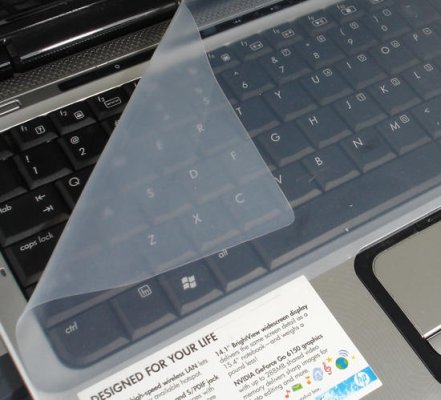
You mean this?

user posted image

Nope, I don't use it since it "Uglify" my laptop haha. Keyboard cover should be easy to find, just survey around your nearby IT Shop.
hctang
post Mar 1 2015, 05:51 PM

Getting Started
**
Junior Member
172 posts

Joined: May 2010


then how u maintain the keyboard.. it tends to get caught with dust tongue.gif
lopiop
post Mar 1 2015, 10:11 PM

Casual
***
Junior Member
312 posts

Joined: Feb 2013
Guys when you put your ear near the fan when it switches off, does it make abit of sound? Cos when idle use got no sound

This post has been edited by lopiop: Mar 1 2015, 10:12 PM
TSshadowlck
post Mar 1 2015, 10:56 PM

Getting Started
**
Junior Member
119 posts

Joined: Dec 2013


QUOTE(lopiop @ Mar 1 2015, 10:11 PM)
Guys when you put your ear near the fan when it switches off, does it make abit of sound? Cos when idle use got no sound
*
Yup, the fan is quiet since its rarely kicks in like other people said.
TSshadowlck
post Mar 1 2015, 10:57 PM

Getting Started
**
Junior Member
119 posts

Joined: Dec 2013


QUOTE(hctang @ Mar 1 2015, 05:51 PM)
then how u maintain the keyboard.. it tends to get caught with dust  tongue.gif
*
I just wipe it everyday haha. Its quite troublesome though. biggrin.gif tongue.gif

This post has been edited by shadowlck: Mar 1 2015, 10:58 PM
lopiop
post Mar 1 2015, 11:12 PM

Casual
***
Junior Member
312 posts

Joined: Feb 2013
QUOTE(shadowlck @ Mar 1 2015, 10:56 PM)
Yup, the fan is quiet since its rarely kicks in like other people said.
*
No what I mean is when shutting down the fan will make a sound?
TSshadowlck
post Mar 1 2015, 11:24 PM

Getting Started
**
Junior Member
119 posts

Joined: Dec 2013


QUOTE(lopiop @ Mar 1 2015, 11:12 PM)
No what I mean is when shutting down the fan will make a sound?
*
Oh, my fan doesn't make any sound when shutting down.
iArvage
post Mar 2 2015, 12:23 AM

Getting Started
**
Junior Member
210 posts

Joined: Apr 2011
If only the 15 inch version had the 4GB 860M T.T
austinjklim
post Mar 2 2015, 12:25 AM

Getting Started
**
Junior Member
72 posts

Joined: Dec 2010
Can someone send a picture on the backlit keyboard? I seen on some pictures that the keyboard fonts doesnt have the red light glowing (if you know what i mean lol). And can give some opinions? Trying to get a good value gaming pc and trying to decide this between the y50. Thanks smile.gif
TSshadowlck
post Mar 2 2015, 12:36 AM

Getting Started
**
Junior Member
119 posts

Joined: Dec 2013


QUOTE(iArvage @ Mar 2 2015, 12:23 AM)
If only the 15 inch version had the 4GB 860M T.T
*
The performance between 2GB and 4GB didn't have much difference though.
TSshadowlck
post Mar 2 2015, 12:38 AM

Getting Started
**
Junior Member
119 posts

Joined: Dec 2013


QUOTE(austinjklim @ Mar 2 2015, 12:25 AM)
Can someone send a picture on the backlit keyboard? I seen on some pictures that the keyboard fonts doesnt have the red light glowing (if you know what i mean lol). And can give some opinions? Trying to get a good value gaming pc and trying to decide this between the y50. Thanks smile.gif
*
Key font do have light but it only can be seen under dark place.

user posted image

Here's some links you can refer before choosing the laptop

http://www.reddit.com/r/SuggestALaptop/com...aspire_v_nitro/

http://www.reddit.com/r/SuggestALaptop/com..._v15_nitro_and/

http://hardforum.com/showthread.php?t=1839758

This post has been edited by shadowlck: Mar 2 2015, 12:57 AM
miong93
post Mar 2 2015, 09:24 AM

~ Fulamak ~
******
Senior Member
1,236 posts

Joined: Apr 2013
QUOTE(shadowlck @ Mar 2 2015, 12:36 AM)
The performance between 2GB and 4GB didn't have much difference though.
*
FYI, if you're playing previous year game on ultra settings, it may affect your performance. More vram means you can render better texture
TSshadowlck
post Mar 2 2015, 09:44 AM

Getting Started
**
Junior Member
119 posts

Joined: Dec 2013


QUOTE(miong93 @ Mar 2 2015, 09:24 AM)
FYI, if you're playing previous year game on ultra settings, it may affect your performance. More vram means you can render better texture
*
Oh. A new knowledge for me xD.
austinjklim
post Mar 2 2015, 10:37 AM

Getting Started
**
Junior Member
72 posts

Joined: Dec 2010
QUOTE(shadowlck @ Mar 2 2015, 12:38 AM)
Key font do have light but it only can be seen under dark place.

user posted image

Here's some links you can refer before choosing the laptop

http://www.reddit.com/r/SuggestALaptop/com...aspire_v_nitro/

http://www.reddit.com/r/SuggestALaptop/com..._v15_nitro_and/

http://hardforum.com/showthread.php?t=1839758
*
So what is your personal opinion of the Nitro? The price tag of RM3280 compared to Y50 RM 2900 is kinda far though but u get a much better IPS screen.

PROS of V15 Nitro
- Much better IPS screen compared to Y50
- Dual cooling Fan
- 3 Usb 3.0

PROS of Y50
- Cheaper than V15
- Has the 4gb gddr5 maxwell gtx860m compared to the V15 2gb gddr5 maxwell gtx860m
- 2 years limited warranty compared to acer 1 year

Im really dissapointed about Acer giving only 1 year warranty though. I dont know how much does the extend to 3 years carry in warranty cost though.


This post has been edited by austinjklim: Mar 2 2015, 10:49 AM
miong93
post Mar 2 2015, 11:19 AM

~ Fulamak ~
******
Senior Member
1,236 posts

Joined: Apr 2013
QUOTE(austinjklim @ Mar 2 2015, 10:37 AM)
So what is your personal opinion of the Nitro?  The price tag of RM3280 compared to Y50 RM 2900 is kinda far though but u get a much better IPS screen.

PROS of V15 Nitro
- Much better IPS screen compared to Y50
- Dual cooling Fan
- 3 Usb 3.0

PROS of Y50
- Cheaper than V15
- Has the 4gb gddr5 maxwell gtx860m compared to the V15 2gb gddr5 maxwell gtx860m
- 2 years limited warranty compared to acer 1 year

Im really dissapointed about Acer giving only 1 year warranty though. I dont know how much does the extend to 3 years carry in warranty cost though.
*
Lenovo Y50 is RM2900 only ?? Since when so cheap ?? I remember it is RM3.3k above. Even Lenovo MY side is stating RM3599 for lowest spec.
Make sure the unit you get for that price is not AP set. A lot of Lenovo AP set in the market.
Both Acer and Lenovo is using dual fan.
IMO, Lenovo screen is a big let down, only 48hz response time and TN panel. You can't get 60fps when using v-sync. Others seems fine though.

This post has been edited by miong93: Mar 2 2015, 11:20 AM
aloy88
post Mar 2 2015, 01:55 PM

Getting Started
**
Junior Member
253 posts

Joined: Mar 2008


QUOTE(miong93 @ Mar 2 2015, 11:19 AM)
Lenovo Y50 is RM2900 only ?? Since when so cheap ?? I remember it is RM3.3k above. Even Lenovo MY side is stating RM3599 for lowest spec.
Make sure the unit you get for that price is not AP set. A lot of Lenovo AP set in the market.
Both Acer and Lenovo is using dual fan.
IMO, Lenovo screen is a big let down, only 48hz response time and TN panel. You can't get 60fps when using v-sync. Others seems fine though.
*
G

I Bought my extended warranty separately which cost me rm180 at aoneplus in lowyat + 2960 for v nitro from lazada
hctang
post Mar 2 2015, 02:44 PM

Getting Started
**
Junior Member
172 posts

Joined: May 2010


i feel satisfied with 2gb ram itself tongue.gif maybe i am not a so demanding person
hctang
post Mar 2 2015, 02:46 PM

Getting Started
**
Junior Member
172 posts

Joined: May 2010


QUOTE(aloy88 @ Mar 2 2015, 01:55 PM)
G

I Bought my extended warranty separately which cost me rm180 at aoneplus in lowyat + 2960 for v nitro from lazada
*
can u provide me more info on where u bought ur warranty ?
austinjklim
post Mar 2 2015, 04:38 PM

Getting Started
**
Junior Member
72 posts

Joined: Dec 2010
QUOTE(miong93 @ Mar 2 2015, 11:19 AM)
Lenovo Y50 is RM2900 only ?? Since when so cheap ?? I remember it is RM3.3k above. Even Lenovo MY side is stating RM3599 for lowest spec.
Make sure the unit you get for that price is not AP set. A lot of Lenovo AP set in the market.
Both Acer and Lenovo is using dual fan.
IMO, Lenovo screen is a big let down, only 48hz response time and TN panel. You can't get 60fps when using v-sync. Others seems fine though.
*
I found one seller in lyn selling at 2.9k not AP set (i think) since its offers 2 years warranty. Been trying to find the lowest price of V15 nitro but no luck sad.gif


QUOTE(aloy88 @ Mar 2 2015, 01:55 PM)
G

I Bought my extended warranty separately which cost me rm180 at aoneplus in lowyat + 2960 for v nitro from lazada
*
Why u buy from lazada so cheap d? The most cheap i saw is Rm3280 here in lyn. sad.gif The warranty 3 years bring in right?
miong93
post Mar 2 2015, 05:23 PM

~ Fulamak ~
******
Senior Member
1,236 posts

Joined: Apr 2013
QUOTE(austinjklim @ Mar 2 2015, 04:38 PM)
I found one seller in lyn selling at 2.9k not AP set (i think) since its offers 2 years warranty. Been trying to find the lowest price of V15 nitro but no luck sad.gif
Why u buy from lazada so cheap d? The most cheap i saw is Rm3280 here in lyn. sad.gif The warranty 3 years bring in right?
*
You need to confirm it yourself. AP set also comes with warranty.
Last time Lazada got promotion so he get it during that time.
aloy88
post Mar 2 2015, 06:43 PM

Getting Started
**
Junior Member
253 posts

Joined: Mar 2008


Cause I bought from lazada which is one year Acer warranty , knowing tech stuff which will might have some risk cause of own personal bad experience with tech items.

I went lowyat all shops selling the super care 2 for rm 250. Aone plus sold it to me for rm 180 for super care 2.

If u guys wanna buy seperately u can go aoneplus in lowyat to purchase the supercare 2 and look for James
austinjklim
post Mar 2 2015, 07:55 PM

Getting Started
**
Junior Member
72 posts

Joined: Dec 2010
QUOTE(aloy88 @ Mar 2 2015, 06:43 PM)
Cause I bought from lazada which is one year Acer warranty , knowing tech stuff which will might have some risk cause of own personal bad experience with tech items.

I went lowyat all shops selling the super care 2 for rm 250. Aone plus sold it to me for rm 180 for super care 2.

If u guys wanna buy seperately u can go aoneplus in lowyat to purchase the supercare 2 and look for James
*
Thanks but too bad i personally dont live in KL sad.gif I heard got news that the new gtx 9xx series will be coming out for the Nitro this month smile.gif hope its comes to malaysia market asap T_T
Loqque
post Mar 2 2015, 09:59 PM

New Member
*
Junior Member
7 posts

Joined: Sep 2014
QUOTE(austinjklim @ Mar 2 2015, 07:55 PM)
Thanks but too bad i personally dont live in KL sad.gif I heard got news that the new gtx 9xx series will be coming out for the Nitro this month smile.gif hope its comes to malaysia market asap T_T
*
Rumour says end march or early april

In malaysia sure after gst
miong93
post Mar 3 2015, 12:38 PM

~ Fulamak ~
******
Senior Member
1,236 posts

Joined: Apr 2013
QUOTE(aloy88 @ Mar 2 2015, 06:43 PM)
Cause I bought from lazada which is one year Acer warranty , knowing tech stuff which will might have some risk cause of own personal bad experience with tech items.

I went lowyat all shops selling the super care 2 for rm 250. Aone plus sold it to me for rm 180 for super care 2.

If u guys wanna buy seperately u can go aoneplus in lowyat to purchase the supercare 2 and look for James
*
May I know the extra warranty you bought is International warranty or Local ? and is it their Acer warranty or their own shop warranty ?

QUOTE(austinjklim @ Mar 2 2015, 07:55 PM)
Thanks but too bad i personally dont live in KL sad.gif I heard got news that the new gtx 9xx series will be coming out for the Nitro this month smile.gif hope its comes to malaysia market asap T_T
*
I think the 9xx series won't come cheap. I bet it will come after GST also which will be more expensive.
austinjklim
post Mar 3 2015, 02:56 PM

Getting Started
**
Junior Member
72 posts

Joined: Dec 2010
QUOTE(miong93 @ Mar 3 2015, 12:38 PM)
May I know the extra warranty you bought is International warranty or Local ? and is it their Acer warranty or their own shop warranty ?
I think the 9xx series won't come cheap. I bet it will come after GST also which will be more expensive.
*
I hope they release the spec faster.
https://forum.lowyat.net/topic/3112306
9xx chips are better performing and maybe at the same price as 8xx series. Hopefully they release the spec fast so I can decide whether to buy it now or just wait few more weeks to get the 9xx series depending on the price
iArvage
post Mar 3 2015, 04:18 PM

Getting Started
**
Junior Member
210 posts

Joined: Apr 2011
QUOTE(shadowlck @ Mar 2 2015, 12:36 AM)
The performance between 2GB and 4GB didn't have much difference though.
*
I plan to play vast city simulation games so I need the extra VRAM to indeed render and hold textures for multiple hundreds of buildings hence the need for 4GB. For Sims 4, Sims 3 and MOBAs it should be enough at 1080.

miong93
post Mar 3 2015, 05:59 PM

~ Fulamak ~
******
Senior Member
1,236 posts

Joined: Apr 2013
QUOTE(austinjklim @ Mar 3 2015, 02:56 PM)
I hope they release the spec faster.
https://forum.lowyat.net/topic/3112306
9xx chips are better performing and maybe at the same price as 8xx series. Hopefully they release the spec fast so I can decide whether to buy it now or just wait few more weeks to get the 9xx series depending on the price
*
Well, 965m is indeed better than 860m, but it will 100% to be more expensive than 860m. But if you could afford 965m, you may as well top up a bit more to get 970m which is even better, the price different of 965m and 970m is <RM200 (ILLEGEAR S5 model)
For 960m vs 860m, the performance increase is just 30%, from 30fps to 39fps. The increase is not dramatic enough for me to get it if the price different is more than RM100.
Personally, I won't expect the 9xx series is going to be the same price as 860m or very near it. Nvidia is dominating mobile gpu market, impossible they will give u a good gpu with budget price.
Just my two cent though.
austinjklim
post Mar 4 2015, 12:03 AM

Getting Started
**
Junior Member
72 posts

Joined: Dec 2010
Went lazada and check manatau got 10% off straight away order no need think back haha! smile.gif Soon to be V15 User smile.gif


Attached thumbnail(s)
Attached Image
chiong1983
post Mar 4 2015, 10:07 AM

New Member
*
Junior Member
10 posts

Joined: Oct 2006
I see this forum thread
http://forum.notebookreview.com/threads/ne....759420/page-74

It use rweverything to adjust fan speed to maximum. Did anyone try?
austinjklim
post Mar 4 2015, 06:55 PM

Getting Started
**
Junior Member
72 posts

Joined: Dec 2010
QUOTE(aloy88 @ Mar 2 2015, 01:55 PM)
G

I Bought my extended warranty separately which cost me rm180 at aoneplus in lowyat + 2960 for v nitro from lazada
*
Sir when u buy from lazada do you get free acer bag? or any other stuff included?
aloy88
post Mar 4 2015, 07:16 PM

Getting Started
**
Junior Member
253 posts

Joined: Mar 2008


QUOTE(austinjklim @ Mar 4 2015, 06:55 PM)
Sir when u buy from lazada do you get free acer bag? or any other stuff included?
*
Only free an Acer bag + 3 year macafee antivirus

Plus a defective keyboard which I send to Acer the next day and got it replace after 4 hours smile.gif
austinjklim
post Mar 4 2015, 07:56 PM

Getting Started
**
Junior Member
72 posts

Joined: Dec 2010
QUOTE(aloy88 @ Mar 4 2015, 07:16 PM)
Only free an Acer bag + 3 year macafee antivirus

Plus a defective keyboard which I send to Acer the next day and got it replace after 4 hours smile.gif
*
Pls hope that i don't get a defective one sad.gif( Haha. Is there any day limit that I must buy SuperCare2 before it's too late?
queenc
post Mar 4 2015, 08:00 PM

~GGMU~
******
Senior Member
1,853 posts

Joined: Feb 2010


grey_m45k
aloy88
post Mar 4 2015, 08:03 PM

Getting Started
**
Junior Member
253 posts

Joined: Mar 2008


QUOTE(austinjklim @ Mar 4 2015, 07:56 PM)
Pls hope that i don't get a defective one sad.gif( Haha. Is there any day limit that I must buy SuperCare2 before it's too late?
*
90 days i think. Welcome to the group

Go find at a one plus for rm180
austinjklim
post Mar 4 2015, 08:04 PM

Getting Started
**
Junior Member
72 posts

Joined: Dec 2010
QUOTE(aloy88 @ Mar 4 2015, 08:03 PM)
90 days i think. Welcome to the group

Go find at a one plus for rm180
*
Yes sir! hopefully I got chance go KL or I have to ask my aunt to buy it for me T_T

btw is the shop at lowyat? Or u buy at other branches?

This post has been edited by austinjklim: Mar 4 2015, 08:13 PM
ai_m
post Mar 5 2015, 12:00 PM

Getting Started
**
Junior Member
86 posts

Joined: Jun 2014
already got a group, i welcome myself into this group then.

I upgraded my v Nitro by adding 128gb SSD to M.2 slot, and buy a seagate 2TB external hdd and crack it open to use for hdd part.

I also open up and re-apply a thermal paste using Xigmatek thermal paste i got spare. I forgot to make some before temp. for gaming. but usually I can get around 70C for GPU now.

and i dont actually like turbo boost that much coz it adds up heats and only provide some unsignificant performance boost, so i set my power profile to use 99% power to disable turbo boost.

what you guys have done to your units?
miong93
post Mar 5 2015, 01:06 PM

~ Fulamak ~
******
Senior Member
1,236 posts

Joined: Apr 2013
QUOTE(ai_m @ Mar 5 2015, 12:00 PM)
already got a group, i welcome myself into this group then.

I upgraded my v Nitro by adding 128gb SSD to M.2 slot, and buy a seagate 2TB external hdd and crack it open to use for hdd part.

I also open up and re-apply a thermal paste using Xigmatek thermal paste i got spare. I forgot to make some before temp. for gaming. but usually I can get around 70C for GPU now.

and i dont actually like turbo boost that much coz it adds up heats and only provide some unsignificant performance boost, so i set my power profile to use 99% power to disable turbo boost.

what you guys have done to your units?
*
Wah.. Why don't just get a 2TB 2.5'' HDD instead of cracking your External HDD ? You already have the HDD beforehand is it ?
ai_m
post Mar 5 2015, 01:27 PM

Getting Started
**
Junior Member
86 posts

Joined: Jun 2014
QUOTE(miong93 @ Mar 5 2015, 01:06 PM)
Wah.. Why don't just get a 2TB 2.5'' HDD instead of cracking your External HDD ? You already have the HDD beforehand is it ?
*
because the cost of buying a hdd 2.5" 2TB is rm50 more than just buying an external hdd. i bought the external hdd around 1 week beforehand, at first i was planning to just use normal 2.5" ssd only. but few weeks after that i found a good deal for 128GB m.2 for rm220 including postage on ebay, then it all from there.

the hdd it came by i put in the external hdd. i use the word crack, but not that destructive, just carefully open the external. haha.
TSshadowlck
post Mar 5 2015, 07:56 PM

Getting Started
**
Junior Member
119 posts

Joined: Dec 2013


QUOTE(ai_m @ Mar 5 2015, 12:00 PM)
already got a group, i welcome myself into this group then.

I upgraded my v Nitro by adding 128gb SSD to M.2 slot, and buy a seagate 2TB external hdd and crack it open to use for hdd part.

I also open up and re-apply a thermal paste using Xigmatek thermal paste i got spare. I forgot to make some before temp. for gaming. but usually I can get around 70C for GPU now.

and i dont actually like turbo boost that much coz it adds up heats and only provide some unsignificant performance boost, so i set my power profile to use 99% power to disable turbo boost.

what you guys have done to your units?
*
The things that I done to my laptop is, everytime I take a piece of unused cloth to the toilet, make it wet, go back to my room and clean my laptop up like helping a baby taking a bath.


Fuck you dust.
ai_m
post Mar 5 2015, 08:05 PM

Getting Started
**
Junior Member
86 posts

Joined: Jun 2014
QUOTE(shadowlck @ Mar 5 2015, 07:56 PM)
Fuck you dust.
*
yup, the keyboard and palmrest really is dust magnet. i also do dusting few times a day. sweat.gif
hctang
post Mar 6 2015, 01:21 AM

Getting Started
**
Junior Member
172 posts

Joined: May 2010


QUOTE(ai_m @ Mar 5 2015, 12:00 PM)
already got a group, i welcome myself into this group then.

I upgraded my v Nitro by adding 128gb SSD to M.2 slot, and buy a seagate 2TB external hdd and crack it open to use for hdd part.

I also open up and re-apply a thermal paste using Xigmatek thermal paste i got spare. I forgot to make some before temp. for gaming. but usually I can get around 70C for GPU now.

and i dont actually like turbo boost that much coz it adds up heats and only provide some unsignificant performance boost, so i set my power profile to use 99% power to disable turbo boost.

what you guys have done to your units?
*
that temperature tongue.gif so freaking low haha
ai_m
post Mar 6 2015, 09:48 AM

Getting Started
**
Junior Member
86 posts

Joined: Jun 2014
QUOTE(hctang @ Mar 6 2015, 01:21 AM)
that temperature  tongue.gif  so freaking low haha
*
maybe i dont max out my cpu n gpu? using HWiNFO max i use only about 70%-75%, because my games i play not usually AAA FPS games.
austinjklim
post Mar 6 2015, 08:35 PM

Getting Started
**
Junior Member
72 posts

Joined: Dec 2010
http://www.notebookcheck.net/Acer-Aspire-V...w.128435.0.html

In the comment section it says the GPU or CPU downclock itself to 800mhz is that true?
ylums
post Mar 10 2015, 02:08 AM

New Member
*
Junior Member
26 posts

Joined: Aug 2012
Want to ask leh, i play dota2, graphic settings all set to high, can get 60fps, but when playing halfway, it will drop to 20~30+fps then rise back to 60fps, frustrating indeed eh sleep.gif same goes to watch dogs, all low settings, smooth but halfway become laggy then smooth back again. Keep repeating. Any suggestion ??
chiong1983
post Mar 10 2015, 07:46 AM

New Member
*
Junior Member
10 posts

Joined: Oct 2006
QUOTE(ylums @ Mar 10 2015, 02:08 AM)
Want to ask leh, i play dota2, graphic settings all set to high, can get 60fps, but when playing halfway, it will drop to 20~30+fps then rise back to 60fps, frustrating indeed eh sleep.gif same goes to watch dogs, all low settings, smooth but halfway become laggy then smooth back again. Keep repeating. Any suggestion ??
*
For those with cooling problems i found a way to control the both fans speed , and i think that auto fan speed never use the full potential of those fans , because i got even 94°C cpu temp and the fans sound aren't nearly close to the nousy sound when i set them to max speed.
You need to download rw everything from here http://rweverything.com/ and launch it , then select the "EC" tab that is circled in screenshot.
tmp2.png
Then go to 90x03 that is for right fan near the GPU , it should h;ave value 04 for auto fan speed , you must modify it to 14 for manual fan speed then you can modify the speed in the next column (90x04) with values from 99 to 60 , where 99 value is the lowest speed and the 60 value the highest speed , in the next column (90x05) you will see the actual speed of the fan
For the left fan near the CPU go to 90x06 and do the same thing: 04 for auto fan speed , 14 for manual fan speed ; and in the next column (90x07) set the speed with values from 99 to 40 , where the 40 is the max speed of that fan.
With the fans set to maximum speed , i never exceed 65°C in GPU and 80°C in CPU that is set to run with all four cores to 3.5GHZ from intel XTU.
I think that the cooling system potential on this laptop is more efficient than the one from asus G571 which is giant.
I hope that was useful for those with high temp problems.


Attached thumbnail(s)
Attached Image
TSshadowlck
post Mar 10 2015, 09:42 AM

Getting Started
**
Junior Member
119 posts

Joined: Dec 2013


QUOTE(chiong1983 @ Mar 10 2015, 07:46 AM)
For those with cooling problems i found a way to control the both fans speed , and i think that auto fan speed never use the full potential of those fans , because i got even 94°C cpu temp and the fans sound aren't nearly close to the nousy sound when i set them to max speed.
You need to download rw everything from here http://rweverything.com/ and launch it , then select the "EC" tab that is circled in screenshot.
tmp2.png
Then go to 90x03 that is for right fan near the GPU , it should h;ave value 04 for auto fan speed , you must modify it to 14 for manual fan speed then you can modify the speed in the next column (90x04) with values from 99 to 60 , where 99 value is the lowest speed and the 60 value the highest speed , in the next column (90x05) you will see the actual speed of the fan
For the left fan near the CPU go to 90x06 and do the same thing: 04 for auto fan speed , 14 for manual fan speed ; and in the next column (90x07) set the speed with values from 99 to 40 , where the 40 is the max speed of that fan.
With the fans set to maximum speed , i never exceed 65°C in GPU and 80°C in CPU that is set to run with all four cores to 3.5GHZ from intel XTU.
I think that the cooling system potential on this laptop is more efficient than the one from asus G571 which is giant.
I hope that was useful for those with high temp problems.
*
Holy shit this works!. Thx! Another method for overcome overheating.

THIS HOLY TEMP! WITH INTEL TURBO BOOST ON! (With extra-high settings)

user posted image

This post has been edited by shadowlck: Mar 10 2015, 09:57 AM
TSshadowlck
post Mar 10 2015, 09:43 AM

Getting Started
**
Junior Member
119 posts

Joined: Dec 2013


QUOTE(ylums @ Mar 10 2015, 02:08 AM)
Want to ask leh, i play dota2, graphic settings all set to high, can get 60fps, but when playing halfway, it will drop to 20~30+fps then rise back to 60fps, frustrating indeed eh sleep.gif same goes to watch dogs, all low settings, smooth but halfway become laggy then smooth back again. Keep repeating. Any suggestion ??
*
Well, your cpu probably overheating. Try this method.

Go to your Power Options -> Change Plan Settings -> Change Advanced Power Settings -> Scroll and go to Processor Power Management -> Change the Maximum processor state from 100 to 99.

This will not harm your laptop. It just let you turn off the intel turbo boost which cause the overheating.

Or try the method post by chiong1983. <= Big thanks to him

This post has been edited by shadowlck: Mar 10 2015, 09:54 AM
miong93
post Mar 10 2015, 11:25 AM

~ Fulamak ~
******
Senior Member
1,236 posts

Joined: Apr 2013
QUOTE(chiong1983 @ Mar 10 2015, 07:46 AM)
For those with cooling problems i found a way to control the both fans speed , and i think that auto fan speed never use the full potential of those fans , because i got even 94°C cpu temp and the fans sound aren't nearly close to the nousy sound when i set them to max speed.
You need to download rw everything from here http://rweverything.com/ and launch it , then select the "EC" tab that is circled in screenshot.
tmp2.png
Then go to 90x03 that is for right fan near the GPU , it should h;ave value 04 for auto fan speed , you must modify it to 14 for manual fan speed then you can modify the speed in the next column (90x04) with values from 99 to 60 , where 99 value is the lowest speed and the 60 value the highest speed , in the next column (90x05) you will see the actual speed of the fan
For the left fan near the CPU go to 90x06 and do the same thing: 04 for auto fan speed , 14 for manual fan speed ; and in the next column (90x07) set the speed with values from 99 to 40 , where the 40 is the max speed of that fan.
With the fans set to maximum speed , i never exceed 65°C in GPU and 80°C in CPU that is set to run with all four cores to 3.5GHZ from intel XTU.
I think that the cooling system potential on this laptop is more efficient than the one from asus G571 which is giant.
I hope that was useful for those with high temp problems.
*
Nice. But didn't Acer V Nitro has a settings or macro key to set the fan speed to maximum ? My Z5 has it so I use it every time I'm playing high demanding game like COD AW.
Good temperature you get there smile.gif should ask the TS to stick it on the first page so all Acer V Nitro user can read it.
ylums
post Mar 10 2015, 12:48 PM

New Member
*
Junior Member
26 posts

Joined: Aug 2012
QUOTE(chiong1983 @ Mar 10 2015, 07:46 AM)
For those with cooling problems i found a way to control the both fans speed , and i think that auto fan speed never use the full potential of those fans , because i got even 94°C cpu temp and the fans sound aren't nearly close to the nousy sound when i set them to max speed.
You need to download rw everything from here http://rweverything.com/ and launch it , then select the "EC" tab that is circled in screenshot.
tmp2.png
Then go to 90x03 that is for right fan near the GPU , it should h;ave value 04 for auto fan speed , you must modify it to 14 for manual fan speed then you can modify the speed in the next column (90x04) with values from 99 to 60 , where 99 value is the lowest speed and the 60 value the highest speed , in the next column (90x05) you will see the actual speed of the fan
For the left fan near the CPU go to 90x06 and do the same thing: 04 for auto fan speed , 14 for manual fan speed ; and in the next column (90x07) set the speed with values from 99 to 40 , where the 40 is the max speed of that fan.
With the fans set to maximum speed , i never exceed 65°C in GPU and 80°C in CPU that is set to run with all four cores to 3.5GHZ from intel XTU.
I think that the cooling system potential on this laptop is more efficient than the one from asus G571 which is giant.
I hope that was useful for those with high temp problems.
*
it works man ! thanks rclxms.gif
a bit noisy but i switched back to auto when i'm not playing games.
ylums
post Mar 10 2015, 12:49 PM

New Member
*
Junior Member
26 posts

Joined: Aug 2012
QUOTE(shadowlck @ Mar 10 2015, 09:43 AM)
Well, your cpu probably overheating. Try this method.

Go to your Power Options -> Change Plan Settings -> Change Advanced Power Settings -> Scroll and go to Processor Power Management -> Change the Maximum processor state from 100 to 99.

This will not harm your laptop. It just let you turn off the intel turbo boost which cause the overheating.

Or try the method post by chiong1983. <= Big thanks to him
*
I will ! Thanks ! rclxms.gif
evum seu
post Mar 10 2015, 07:21 PM

Getting Started
**
Junior Member
208 posts

Joined: Nov 2014


QUOTE(chiong1983 @ Mar 10 2015, 07:46 AM)
For those with cooling problems i found a way to control the both fans speed , and i think that auto fan speed never use the full potential of those fans , because i got even 94°C cpu temp and the fans sound aren't nearly close to the nousy sound when i set them to max speed.
You need to download rw everything from here http://rweverything.com/ and launch it , then select the "EC" tab that is circled in screenshot.
tmp2.png
Then go to 90x03 that is for right fan near the GPU , it should h;ave value 04 for auto fan speed , you must modify it to 14 for manual fan speed then you can modify the speed in the next column (90x04) with values from 99 to 60 , where 99 value is the lowest speed and the 60 value the highest speed , in the next column (90x05) you will see the actual speed of the fan
For the left fan near the CPU go to 90x06 and do the same thing: 04 for auto fan speed , 14 for manual fan speed ; and in the next column (90x07) set the speed with values from 99 to 40 , where the 40 is the max speed of that fan.
With the fans set to maximum speed , i never exceed 65°C in GPU and 80°C in CPU that is set to run with all four cores to 3.5GHZ from intel XTU.
I think that the cooling system potential on this laptop is more efficient than the one from asus G571 which is giant.
I hope that was useful for those with high temp problems.
*
wow, good news! is it this method work to other laptop like g551jm? what is your max speed of the fan? can reach how many rpm?
evum seu
post Mar 10 2015, 07:23 PM

Getting Started
**
Junior Member
208 posts

Joined: Nov 2014


QUOTE(shadowlck @ Mar 10 2015, 09:42 AM)
Holy shit this works!. Thx! Another method for overcome overheating.

THIS HOLY TEMP! WITH INTEL TURBO BOOST ON! (With extra-high settings)

user posted image
*
what game is it? COD:AW gtx 860m can handle this kind of games in extra high setting?

TSshadowlck
post Mar 11 2015, 12:05 AM

Getting Started
**
Junior Member
119 posts

Joined: Dec 2013


QUOTE(evum seu @ Mar 10 2015, 07:23 PM)
what game is it? COD:AW  gtx 860m can handle this kind of games in extra high setting?
*
Yup. Its COD:AW. Here are my settings. (Not really Extra-High though tongue.gif )

user posted image

user posted image

user posted image

This post has been edited by shadowlck: Mar 11 2015, 12:07 AM
iArvage
post Mar 11 2015, 11:01 PM

Getting Started
**
Junior Member
210 posts

Joined: Apr 2011
This thread is pure poison. I REALLY NEED TO CHANGE MY 2011 MACBOOK PRO
Asgaard
post Mar 12 2015, 12:26 AM

Regular
******
Senior Member
1,249 posts

Joined: Apr 2012
Edited.

This post has been edited by Asgaard: Mar 13 2015, 03:07 PM
TSshadowlck
post Mar 12 2015, 08:27 AM

Getting Started
**
Junior Member
119 posts

Joined: Dec 2013


QUOTE(Asgaard @ Mar 12 2015, 12:26 AM)
Sifus, just got my nitro v15 yesterday. I want to ask. Do you sometime feel the words on your screen blur? i felt that especially in Spotify.

Also, if i open dxdiag, under DISPLAY will show INTEL HD GRAPHICS 4000. Under Render will show NVIDIA GEFORCE GTX860M.

is it meant to be like this? It will auto switch to NVIDIA when gaming? sorry , quite blur on this.
*
Well, you need to set the text smaller by going to your desktop => right click => screen resolution => Make text and other items larger or smaller = > then choose 125% - medium
miong93
post Mar 12 2015, 08:54 AM

~ Fulamak ~
******
Senior Member
1,236 posts

Joined: Apr 2013
QUOTE(Asgaard @ Mar 12 2015, 12:26 AM)
Sifus, just got my nitro v15 yesterday. I want to ask. Do you sometime feel the words on your screen blur? i felt that especially in Spotify.

Also, if i open dxdiag, under DISPLAY will show INTEL HD GRAPHICS 4000. Under Render will show NVIDIA GEFORCE GTX860M.

is it meant to be like this? It will auto switch to NVIDIA when gaming? sorry , quite blur on this.
*
QUOTE(shadowlck @ Mar 12 2015, 08:27 AM)
Well, you need to set the text smaller by going to your desktop => right click => screen resolution => Make text and other items larger or smaller = > then choose 125% - medium
*
I think it should be right click on desktop > Personalize > Display > change from medium to smaller (100%). Everything will be sharp then, but the font and icon will be smaller though
aloy88
post Mar 12 2015, 01:40 PM

Getting Started
**
Junior Member
253 posts

Joined: Mar 2008


QUOTE(miong93 @ Mar 12 2015, 08:54 AM)
I think it should be right click on desktop > Personalize > Display > change from medium to smaller (100%). Everything will be sharp then, but the font and icon will be smaller though
*
if i not mistaken, when i first got my pc, i also find out that the spotify logo looks blur,

then i update all my windows with the latest update and restart my pc. then everything is okay d smile.gif
maggigorengxpedas
post Mar 13 2015, 07:31 PM

New Member
*
Newbie
0 posts

Joined: May 2012


QUOTE(shadowlck @ Mar 11 2015, 12:05 AM)
Yup. Its COD:AW. Here are my settings. (Not really Extra-High though  tongue.gif )

user posted image

user posted image

user posted image
*
What program are you using to monitor the cpu and gpu in-game? I also want to check my temps since so many ppl here complain about it lol. I'm getting mine this Sunday! biggrin.gif biggrin.gif
maggigorengxpedas
post Mar 13 2015, 07:41 PM

New Member
*
Newbie
0 posts

Joined: May 2012


Any of the owners here have faced wifi issues so far? I read online that the signal and speed very poor because of poor placement of antennas and lousy wifi card... mellow.gif
ylums
post Mar 13 2015, 10:20 PM

New Member
*
Junior Member
26 posts

Joined: Aug 2012
QUOTE(maggigorengxpedas @ Mar 13 2015, 07:41 PM)
Any of the owners here have faced wifi issues so far? I read online that the signal and speed very poor because of poor placement of antennas and lousy wifi card...  mellow.gif
*
nope
ylums
post Mar 13 2015, 10:23 PM

New Member
*
Junior Member
26 posts

Joined: Aug 2012
After playing Watchdogs, see the max temperature. Already max the fan speed and turned off the turbo boost. Any suggestion will be good. biggrin.gif
ps : GPU max 86c


Attached thumbnail(s)
Attached Image
miong93
post Mar 14 2015, 11:48 AM

~ Fulamak ~
******
Senior Member
1,236 posts

Joined: Apr 2013
QUOTE(ylums @ Mar 13 2015, 10:23 PM)
After playing Watchdogs, see the max temperature. Already max the fan speed and turned off the turbo boost. Any suggestion will be good.  biggrin.gif
ps : GPU max 86c
*
You laptop is overheating. The temperature of your CPU and GPU shouldn't be that high. Either repaste your thermal paste to a better one like IC Diamond or GC Extreme.
Do dust cleaning and try again. If not there is a serious issue in your laptop already.
TSshadowlck
post Mar 14 2015, 02:25 PM

Getting Started
**
Junior Member
119 posts

Joined: Dec 2013


QUOTE(maggigorengxpedas @ Mar 13 2015, 07:31 PM)
What program are you using to monitor the cpu and gpu in-game? I also want to check my temps since so many ppl here complain about it lol. I'm getting mine this Sunday!  biggrin.gif  biggrin.gif
*
I use MSI Afterburner. biggrin.gif
Asgaard
post Mar 14 2015, 04:38 PM

Regular
******
Senior Member
1,249 posts

Joined: Apr 2012
Not sure what happen to my unit. After using awhile, it will suddenly lag. If play songs, sound will crack badly everytime its lagging. Not sure what happening to my acer v nitro.


..
ylums
post Mar 14 2015, 05:06 PM

New Member
*
Junior Member
26 posts

Joined: Aug 2012
QUOTE(Asgaard @ Mar 14 2015, 04:38 PM)
Not sure what happen to my unit. After using awhile, it will suddenly lag. If play songs, sound will crack badly everytime its lagging. Not sure what happening to my acer v nitro.
..
*
same here. Just gotten my laptop reset to factory settings. Now watching movie so far no cracking sound.
ylums
post Mar 14 2015, 05:07 PM

New Member
*
Junior Member
26 posts

Joined: Aug 2012
QUOTE(miong93 @ Mar 14 2015, 11:48 AM)
You laptop is overheating. The temperature of your CPU and GPU shouldn't be that high. Either repaste your thermal paste to a better one like IC Diamond or GC Extreme.
Do dust cleaning and try again. If not there is a serious issue in your laptop already.
*
So frustrating leh. Just bought for 1week only cry.gif
Asgaard
post Mar 14 2015, 05:37 PM

Regular
******
Senior Member
1,249 posts

Joined: Apr 2012
QUOTE(ylums @ Mar 14 2015, 05:06 PM)
same here. Just gotten my laptop reset to factory settings. Now watching movie so far no cracking sound.
*
Same. i just factory reset also. anyone else having this issue? I dont dare to update my windows or graphic driver d because it start happening once i did that
hctang
post Mar 14 2015, 10:35 PM

Getting Started
**
Junior Member
172 posts

Joined: May 2010


damn... looks like i am not alone blush.gif
i faced this problem while i am half way of plying dota...
after reset then ok d tongue.gif
any idea hw to prevent that from happening again.. gonna use it to play gta v cry.gif
hctang
post Mar 14 2015, 10:37 PM

Getting Started
**
Junior Member
172 posts

Joined: May 2010


QUOTE(miong93 @ Mar 14 2015, 11:48 AM)
You laptop is overheating. The temperature of your CPU and GPU shouldn't be that high. Either repaste your thermal paste to a better one like IC Diamond or GC Extreme.
Do dust cleaning and try again. If not there is a serious issue in your laptop already.
*
wouldnt i will void my warranty if i go repaste my thermal paste? thought of buying supercare extended warranty
miong93
post Mar 14 2015, 10:39 PM

~ Fulamak ~
******
Senior Member
1,236 posts

Joined: Apr 2013
QUOTE(hctang @ Mar 14 2015, 10:37 PM)
wouldnt i will void my warranty if i go repaste my thermal paste? thought of buying supercare extended warranty
*
Ask them to repaste for you and specifying what thermal paste you want. I believe the service center will do it for you.
hctang
post Mar 14 2015, 11:16 PM

Getting Started
**
Junior Member
172 posts

Joined: May 2010


QUOTE(miong93 @ Mar 14 2015, 10:39 PM)
Ask them to repaste for you and specifying what thermal paste you want. I believe the service center will do it for you.
*
have u done this before?
miong93
post Mar 15 2015, 09:15 AM

~ Fulamak ~
******
Senior Member
1,236 posts

Joined: Apr 2013
QUOTE(hctang @ Mar 14 2015, 11:16 PM)
have u done this before?
*
Sorry I'm not Acer V Nitro user. I'm ILLEGEAR Z5 user. ILLEGEAR allow you to repaste it youself as long as you didn't damage the component. They provides services to repaste the thermal compound for their laptop also.
I think Acer service center will also provides this service also
ylums
post Mar 15 2015, 11:57 PM

New Member
*
Junior Member
26 posts

Joined: Aug 2012
Any sifu know how to fix this ? DPC latency that makes sound lagging or crackling.


Attached thumbnail(s)
Attached Image
lopiop
post Mar 16 2015, 06:28 PM

Casual
***
Junior Member
312 posts

Joined: Feb 2013
guys is the display just not very bright at max brightness?
zuhaili87
post Mar 16 2015, 07:07 PM

Look at all my stars!!
*******
Senior Member
2,094 posts

Joined: Jan 2008
QUOTE(lopiop @ Mar 16 2015, 06:28 PM)
guys is the display just not very bright at max brightness?
*
yep, not really bright. im using v nitro before, and now switch to msi ge60. i'd say this msi is about 30% brighter than the ips on the v nitro. nod.gif
Asgaard
post Mar 16 2015, 10:37 PM

Regular
******
Senior Member
1,249 posts

Joined: Apr 2012
its driving me crazyyyyyyyyyyy. My laptop will suddenly lag and audio will have shuttering sound/loop back 1 second/crackling sound. The lag is terrible and screen and mouse will freeze like 0.5 seconds. Once i restart, no issue d. But 1 hour later, come back again.


zzzz
zuhaili87
post Mar 16 2015, 10:48 PM

Look at all my stars!!
*******
Senior Member
2,094 posts

Joined: Jan 2008
QUOTE(ylums @ Mar 15 2015, 11:57 PM)
Any sifu know how to fix this ? DPC latency that makes sound lagging or crackling.
*
QUOTE(Asgaard @ Mar 16 2015, 10:37 PM)
its driving me crazyyyyyyyyyyy. My laptop will suddenly lag and audio will have shuttering sound/loop back 1 second/crackling sound. The lag is terrible and screen and mouse will freeze like 0.5 seconds. Once i restart, no issue d. But 1 hour later, come back again.
zzzz
*
Looks a bit similar the problem. hmm.gif
hctang
post Mar 16 2015, 11:29 PM

Getting Started
**
Junior Member
172 posts

Joined: May 2010


QUOTE(Asgaard @ Mar 16 2015, 10:37 PM)
its driving me crazyyyyyyyyyyy. My laptop will suddenly lag and audio will have shuttering sound/loop back 1 second/crackling sound. The lag is terrible and screen and mouse will freeze like 0.5 seconds. Once i restart, no issue d. But 1 hour later, come back again.
zzzz
*
after factory reset then should be fine d.. but then duno whats the reason behind.. feel so sad right now
Asgaard
post Mar 17 2015, 12:41 AM

Regular
******
Senior Member
1,249 posts

Joined: Apr 2012
QUOTE(hctang @ Mar 16 2015, 11:29 PM)
after factory reset then should be fine d.. but then duno whats the reason behind.. feel so sad right now
*
i did factory reset. Issue came back the next day doh.gif Damn frustrating. The problem is it can happen all of sudden when i am not doing anything or when i am playing game etc. It can go on for hours then suddenly disappear. Then came back again.

My mouse will have constant lag. if on music, the sound will crack (grrrrrrrrrrrrrrrrrr sound) when it lag. doh.gif

Now i cant play any game on this "Gaming" laptop. I am thinking to send to Acer, but not sure how to tell them because it wont 24/7 happen.

This post has been edited by Asgaard: Mar 17 2015, 12:42 AM
TSshadowlck
post Mar 17 2015, 12:48 AM

Getting Started
**
Junior Member
119 posts

Joined: Dec 2013


QUOTE(Asgaard @ Mar 17 2015, 12:41 AM)
i did factory reset. Issue came back the next day  doh.gif  Damn frustrating. The problem is it can happen all of sudden when i am not doing anything or when i am playing game etc. It can go on for hours then suddenly disappear. Then came back again.

My mouse will have constant lag. if on music, the sound will crack (grrrrrrrrrrrrrrrrrr sound) when it lag. doh.gif

Now i cant play any game on this "Gaming" laptop. I am thinking to send to Acer, but not sure how to tell them because it wont 24/7 happen.
*
Hmm try to format instead of using Acer recovey (I assume that you using this way).
Asgaard
post Mar 17 2015, 12:53 AM

Regular
******
Senior Member
1,249 posts

Joined: Apr 2012
QUOTE(shadowlck @ Mar 17 2015, 12:48 AM)
Hmm try to format instead of using Acer recovey (I assume that you using this way).
*
Already format too. Now my pc still without any windows update also same. Happen 1 hour ago for 30 minutes. Then no problem until now as i type this reply. shakehead.gif
axcelnet
post Mar 17 2015, 02:22 AM

New Member
*
Junior Member
34 posts

Joined: Apr 2009


QUOTE(zuhaili87 @ Mar 16 2015, 07:07 PM)
yep, not really bright. im using v nitro before, and now switch to msi ge60. i'd say this msi is about 30% brighter than the ips on the v nitro.  nod.gif
*
Nice same as my G551

FYI MSI GE60 and Asus G551 also used same IPS panel, Samsung 156HL01-102 thumbup.gif
gid
post Mar 17 2015, 09:04 AM

Getting Started
**
Junior Member
123 posts

Joined: Jan 2006


QUOTE(Asgaard @ Mar 17 2015, 12:53 AM)
Already format too. Now my pc still without any windows update also same. Happen 1 hour ago for 30 minutes. Then no problem until now as i type this reply.  shakehead.gif
*
please check your CPU Speed in Task Manager or Core Speed in CPUz.
you may also try download Intel Turbo Boost Technology software to check the boost(multiplier)

I got the similar problem and got my motherboard changed.
cyjlolz
post Mar 18 2015, 08:38 AM

New Member
*
Junior Member
32 posts

Joined: Nov 2014
Greetings V Nitro owners,

Did anyone one of you facing problem in which Dolby Digital Plus turned off automatically upon loading DOTA 2 or CSGO? Everytime I have to alt-tab to manually turn it on myself and when play another round it will auto turn off DDP again...............................

Any solution?
zuhaili87
post Mar 18 2015, 10:04 AM

Look at all my stars!!
*******
Senior Member
2,094 posts

Joined: Jan 2008
QUOTE(cyjlolz @ Mar 18 2015, 08:38 AM)
Greetings V Nitro owners,

Did anyone one of you facing problem in which Dolby Digital Plus turned off automatically upon loading DOTA 2 or CSGO? Everytime I have to alt-tab to manually turn it on myself and when play another round it will auto turn off DDP again...............................

Any solution?
*
This is a well known issue for the Dolby Theater with DOTA 2 and CSGO. No solution u just got to turn it on back. It only happen when the game start for example in dota after loading, when want choose hero u hear "all pick" dolby auto off dy. Annoying i know.. This issue has been since on my 4830tg about 3 years ago. sweat.gif
cyjlolz
post Mar 18 2015, 10:14 AM

New Member
*
Junior Member
32 posts

Joined: Nov 2014
QUOTE(zuhaili87 @ Mar 18 2015, 10:04 AM)
This is a well known issue for the Dolby Theater with DOTA 2 and CSGO. No solution u just got to turn it on back. It only happen when the game start for example in dota after loading, when want choose hero u hear "all pick" dolby auto off dy. Annoying i know.. This issue has been since on my 4830tg about 3 years ago.  sweat.gif
*
ggwp Dolby................ rclxms.gif

btw thanks for info
austinjklim
post Mar 18 2015, 04:10 PM

Getting Started
**
Junior Member
72 posts

Joined: Dec 2010
Just got my nitro and having this extremly lag touchpad. Anyway to fix it asap?

*edited - confirmed that my new aspire also have the stupid sound lag problem when i use touchpad. Probably attempt a clean format

This post has been edited by austinjklim: Mar 18 2015, 04:17 PM
Asgaard
post Mar 18 2015, 08:17 PM

Regular
******
Senior Member
1,249 posts

Joined: Apr 2012
QUOTE(austinjklim @ Mar 18 2015, 04:10 PM)
Just got my nitro and having this extremly lag touchpad. Anyway to fix it asap?

*edited - confirmed that my new aspire also have the stupid sound lag problem when i use touchpad. Probably attempt a clean format
*
Having this issue since first day i got this problem.

Finally after so many crazy nights trying to fix it, i might have found a temporary solution. Actually the problem affect lots of users.


CODE
worked for me:
Ctrl-Alt-Del to load Task Manager
Scroll down and look under Background Processes to find 'Intel(r) Technology Access Service'
Right click and choose 'End Task'.


Lag solved thumbup.gif

Have to do it everytime u restart pc
Asgaard
post Mar 18 2015, 08:18 PM

Regular
******
Senior Member
1,249 posts

Joined: Apr 2012
QUOTE(ylums @ Mar 15 2015, 11:57 PM)
Any sifu know how to fix this ? DPC latency that makes sound lagging or crackling.
*
You should probably try this solution too. Many other users reported it works.

CODE

Ctrl-Alt-Del to load Task Manager
Scroll down and look under Background Processes to find 'Intel(r) Technology Access Service'
Right click and choose 'End Task'.

hctang
post Mar 18 2015, 09:43 PM

Getting Started
**
Junior Member
172 posts

Joined: May 2010


QUOTE(Asgaard @ Mar 18 2015, 08:18 PM)
You should probably try this solution too. Many other users reported it works.

CODE

Ctrl-Alt-Del to load Task Manager
Scroll down and look under Background Processes to find 'Intel(r) Technology Access Service'
Right click and choose 'End Task'.

*
source of info ? rclxms.gif
wilsonphua
post Mar 18 2015, 10:18 PM

Gear Up. Game On.
*******
Senior Member
2,152 posts

Joined: Nov 2008
Sorry to hijack the thread. If I bought the V Nitro last month, and experience that lagging sound issue and CPU lag, I will choose to downgrade my Windows 8 to Windows 7 lol.
Asgaard
post Mar 18 2015, 11:04 PM

Regular
******
Senior Member
1,249 posts

Joined: Apr 2012
QUOTE(wilsonphua @ Mar 18 2015, 10:18 PM)
Sorry to hijack the thread. If I bought the V Nitro last month, and experience that lagging sound issue and CPU lag, I will choose to downgrade my Windows 8 to Windows 7 lol.
*
its a software issue with intel. Dont need downgrade.I have been cursing in this thread for few days. Finally issue gone after the temporary fix
Asgaard
post Mar 18 2015, 11:04 PM

Regular
******
Senior Member
1,249 posts

Joined: Apr 2012
QUOTE(hctang @ Mar 18 2015, 09:43 PM)
source of info ?  rclxms.gif
*
Source

Here. Lots of ppl complaining especially Acer users.
PeinEVO
post Mar 18 2015, 11:13 PM

Casual
***
Junior Member
488 posts

Joined: Jun 2013
QUOTE(Asgaard @ Mar 18 2015, 11:04 PM)
Source

Here. Lots of ppl complaining especially Acer users.
*
have you tried uninstalling the Intel R Access technology instead of stopping it? i read from the source that you gave that its for connecting to internet via usb but once uninstalled its all perfect for them O.o
lopiop
post Mar 18 2015, 11:39 PM

Casual
***
Junior Member
312 posts

Joined: Feb 2013
hey guys, just a word of advise, dont install the updates to the geforce drivers from the nvidia geforce experience app, coz my pc had some weird issues, but not frequently, maybe twice in a month the pc will auto reboot while sleeping, and i managed to find out the cause which is the gpu drivers. if you did update the drivers, just go to acer website and install the old one back
lopiop
post Mar 18 2015, 11:42 PM

Casual
***
Junior Member
312 posts

Joined: Feb 2013
to the guys who didnt update their gpu drivers, is the acer one version 345.05?

This post has been edited by lopiop: Mar 18 2015, 11:53 PM
zuhaili87
post Mar 19 2015, 12:01 AM

Look at all my stars!!
*******
Senior Member
2,094 posts

Joined: Jan 2008
QUOTE(lopiop @ Mar 18 2015, 11:39 PM)
hey guys, just a word of advise, dont install the updates to the geforce drivers from the nvidia geforce experience app, coz my pc had some weird issues, but not frequently, maybe twice in a month the pc will auto reboot while sleeping, and i managed to find out the cause which is the gpu drivers. if you did update the drivers, just go to acer website and install the old one back
*
damn, u mean the 347.88?
austinjklim
post Mar 19 2015, 12:04 AM

Getting Started
**
Junior Member
72 posts

Joined: Dec 2010
I just give my acer a clean format with all the latest drivers available on acer's website. Using the latest nvidia driver and did not install acer's bloatware.

Using MPT or G** (i forgot the term) to format my HDD, at first went UEFI bios and put my pendrive boot disk to primary after restart just remove pendrive and continue to win 8 intro page.

So far havent see any mouse problems. But I'm 100% sure that the touchpad and audio lag is because of the intel thing that was quoted last page.

Only dissapointment was the touchpad. Not accurate. And the keyboard not like my z500 where you can feel the keyboard has a deeper space for feedback. But its okay i guess.

One thing i havent fix is that the caps lock num lock havent install back the on screen indicator thing so probably have to browse around more.

I like the external package of the Nitro but was kinda let down by the keyboard compared to z500 or y50. Screen though has a more vibrant color than the y50. At least better than my z500. Going to test drive tomorrow cuz got class at 8;30 :/
lopiop
post Mar 19 2015, 12:14 AM

Casual
***
Junior Member
312 posts

Joined: Feb 2013
QUOTE(zuhaili87 @ Mar 19 2015, 12:01 AM)
damn, u mean the 347.88?
*
on acer website is
http://www.acer.com.my/ac/en/MY/content/drivers
the latest acer provided drivers are 345.05.

actually the thing is you can update the drivers using the geforce experience app, but there is a chance for some random issue to occur. so better just leave it to the acer provided ones
Asgaard
post Mar 19 2015, 02:26 AM

Regular
******
Senior Member
1,249 posts

Joined: Apr 2012
QUOTE(PeinEVO @ Mar 18 2015, 11:13 PM)
have you tried uninstalling the Intel R Access technology instead of stopping it? i read from the source that you gave that its for connecting to internet via usb but once uninstalled its all perfect for them O.o
*
I just end task it everytime i switch on. Dont want to uninstall it as Acer/Intel might come out with a fix maybe?
JerseyBest
post Mar 19 2015, 09:40 PM

Getting Started
**
Junior Member
51 posts

Joined: Jan 2014
Wifi sucks problem?
austinjklim
post Mar 20 2015, 06:10 PM

Getting Started
**
Junior Member
72 posts

Joined: Dec 2010
QUOTE(JerseyBest @ Mar 19 2015, 09:40 PM)
Wifi sucks problem?
*
Same i having this stupid problem since yesterday. Quite stupid. Anyone manage to fix this? Currently there's two wifi chips and i have the NFA344 one. But speed sucks like shit. Probably bring it to service. == so disappointed in acer right now.

Anyone else give me a list of the stock Acer apps? I reformat it without much thinking and forgot to actually write down the names for the acer original apps (NOT BYOC) like the check your own computer information and acer updates all that

NOW CURRENTLY TRYING TO FIX THE STUPID SLOW WIFI PROBLEM

This post has been edited by austinjklim: Mar 20 2015, 06:42 PM
JerseyBest
post Mar 20 2015, 08:37 PM

Getting Started
**
Junior Member
51 posts

Joined: Jan 2014
QUOTE(austinjklim @ Mar 20 2015, 06:10 PM)
Same i having this stupid problem since yesterday. Quite stupid. Anyone manage to fix this? Currently there's two wifi chips and i have the NFA344 one. But speed sucks like shit. Probably bring it to service. == so disappointed in acer right now.

Anyone else give me a list of the stock Acer apps? I reformat it without much thinking and forgot to actually write down the names for the acer original apps (NOT BYOC) like the check your own computer information and acer updates all that

NOW CURRENTLY TRYING TO FIX THE STUPID SLOW WIFI PROBLEM
*
No i actually intends to buy this model now.
. Just read that some wireless card suxks
austinjklim
post Mar 20 2015, 08:50 PM

Getting Started
**
Junior Member
72 posts

Joined: Dec 2010
QUOTE(JerseyBest @ Mar 20 2015, 08:37 PM)
No i actually intends to buy this model now.
. Just read that some wireless card suxks
*
The thing is i own a Lenovo Z500. im using 4g lte digi internet.
Benchmarking on speedtest.net and bitcomet with nvidia driver as file

On lenovo z500 the speed managed to get to 20mb
On acer manage to get 4.61mb

On bitcomet both manage to get 3mbps download speed =="

Problem is why using chrome to speedtest can have so much difference

btw, im actually liking the nitro just that it has stupid problems like this ==
JerseyBest
post Mar 20 2015, 09:10 PM

Getting Started
**
Junior Member
51 posts

Joined: Jan 2014
QUOTE(austinjklim @ Mar 20 2015, 08:50 PM)
The thing is i own a Lenovo Z500. im using 4g lte digi internet.
Benchmarking on speedtest.net and bitcomet with nvidia driver as file

On lenovo z500 the speed managed to get to 20mb
On acer manage to get 4.61mb

On bitcomet both manage to get 3mbps download speed =="

Problem is why using chrome to speedtest can have so much difference

btw, im actually liking the nitro just that it has stupid problems like this ==
*
u got the old or new brand? Old 1 use 4710hq while new model use 4720, acer seems to upgraded the new model wifi..

Also do u have any issue other than wifi problm?

ylums
post Mar 20 2015, 09:27 PM

New Member
*
Junior Member
26 posts

Joined: Aug 2012
I owned the 4720HQ version and the wifi so far no problem but plying dota 2 sometime will experience high ping (not sure is about the internet or the wifi)
other problem i think is the cpu and the gpu get overheat easily (for mine)
zuhaili87
post Mar 21 2015, 12:43 AM

Look at all my stars!!
*******
Senior Member
2,094 posts

Joined: Jan 2008
QUOTE(ylums @ Mar 20 2015, 09:27 PM)
I owned the 4720HQ version and the wifi so far no problem but plying dota 2 sometime will experience high ping (not sure is about the internet or the wifi)
other problem i think is the cpu and the gpu get overheat easily (for mine)
*
Gets overheat easily? Previously when i use v nitro it rarely heats up when gaming. Always stays cool below 83'C. sweat.gif btw whats your temp while gaming? Do u lift the laptop a bit high at the back side so that its easy for air to flow. And i suggest gaming on air conditioned room / put a fan directly to your laptop. This help to cool down the temperature even more. I kind miss the v nitro dual cooling system. Now that i use the msi ge60, i only got one cooling system, my cpu is cool, but not my gpu. But it still stays below 86'C. sweat.gif
mel9338
post Mar 21 2015, 09:10 AM

New Member
*
Junior Member
19 posts

Joined: Mar 2006
Just got my V 15... So far so good.. Mousepad does not act weird.. wifi didn't have any problem as of now.. love it so much!
austinjklim
post Mar 21 2015, 12:12 PM

Getting Started
**
Junior Member
72 posts

Joined: Dec 2010
U guys cant feel it but i tried benchmarking the speed with my lenovoz500 with digi lte

speed manage to go up to 20+ once yesterday night. today back to 5 again while my lenovo constant getting 20-30.

Problem is why speedtest can get these kind of speeds but when use bitcomet sure get full speed?

mine is the 4720hq btw

Edited 21/3/15
Went outside to benchmark with swinburne's wifi. Both getting almost the same results. Tried downloading nvidia latest drivers using bitcomet and manage to get both at 3 minutes(more or less)

Then tried buffering youtube videos and 720p60fps manage to load finish around 1 mins (loaded hatsune miku decorator and world is mine in 720hd60fps cuz im a fagut)

Then tried use back my digi lte and just speedcheck manage to get to 20mbps like my lenovo so i think its okay now?

I basically just uninstall the qualcomm atheros qca61x4 and scan for hardward changes and the driver came back on like on the forum suggested (cant remember which one) then i installed the acer wirless network patch (that changes your power settings to default, just install for the heck of it)

Up until 3pm i think i kinda fix the wifi issue? I also went to the device manager and under qualcomm atheros qca61x4, properties and go to advance->preferred band and change to 2.4ghz. Then at wireless mode i choose 1-a/b/g/n(which is default).

Just my point of view, i think when i was in my room the wifi adapter was blocked by the table cuz my digi lte was behind me. But im outside on a table that has holes under it so i think the connection is better (i know this is stupid but as of now i dont why the fuck is the NFA344 is not working stable)

EDITED 8.30pm - At outside dinner waiting for the dish to come out so try speedtest with lte. And now speed only 1mb. ==

This post has been edited by austinjklim: Mar 21 2015, 08:29 PM
Tuyin
post Mar 22 2015, 01:48 AM

Getting Started
**
Junior Member
209 posts

Joined: Oct 2011
QUOTE(austinjklim @ Mar 20 2015, 07:10 PM)
Same i having this stupid problem since yesterday. Quite stupid. Anyone manage to fix this? Currently there's two wifi chips and i have the NFA344 one. But speed sucks like shit. Probably bring it to service. == so disappointed in acer right now.

Anyone else give me a list of the stock Acer apps? I reformat it without much thinking and forgot to actually write down the names for the acer original apps (NOT BYOC) like the check your own computer information and acer updates all that

NOW CURRENTLY TRYING TO FIX THE STUPID SLOW WIFI PROBLEM
*
Acer just released a patch for this wifi problem...why don't you try it
austinjklim
post Mar 22 2015, 02:16 AM

Getting Started
**
Junior Member
72 posts

Joined: Dec 2010
QUOTE(Tuyin @ Mar 22 2015, 01:48 AM)
Acer just released a patch for this wifi problem...why don't you try it
*
the one that resets your power settings? Patch_Acer_20150204_W81x64_A?

Always patch it. But don't know how effective the patch is. ==
JerseyBest
post Mar 22 2015, 01:50 PM

Getting Started
**
Junior Member
51 posts

Joined: Jan 2014
Just got it and wifi is fine. Only problem is trackpad sometimes jump when u release ur finger, but u can use a mouse.
Also the right side is quite warm to touch, u can feel warm on keyboard also, cpu temp is 52. Haven test gpu. The fan is so quiet i dont even know is the fan running?? Is there a way to check fan
Tuyin
post Mar 22 2015, 03:11 PM

Getting Started
**
Junior Member
209 posts

Joined: Oct 2011
no bluetooth for this laptop?...tried to print something via Bluetooth and can't find the setting
ylums
post Mar 23 2015, 03:44 PM

New Member
*
Junior Member
26 posts

Joined: Aug 2012
QUOTE(Tuyin @ Mar 22 2015, 03:11 PM)
no bluetooth for this laptop?...tried to print something via Bluetooth and can't find the setting
*
there is, just go and search for bluetooth settings. For my case i need too search twice until it appears blink.gif
ylums
post Mar 23 2015, 03:45 PM

New Member
*
Junior Member
26 posts

Joined: Aug 2012
QUOTE(JerseyBest @ Mar 22 2015, 01:50 PM)
Just got it and wifi is fine. Only problem is trackpad sometimes jump when u release ur finger, but u can use a mouse.
Also the right side is quite warm to touch, u can feel warm on keyboard also, cpu temp is 52. Haven test gpu. The fan is so quiet i dont even know is the fan running?? Is there a way to check fan
*
check page 1, there is 1 software to check and adjust the speed manually smile.gif
Tuyin
post Mar 23 2015, 09:08 PM

Getting Started
**
Junior Member
209 posts

Joined: Oct 2011
QUOTE(ylums @ Mar 23 2015, 04:44 PM)
there is, just go and search for bluetooth settings. For my case i need too search twice until it appears  blink.gif
*
Tried reinstalling the driver but still no joy.
Can I see your screenshot for device manager...seems like not detecting the bluetooth
nubfight4
post Mar 23 2015, 09:35 PM

Getting Started
**
Junior Member
146 posts

Joined: Feb 2012
I am really interested in getting this. I was torn between this and the Lenovo Y50. The only reason why I would choose this is because of the better screen + sound system(from what I have heard). But is the overheating issue resolved for you guys yet? And really curious if I should get it now considering I see some of you having problems with it.
lopiop
post Mar 23 2015, 10:08 PM

Casual
***
Junior Member
312 posts

Joined: Feb 2013
QUOTE(nubfight4 @ Mar 23 2015, 09:35 PM)
I am really interested in getting this. I was torn between this and the Lenovo Y50. The only reason why I would choose this is because of the better screen + sound system(from what I have heard). But is the overheating issue resolved for you guys yet? And really curious if I should get it now considering I see some of you having problems with it.
*
there is no overheating issue cool2.gif just very paranoid owners of their laptops biggrin.gif . as long as you make sure there is clearance at your fans and also play in a cool environment, as well as not checking hwinfo every few seconds, you should be fine

nubfight4
post Mar 23 2015, 10:11 PM

Getting Started
**
Junior Member
146 posts

Joined: Feb 2012
QUOTE(lopiop @ Mar 23 2015, 10:08 PM)
there is no overheating issue  cool2.gif  just very paranoid owners of their laptops  biggrin.gif . as long as you make sure there is clearance at your fans and also play in a cool environment, as well as not checking hwinfo every few seconds, you should be fine
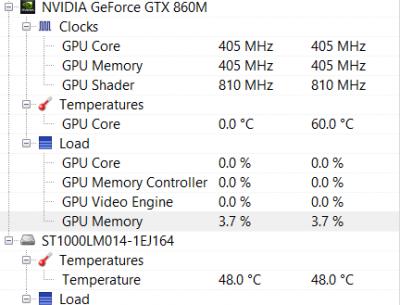
*
So it's a recommended budget gaming laptop right? biggrin.gif
Tuyin
post Mar 23 2015, 10:16 PM

Getting Started
**
Junior Member
209 posts

Joined: Oct 2011
Finally managed to enable the Bluetooth.
In the device manager....One of the USB controllers was disable...just enabled it and my Bluetooth is back to normal.

lopiop
post Mar 23 2015, 10:22 PM

Casual
***
Junior Member
312 posts

Joined: Feb 2013
QUOTE(nubfight4 @ Mar 23 2015, 10:11 PM)
So it's a recommended budget gaming laptop right?  biggrin.gif
*
yup, but there is some compromises, short battery life (3 hrs browsing) and dodgy touchpad. screen is good and gtx 860m plus 12 gb ram is a bonus for its price
nubfight4
post Mar 23 2015, 10:26 PM

Getting Started
**
Junior Member
146 posts

Joined: Feb 2012
QUOTE(lopiop @ Mar 23 2015, 10:22 PM)
yup, but there is some compromises, short battery life (3 hrs browsing) and dodgy touchpad. screen is good and gtx 860m plus 12 gb ram is a bonus for its price
*
I don't mind the battery life since I'll probably use it plugged in most of the time and I'll be using a mouse heh
Stardust2197
post Mar 24 2015, 12:42 AM

New Member
*
Newbie
11 posts

Joined: Mar 2015


QUOTE(nubfight4 @ Mar 23 2015, 09:35 PM)
I am really interested in getting this. I was torn between this and the Lenovo Y50. The only reason why I would choose this is because of the better screen + sound system(from what I have heard). But is the overheating issue resolved for you guys yet? And really curious if I should get it now considering I see some of you having problems with it.
*
I'm having this laptop for several days already . So far so good is all i can say.
Screen and sound is considered very good for a laptop of this size. IPS panel certainly did its job. No way you could complain bout the audio as well until you switched off Dolby Digital Plus.

As for the overheat problem .. Well it depends ..

I ran NFS Rivals ( MAXED OUT ) on it , CPU temps on average is hovering around 84-89*c , reaching a maximum of 92*c , GPU temps on average is around 80-83*c , maximum of 85*c. Constant 30fps as NFS capped it there.

I also ran BF3 on high-ultra settings ( custom ). Without V-sync = similar results as above NFS Rivals but FPS got up to over 100fps. With V-sync on = CPU temp is still almost the same but GPU dropped to around 75*c and FPS capped at a respectable frame rate of 60FPS.

Please take note that I ran those games mentioned above in normal room condition with just a ceiling fan ( no air-cond or whatsoever , however there is a cooling pad below which is a cheapo one that was given as a freebie when i purchased this laptop ) . WASD and the overall left side area was cooling all the time . Lower right, the palm rest area ( below arrow keys do get a bit warm but its acceptable ). Above F7 - F12 function keys do get kinda warm while gaming where that is the place of all the processing chips .

As for COD Advance Warfare , I played it in an air-conditioned room. CPU temp around 72-82*c , GPU temp around 69-75*c with FPS around 35-40 with default graphics preset ( I din check )

ALL TEMPERATURES WERE MONITORED USING MSI AFTERBURNER's ON-SCREEN-DISPLAY

WIFI
I have no issues with the WiFi. I'm getting identical results as my desktop which is connected using LAN cable. No dropped connections and 5 bars all the time . About 20 feet away from my router.

I am using the newer model ACER ASPIRE V15 NITRO VN7-591G-744NK . I hope the above information helped you with your overheating concern on this laptop with a little bonus clarifying what people say about poor wifi connection.


--UPDATE--
After disabling Intel Turbo Boost Technology , both CPU AND GPU temps drop by around 10*c under same load as above . Damn ! and yet still very playable .


This post has been edited by Stardust2197: Mar 26 2015, 04:18 PM
miong93
post Mar 24 2015, 10:47 AM

~ Fulamak ~
******
Senior Member
1,236 posts

Joined: Apr 2013
QUOTE(Stardust2197 @ Mar 24 2015, 12:42 AM)
I'm having this laptop for several days already . So far so good is all i can say.
Screen and sound is considered very good for a laptop of this size. IPS panel certainly did its job. No way you could complain bout the audio as well until you switched off Dolby Digital Plus.

As for the overheat problem .. Well it depends ..

I ran NFS Rivals ( MAXED OUT ) on it , CPU temps on average is hovering around 84-89*c , reaching a maximum of 92*c , GPU temps on average is around 80-83*c , maximum of 85*c. Constant 30fps as NFS capped it there.

I also ran BF3 on high-ultra settings ( custom ). Without V-sync = similar results as above NFS Rivals but FPS got up to over 100fps. With V-sync on = CPU temp is still almost the same but GPU dropped to around 75*c and FPS capped at a respectable frame rate of 60FPS.

Please take note that I ran those games mentioned above in normal room condition with just a ceiling fan ( no air-cond or whatsoever , however there is a cooling pad below which is a cheapo one that was given as a freebie when i purchased this laptop ) . WASD and the overall left side area was cooling all the time . Lower right, the palm rest area ( below arrow keys do get a bit warm but its acceptable ). Above F7 - F12 function keys do get kinda warm while gaming where that is the place of all the processing chips .

As for COD Advance Warfare , I played it in an air-conditioned room. CPU temp around 72-82*c , GPU temp around 69-75*c with FPS around 35-40 with default graphics preset ( I din check )

ALL TEMPERATURES WERE MONITORED USING MSI AFTERBURNER's ON-SCREEN-DISPLAY

WIFI
I have no issues with the WiFi. I'm getting identical results as my desktop which is connected using LAN cable. No dropped connections and 5 bars all the time . About 20 feet away from my router.

I am using the newer model ACER ASPIRE V15 NITRO VN7-591G-744NK . I hope the above information helped you with your overheating concern on this laptop with a little bonus clarifying what people say about poor wifi connection.
*
The new one with gtx960m ? I think it should be cooler right ?
COD AW should be able to play on high settings preset 1080p and you could get 60fps constant without v-sync. Your temperature is quite high compared to others though. I remember there is a Acer user which get 85 degree C max when playing BF or Far Cry. I think maybe your cooling pad is disturbing the air flow ?
Stardust2197
post Mar 24 2015, 03:20 PM

New Member
*
Newbie
11 posts

Joined: Mar 2015


QUOTE(miong93 @ Mar 24 2015, 10:47 AM)
The new one with gtx960m ? I think it should be cooler right ?
COD AW should be able to play on high settings preset 1080p and you could get 60fps constant without v-sync. Your temperature is quite high compared to others though. I remember there is a Acer user which get 85 degree C max when playing BF or Far Cry. I think maybe your cooling pad is disturbing the air flow ?
*
Mine is 860m

i7 4720HQ
8GB ram
intel hd4600 / gtx 860m 2gb

Yea i find it quite high for my taste though. I prefer it to be around 65-75*c most of the times while i'm gaming.
That 85*c is for GPU or CPU ?
Not quite sure if it's disrupting the air flow as the exhaust is at the rear and below it should be the intake. I'll post again when i change my cooling pad ( not quite sure when tongue.gif )
miong93
post Mar 24 2015, 03:41 PM

~ Fulamak ~
******
Senior Member
1,236 posts

Joined: Apr 2013
QUOTE(Stardust2197 @ Mar 24 2015, 03:20 PM)
Mine is 860m

i7 4720HQ
8GB ram
intel hd4600 / gtx 860m 2gb

Yea i find it quite high for my taste though. I prefer it to be around 65-75*c most of the times while i'm gaming.
That 85*c is for GPU or CPU ?
Not quite sure if it's disrupting the air flow as the exhaust is at the rear and below it should be the intake. I'll post again when i change my cooling pad ( not quite sure when  tongue.gif  )
*
Oh. Maybe it is because your GPU is kepler version ? Maxwell will be cooler.
The 85 degree C is for both GPU and CPU. Both below it, GPU will be cooler if not mistaken. There is one thread about 3-4k budget gaming laptop, 100++ pages, inside there is 1 with SS. Check it out.
JerseyBest
post Mar 24 2015, 04:03 PM

Getting Started
**
Junior Member
51 posts

Joined: Jan 2014
where is the fan vent? behind? I cant feel any fan.
the i7 4720hq with some small load constantly 50degree, is everyone like this?

1 more thing, i switched shadowplay on but in game pressed hotkey nothing happened
Stardust2197
post Mar 24 2015, 04:09 PM

New Member
*
Newbie
11 posts

Joined: Mar 2015


QUOTE(miong93 @ Mar 24 2015, 03:41 PM)
Oh. Maybe it is because your GPU is kepler version ? Maxwell will be cooler.
The 85 degree C is for both GPU and CPU. Both below it, GPU will be cooler if not mistaken. There is one thread about 3-4k budget gaming laptop, 100++ pages, inside there is 1 with SS. Check it out.
*
Mine is GM107 stated in GPU-Z which is maxwell.. Perhaps i need better cooling for this laptop haha ~ not sure if acer will provide the service of changing thermal paste for a cost, of course .

Umm , any specific keyword that i can look up ? I don't feel like going through all 109 pages haha
nubfight4
post Mar 25 2015, 12:59 AM

Getting Started
**
Junior Member
146 posts

Joined: Feb 2012
Just got my laptop and I am very impressed with the audio and the screen met my expectations biggrin.gif. A question (a stupid one) about adjusting the fan speed,does that mean if I want to change it's speed I'll have to manually do it before and after playing something?
Stardust2197
post Mar 25 2015, 04:16 AM

New Member
*
Newbie
11 posts

Joined: Mar 2015


Guys , any bright ideas on this one ?
I googled it and they said it was normal .. is it ?

Let me know if you're having that as well ...

Attached Image
austinjklim
post Mar 25 2015, 09:17 AM

Getting Started
**
Junior Member
72 posts

Joined: Dec 2010
QUOTE(Stardust2197 @ Mar 24 2015, 12:42 AM)
I'm having this laptop for several days already . So far so good is all i can say.
Screen and sound is considered very good for a laptop of this size. IPS panel certainly did its job. No way you could complain bout the audio as well until you switched off Dolby Digital Plus.

As for the overheat problem .. Well it depends ..

I ran NFS Rivals ( MAXED OUT ) on it , CPU temps on average is hovering around 84-89*c , reaching a maximum of 92*c , GPU temps on average is around 80-83*c , maximum of 85*c. Constant 30fps as NFS capped it there.

I also ran BF3 on high-ultra settings ( custom ). Without V-sync = similar results as above NFS Rivals but FPS got up to over 100fps. With V-sync on = CPU temp is still almost the same but GPU dropped to around 75*c and FPS capped at a respectable frame rate of 60FPS.

Please take note that I ran those games mentioned above in normal room condition with just a ceiling fan ( no air-cond or whatsoever , however there is a cooling pad below which is a cheapo one that was given as a freebie when i purchased this laptop ) . WASD and the overall left side area was cooling all the time . Lower right, the palm rest area ( below arrow keys do get a bit warm but its acceptable ). Above F7 - F12 function keys do get kinda warm while gaming where that is the place of all the processing chips .

As for COD Advance Warfare , I played it in an air-conditioned room. CPU temp around 72-82*c , GPU temp around 69-75*c with FPS around 35-40 with default graphics preset ( I din check )

ALL TEMPERATURES WERE MONITORED USING MSI AFTERBURNER's ON-SCREEN-DISPLAY

WIFI
I have no issues with the WiFi. I'm getting identical results as my desktop which is connected using LAN cable. No dropped connections and 5 bars all the time . About 20 feet away from my router.

I am using the newer model ACER ASPIRE V15 NITRO VN7-591G-744NK . I hope the above information helped you with your overheating concern on this laptop with a little bonus clarifying what people say about poor wifi connection.
*
True after switching my lenovo z500 tn panel to a ips display, all i can say is its like night and day. Putting on lowest brightness and still better than my lenovo z500.

Didn't have games to test out on the nitro yet but when i spectate d2 omg i never thought it had such beautiful graphics. (dat river tho)

You're lucky that you don't have wifi issues but for those who have please install the acer patchfix available on their website. Im using a NFA344 wifi adapter and this resets your power plan.
It's kinda annoying but hell i rather have better wifi than close lid to not sleep.


zuhaili87
post Mar 25 2015, 11:04 AM

Look at all my stars!!
*******
Senior Member
2,094 posts

Joined: Jan 2008
QUOTE(Stardust2197 @ Mar 25 2015, 04:16 AM)
Guys , any bright ideas on this one ?
I googled it and they said it was normal .. is it ?

Let me know if you're having that as well ...

Attached Image
*
its normal, it will charge back when its below 90% if im not mistaken. nod.gif
Stardust2197
post Mar 25 2015, 12:50 PM

New Member
*
Newbie
11 posts

Joined: Mar 2015


QUOTE(austinjklim @ Mar 25 2015, 09:17 AM)
True after switching my lenovo z500 tn panel to a ips display, all i can say is its like night and day. Putting on lowest brightness and still better than my lenovo z500.

Didn't have games to test out on the nitro yet but when i spectate d2 omg i never thought it had such beautiful graphics. (dat river tho)

You're lucky that you don't have wifi issues but for those who have please install the acer patchfix available on their website. Im using a NFA344 wifi adapter and this resets your power plan.
It's kinda annoying but hell i rather have better wifi than close lid to not sleep.
*
Or maybe I applied the patches already ? haha cz when i purchased this laptop , acer care centre has pushed several updates , i just updated all of them so i guess one of them is the wifi patch haha .. FYI , my wifi card is Atheros QCA61x4
Stardust2197
post Mar 25 2015, 12:51 PM

New Member
*
Newbie
11 posts

Joined: Mar 2015


QUOTE(zuhaili87 @ Mar 25 2015, 11:04 AM)
its normal, it will charge back when its below 90% if im not mistaken. nod.gif
*
Okay ~ thanks mate ~ will try it out ..
austinjklim
post Mar 26 2015, 09:03 AM

Getting Started
**
Junior Member
72 posts

Joined: Dec 2010
QUOTE(Stardust2197 @ Mar 25 2015, 12:50 PM)
Or maybe I applied the patches already ? haha cz when i purchased this laptop , acer care centre has pushed several updates , i just updated all of them so i guess one of them is the wifi patch haha ..  FYI , my wifi card is Atheros QCA61x4
*
Same bro. Hopefully Acer faster push the the updates for fixing the wifi patch without always setting default power plan
lopiop
post Mar 26 2015, 06:47 PM

Casual
***
Junior Member
312 posts

Joined: Feb 2013
anybody did a thermal repaste? will it void warranty? i think im going to do it soon
austinjklim
post Mar 27 2015, 12:06 AM

Getting Started
**
Junior Member
72 posts

Joined: Dec 2010
I think if u go the service center u can request to change the thermal paste but it will cost you. Do tell us the price smile.gif
JerseyBest
post Mar 27 2015, 03:04 AM

Getting Started
**
Junior Member
51 posts

Joined: Jan 2014
Today tested the CPU, usage 100% Clocked over 3300mhz. Temperature around 85degree

Amazingly, the right side is not hot to touch when Cpu is on heavy load, because the fan will run.
Normally idle, Cpu temp is at 50degree and you can feel the heat on the right.

After the heavy load is finish it immediately went back 50
miong93
post Mar 27 2015, 11:13 AM

~ Fulamak ~
******
Senior Member
1,236 posts

Joined: Apr 2013
QUOTE(JerseyBest @ Mar 27 2015, 03:04 AM)
Today tested the CPU, usage 100% Clocked over 3300mhz. Temperature around 85degree

Amazingly, the right side is not hot to touch when Cpu is on heavy load, because the fan will run.
Normally idle, Cpu temp is at 50degree and you can feel the heat on the right.

After the heavy load is finish it immediately went back 50
*
I believe the hot area mainly is caused by the GPU ? cause mostly people feel the hot area is when under playing game.
JerseyBest
post Mar 27 2015, 03:59 PM

Getting Started
**
Junior Member
51 posts

Joined: Jan 2014
QUOTE(miong93 @ Mar 27 2015, 11:13 AM)
I believe the hot area mainly is caused by the GPU ? cause mostly people feel the hot area is when under playing game.
*
Nope, not playing games only some programs running. It's at the right side. Not really"hot", but warm, or above human temperature. Nvidia not used.
Attached Image

This post has been edited by JerseyBest: Mar 27 2015, 03:59 PM
zuhaili87
post Mar 27 2015, 06:13 PM

Look at all my stars!!
*******
Senior Member
2,094 posts

Joined: Jan 2008
QUOTE(JerseyBest @ Mar 27 2015, 03:59 PM)
Nope, not playing games only some programs running. It's at the right side. Not really"hot", but warm, or above human temperature. Nvidia not used.
Attached Image
*
What program did u run to achieve such temperature? is it benchmarking program? btw one thing i notice when i used the nitro before is the hard disk temperature tends to get really hot. always above 40C especially if ure in non air-conditioned room, it tends to go around 45C to 49C. sweat.gif
miong93
post Mar 27 2015, 06:49 PM

~ Fulamak ~
******
Senior Member
1,236 posts

Joined: Apr 2013
QUOTE(JerseyBest @ Mar 27 2015, 03:59 PM)
Nope, not playing games only some programs running. It's at the right side. Not really"hot", but warm, or above human temperature. Nvidia not used.
Attached Image
*
You get me wrong. What I meant is, you get that temperature and feel warm on the particular area is because the GPU is not running. Hence the area is not hot. If the GPU is using, the area may be a bit hotter.
JerseyBest
post Mar 27 2015, 10:14 PM

Getting Started
**
Junior Member
51 posts

Joined: Jan 2014
QUOTE(miong93 @ Mar 27 2015, 06:49 PM)
You get me wrong. What I meant is, you get that temperature and feel warm on the particular area is because the GPU is not running. Hence the area is not hot. If the GPU is using, the area may be a bit hotter.
*
Oh ok, but I dont think the right side is gpu cause when stressing the cpu from idle to max to idle, the right side gets cooler when cpu started running some heavy loads and warmer when somewhat idle (around 50degree). The GPU stayed at 0degree constantly. I stressed the cpu but not gpu
iArvage
post Mar 29 2015, 09:36 PM

Getting Started
**
Junior Member
210 posts

Joined: Apr 2011
Got mine today!
TSshadowlck
post Mar 29 2015, 10:08 PM

Getting Started
**
Junior Member
119 posts

Joined: Dec 2013


QUOTE(iArvage @ Mar 29 2015, 09:36 PM)
Got mine today!
*
Welcome to the AAV Nitro family! biggrin.gif
iArvage
post Mar 29 2015, 10:32 PM

Getting Started
**
Junior Member
210 posts

Joined: Apr 2011
Quick question. My Skype doesn't detect my webcam. Have you guys used your webcams?
ylums
post Mar 29 2015, 11:14 PM

New Member
*
Junior Member
26 posts

Joined: Aug 2012
QUOTE(iArvage @ Mar 29 2015, 10:32 PM)
Quick question. My Skype doesn't detect my webcam. Have you guys used your webcams?
*
No problem. But once I launch skype for the first time, it asks me for the permission to access webcam and microphone. Did you allow it?
iArvage
post Mar 29 2015, 11:29 PM

Getting Started
**
Junior Member
210 posts

Joined: Apr 2011
QUOTE(ylums @ Mar 29 2015, 11:14 PM)
No problem. But once I launch skype for the first time, it asks me for the permission to access webcam and microphone. Did you allow it?
*
It doesn't detect my webcam at all.
nubfight4
post Mar 30 2015, 02:28 AM

Getting Started
**
Junior Member
146 posts

Joined: Feb 2012
Quick question. If i were to manually change the fan speed manually to the fastest EVERY time I play video games (maybe indie games is an exception since they don't require much energy), will it kill the fan or is it fine to make it on full speed all the time I game.
hctang
post Mar 30 2015, 09:17 AM

Getting Started
**
Junior Member
172 posts

Joined: May 2010


how to u set ur fan speed? the link was down... mind to share the software? =)
iArvage
post Mar 30 2015, 12:55 PM

Getting Started
**
Junior Member
210 posts

Joined: Apr 2011
QUOTE(hctang @ Mar 30 2015, 09:17 AM)
how to u set ur fan speed? the link was down... mind to share the software? =)
*
I thought the software was different from the other links. But then I just downloaded it and it works just the same. It's some pretty advanced stuff though so do change it carefully.
bryan997
post Apr 3 2015, 01:29 PM

New Member
*
Junior Member
6 posts

Joined: Jan 2015


Just got mine today. But got problem. Fps in game quite good but suddenly will drop and stutter for few seconds. Happens very often. Like every 30 seconds fps will drop and lag. then go back to normal? Why is this?
-No overheat
-Latest drivers
-Using nvidia gpu not intel
TSshadowlck
post Apr 3 2015, 05:55 PM

Getting Started
**
Junior Member
119 posts

Joined: Dec 2013


QUOTE(bryan997 @ Apr 3 2015, 01:29 PM)
Just got mine today. But got problem. Fps in game quite good but suddenly will drop and stutter for few seconds. Happens very often. Like every 30 seconds fps will drop and lag. then go back to normal? Why is this?
-No overheat
-Latest drivers
-Using nvidia gpu not intel
*
Are you sure that your laptop is not overheating because it sounds like overheating for me. Try use software like MSI Afterburner to monitor temperature in game, not Alt-Tab to check your temperature since the temperature drops right after you alt-tab or exit the game just to monitor the temp "outside" the game.
miong93
post Apr 3 2015, 06:02 PM

~ Fulamak ~
******
Senior Member
1,236 posts

Joined: Apr 2013
QUOTE(bryan997 @ Apr 3 2015, 01:29 PM)
Just got mine today. But got problem. Fps in game quite good but suddenly will drop and stutter for few seconds. Happens very often. Like every 30 seconds fps will drop and lag. then go back to normal? Why is this?
-No overheat
-Latest drivers
-Using nvidia gpu not intel
*
Most probably your GPU or CPU is throttling.
1. Try disable your CPU Intel Turbo Boost and play the game, see if the problem still persist.
2. Underclock your GPU and see if the problem still persist (if you know how to do)
Test it on the current game settings you're playing. Then test it again with lower settings.
ValityMental
post Apr 4 2015, 10:13 AM

I live my own life.
******
Senior Member
1,298 posts

Joined: Sep 2012


I'm tempted to get this laptop? Should i? rclxm9.gif

Currently considering
iverice
post Apr 4 2015, 11:01 AM

New Member
*
Junior Member
43 posts

Joined: Jun 2013
QUOTE(bryan997 @ Apr 3 2015, 01:29 PM)
Just got mine today. But got problem. Fps in game quite good but suddenly will drop and stutter for few seconds. Happens very often. Like every 30 seconds fps will drop and lag. then go back to normal? Why is this?
-No overheat
-Latest drivers
-Using nvidia gpu not intel
*
Thats what happen to me if you refer back to couple pages before. I think its the GPU overheat, i send it back to highpoint at Melacca to let them check yesterday.

Oh and another thing, i also send it back to highpoint serebam before, but that time i send it back through the shop i bought it with, and i dont know why, it dint even fix my problem, i waited FOR 1 MONTH!!! When it came back, it stated that they change the webcam camera and the cable?????? i was like what??? After 1 month and then it fix the wrong thing?

Anyway, i send it to Highpoint Melacca and address the problem personally this time, just hope it will get fix.

Kind of dissapointed with this purchase.
TSshadowlck
post Apr 4 2015, 02:00 PM

Getting Started
**
Junior Member
119 posts

Joined: Dec 2013


Good news guys, 2 new models with GTX 960M came to Malaysia and the information has been updated in the first thread, take a look!
lopiop
post Apr 4 2015, 07:01 PM

Casual
***
Junior Member
312 posts

Joined: Feb 2013
f*** nvidia, 400 more for a slightly overclocked 860m
gelas_plastik
post Apr 4 2015, 07:10 PM

New Member
*
Newbie
1 posts

Joined: Feb 2013
Just got mine a few days back .. so far so good no issues with wifi or crackling sound .. point to note, i've updated everything via acer care center, also I've updated the BIOS to v113 ..

On the overheating, how does one consider an overheat? I've overclock the GPU via MSI to +133 GPU core +100 Mem .. the highest temperature recorded after playing heavily modded skyrim at 1080p was 89c .. still, I didn't really feel the heat on my palm too much and the game run smoothly at 50 - 60fps constantly (no lag) .. I also tried to overclock via XTU, but didn't make much different so I disable that ..

Frankly speaking, I've never consider that my V15 were overheating until I read this thread haha .. So, now I'm on a mission to reduce the heat ..

I read about advice on RWEverything on this thread and try to follow the advice, however there is NO EC TAB on RWEveything .. how do I enable that? Or is it because I've updated my BIOS those value no longer accessible? Anyone care to help?

Thanks ..


gelas_plastik
post Apr 4 2015, 07:17 PM

New Member
*
Newbie
1 posts

Joined: Feb 2013
Just to add .. I've also tried this item to reduce the heat:

http://www.lelong.com.my/v8-universal-supe...6-01-Sale-P.htm

It does help .. temp reduce from 5c to 8c .. but required separated power supply thats why I dont really prefer this option .. bought it with though that it was usb powered ..
iverice
post Apr 4 2015, 07:19 PM

New Member
*
Junior Member
43 posts

Joined: Jun 2013
QUOTE(gelas_plastik @ Apr 4 2015, 07:10 PM)
Just got mine a few days back .. so far so good no issues with wifi or crackling sound .. point to note, i've updated everything via acer care center, also I've updated the BIOS to v113 ..

On the overheating, how does one consider an overheat? I've overclock the GPU via MSI to +133 GPU core +100 Mem .. the highest temperature recorded after playing heavily modded skyrim at 1080p was 89c .. still, I didn't really feel the heat on my palm too much and the game run smoothly at 50 - 60fps constantly (no lag) .. I also tried to overclock via XTU, but didn't make much different so I disable that ..

Frankly speaking, I've never consider that my V15 were overheating until I read this thread haha .. So,  now I'm on a mission to reduce the heat ..

I read about advice on RWEverything  on this thread and try to follow the advice, however there is NO EC TAB on RWEveything .. how do I enable that? Or is it because I've updated my BIOS those value no longer accessible? Anyone care to help?

Thanks ..
*
Well in my case, like I said refer to coupke pages back, my gpu when plying game will rise up to 85c then it will trottle it and the temp drop for abit , hence fps in game will stuter and lag for couple sec, this is jusy very unplayable. My cpu however after disable turbo, it only in the range of 70-80c.
Can u share me whats your temp while playing game, not the max temp but rather average of it.
Asgaard
post Apr 5 2015, 01:28 AM

Regular
******
Senior Member
1,249 posts

Joined: Apr 2012
QUOTE(bryan997 @ Apr 3 2015, 01:29 PM)
Just got mine today. But got problem. Fps in game quite good but suddenly will drop and stutter for few seconds. Happens very often. Like every 30 seconds fps will drop and lag. then go back to normal? Why is this?
-No overheat
-Latest drivers
-Using nvidia gpu not intel
*
disable Intel turbo boost and everything should be fine. If not, refer my post in previous pages. easily solve.
ValityMental
post Apr 6 2015, 06:23 AM

I live my own life.
******
Senior Member
1,298 posts

Joined: Sep 2012


Hey guys , i heard that the battery is non removable , would that be an issue , if the battery is in + i plug in and play whole day?
TSshadowlck
post Apr 6 2015, 10:44 AM

Getting Started
**
Junior Member
119 posts

Joined: Dec 2013


QUOTE(ValityMental @ Apr 6 2015, 06:23 AM)
Hey guys , i heard that the battery is non removable , would that be an issue , if the battery is in + i plug in and play whole day?
*
Nope. The battery is still fine if you plug in and use it for whole day since the battery will stop being charged when it reach certain percent.
mel9338
post Apr 7 2015, 11:34 AM

New Member
*
Junior Member
19 posts

Joined: Mar 2006
Guys...My laptop currently is on a 8GB ram, wanted to upgrade to a 16GB (8GB x 2) and replace the old 8GB . Any advise on whether I should upgrade or not? If yes, any recommendation which brand and spec?

Thanks
miong93
post Apr 7 2015, 12:40 PM

~ Fulamak ~
******
Senior Member
1,236 posts

Joined: Apr 2013
QUOTE(mel9338 @ Apr 7 2015, 11:34 AM)
Guys...My laptop currently is on a 8GB ram, wanted to upgrade to a 16GB (8GB x 2) and replace the old 8GB . Any advise on whether I should upgrade or not? If yes, any recommendation which brand and spec?

Thanks
*
First, are you sure you will be using RAM beyond 8gb ?
I think there is no best brand. The current best bang of buck is kingston. But it may not be compatible with your current ram even though the capacity is the same. That is why a lot people sell RAM in bundle for those who want to dual channel.
Check your RAM details first by using CPUID before you proceed further.
ubuntu
post Apr 7 2015, 07:50 PM

On my way
****
Senior Member
620 posts

Joined: Dec 2006
New owner reporting in. Manage to buy my laptop V Nitro VN7 591G-744NK before GST. smile.gif
ValityMental
post Apr 7 2015, 10:53 PM

I live my own life.
******
Senior Member
1,298 posts

Joined: Sep 2012


Sad to know that we can't re-apply the thermal paste as it will void the warranty?

sad.gif Wanted to apply IC Diamond for my new Nitro
DWExia
post Apr 8 2015, 10:37 AM

Getting Started
**
Junior Member
140 posts

Joined: Dec 2009
hi guys any issues with the speakers? Mine seem awfully soft when watching youtube.

Or maybe I'm just getting deaf -.-
mel9338
post Apr 8 2015, 01:52 PM

New Member
*
Junior Member
19 posts

Joined: Mar 2006
QUOTE(miong93 @ Apr 7 2015, 12:40 PM)
First, are you sure you will be using RAM beyond 8gb ?
I think there is no best brand. The current best bang of buck is kingston. But it may not be compatible with your current ram even though the capacity is the same. That is why a lot people sell RAM in bundle for those who want to dual channel.
Check your RAM details first by using CPUID before you proceed further.
*
Thanks for the reply.

I'm looking into those bundle 8gbx2 dual channel ram. As for the usage, was just planning to max it out now since I got the extra money. I'm also looking into getting msata ssd use for operating system and d existing 1TB for data storage.

I will have a look into my laptop using CPUID you suggest.
miong93
post Apr 8 2015, 02:32 PM

~ Fulamak ~
******
Senior Member
1,236 posts

Joined: Apr 2013
QUOTE(mel9338 @ Apr 8 2015, 01:52 PM)
Thanks for the reply.

I'm looking into those bundle 8gbx2 dual channel ram. As for the usage, was just planning to max it out now since I got the extra money. I'm also looking into getting msata ssd use for operating system and d existing 1TB for data storage.

I will have a look into my laptop using CPUID you suggest.
*
Make sure to check your laptop has mSata slot for the SSD. If you're using Acer, I believe it will be okay to stick to the SSHD. Acer V Nitro is using Hybrid HDD if I'm not mistaken. You already have 8gb cache for the OS for fast boot up. Well you still can add in SSD if you want it, but it will just deem the SSHD to be useless already. And I believe SSHD is 5400rpm without the cache, so it will be slower than 7200rpm HDD
TSshadowlck
post Apr 8 2015, 11:08 PM

Getting Started
**
Junior Member
119 posts

Joined: Dec 2013


QUOTE(DWExia @ Apr 8 2015, 10:37 AM)
hi guys any issues with the speakers? Mine seem awfully soft when watching youtube.

Or maybe I'm just getting deaf -.-
*
Assuming you using the laptop speaker not external speaker, try to enable turn on Digital Dolby Plus. biggrin.gif
nubfight4
post Apr 11 2015, 01:33 PM

Getting Started
**
Junior Member
146 posts

Joined: Feb 2012
What does Intel Turbo Boost do actually? lol
miong93
post Apr 11 2015, 02:36 PM

~ Fulamak ~
******
Senior Member
1,236 posts

Joined: Apr 2013
QUOTE(nubfight4 @ Apr 11 2015, 01:33 PM)
What does Intel Turbo Boost do actually? lol
*
It overclock your CPU to achieve higher clockspeed.
ValityMental
post Apr 11 2015, 09:04 PM

I live my own life.
******
Senior Member
1,298 posts

Joined: Sep 2012


3 years warranty or 1 year? Kinda confuse

http://www.lazada.com.my/acer-v-nitro-vn7-...visitorsdisplay
miong93
post Apr 11 2015, 10:33 PM

~ Fulamak ~
******
Senior Member
1,236 posts

Joined: Apr 2013
QUOTE(ValityMental @ Apr 11 2015, 09:04 PM)
3 years warranty or 1 year? Kinda confuse

http://www.lazada.com.my/acer-v-nitro-vn7-...visitorsdisplay
*
Normally Acer laptop comes with 1 year warranty. But since Lazada listed 3 years, then it should be 3 years.
evofantasy
post Apr 11 2015, 10:55 PM

Avadion of the Enders
*******
Senior Member
2,690 posts

Joined: Aug 2005
From: Penang/ Kuala Lumpur
QUOTE(miong93 @ Apr 11 2015, 02:36 PM)
It overclock your CPU to achieve higher clockspeed.
*
no turbo-boost is not overclock doh.gif
it is mainly using the dormant cores (for example in a quad core, 2 cores are inactive) to boost the speed for the active cores.

ps: this is why base speed is really important and why I said having a quadcore doesnt really matter as much as sellers claim

This post has been edited by evofantasy: Apr 11 2015, 10:56 PM
evofantasy
post Apr 11 2015, 10:55 PM

Avadion of the Enders
*******
Senior Member
2,690 posts

Joined: Aug 2005
From: Penang/ Kuala Lumpur
double posted

This post has been edited by evofantasy: Apr 11 2015, 10:55 PM
miong93
post Apr 12 2015, 09:59 AM

~ Fulamak ~
******
Senior Member
1,236 posts

Joined: Apr 2013
QUOTE(evofantasy @ Apr 11 2015, 10:55 PM)
no turbo-boost is not overclock  doh.gif
it is mainly using the dormant cores (for example in a quad core, 2 cores are inactive) to boost the speed for the active cores.

ps: this is why base speed is really important and why I said having a quadcore doesnt really matter as much as sellers claim
*
Isn't that considered "safe overclock" ? Well that is the term I used together with my colleague. If I'm wrong then sorry about that smile.gif
Ericz
post Apr 12 2015, 03:02 PM

Getting Started
**
Junior Member
116 posts

Joined: Jan 2006
From: Malacca


hi guys, jus wanna ask.. when u do caps/num lock, turn off the touch padd on/off, or any other fn key combo, will you get any kind of on screen indicator? sweat.gif
TSshadowlck
post Apr 12 2015, 04:50 PM

Getting Started
**
Junior Member
119 posts

Joined: Dec 2013


QUOTE(Ericz @ Apr 12 2015, 03:02 PM)
hi guys, jus wanna ask.. when u do caps/num lock, turn off the touch padd on/off, or any other fn key combo, will you get any kind of on screen indicator?  sweat.gif
*
Sadly no. sad.gif
Ericz
post Apr 12 2015, 05:51 PM

Getting Started
**
Junior Member
116 posts

Joined: Jan 2006
From: Malacca


QUOTE(shadowlck @ Apr 12 2015, 04:50 PM)
Sadly no.  sad.gif
*
okay thanks sad.gif
I tho I mess up by uninstalling most of the Acer stuff sweat.gif I kept the Acer Launcher thingy and theres no indicator
Hv to research what those Acer softwares do then, can point me to any shortcut? tongue.gif

So far Iv kept:
- Acer Launcher
- Acer Care Centre
- Acer Power management
- and those recovery stuff
ValityMental
post Apr 12 2015, 06:25 PM

I live my own life.
******
Senior Member
1,298 posts

Joined: Sep 2012


How can i callibrate my screen? Why the graphic is kinda blur? I see the words like a bit blur? New laptop tho
Ericz
post Apr 12 2015, 06:35 PM

Getting Started
**
Junior Member
116 posts

Joined: Jan 2006
From: Malacca


QUOTE(ValityMental @ Apr 12 2015, 06:25 PM)
How can i callibrate my screen? Why the graphic is kinda blur? I see the words like a bit blur? New laptop tho
*
Probably the Display setting. Try going to the display setting, tick the "Let me choose one scaling level for all my displays" and select the size from there (100/125/150%)

Guys, just noticed there's a white spot on my screen shakehead.gif looks like somthin pressed on the screen from behind (very obvious if displayin white color)
anyone have experience prying open the bezel? sweat.gif

This post has been edited by Ericz: Apr 12 2015, 07:18 PM
ValityMental
post Apr 12 2015, 07:02 PM

I live my own life.
******
Senior Member
1,298 posts

Joined: Sep 2012


Guys, why i play d2 after a few minute i keep getting constantly lag and my temperature go around 90C

I already disable intel turbo boost but why like this?
miong93
post Apr 12 2015, 08:06 PM

~ Fulamak ~
******
Senior Member
1,236 posts

Joined: Apr 2013
QUOTE(ValityMental @ Apr 12 2015, 07:02 PM)
Guys, why i play d2 after a few minute i keep getting constantly lag and my temperature go around 90C

I already disable intel turbo boost but why like this?
*
High chance your CPU / GPU is throttling. First check whether you block your air intake or not. If no then I think you need to send it back to have a check up.
ValityMental
post Apr 12 2015, 08:24 PM

I live my own life.
******
Senior Member
1,298 posts

Joined: Sep 2012


QUOTE(miong93 @ Apr 12 2015, 08:06 PM)
High chance your CPU / GPU is throttling. First check whether you block your air intake or not. If no then I think you need to send it back to have a check up.
*
Im not so sure either , i will test it out then if still the same i will send it back to warranty by tomorrow.

Oh ya , regarding z5 , my friend wanna purchase z5 but inside the illegear website there is no payment for using credit card? Anyway on how to do payment through illegear website?
miong93
post Apr 12 2015, 08:30 PM

~ Fulamak ~
******
Senior Member
1,236 posts

Joined: Apr 2013
QUOTE(ValityMental @ Apr 12 2015, 08:24 PM)
Im not so sure either , i will test it out then if still the same i will send it back to warranty by tomorrow.

Oh ya , regarding z5 , my friend wanna purchase z5 but inside the illegear website there is no payment for using credit card? Anyway on how to do payment through illegear website?
*
Contact Prince J to ask for payment method. If I'm not mistaken they do provide easy payment for maybank
ValityMental
post Apr 12 2015, 11:59 PM

I live my own life.
******
Senior Member
1,298 posts

Joined: Sep 2012


At what speed should i put my fan at? As mention by one of the forumer here?

For gaming tho , would running the fan speed at max let the fan rosak faster? LOL
AthrunIJ
post Apr 13 2015, 12:01 AM

Look at all my stars!!
*******
Senior Member
2,992 posts

Joined: Feb 2015

QUOTE(ValityMental @ Apr 12 2015, 11:59 PM)
At what speed should i put my fan at? As mention by one of the forumer here?

For gaming tho , would running the fan speed at max let the fan rosak faster? LOL
*
Yup, wear and tear.
ValityMental
post Apr 13 2015, 12:08 AM

I live my own life.
******
Senior Member
1,298 posts

Joined: Sep 2012


QUOTE(AthrunIJ @ Apr 13 2015, 12:01 AM)
Yup, wear and tear.
*
So what speed do you recommend me to set at?
AthrunIJ
post Apr 13 2015, 12:27 AM

Look at all my stars!!
*******
Senior Member
2,992 posts

Joined: Feb 2015

QUOTE(ValityMental @ Apr 13 2015, 12:08 AM)
So what speed do you recommend me to set at?
*
My mindset is like this. FAN > CPU and GPU or CPU and GPU > FAN (Thats me though). So i set fan as max speed when gaming and set it to medium or low depends on the temp. biggrin.gif , fan is cheaper to replace i suppose than CPU and GPU. tongue.gif
ValityMental
post Apr 13 2015, 12:31 AM

I live my own life.
******
Senior Member
1,298 posts

Joined: Sep 2012


QUOTE(AthrunIJ @ Apr 13 2015, 12:27 AM)
My mindset is like this. FAN > CPU and GPU or CPU and GPU > FAN (Thats me though). So i set fan as max speed when gaming and set it to medium or low depends on the temp.  biggrin.gif , fan is cheaper to replace i suppose than CPU and GPU.  tongue.gif
*
Okay thanks biggrin.gif , so while gaming let it full?
AthrunIJ
post Apr 13 2015, 12:33 AM

Look at all my stars!!
*******
Senior Member
2,992 posts

Joined: Feb 2015

QUOTE(ValityMental @ Apr 13 2015, 12:31 AM)
Okay thanks biggrin.gif , so while gaming let it full?
*
If the temp is ok then let it be if not set it up one level higher and check.
ValityMental
post Apr 13 2015, 12:35 AM

I live my own life.
******
Senior Member
1,298 posts

Joined: Sep 2012


QUOTE(AthrunIJ @ Apr 13 2015, 12:33 AM)
If the temp is ok then let it be if not set it up one level higher and check.
*
Okay thanks , if i go acer service center ask them help me change thermal paste with charges will they do? as if i change myself would void the warranty
AthrunIJ
post Apr 13 2015, 12:37 AM

Look at all my stars!!
*******
Senior Member
2,992 posts

Joined: Feb 2015

QUOTE(ValityMental @ Apr 13 2015, 12:35 AM)
Okay thanks , if i go acer service center ask them help me change thermal paste with charges will they do? as if i change myself would void the warranty
*
This i'm not sure. Need some one with experience to answer you. Though with some $$, they might do it. tongue.gif
ValityMental
post Apr 13 2015, 12:37 AM

I live my own life.
******
Senior Member
1,298 posts

Joined: Sep 2012


Im having my temp like 80+/90 for my CPU while playing dota 2 though.

its kinda too high. Furthermore im currently in an aircorned room.

for gpu would be like 70+/80+
ValityMental
post Apr 13 2015, 12:40 AM

I live my own life.
******
Senior Member
1,298 posts

Joined: Sep 2012


QUOTE(AthrunIJ @ Apr 13 2015, 12:37 AM)
This i'm not sure. Need some one with experience to answer you. Though with some $$, they might do it.  tongue.gif
*
I see ok thanks , will call on to acer service center by tomorrow.
AthrunIJ
post Apr 13 2015, 12:41 AM

Look at all my stars!!
*******
Senior Member
2,992 posts

Joined: Feb 2015

QUOTE(ValityMental @ Apr 13 2015, 12:37 AM)
Im having my temp like 80+/90 for my CPU while playing dota 2 though.

its kinda too high. Furthermore im currently in an aircorned room.

for gpu would be like 70+/80+
*
For me as long it is floating around 80 celcius, i'm fine with it. For yours, yup it is high temp for sure (by my standards anyway)

Different people different view. Of course the lower the better.
ValityMental
post Apr 13 2015, 12:46 AM

I live my own life.
******
Senior Member
1,298 posts

Joined: Sep 2012


QUOTE(AthrunIJ @ Apr 13 2015, 12:41 AM)
For me as long it is floating around 80 celcius, i'm fine with it. For yours, yup it is high temp for sure (by my standards anyway)

Different people different view. Of course the lower the better.
*
Okay thanks , will have a compare with my friend v nitro , cause we bought 2 units today , mine is kinda over heating i guess. i already disabled turbo boost tho
AthrunIJ
post Apr 13 2015, 12:49 AM

Look at all my stars!!
*******
Senior Member
2,992 posts

Joined: Feb 2015

QUOTE(ValityMental @ Apr 13 2015, 12:46 AM)
Okay thanks , will have a compare with my friend v nitro , cause we bought 2 units today , mine is kinda over heating i guess. i already disabled turbo boost tho
*
Well, i disable turbo boost and undervolt my CPU. Since the turbo boost doesnt seem to increase the performance in gaming that much.
ValityMental
post Apr 13 2015, 12:51 AM

I live my own life.
******
Senior Member
1,298 posts

Joined: Sep 2012


QUOTE(AthrunIJ @ Apr 13 2015, 12:49 AM)
Well, i disable turbo boost and undervolt my CPU. Since the turbo boost doesnt seem to increase the performance in gaming that much.
*
I see , setting the maximum what at the power setting to 99 right consider as disable turbo boost right?

how do u undervolt ur cpu mind telling me?
AthrunIJ
post Apr 13 2015, 12:53 AM

Look at all my stars!!
*******
Senior Member
2,992 posts

Joined: Feb 2015

QUOTE(ValityMental @ Apr 13 2015, 12:51 AM)
I see , setting the maximum what at the power setting to 99 right consider as disable turbo boost right?

how do u undervolt ur cpu mind telling me?
*
Using Intel Extreme Tuning Utility. Easy to use. biggrin.gif, Yup setting to 99 disable the turbo boost.

This post has been edited by AthrunIJ: Apr 13 2015, 12:54 AM
ValityMental
post Apr 13 2015, 01:03 AM

I live my own life.
******
Senior Member
1,298 posts

Joined: Sep 2012


QUOTE(AthrunIJ @ Apr 13 2015, 12:53 AM)
Using Intel Extreme Tuning Utility. Easy to use. biggrin.gif, Yup setting to 99 disable the turbo boost.
*
Need to download that? what step should i do after downloading that?
AthrunIJ
post Apr 13 2015, 01:08 AM

Look at all my stars!!
*******
Senior Member
2,992 posts

Joined: Feb 2015

QUOTE(ValityMental @ Apr 13 2015, 01:03 AM)
Need to download that? what step should i do after downloading that?
*
Lol, if you want to then download it then go to manual tuning, look for dynamic CPU Voltage offset and set it stage by stage (I go -25mV then stress test it for stability for 20-30 minutes after stress test is successful i further reduce it by another -25mV then rinse and repeat.)

Do note. When stress test (without gaming), you can undervolt more compared to gaming. So set profiles for normal usage and gaming.

Though the bad thing about undervolt is BSOD. There might be hidden risk so do it at your own risk.


ValityMental
post Apr 13 2015, 01:10 AM

I live my own life.
******
Senior Member
1,298 posts

Joined: Sep 2012


QUOTE(AthrunIJ @ Apr 13 2015, 01:08 AM)
Lol, if you want to then download it then go to manual tuning, look for dynamic CPU Voltage offset and set it stage by stage (I go -25mV then stress test it for stability for 20-30 minutes after stress test is successful i further reduce it by another -25mV then rinse and repeat.)

Do note. When stress test (without gaming), you can undervolt more compared to gaming. So set profiles for normal usage and gaming.

Though the bad thing about undervolt is BSOD. There might be hidden risk so do it at your own risk.
*
Okay thanks , will have a look into it. Hopefully Acer do allow me to change my thermal paste without voiding my warranty. sad.gif , as if asking them to do just i bring along my ic diamond thermal paste.
AthrunIJ
post Apr 13 2015, 01:13 AM

Look at all my stars!!
*******
Senior Member
2,992 posts

Joined: Feb 2015

QUOTE(ValityMental @ Apr 13 2015, 01:10 AM)
Okay thanks , will have a look into it. Hopefully Acer do allow me to change my thermal paste without voiding my warranty. sad.gif , as if asking them to do just i bring along my ic diamond thermal paste.
*
The thing is i prefer them doing while i'm watching. You'll never know what they do behind close door (My 2 cents).
ValityMental
post Apr 13 2015, 01:15 AM

I live my own life.
******
Senior Member
1,298 posts

Joined: Sep 2012


QUOTE(AthrunIJ @ Apr 13 2015, 01:13 AM)
The thing is i prefer them doing while i'm watching. You'll never know what they do behind close door (My 2 cents).
*
Yeah i know , i will request them to do it right infront of me.

Maybe its my luck tho getting a faulty unit? kinda the temp is kinda high
AthrunIJ
post Apr 13 2015, 01:16 AM

Look at all my stars!!
*******
Senior Member
2,992 posts

Joined: Feb 2015

QUOTE(ValityMental @ Apr 13 2015, 01:15 AM)
Yeah i know , i will request them to do it right infront of me.

Maybe its my luck tho getting a faulty unit? kinda the temp is kinda high
*
Maybe. But most probably is the fan control setting that is set by Acer (From what i have gather).
iArvage
post Apr 13 2015, 01:56 AM

Getting Started
**
Junior Member
210 posts

Joined: Apr 2011
My temperatures are also high. Playing Cities Skylines even with the lowest possible settings and resolution causes it to throttle. For D2 not so bad I guess but occasional throttling also (3+ games, 1 throttle). I think I really need to repaste :/
Tuyin
post Apr 13 2015, 03:07 AM

Getting Started
**
Junior Member
209 posts

Joined: Oct 2011
QUOTE(Ericz @ Apr 12 2015, 06:51 PM)
okay thanks  sad.gif 
I tho I mess up by uninstalling most of the Acer stuff  sweat.gif  I kept the Acer Launcher thingy and theres no indicator
Hv to research what those Acer softwares do then, can point me to any shortcut?  tongue.gif

So far Iv kept:
- Acer Launcher
- Acer Care Centre
- Acer Power management
- and those recovery stuff
*
uninstall all the acer crap and still can get the indicator to work
pandera999
post Apr 13 2015, 07:45 AM

모든 것​에는 정해진 때​가 있으니
*******
Senior Member
6,214 posts

Joined: Sep 2010
From: Busan, Kr | Kuching, Swk


shadowlck

QUOTE
For those with cooling problems i found a way to control the both fans speed , and i think that auto fan speed never use the full potential of those fans , because i got even 94°C cpu temp and the fans sound aren't nearly close to the nousy sound when i set them to max speed.
You need to download rw everything from here http://rweverything.com/ and launch it , then select the "EC" tab that is circled in screenshot.
tmp2.png


i cant see sweat.gif laugh.gif
ValityMental
post Apr 13 2015, 07:57 AM

I live my own life.
******
Senior Member
1,298 posts

Joined: Sep 2012


QUOTE(iArvage @ Apr 13 2015, 01:56 AM)
My temperatures are also high. Playing Cities Skylines even with the lowest possible settings and resolution causes it to throttle. For D2 not so bad I guess but occasional throttling also (3+ games, 1 throttle). I think I really need to repaste :/
*
I guess we have to repaste our lappy sad.gif , hopefully they dont void our warranty for doing so .
ValityMental
post Apr 13 2015, 08:07 AM

I live my own life.
******
Senior Member
1,298 posts

Joined: Sep 2012


Any recommendation of what cooling pad should i get for my vnitro? Since the vent is behind tho? Any recommendation at least to push some fresh air inside?
ValityMental
post Apr 13 2015, 09:54 AM

I live my own life.
******
Senior Member
1,298 posts

Joined: Sep 2012


I just went to Acer Service center this morning to ask regarding on switching to IC Diamond TP. They say they have to refer to KL whether can change or not, unless using their own thermal paste yes.

This post has been edited by ValityMental: Apr 13 2015, 09:55 AM
Ericz
post Apr 13 2015, 10:20 AM

Getting Started
**
Junior Member
116 posts

Joined: Jan 2006
From: Malacca


Hey guys, anyone hv experience with Acer service centre, for screen problem, u think they can fix it on the spot? they keep spare parts stock for such repair? Tq
miong93
post Apr 13 2015, 01:16 PM

~ Fulamak ~
******
Senior Member
1,236 posts

Joined: Apr 2013
QUOTE(AthrunIJ @ Apr 13 2015, 01:08 AM)
Lol, if you want to then download it then go to manual tuning, look for dynamic CPU Voltage offset and set it stage by stage (I go -25mV then stress test it for stability for 20-30 minutes after stress test is successful i further reduce it by another -25mV then rinse and repeat.)

Do note. When stress test (without gaming), you can undervolt more compared to gaming. So set profiles for normal usage and gaming.

Though the bad thing about undervolt is BSOD. There might be hidden risk so do it at your own risk.
*
Wow. I thought most laptop now comes with locked BIOS so you can't do those undervolt stuff already. Good to know that software can be used rclxms.gif

QUOTE(ValityMental @ Apr 13 2015, 09:54 AM)
I just went to Acer Service center this morning to ask regarding on switching to IC Diamond TP. They say they have to refer to KL whether can change or not, unless using their own thermal paste yes.
*
May I know what is your config for your Acer ? 4720HQ + gtx960m + 8gb ram + 1tb HDD ?
If your Acer is the old model, gtx860m + 4710HQ, your temperature is definitely too high. You're even in an air condition room. IIRC, in aircond room, your temperature will be <85 for gpu and cpu.
Do a benchmark. Do it for about 1 hours. See what temperature you get for your CPU and GPU. If it is stable it should be around 80-85 or even lesser.

P.S: You may consider other thermal paste like GC Extreme. I heard that it is better than IC Diamond.
AthrunIJ
post Apr 13 2015, 01:20 PM

Look at all my stars!!
*******
Senior Member
2,992 posts

Joined: Feb 2015

QUOTE(miong93 @ Apr 13 2015, 01:16 PM)
Wow. I thought most laptop now comes with locked BIOS so you can't do those undervolt stuff already. Good to know that software can be used rclxms.gif
brows.gif brows.gif brows.gif brows.gif
pandera999
post Apr 13 2015, 04:44 PM

모든 것​에는 정해진 때​가 있으니
*******
Senior Member
6,214 posts

Joined: Sep 2010
From: Busan, Kr | Kuching, Swk


QUOTE(miong93 @ Apr 13 2015, 01:16 PM)
Wow. I thought most laptop now comes with locked BIOS so you can't do those undervolt stuff already. Good to know that software can be used rclxms.gif
May I know what is your config for your Acer ? 4720HQ + gtx960m + 8gb ram + 1tb HDD ?
If your Acer is the old model, gtx860m + 4710HQ, your temperature is definitely too high. You're even in an air condition room. IIRC, in aircond room, your temperature will be <85 for gpu and cpu.
Do a benchmark. Do it for about 1 hours. See what temperature you get for your CPU and GPU. If it is stable it should be around 80-85 or even lesser.

P.S: You may consider other thermal paste like GC Extreme. I heard that it is better than IC Diamond.
*
software to do undervolt stuff? hmm.gif

i tot wanna take risk and buy this notebook since my notebook burn after i do 3D rendering.. vmad.gif damn phenom burn my mobo till smelly vmad.gif

after see review here. i feel scared laugh.gif better i go for other notebook. too bad, no Dell in kuching. else i will buy dell

This post has been edited by pandera999: Apr 13 2015, 04:45 PM
miong93
post Apr 13 2015, 05:13 PM

~ Fulamak ~
******
Senior Member
1,236 posts

Joined: Apr 2013
QUOTE(pandera999 @ Apr 13 2015, 04:44 PM)
software to do undervolt stuff?  hmm.gif

i tot wanna take risk and buy this notebook since my notebook burn after i do 3D rendering..  vmad.gif  damn phenom burn my mobo till smelly  vmad.gif 

after see review here. i feel scared  laugh.gif  better i go for other notebook. too bad, no Dell in kuching. else i will buy dell
*
Yea that's why I feel amaze lo. Cause what I know of is need to access BIOS features to tweak the settings. Well last time MSI Afterburner do have features to undervolt or overvolt your GPU. I think now still got.

I think they just get lemon unit. Other Acer user seems very quiet didn't complaint much. It is still the cheapest tho. haha

3D rendering require good CPU tho, if you're doing intense work, better get desktop or other CPU. I believe 4710HQ or 4720HQ can't handle intense 3D rendering well.
iArvage
post Apr 13 2015, 05:14 PM

Getting Started
**
Junior Member
210 posts

Joined: Apr 2011
QUOTE(pandera999 @ Apr 13 2015, 04:44 PM)
software to do undervolt stuff?  hmm.gif

i tot wanna take risk and buy this notebook since my notebook burn after i do 3D rendering..  vmad.gif  damn phenom burn my mobo till smelly  vmad.gif 

after see review here. i feel scared  laugh.gif  better i go for other notebook. too bad, no Dell in kuching. else i will buy dell
*
You can try Lenovo but then the screen is just, no. Asus has a similar laptop but theirs is single fan. Not a bad design choice because Asus has good thermals but a bit on the riskier side. I personally didn't go for Asus because of my friend's experience with the customer service. For Dell, you only have the Alienware sporting this graphic card. That i5 U processor might be a bottle neck to the GTX860M though and even when you buy that added box for desktop graphic cards, the processor is a surefire bottleneck for those as well. Their 'home' laptop I think uses GTX850M but you get touch screen for the same price as GTX 860M 4GB variants of all the Lenovo, Acer and Asus laptops. I would suggest the Illegear Z5 but you live in Kuching. If there's a problem you have to go back to KL. But this is, in my opinion, the best laptop for GTX860M. You can customize to your heart's content and budget and as an added bonus, there's a keyboard shortcut for maximum fan speed if you're THAT worried. If it weren't for warranty and it's overall super flashy design, I would have gone for the Illegear myself.

The laptop is fine actually. Maybe the Cities: Skylines game is a bit too demanding. Sims 4, Heroes of Newerth, Sims 3, Microsoft Flight Simulator, SimCity and everything else runs perfectly fine (no throttling). When I limit my frame rate for Cities: Skylines it takes much much longer to throttle but throttling is still there sad.gif
miong93
post Apr 13 2015, 05:34 PM

~ Fulamak ~
******
Senior Member
1,236 posts

Joined: Apr 2013
QUOTE(iArvage @ Apr 13 2015, 05:14 PM)
You can try Lenovo but then the screen is just, no. Asus has a similar laptop but theirs is single fan. Not a bad design choice because Asus has good thermals but a bit on the riskier side. I personally didn't go for Asus because of my friend's experience with the customer service. For Dell, you only have the Alienware sporting this graphic card. That i5 U processor might be a bottle neck to the GTX860M though and even when you buy that added box for desktop graphic cards, the processor is a surefire bottleneck for those as well. Their 'home' laptop I think uses  GTX850M but you get touch screen for the same price as GTX 860M 4GB variants of all the Lenovo, Acer and Asus laptops. I would suggest the Illegear Z5 but you live in Kuching. If there's a problem you have to go back to KL. But this is, in my opinion, the best laptop for GTX860M. You can customize to your heart's content and budget and as an added bonus, there's a keyboard shortcut for maximum fan speed if you're THAT worried. If it weren't for warranty and it's overall super flashy design, I would have gone for the Illegear myself.

The laptop is fine actually. Maybe the Cities: Skylines game is a bit too demanding. Sims 4, Heroes of Newerth, Sims 3, Microsoft Flight Simulator, SimCity and everything else runs perfectly fine (no throttling). When I limit my frame rate for Cities: Skylines it takes much much longer to throttle but throttling is still there sad.gif
*
IIRC, gtx860m is not good in open world game. Your game is quite new tho. Try lowering your AA or don't use it.
ValityMental
post Apr 13 2015, 07:47 PM

I live my own life.
******
Senior Member
1,298 posts

Joined: Sep 2012


QUOTE(miong93 @ Apr 13 2015, 01:16 PM)
Wow. I thought most laptop now comes with locked BIOS so you can't do those undervolt stuff already. Good to know that software can be used rclxms.gif
May I know what is your config for your Acer ? 4720HQ + gtx960m + 8gb ram + 1tb HDD ?
If your Acer is the old model, gtx860m + 4710HQ, your temperature is definitely too high. You're even in an air condition room. IIRC, in aircond room, your temperature will be <85 for gpu and cpu.
Do a benchmark. Do it for about 1 hours. See what temperature you get for your CPU and GPU. If it is stable it should be around 80-85 or even lesser.

P.S: You may consider other thermal paste like GC Extreme. I heard that it is better than IC Diamond.
*
The one i have is 4720HQ with GTX860M rather than 960.

If gaming 80+/90 consider safe?
AthrunIJ
post Apr 13 2015, 07:49 PM

Look at all my stars!!
*******
Senior Member
2,992 posts

Joined: Feb 2015

QUOTE(ValityMental @ Apr 13 2015, 07:47 PM)
The one i have is 4720HQ with GTX860M rather than 960.

If gaming 80+/90 consider safe?
*
Well, the Tmax for the CPU is around 100 Celsius, you be the judge. tongue.gif

Link : http://www.notebookcheck.net/Intel-Core-i7...r.132361.0.html
iverice
post Apr 13 2015, 07:52 PM

New Member
*
Junior Member
43 posts

Joined: Jun 2013
i just did repaste from the centre.
The problem is still there. Im starting to think that it is the fan. When running games, the fan wont run 100 %, i cant hear it as loud as when i use rweverything and set the fan to max and play.With rweverything, the fan was so loud like a small jet. Then the temp was good, GPU in the early 80c. Though i still need to test it more.
I just hope it can stay like this. The way Acer program the fan, i dunno, maybe not aggressive enough?
pandera999
post Apr 13 2015, 08:37 PM

모든 것​에는 정해진 때​가 있으니
*******
Senior Member
6,214 posts

Joined: Sep 2010
From: Busan, Kr | Kuching, Swk


QUOTE(miong93 @ Apr 13 2015, 05:13 PM)
Yea that's why I feel amaze lo. Cause what I know of is need to access BIOS features to tweak the settings. Well last time MSI Afterburner do have features to undervolt or overvolt your GPU. I think now still got.

I think they just get lemon unit. Other Acer user seems very quiet didn't complaint much. It is still the cheapest tho. haha

3D rendering require good CPU tho, if you're doing intense work, better get desktop or other CPU. I believe 4710HQ or 4720HQ can't handle intense 3D rendering well.
*
ya.. i had make my dsktp portable laugh.gif sweat.gif

QUOTE(iArvage @ Apr 13 2015, 05:14 PM)
You can try Lenovo but then the screen is just, no. Asus has a similar laptop but theirs is single fan. Not a bad design choice because Asus has good thermals but a bit on the riskier side. I personally didn't go for Asus because of my friend's experience with the customer service. For Dell, you only have the Alienware sporting this graphic card. That i5 U processor might be a bottle neck to the GTX860M though and even when you buy that added box for desktop graphic cards, the processor is a surefire bottleneck for those as well. Their 'home' laptop I think uses  GTX850M but you get touch screen for the same price as GTX 860M 4GB variants of all the Lenovo, Acer and Asus laptops. I would suggest the Illegear Z5 but you live in Kuching. If there's a problem you have to go back to KL. But this is, in my opinion, the best laptop for GTX860M. You can customize to your heart's content and budget and as an added bonus, there's a keyboard shortcut for maximum fan speed if you're THAT worried. If it weren't for warranty and it's overall super flashy design, I would have gone for the Illegear myself.

The laptop is fine actually. Maybe the Cities: Skylines game is a bit too demanding. Sims 4, Heroes of Newerth, Sims 3, Microsoft Flight Simulator, SimCity and everything else runs perfectly fine (no throttling). When I limit my frame rate for Cities: Skylines it takes much much longer to throttle but throttling is still there sad.gif
*
there is illegear shop in kuching. quite surprise. but not sure where is the location. saw few local seller sell it here though. i do often fly to kl.. but, once more.. not for vacation. had few meetings need attend and fly back sweat.gif

i'm think just build desktop right away. for few months.. then resale again laugh.gif
miong93
post Apr 13 2015, 08:51 PM

~ Fulamak ~
******
Senior Member
1,236 posts

Joined: Apr 2013
QUOTE(ValityMental @ Apr 13 2015, 07:47 PM)
The one i have is 4720HQ with GTX860M rather than 960.

If gaming 80+/90 consider safe?
*
It is safe as long as it is <90. If anything >90 it is like MSI GE60, which can be consider having heat issue already. gtx860m shouldn't be that hot, can you double confirm your GPU is maxwell type and not kepler ? Maxwell will be cooler.
Acer V Nitro shouldn't reach 90 mark, cause last time user reach about 80-85 only.

P.S: I'm glad my Z5 is one hella beast in cooling, the max I get is 69 degree C when playing COD AW and BF4. It is not in air-cond room somemore. (but with max fan)
miong93
post Apr 13 2015, 08:52 PM

~ Fulamak ~
******
Senior Member
1,236 posts

Joined: Apr 2013
QUOTE(pandera999 @ Apr 13 2015, 08:37 PM)
ya.. i had make my dsktp portable  laugh.gif  sweat.gif
there is illegear shop in kuching. quite surprise. but not sure where is the location. saw few local seller sell it here though. i do often fly to kl.. but, once more.. not for vacation. had few meetings need attend and fly back  sweat.gif

i'm think just build desktop right away. for few months.. then resale again  laugh.gif
*
Since Kuching got service center, then can consider ILLEGEAR lo. Z5 is quite good actually. At least its cooling is a proven fact.
pandera999
post Apr 13 2015, 09:17 PM

모든 것​에는 정해진 때​가 있으니
*******
Senior Member
6,214 posts

Joined: Sep 2010
From: Busan, Kr | Kuching, Swk


QUOTE(miong93 @ Apr 13 2015, 08:52 PM)
Since Kuching got service center, then can consider ILLEGEAR lo. Z5 is quite good actually. At least its cooling is a proven fact.
*
use these 2 months, sell following months laugh.gif wonder who will buy it. i'm not into much games though since busy and cant play every games. sweat.gif i want but then i have no time for my work laugh.gif after immerse wif da game.. me gg liao.. work abandon .. gonna look for mid-end like dell 7447.. might consider acer nitro but heat issue will be a big matter to me
McPeePee
post Apr 13 2015, 09:17 PM

Getting Started
**
Junior Member
107 posts

Joined: Jan 2015
VN7-591G-73A2:

Can add any SSD in addition to existing?
miong93
post Apr 13 2015, 09:36 PM

~ Fulamak ~
******
Senior Member
1,236 posts

Joined: Apr 2013
QUOTE(pandera999 @ Apr 13 2015, 09:17 PM)
use these 2 months, sell following months  laugh.gif  wonder who will buy it. i'm not into much games though since busy and cant play every games.  sweat.gif  i want but then i have no time for my work  laugh.gif after immerse wif da game.. me gg liao.. work abandon .. gonna look for mid-end like dell 7447.. might consider acer nitro but heat issue will be a big matter to me
*
I recommend you it because it got better CUDA core and i7 quad core.. Well I got your point, maybe the resell value is not as high as Dell since not much people know of this brand.
Just make sure you got a i7 quad core or abv + min 8gb ram. Preferable 16gb if you're doing some intense high texture sh*t modeling. haha
I personally won't get laptop to do intense rendering job. It is a waste of money sweat.gif
pandera999
post Apr 13 2015, 09:54 PM

모든 것​에는 정해진 때​가 있으니
*******
Senior Member
6,214 posts

Joined: Sep 2010
From: Busan, Kr | Kuching, Swk


QUOTE(miong93 @ Apr 13 2015, 09:36 PM)
I recommend you it because it got better CUDA core and i7 quad core.. Well I got your point, maybe the resell value is not as high as Dell since not much people know of this brand.
Just make sure you got a i7 quad core or abv + min 8gb ram. Preferable 16gb if you're doing some intense high texture sh*t modeling. haha
I personally won't get laptop to do intense rendering job. It is a waste of money sweat.gif
*
true nod.gif but i think this nitro can do well, just really scared with this heat issue.. and since few pages, saw complaints. and i'm not sure this model or another model that have issue with wifi keep dc.. hmm.gif and acer tech suggest to fix it using power management control.
iArvage
post Apr 13 2015, 10:00 PM

Getting Started
**
Junior Member
210 posts

Joined: Apr 2011
QUOTE(miong93 @ Apr 13 2015, 05:34 PM)
IIRC, gtx860m is not good in open world game. Your game is quite new tho. Try lowering your AA or don't use it.
*
I see. Well I played Cities:Skylines just now and surprisingly I found a good playable graphics setting. The game didn't throttle once. It usually throttles when I set it to speed 3 for a long time but the temperature hovered around 76-77 degrees and was at it's hottest at 82 degrees.
miong93
post Apr 13 2015, 10:03 PM

~ Fulamak ~
******
Senior Member
1,236 posts

Joined: Apr 2013
QUOTE(iArvage @ Apr 13 2015, 10:00 PM)
I see. Well I played Cities:Skylines just now and surprisingly I found a good playable graphics setting. The game didn't throttle once. It usually throttles when I set it to speed 3 for a long time but the temperature hovered around 76-77 degrees and was at it's hottest at 82 degrees.
*
What settings are you using ? If possible avoid using AA in high demanding game. Or use FMAA is enough.
iArvage
post Apr 13 2015, 10:09 PM

Getting Started
**
Junior Member
210 posts

Joined: Apr 2011
QUOTE(miong93 @ Apr 13 2015, 10:03 PM)
What settings are you using ? If possible avoid using AA in high demanding game. Or use FMAA is enough.
*
Shadows: Low, Shadow Distance: Very Short, Texture: Medium, Details: Medium, AA: On, Anisotropic Filtering: On.
miong93
post Apr 13 2015, 10:31 PM

~ Fulamak ~
******
Senior Member
1,236 posts

Joined: Apr 2013
QUOTE(iArvage @ Apr 13 2015, 10:09 PM)
Shadows: Low, Shadow Distance: Very Short, Texture: Medium, Details: Medium, AA: On, Anisotropic Filtering: On.
*
I think AA and AF are the settings which causes the throttling. Try don't use those 2, those 2 are the well known "performance killer".
ValityMental
post Apr 17 2015, 12:23 AM

I live my own life.
******
Senior Member
1,298 posts

Joined: Sep 2012


Guys my laptop reached 100% it wont have like what plugged - not charging , it keep on showing charged - plugged in . Wouldn't it affect the battery . battery life? HMMM
zuhaili87
post Apr 17 2015, 12:44 AM

Look at all my stars!!
*******
Senior Member
2,094 posts

Joined: Jan 2008
QUOTE(ValityMental @ Apr 17 2015, 12:23 AM)
Guys my laptop reached 100% it wont have like what plugged - not charging , it keep on showing charged - plugged in . Wouldn't it affect the battery . battery life? HMMM
*
It certainly will affect the battery life. But the effect is not as bad as heat. Heat is battery no.1 enemy. I suggest just unplug the charger whenever it reaches 100%. nod.gif or even better just use the battery as u wish since sooner or later the battery will deteriorate anyway, thats the side effect of built in battery. biggrin.gif
ValityMental
post Apr 17 2015, 12:56 AM

I live my own life.
******
Senior Member
1,298 posts

Joined: Sep 2012


QUOTE(zuhaili87 @ Apr 17 2015, 12:44 AM)
It certainly will affect the battery life. But the effect is not as bad as heat. Heat is battery no.1 enemy. I suggest just unplug the charger whenever it reaches 100%. nod.gif or even better just use the battery as u wish since sooner or later the battery will deteriorate anyway, thats the side effect of built in battery. biggrin.gif
*
Okay thanks , why other will have like not charging why mine won't? and what laptop cooler do u recommend me to get? biggrin.gif
zuhaili87
post Apr 17 2015, 07:59 AM

Look at all my stars!!
*******
Senior Member
2,094 posts

Joined: Jan 2008
QUOTE(ValityMental @ Apr 17 2015, 12:56 AM)
Okay thanks , why other will have like not charging why mine won't? and what laptop cooler do u recommend me to get? biggrin.gif
*
Different manufacturer different setting. Actually when i use v nitro before this i never use any cooler, since the fan is at the back theres no point of using cooler, just make sure that u lift up the back part a bit higher so that the air can easily flow. That would do the trick. U can try and see the difference in temperature when u lift and not lift the back. thumbup.gif
ValityMental
post Apr 17 2015, 08:18 AM

I live my own life.
******
Senior Member
1,298 posts

Joined: Sep 2012


QUOTE(zuhaili87 @ Apr 17 2015, 07:59 AM)
Different manufacturer different setting. Actually when i use v nitro before this i never use any cooler, since the fan is at the back theres no point of using cooler, just make sure that u lift up the back part a bit higher so that the air can easily flow. That would do the trick. U can try and see the difference in temperature when u lift and not lift the back.  thumbup.gif
*
So i'm so unlucky to get 'such sets' . Okay , will do , will keep you update with the temp , whats your temp when playing d2 under aircorn room?
zuhaili87
post Apr 17 2015, 08:30 AM

Look at all my stars!!
*******
Senior Member
2,094 posts

Joined: Jan 2008
QUOTE(ValityMental @ Apr 17 2015, 08:18 AM)
So i'm so unlucky to get 'such sets' . Okay , will do , will keep you update with the temp , whats your temp when playing d2 under aircorn room?
*
I cant remember correctly as i already sell the laptop tongue.gif if im not misaken D2 under aircond room should be below 82C for both cpu n gpu in max settings. nod.gif
ValityMental
post Apr 17 2015, 08:31 AM

I live my own life.
******
Senior Member
1,298 posts

Joined: Sep 2012


QUOTE(zuhaili87 @ Apr 17 2015, 08:30 AM)
I cant remember correctly as i already sell the laptop  tongue.gif  if im not misaken D2 under aircond room should be below 82C for both cpu n gpu in max settings. nod.gif
*
How much you sell? I plan to sell to get illegear blink.gif , 1 week old lappy hahaha
zuhaili87
post Apr 17 2015, 08:33 AM

Look at all my stars!!
*******
Senior Member
2,094 posts

Joined: Jan 2008
QUOTE(zuhaili87 @ Dec 10 2014, 12:07 AM)
this is my temperature after one game of dota 2 (all max settings fhd)

quite good i must say, plus it runs quitely while gaming, my wife and son can sleep peacefully while im gaming.  laugh.gif

[attachmentid=4252744]
*
QUOTE(ValityMental @ Apr 17 2015, 08:31 AM)
How much you sell? I plan to sell to get illegear  blink.gif , 1 week old lappy hahaha
*
Found it. Haha. Yup, 84C CPU, 80C GPU. Haha. I sell it for 2850 2 months back. laugh.gif u can try to sell at mudah can get good buyer, dont ever sell here many fucken lowballers. biggrin.gif
TSshadowlck
post Apr 18 2015, 12:16 AM

Getting Started
**
Junior Member
119 posts

Joined: Dec 2013


QUOTE(pandera999 @ Apr 13 2015, 07:45 AM)
shadowlck
i cant see  sweat.gif  laugh.gif
*
Edited. Hehe sorry for the late edit though. biggrin.gif sweat.gif
ValityMental
post Apr 18 2015, 11:45 AM

I live my own life.
******
Senior Member
1,298 posts

Joined: Sep 2012


Since my laptop wont cut off charging should i go service centre to ask them? It may affect the battery life if plugged in charging and playing
miong93
post Apr 18 2015, 12:46 PM

~ Fulamak ~
******
Senior Member
1,236 posts

Joined: Apr 2013
QUOTE(ValityMental @ Apr 18 2015, 11:45 AM)
Since my laptop wont cut off charging should i go service centre to ask them? It may affect the battery life if plugged in charging and playing
*
Try after it is fully charged, switch off the power adapter and wait a few seconds. Then plug it back and switch on the adapter. The indicator of the battery will most probably be updated by that time
ValityMental
post Apr 18 2015, 12:54 PM

I live my own life.
******
Senior Member
1,298 posts

Joined: Sep 2012


QUOTE(miong93 @ Apr 18 2015, 12:46 PM)
Try after it is fully charged, switch off the power adapter and wait a few seconds. Then plug it back and switch on the adapter. The indicator of the battery will most probably be updated by that time
*
Okay will do , if it still wont cut off charging , any solution?
miong93
post Apr 18 2015, 01:01 PM

~ Fulamak ~
******
Senior Member
1,236 posts

Joined: Apr 2013
QUOTE(ValityMental @ Apr 18 2015, 12:54 PM)
Okay will do , if it still wont cut off charging , any solution?
*
Then I guess you need to consult the service center
ubuntu
post Apr 19 2015, 05:35 PM

On my way
****
Senior Member
620 posts

Joined: Dec 2006
Guys, I notice my v nitro screen got 2 small white dot, are these cover in warranty? If not mistaken these white dots will spread over the screen after sometimes, eventually it will make the screen blur/unusesble. Anyone has the same problem as mine?
ValityMental
post Apr 20 2015, 02:52 PM

I live my own life.
******
Senior Member
1,298 posts

Joined: Sep 2012


Just send my V Nitro to service center just now , regarding on my smart charging. They have no idea about what happened lmfao.

konchy
post Apr 21 2015, 08:11 AM

New Member
*
Junior Member
45 posts

Joined: Dec 2005
This is to help those with CPU throttling issues on their Acer Nitro Laptop. I have a Acer Nitro VN7-591G-744N with a i7-4720HQ processor. Once in a while randomly, the CPU is stuck at 798 – 837 MHz. CPU fan runs very slowly. Power Options are always set to High Performance or Balanced, not Power Saver. Even when I run any programs or games, the CPU is always stuck at 798 – 837 MHz. I’ve tried reformatting it but it doesn’t help.


user posted image

You can fix this using ThrottleStop. Uncheck the option called BD Prochot and Click Save. You do not have to click the Turn On Button. From then on it should work properly.


user posted image
hctang
post Apr 21 2015, 09:25 PM

Getting Started
**
Junior Member
172 posts

Joined: May 2010


is there anyone playing gta v using this laptop?
what is the max setting it can go? ? tongue.gif
any issue on heating or what so ever.. do share here! =D
TSshadowlck
post Apr 25 2015, 12:33 PM

Getting Started
**
Junior Member
119 posts

Joined: Dec 2013


QUOTE(hctang @ Apr 21 2015, 09:25 PM)
is there anyone playing gta v using this laptop?
what is the max setting it can go? ?  tongue.gif
any issue on heating or what so ever.. do share here! =D
*
Sorry for the late reply, just finished download GTA V tongue.gif Here's the screenshot of it:

user posted image

user posted image

Minimum FPS - 45
Average FPS - 50
Maximum FPS - 55

Below is the settings I currently use:

user posted image

user posted image

user posted image

Well, these are my optimal settings for now. Will try to test for more.
Asgaard
post Apr 25 2015, 04:41 PM

Regular
******
Senior Member
1,249 posts

Joined: Apr 2012
QUOTE(shadowlck @ Apr 25 2015, 12:33 PM)
Sorry for the late reply, just finished download GTA V  tongue.gif Here's the screenshot of it:

user posted image

user posted image

Minimum FPS - 45
Average FPS - 50
Maximum FPS - 55

Below is the settings I currently use:

user posted image

Well, these are my optimal settings for now. Will try to test for more.
*
How do u make the game show the fps on the top left corner?
Asgaard
post Apr 25 2015, 04:44 PM

Regular
******
Senior Member
1,249 posts

Joined: Apr 2012
Apparently, nitro v15 is the best selling gaming laptop in Germany.


And Acer will be launching high end Gaming laptop under the brand Predator 3rd quarter this year.
zuhaili87
post Apr 25 2015, 05:00 PM

Look at all my stars!!
*******
Senior Member
2,094 posts

Joined: Jan 2008
QUOTE(shadowlck @ Apr 25 2015, 12:33 PM)
Sorry for the late reply, just finished download GTA V  tongue.gif Here's the screenshot of it:

user posted image

user posted image

Minimum FPS - 45
Average FPS - 50
Maximum FPS - 55

Below is the settings I currently use:

user posted image

user posted image

user posted image

Well, these are my optimal settings for now. Will try to test for more.
*
Bro is this ehem2 version or ori? Nice temp and fps u got there! thumbup.gif rclxms.gif

QUOTE(Asgaard @ Apr 25 2015, 04:41 PM)
How do u make the game show the fps on the top left corner?
*
U can do that by installing msi afterburner. nod.gif
zuhaili87
post Apr 25 2015, 05:01 PM

Look at all my stars!!
*******
Senior Member
2,094 posts

Joined: Jan 2008
QUOTE(Asgaard @ Apr 25 2015, 04:44 PM)
Apparently, nitro v15 is the best selling gaming laptop in Germany.
And Acer will be launching high end Gaming laptop under the brand Predator 3rd quarter this year.
*
The predator lineup really ganas one. I wonder what will the price be. I hope its not overprice. laugh.gif
iverice
post Apr 25 2015, 06:49 PM

New Member
*
Junior Member
43 posts

Joined: Jun 2013
QUOTE(shadowlck @ Apr 25 2015, 12:33 PM)
Sorry for the late reply, just finished download GTA V  tongue.gif Here's the screenshot of it:

user posted image

user posted image

Minimum FPS - 45
Average FPS - 50
Maximum FPS - 55

Below is the settings I currently use:

user posted image

user posted image

user posted image

Well, these are my optimal settings for now. Will try to test for more.
*
Wow, your temp were so nice, did you use rweverthing ?
TSshadowlck
post Apr 27 2015, 11:55 AM

Getting Started
**
Junior Member
119 posts

Joined: Dec 2013


QUOTE(Asgaard @ Apr 25 2015, 04:41 PM)
How do u make the game show the fps on the top left corner?
*
MSI Afterburner with Rivatuner Statistic Server biggrin.gif
TSshadowlck
post Apr 27 2015, 11:56 AM

Getting Started
**
Junior Member
119 posts

Joined: Dec 2013


QUOTE(iverice @ Apr 25 2015, 06:49 PM)
Wow, your temp were so nice, did you use rweverthing ?
*
Nope. Just playing gta 5 with turbo boost off and cooling pad.
TSshadowlck
post Apr 27 2015, 11:59 AM

Getting Started
**
Junior Member
119 posts

Joined: Dec 2013


QUOTE(zuhaili87 @ Apr 25 2015, 05:00 PM)
Bro is this ehem2 version or ori? Nice temp and fps u got there!  thumbup.gif  rclxms.gif
Its ehem version with latest update I guess. Took my freaking 3+ hrs to install it.
zuhaili87
post Apr 27 2015, 12:00 PM

Look at all my stars!!
*******
Senior Member
2,094 posts

Joined: Jan 2008
QUOTE(shadowlck @ Apr 27 2015, 11:59 AM)
Its ehem version with latest update I guess. Took my freaking 3+ hrs to install it.
*
Which version u download? Is it the 30GB++ repack? Or the 60GB?
TSshadowlck
post Apr 27 2015, 12:04 PM

Getting Started
**
Junior Member
119 posts

Joined: Dec 2013


Oh btw guys, my fan starts running frequently while playing games after updated bios to latest version biggrin.gif

This post has been edited by shadowlck: Apr 27 2015, 12:04 PM
TSshadowlck
post Apr 27 2015, 12:08 PM

Getting Started
**
Junior Member
119 posts

Joined: Dec 2013


QUOTE(zuhaili87 @ Apr 27 2015, 12:00 PM)
Which version u download? Is it the 30GB++ repack? Or the 60GB?
*
Repack with 30gb ++ (Ain't no fast internet to download 60gb ver). Need to download additional files since there's missing files in repack :/
ValityMental
post Apr 27 2015, 02:37 PM

I live my own life.
******
Senior Member
1,298 posts

Joined: Sep 2012


QUOTE(shadowlck @ Apr 27 2015, 12:04 PM)
Oh btw guys, my fan starts running frequently while playing games after updated bios to latest version biggrin.gif
*
When is the bios update? why i dont have notifcation for that? cry.gif
TSshadowlck
post Apr 27 2015, 04:06 PM

Getting Started
**
Junior Member
119 posts

Joined: Dec 2013


QUOTE(ValityMental @ Apr 27 2015, 02:37 PM)
When is the bios update? why i dont have notifcation for that? cry.gif
*
Its ver 1.13 though, not the freshly release bios tongue.gif . Just install it recently and I found out that the fan kicks in more frequently than before while playing games.
iArvage
post Apr 27 2015, 06:08 PM

Getting Started
**
Junior Member
210 posts

Joined: Apr 2011
Just sent my unit for servicing. The camera is just annoying to work with. Sometimes it works sometimes it doesn't. GPU fan also rattling suddenly.
iverice
post Apr 27 2015, 06:49 PM

New Member
*
Junior Member
43 posts

Joined: Jun 2013
QUOTE(iArvage @ Apr 27 2015, 06:08 PM)
Just sent my unit for servicing. The camera is just annoying to work with. Sometimes it works sometimes it doesn't. GPU fan also rattling suddenly.
*
what do u mean by rattling?
ValityMental
post Apr 27 2015, 07:29 PM

I live my own life.
******
Senior Member
1,298 posts

Joined: Sep 2012


Just bought GTA V , ready to roll tomorrow biggrin.gif
hctang
post Apr 28 2015, 12:18 AM

Getting Started
**
Junior Member
172 posts

Joined: May 2010


QUOTE(shadowlck @ Apr 27 2015, 04:06 PM)
Its ver 1.13 though, not the freshly release bios  tongue.gif . Just install it recently and I found out that the fan kicks in more frequently than before while playing games.
*
can u provide the link for the update? thanks =D
and mind pm me for the ehem version? tongue.gif
TSshadowlck
post Apr 28 2015, 12:31 AM

Getting Started
**
Junior Member
119 posts

Joined: Dec 2013


QUOTE(hctang @ Apr 28 2015, 12:18 AM)
can u provide the link for the update? thanks =D
and mind pm me for the ehem version?  tongue.gif
*
Here's the link for bios = http://global-download.acer.com/GDFiles/BI...BC=ACER&SC=PA_6
iArvage
post Apr 28 2015, 08:54 AM

Getting Started
**
Junior Member
210 posts

Joined: Apr 2011
QUOTE(iverice @ Apr 27 2015, 06:49 PM)
what do u mean by rattling?
*
It's making sounds that it's not supposed to make.
ValityMental
post Apr 28 2015, 11:29 AM

I live my own life.
******
Senior Member
1,298 posts

Joined: Sep 2012


Why when i play GTA V it will like delay or lag? what setting is the best tho?
TSshadowlck
post Apr 28 2015, 12:04 PM

Getting Started
**
Junior Member
119 posts

Joined: Dec 2013


QUOTE(ValityMental @ Apr 28 2015, 11:29 AM)
Why when i play GTA V it will like delay or lag? what setting is the best tho?
*
Well, you can try to test the settings for yourself until it suits you. Or you can follow my setting in the previous post.
ValityMental
post Apr 28 2015, 12:34 PM

I live my own life.
******
Senior Member
1,298 posts

Joined: Sep 2012


QUOTE(shadowlck @ Apr 28 2015, 12:04 PM)
Well, you can try to test the settings for yourself until it suits you. Or you can follow my setting in the previous post.
*
Why will my GTA V delay when driving? My friend at my house play wont delay wor. whats happening , is it due to my laptop or what? internet speed we connecting through same wifi tho.

We are having the same spec laptop as well.
ValityMental
post Apr 28 2015, 03:08 PM

I live my own life.
******
Senior Member
1,298 posts

Joined: Sep 2012


Ok guys , i realised the problem already which is i put power saving mode it will lag , but once i change to Balanced mode , everything work fine , getting a constant of 50+ fps. biggrin.gif
Stardust2197
post Apr 28 2015, 08:42 PM

New Member
*
Newbie
11 posts

Joined: Mar 2015


QUOTE(shadowlck @ Apr 28 2015, 12:31 AM)
How to backup the current bios ? I did some googling but couldn't find a safe method.

Just in case i screw up..

I'm using 1.11 but I couldn't find it on acer's website .. They have either 1.08 or 1.13
TSshadowlck
post Apr 28 2015, 09:50 PM

Getting Started
**
Junior Member
119 posts

Joined: Dec 2013


QUOTE(Stardust2197 @ Apr 28 2015, 08:42 PM)
How to backup the current bios ? I did some googling but couldn't find a safe method.

Just in case i screw up..

I'm using 1.11 but I couldn't find it on acer's website .. They have either 1.08 or 1.13
*
No need to backup actually. It just only take a short time to update new bios, don't worry. When installing just don't close it. biggrin.gif
ValityMental
post Apr 28 2015, 10:18 PM

I live my own life.
******
Senior Member
1,298 posts

Joined: Sep 2012


Just sent my V Nitro for warranty today , bought on 12 April,2015 . Went in to service center twice already.

Today is the 3rd time , i'm requesting for 1 to 1 exchange as the temperature is going up to 98C even in Balance mode , Turbo boost is disabled.

So yeah , hope they replace me a new unit . I'm hoping to get a illegear z5 , will see how. Get the V Nitro and sell it off and top up for a z5.

Acer is kinda making me disappointed.

doh.gif

Attached Image

Tested the GTA 5 at PC Image Kuching , with the sales person beside me , he see the temperature he also shock , Playing at Mid Setting.


TSshadowlck
post Apr 28 2015, 10:28 PM

Getting Started
**
Junior Member
119 posts

Joined: Dec 2013


QUOTE(ValityMental @ Apr 28 2015, 10:18 PM)
Just sent my V Nitro for warranty today , bought on 12 April,2015 . Went in to service center twice already.

Today is the 3rd time , i'm requesting for 1 to 1 exchange as the temperature is going up to 98C even in Balance mode , Turbo boost is disabled.

So yeah , hope they replace me a new unit . I'm hoping to get a illegear z5 , will see how. Get the V Nitro and sell it off and top up for a z5.

Acer is kinda making me disappointed.

doh.gif

Attached Image

Tested the GTA 5 at PC Image Kuching , with the sales person beside me , he see the temperature he also shock , Playing at Mid Setting.
*
Wow that is some serious temp you've got. Not sure if mine will turn me down like this sad.gif Happy getting your z5 biggrin.gif
ValityMental
post Apr 28 2015, 10:37 PM

I live my own life.
******
Senior Member
1,298 posts

Joined: Sep 2012


QUOTE(shadowlck @ Apr 28 2015, 10:28 PM)
Wow that is some serious temp you've got. Not sure if mine will turn me down like this  sad.gif Happy getting your z5  biggrin.gif
*
Yeah , kinda what's ur feeling when your laptop newly bought , 2 weeks old , went to service center for 3 times already?

I'm not getting it yet , but i hope can , cause need top up like 1.2K+/- doh.gif doh.gif doh.gif
chok_FuNG
post Apr 28 2015, 11:07 PM

New Member
*
Junior Member
27 posts

Joined: Apr 2015
QUOTE(ValityMental @ Apr 28 2015, 10:37 PM)
Yeah , kinda what's ur feeling when your laptop newly bought , 2 weeks old , went to service center for 3 times already?

I'm not getting it yet , but i hope can , cause need top up like 1.2K+/- doh.gif  doh.gif  doh.gif
*
bro, is it really that unsatisfied? cause i m planning to get 1..but it looks like got many problems..
do you play dota 2?will it be overheat when playing dota2?

ValityMental
post Apr 28 2015, 11:18 PM

I live my own life.
******
Senior Member
1,298 posts

Joined: Sep 2012


QUOTE(chok_FuNG @ Apr 28 2015, 11:07 PM)
bro, is it really that unsatisfied? cause i m planning to get 1..but it looks like got many problems..
do you play dota 2?will it be overheat when playing dota2?
*
Not to say unsatisfied , just that with that i got a bit lose hope.

Dota 2 i have no problem , constantly getting 60+/70C
chok_FuNG
post Apr 28 2015, 11:23 PM

New Member
*
Junior Member
27 posts

Joined: Apr 2015
QUOTE(ValityMental @ Apr 28 2015, 11:18 PM)
Not to say unsatisfied , just that with that i got a bit lose hope.

Dota 2 i have no problem , constantly getting 60+/70C
*
ya bro, i knew your feel nod.gif
what is the temperature when u tested gta V at Pc image? i cant see it clearly... 90 +?
ValityMental
post Apr 28 2015, 11:25 PM

I live my own life.
******
Senior Member
1,298 posts

Joined: Sep 2012


QUOTE(chok_FuNG @ Apr 28 2015, 11:23 PM)
ya bro, i knew your feel  nod.gif
what is the temperature when u tested gta V at Pc image? i cant see it clearly... 90 +?
*
Yup sad.gif , yeah 97C/ 98C .

My unit is faulty i guess that why i requested to change a new unit smile.gif

Letting go the new sealed unit , let me know if you're interested , letting it go cheap
kylelim
post May 7 2015, 12:43 PM

New Member
*
Newbie
0 posts

Joined: Apr 2012
yesterday just receive the notebook biggrin.gif so far so good~

wan to ask battery is it built in cant remove? battery life seem not so good~

bought from lazada with 12% code....damage rm29xx
TSshadowlck
post May 7 2015, 02:21 PM

Getting Started
**
Junior Member
119 posts

Joined: Dec 2013


QUOTE(kylelim @ May 7 2015, 12:43 PM)
yesterday just receive the notebook biggrin.gif so far so good~

wan to ask battery is it built in cant remove? battery life seem not so good~

bought from lazada with 12% code....damage rm29xx
*
Yup, the battery is built in so you can't remove it sad.gif
zuhaili87
post May 7 2015, 06:37 PM

Look at all my stars!!
*******
Senior Member
2,094 posts

Joined: Jan 2008
QUOTE(ValityMental @ Apr 28 2015, 11:25 PM)
Yup sad.gif , yeah 97C/ 98C .

My unit is faulty i guess that why i requested to change a new unit smile.gif

Letting go the new sealed unit , let me know if you're interested , letting it go cheap
*
Wow u get a new sealed set?
iArvage
post May 7 2015, 06:43 PM

Getting Started
**
Junior Member
210 posts

Joined: Apr 2011
Anyone can screenshot their microphone settings for me please?
Ericz
post May 8 2015, 09:14 AM

Getting Started
**
Junior Member
116 posts

Joined: Jan 2006
From: Malacca


QUOTE(shadowlck @ May 7 2015, 02:21 PM)
Yup, the battery is built in so you can't remove it  sad.gif
*
and how I miss my previous lappy where there is option to stop charging the battery at 60% sad.gif
TSshadowlck
post May 8 2015, 09:44 PM

Getting Started
**
Junior Member
119 posts

Joined: Dec 2013


QUOTE(Ericz @ May 8 2015, 09:14 AM)
and how I miss my previous lappy where there is option to stop charging the battery at 60%  sad.gif
*
Well Acer Aspire V Nitro will also stop charging your battery at some point though.
TSshadowlck
post May 8 2015, 09:50 PM

Getting Started
**
Junior Member
119 posts

Joined: Dec 2013


QUOTE(iArvage @ May 7 2015, 06:43 PM)
Anyone can screenshot their microphone settings for me please?
*
Not sure why you want it or what do you want, so here it is:

user posted image
zuhaili87
post May 9 2015, 01:25 AM

Look at all my stars!!
*******
Senior Member
2,094 posts

Joined: Jan 2008
QUOTE(Ericz @ May 8 2015, 09:14 AM)
and how I miss my previous lappy where there is option to stop charging the battery at 60%  sad.gif
*
You used what laptop before this?

Previously im using V Nitro, now already changed to Y50 and totally in love with it. And yes i love the conservative mode which stops the battery from charging at 55%-60%. brows.gif
ValityMental
post May 9 2015, 07:45 AM

I live my own life.
******
Senior Member
1,298 posts

Joined: Sep 2012


QUOTE(zuhaili87 @ May 7 2015, 06:37 PM)
Wow u get a new sealed set?
*
sadly they didn't accept my request , they just replaced the heatsink module.
Ericz
post May 9 2015, 09:30 AM

Getting Started
**
Junior Member
116 posts

Joined: Jan 2006
From: Malacca


QUOTE(zuhaili87 @ May 9 2015, 01:25 AM)
You used what laptop before this?

Previously im using V Nitro, now already changed to Y50 and totally in love with it. And yes i love the conservative mode which stops the battery from charging at 55%-60%. brows.gif
*
Yeah.. Lenovo Energy Management right brows.gif
Previously Y580 icon_idea.gif

If not for the TN panel and slightly more bulky, I would have bought Y50 too drool.gif My first ever Acer really, I must say not really that satisfy sweat.gif
zuhaili87
post May 9 2015, 09:50 AM

Look at all my stars!!
*******
Senior Member
2,094 posts

Joined: Jan 2008
QUOTE(Ericz @ May 9 2015, 09:30 AM)
Yeah.. Lenovo Energy Management right  brows.gif
Previously Y580  icon_idea.gif

If not for the TN panel and slightly more bulky, I would have bought Y50 too  drool.gif  My first ever Acer really, I must say not really that satisfy  sweat.gif
*
Trust me bro, ive used the Nitro i used to recommend ppl to go for it but now honestly there's nothing that i really missed about it. biggrin.gif Even the not really satisfying "IPS" display on it. To me the most beautiful IPS display ive ever used is on the MSI GE60 Samsung PLS. nod.gif

Plus the cooling difference, Y50 performs great averaging around 72C in Battlefield 4 while Nitro averaging around 87C with same settings. nod.gif

And also the build quality, on Nitro u got to be really careful with the material that they use on the body especially on the cover lid. (Easily scratch and chip off).

Last but not least, the Lenovo Energy Management as uve mentioned. brows.gif Overall Y50 is better in every way except for the TN Panel which i already got used to after a week of using it. biggrin.gif

Ericz
post May 9 2015, 10:19 AM

Getting Started
**
Junior Member
116 posts

Joined: Jan 2006
From: Malacca


QUOTE(zuhaili87 @ May 9 2015, 09:50 AM)
Trust me bro, ive used the Nitro i used to recommend ppl to go for it but now honestly there's nothing that i really missed about it. biggrin.gif Even the not really satisfying "IPS" display on it. To me the most beautiful IPS display ive ever used is on the MSI GE60 Samsung PLS. nod.gif

Plus the cooling difference, Y50 performs great averaging around 72C in Battlefield 4 while Nitro averaging around 87C with same settings. nod.gif

And also the build quality, on Nitro u got to be really careful with the material that they use on the body especially on the cover lid. (Easily scratch and chip off).

Last but not least, the Lenovo Energy Management as uve mentioned. brows.gif Overall Y50 is better in every way except for the TN Panel which i already got used to after a week of using it. biggrin.gif
*
When I'm buying the nitro, I poisoned my friend to get Y50 too haha and yep, Build/Material quality is inferior compared to Y50, backlit on Y50 keyboard is a lot better too. I take care of my laptop really well (OCD haha) and there's already chip on the surface coating at the bottom near the rubber stand

Wellll, got Acer cus of its design (prefer more 'typical' looking laptop) and IPS screen, but ended up buying a Monitor cus my unit have a 'white spot' on screen sweat.gif and also a dead pixel, which I quote the service center girl saying "dead pixel tu standard la" doh.gif I believe few here also having this prob. Went service center twice ady now still waiting for part.
zuhaili87
post May 9 2015, 11:15 AM

Look at all my stars!!
*******
Senior Member
2,094 posts

Joined: Jan 2008
QUOTE(Ericz @ May 9 2015, 10:19 AM)
When I'm buying the nitro, I poisoned my friend to get Y50 too haha and yep, Build/Material quality is inferior compared to Y50, backlit on Y50 keyboard is a lot better too. I take care of my laptop really well (OCD haha) and there's already chip on the surface coating at the bottom near the rubber stand

Wellll, got Acer cus of its design (prefer more 'typical' looking laptop) and IPS screen, but ended up buying a Monitor cus my unit have a 'white spot' on screen  sweat.gif and also a dead pixel, which I quote the service center girl saying "dead pixel tu standard la"  doh.gif I believe few here also having this prob. Went service center twice ady now still waiting for part.
*
Ya bro, thats why i said the IPS screen is really not up to standard. I also have the white spot issue before this. Its really annoying, and also a small white pixel on the screen. And the screen quality is also not good, as the screen surface somehow quite easy to catch dirt and its hard to clean it when compared to other laptop screen. I dont know maybe i got a lemon unit thus i already sell it and feel "lega" gila after that. biggrin.gif sweat.gif yup the rubber surface on nitro really annoying. I remember last time i got plenty of chipping. Padahal i take good care of the laptop. sweat.gif
iverice
post May 10 2015, 02:41 PM

New Member
*
Junior Member
43 posts

Joined: Jun 2013
QUOTE(ValityMental @ May 9 2015, 07:45 AM)
sadly they didn't accept my request , they just replaced the heatsink module.
*
Then have your issues been fix after replacing the heatsink?
voncrane
post May 10 2015, 06:39 PM

Noir et fier!
*******
Senior Member
7,118 posts

Joined: Oct 2011
From: Wakanda


Hi, got the VN7-591G-744N recently and thinking of tossing in an SSD to work alongside the included SSHD. Can that be done on this model and has anyone successfully done that and also cloned the SSHD contents onto the new SSD, to preserve license, content etc? Plan to use the SSD for OS & programs, SSHD for other data. Might up the RAM to 16GB also for virtual machines.

P.S. Will the warranty be void?

This post has been edited by voncrane: May 10 2015, 06:48 PM
LeRoyVoss
post May 10 2015, 08:25 PM

New Member
*
Newbie
0 posts

Joined: May 2015
Hi all!

I am a new member, based on Italy. I registered on this forum mainly because of this thread smile.gif I hope I am welcome! biggrin.gif
So I recently bought the 591G (4720HQ, 8GB RAM, 1TB HDD and 960m 2GB). I ordered it a few days ago and I hope to receive it soon, should be in my hands before the next weekend. Paid around 930€ for it (shipped and taxed).
I also ordered an SSD drive, the M.2 SATA 250GB Crucial MX200, to toss in alongside the mechanical hard drive that is already inside. I was thinking to dual boot Win/Linux, so both OSes will be installed on the SSD.

As I already stated, I hope to receive the machine soon; I didn't read each single post in this thread (it is a bit long), I will slowly do it when I have time. But I want to be prepared for when I will get my hand on the computer, so I have a few question if you're nice enough to answer.

1) Is someone kind enough to summarize all the flaws/problems that have emerged about this notebook? Can you also share your personal experiences?
2) Is someone also kind enough to summarize what I should do/check as soon as I receive the laptop (maybe things that were discovered to improve performance/usability, things that I should absolutely avoid and be aware of or problems that my unit may have and I should check immediately)?

All in all, I think this is an awesome machine for its price; I hope I will not be disappointed, can't wait to receive it. cool2.gif

I will wait for some answers, many thanks to anyone who will take his/her time to help me through. notworthy.gif
AthrunIJ
post May 10 2015, 08:44 PM

Look at all my stars!!
*******
Senior Member
2,992 posts

Joined: Feb 2015

QUOTE(LeRoyVoss @ May 10 2015, 08:25 PM)
Hi all!

I am a new member, based on Italy. I registered on this forum mainly because of this thread  smile.gif I hope I am welcome!  biggrin.gif
So I recently bought the 591G (4720HQ, 8GB RAM, 1TB HDD and 960m 2GB). I ordered it a few days ago and I hope to receive it soon, should be in my hands before the next weekend. Paid around 930€ for it (shipped and taxed).
I also ordered an SSD drive, the M.2 SATA 250GB Crucial MX200, to toss in alongside the mechanical hard drive that is already inside. I was thinking to dual boot Win/Linux, so both OSes will be installed on the SSD.

As I already stated, I hope to receive the machine soon; I didn't read each single post in this thread (it is a bit long), I will slowly do it when I have time. But I want to be prepared for when I will get my hand on the computer, so I have a few question if you're nice enough to answer.

1) Is someone kind enough to summarize all the flaws/problems that have emerged about this notebook? Can you also share your personal experiences?
2) Is someone also  kind enough to summarize what I should do/check as soon as I receive the laptop (maybe things that were discovered to improve performance/usability, things that I should absolutely avoid and be aware of or problems that my unit may have and I should check immediately)?

All in all, I think this is an awesome machine for its price; I hope I will not be disappointed, can't wait to receive it.  cool2.gif

I will wait for some answers, many thanks to anyone who will take his/her time to help me through.  notworthy.gif
*
Aint a user but do check out post number one for the fan/heat issue and ENJOY the LAPTOP!!!! biggrin.gif
LeRoyVoss
post May 10 2015, 09:01 PM

New Member
*
Newbie
0 posts

Joined: May 2015
QUOTE(AthrunIJ @ May 10 2015, 02:44 PM)
Aint a user but do check out post number one for the fan/heat issue and ENJOY the LAPTOP!!!! biggrin.gif
*
Thanks a lot for the input! icon_rolleyes.gif Will check it out for sure.


Still waiting for more detailed replies.
QUOTE(LeRoyVoss @ May 10 2015, 02:25 PM)
1) Is someone kind enough to summarize all the flaws/problems that have emerged about this notebook? Can you also share your personal experiences?
2) Is someone also  kind enough to summarize what I should do/check as soon as I receive the laptop (maybe things that were discovered to improve performance/usability, things that I should absolutely avoid and be aware of or problems that my unit may have and I should check immediately)?
*
ValityMental
post May 11 2015, 08:30 AM

I live my own life.
******
Senior Member
1,298 posts

Joined: Sep 2012


QUOTE(iverice @ May 10 2015, 02:41 PM)
Then have your issues been fix after replacing the heatsink?
*
Issued has been fixed.
voncrane
post May 12 2015, 11:34 PM

Noir et fier!
*******
Senior Member
7,118 posts

Joined: Oct 2011
From: Wakanda


QUOTE(voncrane @ May 10 2015, 06:39 PM)
Hi, got the VN7-591G-744N recently and thinking of tossing in an SSD to work alongside the included SSHD. Can that be done on this model and has anyone successfully done that and also cloned the SSHD contents onto the new SSD, to preserve license, content etc? Plan to use the SSD for OS & programs, SSHD for other data. Might up the RAM to 16GB also for virtual machines.

P.S. Will the warranty be void?
*
C'mon folks, answers to this would be deeply appreciated.
zenquix
post May 13 2015, 02:38 PM

Life is short!
*******
Senior Member
2,552 posts

Joined: Jan 2008


QUOTE(voncrane @ May 12 2015, 11:34 PM)
C'mon folks, answers to this would be deeply appreciated.
*
Can that be done on this model - yes

and has anyone successfully done that and also cloned the SSHD contents onto the new SSD, to preserve license, content etc? yes

Plan to use the SSD for OS & programs, SSHD for other data. Might up the RAM to 16GB also for virtual machines.

warranty - grey area - really depend on acer, altho based on what i read there are no stickers to stop you

Read
http://forum.notebookreview.com/threads/ne...759420/page-165

from the beginning for experiences, links, pictures
voncrane
post May 13 2015, 07:11 PM

Noir et fier!
*******
Senior Member
7,118 posts

Joined: Oct 2011
From: Wakanda


QUOTE(zenquix @ May 13 2015, 02:38 PM)
Can that be done on this model - yes

and has anyone successfully done that and also cloned the SSHD contents onto the new SSD, to preserve license, content etc? yes

Plan to use the SSD for OS & programs, SSHD for other data. Might up the RAM to 16GB also for virtual machines.

warranty - grey area - really depend on acer, altho based on what i read there are no stickers to stop you

Read
http://forum.notebookreview.com/threads/ne...759420/page-165

from the beginning for experiences, links, pictures
*
That clarifies things a lot. Thanks. I was aware of it being done on models sold in other countries and the 17 inch, but wasn't sure if the same internals & techniques also applied to the ones manufactured for the Malaysian market.
john6248
post May 19 2015, 01:08 PM

New Member
*
Junior Member
6 posts

Joined: Jul 2007


Hi, I am currently thinking to buy this laptop. As I scroll through this thread, I am kinda worry about the heating issue of this laptop.

But to be honest, I am not a heavy gamer as I use 2D CAD program for work only. Is there any owner here uses CAD program? Will CAD program like AutoCAD causes overheating issue?

Thanks in advance! tongue.gif


mrSherlock
post May 23 2015, 06:11 PM

Getting Started
**
Junior Member
84 posts

Joined: Aug 2007


hey everyone,

I'm thinking about getting the Acer V Nitro. Checked around LYN, Digital Mall, Lelong, IPMart, Lazada etc. So far the cheapest is at IPMart. Has anyone bought from there before? am skeptical because i read somewhere they are middlemen only. Any ideas?
-Torrz
post May 24 2015, 12:05 AM

◕‿◕
*******
Senior Member
2,095 posts

Joined: Nov 2008
From: misery


^lowyat got promotion at ground floor. it ends this sunday though.
kingnoss
post May 24 2015, 12:09 AM

Getting Started
**
Junior Member
94 posts

Joined: Aug 2005
From: K.L


Hello all,Just bought v nitro today but the fan is whirring like mad when The processor is doing its thing.Is this normal?
AthrunIJ
post May 24 2015, 12:10 AM

Look at all my stars!!
*******
Senior Member
2,992 posts

Joined: Feb 2015

QUOTE(kingnoss @ May 24 2015, 12:09 AM)
Hello all,Just bought v nitro today but the fan is whirring like mad when The processor is doing its thing.Is this normal?
*
It better be unless you want to fry an egg and assuming doing its thing meaning you are doing CPU intensive stuffs.
kingnoss
post May 24 2015, 12:21 AM

Getting Started
**
Junior Member
94 posts

Joined: Aug 2005
From: K.L


Nothing intensive really,just the first time startup and trying to get familiar with my new lappy.The sound is unnaturally loud and flappy
AthrunIJ
post May 24 2015, 12:27 AM

Look at all my stars!!
*******
Senior Member
2,992 posts

Joined: Feb 2015

QUOTE(kingnoss @ May 24 2015, 12:21 AM)
Nothing intensive really,just the first time startup and trying to get familiar with my new lappy.The sound is unnaturally loud and flappy
*
blink.gif blink.gif , install some third party temp monitor to see the temperature of the cpu or you are just not use to it. i suppose.
kingnoss
post May 24 2015, 12:40 AM

Getting Started
**
Junior Member
94 posts

Joined: Aug 2005
From: K.L


QUOTE(AthrunIJ @ May 24 2015, 12:27 AM)
blink.gif  blink.gif , install some third party temp monitor to see the temperature of the cpu or you are just not use to it. i suppose.
*
Yeah maybe i'll do that thanks,
Ericz
post May 25 2015, 08:29 PM

Getting Started
**
Junior Member
116 posts

Joined: Jan 2006
From: Malacca


Hey guys, went to service centre to replace my lcd panel which is hving a white spot and a dead pixel near bottom.. Now the new panel is even worse, dead pixel near middle of screen doh.gif they get minor defect parts for cheaper price izit haiz.. never had any issue with pixel before on any screen.. now my first Acer product, got 2 in a row..

Jus had chance to play GTA V.. cpu reached max temp of 96 and gpu 93.. hvnt try settin fan speed to max tho..

Kinda disapointed wit acer
lopiop
post May 25 2015, 10:14 PM

Casual
***
Junior Member
312 posts

Joined: Feb 2013
@shadowlck how did you get such low temperatures in game gta 5? i updated to the latest bios with turbo boost off and my cpu temp is ranging from 80 to 90 degrees while gpu remains below 80

This post has been edited by lopiop: May 25 2015, 10:15 PM
iverice
post May 26 2015, 07:28 PM

New Member
*
Junior Member
43 posts

Joined: Jun 2013
QUOTE(Ericz @ May 25 2015, 08:29 PM)
Hey guys, went to service centre to replace my lcd panel which is hving a white spot and a dead pixel near bottom.. Now the new panel is even worse, dead pixel near middle of screen  doh.gif  they get minor defect parts for cheaper price izit haiz.. never had any issue with pixel before on any screen.. now my first Acer product, got 2 in a row..

Jus had chance to play GTA V.. cpu reached max temp of 96 and gpu 93.. hvnt try settin fan speed to max tho..

Kinda disapointed wit acer
*
That's because the fan of the laptop does not even run at half of it's speed, if you try to set the fan to max speed, it should be under 80c, well that's for me at least.
TSshadowlck
post Jun 4 2015, 05:26 PM

Getting Started
**
Junior Member
119 posts

Joined: Dec 2013


QUOTE(lopiop @ May 25 2015, 10:14 PM)
@shadowlck how did you get such low temperatures in game gta 5? i updated to the latest bios with turbo boost off and my cpu temp is ranging from 80 to 90 degrees while gpu remains below 80
*
I also have the same temp as you have after play it for a long time.
TSshadowlck
post Jun 4 2015, 05:29 PM

Getting Started
**
Junior Member
119 posts

Joined: Dec 2013


QUOTE(Ericz @ May 25 2015, 08:29 PM)
Hey guys, went to service centre to replace my lcd panel which is hving a white spot and a dead pixel near bottom.. Now the new panel is even worse, dead pixel near middle of screen  doh.gif  they get minor defect parts for cheaper price izit haiz.. never had any issue with pixel before on any screen.. now my first Acer product, got 2 in a row..

Jus had chance to play GTA V.. cpu reached max temp of 96 and gpu 93.. hvnt try settin fan speed to max tho..

Kinda disapointed wit acer
*
I also have a white spot on the screen on the right bottom of the screen just like yours. It only visible when the background in white colour. Hope it doesn't go bad :/
Luqmanakim
post Jun 10 2015, 10:30 PM

Getting Started
**
Junior Member
54 posts

Joined: Oct 2014


Hye guys, I've been a V Nitro owner since Nov last year but just noticed that there is a thread dedicated to this wonderful laptop. Just a question though, to you guys who has updated their BIOS to v1.13, is there any significant difference as compared to v1.08?
Macrusin
post Jun 10 2015, 11:50 PM

Casual
***
Junior Member
364 posts

Joined: Dec 2009
I just bought it few weeks ago after compared to Asus JM551 and Lenovo Y50.
At the end,decided to took this.
To be honest very satisfied with this laptop, sound quality very up to standard.Screen is much better than Y50 as mentioned by many reviewers.

This post has been edited by Macrusin: Jun 10 2015, 11:50 PM
TSshadowlck
post Jun 11 2015, 12:06 AM

Getting Started
**
Junior Member
119 posts

Joined: Dec 2013


QUOTE(Luqmanakim @ Jun 10 2015, 10:30 PM)
Hye guys, I've been a V Nitro owner since Nov last year but just noticed that there is a thread dedicated to this wonderful laptop. Just a question though, to you guys who has updated their BIOS to v1.13, is there any significant difference as compared to v1.08?
*
For me, there's not much differences after updated to latest version of BIOS. You can try to update it and tell us the differences you've seen. biggrin.gif
voncrane
post Jun 11 2015, 12:11 AM

Noir et fier!
*******
Senior Member
7,118 posts

Joined: Oct 2011
From: Wakanda


Hey, the palm rest area on the right side gets uncomfortably warm. Is this normal under just normal usage? Web browsing only? Even in an air-conditioned room.
zuhaili87
post Jun 11 2015, 12:33 AM

Look at all my stars!!
*******
Senior Member
2,094 posts

Joined: Jan 2008
QUOTE(voncrane @ Jun 11 2015, 12:11 AM)
Hey, the palm rest area on the right side gets uncomfortably warm. Is this normal under just normal usage? Web browsing only? Even in an air-conditioned room.
*
Previously when im using V Nitro i also encounter this. But it does not happen regularly, sometimes only. I think its because of the Hard Drive warms up. nod.gif
voncrane
post Jun 11 2015, 12:50 AM

Noir et fier!
*******
Senior Member
7,118 posts

Joined: Oct 2011
From: Wakanda


QUOTE(zuhaili87 @ Jun 11 2015, 12:33 AM)
Previously when im using V Nitro i also encounter this. But it does not happen regularly, sometimes only. I think its because of the Hard Drive warms up. nod.gif
*
Mine has been happening all the time. Currently using an external display and wireless keyboard so not rally affecting but those times when I check or have to use it on the go, it feels quite warm. For its price point, its quite unacceptable, if you ask me and I'm seriously considering having it sent back for warranty claims. Current CPU temp according to Intel Tuning Utility fluctuates between 51 - 52 degrees. Was using a Vaio before this and that device was always super cool (aluminum shell) no matter how hard I pushed it.

Attached Image
Ericz
post Jun 11 2015, 04:05 PM

Getting Started
**
Junior Member
116 posts

Joined: Jan 2006
From: Malacca


QUOTE(shadowlck @ Jun 11 2015, 12:06 AM)
QUOTE
Hye guys, I've been a V Nitro owner since Nov last year but just noticed that there is a thread dedicated to this wonderful laptop. Just a question though, to you guys who has updated their BIOS to v1.13, is there any significant difference as compared to v1.08?

For me, there's not much differences after updated to latest version of BIOS. You can try to update it and tell us the differences you've seen.  biggrin.gif
*
I did not notice any difference too laugh.gif
I updated cus someone mentioned the Auto Fan Speed should be better in the newer version.

This post has been edited by Ericz: Jun 11 2015, 04:06 PM
Luqmanakim
post Jun 11 2015, 09:08 PM

Getting Started
**
Junior Member
54 posts

Joined: Oct 2014


[quote=Ericz,Jun 11 2015, 04:05 PM]
For me, there's not much differences after updated to latest version of BIOS. You can try to update it and tell us the differences you've seen.  biggrin.gif
*

[/quote]
I did not notice any difference too laugh.gif
I updated cus someone mentioned the Auto Fan Speed should be better in the newer version.
*

[/quote]


Ah, if that's the supposed improvement then I'm willing to give it a shot as well, thanks guys! thumbup.gif We'll be telling you guys if I notice anything different as well. As of the moment the laptop is very satisfying, gaming is pleasant and speaker volume is amazing compared to others but sometimes tend to suddenly drop down during gaming (noticed this especially in Warframe), any one of you experienced this? No heat problems for me but maybe I haven't really strained it yet.
ultra_nyamuk
post Jun 11 2015, 09:16 PM

Regular
******
Senior Member
1,832 posts

Joined: Dec 2008
So white spot on the screen is very common eh? I too kinda regret getting v nitro. Can see the coating coming off already altho its mostly on my desktop. Performance is good. Screen is nice to look at,except for that white spot. I thought of giving acer a chance..but I think I wont buy acer anymore.
zuhaili87
post Jun 11 2015, 11:49 PM

Look at all my stars!!
*******
Senior Member
2,094 posts

Joined: Jan 2008
QUOTE(voncrane @ Jun 11 2015, 12:50 AM)
Mine has been happening all the time. Currently using an external display and wireless keyboard so not rally affecting but those times when I check or have to use it on the go, it feels quite warm. For its price point, its quite unacceptable, if you ask me and I'm seriously considering having it sent back for warranty claims. Current CPU temp according to Intel Tuning Utility fluctuates between 51 - 52 degrees. Was using a Vaio before this and that device was always super cool (aluminum shell) no matter how hard I pushed it.

Attached Image
*
51'C-52'C is quite normal for V Nitro bro. nod.gif

QUOTE(ultra_nyamuk @ Jun 11 2015, 09:16 PM)
So white spot on the screen is very common eh? I too kinda regret getting v nitro. Can see the coating coming off already altho its mostly on my desktop. Performance is good. Screen is nice to look at,except for that white spot. I thought of giving acer a chance..but I think I wont buy acer anymore.
*
Yap, can confirmed that its normal. I got 2 white spots on my screen previously. And yeah the coating sucks too. Thats why i sell the laptop. Lol. laugh.gif
ultra_nyamuk
post Jun 12 2015, 01:59 PM

Regular
******
Senior Member
1,832 posts

Joined: Dec 2008
QUOTE(zuhaili87 @ Jun 11 2015, 11:49 PM)
51'C-52'C is quite normal for V Nitro bro. nod.gif
Yap, can confirmed that its normal. I got 2 white spots on my screen previously. And yeah the coating sucks too. Thats why i sell the laptop. Lol. laugh.gif
*
Mind to pm me how much you can sell off?
skaiz
post Jun 12 2015, 02:14 PM

New Member
*
Junior Member
18 posts

Joined: Jun 2013
im gonna get this laptop soon. cant decide whether shud get the one with gtx860 or gtx960. does the newer graphic card worth the money?


ultra_nyamuk
post Jun 12 2015, 02:37 PM

Regular
******
Senior Member
1,832 posts

Joined: Dec 2008
QUOTE(skaiz @ Jun 12 2015, 02:14 PM)
im gonna get this laptop soon. cant decide whether shud get the one with gtx860 or gtx960. does the newer graphic card worth the money?
*
i think yes.. only extra 300?
skaiz
post Jun 12 2015, 03:45 PM

New Member
*
Junior Member
18 posts

Joined: Jun 2013
QUOTE(ultra_nyamuk @ Jun 12 2015, 02:37 PM)
i think yes.. only extra 300?
*
hmm...just realised it is only a minor improvement to gtx860 in terms of graphic quality...
im a noob here... gtx 860 or gtx 960 makes no difference to the heat of the laptop right?
voncrane
post Jun 12 2015, 05:46 PM

Noir et fier!
*******
Senior Member
7,118 posts

Joined: Oct 2011
From: Wakanda


QUOTE(skaiz @ Jun 12 2015, 03:45 PM)
hmm...just realised it is only a minor improvement to gtx860 in terms of graphic quality...
im a noob here... gtx 860 or gtx 960 makes no difference to the heat of the laptop right?
*
To my knowledge, its only a minor improvement, performance wise and so far, makes no difference towards heating. PM me if you are interested in picking up the i7-4720HQ with GTX860M. smile.gif
voncrane
post Jun 12 2015, 05:48 PM

Noir et fier!
*******
Senior Member
7,118 posts

Joined: Oct 2011
From: Wakanda


QUOTE(zuhaili87 @ Jun 11 2015, 11:49 PM)
51'C-52'C is quite normal for V Nitro bro. nod.gif
*
Yeah, I know its quite normal and perfectly fine with that. Just the slight warmth under the fight side palm-rest area. Apparently, its where the hard disk resides.
zuhaili87
post Jun 12 2015, 05:48 PM

Look at all my stars!!
*******
Senior Member
2,094 posts

Joined: Jan 2008
QUOTE(ultra_nyamuk @ Jun 12 2015, 01:59 PM)
Mind to pm me how much you can sell off?
*
If im not mistaken around 2700. But thats like 4 months ago. nod.gif

QUOTE(skaiz @ Jun 12 2015, 03:45 PM)
hmm...just realised it is only a minor improvement to gtx860 in terms of graphic quality...
im a noob here... gtx 860 or gtx 960 makes no difference to the heat of the laptop right?
*
Its really a minor improvement and ive read some review stated 960 runs hotter than 860. nod.gif
x3cream
post Jun 12 2015, 05:50 PM

Casual
***
Junior Member
391 posts

Joined: Mar 2012


Do you guys use the laptop while charging? I mostly play games while charging but will i damage the battery? I scare it expand lol because without charging, I feel its so laggy
zuhaili87
post Jun 12 2015, 05:51 PM

Look at all my stars!!
*******
Senior Member
2,094 posts

Joined: Jan 2008
QUOTE(voncrane @ Jun 12 2015, 05:48 PM)
Yeah, I know its quite normal and perfectly fine with that. Just the slight warmth under the fight side palm-rest area. Apparently, its where the hard disk resides.
*
Ya bro, like i said earlier, maybe cuz of the hard drive cuz hard drive temperature in V Nitro quite high apparently. Mine previously around 40'ish Celcius. So i guess thats the reason the palm area gets warm a lil bit. Bad cooling design i suppose. nod.gif
voncrane
post Jun 12 2015, 06:04 PM

Noir et fier!
*******
Senior Member
7,118 posts

Joined: Oct 2011
From: Wakanda


QUOTE(x3cream @ Jun 12 2015, 05:50 PM)
Do you guys use the laptop while charging? I mostly play games while charging but will i damage the battery? I scare it expand lol because without charging, I feel its so laggy
*
Nah... Mine is like plugged in all the time. Of course, I did a few battery full charges and depletion to properly calibrate its readings. Once stable, hovering the mouse over the power icon, you'll notice "**% available (plugged in, not charging)".

QUOTE(zuhaili87 @ Jun 12 2015, 05:51 PM)
Ya bro, like i said earlier, maybe cuz of the hard drive cuz hard drive temperature in V Nitro quite high apparently. Mine previously around 40'ish Celcius. So i guess thats the reason the palm area gets warm a lil bit. Bad cooling design i suppose. nod.gif
*
Silly. Might have to go the SSD route sooner than planned.

This post has been edited by voncrane: Jun 12 2015, 06:06 PM
misake17
post Jun 19 2015, 02:24 AM

New Member
*
Newbie
1 posts

Joined: Aug 2014
From: Somewhere on Earth
Hi guys!!! I would like to ask a few question about acer v15 nitro
1. Isnt using this method (device manager> battery> disable microsoft APCI-Compliant Control Method battery) will increase the battery life?
2. Isnt that dust defender and cooler boost techonolgy is just for acer v17 nitro because i checked acer's official website said that acer v nitro series laptop had this feature.
3. Is that any other ways to extend battery life for built-in battery laptop ?
Hopefully anyone can answer my question and thank you very much if you answer it. Thank you~
skaiz
post Jun 26 2015, 09:43 AM

New Member
*
Junior Member
18 posts

Joined: Jun 2013
i finally got myself a V Nitro. I noticed the screen is rather yellowish/greenish. Is it normal or do I have to do colour calibration? anyone mind sharing your calibration settings?
voncrane
post Jun 27 2015, 01:09 AM

Noir et fier!
*******
Senior Member
7,118 posts

Joined: Oct 2011
From: Wakanda


QUOTE(skaiz @ Jun 26 2015, 09:43 AM)
i finally got myself a V Nitro. I noticed the screen is rather yellowish/greenish. Is it normal or do I have to do colour calibration? anyone mind sharing your calibration settings?
*
Hmmm, Mine isn't and so shouldn't be normal. So try to update graphics drivers and system updates and see if it improves.
DWExia
post Jun 27 2015, 01:44 PM

Getting Started
**
Junior Member
140 posts

Joined: Dec 2009
guys how do check the laptop temperature
sqahmad17
post Jun 27 2015, 02:22 PM

Getting Started
**
Junior Member
73 posts

Joined: Feb 2015
QUOTE(DWExia @ Jun 27 2015, 01:44 PM)
guys how do check the laptop temperature
*
try using hwmonitor

ylums
post Jun 28 2015, 10:58 PM

New Member
*
Junior Member
26 posts

Joined: Aug 2012
Anyone here experience ping shuttering using QCA61x4 wireless adapter when playing dota 2? I got a spare wireless adapter (tp-link) and found out that this problem dont happens
DWExia
post Jun 30 2015, 01:09 AM

Getting Started
**
Junior Member
140 posts

Joined: Dec 2009
So recently ive started to experience problems with my v nitro

Bought since March,2015, Nowadays when I play Dota it tends to lag/ framerate drop when alot of things happening on screen

Never happen previously before. Any way to find out what's wrong with it
skaiz
post Jun 30 2015, 11:53 AM

New Member
*
Junior Member
18 posts

Joined: Jun 2013
QUOTE(voncrane @ Jun 27 2015, 01:09 AM)
Hmmm, Mine isn't and so shouldn't be normal. So try to update graphics drivers and system updates and see if it improves.
*
updated all drivers, dun seem to improve.
but after i recalibrated, it is more bearable now.
warranty does cover the monitor? no?
voncrane
post Jun 30 2015, 08:25 PM

Noir et fier!
*******
Senior Member
7,118 posts

Joined: Oct 2011
From: Wakanda


QUOTE(skaiz @ Jun 30 2015, 11:53 AM)
updated all drivers, dun seem to improve.
but after i recalibrated, it is more bearable now.
warranty does cover the monitor? no?
*
Yup... Definitely falls under warranty as long as you can prove it to them when dropping it off and also, no hardware modifications have been done on the laptop.
TSshadowlck
post Jun 30 2015, 11:34 PM

Getting Started
**
Junior Member
119 posts

Joined: Dec 2013


QUOTE(DWExia @ Jun 30 2015, 01:09 AM)
So recently ive started to experience problems with my v nitro

Bought since March,2015, Nowadays when I play Dota it tends to lag/ framerate drop when alot of things happening on screen

Never happen previously before. Any way to find out what's wrong with it
*
Is it sudden framedrop for few second? If yes, then it means that your laptop is overheating and CPU start throttling. Try follow the method to reduce temp at the first post.
DWExia
post Jul 2 2015, 03:05 PM

Getting Started
**
Junior Member
140 posts

Joined: Dec 2009
Attached Image

Guys is this normal for dota 2? I think my laptop is overheating and throttling
iverice
post Jul 2 2015, 05:36 PM

New Member
*
Junior Member
43 posts

Joined: Jun 2013
QUOTE(DWExia @ Jul 2 2015, 03:05 PM)
Attached Image

Guys is this normal for dota 2? I think my laptop is overheating and throttling
*
Acer had programmed the fan to very "unaggresive" i would say, the fan just does not run at higher rpm even though the temperature of cpu and gpu is very high, you should try use rweverthing in page one and set the fan speed, the temperature will drop to 60-70+c in dota 2 (dota 2 is not very demanding).
LadyQ
post Jul 3 2015, 11:25 AM

Getting Started
**
Junior Member
52 posts

Joined: Nov 2014
Anyone can share with me your experience when you play FIFA 15 with this model VN7-591G-78A2 (New Model With GTX 960M)
Specs

Windows 8.1 Single Language
Intel Core i7-4720HQ Quad-core 2.60 GHz
39.6 cm (15.6") Full HD (1920 x 1080) 16:9 IPS
NVIDIA GeForce GTX 960M with 4 GB Dedicated Memory
16 GB, DDR3L SDRAM
1 TB HDD + 128 GB SSD

Is it overheat and laggy ? Thanks.
LadyQ
post Jul 5 2015, 12:41 AM

Getting Started
**
Junior Member
52 posts

Joined: Nov 2014
Anybody can help me please...
zuhaili87
post Jul 6 2015, 12:00 AM

Look at all my stars!!
*******
Senior Member
2,094 posts

Joined: Jan 2008
QUOTE(LadyQ @ Jul 3 2015, 11:25 AM)
Anyone can share with me your experience when you play FIFA 15 with this model VN7-591G-78A2 (New Model With GTX 960M)
Specs

Windows 8.1 Single Language
Intel Core i7-4720HQ Quad-core 2.60 GHz
39.6 cm (15.6") Full HD (1920 x 1080) 16:9 IPS
NVIDIA GeForce GTX 960M with 4 GB Dedicated Memory
16 GB, DDR3L SDRAM
1 TB HDD + 128 GB SSD

Is it overheat and laggy ? Thanks.
*
QUOTE(LadyQ @ Jul 5 2015, 12:41 AM)
Anybody can help me please...
*
FIFA15 defnitely won't lag in this model. I'm playing it on my Y50 with GTX860M, 60fps while playing, 30fps cutscene or menu. nod.gif
sinslayer91
post Jul 7 2015, 08:23 PM

Getting Started
**
Junior Member
59 posts

Joined: Dec 2014
for the custom fan speed using RWEverything, what speed do u guys usually set it to for both GPU and CPU? max, or a little bit lower?
TSshadowlck
post Jul 7 2015, 11:52 PM

Getting Started
**
Junior Member
119 posts

Joined: Dec 2013


QUOTE(sinslayer91 @ Jul 7 2015, 08:23 PM)
for the custom fan speed using RWEverything, what speed do u guys usually set it to for both GPU and CPU? max, or a little bit lower?
*
I set it to lower since I scare it will spoil the fans if set to maximum. xD
PeinEVO
post Jul 9 2015, 01:29 PM

Casual
***
Junior Member
488 posts

Joined: Jun 2013
QUOTE(shadowlck @ Jul 7 2015, 11:52 PM)
I set it to lower since I scare it will spoil the fans if set to maximum. xD
*
Just wondering do you have to do the setting manually everytime you want to start gaming?
TSshadowlck
post Jul 10 2015, 03:30 PM

Getting Started
**
Junior Member
119 posts

Joined: Dec 2013


QUOTE(PeinEVO @ Jul 9 2015, 01:29 PM)
Just wondering do you have to do the setting manually everytime you want to start gaming?
*
There's no need for me to set the fan whenever I want to play games. Turning off Intel Turbo Boost already enough for me. smile.gif
PeinEVO
post Jul 10 2015, 03:51 PM

Casual
***
Junior Member
488 posts

Joined: Jun 2013
QUOTE(shadowlck @ Jul 10 2015, 03:30 PM)
There's no need for me to set the fan whenever I want to play games. Turning off Intel Turbo Boost already enough for me.  smile.gif
*
What game are we talking about? And ur bios was updated right? smile.gif do you use any cooling pad? Any cooling pad to recommend? As well as do u change the stock thermal paste? sorry too many questions..dont want to spoil my baby so soon biggrin.gif

This post has been edited by PeinEVO: Jul 10 2015, 11:36 PM
TSshadowlck
post Jul 11 2015, 11:57 PM

Getting Started
**
Junior Member
119 posts

Joined: Dec 2013


QUOTE(PeinEVO @ Jul 10 2015, 03:51 PM)
What game are we talking about? And ur bios was updated right? smile.gif do you use any cooling pad? Any cooling pad to recommend? As well as do u change the stock thermal paste? sorry too many questions..dont want to spoil my baby so soon biggrin.gif
*
Decent games.
Yup my bios was updated.
Yes, I'm using cooling pad, but cooling pad not really helping to reduce the temperature, it just improve the airflow. Nope, I'm using stock paste.

I know your feel bro biggrin.gif

This post has been edited by shadowlck: Jul 11 2015, 11:58 PM
PeinEVO
post Jul 12 2015, 03:22 AM

Casual
***
Junior Member
488 posts

Joined: Jun 2013
QUOTE(shadowlck @ Jul 11 2015, 11:57 PM)
Decent games.
Yup my bios was updated.
Yes, I'm using cooling pad, but cooling pad not really helping to reduce the temperature, it just improve the airflow. Nope, I'm using stock paste.

I know your feel bro  biggrin.gif
*
Coolig pad not helping the temperature? Thought of trying coolermaster u3 plus.. oh well.. thank you for your answer smile.gif
Shadesofkevin
post Jul 12 2015, 09:25 AM

New Member
*
Newbie
0 posts

Joined: Jul 2015
Hi, just received my vnitro7 yesterday, I'm having some fuzzy or blurry texts and content on some programmes, is there a fix to this? Thanks
TSshadowlck
post Jul 12 2015, 10:40 AM

Getting Started
**
Junior Member
119 posts

Joined: Dec 2013


QUOTE(Shadesofkevin @ Jul 12 2015, 09:25 AM)
Hi, just received my vnitro7 yesterday, I'm having some fuzzy or blurry texts and content on some programmes, is there a fix to this? Thanks
*
On the desktop, right click and select screen resolution, then select "Make text or other items blah blah blah", and then choose 125%. Should put this on first post since many people ask. biggrin.gif

This post has been edited by shadowlck: Jul 12 2015, 10:40 AM
TSshadowlck
post Jul 12 2015, 10:42 AM

Getting Started
**
Junior Member
119 posts

Joined: Dec 2013


QUOTE(PeinEVO @ Jul 12 2015, 03:22 AM)
Coolig pad not helping the temperature? Thought of trying coolermaster u3 plus.. oh well.. thank you for your answer smile.gif
*
Its not like cooling pad is not helping at all though. Btw, I'm using cooler master u3 plus lel.

This post has been edited by shadowlck: Jul 12 2015, 10:42 AM
PeinEVO
post Jul 12 2015, 10:50 AM

Casual
***
Junior Member
488 posts

Joined: Jun 2013
QUOTE(shadowlck @ Jul 12 2015, 10:42 AM)
Its not like cooling pad is not helping at all though. Btw, I'm using cooler master u3 plus lel.
*
The one with the adjustable fan right? How much u get it for?
TSshadowlck
post Jul 12 2015, 03:18 PM

Getting Started
**
Junior Member
119 posts

Joined: Dec 2013


QUOTE(PeinEVO @ Jul 12 2015, 10:50 AM)
The one with the adjustable fan right? How much u get it for?
*
Yup. I got it for RM80
PeinEVO
post Jul 12 2015, 04:48 PM

Casual
***
Junior Member
488 posts

Joined: Jun 2013
QUOTE(shadowlck @ Jul 12 2015, 03:18 PM)
Yup. I got it for RM80
*
Eh i saw in lyn around rm100 something.. where you get it though? :0

This post has been edited by PeinEVO: Jul 12 2015, 04:48 PM
Shadesofkevin
post Jul 12 2015, 10:38 PM

New Member
*
Newbie
0 posts

Joined: Jul 2015
QUOTE(shadowlck @ Jul 12 2015, 10:40 AM)
On the desktop, right click and select screen resolution, then select "Make text or other items blah blah blah", and then choose 125%. Should put this on first post since many people ask. biggrin.gif
*
Thanks for the reply. Manage to get the text and content sharp but now some of the programmes are really small .
TSshadowlck
post Jul 13 2015, 11:35 AM

Getting Started
**
Junior Member
119 posts

Joined: Dec 2013


QUOTE(PeinEVO @ Jul 12 2015, 04:48 PM)
Eh i saw in lyn around rm100 something.. where you get it though? :0
*
Hehe shop nearby. I got discount from them.
TSshadowlck
post Jul 13 2015, 11:36 AM

Getting Started
**
Junior Member
119 posts

Joined: Dec 2013


QUOTE(Shadesofkevin @ Jul 12 2015, 10:38 PM)
Thanks for the reply. Manage to get the text and content sharp but now some of the programmes are really small .
*
Well, you will soon adapt to it. biggrin.gif
Shadesofkevin
post Jul 13 2015, 10:37 PM

New Member
*
Newbie
0 posts

Joined: Jul 2015
QUOTE(shadowlck @ Jul 13 2015, 11:36 AM)
Well, you will soon adapt to it. biggrin.gif
*
Hope so :/
Macrusin
post Jul 15 2015, 04:54 PM

Casual
***
Junior Member
364 posts

Joined: Dec 2009
Guys, May I Know anyone of u got Lockscreen Picture problem?
I have 1 issue, which I have aldy changed the lockscreen picture but when I power on my acer v nitro it will show up 1 seconds of default lock screen.
Ericz
post Jul 15 2015, 05:00 PM

Getting Started
**
Junior Member
116 posts

Joined: Jan 2006
From: Malacca


QUOTE(Macrusin @ Jul 15 2015, 04:54 PM)
Guys, May I Know anyone of u got Lockscreen Picture problem?
I have 1 issue, which I have aldy changed the lockscreen picture but when I power on my acer v nitro it will show up 1 seconds of default lock screen.
*
Mine too. Wil show the colorful lock screen for a split sec..
I jus ignore it tho. Thinkin it was win8 prob.. din google also..

Neway win10 coming laugh.gif
Macrusin
post Jul 15 2015, 06:08 PM

Casual
***
Junior Member
364 posts

Joined: Dec 2009
QUOTE(Ericz @ Jul 15 2015, 06:00 PM)
Mine too. Wil show the colorful lock screen for a split sec..
I jus ignore it tho. Thinkin it was win8 prob.. din google also..

Neway win10 coming laugh.gif
*
Exactly same problem here, I thought is QC problem.
Kind of annoying,felt so imperfect for me.
Since u r having the same issue, I assumed it's the windows problem biggrin.gif
Ericz
post Jul 16 2015, 09:12 AM

Getting Started
**
Junior Member
116 posts

Joined: Jan 2006
From: Malacca


QUOTE(Macrusin @ Jul 15 2015, 06:08 PM)
Exactly same problem here, I thought is QC problem.
Kind of annoying,felt so imperfect for me.
Since u r having the same issue, I assumed it's the windows problem biggrin.gif
*
not bothered to google before, just did. yep, others having the same issue too.
no solution found yet.. thinking maybe we should just replace the lock screen picture file with our own instead of changing it in setting rolleyes.gif might work laugh.gif
PeinEVO
post Jul 17 2015, 04:36 PM

Casual
***
Junior Member
488 posts

Joined: Jun 2013
My laptop doesnt have the not charging notifications when battery is above 90(even at 100%) ..is this normal?
voncrane
post Jul 17 2015, 08:13 PM

Noir et fier!
*******
Senior Member
7,118 posts

Joined: Oct 2011
From: Wakanda


QUOTE(PeinEVO @ Jul 17 2015, 04:36 PM)
My laptop doesnt have the not charging notifications when battery is above 90(even at 100%) ..is this normal?
*
Did you recently just start using it? Cuz mine started off the same but after a few full charges and discharges. It sort of calibrated? Now it just sits on "96% available (plugged in, not charging)". So try that if u already haven't.
PeinEVO
post Jul 17 2015, 09:10 PM

Casual
***
Junior Member
488 posts

Joined: Jun 2013
QUOTE(voncrane @ Jul 17 2015, 08:13 PM)
Did you recently just start using it? Cuz mine started off the same but after a few full charges and discharges. It sort of calibrated? Now it just sits on "96% available (plugged in, not charging)". So try that if u already haven't.
*
well yeah... i just started to use it.. will try to charge and discharge accordingly biggrin.gif thanks!
QSquare
post Jul 17 2015, 11:55 PM

New Member
*
Junior Member
48 posts

Joined: Jul 2014
Hey guys, rweverything website is not working anymore. Could any old timers here share the app with me?
TSshadowlck
post Jul 21 2015, 04:11 PM

Getting Started
**
Junior Member
119 posts

Joined: Dec 2013


QUOTE(QSquare @ Jul 17 2015, 11:55 PM)
Hey guys, rweverything website is not working anymore. Could any old timers here share the app with me?
*
Here's the new link. http://rw-everything.software.informer.com/
Moogle Stiltzkin
post Jul 22 2015, 05:36 AM

Look at all my stars!!
*******
Senior Member
4,456 posts

Joined: Jan 2003
bruce.gif

This post has been edited by Moogle Stiltzkin: Jul 16 2017, 03:41 PM
QSquare
post Jul 22 2015, 09:54 PM

New Member
*
Junior Member
48 posts

Joined: Jul 2014
I have found the working link, thanks.

I have owned V Nitro for more than a week now. The sound system is incredible. Best sounding laptop I have ever owned.
Macrusin
post Jul 30 2015, 11:12 PM

Casual
***
Junior Member
364 posts

Joined: Dec 2009
Did anyone of u facing the same problem just like after updated the windows 10.
Previously we adjusted the scale to 125 % to solved blurry font in windows 8.1.
Now 125% in windows 10 look blurry, it makes need to adjust to 100%.
Ericz
post Jul 31 2015, 01:45 AM

Getting Started
**
Junior Member
116 posts

Joined: Jan 2006
From: Malacca


QUOTE(Macrusin @ Jul 30 2015, 11:12 PM)
Did anyone of u facing the same problem just like after updated the windows 10.
Previously we adjusted the scale to 125 % to solved blurry font in windows 8.1.
Now 125% in windows 10 look blurry, it makes need to adjust to 100%.
*
Yep, same here. Just updated and noticed some blury texts.. also my bluetooth mouse stopd workin..
gettin drivers update from Acer site now.. looks like many things to fix/clean
Macrusin
post Jul 31 2015, 11:13 AM

Casual
***
Junior Member
364 posts

Joined: Dec 2009
QUOTE(Ericz @ Jul 31 2015, 02:45 AM)
Yep, same here. Just updated and noticed some blury texts.. also my bluetooth mouse stopd workin..
gettin drivers update from Acer site now.. looks like many things to fix/clean
*
where did u get update drive from acer?
Inside apps or from website, can provide the info?

iverice
post Jul 31 2015, 03:41 PM

New Member
*
Junior Member
43 posts

Joined: Jun 2013
QUOTE(Macrusin @ Jul 31 2015, 11:13 AM)
where did u get update drive from acer?
Inside apps or from website, can provide the info?
*
you can download driver here http://www.acer.com.my/ac/en/MY/content/drivers

And since you already updated to windows 10, do you mind helping me to check whether RWeverything(the software that control fan speed in thread 1) is funtionnal or not in windwos 10. Thanks in advanced.
Macrusin
post Jul 31 2015, 07:40 PM

Casual
***
Junior Member
364 posts

Joined: Dec 2009
QUOTE(iverice @ Jul 31 2015, 04:41 PM)
you can download driver here  http://www.acer.com.my/ac/en/MY/content/drivers

And since you already updated to windows 10, do you mind helping me to check whether RWeverything(the software that control fan speed in thread 1) is funtionnal or not in windwos 10. Thanks in advanced.
*
Ok no problem^^
There are so many drivers in different category, u guys mostly update all?
Macrusin
post Jul 31 2015, 07:53 PM

Casual
***
Junior Member
364 posts

Joined: Dec 2009
user posted image

Am I So supposed to update all of these?
I have detected my drive, vendor > Realtek.
Should I update all or just drivers in Realtek Categeory
iverice
post Jul 31 2015, 09:58 PM

New Member
*
Junior Member
43 posts

Joined: Jun 2013
QUOTE(Macrusin @ Jul 31 2015, 07:53 PM)
user posted image

Am I So supposed to update all of these?
I have detected my drive, vendor > Realtek.
Should I update all or just drivers in Realtek Categeory
*
I think the more imporntant are the intel and nvidia driver, others like bluetooh, wireless driver is fine if you can use it with current driver, but still you can update it of course.
By the way, have you tried RWeverthing on it?
Luqmanakim
post Aug 1 2015, 12:22 AM

Getting Started
**
Junior Member
54 posts

Joined: Oct 2014


Any gaming issues on the V Nitro with Windows 10? Is the performance similar or better? I'm still considering the upgrade but am doing the backup at the moment.
Macrusin
post Aug 1 2015, 01:09 AM

Casual
***
Junior Member
364 posts

Joined: Dec 2009
QUOTE(iverice @ Jul 31 2015, 10:58 PM)
I think the more imporntant are the intel and nvidia driver, others like bluetooh, wireless driver is fine if you can use it  with current driver, but still you can update it of course.
By the way, have you tried RWeverthing on it?
*
Yes, I have installed and tested.
It works perfectly. rclxms.gif
iverice
post Aug 3 2015, 01:52 PM

New Member
*
Junior Member
43 posts

Joined: Jun 2013
QUOTE(Macrusin @ Aug 1 2015, 01:09 AM)
Yes, I have installed and tested.
It works perfectly.  rclxms.gif
*
Hey, thanks for your help. I also upgraded to win10. So far no problem.
raymondz4ever
post Aug 8 2015, 07:56 PM

New Member
*
Junior Member
15 posts

Joined: May 2015


QUOTE(Ericz @ Jul 31 2015, 01:45 AM)
Yep, same here. Just updated and noticed some blury texts.. also my bluetooth mouse stopd workin..
gettin drivers update from Acer site now.. looks like many things to fix/clean
*
bro is your bluetooth working now?
if yes may i know how u fix it?
voncrane
post Aug 8 2015, 10:45 PM

Noir et fier!
*******
Senior Member
7,118 posts

Joined: Oct 2011
From: Wakanda


Hey all. Dropped by to inform that you can do a clean install of Windows 10 and still retain the genuine activation. Helped me get rid of all the bloatware.
1. Upgrade as normal from windows 8.1
2. Completely boot into windows 10, run windows update to be further sure that Microsoft servers recognize your Windows 10 license/upgrade.
3. Download the media creation tool from here (64-Bit Version).
4. Create an bootable installation media using a flash drive with at least 4GB. It will be formatted.
5. During install select the same Windows edition as 8.1. In my case, Windows 10 Home 64-Bit with English language.
The rest is easy peasy.
Ericz
post Aug 9 2015, 01:21 PM

Getting Started
**
Junior Member
116 posts

Joined: Jan 2006
From: Malacca


QUOTE(raymondz4ever @ Aug 8 2015, 07:56 PM)
bro is your bluetooth working now?
if yes may i know how u fix it?
*
yeah working now. I just download and install the bluetooth driver for win10 from Acer site thn no more issue.
hctang
post Aug 9 2015, 08:36 PM

Getting Started
**
Junior Member
172 posts

Joined: May 2010


what about the 'ehem' version of games? does window 10 support?

TSshadowlck
post Aug 9 2015, 09:54 PM

Getting Started
**
Junior Member
119 posts

Joined: Dec 2013


QUOTE(hctang @ Aug 9 2015, 08:36 PM)
what about the 'ehem' version of games? does window 10 support?
*
Lol it sure support pir*ahem* games.
ylums
post Aug 10 2015, 02:41 AM

New Member
*
Junior Member
26 posts

Joined: Aug 2012
What is the function of the pinhole with a logo of battery behind the laptop ?
evum seu
post Aug 10 2015, 11:23 AM

Getting Started
**
Junior Member
208 posts

Joined: Nov 2014


QUOTE(DWExia @ Jul 2 2015, 03:05 PM)
Attached Image

Guys is this normal for dota 2? I think my laptop is overheating and throttling
*
You had turned off intel turbo boost? Cpu clock at 2.5ghz is no normal if you havent turned off that feature
ai_m
post Aug 11 2015, 12:35 PM

Getting Started
**
Junior Member
86 posts

Joined: Jun 2014
QUOTE(ylums @ Aug 10 2015, 02:41 AM)
What is the function of the pinhole with a logo of battery behind the laptop ?
*
to simulate the battery removal. it is for if your laptop hangs (if it ever will) and nothing you do can recover, you can press the pin to make it like remove battery.
Macrusin
post Aug 24 2015, 02:24 AM

Casual
***
Junior Member
364 posts

Joined: Dec 2009
Did anyone of u remove the AOP Framework by Acer?
voncrane
post Aug 24 2015, 02:52 AM

Noir et fier!
*******
Senior Member
7,118 posts

Joined: Oct 2011
From: Wakanda


QUOTE(Macrusin @ Aug 24 2015, 02:24 AM)
Did anyone of u remove the AOP Framework by Acer?
*
Did a Windows 10 clean install.
PeinEVO
post Aug 24 2015, 10:04 AM

Casual
***
Junior Member
488 posts

Joined: Jun 2013
QUOTE(shadowlck @ Aug 9 2015, 09:54 PM)
Lol it sure support pir*ahem* games.
*
Hey u r using the u3 plus cooler pad right.. does the laptop hangs over it at the side or does it fits perfectly with the laptop?
TSshadowlck
post Aug 25 2015, 07:24 PM

Getting Started
**
Junior Member
119 posts

Joined: Dec 2013


QUOTE(PeinEVO @ Aug 24 2015, 10:04 AM)
Hey u r using the u3 plus cooler pad right.. does the laptop hangs over it at the side or does it fits perfectly with the laptop?
*
It fits but the laptop slides down from the cooling pad everytime, so I had to balance the cooling pad.
PeinEVO
post Aug 25 2015, 07:29 PM

Casual
***
Junior Member
488 posts

Joined: Jun 2013
QUOTE(shadowlck @ Aug 25 2015, 07:24 PM)
It fits but the laptop slides down from the cooling pad everytime, so I had to balance the cooling pad.
*
I see.. hurm few weeks has passed and im still looking a cooling pad to replace my old one for this beauty.. and thought u3 was perfect.. back to square one biggrin.gif
voncrane
post Aug 25 2015, 09:15 PM

Noir et fier!
*******
Senior Member
7,118 posts

Joined: Oct 2011
From: Wakanda


QUOTE(PeinEVO @ Aug 25 2015, 07:29 PM)
I see.. hurm few weeks has passed and im still looking a cooling pad to replace my old one for this beauty.. and thought u3 was perfect.. back to square one biggrin.gif
*
I'm also in the market for a decent one, so do post here if you finally get one and review so I consider... Mine's mostly on a table hooked up to an external display with Keyboard n mouse combo. So for now, 4 bottle-caps positioned under the laptop promotes airflow... biggrin.gif
bobb_86
post Aug 30 2015, 12:56 PM

New Member
*
Junior Member
36 posts

Joined: Jul 2006
Mine is VN7-591G-73A2 version. Can add ssd m2 or not? Suggestion on ssd? Can Highpoint install for us ?
sinslayer91
post Sep 2 2015, 12:30 AM

Getting Started
**
Junior Member
59 posts

Joined: Dec 2014
QUOTE(Loperamide @ Aug 30 2015, 01:45 AM)
gonna get this in 2 weeks time.

so far from this thread i can see only heat problem, screen dead pixel and cover easily scratched are the common ones i guess? hopefully other aspects are great for this comp
*
no heat problem, if you are playing very graphically demanding game just use the program pinned at the first post to set the fan speed higher. otherwise, it's mostly cool.
TSshadowlck
post Sep 4 2015, 05:29 PM

Getting Started
**
Junior Member
119 posts

Joined: Dec 2013


Well guys, Acer announced new gaming series laptop called Predator. Hope they don't abandon Acer Aspire V Nitro though.

2 Pages  1 2 >Top
 

Change to:
| Lo-Fi Version
0.2263sec    0.66    6 queries    GZIP Disabled
Time is now: 2nd December 2025 - 09:34 PM