Welcome Guest ( Log In | Register )

Outline · [ Standard ] · Linear+

 Acer Aspire V Nitro Thread, Designed to rev up your life

views
     
Stardust2197
post Mar 24 2015, 12:42 AM

New Member
*
Newbie
11 posts

Joined: Mar 2015


QUOTE(nubfight4 @ Mar 23 2015, 09:35 PM)
I am really interested in getting this. I was torn between this and the Lenovo Y50. The only reason why I would choose this is because of the better screen + sound system(from what I have heard). But is the overheating issue resolved for you guys yet? And really curious if I should get it now considering I see some of you having problems with it.
*
I'm having this laptop for several days already . So far so good is all i can say.
Screen and sound is considered very good for a laptop of this size. IPS panel certainly did its job. No way you could complain bout the audio as well until you switched off Dolby Digital Plus.

As for the overheat problem .. Well it depends ..

I ran NFS Rivals ( MAXED OUT ) on it , CPU temps on average is hovering around 84-89*c , reaching a maximum of 92*c , GPU temps on average is around 80-83*c , maximum of 85*c. Constant 30fps as NFS capped it there.

I also ran BF3 on high-ultra settings ( custom ). Without V-sync = similar results as above NFS Rivals but FPS got up to over 100fps. With V-sync on = CPU temp is still almost the same but GPU dropped to around 75*c and FPS capped at a respectable frame rate of 60FPS.

Please take note that I ran those games mentioned above in normal room condition with just a ceiling fan ( no air-cond or whatsoever , however there is a cooling pad below which is a cheapo one that was given as a freebie when i purchased this laptop ) . WASD and the overall left side area was cooling all the time . Lower right, the palm rest area ( below arrow keys do get a bit warm but its acceptable ). Above F7 - F12 function keys do get kinda warm while gaming where that is the place of all the processing chips .

As for COD Advance Warfare , I played it in an air-conditioned room. CPU temp around 72-82*c , GPU temp around 69-75*c with FPS around 35-40 with default graphics preset ( I din check )

ALL TEMPERATURES WERE MONITORED USING MSI AFTERBURNER's ON-SCREEN-DISPLAY

WIFI
I have no issues with the WiFi. I'm getting identical results as my desktop which is connected using LAN cable. No dropped connections and 5 bars all the time . About 20 feet away from my router.

I am using the newer model ACER ASPIRE V15 NITRO VN7-591G-744NK . I hope the above information helped you with your overheating concern on this laptop with a little bonus clarifying what people say about poor wifi connection.


--UPDATE--
After disabling Intel Turbo Boost Technology , both CPU AND GPU temps drop by around 10*c under same load as above . Damn ! and yet still very playable .


This post has been edited by Stardust2197: Mar 26 2015, 04:18 PM
Stardust2197
post Mar 24 2015, 03:20 PM

New Member
*
Newbie
11 posts

Joined: Mar 2015


QUOTE(miong93 @ Mar 24 2015, 10:47 AM)
The new one with gtx960m ? I think it should be cooler right ?
COD AW should be able to play on high settings preset 1080p and you could get 60fps constant without v-sync. Your temperature is quite high compared to others though. I remember there is a Acer user which get 85 degree C max when playing BF or Far Cry. I think maybe your cooling pad is disturbing the air flow ?
*
Mine is 860m

i7 4720HQ
8GB ram
intel hd4600 / gtx 860m 2gb

Yea i find it quite high for my taste though. I prefer it to be around 65-75*c most of the times while i'm gaming.
That 85*c is for GPU or CPU ?
Not quite sure if it's disrupting the air flow as the exhaust is at the rear and below it should be the intake. I'll post again when i change my cooling pad ( not quite sure when tongue.gif )
Stardust2197
post Mar 24 2015, 04:09 PM

New Member
*
Newbie
11 posts

Joined: Mar 2015


QUOTE(miong93 @ Mar 24 2015, 03:41 PM)
Oh. Maybe it is because your GPU is kepler version ? Maxwell will be cooler.
The 85 degree C is for both GPU and CPU. Both below it, GPU will be cooler if not mistaken. There is one thread about 3-4k budget gaming laptop, 100++ pages, inside there is 1 with SS. Check it out.
*
Mine is GM107 stated in GPU-Z which is maxwell.. Perhaps i need better cooling for this laptop haha ~ not sure if acer will provide the service of changing thermal paste for a cost, of course .

Umm , any specific keyword that i can look up ? I don't feel like going through all 109 pages haha
Stardust2197
post Mar 25 2015, 04:16 AM

New Member
*
Newbie
11 posts

Joined: Mar 2015


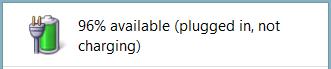
Guys , any bright ideas on this one ?
I googled it and they said it was normal .. is it ?

Let me know if you're having that as well ...

Attached Image
Stardust2197
post Mar 25 2015, 12:50 PM

New Member
*
Newbie
11 posts

Joined: Mar 2015


QUOTE(austinjklim @ Mar 25 2015, 09:17 AM)
True after switching my lenovo z500 tn panel to a ips display, all i can say is its like night and day. Putting on lowest brightness and still better than my lenovo z500.

Didn't have games to test out on the nitro yet but when i spectate d2 omg i never thought it had such beautiful graphics. (dat river tho)

You're lucky that you don't have wifi issues but for those who have please install the acer patchfix available on their website. Im using a NFA344 wifi adapter and this resets your power plan.
It's kinda annoying but hell i rather have better wifi than close lid to not sleep.
*
Or maybe I applied the patches already ? haha cz when i purchased this laptop , acer care centre has pushed several updates , i just updated all of them so i guess one of them is the wifi patch haha .. FYI , my wifi card is Atheros QCA61x4
Stardust2197
post Mar 25 2015, 12:51 PM

New Member
*
Newbie
11 posts

Joined: Mar 2015


QUOTE(zuhaili87 @ Mar 25 2015, 11:04 AM)
its normal, it will charge back when its below 90% if im not mistaken. nod.gif
*
Okay ~ thanks mate ~ will try it out ..
Stardust2197
post Apr 28 2015, 08:42 PM

New Member
*
Newbie
11 posts

Joined: Mar 2015


QUOTE(shadowlck @ Apr 28 2015, 12:31 AM)
How to backup the current bios ? I did some googling but couldn't find a safe method.

Just in case i screw up..

I'm using 1.11 but I couldn't find it on acer's website .. They have either 1.08 or 1.13


Change to:
| Lo-Fi Version
0.0310sec    0.91    7 queries    GZIP Disabled
Time is now: 2nd December 2025 - 10:11 PM