Welcome Guest ( Log In | Register )

490 Pages « < 206 207 208 209 210 > » Bottom

Outline · [ Standard ] · Linear+

 The Official Maxis FTTH Thread | v5, Maxis Home Fibre Internet, from RM89

views
     
AhBoy~~
post Feb 4 2019, 04:15 PM

Regular
******
Senior Member
1,149 posts

Joined: Feb 2009


QUOTE(Boomeraangkid @ Feb 3 2019, 05:39 PM)
Is it a heating problem?
*
when my home is full house (a lot of devices connected) or a week of usage without restarting the router then the network will start to misbehave like page with stuck loading forever.

after I a throw in a fan for ~ 1/2 month, network so far stable without need to restart the router.
hafiez
post Feb 4 2019, 06:14 PM

Look at all my stars!!
*******
Senior Member
2,980 posts

Joined: Jan 2007
From: Mount Chiliad


Do u guys received the sim card upon registrstion?

I dont understand about this sim card thing, because i didnt received any.

Do i need to subscribed to other plan?

Im using home fibre 100mbps.

Read in their website, its for Biz plan fibre.

And, if i have this sim card, can i use it in my iPad?
jusbella
post Feb 4 2019, 08:33 PM

Look at all my stars!!
*******
Senior Member
3,039 posts

Joined: Dec 2011


QUOTE(hafiez @ Feb 4 2019, 06:14 PM)
Do u guys received the sim card upon registrstion?

I dont understand about this sim card thing, because i didnt received any.

Do i need to subscribed to other plan?

Im using home fibre 100mbps.

Read in their website, its for Biz plan fibre.

And, if i have this sim card, can i use it in my iPad?
*
Cannot, the SIM card is 4g backup only once your fibre down.

They will block your 4g backup sim if they found unusual activity regarding SIM card.

They either give u by usb dongle or they put into the router.
peri peri
post Feb 6 2019, 12:54 AM

10k nonsense talkative club
********
All Stars
11,943 posts

Joined: Mar 2012
From: Kuala Lumpur


QUOTE(AhBoy~~ @ Feb 4 2019, 04:15 PM)
when my home is full house (a lot of devices connected) or a week of usage without restarting the router then the network will start to misbehave like page with stuck loading forever.

after I a throw in a fan for ~ 1/2 month, network so far stable without need to restart the router.
*
Hi,

Not sure how u position ur usb fan. after reading ur post, i decided to blow it from side vent of the router and modem. Hopefully it will resolve the unstable connection issue.

really vomit blood with maxis
piju
post Feb 6 2019, 01:42 PM

Getting Started
**
Junior Member
164 posts

Joined: Feb 2008
QUOTE(supervai @ Feb 4 2019, 04:14 PM)
Login - Administrator
Password - router serial number
*
thanks bro!
AhBoy~~
post Feb 6 2019, 04:02 PM

Regular
******
Senior Member
1,149 posts

Joined: Feb 2009


QUOTE(peri peri @ Feb 6 2019, 12:54 AM)
Hi,

Not sure how u position ur usb fan. after reading ur post, i decided to blow it from side vent of the router and modem. Hopefully it will resolve the unstable connection issue.

really vomit blood with maxis
*
you can touch the back and it is no longer warm as the heat is being blow away, let us know if you find any different before and after

No idea why maxis supply such a device and unstable firmware

This post has been edited by AhBoy~~: Feb 6 2019, 04:02 PM
cherriedpie
post Feb 7 2019, 10:31 PM

Casual
***
Junior Member
307 posts

Joined: Jul 2008
Hi guys, am also a user with the Maxis router Archer C5v!
Noticed with this router it really messed up my Chromecast connectivity. My chromecast is first generation which means it can only connect to 2.4ghz wifi, but somehow if I switch my device to the 5ghz wifi I am able to connect to the Chromecast. But it is really unstable and not always reliable, my device will often lose connection to the Chromecast after a while.

Then, I noticed my devices on 5ghz wifi is always disconnected intermittently - I finally decided to disable 5ghz altogether. This helped the Chromecast connectivity a bit because it is no longer 'confused'. However, I noticed even with just the 2.4ghz active, the device can't find the 'cast' icon and is occasionally unable to connect to the Chromecast sleep.gif I noticed it will return to normal after I decide to restart the router, then my devices are able to cast to the Chromecast as normal, this issue will recur every 2 days for some reason. It's like after a while, Chromecast decides that it wants to disappear and does not want to be found.

Can anyone give any suggestions on what router to switch to? I am not sure whether this is a Chromecast issue or a router issue. I know that this Archer c5v is really shit and I am willing to make an investment on a good router provided that the none of the above-mentioned issues appear again...but if it's just maybe that Chromecast itself is unreliable, then perhaps I should get an Android TV box where I don't have to bother about 'casting' because the only reason why I would cast is to watch Netflix, YouTube and Spotify which are all easily available on an Android TV box...

This post has been edited by cherriedpie: Feb 7 2019, 10:34 PM

sitescope
post Feb 7 2019, 10:56 PM

Look at all my stars!!
*******
Senior Member
4,504 posts

Joined: Oct 2013
QUOTE(cherriedpie @ Feb 7 2019, 10:31 PM)
Hi guys, am also a user with the Maxis router Archer C5v!
Noticed with this router it really messed up my Chromecast connectivity. My chromecast is first generation which means it can only connect to 2.4ghz wifi, but somehow if I switch my device to the 5ghz wifi I am able to connect to the Chromecast. But it is really unstable and not always reliable, my device will often lose connection to the Chromecast after a while.

Then, I noticed my devices on 5ghz wifi is always disconnected intermittently - I finally decided to disable 5ghz altogether. This helped the Chromecast connectivity a bit because it is no longer 'confused'. However, I noticed even with just the 2.4ghz active, the device can't find the 'cast' icon and is occasionally unable to connect to the Chromecast sleep.gif I noticed it will return to normal after I decide to restart the router, then my devices are able to cast to the Chromecast as normal, this issue will recur every 2 days for some reason. It's like after a while, Chromecast decides that it wants to disappear and does not want to be found.

Can anyone give any suggestions on what router to switch to? I am not sure whether this is a Chromecast issue or a router issue. I know that this Archer c5v is really shit and I am willing to make an investment on a good router provided that the none of the above-mentioned issues appear again...but if it's just maybe that Chromecast itself is unreliable, then perhaps I should get an Android TV box where I don't have to bother about 'casting' because the only reason why I would cast is to watch Netflix, YouTube and Spotify which are all easily available on an Android TV box...
*
Tenda ac18
chubbyqq
post Feb 10 2019, 05:15 PM

Casual
***
Junior Member
442 posts

Joined: Apr 2014
QUOTE(sitescope @ Feb 7 2019, 10:56 PM)
Tenda ac18
*
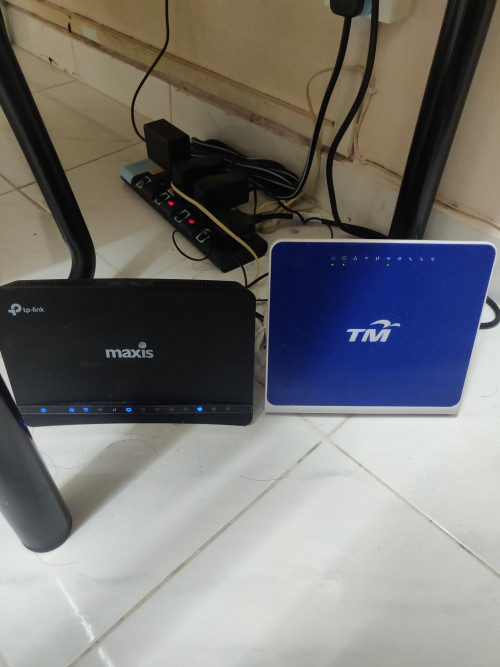
user posted image

I just replace the black one here and connection will be more stable? Mine is 30mbps
supervai
post Feb 11 2019, 12:16 AM

Getting Started
**
Junior Member
235 posts

Joined: Sep 2010
QUOTE(chubbyqq @ Feb 10 2019, 05:15 PM)
user posted image

I just replace the black one here and connection will be more stable? Mine is 30mbps
*
If you don't use VOIP then replace black one will do.
attw
post Feb 11 2019, 03:15 PM

20k VIP Club
*********
All Stars
32,468 posts

Joined: Mar 2005


I can't believe I'm saying this, but 4 months after switching from unifi to maxis (100Mbps) I'm regretting and counting down the months before the contract is over so I can switch back to unifi (20 months to go - yikes!)

First problem is intermittent connection on my PC (with LAN cable) when I'm having a lengthy teleconference (over an hour) or downloading a huge file (above 300MB) from file hosting websites. This is especially true during the nights when I suppose it is peak hours.

Second one, to echo cherriedpie, my mobile devices on the 5Ghz channels also keep getting disconnected or worse, at times, the devices can't pick up the 5Ghz channel even though I could be just in the next room, a mere 5 meters away from the C5v router. It's annoying. Has anyone here changed the router to your own and have better connection? I'm wondering if that is the cause...

Sigh, if only unifi had launched their 100Mbps plan for RM129 earlier...
sitescope
post Feb 11 2019, 04:55 PM

Look at all my stars!!
*******
Senior Member
4,504 posts

Joined: Oct 2013
QUOTE(attw @ Feb 11 2019, 03:15 PM)
I can't believe I'm saying this, but 4 months after switching from unifi to maxis (100Mbps) I'm regretting and counting down the months before the contract is over so I can switch back to unifi (20 months to go - yikes!)

First problem is intermittent connection on my PC (with LAN cable) when I'm having a lengthy teleconference (over an hour) or downloading a huge file (above 300MB) from file hosting websites. This is especially true during the nights when I suppose it is peak hours.

Second one, to echo cherriedpie, my mobile devices on the 5Ghz channels also keep getting disconnected or worse, at times, the devices can't pick up the 5Ghz channel even though I could be just in the next room, a mere 5 meters away from the C5v router. It's annoying. Has anyone here changed the router to your own and have better connection? I'm wondering if that is the cause...

Sigh, if only unifi had launched their 100Mbps plan for RM129 earlier...
*
My fren replaced with tenda ac18
All the prob gone

attw
post Feb 11 2019, 07:27 PM

20k VIP Club
*********
All Stars
32,468 posts

Joined: Mar 2005


QUOTE(sitescope @ Feb 11 2019, 04:55 PM)
My fren replaced with tenda ac18
All the prob gone
*
Huh, really so miraculous? A router change will solve my problems? smile.gif
supervai
post Feb 11 2019, 09:56 PM

Getting Started
**
Junior Member
235 posts

Joined: Sep 2010
QUOTE(attw @ Feb 11 2019, 03:15 PM)
I can't believe I'm saying this, but 4 months after switching from unifi to maxis (100Mbps) I'm regretting and counting down the months before the contract is over so I can switch back to unifi (20 months to go - yikes!)

First problem is intermittent connection on my PC (with LAN cable) when I'm having a lengthy teleconference (over an hour) or downloading a huge file (above 300MB) from file hosting websites. This is especially true during the nights when I suppose it is peak hours.

Second one, to echo cherriedpie, my mobile devices on the 5Ghz channels also keep getting disconnected or worse, at times, the devices can't pick up the 5Ghz channel even though I could be just in the next room, a mere 5 meters away from the C5v router. It's annoying. Has anyone here changed the router to your own and have better connection? I'm wondering if that is the cause...

Sigh, if only unifi had launched their 100Mbps plan for RM129 earlier...
*
Are you using VOIP? If no direct change the router. I confirm its router issue. If you change then your problems will go away.
For the LAN port it's proven a problem. To avoid this problem I set static IP from the router for the pc.

I use a mesh to connect to Maxis TP Link. My WiFi is controlled by mesh fully and I no longer have WiFi issue.

Actually if you are worried, what you can do is get a spare router or if you have an old router, let it run the WiFi and you will see the difference in terms of stability.
supervai
post Feb 11 2019, 09:56 PM

Getting Started
**
Junior Member
235 posts

Joined: Sep 2010
QUOTE(attw @ Feb 11 2019, 07:27 PM)
Huh, really so miraculous? A router change will solve my problems? smile.gif
*
I confirm a router change will do wonders
blibala
post Feb 11 2019, 10:40 PM

Regular
******
Senior Member
1,922 posts

Joined: Jan 2005
QUOTE(supervai @ Feb 11 2019, 09:56 PM)
I confirm a router change will do wonders
*
Is xiaomi router compatible?
supervai
post Feb 11 2019, 11:06 PM

Getting Started
**
Junior Member
235 posts

Joined: Sep 2010
QUOTE(blibala @ Feb 11 2019, 10:40 PM)
Is xiaomi router compatible?
*
Not really sure about that as I don't have their products to try.


https://s.lazada.com.my/s.mVZ7

Please read this that I found from Lazada. Require original router to connect to Xiaomi router to run as AP

This post has been edited by supervai: Feb 11 2019, 11:11 PM
danieltay
post Feb 12 2019, 01:01 AM

Getting Started
**
Junior Member
209 posts

Joined: Sep 2009
QUOTE(Boomeraangkid @ Feb 3 2019, 03:52 PM)
I keep getting intermittent disconnections on 5Ghz wifi when surfing twitter and also playing games through the wireless router. Any ideas how to fix?
*
same issue on youtube as well, only found out yesterday
waisang
post Feb 12 2019, 03:09 AM

On my way
****
Junior Member
591 posts

Joined: Dec 2009
QUOTE(attw @ Feb 11 2019, 03:15 PM)
I can't believe I'm saying this, but 4 months after switching from unifi to maxis (100Mbps) I'm regretting and counting down the months before the contract is over so I can switch back to unifi (20 months to go - yikes!)

First problem is intermittent connection on my PC (with LAN cable) when I'm having a lengthy teleconference (over an hour) or downloading a huge file (above 300MB) from file hosting websites. This is especially true during the nights when I suppose it is peak hours.

Second one, to echo cherriedpie, my mobile devices on the 5Ghz channels also keep getting disconnected or worse, at times, the devices can't pick up the 5Ghz channel even though I could be just in the next room, a mere 5 meters away from the C5v router. It's annoying. Has anyone here changed the router to your own and have better connection? I'm wondering if that is the cause...

Sigh, if only unifi had launched their 100Mbps plan for RM129 earlier...
*
Forget about the Maxis stock TPlink Router, change to the different router for resolution, example tenda ac18, anyway it is known problem without fixed by maxis
attw
post Feb 12 2019, 06:49 AM

20k VIP Club
*********
All Stars
32,468 posts

Joined: Mar 2005


QUOTE(supervai @ Feb 11 2019, 09:56 PM)
I confirm a router change will do wonders
*
QUOTE(waisang @ Feb 12 2019, 03:09 AM)
Forget about the Maxis stock TPlink Router, change to the different router for resolution, example tenda ac18, anyway it is known problem without fixed by maxis
*
Thanks guys, I think I'll do that this weekend and will report back here if that works!

490 Pages « < 206 207 208 209 210 > » Top
 

Change to:
| Lo-Fi Version
0.0197sec    0.43    6 queries    GZIP Disabled
Time is now: 24th December 2025 - 08:34 PM