Welcome Guest ( Log In | Register )

3 Pages  1 2 3 >Bottom

Outline · [ Standard ] · Linear+

 The Official Maxis FTTH Thread | v5, Maxis Home Fibre Internet, from RM89

views
     
AhBoy~~
post Jul 22 2017, 06:04 PM

Regular
******
Senior Member
1,149 posts

Joined: Feb 2009


QUOTE(danieltay @ Jul 20 2017, 02:06 PM)
Anyone with extra cordless phone to let go?

My cordless phone is spoilt and need to get one for replacement.

Let me know, thanks.
*
I have extra, new with box
AhBoy~~
post Jul 30 2017, 07:05 PM

Regular
******
Senior Member
1,149 posts

Joined: Feb 2009


QUOTE(jcyl2 @ Jul 30 2017, 09:58 AM)
I'm still facing the issues of certain sites cannot access.  Check on my router page and it shows i'm still connected via ipv6.. sigh..
No issues for computer as i can turn off ipv6 from network settings.. but not on my mobile devices.
*
Call them to complain and they will turn it off for you default router
AhBoy~~
post Sep 19 2017, 10:12 PM

Regular
******
Senior Member
1,149 posts

Joined: Feb 2009


Astro IPTV on Maxis line.. internet like sh*t.. can't even fb
AhBoy~~
post Jun 21 2018, 12:57 AM

Regular
******
Senior Member
1,149 posts

Joined: Feb 2009


I notice some site loading slowly after maxis roll out IPv6.

Loading fast on some of my device that I set IPv6 DNS manually.

Anyone know a way to set IPv6 DNS on Technicolor TG784n v3?
AhBoy~~
post Oct 15 2018, 06:24 PM

Regular
******
Senior Member
1,149 posts

Joined: Feb 2009


Anyone had experience installing 2 services in one house?

I have existing unifi line, want added another maxis, how the setup will be?
AhBoy~~
post Oct 16 2018, 06:06 PM

Regular
******
Senior Member
1,149 posts

Joined: Feb 2009


QUOTE(poh880 @ Oct 15 2018, 07:54 PM)
What speed is your Unifi? Maxis use LAN 2
*
10Mbps (the expensive version)

QUOTE(Captain8 @ Oct 15 2018, 08:34 PM)
You want to setup Maxis then port out Unifi right biggrin.gif LOL
Just now see Maxis IP = Dynamic, every 48 hours.
Wonder will this be a problem for my subscriptions.
*
Yes, will port out once contract is out, now not yet so will keep both
AhBoy~~
post Dec 14 2018, 08:28 PM

Regular
******
Senior Member
1,149 posts

Joined: Feb 2009


QUOTE(poh880 @ Dec 14 2018, 02:55 PM)
When their system detect TM fibre breakdown then only the SIM can registered to their 4G network? dry.gif
By the time their know it, fibre network may already down for few hours or even worst TM may already fixed that issue on their side. sweat.gif

Same goes to me
» Click to show Spoiler - click again to hide... «

*
easy turn off btu, log a service ticket complain no internet see what happen
AhBoy~~
post Dec 26 2018, 03:21 PM

Regular
******
Senior Member
1,149 posts

Joined: Feb 2009


QUOTE(stevenlee @ Dec 26 2018, 08:50 AM)
I having an issue with archer c5v where some of my device will drop and no connection at all.
Anyone facing this issue and how to fix it?
I think to change to new router if new router can fix it.
Any sifu can advise
*
I have problem with wifi connected but no loading.

Especially thing like youtube video is loading but comment and text not loading...
AhBoy~~
post Jan 4 2019, 01:57 AM

Regular
******
Senior Member
1,149 posts

Joined: Feb 2009


QUOTE(numbertwo @ Jan 3 2019, 11:57 AM)
I'm a normal home user, no gaming, light movie streaming .. and the AC1200 is working ok to me since 1. i turn off 2.4ghz , 2. maximize DHCP lease time , and 3.  turn off IPv6 DHCP LAN.
*
lets see if the same tricks works for me. So far 2.4 is more stable for me than 5.

things get better after I turn WAN ipv6 but still not up to expectation.

AhBoy~~
post Jan 14 2019, 09:44 PM

Regular
******
Senior Member
1,149 posts

Joined: Feb 2009


QUOTE(waisang @ Jan 14 2019, 08:20 PM)
Maxis has spoken and clarified that the V1.0_181024 is latest and official, how do you get this?

I don't understand why there is so many drama within Maxis, this is really makes me sick,

Can you do a screenshot and share with us example this https://pictr.com/image/0wDqXf
*
I'm running V1.0_181024 too, wifi like sh*t doh.gif

I used to have these Technicolor router that I tot it was bad until now... bangwall.gif
AhBoy~~
post Jan 15 2019, 08:04 PM

Regular
******
Senior Member
1,149 posts

Joined: Feb 2009


QUOTE(waisang @ Jan 15 2019, 07:49 PM)
It is taken too long time for Maxis to identify the TP-Link router bugs since they have been implemented the new router about 4-5 months until now,
Sggest you to maintain the existing without upgrade or change to different provider
*
not sure maxis didn't invest in hire the ppl to write their own router firmware or they hire some rubbish engineer ranting.gif

I don't think maxis will fix the problem.
AhBoy~~
post Jan 26 2019, 07:13 PM

Regular
******
Senior Member
1,149 posts

Joined: Feb 2009


QUOTE(peri peri @ Jan 26 2019, 12:01 AM)
user posted image

after upgraded from 181024, even shitty!!!!

thinking to change back my thompson router. the archer 5g is plain stupid and unstable
*
If you are using iPhone the effect is even worst. Yes, 5G is unusable at all, I wonder why do they even include it when the technician advise me not to use it; "Boss 5Ghz jangan pakai, problem byk".

My family have Note9, Mi Note, iPhone 7+ and iPhone XR, iPhones connection keep dropping as soon as moving different room where the router place... doh.gif
AhBoy~~
post Jan 28 2019, 08:41 PM

Regular
******
Senior Member
1,149 posts

Joined: Feb 2009


QUOTE(erichhl @ Jan 28 2019, 05:50 PM)
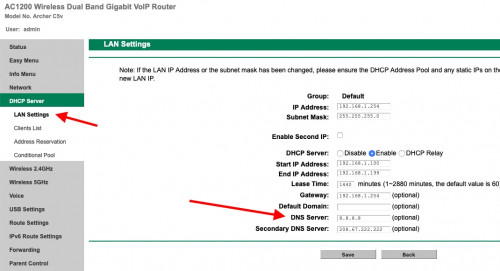
Any Sifu here can help me, how to set Alternate DNS on this maxis TP-Link Archer c5v router ah? notworthy.gif
*
This is how I do it, not sure about IPv6, anyway I disable IPv6 for better stability doh.gif

user posted image
AhBoy~~
post Jan 29 2019, 11:23 PM

Regular
******
Senior Member
1,149 posts

Joined: Feb 2009


QUOTE(lithium @ Jan 29 2019, 08:28 AM)
how to disable ipv6?
*
QUOTE(supervai @ Jan 29 2019, 11:01 AM)
so from network - WAN settings - eInternet, on right-hand side got an Edit button. Press that and untick Enable IPv6
*
just like supervai said.

also I disable IPv6 DHCP LAN,
as I notice sometime my device not getting an IP address assigned(hang moment while connect to wifi), after I disable IPv6 DHCP LAN then never face the same issue.

Is under the same menu as above >> Network >> IPv6 LAN Settings
AhBoy~~
post Jan 31 2019, 08:15 PM

Regular
******
Senior Member
1,149 posts

Joined: Feb 2009


QUOTE(aeiou228 @ Jan 31 2019, 07:03 AM)
My wireless network HP printer was not detected by my pc, tablet and phones even though the printer is connected to the same network.Do you reckon ipv6 is the cause ? printer was working fine with the previous Technicolor router.
*
Few things you can try:
- Make sure Client Isolation is NOT enabled under "wireless 2.4/5 >>Wireless Advanced"

- Check if the printer is really connect under client list then Assigned a static IP to your printer

- Make sure the Printer is connected to 2.4Ghz as host network
- PC is connected to the same wireless frequency as the printer

I had the same issue as yours earlier on with my repeater and one of the HTPC but tv box doesn't have that issue (Repeater, HTPC and TV box connected 5Ghz while the rest of all other PC/phone is on 2.4)

but later discover I'm able to ping each other once I connect them to the same AP/frequency. rclxub.gif

If all above doesn't work for you, i think you are out of luck with the provided router. unsure.gif
AhBoy~~
post Feb 3 2019, 03:55 PM

Regular
******
Senior Member
1,149 posts

Joined: Feb 2009


QUOTE(Boomeraangkid @ Feb 3 2019, 03:52 PM)
I keep getting intermittent disconnections on 5Ghz wifi when surfing twitter and also playing games through the wireless router. Any ideas how to fix?
*
no fix, can only stop using it, a known issue for maxis provided router.
AhBoy~~
post Feb 3 2019, 03:56 PM

Regular
******
Senior Member
1,149 posts

Joined: Feb 2009


QUOTE(chubbyqq @ Feb 2 2019, 11:10 PM)
Need help, I changed the router password for Administrator some time ago and I forgotten about it. How to reset?
*
there is a reset button at the back/on the device itself
AhBoy~~
post Feb 3 2019, 04:01 PM

Regular
******
Senior Member
1,149 posts

Joined: Feb 2009


QUOTE(Boomeraangkid @ Feb 3 2019, 03:56 PM)
sweet. love it
*
life will be slightly better when you stop using it.

alt if you like tying; Try to using usb fan and blow on it, see if it get any better?
Mine has one, but only my htpc and tv box using 5Ghz, all other devices using 2.4, so far stability is better with a fan (at least no need to restart every 2 days)

read a few page you will most of us here cursing maxis on a daily basis ranting.gif puke.gif
AhBoy~~
post Feb 4 2019, 04:15 PM

Regular
******
Senior Member
1,149 posts

Joined: Feb 2009


QUOTE(Boomeraangkid @ Feb 3 2019, 05:39 PM)
Is it a heating problem?
*
when my home is full house (a lot of devices connected) or a week of usage without restarting the router then the network will start to misbehave like page with stuck loading forever.

after I a throw in a fan for ~ 1/2 month, network so far stable without need to restart the router.
AhBoy~~
post Feb 6 2019, 04:02 PM

Regular
******
Senior Member
1,149 posts

Joined: Feb 2009


QUOTE(peri peri @ Feb 6 2019, 12:54 AM)
Hi,

Not sure how u position ur usb fan. after reading ur post, i decided to blow it from side vent of the router and modem. Hopefully it will resolve the unstable connection issue.

really vomit blood with maxis
*
you can touch the back and it is no longer warm as the heat is being blow away, let us know if you find any different before and after

No idea why maxis supply such a device and unstable firmware

This post has been edited by AhBoy~~: Feb 6 2019, 04:02 PM

3 Pages  1 2 3 >Top
 

Change to:
| Lo-Fi Version
0.0364sec    0.57    7 queries    GZIP Disabled
Time is now: 12th December 2025 - 07:34 PM