

Using tenda ac18 as recommended. Setup was quick and easy. I'll report back in in a week and a month too see how stable it is hehe
The Official Maxis FTTH Thread | v5, Maxis Home Fibre Internet, from RM89
The Official Maxis FTTH Thread | v5, Maxis Home Fibre Internet, from RM89
|
|
 Feb 16 2019, 11:37 PM Feb 16 2019, 11:37 PM
|
 
Junior Member
442 posts Joined: Apr 2014 
|
Using tenda ac18 as recommended. Setup was quick and easy. I'll report back in in a week and a month too see how stable it is hehe
|
|
|
|
|
|
Feb 17 2019, 02:14 PM
Show posts by this member only | IPv6 | Post
#4182
|

Newbie
8 posts Joined: Feb 2010 
|
I’m interested to change to Tenda AC18, though I still want to use VoIP + 4G dongle. Anyone here has this kind of setup where you use the Tenda as AP and if it works well?
This post has been edited by wforwumbo: Feb 17 2019, 02:30 PM |
|
|
Feb 17 2019, 09:35 PM
|
|
Junior Member
235 posts Joined: Sep 2010
|
QUOTE(wforwumbo @ Feb 17 2019, 02:14 PM) I’m interested to change to Tenda AC18, though I still want to use VoIP + 4G dongle. Anyone here has this kind of setup where you use the Tenda as AP and if it works well? I'm still using maxis TP Link for VoIP and as a switch to my mesh n pc. So my mesh controls my WiFi and everything works well. But don't forget to turn off WiFi on original TP Link |
|
|
Feb 17 2019, 11:39 PM
Show posts by this member only | IPv6 | Post
#4184
|
|
Senior Member
4,500 posts Joined: Oct 2013
|
QUOTE(supervai @ Feb 17 2019, 09:35 PM) I'm still using maxis TP Link for VoIP and as a switch to my mesh n pc. So my mesh controls my WiFi and everything works well. But don't forget to turn off WiFi on original TP Link Got the cable diagrsm between modem + tplink + mesh ? |
|
|
Feb 18 2019, 10:17 AM
|
|
Junior Member
235 posts Joined: Sep 2010
|
QUOTE(sitescope @ Feb 17 2019, 11:39 PM) Got the cable diagrsm between modem + tplink + mesh ? Ok will try to explain. Diagram none as it was trial error. 1) Modem to Maxis TP Link WAN port 2) Maxis TP Link LAN port to TP Link Mesh primary (any of 2 ports) on Cat 6 cable 3) Back haul from TP Link Mesh primary to 2nd Unit of TP Link Mesh (upstairs) - on Cat 6 cable also. |
|
|
Feb 18 2019, 12:06 PM
|
|
Senior Member
848 posts Joined: Feb 2005 From: everywhere, yet nowhere. 
|
ditching tplink archer c5v
My equipment: Huawei WS880 flashed to Xwrt-Vortex TM's own Huawei HG8240W Huawei E8372 -FYI, i can't get the provided ZTE MF833V to work with PC/other router. It can only work with the provided tplink router. When connected to other PC/router, only DNS lookup can be resolved, Internet packet won't go through. For this, i replaced it with my own Huawei E8372. If your dongle can work with PC, there's shouldn't be any issue for it to work with other router. Setting for Dual WAN 

-Ignore that I selected USB device as Android phone instead of USB modem as both mode will work since Huawei E8372 or ZTE MF833V works in hostless modem mode. APN should be configured on the dongle, not on the router. Setting for VOIP 


|
|
|
|
|
|
Feb 19 2019, 10:16 PM
|

Junior Member
518 posts Joined: Jul 2011 From: Selangor
|
Hello guys, I'm experiencing no internet access when connecting to my maxis BB.
It shows that I have no connection to PP and auth failure when I log onto my maxis gateway. I have really no idea what this acronym meant through. This post has been edited by BoonieTan: Feb 19 2019, 10:19 PM Attached thumbnail(s) 

|
|
|
Feb 19 2019, 10:44 PM
|
|
Senior Member
3,038 posts Joined: Dec 2011
|
QUOTE(BoonieTan @ Feb 19 2019, 10:16 PM) Hello guys, I'm experiencing no internet access when connecting to my maxis BB. Ur fibre line disconnected.It shows that I have no connection to PP and auth failure when I log onto my maxis gateway. I have really no idea what this acronym meant through. |
|
|
Feb 20 2019, 10:50 PM
|

Senior Member
735 posts Joined: Dec 2017
|
QUOTE(trix @ Feb 18 2019, 12:06 PM) ditching tplink archer c5v What a fool I've been, damn it. I thought only hg8240h has webUI, but not hg8240w... Pay attention guys, if u have this huawei hg8240w BTU or ONT or modem, even if u r under fiber connection instead of VDSL connection(where u are issued with hg655m), it is possible to connect VOIP to TM BTU's RJ11 port, instead of the Thompson/Technicolor/Aminia/TPLink crap. Yes, u may now fully ditch those bricks!! My equipment: Huawei WS880 flashed to Xwrt-Vortex TM's own Huawei HG8240W Huawei E8372 -FYI, i can't get the provided ZTE MF833V to work with PC/other router. It can only work with the provided tplink router. When connected to other PC/router, only DNS lookup can be resolved, Internet packet won't go through. For this, i replaced it with my own Huawei E8372. If your dongle can work with PC, there's shouldn't be any issue for it to work with other router. Setting for Dual WAN
-Ignore that I selected USB device as Android phone instead of USB modem as both mode will work since Huawei E8372 or ZTE MF833V works in hostless modem mode. APN should be configured on the dongle, not on the router. Setting for VOIP
 |
|
|
Feb 22 2019, 02:20 PM
|
|
Junior Member
73 posts Joined: Apr 2011
|
Can we use the dongle at our own laptop outside?
I had plugged it in my laptop and it shows connected but failed to connect to the internet. Any advice? |
|
|
Feb 22 2019, 03:16 PM
|
|
Senior Member
3,038 posts Joined: Dec 2011
|
QUOTE(jie103 @ Feb 22 2019, 02:20 PM) Can we use the dongle at our own laptop outside? That dongle purpose is for fibre down only can use. Cannot be use outside the area.I had plugged it in my laptop and it shows connected but failed to connect to the internet. Any advice? |
|
|
Feb 23 2019, 10:50 AM
|

Junior Member
83 posts Joined: Dec 2008
|
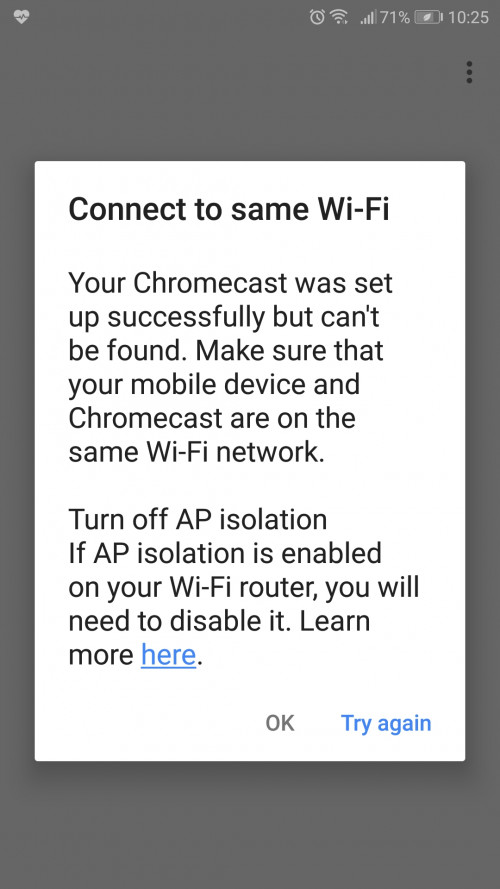
Anyone cant connect to chromecast using the c5v router? My home mini no problem.
 |
|
|
Feb 23 2019, 05:11 PM
|

Junior Member
30 posts Joined: Aug 2005
|
QUOTE(nikongrapher @ Feb 23 2019, 10:50 AM) Anyone cant connect to chromecast using the c5v router? My home mini no problem. have the same problem... but able to found it by using youtube to stream to chromecast first. |
|
|
|
|
|
Feb 23 2019, 05:14 PM
|
|
Junior Member
30 posts Joined: Aug 2005
|
QUOTE(jusbella @ Feb 22 2019, 03:16 PM) That dongle purpose is for fibre down only can use. Cannot be use outside the area. hi... you know if we can simulate the down time and use the dongle on maxis router ?try to unplugged the fibre from the modem.... the 4G status says connected but there is no internet on phone or laptop... wonder how maxis router know when to activate the backup 4g ? |
|
|
Feb 23 2019, 05:21 PM
|
|
Senior Member
3,038 posts Joined: Dec 2011
|
QUOTE(localbus @ Feb 23 2019, 05:14 PM) hi... you know if we can simulate the down time and use the dongle on maxis router ? Then there is issue with the configuration on the router..try to unplugged the fibre from the modem.... the 4G status says connected but there is no internet on phone or laptop... wonder how maxis router know when to activate the backup 4g ? Or else u try manually pun DNS to ur devices, please use 8.8.8.8 and alternative DNS is 8.8.4.4. |
|
|
Feb 23 2019, 05:25 PM
|
|
Junior Member
30 posts Joined: Aug 2005
|
QUOTE(jusbella @ Feb 23 2019, 05:21 PM) Then there is issue with the configuration on the router.. ipv6 already disabled, dns already set to google.Or else u try manually pun DNS to ur devices, please use 8.8.8.8 and alternative DNS is 8.8.4.4. |
|
|
Feb 23 2019, 05:30 PM
|
|
Senior Member
3,038 posts Joined: Dec 2011
|
QUOTE(localbus @ Feb 23 2019, 05:25 PM) ipv6 already disabled, dns already set to google. If that the case u need contact maxis to remote check ur dongle. |
|
|
Feb 24 2019, 04:52 PM
|
|
Junior Member
73 posts Joined: Apr 2011
|
QUOTE(jusbella @ Feb 22 2019, 03:16 PM) That dongle purpose is for fibre down only can use. Cannot be use outside the area. If i take out the sim from the dongle and use it on my other mobile phone for internet only? |
|
|
Feb 24 2019, 05:33 PM
|
|
Senior Member
3,038 posts Joined: Dec 2011
|
QUOTE(jie103 @ Feb 24 2019, 04:52 PM) If i take out the sim from the dongle and use it on my other mobile phone for internet only? Also can't. Their sim registered for your home area only. |
|
|
Feb 24 2019, 07:18 PM
Show posts by this member only | IPv6 | Post
#4200
|
|
Junior Member
573 posts Joined: Mar 2012
|
i hav 3 questions on the tp-link Archer C5v router:
1) to improve security, i know can log in as administrator using the SN & change the password. but how about user/user? how do i change the password for this? 2) is there any backdoor to turn off TR-069, aka the CWMP settings? this setting basically allows maxis to collect data & also force certain settings in your router. 3) how do i effectively change DNS? i know it's in the DHCP server -> LAN, but changing DNS there doesn't seems to giv any effect, maybe is bcoz of number 2 above. i lazy to set DNS on which device, was hoping can set it in the router itself. maybe som of the question edi been answered in this thread somewhere. obviously that's a lot to go through. so i hope there som of the forumers here can shed som light. This post has been edited by unknown_2: Feb 25 2019, 09:12 AM |
| Change to: |  0.1837sec 0.1837sec
 0.73 0.73
 6 queries 6 queries
 GZIP Disabled GZIP Disabled
Time is now: 19th December 2025 - 08:41 PM |
 Quote
Quote