

Two times installation of maxisnfibre also failed. Wonder if tm purposely dont want turn out to activate service. Wasting my time
The Official Maxis FTTH Thread | v5, Maxis Home Fibre Internet, from RM89
The Official Maxis FTTH Thread | v5, Maxis Home Fibre Internet, from RM89
|
|
 Jan 26 2019, 03:43 PM Jan 26 2019, 03:43 PM
Return to original view | Post
#1
|
 
Senior Member
1,920 posts Joined: Jan 2005 
|
Two times installation of maxisnfibre also failed. Wonder if tm purposely dont want turn out to activate service. Wasting my time
|
|
|
|
|
|
Jan 27 2019, 05:09 PM
Return to original view | Post
#2
|
|
Senior Member
1,920 posts Joined: Jan 2005
|
QUOTE(Mr.Beanster @ Jan 27 2019, 04:56 PM) The new maxis router is just as hopeless as the old tp link. It is so frustrating to disconnect every 5mins in an online game. Called up techical support all they can guide is restart the modem, change port, change connection channel.. lastly change another to another same modem still same issues. Come on la maxis sign up for the service still has to fork up money to get a router by myself. Wifi? |
|
|
Feb 11 2019, 10:40 PM
Return to original view | Post
#3
|
|
Senior Member
1,920 posts Joined: Jan 2005
|
QUOTE(supervai @ Feb 11 2019, 09:56 PM) I confirm a router change will do wonders Is xiaomi router compatible? |
|
|
Feb 16 2022, 10:19 PM
Return to original view | Post
#4
|
|
Senior Member
1,920 posts Joined: Jan 2005
|
QUOTE(PRSXFENG @ Feb 16 2022, 02:56 PM) In my experience ok lah In dilemma whether want to switch to maxis. Currently with unifi and so far no major issue. So is Maxis really stabil as unifi?BUT my area is Maxis own Infra Since you are coming from Unifi, then you are probably using Maxis on Unifi infrastructure In that case, please do expect to not see as expected speeds (eg, subscribe 30Mbps get 28Mbps) Blame TM for unfairly caping speeds on the modem to make users think that Unifi is better Other things to note You are on Private IP by default, can contact CS to switch to Public Provided wifi 6 router on paper sounds good but some threads here say it ain't great With that said routing wise Maxis should be better |
|
|
Feb 17 2022, 12:30 PM
Return to original view | Post
#5
|
|
Senior Member
1,920 posts Joined: Jan 2005
|
QUOTE(QuantumEdge @ Feb 17 2022, 11:58 AM) For me lah, I'm 2 months into Maxis Is maxis giving sim card as backup?I changed to Maxis because previously Unifi kept having bad ping and high package loss in the night Youtube, Twitter, FB either video or images wouldn't load on IPv6 connection Maxis so far 0 problem and they're willing to provide public IP without many questions asked. Yeah, apart from needing VPN to browse udang hub, all is well Ping normal on Maxis, tvbox works fine, video conference all normal If you wanna register for it, I can recommend an agent to you |
|
|
Feb 17 2022, 01:26 PM
Return to original view | Post
#6
|
|
Senior Member
1,920 posts Joined: Jan 2005
|
QUOTE(QuantumEdge @ Feb 17 2022, 12:33 PM) You'll need to register for Maxis Postpaid, only that comes with sim card when you signup broadband Heard also many bad review for maxis fibre. Late technical support coz need to depend on tm, frequent service down.. |
|
|
|
|
|
Feb 17 2022, 02:37 PM
Return to original view | Post
#7
|
|
Senior Member
1,920 posts Joined: Jan 2005
|
i even heard there is offer of RM99 for 300mbps with unifi tv and free voice. but that is insider offer already.
|
|
|
Feb 17 2022, 03:58 PM
Return to original view | Post
#8
|
|
Senior Member
1,920 posts Joined: Jan 2005
|
QUOTE(AaIto @ Feb 17 2022, 02:46 PM) Woah, so good deal, sure or not.... P&C info cant disclose. too bad not offered to me |
|
|
Feb 18 2022, 01:12 PM
Return to original view | Post
#9
|
|
Senior Member
1,920 posts Joined: Jan 2005
|
QUOTE(QuantumEdge @ Feb 18 2022, 11:18 AM) 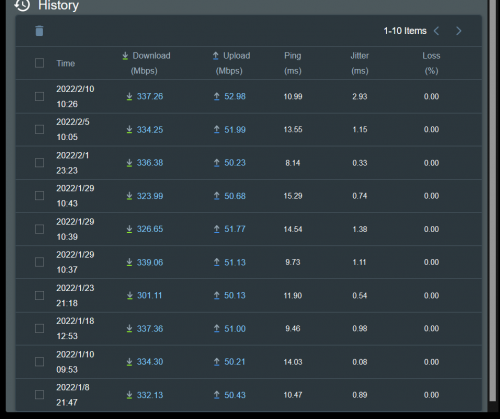 I'm also riding on TM's infra, no such problem maybe poke their CS?  |
|
|
Mar 13 2022, 04:03 PM
Return to original view | Post
#10
|
|
Senior Member
1,920 posts Joined: Jan 2005
|
Is huawei router given by maxis good?
|
|
|
Mar 14 2022, 12:18 AM
Return to original view | Post
#11
|
|
Senior Member
1,920 posts Joined: Jan 2005
|
QUOTE(Cybuster @ Mar 8 2022, 07:36 PM) Nope, it wont work as the port for RJ11 wont light. So do you manage to get it work?It only cascade the network only. |
|
|
Mar 21 2022, 03:16 PM
Return to original view | Post
#12
|
|
Senior Member
1,920 posts Joined: Jan 2005
|
QUOTE(YoungMan @ Mar 16 2022, 04:30 PM) Ok just to make sure. I also tried this method but not working.. Set original huawei router as router or bridge alsi not working.. Guess it is not so straightforward things.. Or anyone has successful setting up this? Have you check if lan 4 of the AX73 already set with correct VLAN? Can't remember exactly the VLAN for voip, either 821 or 822. Second try, if you set the Kaon router to bridge mode and connect to LAN 4 of the AX73 which is already configure for VOIP, it work? If still not working, perhaps this will be your last attempt if you don't mine to experiment. 1. Make sure your current Kaon router is connected to BTU, and internet and voip is working. 2. Change the Kaon router to Bridge Mode. 3. Connect your AX73 WAN port to one of the Kaon lan port, and setup the internet connection on the router with PPPOE username and pw provided by Maxis. 4. Check if your internet and VOIP is working. Restart both router just to make sure. 5. If both VOIP and internet is working, time for you to turn off Wifi for the Kaon router and keep it there just for VOIP purpose. |
|
|
Apr 5 2022, 11:36 AM
Return to original view | IPv6 | Post
#13
|
|
Senior Member
1,920 posts Joined: Jan 2005
|
QUOTE(AdrianS_99 @ Apr 5 2022, 11:17 AM) UPDATE, MAXIS FIBER for this promotion has been extended until End OF APRIL 2022 Sure keep extending due to good response..Hurry b4 ends (Later Extend more 1months?) Singh93 liked this post
|
|
|
|
|
|
Jul 14 2022, 11:17 PM
Return to original view | Post
#14
|
|
Senior Member
1,920 posts Joined: Jan 2005
|
QUOTE(Oltromen Ripot @ Jul 9 2022, 04:10 PM) I took the up 70" Sharp AndroidTV on 36mth Zerolution. Waiting delivery ETA next weekend. Also waiting for 2 mesh routers to be delivered as well. U took only fibre plan or together with their mobile plan in order to get the TV?The Samsung ones are SmartTV on Tizen, not acceptable if Samsung stops supporting. Was on 100Mbps RM129. Have existing rebates from sign up promotion, but Centre staff said still eligible to continue after upgrade speed plan. If remain 100Mbps RM129, Zerolution RM100. Projected damage = +RM100/mth If upgrade to 300Mbps RM149, Zerolution RM80. Projected damage = +RM100/mth If upgrade to 500Mbps RM219, Zerolution RM21. Projected damage = +RM111/mth So I upgraded to 500Mbps. No brainer to get more Mbps for similar +damage. 36mth is not big deal as this is fibre, bukan nak tukar-tukar pun, especially the alternatives will end up still on same HSBB. |
|
|
Jul 15 2022, 11:14 AM
Return to original view | Post
#15
|
|
Senior Member
1,920 posts Joined: Jan 2005
|
QUOTE(Oltromen Ripot @ Jul 15 2022, 08:53 AM) before: was already on mobile w/ a few on-going and recently expired zerolution. after add fibre, becomes unlimited data for all lines inside same account. i see. coz if just the fibre plan along is unable to get 70" TVFeb: uncabled fibre DB only appeared recently behind landed house. Mar: cabled fibre DB, apply for fibre April: installed fibre |
|
|
Jul 16 2022, 11:03 PM
Return to original view | Post
#16
|
|
Senior Member
1,920 posts Joined: Jan 2005
|
QUOTE(westlife @ Jul 16 2022, 08:26 PM) Fibre alone also can get the new tv now. Dont think can get the 70". I went to maxis 2 weeks ago. After verification and they only offer 65' samsung |
|
|
Aug 17 2022, 02:13 PM
Return to original view | Post
#17
|
|
Senior Member
1,920 posts Joined: Jan 2005
|
anyone knows whether any ongoing promo for existing subscriber that is still within contract?
|
|
|
Aug 18 2022, 02:33 PM
Return to original view | Post
#18
|
|
Senior Member
1,920 posts Joined: Jan 2005
|
QUOTE(mytaffeta @ Aug 18 2022, 10:45 AM) why would they want to offer those in contract bro? Never mind.... Already 'adjusted'. |
|
|
Aug 23 2022, 10:35 AM
Return to original view | Post
#19
|
|
Senior Member
1,920 posts Joined: Jan 2005
|
QUOTE(khainiz94 @ Aug 23 2022, 09:43 AM) Surprisingly it is not an existing installation. Since u have proof from tm it can be cancelled u can make police report and then cc to mcmc and tm agent. It is a completely new installation. Fibre have just come to my area via Unifi and I have been trying to ask Unifi to cancel my order because I have rejected my installation in the first place. They clearly states I should have no issue to cancel my order if I rejected the installation in the first place. So that part is settled. The issue is I have asked TM to cancel my order, but TM keep referring to the agent that I subscribe to cancel my order. So that TM agent keep calling me I cannot install because I have rejected his installation and have to wait 3 to 4 months to get a port to install Maxis Fibre. I have asked TM again why he keep calling me, and he said the order should be cancelled with no issue and can install any fibre of my choosing, the issue is the TM Point agent keep holding my address for ransom and keep harrasing me telling no port for me but Maxis said have port but my address blocked by TM. Go to TM Point no help because the TM agent have to cancel that order. This have been going on for more than a week. I just want to relocate my Maxis Fibre from another home to my current home but that TM agent makes everything difficult. They don't want to release my address. |
|
|
Feb 4 2023, 12:32 PM
Return to original view | IPv6 | Post
#20
|
|
Senior Member
1,920 posts Joined: Jan 2005
|
QUOTE(arkana @ Feb 3 2023, 04:22 PM) Hi I just installed Maxis Fibre 100mbps. +-5% speed difference is acceptable. Most important is the service is stable and no frequent outageJust want to check on the following item: 1. I'm getting 94mbps / 45mbps when I connect thru Lan cable for 100mbps. Is this acceptable speed for 100mbps? My expectation is getting 100mbps for what I paid for. 2. My Maxis Fibre doesn't come up backup Maxis 4G simcard ... I ask the installer he told me need to go Maxis to get the backup sim. Is he telling me the correct info? Thanks in advance for the reply. This post has been edited by blibala: Feb 4 2023, 10:56 PM |
| Change to: |  0.3049sec 0.3049sec
 0.30 0.30
 7 queries 7 queries
 GZIP Disabled GZIP Disabled
Time is now: 15th December 2025 - 03:07 PM |
 Quote
Quote