Welcome Guest ( Log In | Register )

Bump Topic Topic Closed RSS Feed
125 Pages « < 113 114 115 116 117 > » Bottom

Outline · [ Standard ] · Linear+

Unifi Official TM UniFi High Speed Broadband Thread V19, ( -_・) ︻デ═一▸ Maxis & Time

views
     
cybpsych
post Jan 2 2015, 10:27 AM

---------------------
*********
All Stars
65,356 posts

Joined: Jan 2003
QUOTE(silentsunami @ Jan 2 2015, 09:00 AM)
U know anything about the new packages? Malaysia broadband really very expensive
*
QUOTE(jasonchaw @ Jan 2 2015, 09:05 AM)
izzit? I planning to install a fibre internet now... u know when it will release new package?
*
somewhere april or may 2015.

donno the details cuz that's what the unifi agent told me; wanted me to take up the offer for 10mbps @ RM179 quickly.
jasonchaw
post Jan 2 2015, 10:32 AM

On my way
****
Senior Member
659 posts

Joined: Mar 2010
QUOTE(cybpsych @ Jan 2 2015, 10:27 AM)
somewhere april or may 2015.

donno the details cuz that's what the unifi agent told me; wanted me to take up the offer for 10mbps @ RM179 quickly.
*
But I think TM wont mark down the current price.. just provide faster speed and pay more.. I think
cybpsych
post Jan 2 2015, 10:39 AM

---------------------
*********
All Stars
65,356 posts

Joined: Jan 2003
QUOTE(jasonchaw @ Jan 2 2015, 10:32 AM)
But I think TM wont mark down the current price.. just provide faster speed and pay more.. I think
*
possibly TM is streamlining their broadband packages between Streamyx & Unifi (packages & price points).

Unifi VIP10 is now retailing RM199, retention program offers RM179. Possibly "new" VIP10 could be slotted into RM189 price point, while not offending those customers who gotten it at RM179 earlier laugh.gif

let's see what they will offer then....

This post has been edited by cybpsych: Jan 2 2015, 10:39 AM
InvokerProphet
post Jan 2 2015, 04:53 PM

New Member
*
Newbie
1 posts

Joined: Jul 2014
Good evening, sort of. I would like to ask a thing or two. I have tablet and phones connected to the UniFi router, the D-Link orange router. Currently, I have connection issue. It is like when I play online games on the PS4, I always lag when I am the host.

I am thinking about upgrading the router but not sure which. If there's a router that can accept better connection, do let me know because I dislike lagging on my own host.

If it helps, I'm using the VIP20 package currently.

Thank you.
odin88
post Jan 2 2015, 07:07 PM

Casual
***
Junior Member
475 posts

Joined: Oct 2004
From: -Klang-Kelana Jaya-


QUOTE(InvokerProphet @ Jan 2 2015, 04:53 PM)
Good evening, sort of. I would like to ask a thing or two. I have tablet and phones connected to the UniFi router, the D-Link orange router. Currently, I have connection issue. It is like when I play online games on the PS4, I always lag when I am the host.

I am thinking about upgrading the router but not sure which. If there's a router that can accept better connection, do let me know because I dislike lagging on my own host.

If it helps, I'm using the VIP20 package currently.

Thank you.
*
Change router
sabelt
post Jan 2 2015, 10:48 PM

Getting Started
**
Junior Member
111 posts

Joined: Jan 2003
Hi does anyone know where to change dns setting in RG router?
Icehart
post Jan 3 2015, 02:20 AM

72.55.191.6
********
All Stars
14,901 posts

Joined: Apr 2005
From: Kuala Lumpur & Selangor


QUOTE(cybpsych @ Jan 2 2015, 10:39 AM)
possibly TM is streamlining their broadband packages between Streamyx & Unifi (packages & price points).

Unifi VIP10 is now retailing RM199, retention program offers RM179. Possibly "new" VIP10 could be slotted into RM189 price point, while not offending those customers who gotten it at RM179 earlier  laugh.gif

let's see what they will offer then....
*
I wish they could do it better..like 5mbps price RM 99, 10mbps 149, 20mbps 179, 30mbps 199, 50mbps 229, 100mbps 299 brows.gif
Lineage
post Jan 3 2015, 03:09 AM

the Chaotic Throne
*******
Senior Member
4,524 posts

Joined: Oct 2007
From: ~Still finding the place~


QUOTE(cybpsych @ Jan 2 2015, 10:39 AM)
possibly TM is streamlining their broadband packages between Streamyx & Unifi (packages & price points).

Unifi VIP10 is now retailing RM199, retention program offers RM179. Possibly "new" VIP10 could be slotted into RM189 price point, while not offending those customers who gotten it at RM179 earlier  laugh.gif

let's see what they will offer then....
*
I got my VIP10 at RM169 earlier.. drool.gif

Attached Image

This post has been edited by Lineage: Jan 3 2015, 03:13 AM
cybpsych
post Jan 3 2015, 08:08 AM

---------------------
*********
All Stars
65,356 posts

Joined: Jan 2003
QUOTE(Lineage @ Jan 3 2015, 03:09 AM)
I got my VIP10 at RM169 earlier..  drool.gif

Attached Image
*
RM169 only for early adopters of Unifi thumbup.gif then RM179 offered to the rest.
archonixm
post Jan 3 2015, 08:18 AM

Enthusiast
*****
Senior Member
774 posts

Joined: Jan 2003
From: Prontera's Inn


QUOTE(jasonchaw @ Dec 31 2014, 02:41 PM)
Is it possible to get RM179 for 10m offer at any TMcounter or agent ?
*
yeah, i want it too
Lineage
post Jan 3 2015, 08:46 AM

the Chaotic Throne
*******
Senior Member
4,524 posts

Joined: Oct 2007
From: ~Still finding the place~


QUOTE(cybpsych @ Jan 3 2015, 08:08 AM)
RM169 only for early adopters of Unifi  thumbup.gif then RM179 offered to the rest.
*
Now HOPING TM call and offer me RM199 for VIP20.. rclxm9.gif
JohnL77
post Jan 3 2015, 10:06 AM

Regular
******
Senior Member
1,887 posts

Joined: Mar 2013


Hi,

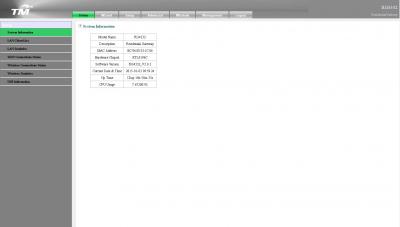
Anyone know how to change DNS settings on Unifi's router? I'm using the router with this kind of settings page:

Attached Image

If this is the wrong forum to ask, can you please guide me to the correct one? Thanks.

This post has been edited by JohnL77: Jan 3 2015, 10:06 AM
kamfoo
post Jan 3 2015, 01:54 PM

Enthusiast
*****
Junior Member
847 posts

Joined: Nov 2010


if tm installer need go up roof top need pay extra or not...? single story house
sHawTY
post Jan 3 2015, 03:35 PM

Frequent Reporter
********
All Stars
14,909 posts

Joined: Jul 2005

QUOTE(kamfoo @ Jan 3 2015, 01:54 PM)
if tm installer need go up roof top need pay extra or not...? single story house
No.
The 15 meters is only counted once it enters the wall of your house.
If you require the technician to use more than 15 meters in your house then only you'll be charged.

I once was nearly scammed by a technician that told me he needs to charge RM150 because the cable exceeds more than 15 meters when it doesn't even reach 5 meters from the main point to the place I told the technician to put the BTU.
I told the technician to go home & I also told him I will report this to TM.
After the technician goes, I called UniFi helpline, report about it & give the helpline the technician's phone number.

The next day, another technician came & install everything without any charge at all.
Like what they're supposed to do.

dankzone
post Jan 3 2015, 03:44 PM

New Member
*
Junior Member
10 posts

Joined: Nov 2014
QUOTE(JohnL77 @ Jan 3 2015, 10:06 AM)
Hi,

Anyone know how to change DNS settings on Unifi's router? I'm using the router with this kind of settings page:

Attached Image

If this is the wrong forum to ask, can you please guide me to the correct one? Thanks.
*
1)Login to your router using the username: operator, password : h566UniFi.
2)Go to Setup->WAN-> edit 1_INTERNET_R icon.
3)Enter Manual DNS, Apply.

Note, for those who haven't already discovered the operator login method on your RG4332s, make sure you modify the password for security purposes. Best way is to delete the admin user, rename the operator to admin, and then set your normal password to this "pure" admin account. TM kinda duped us into thinking that our default admin account is really an admin accessible account. It has actually been set to operator level which has less privileges than an admin account.

Avoid TM's backdoors as much as possible.

This post has been edited by dankzone: Jan 3 2015, 03:46 PM
kamfoo
post Jan 3 2015, 04:30 PM

Enthusiast
*****
Junior Member
847 posts

Joined: Nov 2010


hi thank for ur input. im register to maxis.. i think hard to get them come again....My plan is put FTB box on roof then tarik thru air well....

QUOTE(sHawTY @ Jan 3 2015, 03:35 PM)
No.
The 15 meters is only counted once it enters the wall of your house.
If you require the technician to use more than 15 meters in your house then only you'll be charged.

I once was nearly scammed by a technician that told me he needs to charge RM150 because the cable exceeds more than 15 meters when it doesn't even reach 5 meters from the main point to the place I told the technician to put the BTU.
I told the technician to go home & I also told him I will report this to TM.
After the technician goes, I called UniFi helpline, report about it & give the helpline the technician's phone number.

The next day, another technician came & install everything without any charge at all.
Like what they're supposed to do.
*
petlu28
post Jan 3 2015, 04:51 PM

Look at all my stars!!
*******
Senior Member
3,936 posts

Joined: Dec 2010
Can anyone advise which one should choose? Unifi or maxis home? Thanks
dankzone
post Jan 3 2015, 06:18 PM

New Member
*
Junior Member
10 posts

Joined: Nov 2014
QUOTE(sHawTY @ Jan 3 2015, 03:35 PM)
No.
The 15 meters is only counted once it enters the wall of your house.
If you require the technician to use more than 15 meters in your house then only you'll be charged.

I once was nearly scammed by a technician that told me he needs to charge RM150 because the cable exceeds more than 15 meters when it doesn't even reach 5 meters from the main point to the place I told the technician to put the BTU.
I told the technician to go home & I also told him I will report this to TM.
After the technician goes, I called UniFi helpline, report about it & give the helpline the technician's phone number.

The next day, another technician came & install everything without any charge at all.
Like what they're supposed to do.
*
I payed RM170 for free cabling too. Got ripped off on the first day. Beware of these contractors.
sHawTY
post Jan 3 2015, 06:43 PM

Frequent Reporter
********
All Stars
14,909 posts

Joined: Jul 2005

QUOTE(dankzone @ Jan 3 2015, 06:18 PM)
I payed RM170 for free cabling too. Got ripped off on the first day. Beware of these contractors.
Did you report to TM or not?
JohnL77
post Jan 3 2015, 07:08 PM

Regular
******
Senior Member
1,887 posts

Joined: Mar 2013


QUOTE(dankzone @ Jan 3 2015, 03:44 PM)
1)Login to your router using the username: operator, password : h566UniFi.
2)Go to Setup->WAN-> edit 1_INTERNET_R icon.
3)Enter Manual DNS, Apply.

Note, for those who haven't already discovered the operator login method on your RG4332s, make sure you modify the password for security purposes. Best way is to delete the admin user, rename the operator to admin, and then set your normal password to this "pure" admin account. TM kinda duped us into thinking that our default admin account is really an admin accessible account. It has actually been set to operator level which has less privileges than an admin account.

Avoid TM's backdoors as much as possible.
*
It worked! rclxms.gif Thanks!

Is it okay to delete the "admin" account? Won't it breach some terms of service or something? How to delete this account?

What other backdoor things are TM doing? Teach me, sifu.

125 Pages « < 113 114 115 116 117 > » Top
Topic ClosedOptions
 

Change to:
| Lo-Fi Version
0.0383sec    0.77    6 queries    GZIP Disabled
Time is now: 18th December 2025 - 01:11 PM