Welcome Guest ( Log In | Register )

Bump Topic Topic Closed RSS Feed

Outline · [ Standard ] · Linear+

Unifi Official TM UniFi High Speed Broadband Thread V19, ( -_・) ︻デ═一▸ Maxis & Time

views
     
dankzone
post Dec 24 2014, 09:07 PM

New Member
*
Junior Member
10 posts

Joined: Nov 2014
Guys,

has anyone of you successfully connected Huawei's EC6106V5 STB for HyppTV IPTV wirelessly using stock firmware.? I have had my Unifi 5MBPS for a couple of months now and i find it kinda useless to be subscribed to HyppTV without getting access to it because the BTU and RG has been far away from my main TV.

I have my RG4332 residential gateway modem connected to my home network which has a 16-port switch and 2 other wireless routers across the house. Since it is a 2 storey house, and every room has an ethernet port already concealed and connected to the switch in the store room via cat5 cable, I managed to strategically place the wireless routers & RG4332 & BTU so that every room has got wireless connectivity without dead-spots. However, I still have a problem for my STB because my TV is no where near any ethernet port, and I want to configure it with what I already have without spending extra to get the channels for my TV.

The only logical way i can think of is to wirelessly connect this EC6106V5 STB to the home network or RG4332 router so that I can plug it to my TV via HDMI without cables running around(everything else is concealed so a bit cacat to run a long ass ethernet cable from any of the LAN ports around the house).

So far, I have a couple of options. Obvious one is to buy the ever famous homeplug and voilah!, problem solved. But my house has 3 phase power with different circuit breakers upstairs and downstairs, and the Unifi technicians only managed to install the BTU and RG upstairs, which was at the front of the house where it was the easiest to pull the fibre optic cable straight from the TNB tiang. So I don't wanna risk buying a pair and then it doesn't work. It might work but I'm putting this idea on hold for budget purposes.

The second option is to use Huawei's STBs built in wireless connectivity function to directly access IPTV over the air. I can connect to the internet through the STB's browser if i use any of the available wifi connections from the house, but obviously the IPTV doesn't work because the RG4332 has only port 4 associated with IPTV functionality. So i tried fixing one wireless access point straight to lanPort4 and was hoping that once the STB connects to this Wifi point, it will work but it didn't.

Then, I found out how to go into operator mode and bind an SSID together with LANport4 to the VLAN 600 WAN connection which is Unifi's IPTV service in the RG4332. For some odd reason, it shows a no satellite image on the channels but I am able to browse TV guide etc, which was frustrating because it doesn't make sense! All the network configuration(host ip,dns and gateway address) is the same as plugging through a LAN cable but the damn channels don't show.

Third final option is to get a Unifi supported router and either try port binding there or flash my RG4332 or other routers with custom firmware like OpenWRT etc, but costs $ and risk of losing internet connection over the next few days.

So, My question to any technically savvy lowyat forum users out there is: is there a way to configure the given stock router from unifi and successfully connect the STB wirelessly with working channels including HD ones.? Took me the whole day to crack this puzzle, so I would appreciate if any one out there has been through this before or tried hooking up this shit (EC6106V5 wirelessly to RG4332).

Thank you for the feedback, if any. Have a nice day peeps

This post has been edited by dankzone: Dec 24 2014, 09:12 PM


Attached thumbnail(s)
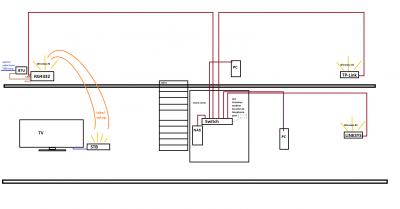
Attached Image Attached Image
dankzone
post Dec 27 2014, 10:11 AM

New Member
*
Junior Member
10 posts

Joined: Nov 2014
QUOTE(raynman @ Dec 25 2014, 09:12 AM)
The built-in wireless adapter in the Huawei STB cannot be used for IPTV streaming in Unifi.

It is meant for Streamyx use.

I, too, have tried to attach a wireless AP to LanPort4 of the RG to connect to the STB, but it also showed a no satellite image on the TV screen.

Your best bet is to use an Aztech homeplug solution designed for 3-phase operation.

user posted image
*
Thanks for the clarification raynman. Guess I will settle with the homeplugs.

Arigato
dankzone
post Dec 28 2014, 02:26 PM

New Member
*
Junior Member
10 posts

Joined: Nov 2014
QUOTE(Ned_Fromthenorth @ Dec 28 2014, 02:16 PM)
something wrong with the unifi occ website? cant get it without being redirect to the mytm site.
*
nope, works on my end as of 14:24 - 28/12/14
dankzone
post Dec 30 2014, 06:25 PM

New Member
*
Junior Member
10 posts

Joined: Nov 2014
QUOTE(neato4u @ Dec 30 2014, 01:37 AM)
Guys, can someone please shed some light here..

I'm using VIP5 for 2 years. No issues. But lately when it's night time (10pm onwards) the internet is super slow... It's like on dial up speed.
Opening webpages is slow.. even whatsapp loading images is slow..

I am in total control over the network at my place, so no it's not been hacked (can't see any other unknown connection from router status) and not WIFI issues (even plugged a LAN directly). Tested on different computers and phones as well all the same.

Come morning speed is back to normal...

Can someone suggest anything other than contacting TMnut..
*
Sometimes even though it may seem like everything is normal, something might be leeching without trace. Best scenario is to maybe limit connection to one wired device by switching off wireless access or set the mac filter on the router for only your device and test the connection with this configuration. If it still persists or if you have tried this already, try a hard reset but make sure you know your unifi username/password and how to reconfigure the modem.

If this doesn't help, it's most likely that you've been throttled some way or another, and i have no experience dealing with this as it's likely beyond a customer's control at this point.
dankzone
post Dec 31 2014, 03:34 PM

New Member
*
Junior Member
10 posts

Joined: Nov 2014
QUOTE(LostAndFound @ Dec 31 2014, 08:47 AM)
Don't rule out virus as well, good to monitor exactly how much your system is using (not how much speed you 'feel' while browsing). Applies to all devices.
*
Good point.
dankzone
post Jan 3 2015, 03:44 PM

New Member
*
Junior Member
10 posts

Joined: Nov 2014
QUOTE(JohnL77 @ Jan 3 2015, 10:06 AM)
Hi,

Anyone know how to change DNS settings on Unifi's router? I'm using the router with this kind of settings page:

[attachmentid=4285017]

If this is the wrong forum to ask, can you please guide me to the correct one? Thanks.
*
1)Login to your router using the username: operator, password : h566UniFi.
2)Go to Setup->WAN-> edit 1_INTERNET_R icon.
3)Enter Manual DNS, Apply.

Note, for those who haven't already discovered the operator login method on your RG4332s, make sure you modify the password for security purposes. Best way is to delete the admin user, rename the operator to admin, and then set your normal password to this "pure" admin account. TM kinda duped us into thinking that our default admin account is really an admin accessible account. It has actually been set to operator level which has less privileges than an admin account.

Avoid TM's backdoors as much as possible.

This post has been edited by dankzone: Jan 3 2015, 03:46 PM
dankzone
post Jan 3 2015, 06:18 PM

New Member
*
Junior Member
10 posts

Joined: Nov 2014
QUOTE(sHawTY @ Jan 3 2015, 03:35 PM)
No.
The 15 meters is only counted once it enters the wall of your house.
If you require the technician to use more than 15 meters in your house then only you'll be charged.

I once was nearly scammed by a technician that told me he needs to charge RM150 because the cable exceeds more than 15 meters when it doesn't even reach 5 meters from the main point to the place I told the technician to put the BTU.
I told the technician to go home & I also told him I will report this to TM.
After the technician goes, I called UniFi helpline, report about it & give the helpline the technician's phone number.

The next day, another technician came & install everything without any charge at all.
Like what they're supposed to do.
*
I payed RM170 for free cabling too. Got ripped off on the first day. Beware of these contractors.
dankzone
post Jan 5 2015, 03:53 PM

New Member
*
Junior Member
10 posts

Joined: Nov 2014
QUOTE(sHawTY @ Jan 3 2015, 06:43 PM)
Did you report to TM or not?
*
Nope, long story short, i was pissed but rather too excited about getting fibre internet that I considered it as tips after they left. paiseh. too lazy to tell the full story also but they conned me for sure, illegally.
dankzone
post Jan 5 2015, 04:18 PM

New Member
*
Junior Member
10 posts

Joined: Nov 2014
QUOTE(JohnL77 @ Jan 3 2015, 07:08 PM)
It worked!  rclxms.gif  Thanks!

Is it okay to delete the "admin" account? Won't it breach some terms of service or something? How to delete this account?

What other backdoor things are TM doing? Teach me, sifu.
*
Yes, that would be fine.

The real sifu is master rizvanrp, take a look at his guide to router security and concerns about TM's practices:

https://rizvanrp.com/pub/unifi_athena_my/ro...curity.php.html

To summarize, and for a specific router like RG4332:

A)Default username/password combination can be changed at Management->User Management.
B)TR-069 Protocol can be disabled at Management->TR069 Configuration.
C)Firewall Settings at Advanced->Anti Attack.
D)Remote Management at Advanced->Access Control which is already configured for only pinging by default.

dankzone
post Jan 6 2015, 11:39 PM

New Member
*
Junior Member
10 posts

Joined: Nov 2014
QUOTE(nubye @ Jan 6 2015, 11:06 PM)
Paid RM400 to the installer today because he said I had to pay RM450 to TM because I had to install it on the 1st Floor of my house, so he could do it for cheaper. Did I get ripped off or is this normal?
*
These are the official Installation Guides for both Standard & Optional Installation if you're under residential landed property category:

https://www.tm.com.my/Home/Broadband/unifi/...-Diagram-v1.jpg

https://www.tm.com.my/Home/Broadband/unifi/...-Diagram-v1.jpg

Most come under the free category(standard) but it depends on how long and the type of wiring/conduit required for the job. Sometimes they cincai charge you cuz you aren't sure yourself of the specifics when they come to survey and quote. I read that sometimes you can negotiate and get a discount, I was charged RM170 for cabling which i realized was free, and the installer gave me a discount of RM20 because he didn't have small change with him. So, to answer your question, you can refer to the type of installation from the sheet of paper you signed(given to you after installation), and compare it with the table above to see if it matches. Most probably they overcharged you in the case of many prior incidents. shakehead.gif

This post has been edited by dankzone: Jan 6 2015, 11:56 PM

Topic ClosedOptions
 

Change to:
| Lo-Fi Version
0.0496sec    0.29    7 queries    GZIP Disabled
Time is now: 16th December 2025 - 05:59 PM