

hi all, need help about public ip and private ip
my maxis is private ip now, is any benefit when we on private ip ? thank you
The Official Maxis FTTH Thread | v4, Maxis Home Fibre Internet, from RM148
The Official Maxis FTTH Thread | v4, Maxis Home Fibre Internet, from RM148
|
|
 Jun 18 2013, 09:59 PM Jun 18 2013, 09:59 PM
|
 
Junior Member
25 posts Joined: Jun 2009 
|
hi all, need help about public ip and private ip
my maxis is private ip now, is any benefit when we on private ip ? thank you |
|
|
|
|
|
Jun 18 2013, 10:02 PM
|

Senior Member
3,310 posts Joined: Apr 2005
|
After a year using, so far so good. Noticed a lot bad experience here.
I'm not gamer, most usage for online streaming, EPL, drama, torrent. Torrent is good, healthy one always up to 1000kbps. |
|
|
Jun 19 2013, 04:47 PM
|

Senior Member
1,866 posts Joined: Dec 2006 From: Klang  
|
QUOTE(feizaiII @ Jun 18 2013, 10:02 PM) After a year using, so far so good. Noticed a lot bad experience here. I hope mine would be same as yours, stable~I'm not gamer, most usage for online streaming, EPL, drama, torrent. Torrent is good, healthy one always up to 1000kbps.  |
|
|
Jun 19 2013, 10:21 PM
|

Junior Member
215 posts Joined: Jul 2006
|
QUOTE(wiraone @ Jun 1 2013, 09:03 PM) 1. Logon into router after u restart u manage to surf via unblock-us DNS? i change that, but when i restart > open netflix > out of region. how laa2. Go to path => Home Network -> Interfaces 3. Click on LocalNetwork and click on Configure 4. Under DHCP Pools, click Edit button on LAN_private 5. Edit the Primary/Secondary DNS fields 6. Click on Apply 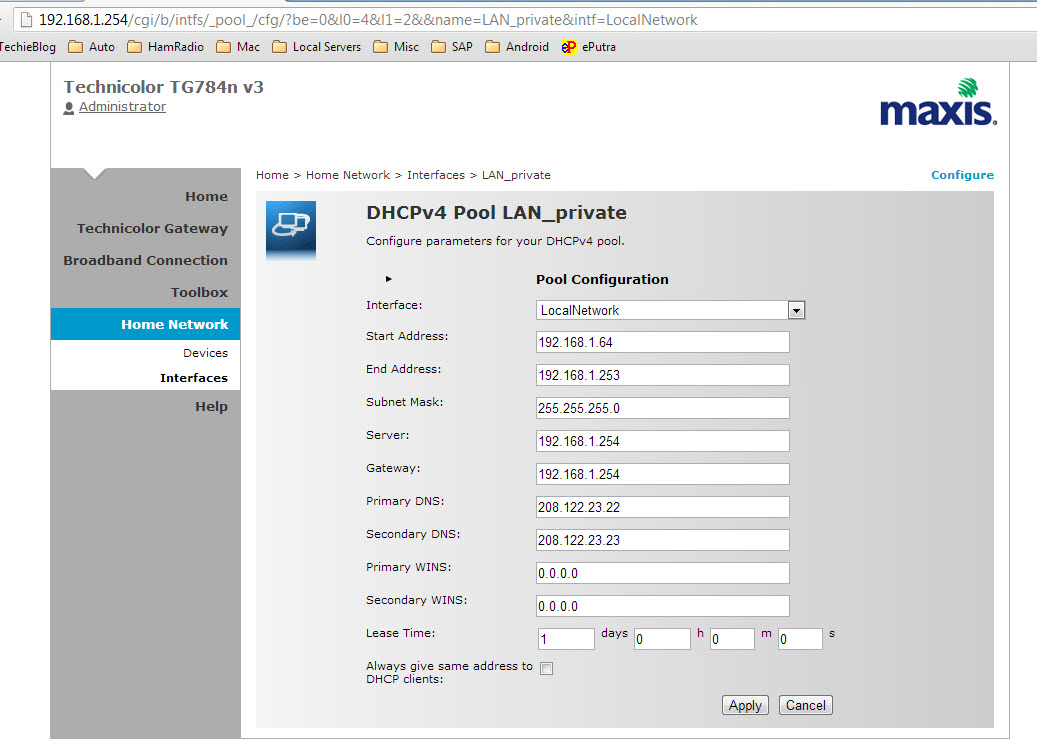 Note: I reset my router yesterday and start a new, didn't need to use Administrator to do all the setup. |
|
|
Jun 19 2013, 10:29 PM
|

Junior Member
335 posts Joined: Feb 2009
|
QUOTE(kkm @ Jun 14 2013, 11:18 AM) That's the angle which many users do not mention. Unifi has come up with a good upgrade campaign. I signed up for the rm118 deal. For that, I got: a) 10mbps up and down. I'm not much of an online gamer, so I have no complaints on the ping issue (although that has improved a lot since the early days). My downloads (unlimited so far) are super fast and upload (pictures, dropbox, etc) also no complaints. b) I get 200 mins IDD to 20 countries, including places relevant to me like UK and Australia, so I save easily rm30-50 per month on that. c) I get 600 mins for my house phone to call Maxis mobile phones. As many of my family and friends are on Maxis, that's a real saving. d) There's also 150 free minutes added to my personal Maxis mobile line I was on Unifi before this, paid rm150 fpr 5 mbps which included IPTV which I never watched, and got free calls to TM fixed line phones (how many friends do you know use that?). And calls to mobile were expensive. So for me, the numbers were compelling. In fact, I paid the rm500 penalty to TM to break my contract. Though, I must say, there have been some hiccups along the way, but nothing so bad that I would want to give up the service... |
|
|
Jun 20 2013, 01:05 AM
|
|
Junior Member
32 posts Joined: Oct 2010
|
QUOTE(bllizard19 @ Jun 19 2013, 10:21 PM) after u restart u manage to surf via unblock-us DNS? i change that, but when i restart > open netflix > out of region. how laa I don't think your problem is dns related. It should be due to your internet ip range which is not US IP range. You'll need vpn to US for that |
|
|
|
|
|
Jun 20 2013, 09:16 AM
|
|
Junior Member
215 posts Joined: Jul 2006
|
QUOTE(gogetter83 @ Jun 20 2013, 01:05 AM) I don't think your problem is dns related. It should be due to your internet ip range which is not US IP range. You'll need vpn to US for that thats the use of the DNS from unblock-us (a paid service). been using all this while on my Unifi's d-link. |
|
|
Jun 20 2013, 09:19 AM
|
|
Junior Member
335 posts Joined: Feb 2009
|
QUOTE(bllizard19 @ Jun 20 2013, 09:16 AM) thats the use of the DNS from unblock-us (a paid service). been using all this while on my Unifi's d-link. Guys, Maxis sucks big time. Just check out the complaints on their own forum https://forum.maxis.com.my/forum_forum.asp?FORUM_ID=70 |
|
|
Jun 20 2013, 09:23 AM
|

Senior Member
3,892 posts Joined: Jan 2003 From: Back on earth!
|
QUOTE(bllizard19 @ Jun 19 2013, 10:21 PM) after u restart u manage to surf via unblock-us DNS? i change that, but when i restart > open netflix > out of region. how laa You need to go to unblock-us.com using your pc with your DNS correctly set, do check service, if it is verified, then restart your appletv or from your pc, you'll allow to log into netflix. |
|
|
Jun 20 2013, 02:26 PM
|
|
Senior Member
3,892 posts Joined: Jan 2003 From: Back on earth!
|
QUOTE(adslgourou @ Jun 20 2013, 09:19 AM) Guys, Maxis sucks big time. Just check out the complaints on their own forum https://forum.maxis.com.my/forum_forum.asp?FORUM_ID=70 I don't have much complaints about Maxis though I've just subscribe to the service. There was one when the VOIP went to unregistered and the support people quite helpful. Will see how it goes .. I was using UNIFI before. BTW, I'm using my own router now for Maxis FTTH since I've disconnected UNIFI service yesterday. All went smoothly well with my swap over from Maxis router to my own router. Bad thing we couldn't put OpenWRT into Maxis router, I have two in my house, the installer left his and didn't come and pick up ..  Next project for me, move the VOIP from Maxis router to my old Linksys VOIP adapter. Or probably the best to just use the second voip port in the Huawei modem... This post has been edited by wiraone: Jun 20 2013, 02:28 PM |
|
|
Jun 20 2013, 05:11 PM
|

Junior Member
563 posts Joined: Apr 2009 From: Where the music plays...
|
QUOTE(wiraone @ Jun 20 2013, 02:26 PM) I don't have much complaints about Maxis though I've just subscribe to the service. There was one when the VOIP went to unregistered and the support people quite helpful. Will see how it goes .. I was using UNIFI before. BTW, I'm using my own router now for Maxis FTTH since I've disconnected UNIFI service yesterday. All went smoothly well with my swap over from Maxis router to my own router. Bad thing we couldn't put OpenWRT into Maxis router, I have two in my house, the installer left his and didn't come and pick up .. Which router u using bro? I have WR1043ND. Can use for maxis? Care to explain how, settings, etc and would it work with byond iptv as I am using byond iptv with maxis bb.Next project for me, move the VOIP from Maxis router to my old Linksys VOIP adapter. Or probably the best to just use the second voip port in the Huawei modem... |
|
|
Jun 20 2013, 05:27 PM
|
|
Senior Member
3,892 posts Joined: Jan 2003 From: Back on earth!
|
QUOTE(aceedburn @ Jun 20 2013, 05:11 PM) Which router u using bro? I have WR1043ND. Can use for maxis? Care to explain how, settings, etc and would it work with byond iptv as I am using byond iptv with maxis bb. I'm using Buffalo WHR-G300NH, but WR1043ND should works too. There is another thread about this, I believe they're saying the WR1043ND will disable it WAN port when it sense that it is not using the official firmware. BTW, I'm using OpenWRT and since I don't use IPTV, I couldn't test this. Setting is a straight forward, just like when you're setting for UNIFI, just that the VLAN is changed from 500 to 621 for internet .. |
|
|
Jun 20 2013, 05:59 PM
|
|
Junior Member
563 posts Joined: Apr 2009 From: Where the music plays...
|
QUOTE(wiraone @ Jun 20 2013, 05:27 PM) I'm using Buffalo WHR-G300NH, but WR1043ND should works too. There is another thread about this, I believe they're saying the WR1043ND will disable it WAN port when it sense that it is not using the official firmware. BTW, I'm using OpenWRT and since I don't use IPTV, I couldn't test this. thanks bro, will try and see. Setting is a straight forward, just like when you're setting for UNIFI, just that the VLAN is changed from 500 to 621 for internet .. |
|
|
|
|
|
Jun 21 2013, 10:15 AM
|
|
Senior Member
1,866 posts Joined: Dec 2006 From: Klang
|
QUOTE(wiraone @ Jun 20 2013, 02:26 PM) I don't have much complaints about Maxis though I've just subscribe to the service. There was one when the VOIP went to unregistered and the support people quite helpful. Will see how it goes .. I was using UNIFI before. BTW, I'm using my own router now for Maxis FTTH since I've disconnected UNIFI service yesterday. All went smoothly well with my swap over from Maxis router to my own router. Bad thing we couldn't put OpenWRT into Maxis router, I have two in my house, the installer left his and didn't come and pick up .. Bro, so far how's the connection?Next project for me, move the VOIP from Maxis router to my old Linksys VOIP adapter. Or probably the best to just use the second voip port in the Huawei modem... |
|
|
Jun 21 2013, 04:21 PM
|

Senior Member
2,266 posts Joined: Jul 2009 From: Macintosh HD 
|
just got my Maxis IPTV installed.. not bad
|
|
|
Jun 21 2013, 04:37 PM
|
|
Senior Member
3,892 posts Joined: Jan 2003 From: Back on earth!
|
QUOTE(Liuism @ Jun 21 2013, 10:15 AM) Bro, so far how's the connection? It is okay as for my need, couldn't really tell if it is faster the my VIP5 during internet browsing but downloading is well faster .. no regret for me, at least for now . |
|
|
Jun 21 2013, 05:19 PM
|

Junior Member
199 posts Joined: Jan 2003 From: KL-Singapore
|
Still cant find a way to use my own router for Maxis Astro IPTV.. Changed the VLAN port on my asus 823,822,821,721 all but not working. AStro shows IP and multicast gateway...but no picture.. adding 1 more problem to me..
Also, if your Internet is down.. bye bye ASTRO even in hybrid mode.. Reboot modem also.. Thought hybrid mode would just change the signal to dish but it's not. |
|
|
Jun 21 2013, 05:24 PM
|
|
Senior Member
2,266 posts Joined: Jul 2009 From: Macintosh HD
|
pikaphebat.. the installer told me vlan 823 is the id for iptv.. sure not working? shit means need to stick with default router
|
|
|
Jun 21 2013, 05:44 PM
|

Senior Member
1,649 posts Joined: Jan 2003
|
Does Maxis Fiber use same physical lines as Unifi?
If so, is routing similar? Reliability similar? |
|
|
Jun 21 2013, 11:59 PM
|

Senior Member
2,466 posts Joined: Nov 2004
|
QUOTE(biatche @ Jun 21 2013, 05:44 PM) Does Maxis Fiber use same physical lines as Unifi? Same line. If so, is routing similar? Reliability similar? Routing is different for Internet traffic. |
|
Topic ClosedOptions
|
| Change to: |  0.0350sec 0.0350sec
 0.12 0.12
 6 queries 6 queries
 GZIP Disabled GZIP Disabled
Time is now: 6th December 2025 - 05:39 PM |
 Quote
Quote