
Welcome Guest ( Log In | Register )

Bump Topic Topic Closed RSS Feed

Outline · [ Standard ] · Linear+

 The Official Maxis FTTH Thread | v4, Maxis Home Fibre Internet, from RM148

views
     
bllizard19
post Jun 19 2013, 10:21 PM

Getting Started
**
Junior Member
215 posts

Joined: Jul 2006
QUOTE(wiraone @ Jun 1 2013, 09:03 PM)
1. Logon into router
2. Go to path => Home Network -> Interfaces
3. Click on LocalNetwork and click on Configure
4. Under DHCP Pools, click Edit button on LAN_private
5. Edit the Primary/Secondary DNS fields
6. Click on Apply
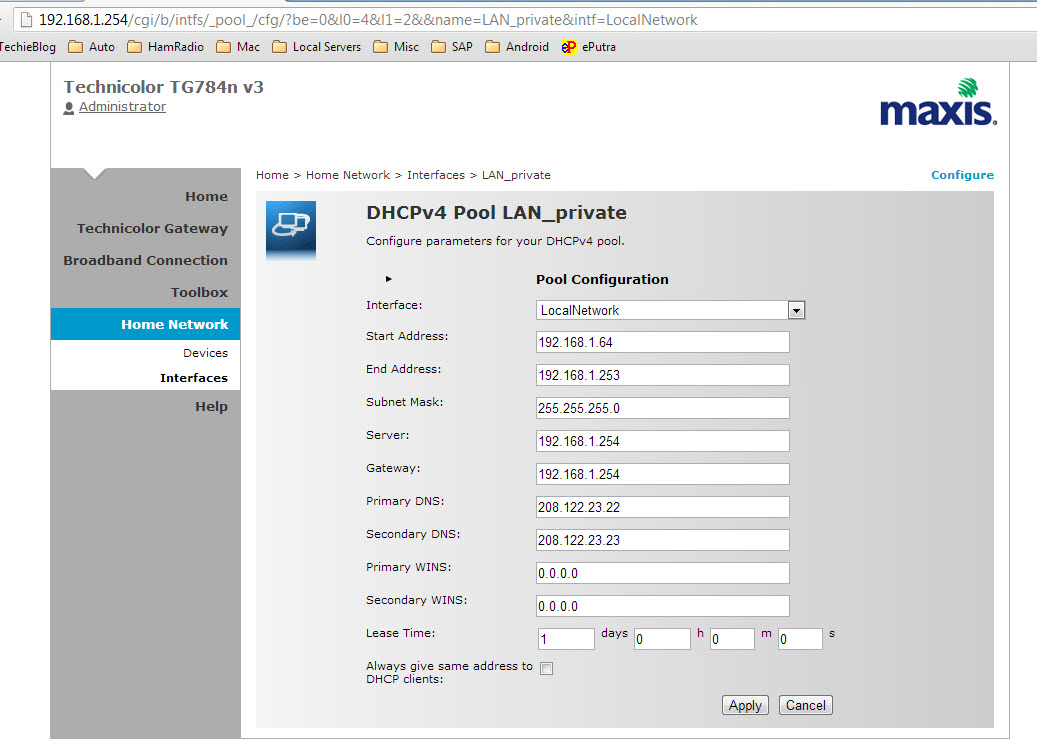
user posted image

Note: I reset my router yesterday and start a new, didn't need to use Administrator to do all the setup.
*
after u restart u manage to surf via unblock-us DNS? i change that, but when i restart > open netflix > out of region. how laa
bllizard19
post Jun 20 2013, 09:16 AM

Getting Started
**
Junior Member
215 posts

Joined: Jul 2006
QUOTE(gogetter83 @ Jun 20 2013, 01:05 AM)
I don't think your problem is dns related. It should be due to your internet ip range which is not US IP range. You'll need vpn to US for that
*
thats the use of the DNS from unblock-us (a paid service). been using all this while on my Unifi's d-link.
bllizard19
post Jun 29 2013, 09:36 AM

Getting Started
**
Junior Member
215 posts

Joined: Jul 2006
Hi, anyone manage to change the ip to google open dns or unblock-us dns? I changes the dns setting in router but its does not take effect. Any way to use our own router for this maxis BB? My ROKU3 not working since the day i change from unifi to this maxis (due to the iptv offer).
bllizard19
post Jun 29 2013, 11:13 AM

Getting Started
**
Junior Member
215 posts

Joined: Jul 2006
QUOTE(StanleYz @ Jun 29 2013, 01:34 AM)
TL-WDR4300 new firmware support maxis fiber+astro iptv

http://www.tp-link.com.my/support/download...4300&version=V1
*
u used the same router to connect to Maxis fibre + iptv? can u use custom DNS?

Topic ClosedOptions
 

Change to:
| Lo-Fi Version
0.0413sec    0.50    7 queries    GZIP Disabled
Time is now: 5th December 2025 - 09:25 PM