

QUOTE(wiraone @ May 13 2013, 11:28 AM)
Finally, managed to change my DNS to unblock-us .. !!

do you mind letting me know how bro?The Official Maxis FTTH Thread | v4, Maxis Home Fibre Internet, from RM148
|
|
 Jun 1 2013, 03:53 PM Jun 1 2013, 03:53 PM
Return to original view | Post
#1
|
 
Junior Member
563 posts Joined: Apr 2009 From: Where the music plays...   
|
QUOTE(wiraone @ May 13 2013, 11:28 AM) Finally, managed to change my DNS to unblock-us .. !! do you mind letting me know how bro? |
|
|
|
|
|
Jun 7 2013, 03:35 PM
Return to original view | Post
#2
|
|
Junior Member
563 posts Joined: Apr 2009 From: Where the music plays...
|
QUOTE(Liuism @ Jun 5 2013, 05:55 PM) guys, the maxis home fiber+voice line is same cable/fiber with TM rite, therefore no problem to connect to the alarm system right? Please advise. yes it uses the same unifi infrastructure. however as default, maxis uses private ip and therefore you cannot connect with your cctv unless you request for a public ip. I did that but had to call the centre several times before they fiannly did it. after they activate your public ip, you have to change your username from xxxx@home.maxis, etc to xxxx@public.maxis,etc.... |
|
|
Jun 20 2013, 05:11 PM
Return to original view | Post
#3
|
|
Junior Member
563 posts Joined: Apr 2009 From: Where the music plays...
|
QUOTE(wiraone @ Jun 20 2013, 02:26 PM) I don't have much complaints about Maxis though I've just subscribe to the service. There was one when the VOIP went to unregistered and the support people quite helpful. Will see how it goes .. I was using UNIFI before. BTW, I'm using my own router now for Maxis FTTH since I've disconnected UNIFI service yesterday. All went smoothly well with my swap over from Maxis router to my own router. Bad thing we couldn't put OpenWRT into Maxis router, I have two in my house, the installer left his and didn't come and pick up .. Which router u using bro? I have WR1043ND. Can use for maxis? Care to explain how, settings, etc and would it work with byond iptv as I am using byond iptv with maxis bb. Next project for me, move the VOIP from Maxis router to my old Linksys VOIP adapter. Or probably the best to just use the second voip port in the Huawei modem... |
|
|
Jun 20 2013, 05:59 PM
Return to original view | Post
#4
|
|
Junior Member
563 posts Joined: Apr 2009 From: Where the music plays...
|
QUOTE(wiraone @ Jun 20 2013, 05:27 PM) I'm using Buffalo WHR-G300NH, but WR1043ND should works too. There is another thread about this, I believe they're saying the WR1043ND will disable it WAN port when it sense that it is not using the official firmware. BTW, I'm using OpenWRT and since I don't use IPTV, I couldn't test this. thanks bro, will try and see. Setting is a straight forward, just like when you're setting for UNIFI, just that the VLAN is changed from 500 to 621 for internet .. |
|
|
Jul 15 2013, 02:39 PM
Return to original view | Post
#5
|
|
Junior Member
563 posts Joined: Apr 2009 From: Where the music plays...
|
QUOTE(yoikn @ Jul 15 2013, 02:19 PM) OK. It will not affect the Astro IPTV right? Coz mine is Maxis Fiber + Astro IPTV. Nope, won't effect. I'm using iptv too. Works great.LOL, still haven't got my first bill and i'm already trying to do all sorts of modifications.  |
|
|
Aug 13 2013, 10:16 AM
Return to original view | Post
#6
|
|
Junior Member
563 posts Joined: Apr 2009 From: Where the music plays...
|
QUOTE(dunno @ Aug 12 2013, 11:52 PM) anybody know where to download latest firmware for the technicolor router? U can't download it as it is a customized firmware for maxis fibre use. I had mine upgraded to the latest version when the technician came over recently to troubleshoot some issues. The latest available version is 10.2.5.2 (BE variant). |
|
|
|
|
|
Sep 14 2013, 09:59 PM
Return to original view | Post
#7
|
|
Junior Member
563 posts Joined: Apr 2009 From: Where the music plays...
|
QUOTE(narutokun83 @ Sep 14 2013, 04:48 PM) Astro just finished installing their IPTV services at my place. 10mb maxis fibre internet. Just out of curiosity, didn't u test the network after they installed it?This is a dumb question, but is the modem they provide (Technicolor TG784nv3) able to transmit WIFI like my previous Unifi modem? I can't seem to get my WIFI to work. |
|
|
Oct 1 2013, 07:43 PM
Return to original view | Post
#8
|
|
Junior Member
563 posts Joined: Apr 2009 From: Where the music plays...
|
Yep, I'm on astro iptv powered by maxis. Installed about 4 months ago. So far so good, but internet face slow speeds occasionally but otherwise very happy with it.
|
|
|
Oct 2 2013, 09:42 AM
Return to original view | Post
#9
|
|
Junior Member
563 posts Joined: Apr 2009 From: Where the music plays...
|
QUOTE(knightkew @ Oct 2 2013, 01:33 AM) ur location please? Kelana Jaya. |
|
|
Nov 28 2013, 07:45 PM
Return to original view | Post
#10
|
|
Junior Member
563 posts Joined: Apr 2009 From: Where the music plays...
|
2 days ago the maxis technician remotely updated my technicolor TG784n v3 to version 10.2.7.4 variant CC after I complaint about slow speed. So far so good, and there is a new starting summary page which shows at a glance info including my Astro IPTV connection.
|
|
|
Dec 9 2013, 07:00 PM
Return to original view | Post
#11
|
|
Junior Member
563 posts Joined: Apr 2009 From: Where the music plays...
|
QUOTE(calvin_ng @ Dec 9 2013, 05:45 PM) Change mine to TP-Link router... now it is as solid as a ROCK... That is the best and vital decision to make. Unfortunately, for us with Astro IPTV, we are stuck with the sub-standard Technicolor routers which have the worst wireless range I have ever used in my life. Why can't they allow custom routers and provide the necessary settings needed for IPTV? |
|
|
Dec 10 2013, 09:40 AM
Return to original view | Post
#12
|
|
Junior Member
563 posts Joined: Apr 2009 From: Where the music plays...
|
QUOTE(calvin_ng @ Dec 9 2013, 10:20 PM) The new tp link. Can set the Astro vlan address no problem... I have tried this exact router for Astro IPTV, I set vlan as 822, 821 and even 823 as I read in a forum somewhere, doesn't work. Internet works great but no IPTV. When I asked the technical team, they said only technicolor router can be used for Astro IPTV.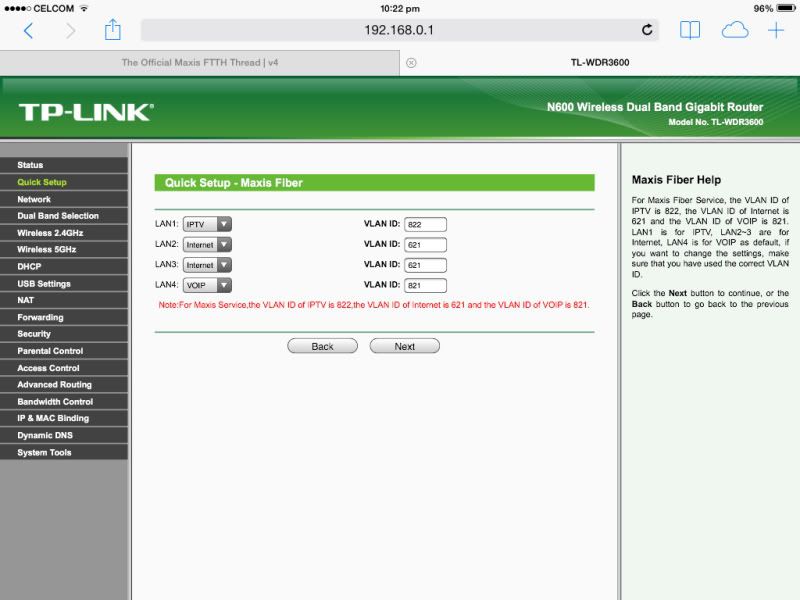 |
|
|
Dec 13 2013, 06:07 PM
Return to original view | Post
#13
|
|
Junior Member
563 posts Joined: Apr 2009 From: Where the music plays...
|
QUOTE(GothFebrio @ Dec 13 2013, 05:46 PM) not sure what they really use(as it depends on contractor), i signed up for maxis+astro iptv. they gave me Technicolor TG784n v3 router. the modem in my case, they just use my unifi modem(BTU). Is it the old black TM btu? That's the huawei hg655g. Ask them to change for you to the new TM btu, huawei hg655m, silver color. After they changed it for me and upgraded the technicolor tg784n v3 with the new firmware, I'm getting much better speed, stability, etc.This post has been edited by aceedburn: Dec 13 2013, 06:08 PM |
|
|
|
|
|
Dec 16 2013, 11:42 AM
Return to original view | Post
#14
|
|
Junior Member
563 posts Joined: Apr 2009 From: Where the music plays...
|
I just noticed that my technicolor router was updated with new firmware again. Now it's version 10.2.8.3 as in the screenshot. I also noticed 2 new WLAN networks as in the other screenshot. Does anyone know what it's for? And another point is I notice now the wireless range is much better. Previously I couldn't be connected in my kitchen and outside verandah, but now I been tried streaming YouTube, no problem. So wireless performance is much better now. But what are the items there for?
Attached thumbnail(s) 

|
|
|
Dec 16 2013, 01:03 PM
Return to original view | Post
#15
|
|
Junior Member
563 posts Joined: Apr 2009 From: Where the music plays...
|
QUOTE(krel89 @ Dec 16 2013, 12:26 PM) im still stuck at 10.2.3.0 Maxis did the update remotely. Maybe u need to call them and ask them to do it. I complained about bad wireless coverage and slow speed, therefore they must loaded the new firmware for me.how to update??? |
|
|
Dec 16 2013, 08:05 PM
Return to original view | Post
#16
|
|
Junior Member
563 posts Joined: Apr 2009 From: Where the music plays...
|
QUOTE(krel89 @ Dec 16 2013, 07:50 PM) u have iptv right?? Yes IPTV, I called Astro and complained about slow speed and bad wireless coverage. I sent them a very nasty email. Very nasty. Next day someone from Astro service recovery unit called me and apologized and gave me 2 options. I can either cancel my Astro IPTV and maxis broadband with no penalty fees and revert back to normal Astro and re-connect my Unifi or give the a chance to solve my problem. So I decided to give one last chance. After that a technician from maxis called me and told me he is remotely upgrading my firmware which includes some new wireless tweaks as in my screenshot in my previous post above, but I don't know what those settings are for. My wireless coverage has indeed improved. Speed also so far so good.called astro or maxis?? |
|
|
Dec 18 2013, 10:58 AM
Return to original view | Post
#17
|
|
Junior Member
563 posts Joined: Apr 2009 From: Where the music plays...
|
Yep, my firmware also auto updated again to version 10.2.8.3 (CN)
Attached thumbnail(s) 
|
|
|
Jan 3 2014, 07:45 PM
Return to original view | Post
#18
|
|
Junior Member
563 posts Joined: Apr 2009 From: Where the music plays...
|
QUOTE(nickcct @ Jan 3 2014, 07:23 PM) Recently notice high ping if use Google DNS. Remove Google DNS and seems high ping solved. Anyone same? Remove Google DNS, then which DNS u use? Maxis default? Or router default? |
|
|
Jan 15 2014, 06:17 PM
Return to original view | Post
#19
|
|
Junior Member
563 posts Joined: Apr 2009 From: Where the music plays...
|
Anyone here using Apple TV? I'm getting constant buffering on streaming radio and netflix. When I connect to my DiGi broadband, streams ok.
|
|
|
Jan 15 2014, 07:45 PM
Return to original view | Post
#20
|
|
Junior Member
563 posts Joined: Apr 2009 From: Where the music plays...
|
QUOTE(aeiou228 @ Jan 15 2014, 06:22 PM) I'm fine here. Wifi or Lan ? Tried both. When I connect with DiGi broadband it's fine. I've made a complaint to Astro already. |
|
Topic ClosedOptions
|
| Change to: |  0.0264sec 0.0264sec
 0.31 0.31
 7 queries 7 queries
 GZIP Disabled GZIP Disabled
Time is now: 1st December 2025 - 09:33 PM |
 Quote
Quote