

Hi ASUSmy,
I just tested it and i found it works! Thanks!
Home Networking ASUS Malaysia Networking User & Technical Support, Managed by ASUS Malaysia Representative
Home Networking ASUS Malaysia Networking User & Technical Support, Managed by ASUS Malaysia Representative
|
|
 Nov 30 2018, 05:37 PM Nov 30 2018, 05:37 PM
|
 
Junior Member
466 posts Joined: Dec 2005  
|
Hi ASUSmy,
I just tested it and i found it works! Thanks! |
|
|
|
 |
Nov 30 2018, 06:07 PM
|

Senior Member
2,319 posts Joined: Mar 2010
|
QUOTE(aimeh @ Nov 30 2018, 05:37 PM) Hi ASUSmy, I just tested it and i found it works! Thanks!   |
|
|
Nov 30 2018, 06:08 PM
|
|
Senior Member
2,319 posts Joined: Mar 2010
|
Good News for Lyra user.
If your main router can support AiMesh then you can turn your Lyra to AiMesh Node. https://www.asus.com/my/Networking/Lyra/HelpDesk_BIOS/ This post has been edited by ASUSmy: Nov 30 2018, 06:09 PM Attached thumbnail(s) 
|
|
|
Dec 1 2018, 10:01 AM
|

Senior Member
1,916 posts Joined: Mar 2007 From: Petaling Jaya 
|
Hi ASUSmy,
i have checked my unifi already in turbo package(500mbps), but how come my AC87U router cannot reach 500mbps? not even 100mbps actually. Thanks. |
|
|
Dec 2 2018, 01:45 PM
Show posts by this member only | IPv6 | Post
#9525
|
 
Staff
7,529 posts Joined: Jan 2003
|
ASUSmy
What unifi router would you suggest for a house coverage that is more that 2000 square feet? It’s a townhouse with 3 storey. I had the RT12hp and the WiFi range is ok but since I’m turbo-ed to 500mbps, I’m looking at ac1300 uhp, ac1200 and AC58 Though ac1200 is using a 5db antenna, it’s not high powered like ac1300 right? The default dlink DIR-842 dual band given by them are laggy after a few days and the 5ghz isn’t good enough. Would the UHP antenna 5ghz penetration be better than the DIR 842? |
|
|
Dec 3 2018, 09:20 AM
|
|
Senior Member
2,319 posts Joined: Mar 2010
|
QUOTE(Lynixx @ Dec 1 2018, 10:01 AM) Hi ASUSmy, Hi Lynixx,i have checked my unifi already in turbo package(500mbps), but how come my AC87U router cannot reach 500mbps? not even 100mbps actually. Thanks. May I know what is the speed that you get if use LAN to do the speedtest? Please check whether you have enabled QoS. Thank you |
|
|
|
|
|
Dec 3 2018, 09:59 AM
|
|
Senior Member
2,319 posts Joined: Mar 2010
|
QUOTE(nairud @ Dec 2 2018, 01:45 PM) ASUSmy Hi nairud,What unifi router would you suggest for a house coverage that is more that 2000 square feet? It’s a townhouse with 3 storey. I had the RT12hp and the WiFi range is ok but since I’m turbo-ed to 500mbps, I’m looking at ac1300 uhp, ac1200 and AC58 Though ac1200 is using a 5db antenna, it’s not high powered like ac1300 right? The default dlink DIR-842 dual band given by them are laggy after a few days and the 5ghz isn’t good enough. Would the UHP antenna 5ghz penetration be better than the DIR 842? 5GHz will have shorter coverage compared to 2.4GHz when there is a blockage. And for 500Mbps, I would recommend to use 5GHz with 1300Mbps transfer rate and above. If you are comparing these 3 units, I would go for RT-AC13UHP. Thank you |
|
|
Dec 3 2018, 10:45 PM
|
|
Senior Member
1,916 posts Joined: Mar 2007 From: Petaling Jaya
|
QUOTE(ASUSmy @ Dec 3 2018, 09:20 AM) Hi Lynixx, 5.80Mbps...May I know what is the speed that you get if use LAN to do the speedtest? Please check whether you have enabled QoS. Thank you at first i did not enable QoS, but after enabled the result still same. |
|
|
Dec 3 2018, 11:27 PM
|

Senior Member
2,551 posts Joined: Jan 2003 From: Cheras / Ampang
|
ASUSmy
May I know what is the optimal setting for the GT-AC5300? I'm using Unifi 800MB. Thanks~ |
|
|
Dec 4 2018, 12:18 AM
|

Junior Member
245 posts Joined: Feb 2010
|
QUOTE(ASUSmy @ Nov 30 2018, 07:08 PM) Good News for Lyra user. If your main router can support AiMesh then you can turn your Lyra to AiMesh Node. https://www.asus.com/my/Networking/Lyra/HelpDesk_BIOS/  |
|
|
Dec 4 2018, 09:46 AM
|
|
Senior Member
2,319 posts Joined: Mar 2010
|
QUOTE(Lynixx @ Dec 3 2018, 10:45 PM) 5.80Mbps... Hi Lynixx,at first i did not enable QoS, but after enabled the result still same. 5.8Mbps from LAN is not normal unless you have high ping and server not from Malaysia. Can you tryupdate the firmware to the latest and do a factory reset. Thank you |
|
|
Dec 4 2018, 09:52 AM
|
|
Senior Member
2,319 posts Joined: Mar 2010
|
QUOTE(cskean @ Dec 3 2018, 11:27 PM) ASUSmy Hi cskean,May I know what is the optimal setting for the GT-AC5300? I'm using Unifi 800MB. Thanks~ You can have a look at the link below. https://www.asus.com/au/News/tsDROi4VXXflT7H5 Thank you |
|
|
Dec 4 2018, 07:24 PM
|
 
Elite
8,415 posts Joined: Jul 2008 
|
Quick test of Asus RT-AX88U
This is tested with PCE-AC88 since there are no AX adapters in the market yet. AX can help with AC devices since the newer chipset normally comes with better interference mitigation and faster processing. I expect the performance to be even better when AX receivers are mainstream.  |
|
|
|
|
|
Dec 4 2018, 10:49 PM
|

Senior Member
1,155 posts Joined: Apr 2016
|
QUOTE(blacktubi @ Dec 4 2018, 07:24 PM) Quick test of Asus RT-AX88U Cool. Can't wait for your 2.4Ghz speed test once you get your 802.11AX adapter This is tested with PCE-AC88 since there are no AX adapters in the market yet. AX can help with AC devices since the newer chipset normally comes with better interference mitigation and faster processing. I expect the performance to be even better when AX receivers are mainstream.  |
|
|
Dec 5 2018, 12:15 AM
Show posts by this member only | IPv6 | Post
#9535
|
|
Elite
8,415 posts Joined: Jul 2008
|
QUOTE(Doraku @ Dec 4 2018, 10:49 PM) Cool. Can't wait for your 2.4Ghz speed test once you get your 802.11AX adapter I doubt there will be significant improvement for 2.4Ghz. |
|
|
Dec 5 2018, 08:59 AM
|

Junior Member
245 posts Joined: Jul 2007
|
Dear All,
Just a quick update to any1 here who using China 360 antivirus and system tool... Recently my internet speed unable to achieved 800mbps, make a complaint to TM, they come and check line already provided with 800 mbps using their laptop. After searching around my laptop and desktop, noticed that whenever i off my 360 antivirus and tool i managed to get 825mbps, with 360 antivirus on only managed to get 4-500mbps. So not sure whether this software took too much RAM or some setting or anything which prevent u to achieve full speed. TQ |
|
|
Dec 5 2018, 02:16 PM
Show posts by this member only | IPv6 | Post
#9537
|

Junior Member
49 posts Joined: Nov 2015
|
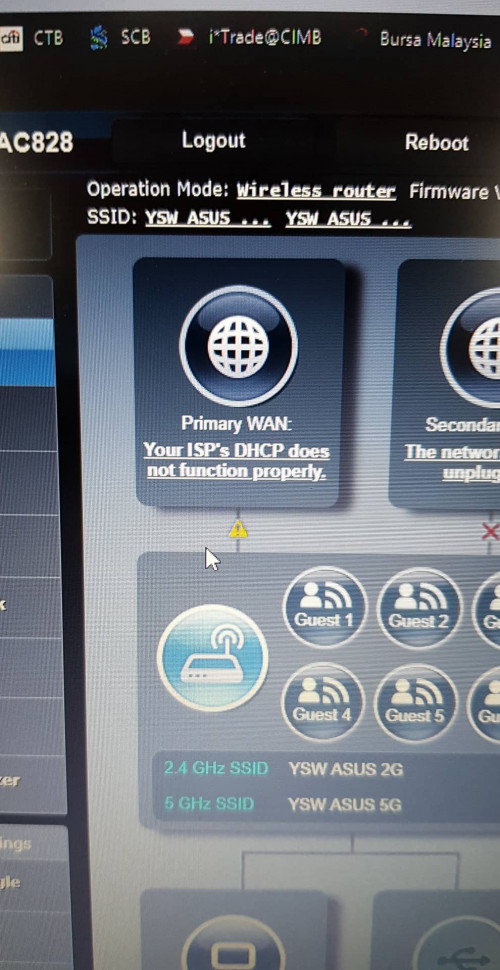 just bought the AC 828 but the configure keep on showing this any ideas how to solve this , the old router work fine, i plug it in n it will connect but this new router keep showing this |
|
|
Dec 5 2018, 07:40 PM
|
|
Senior Member
1,155 posts Joined: Apr 2016
|
QUOTE(blacktubi @ Dec 5 2018, 12:15 AM) I doubt there will be significant improvement for 2.4Ghz. same here, my guess for avg speed AX 4x4 2.4Ghz probably going to be around 150-300Mbps because of how congested is 2.4Ghz QUOTE(carsalesperson @ Dec 5 2018, 02:16 PM) just bought the AC 828 but the configure keep on showing this any ideas how to solve this , the old router work fine, i plug it in n it will connect but this new router keep showing this Try follow Blacktubi setup guide. https://www.blacktubi.com/unifi/setup-asus-router-for-unifi/ Is you already set it properly, your old router MAC Address might be tagged to your PPPoE acoount, or PPPoE session is stuck, Try plug your old router and disconnect internet via router WebGUI, and test your new router, And it is doesn't work, dont turn on your old router for about one hour and try again. And is that does not work either call TM and ask them to clear MAC Address Tag from your PPPoE account. This post has been edited by Doraku: Dec 5 2018, 07:43 PM |
|
|
Dec 6 2018, 07:19 AM
|

Senior Member
2,429 posts Joined: Jul 2007
|
Is there any recommended settings for AC86U, apart from Unifi credentials and LAN > IPTV settings to enhance performance/secure the WiFi router especially?
|
|
|
Dec 6 2018, 08:02 AM
|
|
Junior Member
380 posts Joined: Jul 2014
|
QUOTE(jutamind @ Dec 6 2018, 07:19 AM) Is there any recommended settings for AC86U, apart from Unifi credentials and LAN > IPTV settings to enhance performance/secure the WiFi router especially? aiprotection > network protection |
| Change to: |  0.0300sec 0.0300sec
 0.46 0.46
 6 queries 6 queries
 GZIP Disabled GZIP Disabled
Time is now: 11th December 2025 - 06:16 PM |
 Quote
Quote